> ## Documentation Index
> Fetch the complete documentation index at: https://docs.bizbone.com/llms.txt
> Use this file to discover all available pages before exploring further.

# Indirect Cost Pool

> Manage indirect cost pools and sub-pools used to organize and track indirect costs for accounting and cost allocation purposes. Supports adding, editing, and managing indirect cost pool structures.

## Add an Indirect Cost Pool
<Steps>
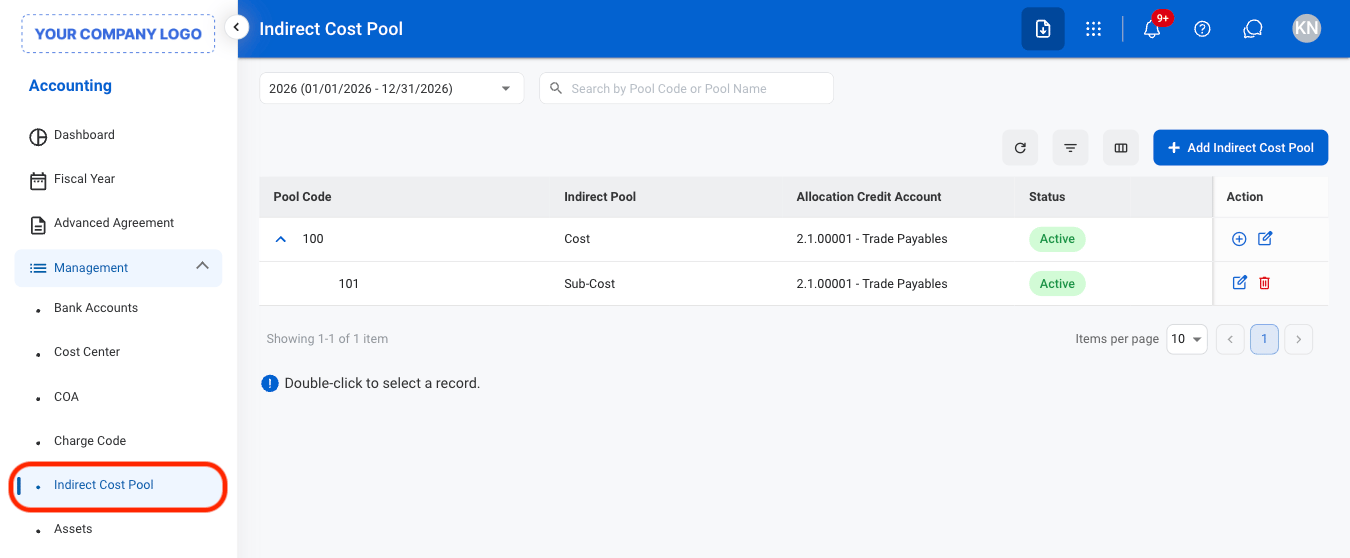
  <Step title="Navigate to Indirect Cost Pool">
    <img src="https://mintcdn.com/bizbone/mIx1A9HK_PkkUrI0/images/A-ICP-Nav.png?fit=max&auto=format&n=mIx1A9HK_PkkUrI0&q=85&s=3e40bc499bcd50b4b78cda3f67a13a51" alt="A ICP Nav" width="1350" height="558" data-path="images/A-ICP-Nav.png" />
  </Step>

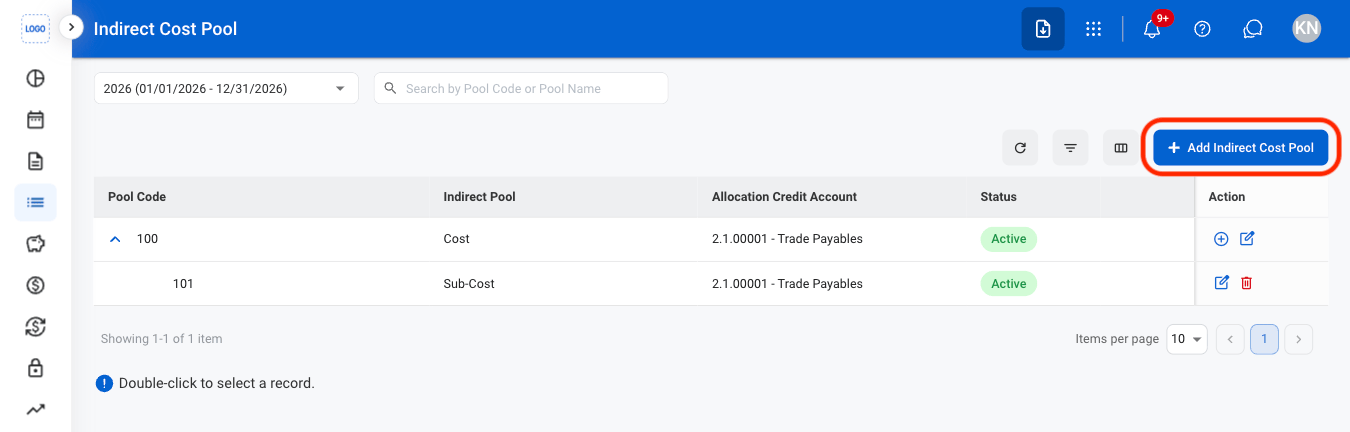
  <Step title="Select Add Indirect Cost Pool">
    <img src="https://mintcdn.com/bizbone/mIx1A9HK_PkkUrI0/images/A-ICP-Add.png?fit=max&auto=format&n=mIx1A9HK_PkkUrI0&q=85&s=c4f8e98c41870d19ca902711838123fb" alt="A ICP Add" width="1350" height="432" data-path="images/A-ICP-Add.png" />
  </Step>

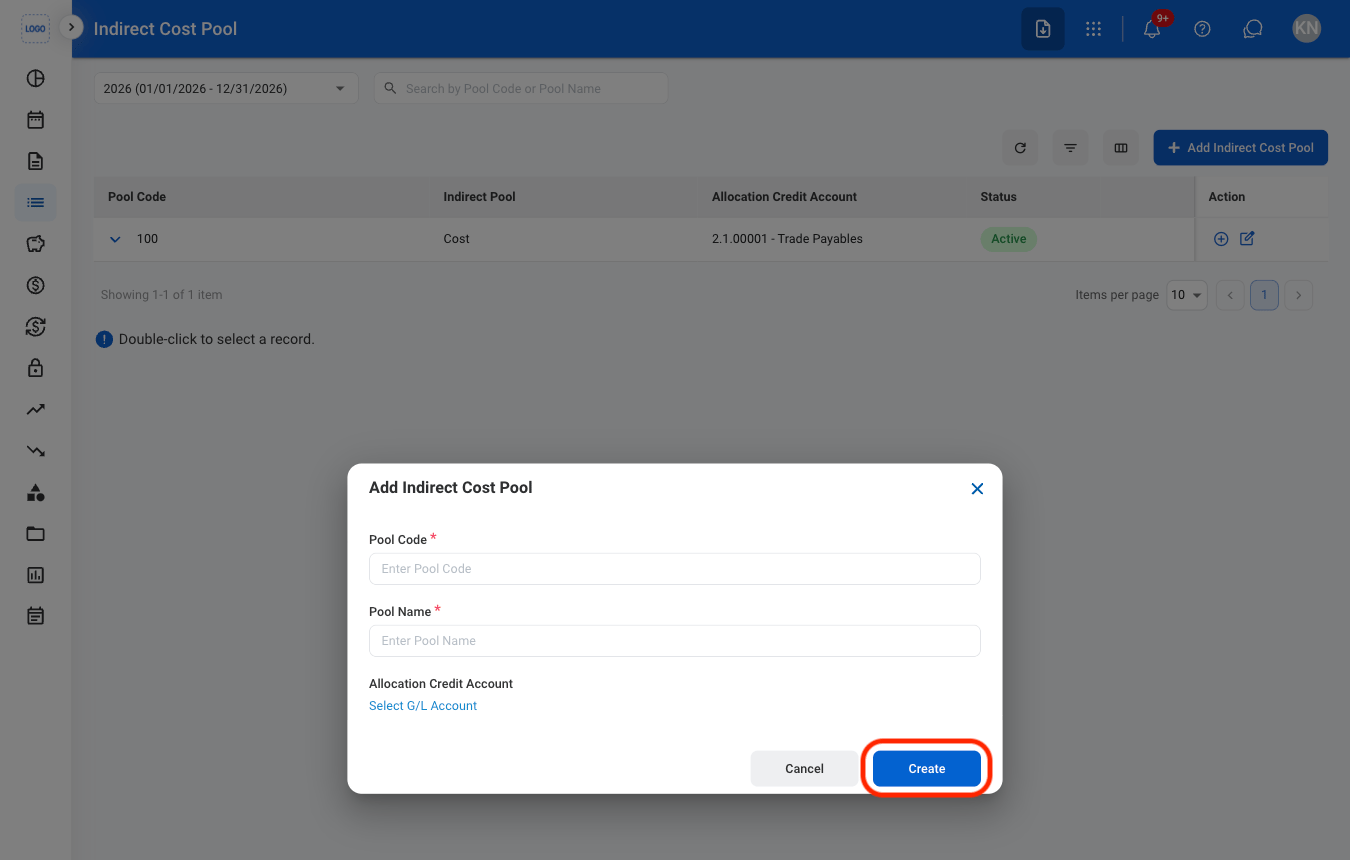
  <Step title="Fill in the required information ">
    <img src="https://mintcdn.com/bizbone/mIx1A9HK_PkkUrI0/images/A-ICP-CAdd.png?fit=max&auto=format&n=mIx1A9HK_PkkUrI0&q=85&s=5aeb6561b8f9632ade2038b95ad348c1" alt="A ICP C Add" width="1350" height="860" data-path="images/A-ICP-CAdd.png" />

    Select **Create** to complete or **Cancel** to exit without saving changes. 
  </Step>
</Steps>

## Add an Indirect Cost Sub-Pool

<Steps>
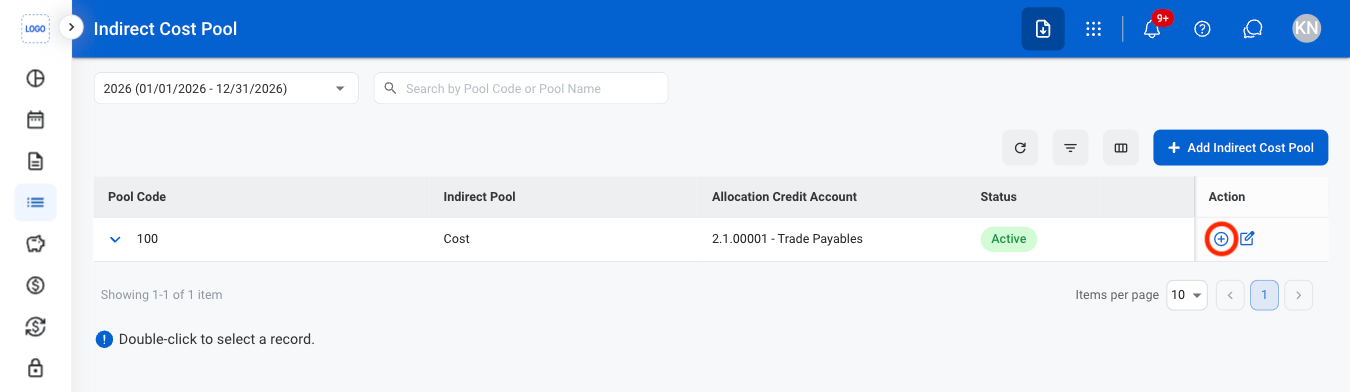
  <Step title="Select the add icon">
    <img src="https://mintcdn.com/bizbone/mIx1A9HK_PkkUrI0/images/A-ICP-Sub-Add.png?fit=max&auto=format&n=mIx1A9HK_PkkUrI0&q=85&s=84e13adf61b3663b72ed7ab9c9731921" alt="A ICP Sub Add" width="1350" height="392" data-path="images/A-ICP-Sub-Add.png" />
  </Step>

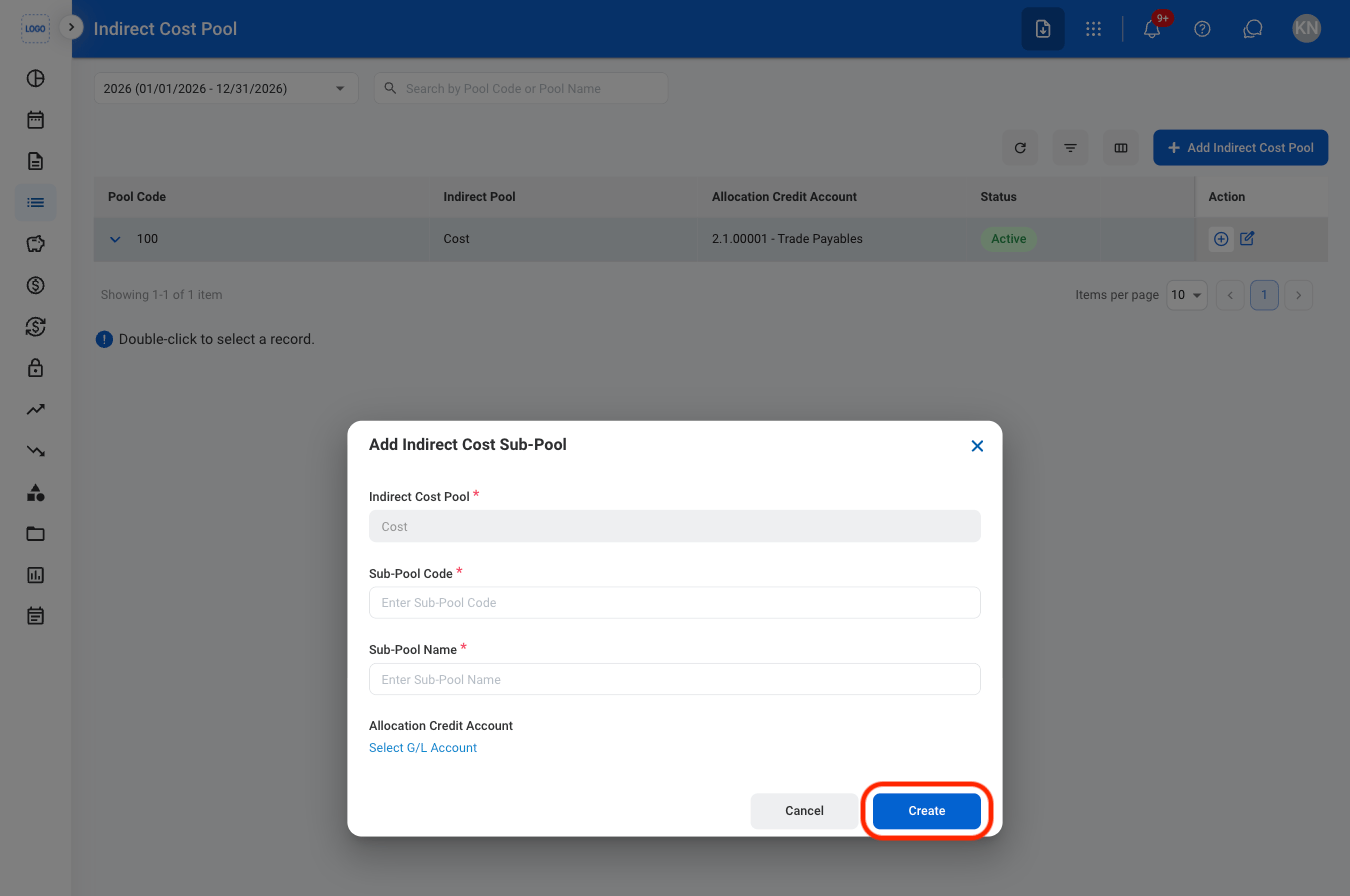
  <Step title="Fill in the required information ">
    <img src="https://mintcdn.com/bizbone/mIx1A9HK_PkkUrI0/images/A-ICP-Sub-CAdd.png?fit=max&auto=format&n=mIx1A9HK_PkkUrI0&q=85&s=75088154346a910407306649f4483246" alt="A ICP Sub C Add" width="1350" height="896" data-path="images/A-ICP-Sub-CAdd.png" />

    Select **Create** to complete or **Cancel** to exit without saving changes. 
  </Step>
</Steps>

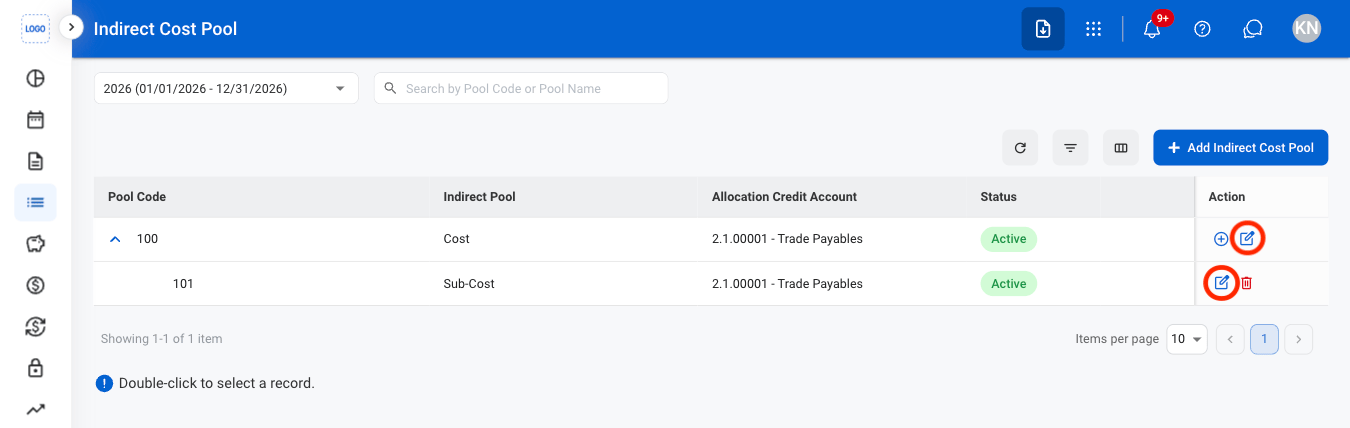
## Edit an Indirect Cost Pool or Sub-Pool
<Steps>
  <Step title="Select the edit icon">
    <img src="https://mintcdn.com/bizbone/mIx1A9HK_PkkUrI0/images/A-ICP-Edit.png?fit=max&auto=format&n=mIx1A9HK_PkkUrI0&q=85&s=fd9ce6a5e869bb13b6ad239e196a52ff" alt="A ICP Edit" width="1350" height="428" data-path="images/A-ICP-Edit.png" />
  </Step>

  <Step title="Fill in the required information ">
    Select **Save** to complete or **Cancel** to exit without saving changes. 
  </Step>
</Steps>

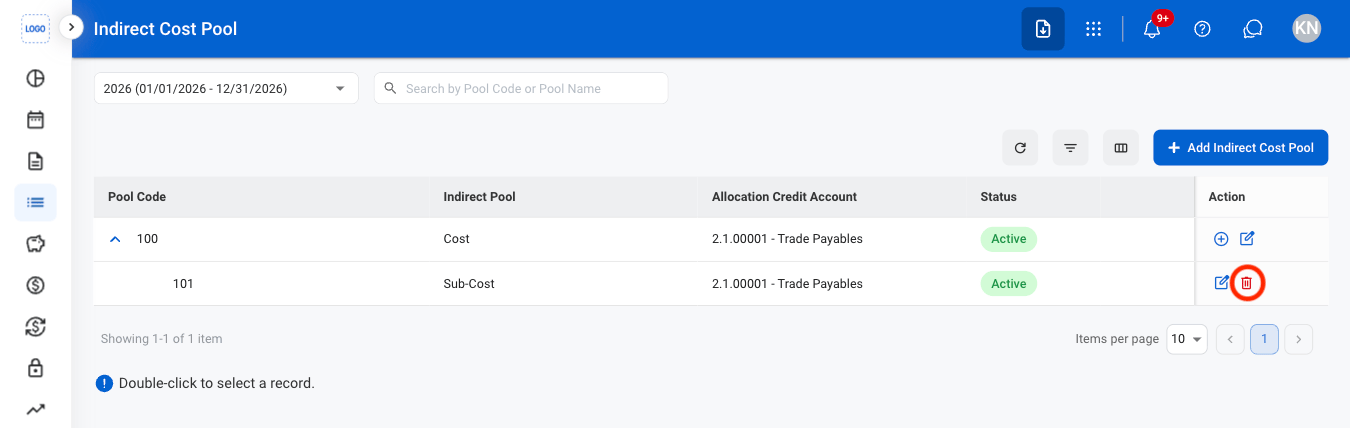
## Delete an Indirect Cost Sub-Pool

<Steps>
  <Step title="Select the delete icon">
    <img src="https://mintcdn.com/bizbone/mIx1A9HK_PkkUrI0/images/A-ICP-Delete.png?fit=max&auto=format&n=mIx1A9HK_PkkUrI0&q=85&s=39fd70ee2b0dca44a2954f8fbbc4b8af" alt="A ICP Delete" width="1350" height="428" data-path="images/A-ICP-Delete.png" />
  </Step>

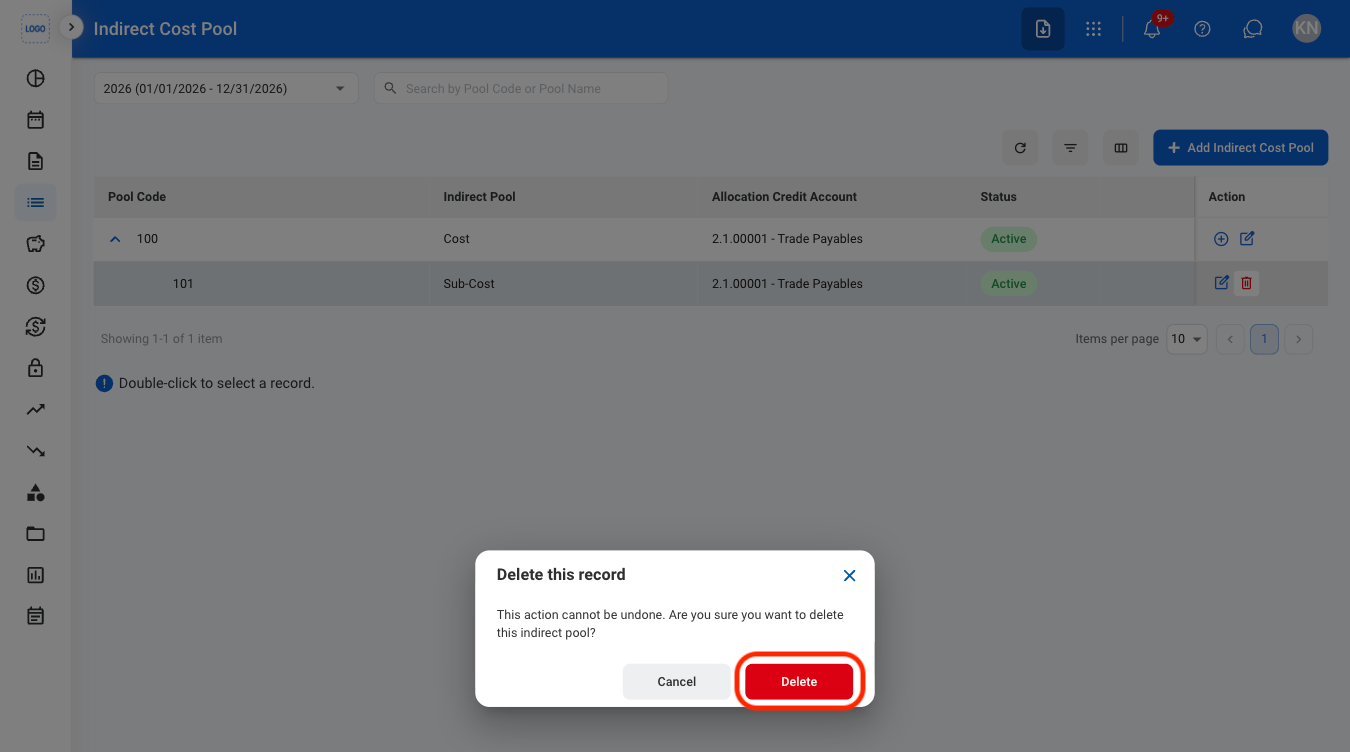
  <Step title="Confirm the action">
    <img src="https://mintcdn.com/bizbone/mIx1A9HK_PkkUrI0/images/A-ICP-CDelete.png?fit=max&auto=format&n=mIx1A9HK_PkkUrI0&q=85&s=bbec5282947b6a912d3df2f38529d422" alt="A ICP C Delete" width="1350" height="752" data-path="images/A-ICP-CDelete.png" />

    Select **Delete** to complete or **Cancel** to exit without saving changes. 
  </Step>
</Steps>