> ## Documentation Index
> Fetch the complete documentation index at: https://docs.bizbone.com/llms.txt
> Use this file to discover all available pages before exploring further.

# Leave Accrual

> Manage employee leave balances and entitlements across leave types. Supports filtering and searching employee records, updating leave balances for multiple employees, and importing or exporting leave data for efficient balance management and policy updates.

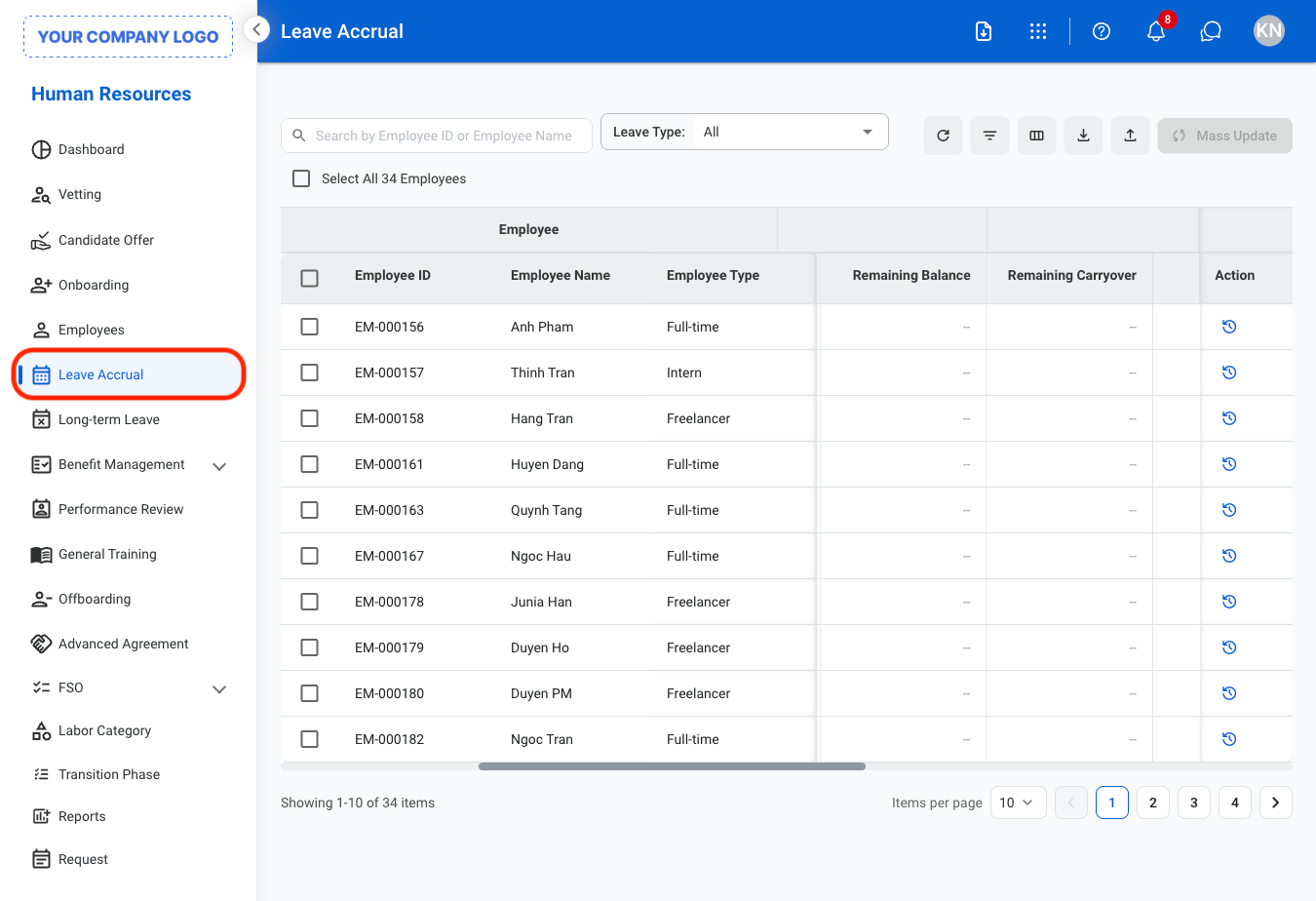
## View Leave Accrual by Leave Type
<Steps>
  <Step title="Navigate to Leave Accrual">
    <img src="https://mintcdn.com/bizbone/oFiTZXMlREk2iqsf/images/HR-LA-Nav.png?fit=max&auto=format&n=oFiTZXMlREk2iqsf&q=85&s=c08c2126c12a9a61e956f0e6b3b27fb9" alt="HR LA Nav" width="1350" height="924" data-path="images/HR-LA-Nav.png" />
  </Step>

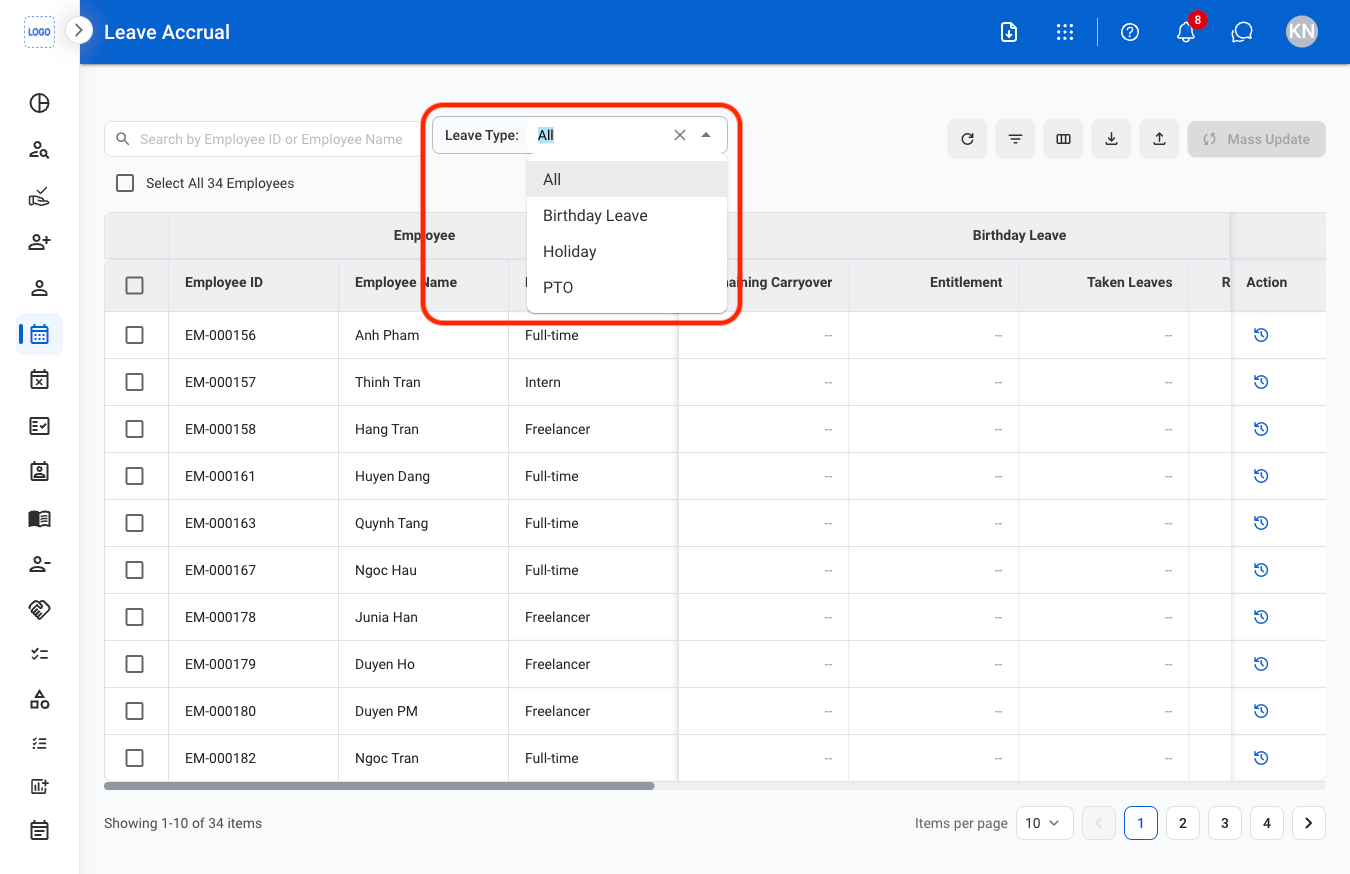
  <Step title="Select a leave type">
    <img src="https://mintcdn.com/bizbone/oFiTZXMlREk2iqsf/images/HR-LA-Type.png?fit=max&auto=format&n=oFiTZXMlREk2iqsf&q=85&s=110b6b1e90822fb19728e30248fd6c77" alt="HR LA Type" width="1350" height="874" data-path="images/HR-LA-Type.png" />
  </Step>
</Steps>

## Update Leave Accrual

<Steps>
  <Step title="Select a leave type">
    <img src="https://mintcdn.com/bizbone/oFiTZXMlREk2iqsf/images/HR-LA-Type.png?fit=max&auto=format&n=oFiTZXMlREk2iqsf&q=85&s=110b6b1e90822fb19728e30248fd6c77" alt="HR LA Type" width="1350" height="874" data-path="images/HR-LA-Type.png" />
  </Step>

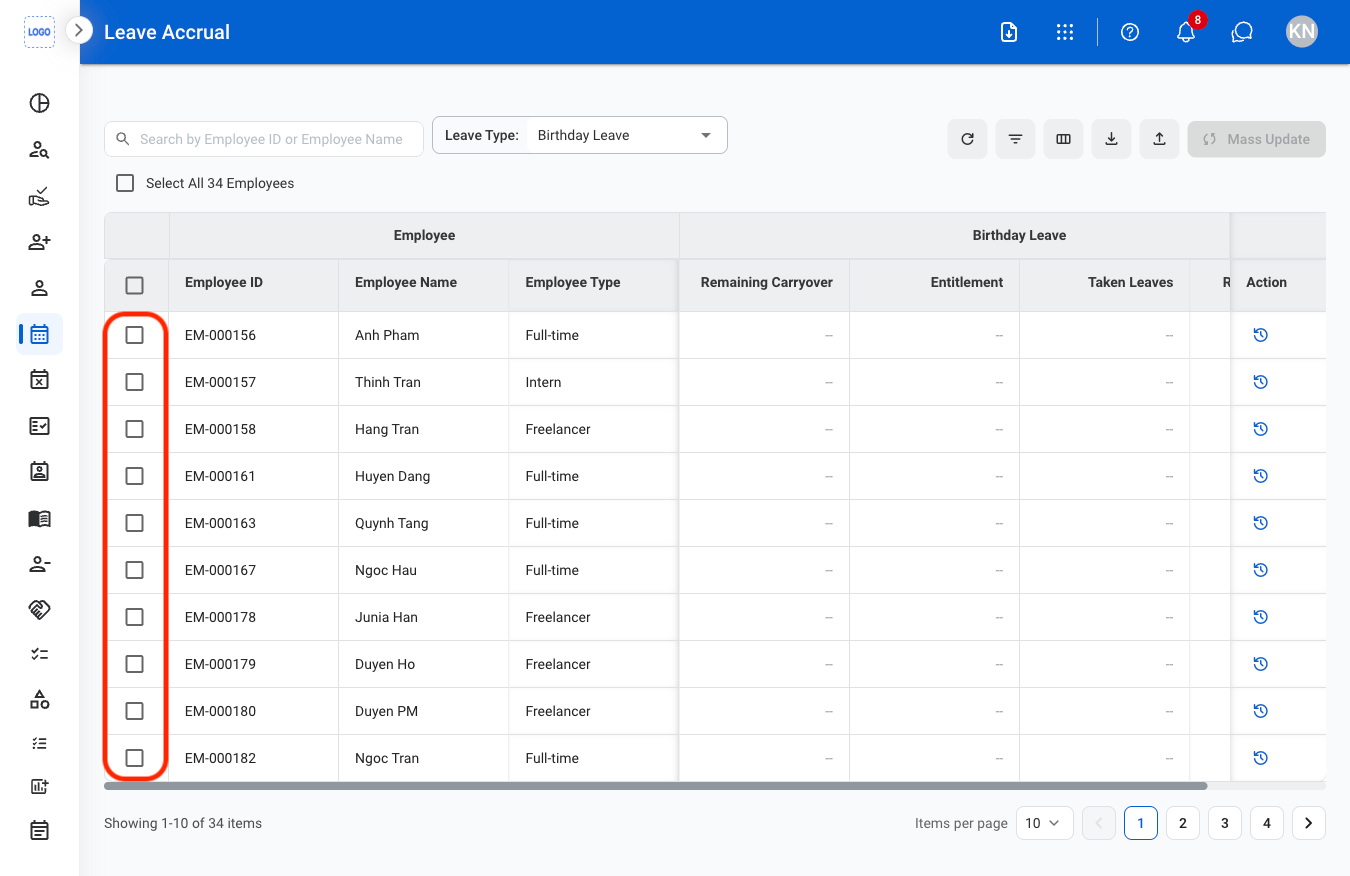
  <Step title="Select employee(s)">
    <img src="https://mintcdn.com/bizbone/oFiTZXMlREk2iqsf/images/HR-LA-Select.png?fit=max&auto=format&n=oFiTZXMlREk2iqsf&q=85&s=764d9ae65dbd40728b6fdeb6fd7939b7" alt="HR LA Select" width="1350" height="876" data-path="images/HR-LA-Select.png" />
  </Step>

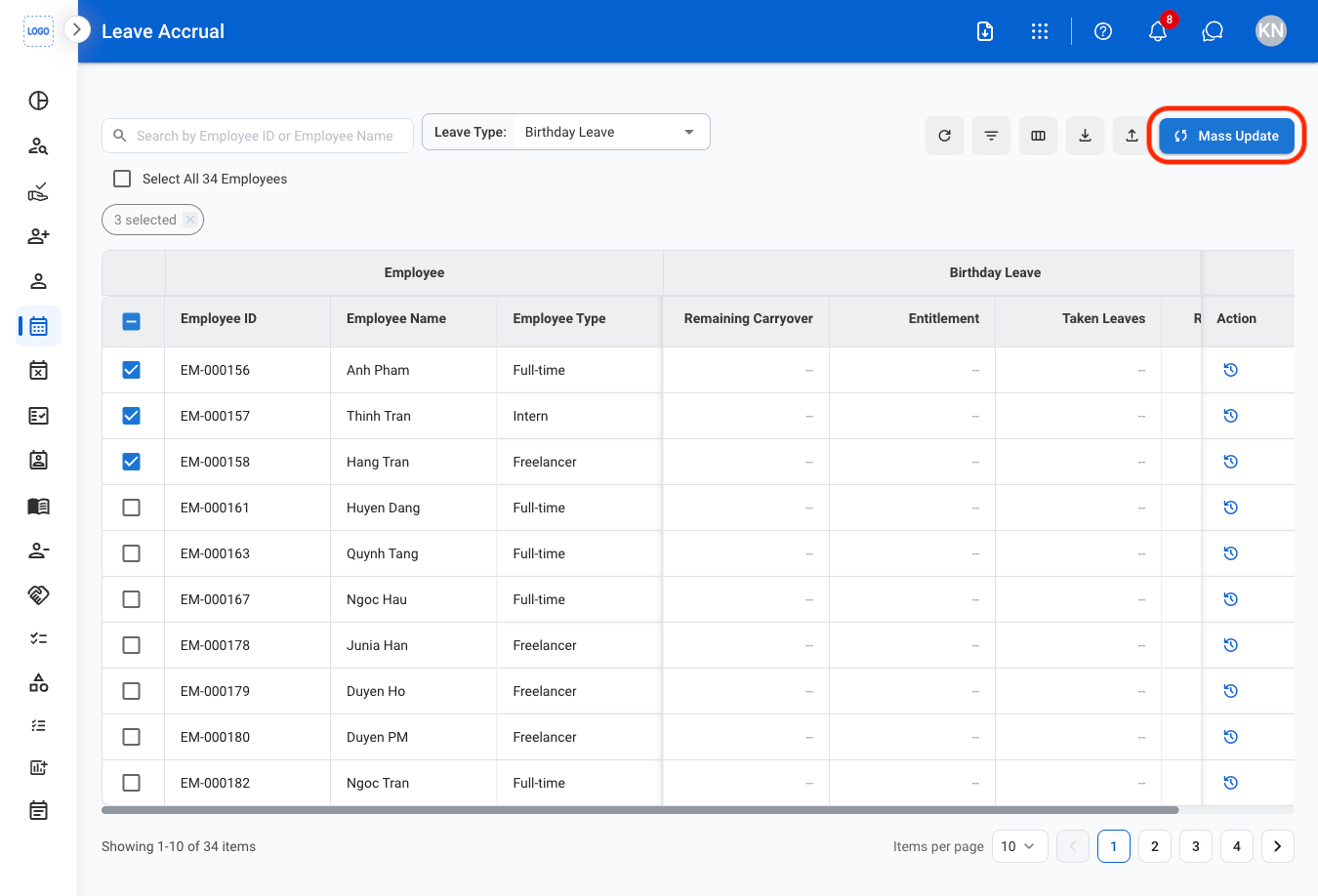
  <Step title="Select Mass Update">
    <img src="https://mintcdn.com/bizbone/oFiTZXMlREk2iqsf/images/HR-LA-Update.png?fit=max&auto=format&n=oFiTZXMlREk2iqsf&q=85&s=02d87e416dd744abfa2a97c9d7b6a6a3" alt="HR LA Update" width="1350" height="918" data-path="images/HR-LA-Update.png" />
  </Step>

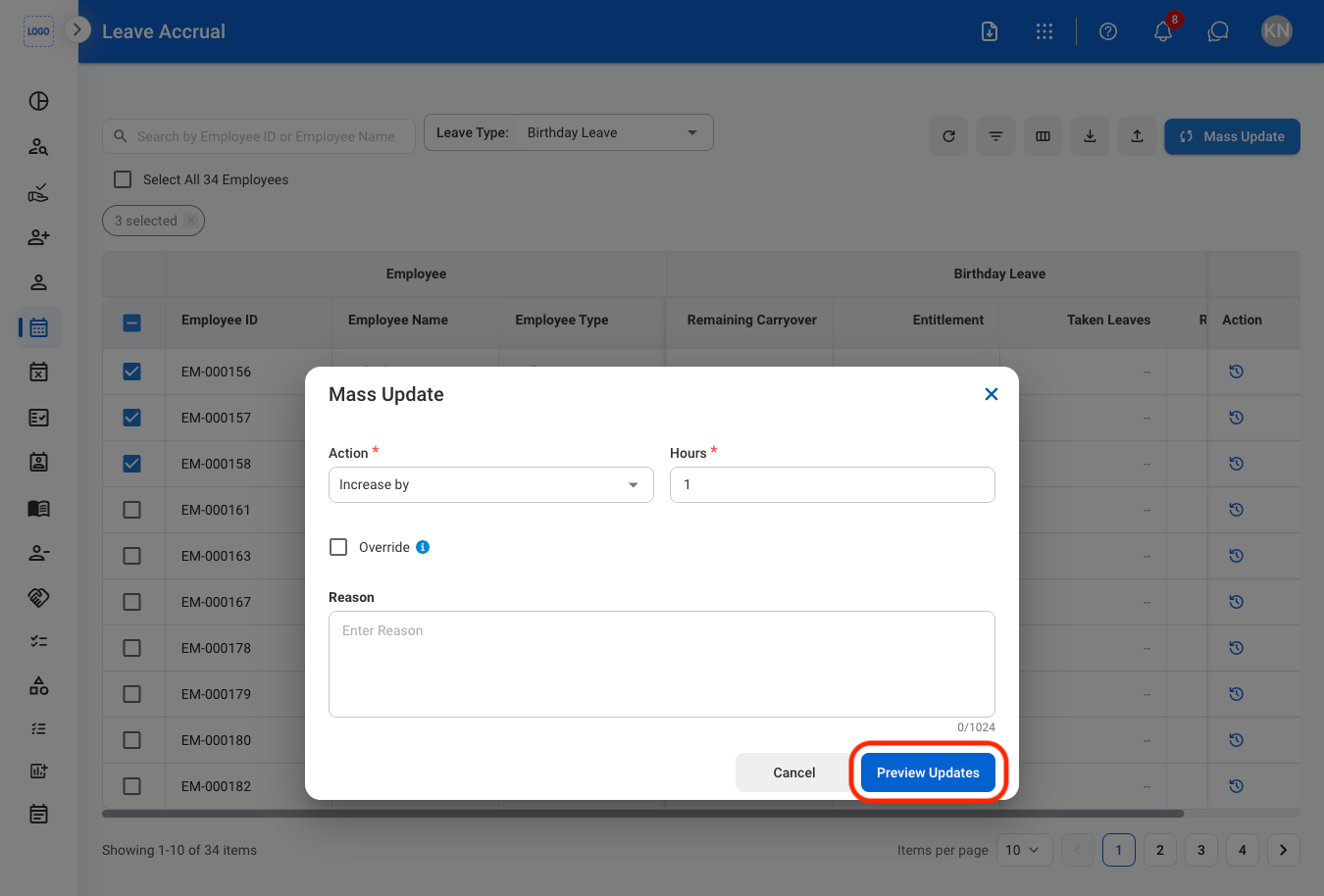
  <Step title="Fill in the required information">
    <img src="https://mintcdn.com/bizbone/oFiTZXMlREk2iqsf/images/HR-LA-InfoUpdate.png?fit=max&auto=format&n=oFiTZXMlREk2iqsf&q=85&s=992d8b682ceb82bb345a0f2de8e67b2f" alt="HR LA Info Update" width="1350" height="914" data-path="images/HR-LA-InfoUpdate.png" />

    Select **Preview Updates** to continue or **Cancel** to exit without saving changes
  </Step>

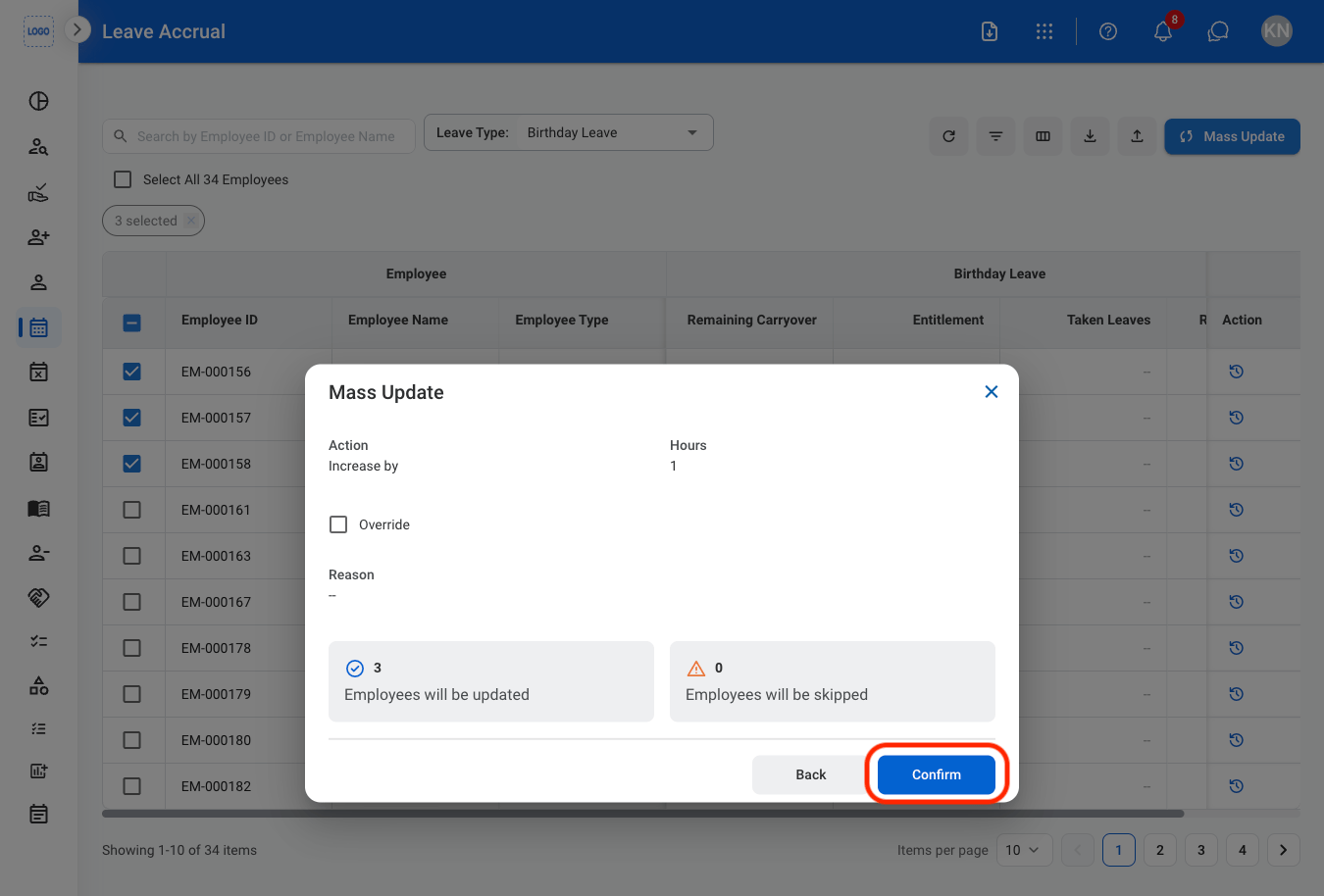
  <Step title="Confirm the action">
    <img src="https://mintcdn.com/bizbone/oFiTZXMlREk2iqsf/images/HR-LA-CUpdate.png?fit=max&auto=format&n=oFiTZXMlREk2iqsf&q=85&s=e692bc5dcd23841dfc2987f20de445c8" alt="HR LA C Update" width="1350" height="914" data-path="images/HR-LA-CUpdate.png" />

    Select **Confirm** to complete or **Back** to return to the previous screen. 
  </Step>
</Steps>

## Import Leave Accrual Information

<Steps>
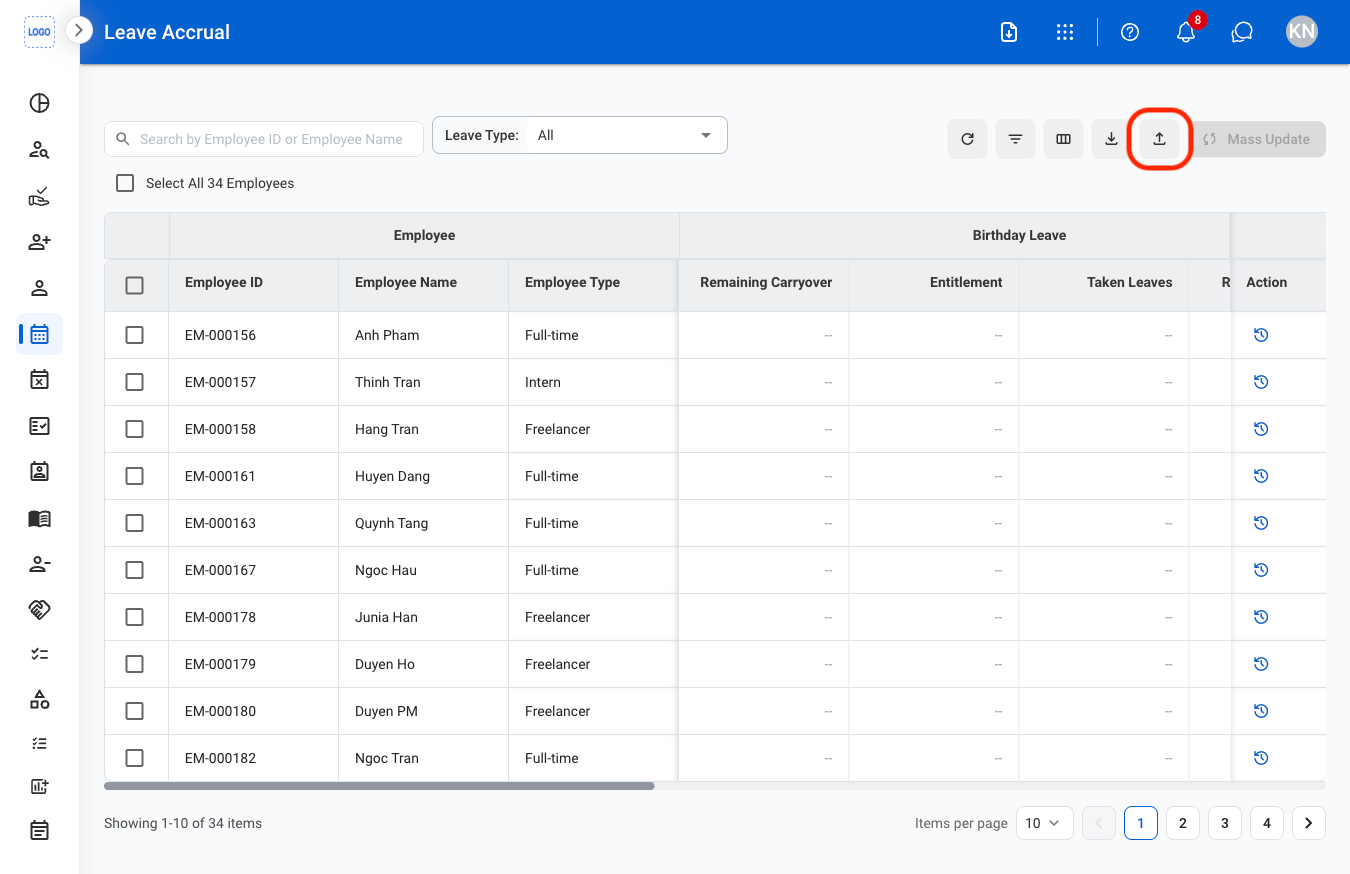
  <Step title="Select the import button">
    <img src="https://mintcdn.com/bizbone/oFiTZXMlREk2iqsf/images/HR-LA-Import.png?fit=max&auto=format&n=oFiTZXMlREk2iqsf&q=85&s=5f6ab17855c88938bf6061db04f10f3e" alt="HR LA Import" width="1350" height="874" data-path="images/HR-LA-Import.png" />
  </Step>

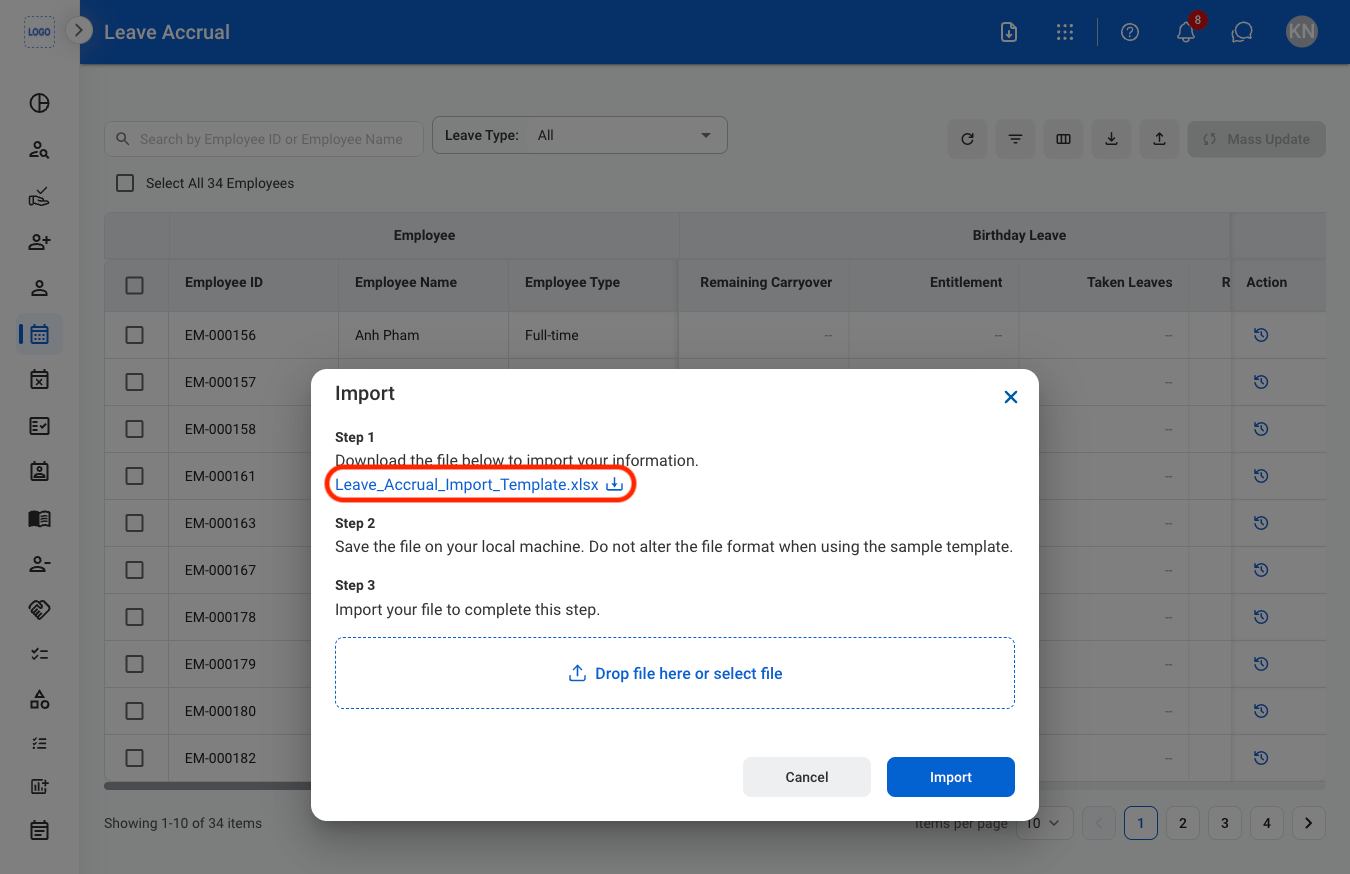
  <Step title="Download the template">
    <img src="https://mintcdn.com/bizbone/oFiTZXMlREk2iqsf/images/HR-LA-Template.png?fit=max&auto=format&n=oFiTZXMlREk2iqsf&q=85&s=0eaf6e2d38b7748a93b75a606875ab1c" alt="HR LA Template" width="1350" height="874" data-path="images/HR-LA-Template.png" />
  </Step>

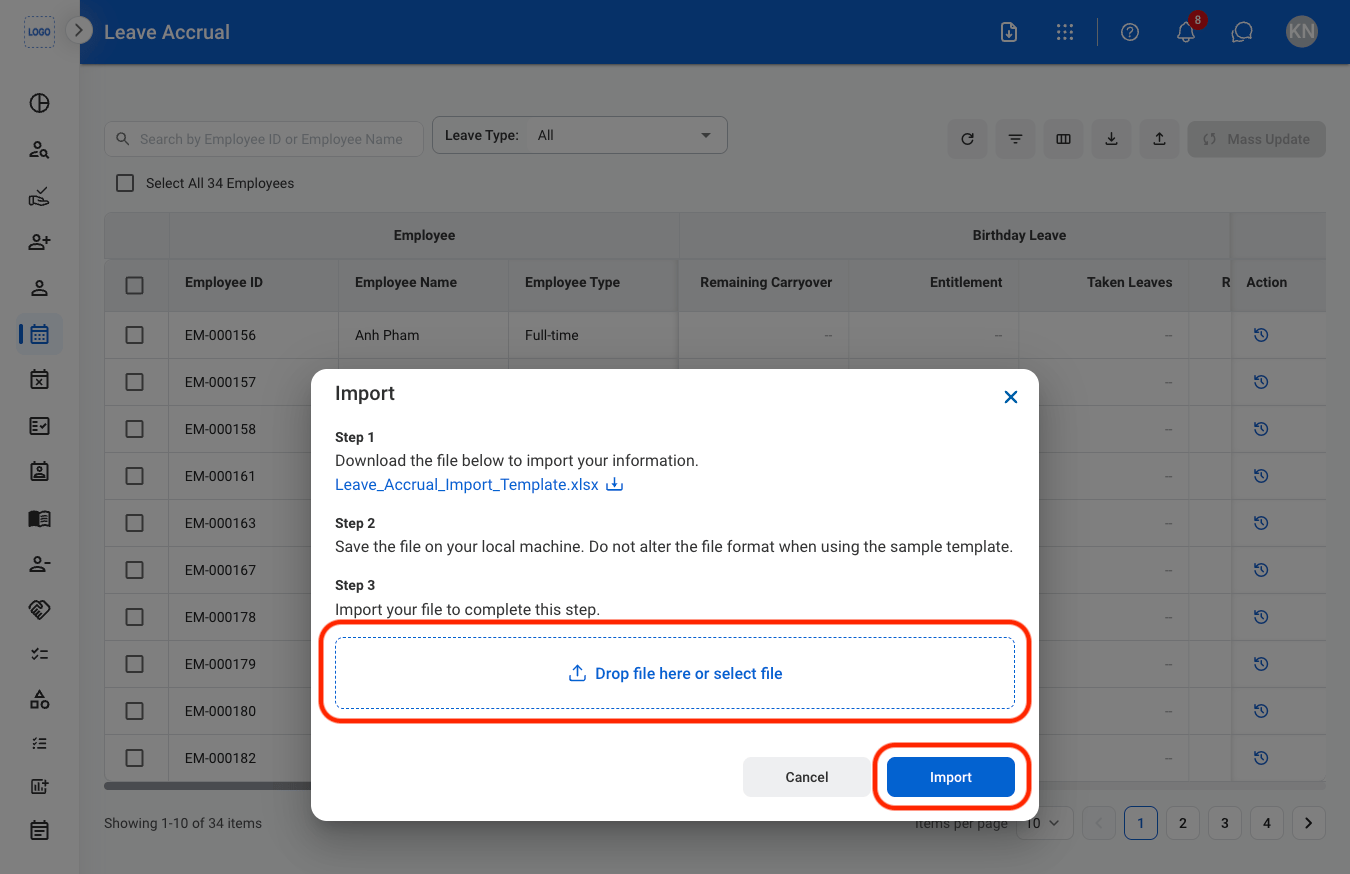
  <Step title="Upload the completed template">
    <img src="https://mintcdn.com/bizbone/oFiTZXMlREk2iqsf/images/HR-LA-CImport.png?fit=max&auto=format&n=oFiTZXMlREk2iqsf&q=85&s=a0d9854e4ffd727740006c56ff8035c0" alt="HR LA C Import" width="1350" height="874" data-path="images/HR-LA-CImport.png" />

    Select **Import** to complete or **Cancel** to exit without saving changes. 
  </Step>
</Steps>

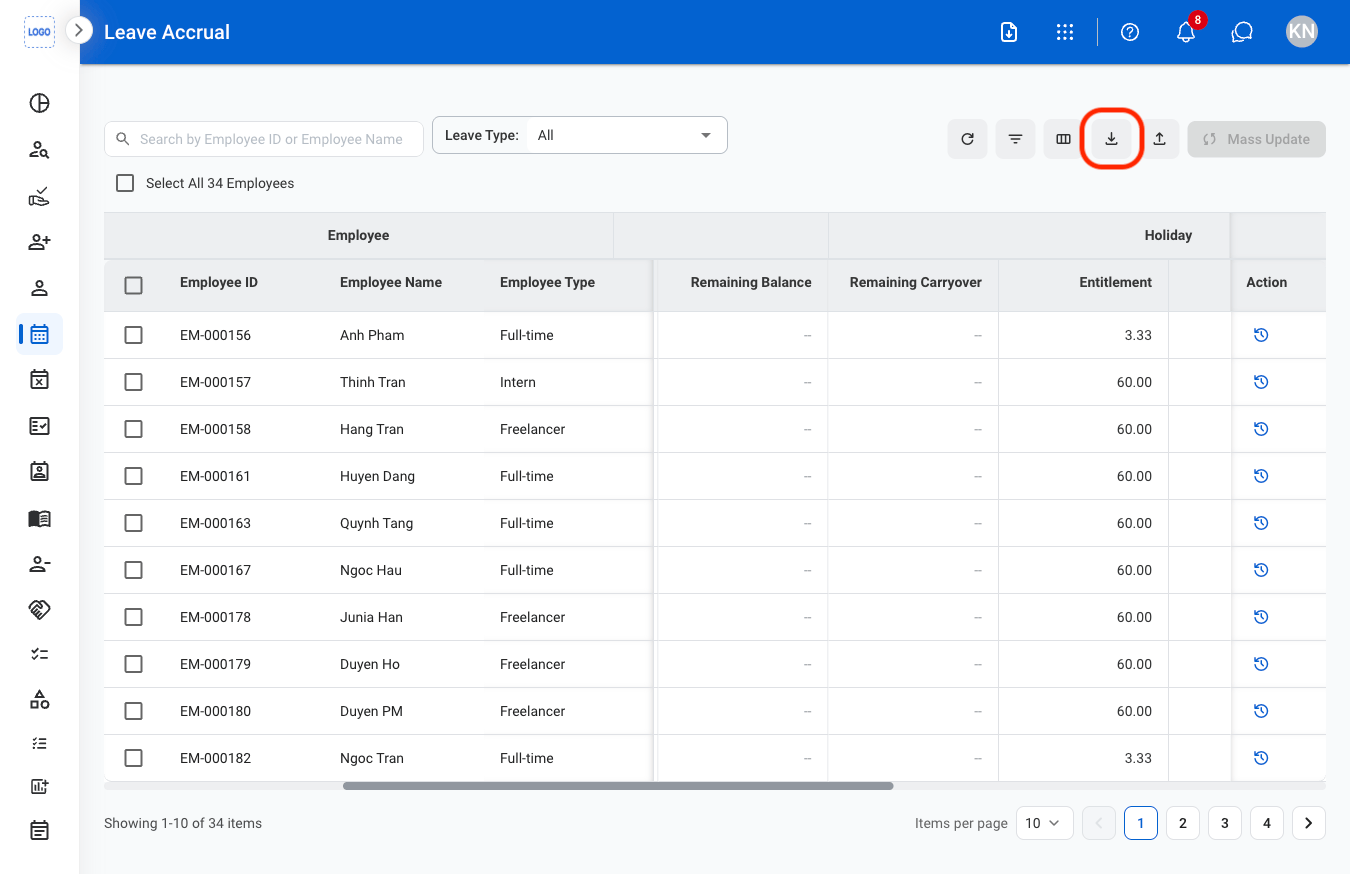
## Download Leave Accrual Information

<Steps>
  <Step title="Select the Download icon">
    <img src="https://mintcdn.com/bizbone/oFiTZXMlREk2iqsf/images/HR-LA-Download.png?fit=max&auto=format&n=oFiTZXMlREk2iqsf&q=85&s=d1619478bd78ba4e744ca2e3e29f1c92" alt="HR LA Download" width="1350" height="874" data-path="images/HR-LA-Download.png" />

    Download of xlsx file will begin immediately upon selection. 
  </Step>
</Steps>

## View Leave Accrual History

<Steps>
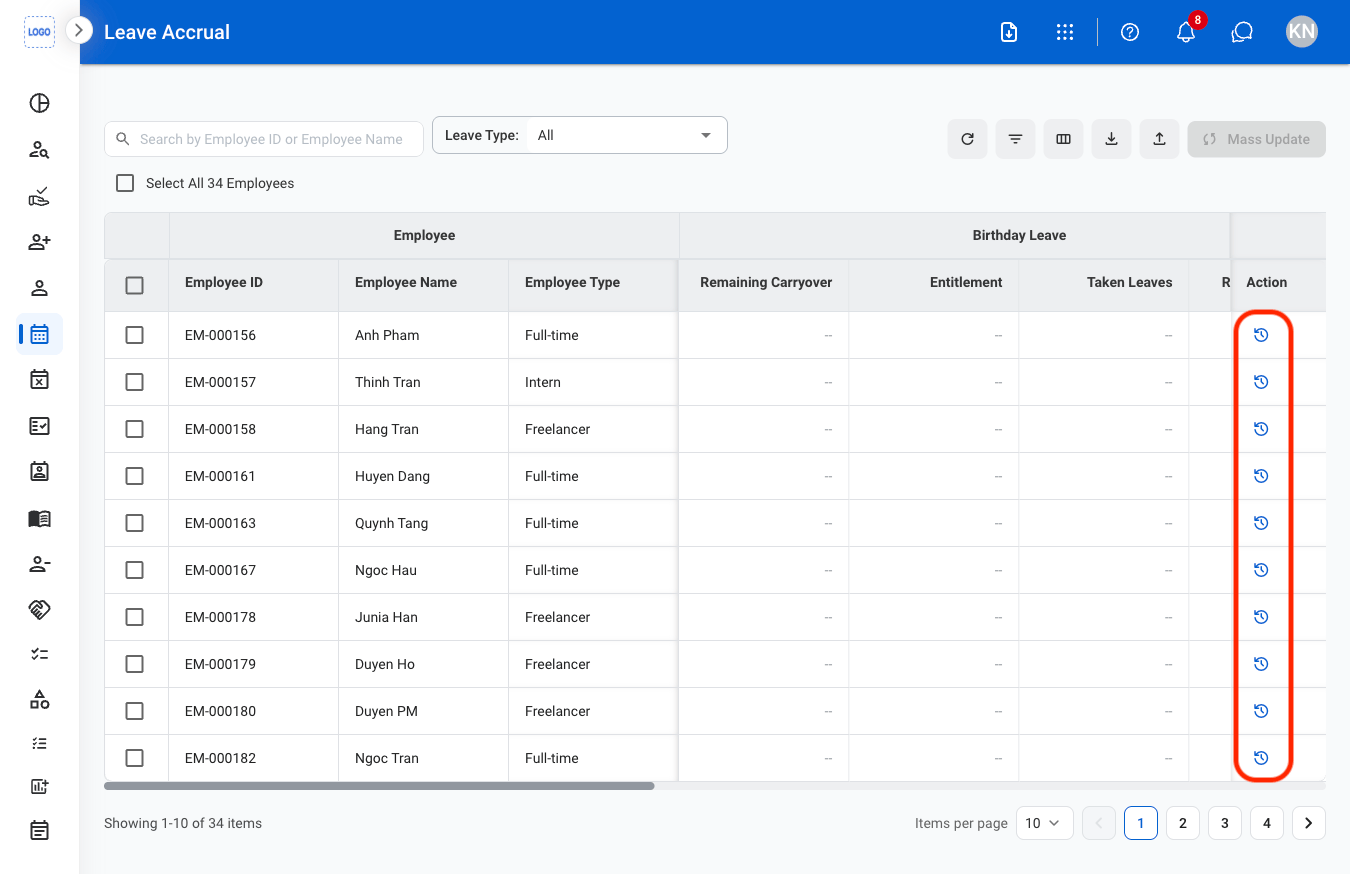
  <Step title="Select the history icon">
    <img src="https://mintcdn.com/bizbone/oFiTZXMlREk2iqsf/images/HR-LA-History.png?fit=max&auto=format&n=oFiTZXMlREk2iqsf&q=85&s=10603022bd830409087080f94c373555" alt="HR LA History" width="1350" height="874" data-path="images/HR-LA-History.png" />
  </Step>
</Steps>