> ## Documentation Index
> Fetch the complete documentation index at: https://docs.bizbone.com/llms.txt
> Use this file to discover all available pages before exploring further.

# Team Timesheet

View and manage timesheets for assigned team members, including review and approval activities.

## View a Team Member's Timesheet

<Steps>
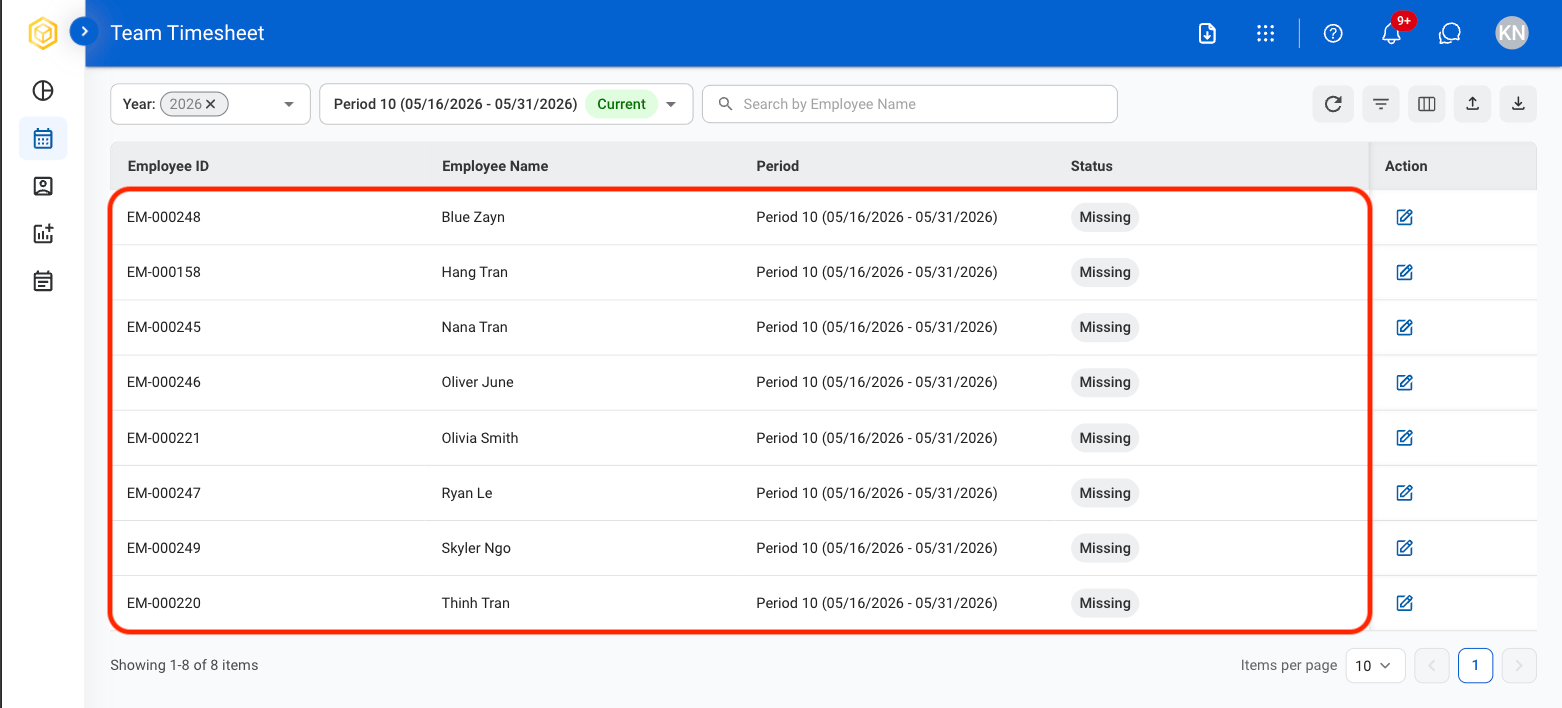
  <Step title="Navigate to Team Timesheet">
    <Frame>
      <img src="https://mintcdn.com/bizbone/_k3erF2n8rcHBsQu/images/T-TT-Navigation.png?fit=max&auto=format&n=_k3erF2n8rcHBsQu&q=85&s=dc0724c91f78152b42c78581d12fd610" alt="T TT Navigation" width="1562" height="730" data-path="images/T-TT-Navigation.png" />
    </Frame>
  </Step>

  <Step title="Select a team member">
    <Frame>
      <img src="https://mintcdn.com/bizbone/_k3erF2n8rcHBsQu/images/T-TT-Select-Emp.png?fit=max&auto=format&n=_k3erF2n8rcHBsQu&q=85&s=63d7b1307e95d50a209448976c9d9b73" alt="T TT Select Emp" width="1562" height="708" data-path="images/T-TT-Select-Emp.png" />
    </Frame>
  </Step>

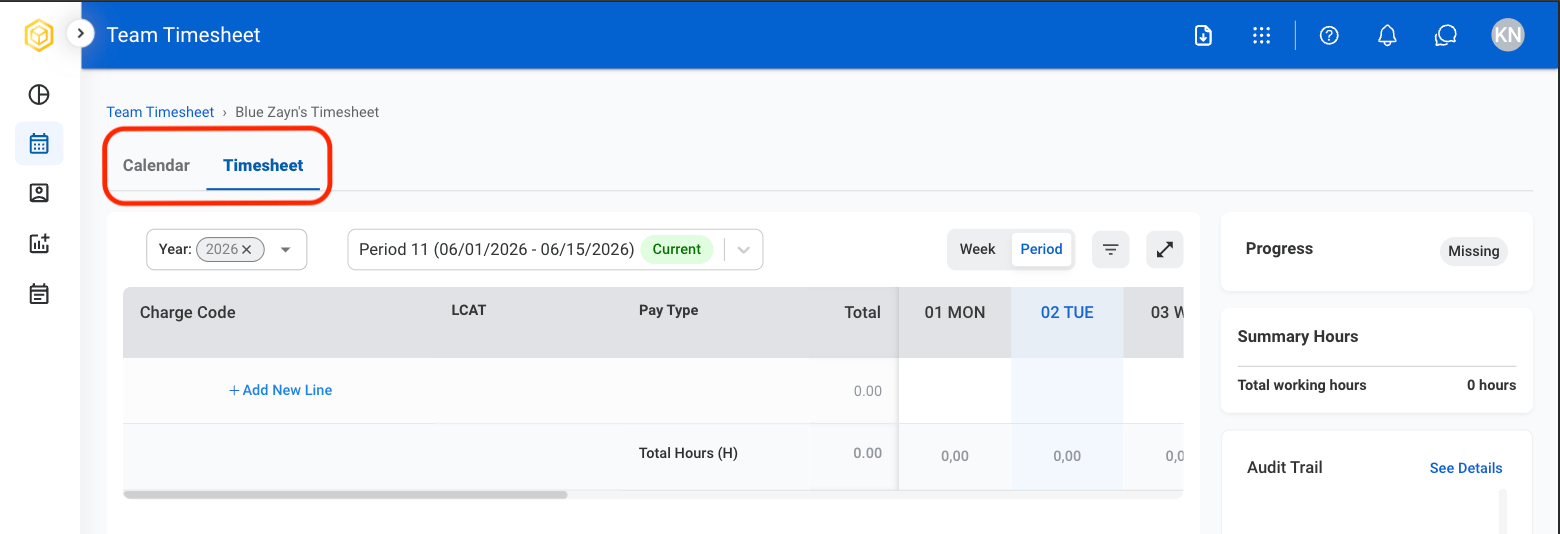
  <Step title="Select a tab">
    <Frame>
      <img src="https://mintcdn.com/bizbone/_k3erF2n8rcHBsQu/images/T-T-Team-View.png?fit=max&auto=format&n=_k3erF2n8rcHBsQu&q=85&s=921078b62133ce5a60751f27d4ffc59f" alt="T T Team View" width="1560" height="534" data-path="images/T-T-Team-View.png" />
    </Frame>
  </Step>

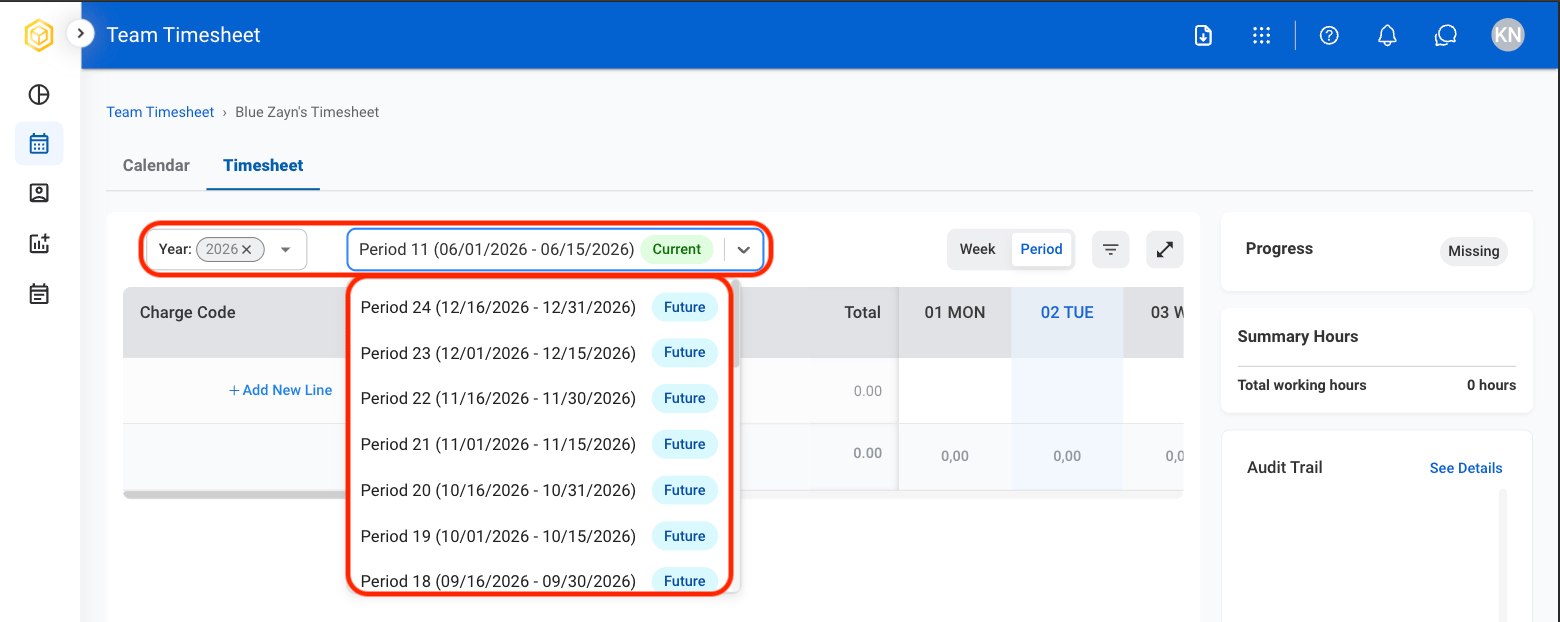
  <Step title="Select a time period">
    <Frame>
      <img src="https://mintcdn.com/bizbone/_k3erF2n8rcHBsQu/images/T-T-Time.png?fit=max&auto=format&n=_k3erF2n8rcHBsQu&q=85&s=f7996c94d39303cafc493a1a548bf1c2" alt="T T Time" width="1560" height="622" data-path="images/T-T-Time.png" />
    </Frame>
  </Step>
</Steps>

## Submit a Team Member's Timesheet

<Steps>
  <Step title="Select a team member">
    <Frame>
      <img src="https://mintcdn.com/bizbone/_k3erF2n8rcHBsQu/images/T-TT-Select-Emp.png?fit=max&auto=format&n=_k3erF2n8rcHBsQu&q=85&s=63d7b1307e95d50a209448976c9d9b73" alt="T TT Select Emp" width="1562" height="708" data-path="images/T-TT-Select-Emp.png" />
    </Frame>
  </Step>

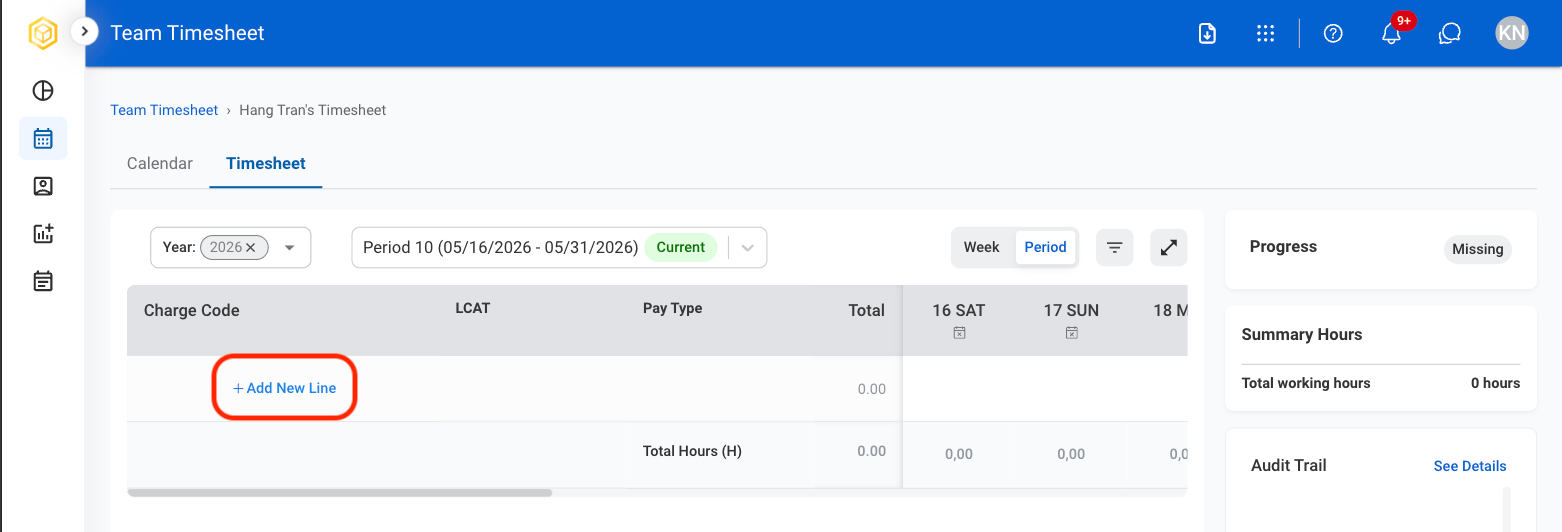
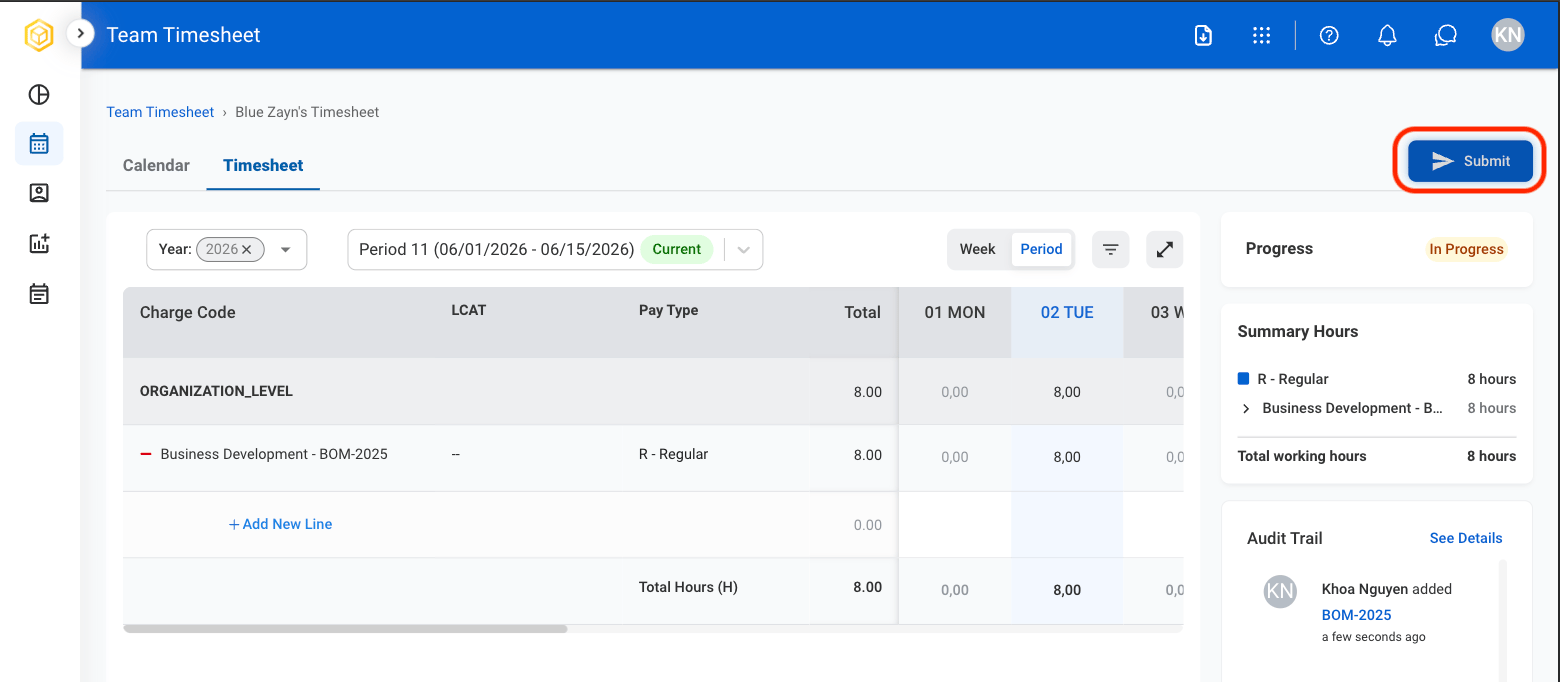
  <Step title="Select Add New Line">
    <Frame>
      <img src="https://mintcdn.com/bizbone/_k3erF2n8rcHBsQu/images/T-TT-Add-New-Line.png?fit=max&auto=format&n=_k3erF2n8rcHBsQu&q=85&s=62ba2a29e8aff727c3d6040bf7b2e249" alt="T TT Add New Line" width="1562" height="532" data-path="images/T-TT-Add-New-Line.png" />
    </Frame>
  </Step>

  <Step title="Select time entry classifications">
    <Frame>
      <img src="https://mintcdn.com/bizbone/_k3erF2n8rcHBsQu/images/T-TT-AddTImesheet.png?fit=max&auto=format&n=_k3erF2n8rcHBsQu&q=85&s=6d10d4d6593f9258b570db6b949c9d29" alt="T TT Add T Imesheet" width="1562" height="884" data-path="images/T-TT-AddTImesheet.png" />
    </Frame>

    * **Charge Code**: Identifier used to track and categorize work performed for billing or reporting purposes.
    * **LCAT**: Labor category that defines the type of work performed and the associated role classification.
    * **Pay Type**: Classification of time entry indicating how hours are compensated. Select Add to complete or Cancel to exit without saving changes. 
  </Step>

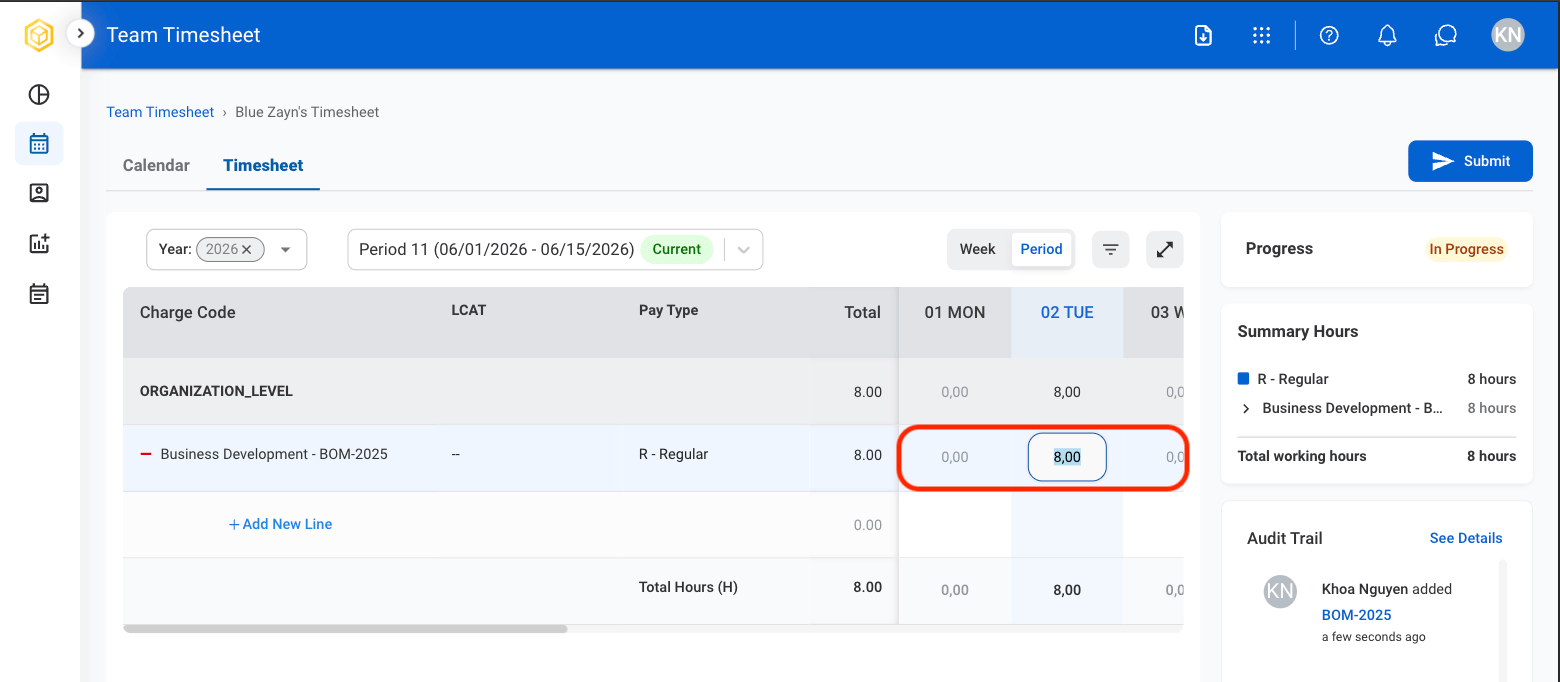
  <Step title="Select a cell to enter hours worked">
    <Frame>
      <img src="https://mintcdn.com/bizbone/GWQ1l3p7pywsLplB/images/T-T-Enter-Hrs.png?fit=max&auto=format&n=GWQ1l3p7pywsLplB&q=85&s=54ea5be9e568da8c1baf85aff32b0de1" alt="T T Enter Hrs" width="1560" height="682" data-path="images/T-T-Enter-Hrs.png" />
    </Frame>

    After entry, hours will populate in Summary Hours and Audit Trail.

    * **Summary Hours**: Displays total hours entered in a given period.   
    * **Audit Trail**: Displays all time entries and changes in a given period. 
  </Step>

  <Step title="Select Submit">
    <Frame>
      <img src="https://mintcdn.com/bizbone/GWQ1l3p7pywsLplB/images/T-T-Submit-Button.png?fit=max&auto=format&n=GWQ1l3p7pywsLplB&q=85&s=2d8df33bc53e35ada89f83d3a97256bc" alt="T T Submit Button" width="1560" height="682" data-path="images/T-T-Submit-Button.png" />
    </Frame>
  </Step>

  <Step title="Confirm action">
    <Frame>
      <img src="https://mintcdn.com/bizbone/GWQ1l3p7pywsLplB/images/T-T-Submit-Conf.png?fit=max&auto=format&n=GWQ1l3p7pywsLplB&q=85&s=2d1152ddf5f0da8e48a979670e08d678" alt="T T Submit Conf" width="1560" height="796" data-path="images/T-T-Submit-Conf.png" />
    </Frame>

    Select **Submit** to complete or **Cancel** to exit without saving changes. 
  </Step>
</Steps>

## Remove a Charge Code

<Steps>
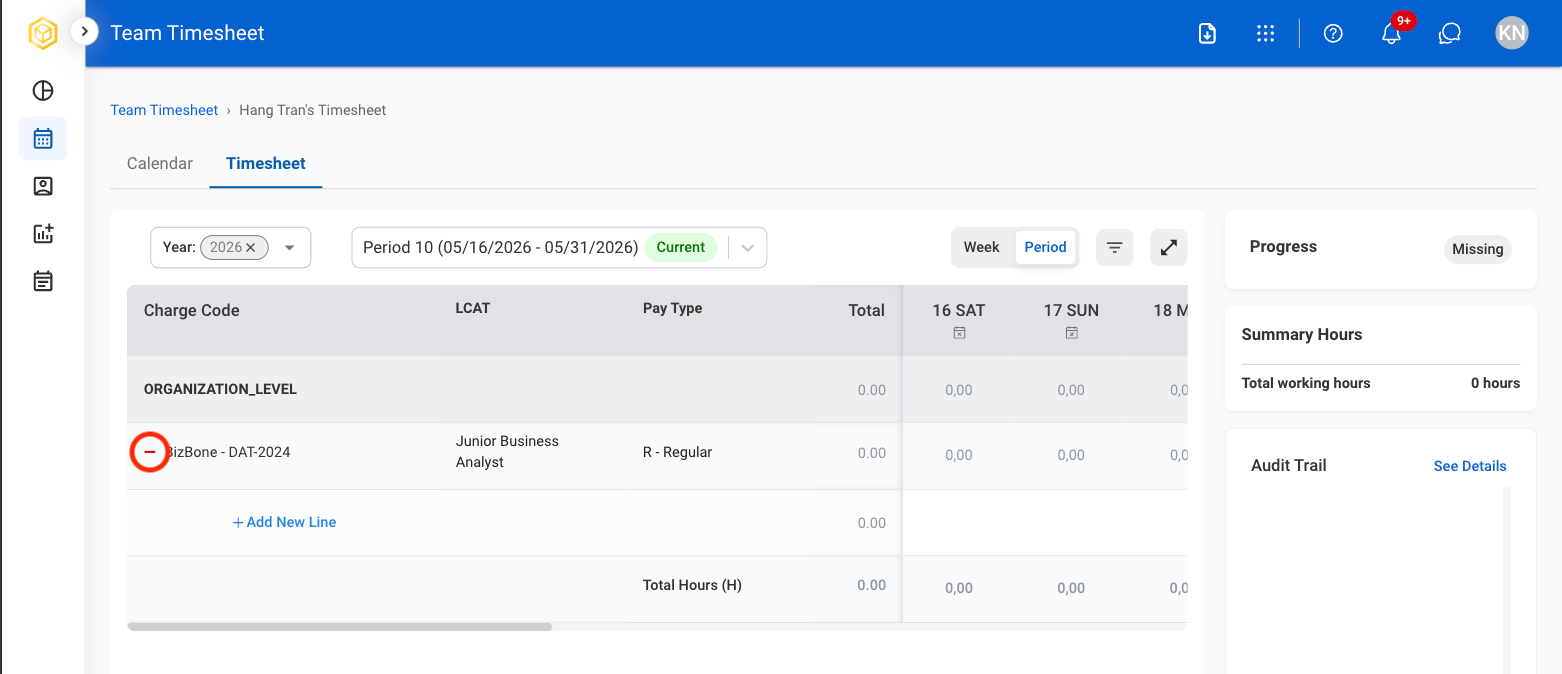
  <Step title="Select the remove icon">
    <Frame>
      <img src="https://mintcdn.com/bizbone/_k3erF2n8rcHBsQu/images/T-TT-Remove-Icon.png?fit=max&auto=format&n=_k3erF2n8rcHBsQu&q=85&s=db4309e108a50592eb827023e65a96a6" alt="T TT Remove Icon" width="1562" height="674" data-path="images/T-TT-Remove-Icon.png" />
    </Frame>
  </Step>

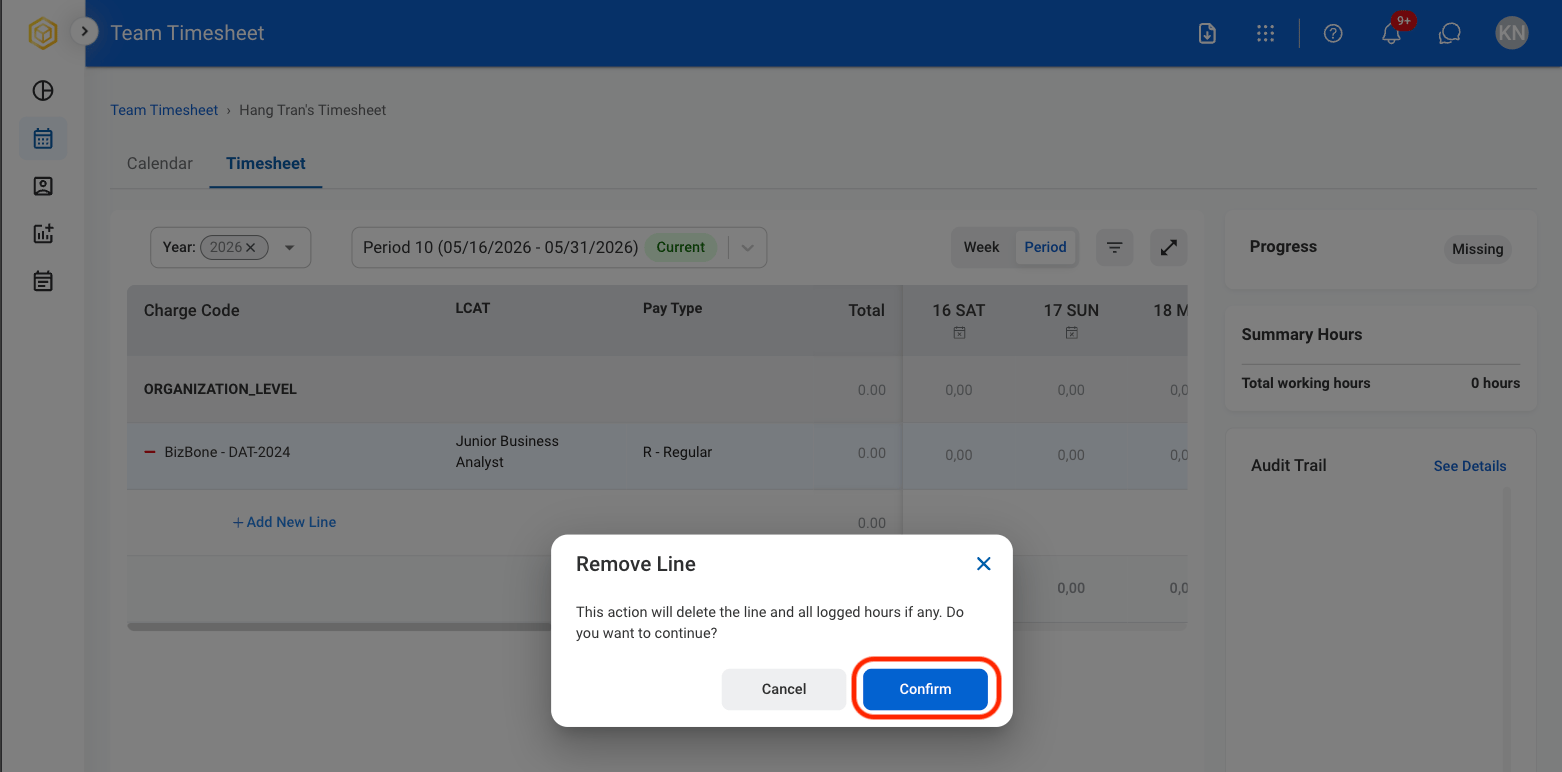
  <Step title="Confirm the action">
    <Frame>
      <img src="https://mintcdn.com/bizbone/_k3erF2n8rcHBsQu/images/T-TT-Confirm.png?fit=max&auto=format&n=_k3erF2n8rcHBsQu&q=85&s=9a6d1a37933c2490b3b534116c08d612" alt="T TT Confirm" width="1562" height="772" data-path="images/T-TT-Confirm.png" />
    </Frame>
  </Step>
</Steps>

## Review a Team Member's Timesheet

<Steps>
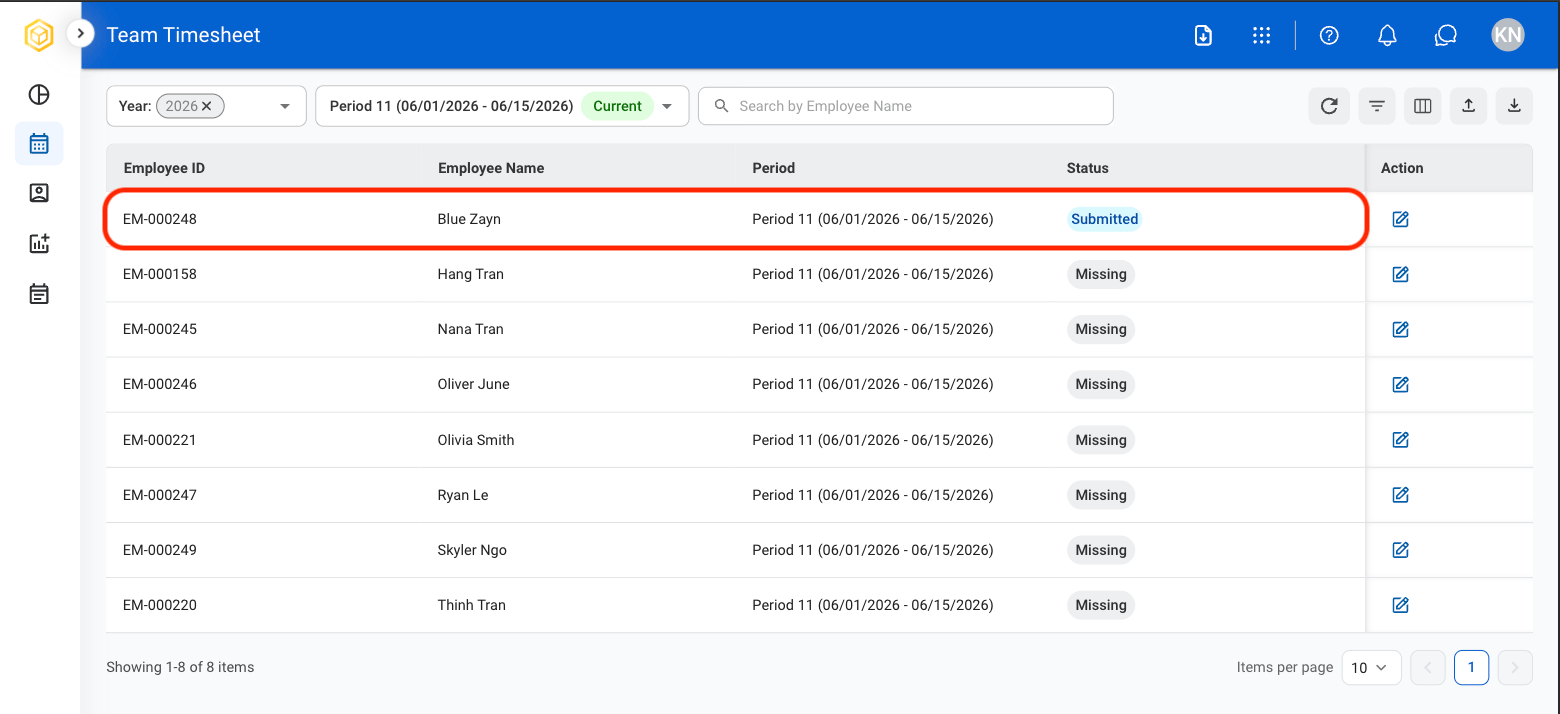
  <Step title="Select a team member">
    <Frame>
      <img src="https://mintcdn.com/bizbone/_k3erF2n8rcHBsQu/images/T-T-TT-Select.png?fit=max&auto=format&n=_k3erF2n8rcHBsQu&q=85&s=98d022eda23e2e7f44b081d82e0dc2e7" alt="T T TT Select" width="1560" height="714" data-path="images/T-T-TT-Select.png" />
    </Frame>

    <Info>
      Status must be Submitted in order to review. 
    </Info>
  </Step>

  <Step title="Select an action">
    <Frame>
      <img src="https://mintcdn.com/bizbone/_k3erF2n8rcHBsQu/images/T-T-TT-Action.png?fit=max&auto=format&n=_k3erF2n8rcHBsQu&q=85&s=ebc0156c3f0270e0880a65b8c7ca3f49" alt="T T TT Action" width="1560" height="758" data-path="images/T-T-TT-Action.png" />
    </Frame>

    * **Approve:** Approve the timecard for processing.
    * **Reject:** Reject the timecard and return it for correction.
    * **Elevate:** Escalate the timecard for higher-level review.
  </Step>

  <Step title="Confirm action ">
    * **Approve:** Select **Approve** to complete or **Cancel** to exit without saving changes. 
    * **Reject:** Provide a reason for rejection and select **Reject** to complete or **Cancel** to exit without saving changes. 
    * **Elevate:** Select a manager and select **Elevate** to complete or **Cancel** to exit without saving changes. 
  </Step>
</Steps>