> ## Documentation Index
> Fetch the complete documentation index at: https://docs.bizbone.com/llms.txt
> Use this file to discover all available pages before exploring further.

# Introduction

## Overview of the Product Management Module

The Product Management module provides tools to manage product information, product records, pricing, categories, and inventory. Supports product lifecycle management through product creation, maintenance, organization, and inventory management.

## Key Features of the Product Management Module

<Columns cols={2}>
  <Card title="Purchase Orders" icon="shopping-cart">
    Create, review, approve, and manage purchase orders throughout the procurement lifecycle.
  </Card>

  <Card title="Vendors" icon="money-check-pen">
    Manage vendor information, supplier records, product pricing, and procurement-related details.
  </Card>
</Columns>

## Module Access

<Steps>
  <Step title="Select the Module Menu icon">
    <Frame>
      <img src="https://mintcdn.com/bizbone/3BvPU03mTm_6TIU5/images/Module-Menu.png?fit=max&auto=format&n=3BvPU03mTm_6TIU5&q=85&s=5a2b8a581849af05aa2fde51d766d9e6" alt="Module Menu" width="1562" height="122" data-path="images/Module-Menu.png" />
    </Frame>
  </Step>

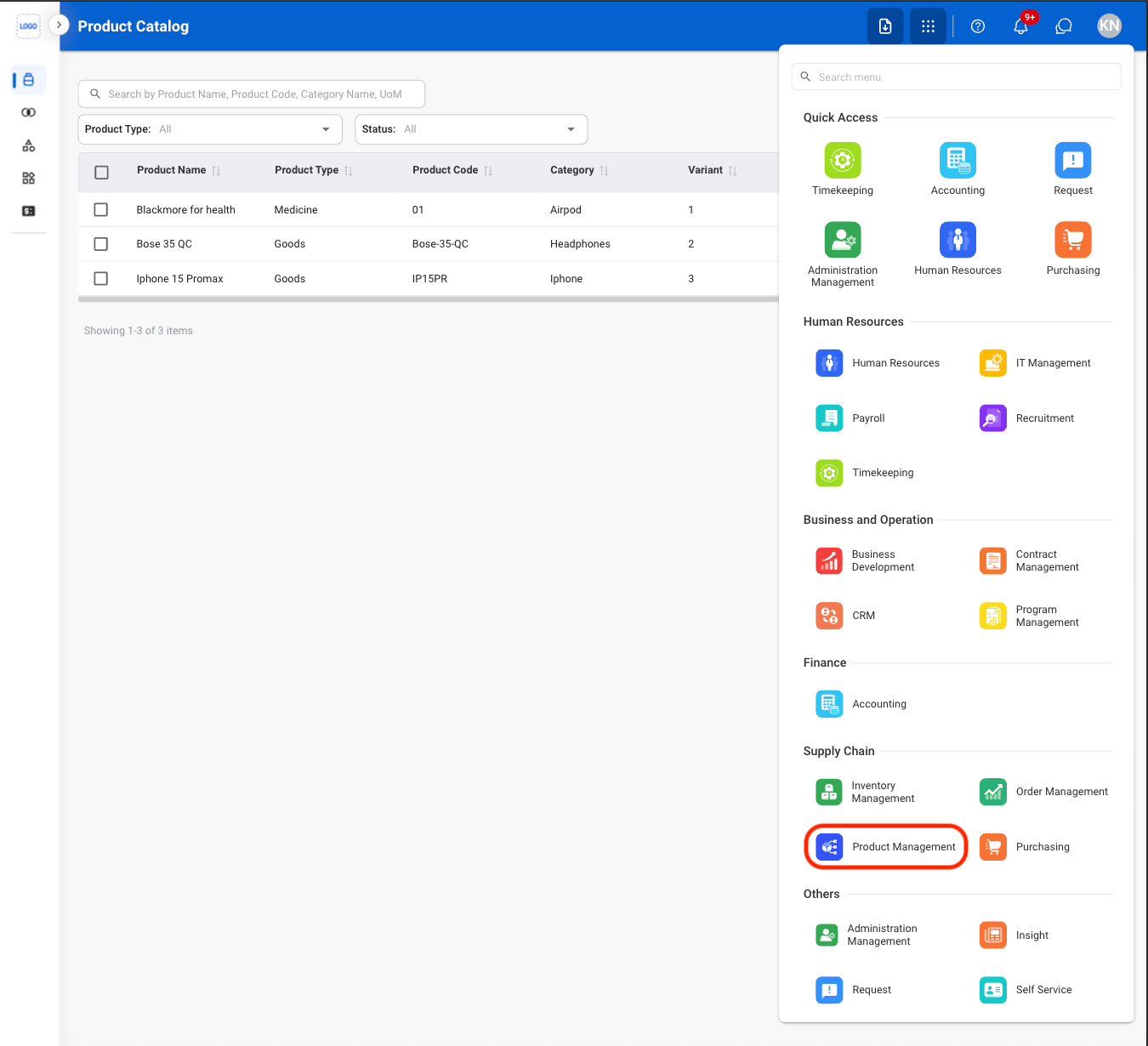
  <Step title="Select the Product Management Module">
    <Frame>
      <img src="https://mintcdn.com/bizbone/pFtSY-Ipzl50uWKG/images/PM-Nav.png?fit=max&auto=format&n=pFtSY-Ipzl50uWKG&q=85&s=c8d59b5fb691713fce3b022c7891fd25" alt="PM Nav" width="1350" height="1230" data-path="images/PM-Nav.png" />
    </Frame>
  </Step>
</Steps>