> ## Documentation Index
> Fetch the complete documentation index at: https://docs.bizbone.com/llms.txt
> Use this file to discover all available pages before exploring further.

# Profile

Serves as the central repository for personal information. View and manage contact, employment, and organizational details associated with the account.

## View Profile

<Steps>
  <Step title="Navigate to Profile">
    <Frame>
      <img src="https://mintcdn.com/bizbone/6cI01-W8VdftgePz/images/SS-P-Nav.png?fit=max&auto=format&n=6cI01-W8VdftgePz&q=85&s=898a37fe0a7aa95d769114fa41041cc6" alt="SS P Nav" width="1560" height="1152" data-path="images/SS-P-Nav.png" />
    </Frame>
  </Step>
</Steps>

## Update Employee Information

### General Information

Update basic profile details.

<Steps>
  <Step title="Select Edit to make changes">
    <Frame>
      <img src="https://mintcdn.com/bizbone/6cI01-W8VdftgePz/images/SS-P-Edit.png?fit=max&auto=format&n=6cI01-W8VdftgePz&q=85&s=3ec48d8def1a80b8756fdcf629ed4daf" alt="SS P Edit" width="1560" height="1152" data-path="images/SS-P-Edit.png" />
    </Frame>
  </Step>

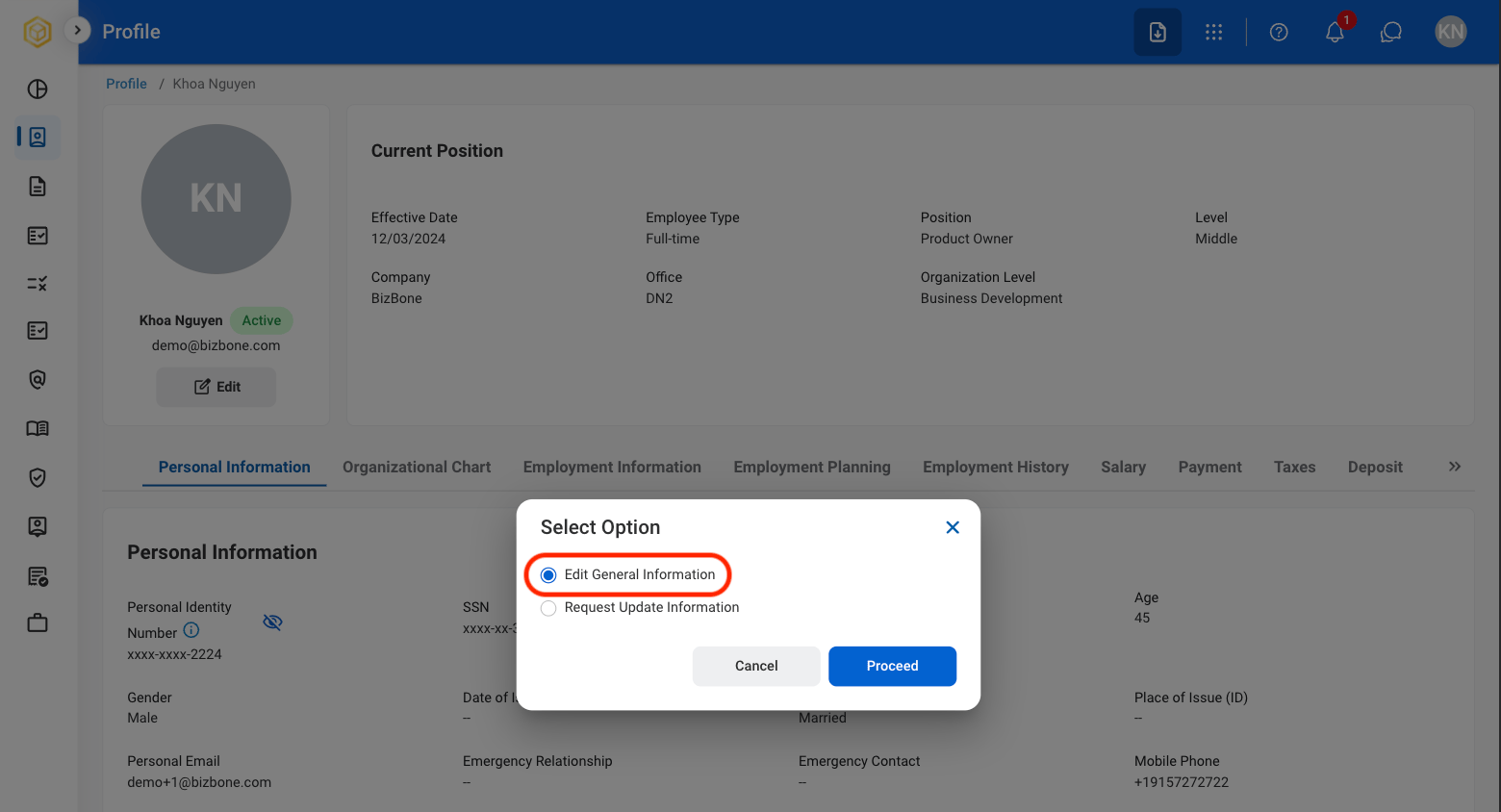
  <Step title="Select Edit General Information">
    <Frame>
      <img src="https://mintcdn.com/bizbone/6cI01-W8VdftgePz/images/SS-P-Gen-Info.png?fit=max&auto=format&n=6cI01-W8VdftgePz&q=85&s=f169207f299efdb6a29326d0a01449b0" alt="SS P Gen Info" width="1560" height="844" data-path="images/SS-P-Gen-Info.png" />
    </Frame>

    Select **Proceed** to continue or **Cancel** to exit without saving changes. 
  </Step>

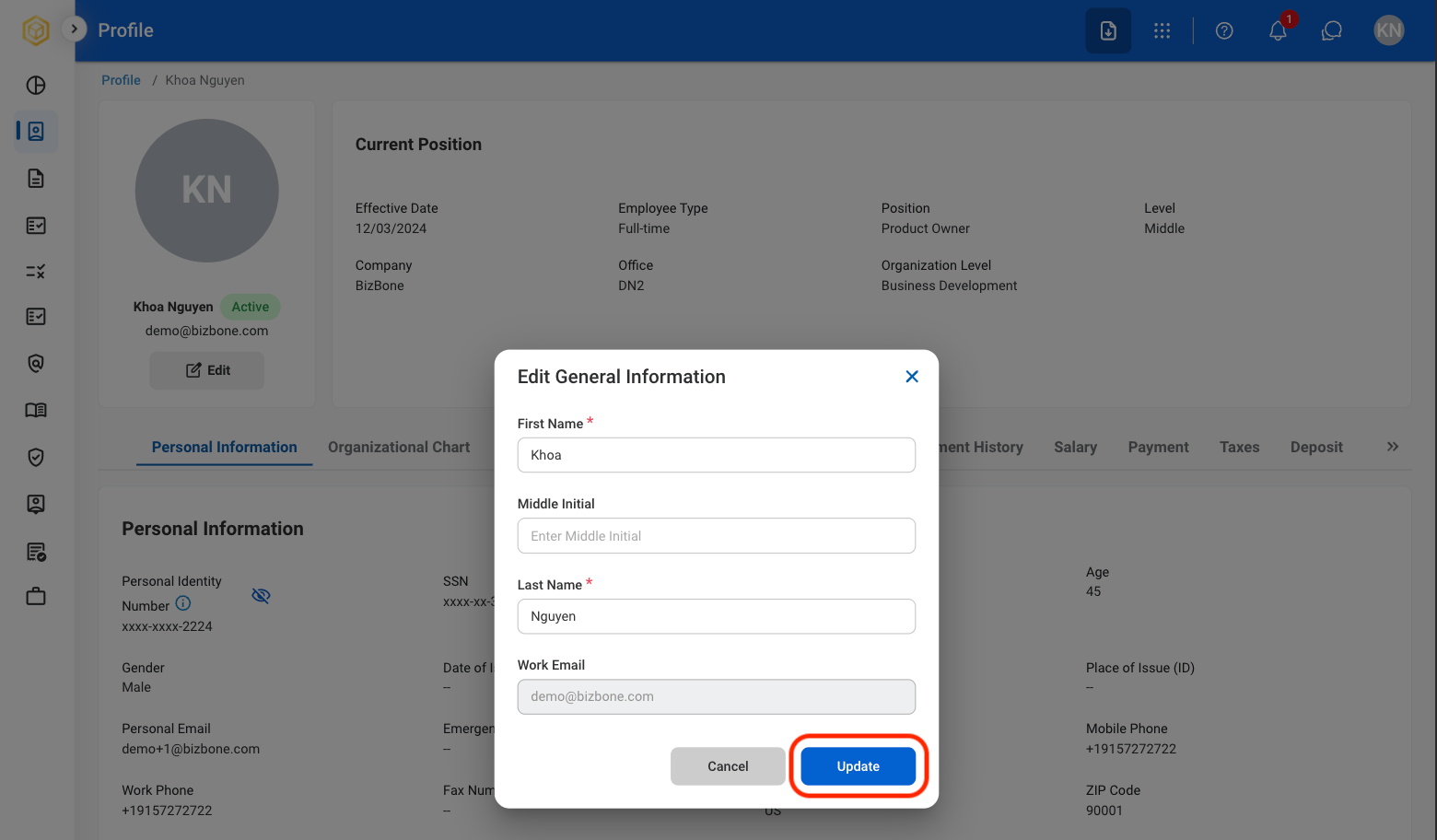
  <Step title="Fill in the required information ">
    <Frame>
      <img src="https://mintcdn.com/bizbone/6cI01-W8VdftgePz/images/SS-P-Conf-Gen-Info.png?fit=max&auto=format&n=6cI01-W8VdftgePz&q=85&s=ea01d2057b79a4d1472b48c2434dbbd4" alt="SS P Conf Gen Info" width="1560" height="912" data-path="images/SS-P-Conf-Gen-Info.png" />
    </Frame>

    Select **Update** to continue or **Cancel** to exit without saving changes. 
  </Step>
</Steps>

### Add Employment History

<Steps>
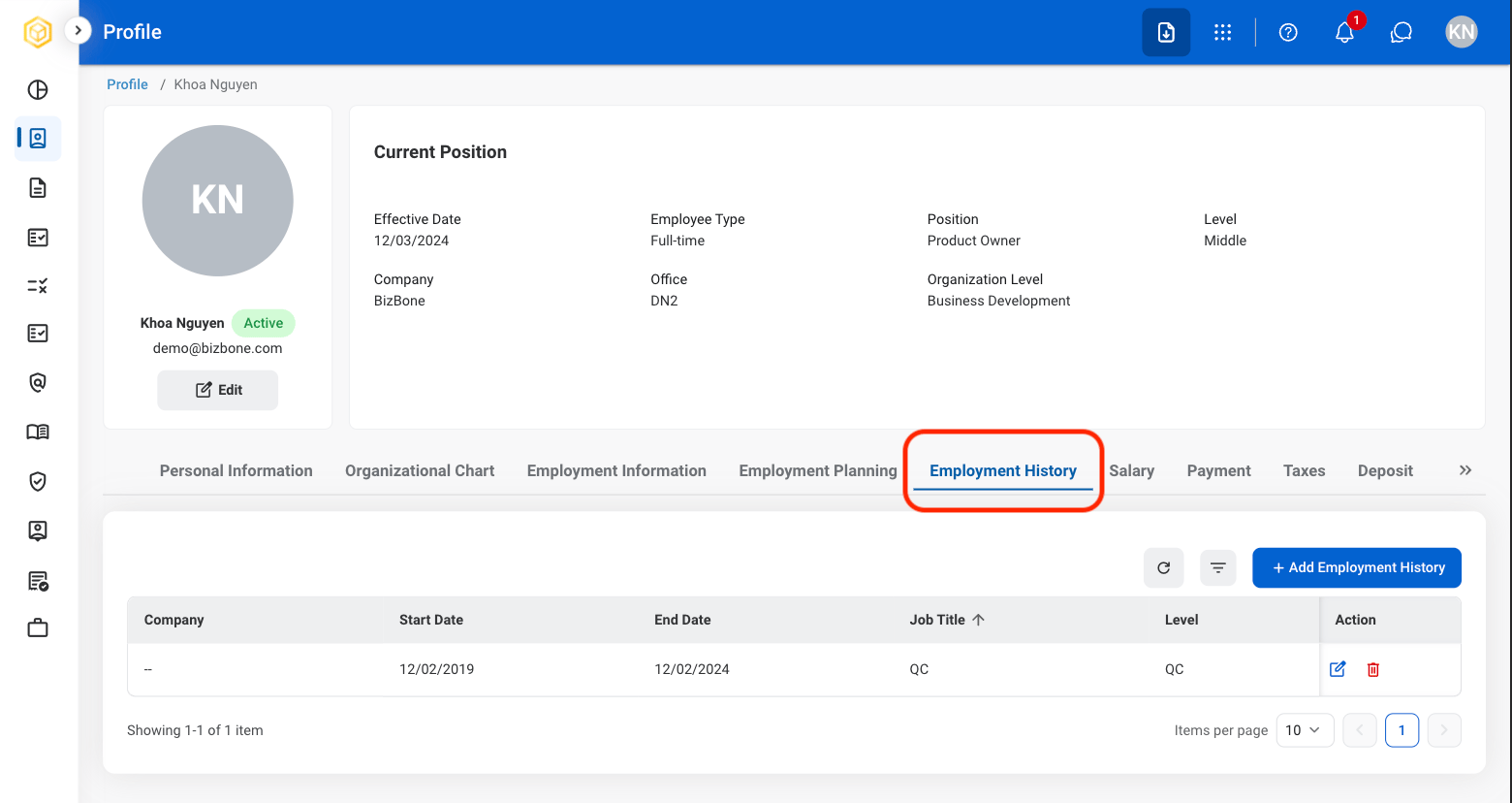
  <Step title="Select the Employment History tab">
    <Frame>
      <img src="https://mintcdn.com/bizbone/6cI01-W8VdftgePz/images/SS-P-Emp-Histry.png?fit=max&auto=format&n=6cI01-W8VdftgePz&q=85&s=8c2b423ab51cd0f124909e06d80b067a" alt="SS P Emp Histry" width="1560" height="828" data-path="images/SS-P-Emp-Histry.png" />
    </Frame>
  </Step>

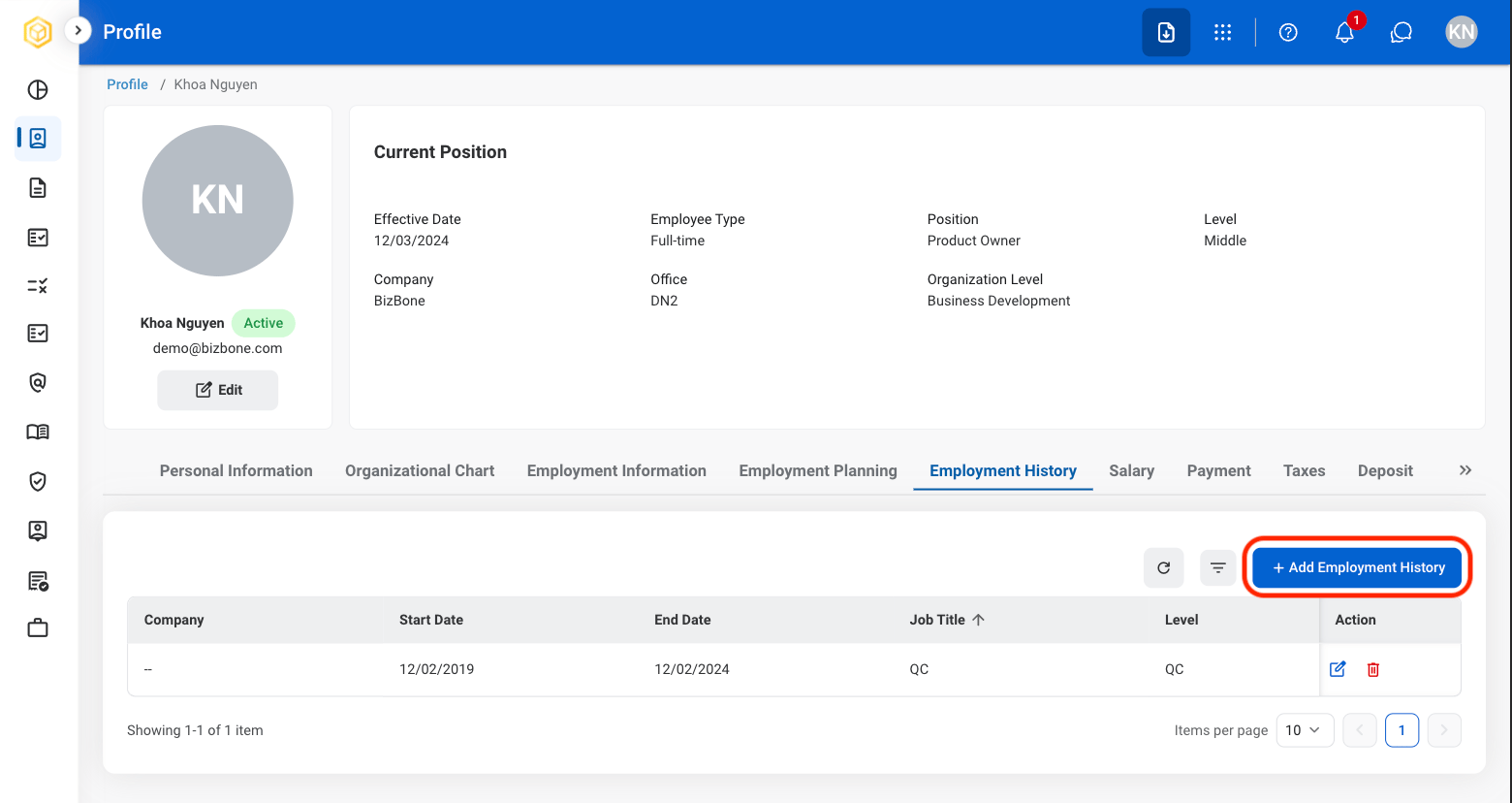
  <Step title="Select Add Employment History">
    <Frame>
      <img src="https://mintcdn.com/bizbone/6cI01-W8VdftgePz/images/SS-P-Add-Emp-H.png?fit=max&auto=format&n=6cI01-W8VdftgePz&q=85&s=5af18bdc5d7e7fd5398cb5cc9de97f38" alt="SS P Add Emp H" width="1560" height="828" data-path="images/SS-P-Add-Emp-H.png" />
    </Frame>
  </Step>

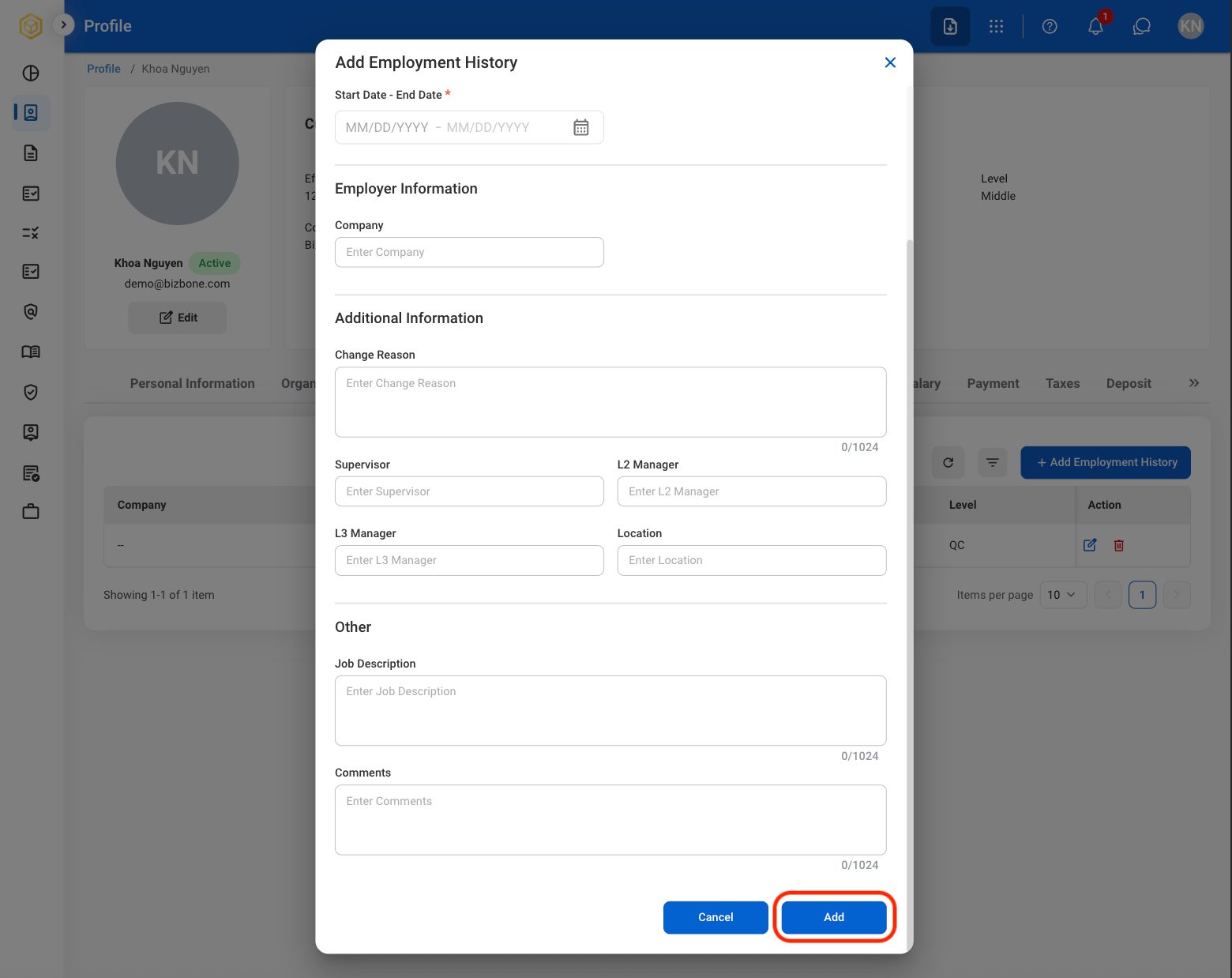
  <Step title="Fill in the required information">
    <Frame>
      <img src="https://mintcdn.com/bizbone/6cI01-W8VdftgePz/images/SS-P-Conf-Add-EH.png?fit=max&auto=format&n=6cI01-W8VdftgePz&q=85&s=52aa521f2c5a41a63bdbf541356634c4" alt="SS P Conf Add EH" width="1560" height="1238" data-path="images/SS-P-Conf-Add-EH.png" />
    </Frame>

    Select **Add** to continue or **Cancel** to exit without saving changes. 
  </Step>

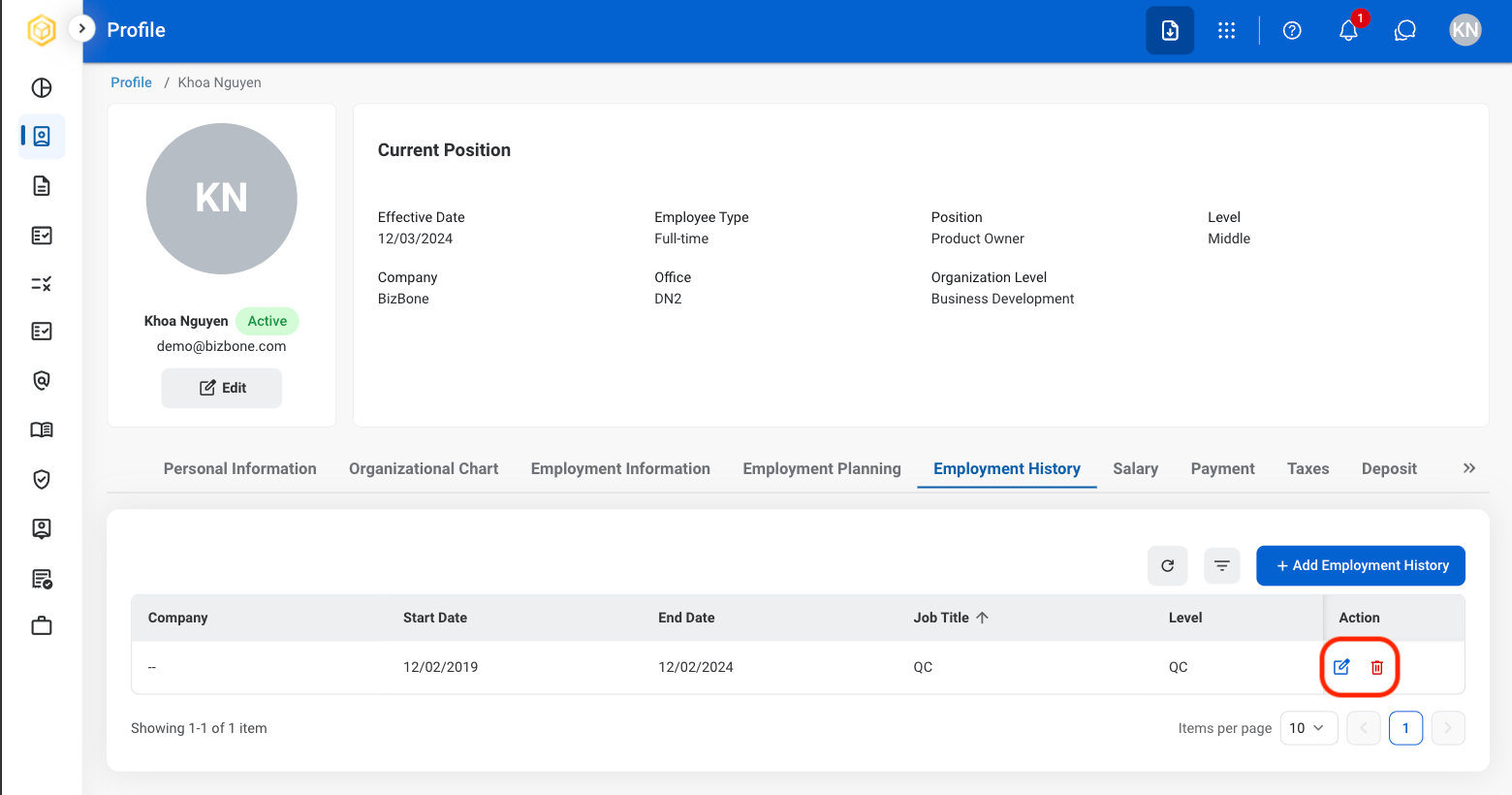
  <Step title="To make changes">
    <Frame>
      <img src="https://mintcdn.com/bizbone/6cI01-W8VdftgePz/images/SS-P-EH-Changes.png?fit=max&auto=format&n=6cI01-W8VdftgePz&q=85&s=b4b6230dea8093dee8ea951ba1c380af" alt="SS P EH Changes" width="1560" height="820" data-path="images/SS-P-EH-Changes.png" />
    </Frame>

    * To **Edit**: Select the **edit icon** to update an existing entry.
    * To **Delete**: Select the **trash icon** to delete an existing entry. 
  </Step>
</Steps>

### Add Certificates

<Steps>
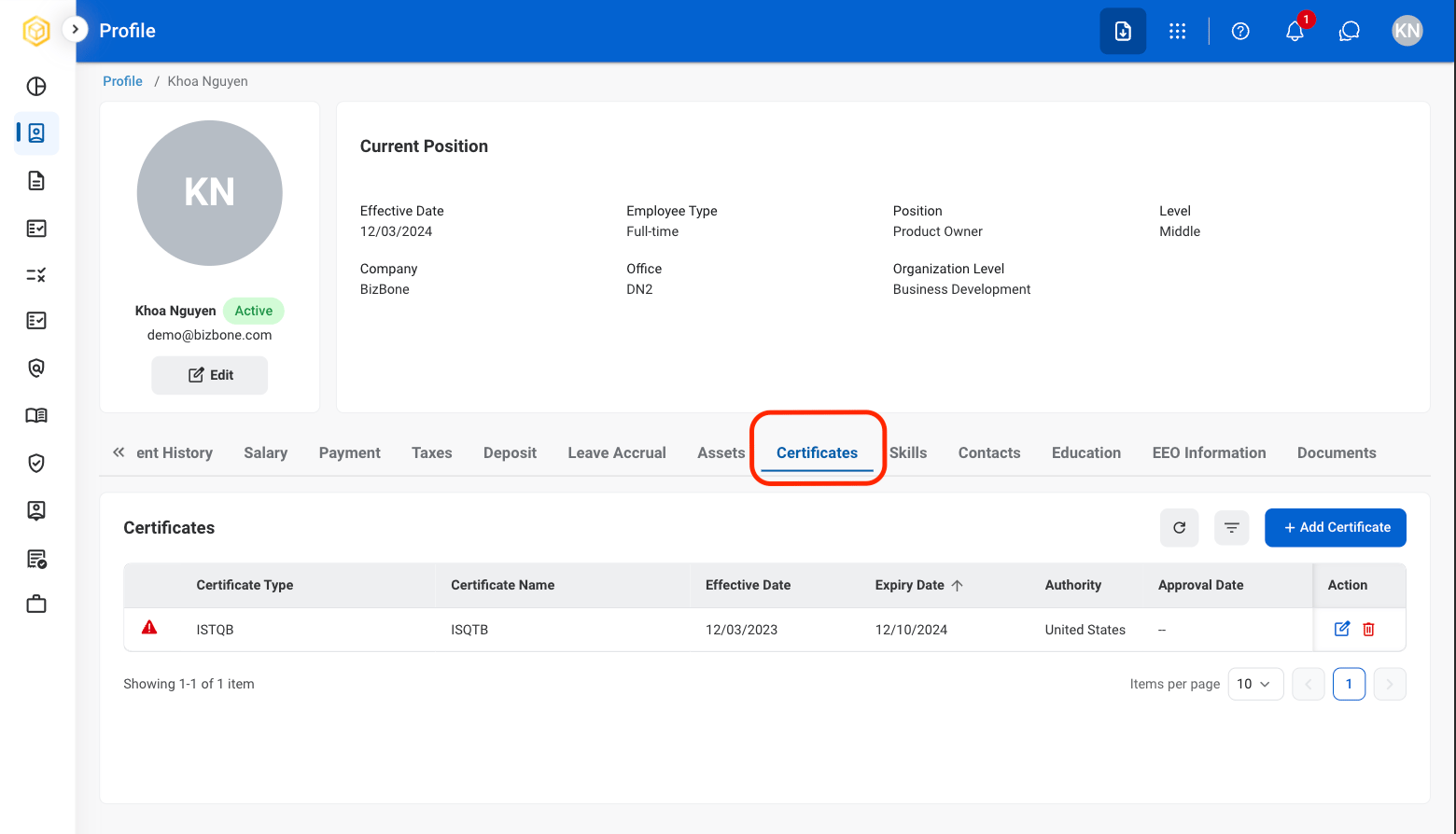
  <Step title="Select the Certificates tab">
    <Frame>
      <img src="https://mintcdn.com/bizbone/6cI01-W8VdftgePz/images/SS-P-Cert.png?fit=max&auto=format&n=6cI01-W8VdftgePz&q=85&s=f18e033940f5781ca039ca7f87d52f50" alt="SS P Cert" width="1560" height="894" data-path="images/SS-P-Cert.png" />
    </Frame>
  </Step>

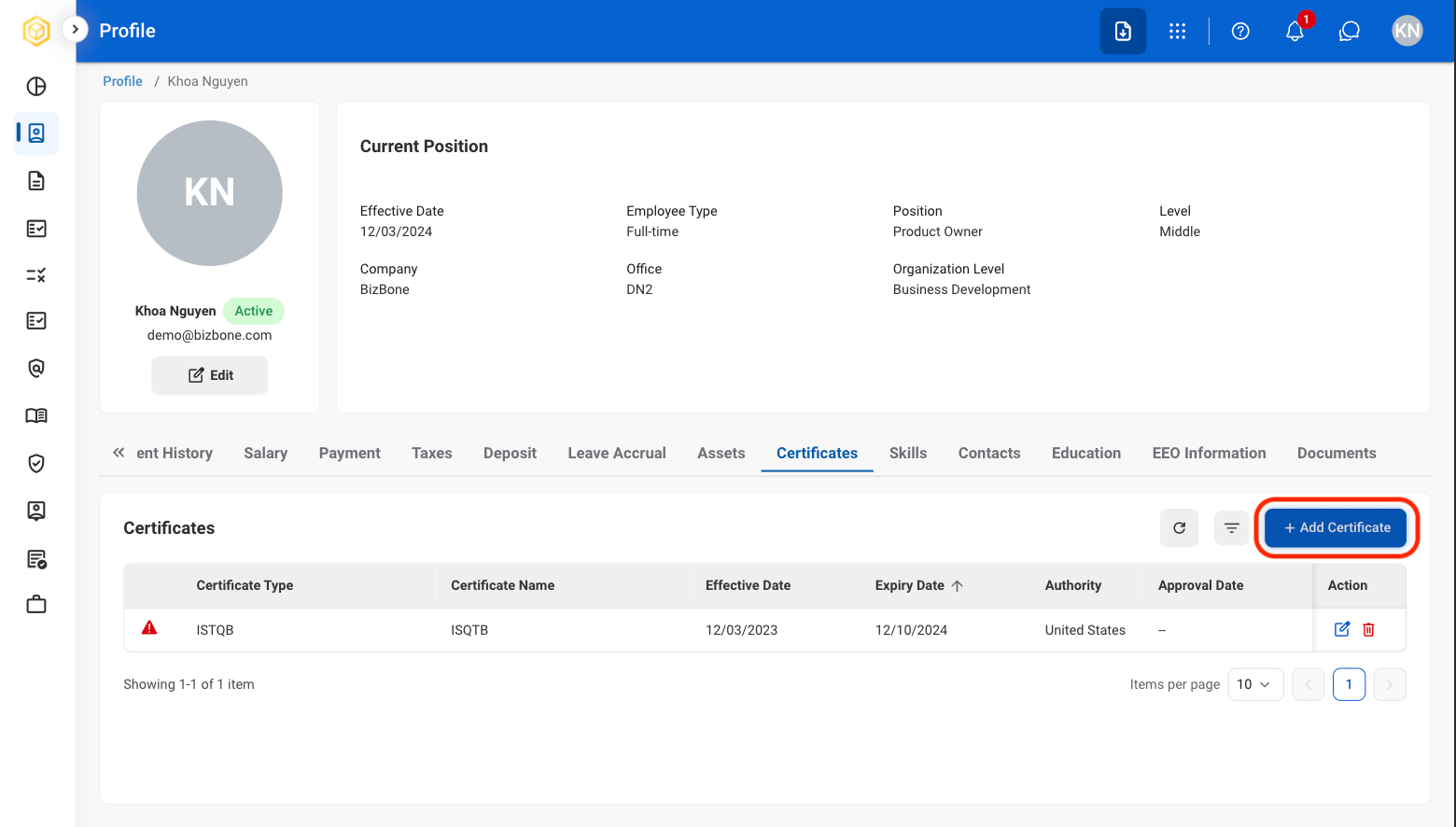
  <Step title="Select Add Certificate">
    <Frame>
      <img src="https://mintcdn.com/bizbone/6cI01-W8VdftgePz/images/SS-P-Add-C.png?fit=max&auto=format&n=6cI01-W8VdftgePz&q=85&s=f3776206988eca7e09b46dd69f1dbb0b" alt="SS P Add C" width="1560" height="886" data-path="images/SS-P-Add-C.png" />
    </Frame>
  </Step>

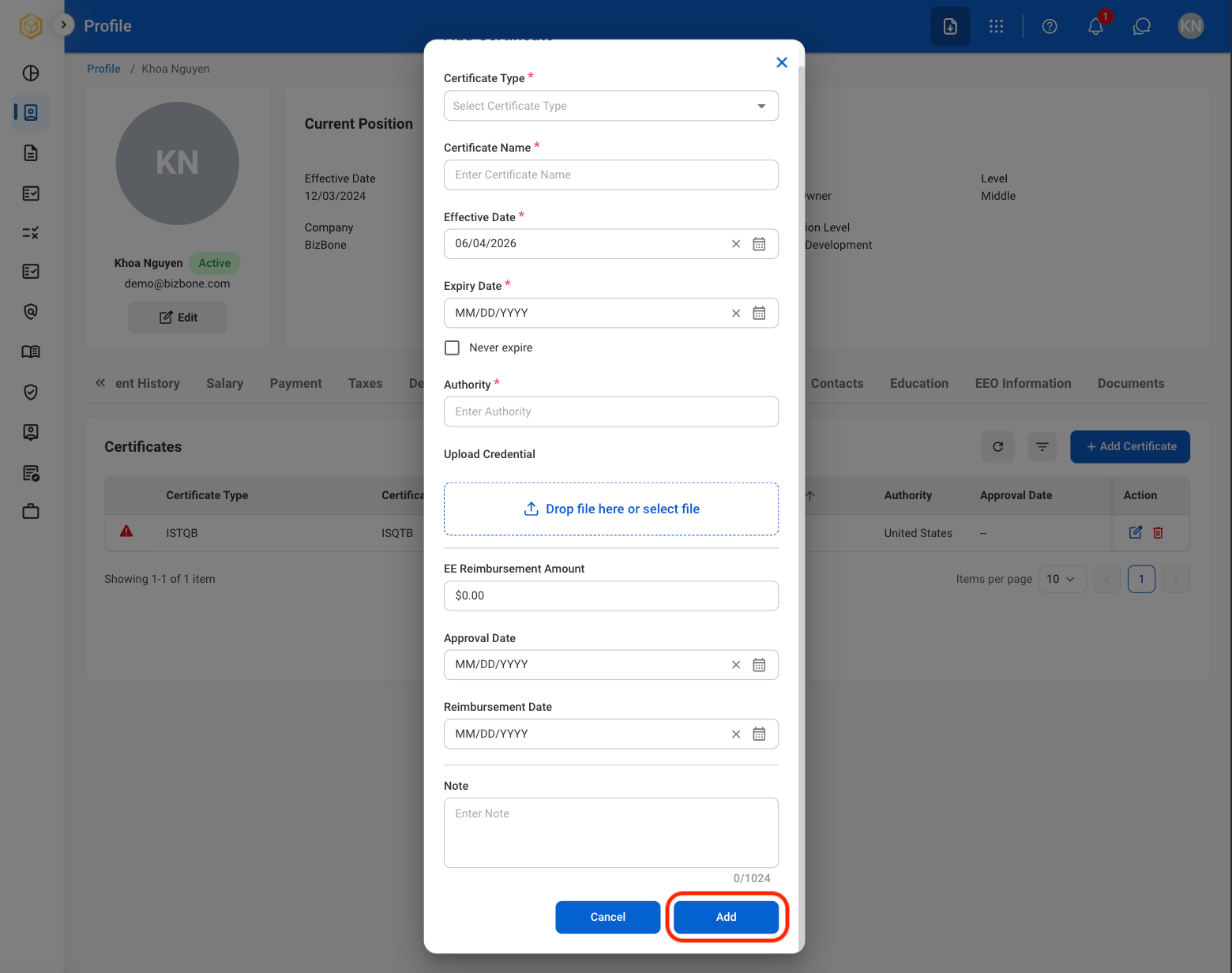
  <Step title="Fill in the required information">
    <Frame>
      <img src="https://mintcdn.com/bizbone/6cI01-W8VdftgePz/images/SS-P-Add-Cert-C.png?fit=max&auto=format&n=6cI01-W8VdftgePz&q=85&s=91938be69ab67a9cf35e9cd22719ab73" alt="SS P Add Cert C" width="1560" height="1232" data-path="images/SS-P-Add-Cert-C.png" />
    </Frame>

    Select **Add** to continue or **Cancel** to exit without saving changes. 
  </Step>

  <Step title="To make changes">
    <Frame>
      <img src="https://mintcdn.com/bizbone/6cI01-W8VdftgePz/images/SS-P-C-Changes.png?fit=max&auto=format&n=6cI01-W8VdftgePz&q=85&s=6dd4b50a0854905c7d43b43c691dbd9d" alt="SS P C Changes" width="1560" height="774" data-path="images/SS-P-C-Changes.png" />
    </Frame>

    * To **Edit**: Select the **edit icon** to update an existing entry.
    * To **Delete**: Select the **trash icon** to delete an existing entry. 
  </Step>
</Steps>

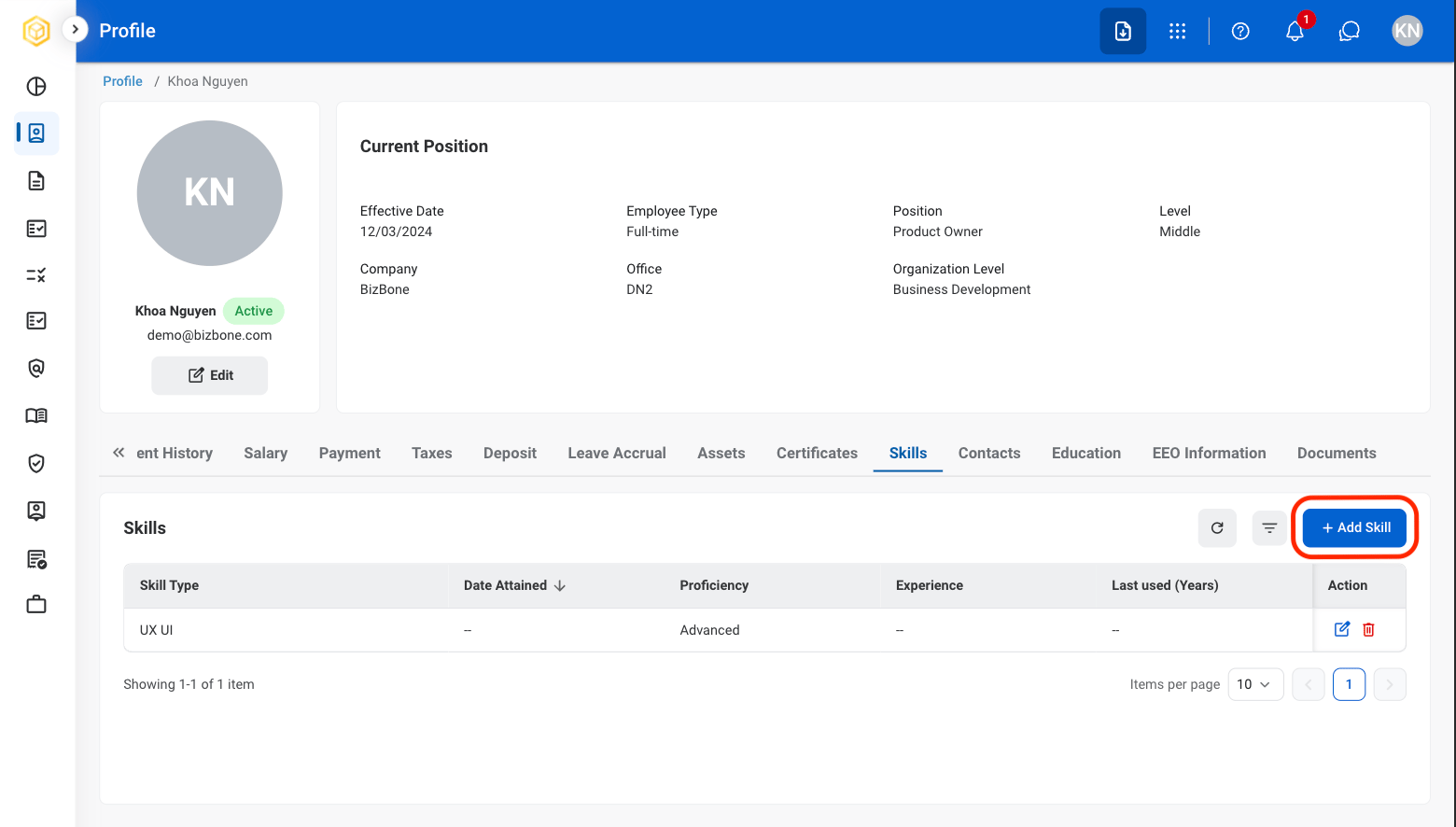
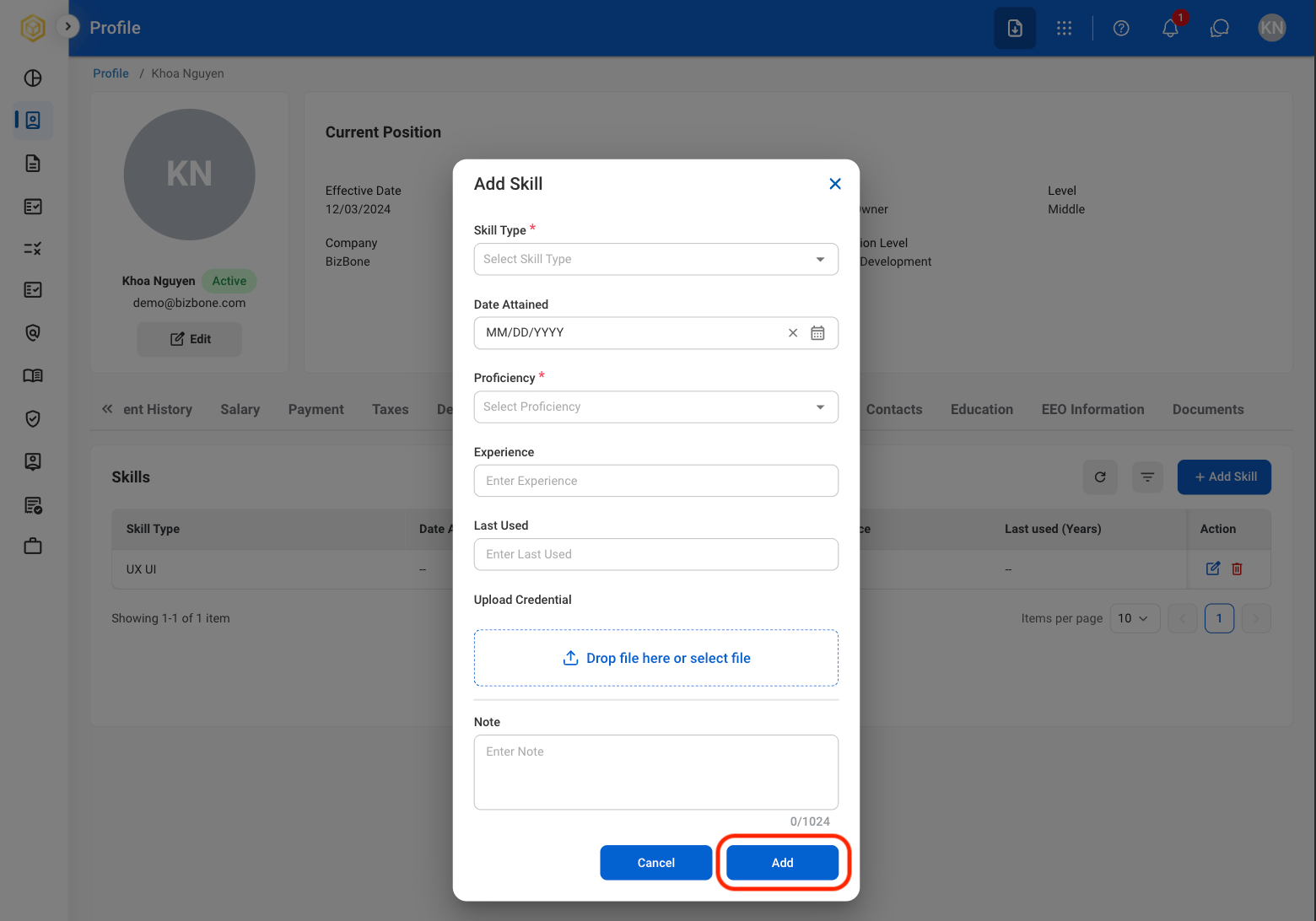
### Add Skills

<Steps>
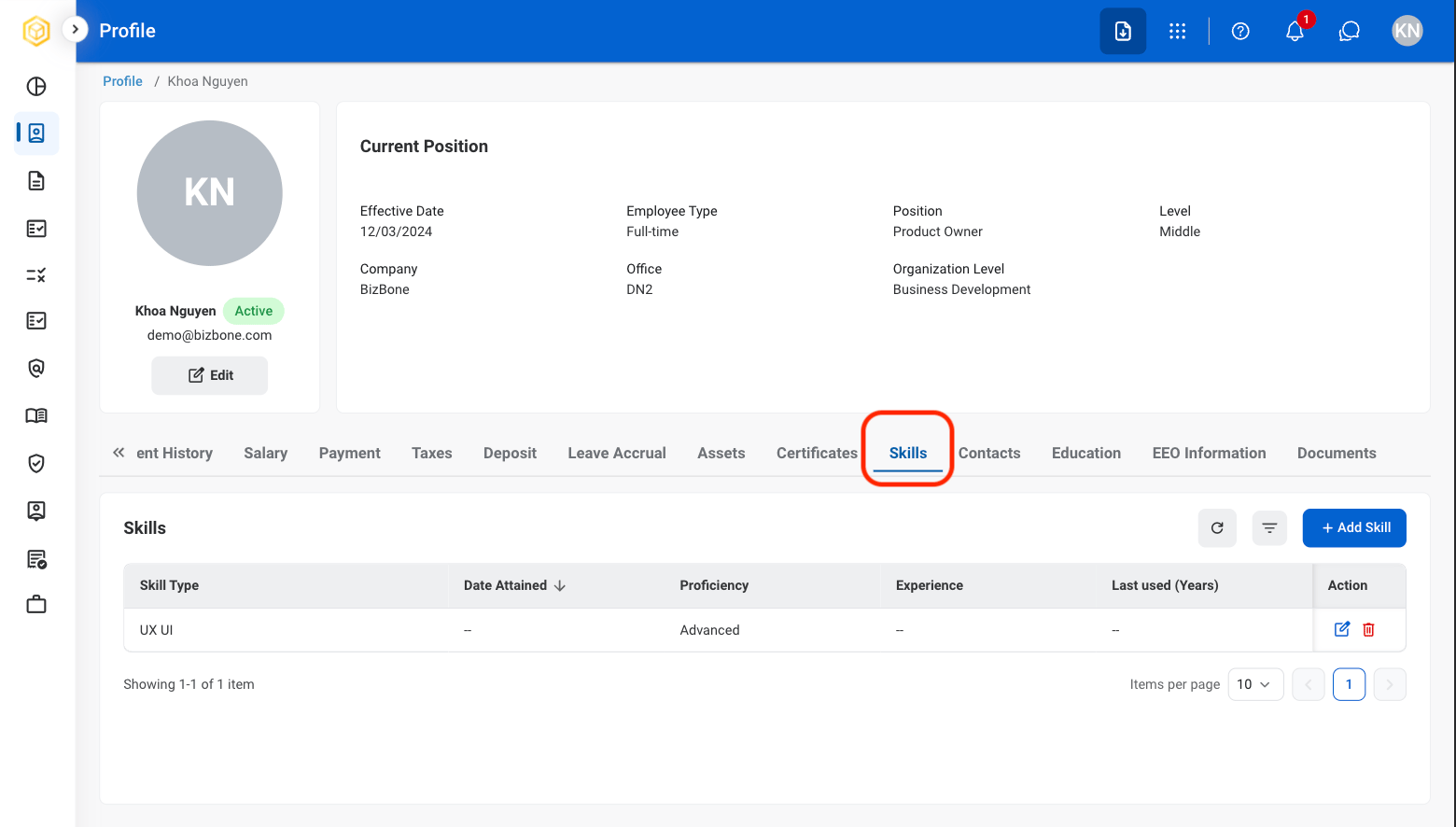
  <Step title="Select the Skills tab">
    <Frame>
      <img src="https://mintcdn.com/bizbone/6cI01-W8VdftgePz/images/SS-P-Skill.png?fit=max&auto=format&n=6cI01-W8VdftgePz&q=85&s=62693673192ca40a8268f5d8ca93765c" alt="SS P Skill" width="1560" height="886" data-path="images/SS-P-Skill.png" />
    </Frame>
  </Step>

  <Step title="Select Add Skill">
    <Frame>
      <img src="https://mintcdn.com/bizbone/6cI01-W8VdftgePz/images/SS-P-Add-Skill.png?fit=max&auto=format&n=6cI01-W8VdftgePz&q=85&s=d8b0a7186a2c98e81b623741f6dbac35" alt="SS P Add Skill" width="1560" height="886" data-path="images/SS-P-Add-Skill.png" />
    </Frame>
  </Step>

  <Step title="Fill in the required information">
    <Frame>
      <img src="https://mintcdn.com/bizbone/6cI01-W8VdftgePz/images/SS-P-Conf-Add-S.png?fit=max&auto=format&n=6cI01-W8VdftgePz&q=85&s=4a88a305ed62bba1dd2f349196914949" alt="SS P Conf Add S" width="1560" height="1092" data-path="images/SS-P-Conf-Add-S.png" />
    </Frame>

    Select **Add** to complete or **Cancel** to exit without saving changes
  </Step>

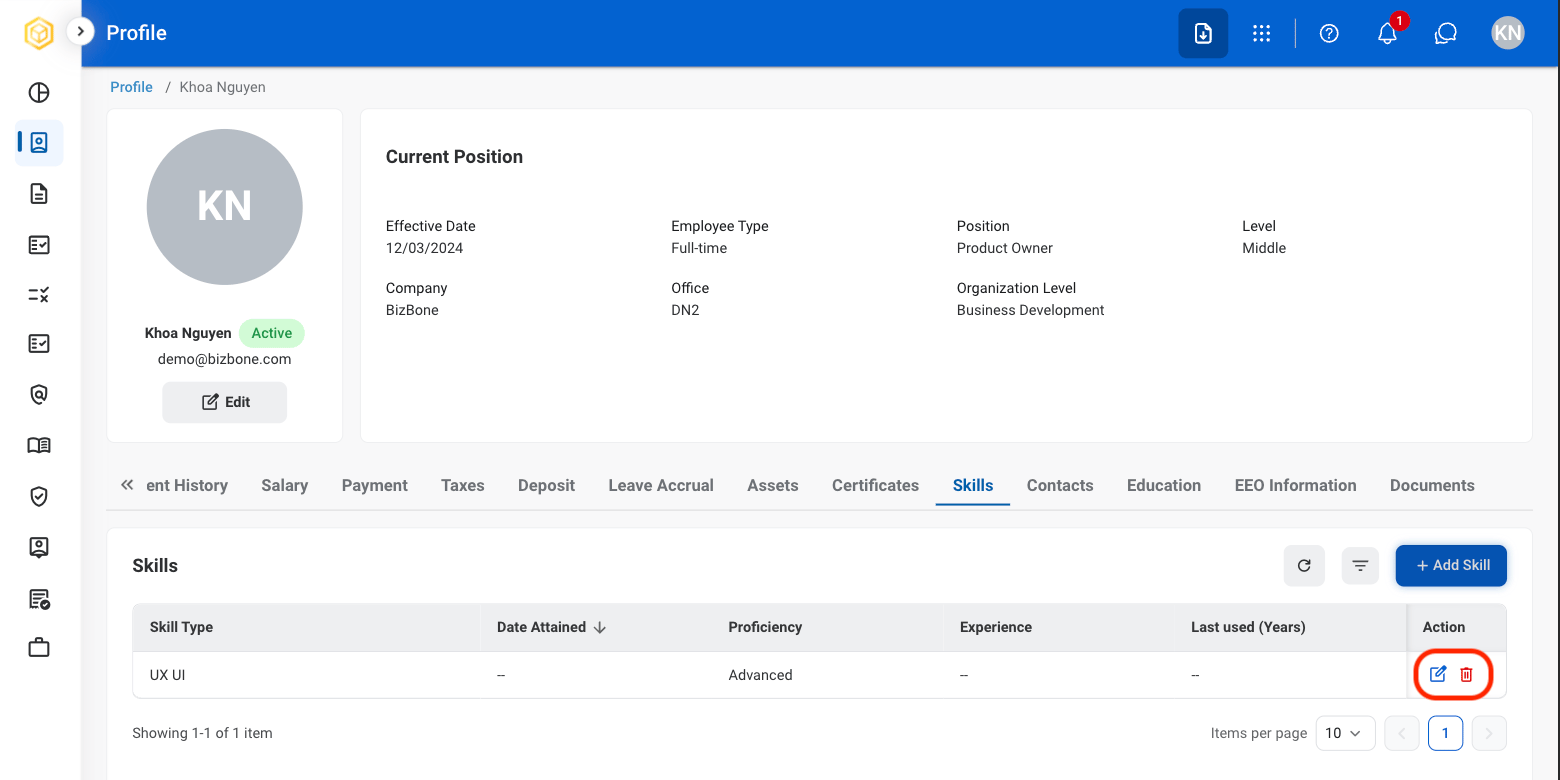
  <Step title="To make changes">
    <Frame>
      <img src="https://mintcdn.com/bizbone/6cI01-W8VdftgePz/images/SS-P-Edit-S.png?fit=max&auto=format&n=6cI01-W8VdftgePz&q=85&s=42aab2b50ba7c716ba9c597f5f79f001" alt="SS P Edit S" width="1560" height="780" data-path="images/SS-P-Edit-S.png" />
    </Frame>

    * To **Edit**: Select the **edit icon** to update an existing entry.
    * To **Delete**: Select the **trash icon** to delete an existing entry. 
  </Step>
</Steps>

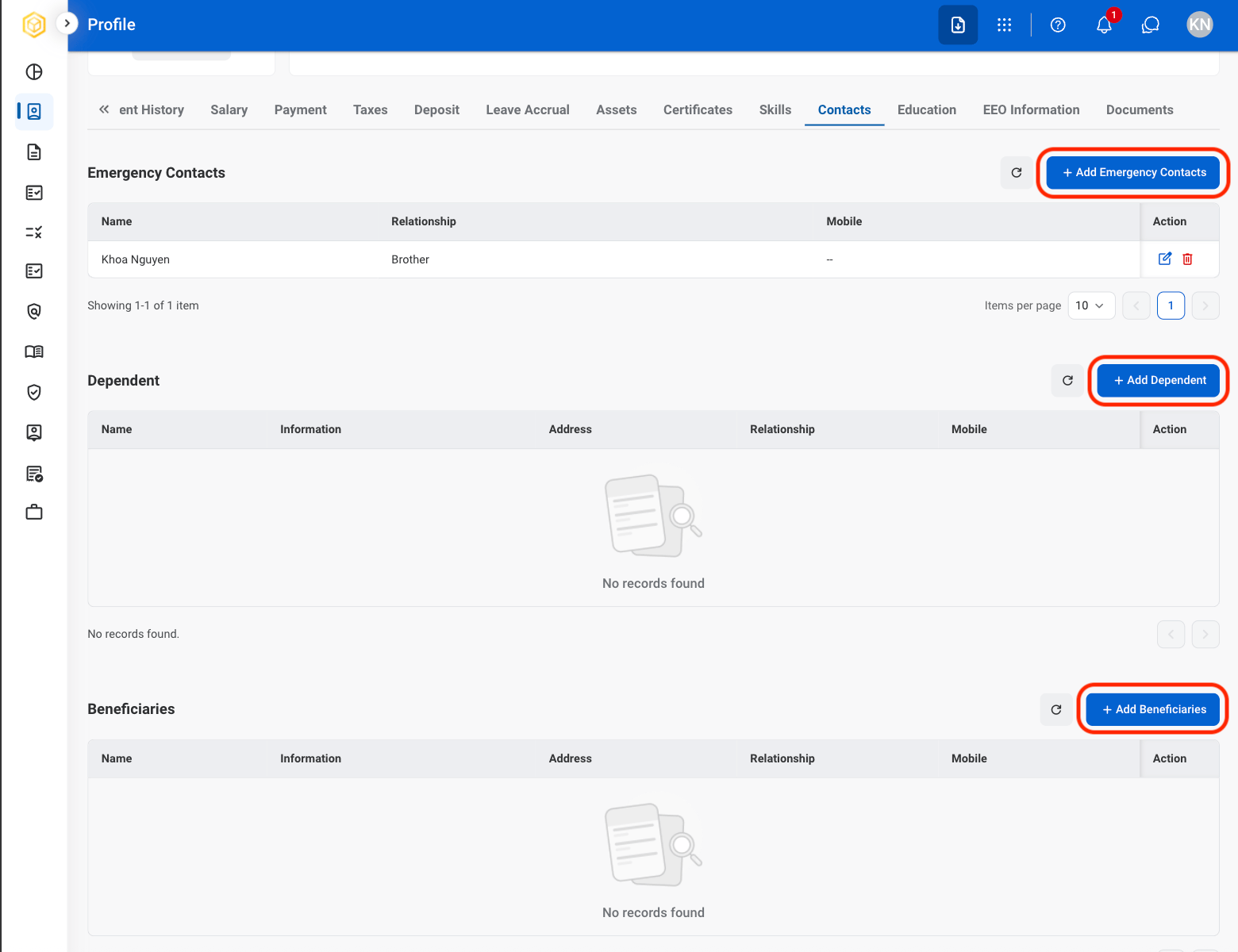
### Add Contacts

<Steps>
  <Step title="Select the Contacts tab">
    <Frame>
      <img src="https://mintcdn.com/bizbone/6cI01-W8VdftgePz/images/SS-P-Contacts.png?fit=max&auto=format&n=6cI01-W8VdftgePz&q=85&s=f2da85a8999243df4b5c15877940f2cd" alt="SS P Contacts" width="1560" height="784" data-path="images/SS-P-Contacts.png" />
    </Frame>
  </Step>

  <Step title="Select a category">
    <Frame>
      <img src="https://mintcdn.com/bizbone/6cI01-W8VdftgePz/images/SS-P-Add-Contacts.png?fit=max&auto=format&n=6cI01-W8VdftgePz&q=85&s=57a407e2152d58a39265b5b397879750" alt="SS P Add Contacts" width="1560" height="1200" data-path="images/SS-P-Add-Contacts.png" />
    </Frame>

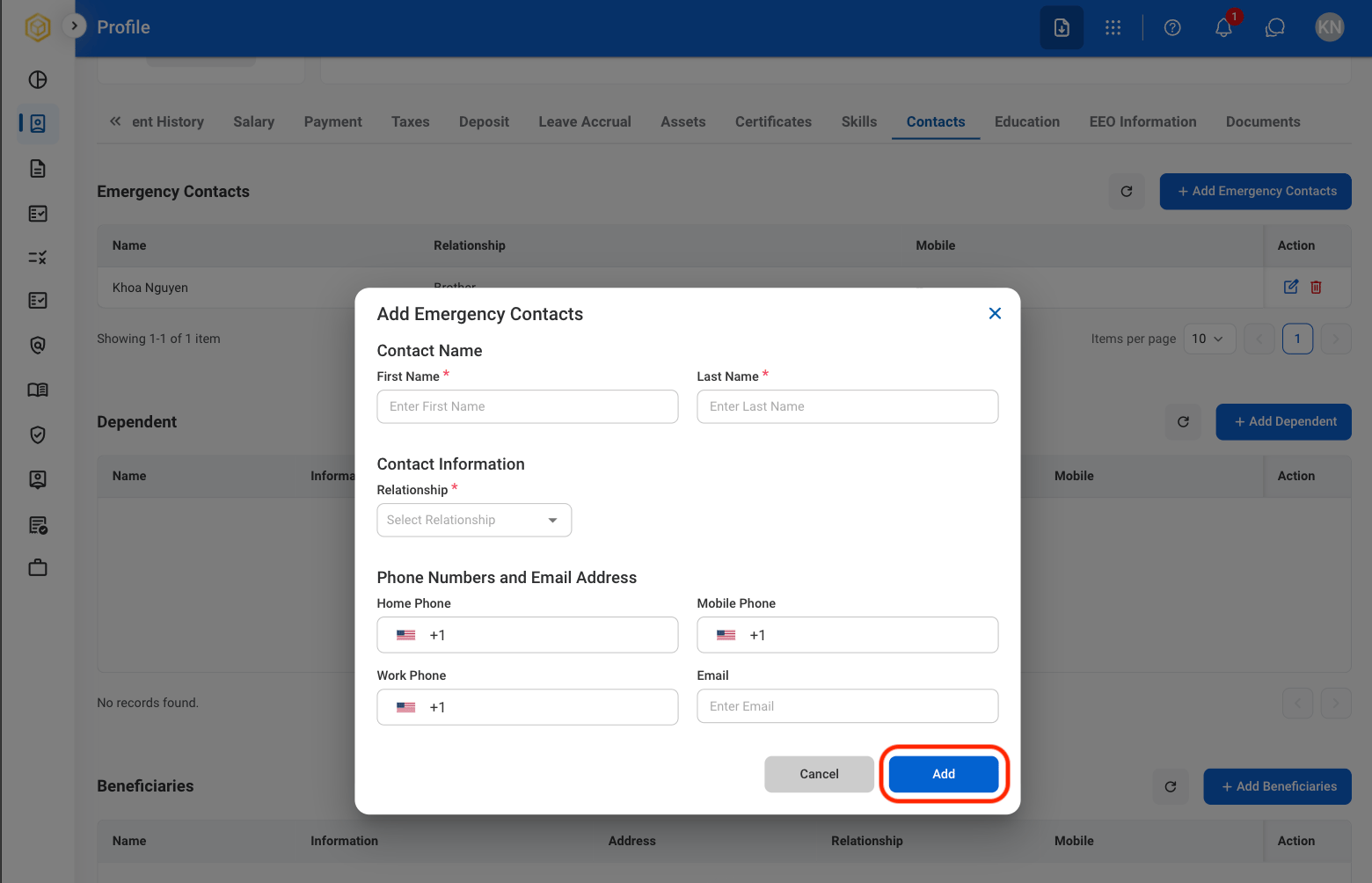
    Select **Add Emergency Contacts**, **Add Dependent**, or **Add Beneficiaries**.
  </Step>

  <Step title="Fill in the required information ">
    <Frame>
      <img src="https://mintcdn.com/bizbone/6cI01-W8VdftgePz/images/SS-P-Conf-Add-C.png?fit=max&auto=format&n=6cI01-W8VdftgePz&q=85&s=1998c8aabed304721d4165637b9eaab1" alt="SS P Conf Add C" width="1560" height="1004" data-path="images/SS-P-Conf-Add-C.png" />
    </Frame>
  </Step>

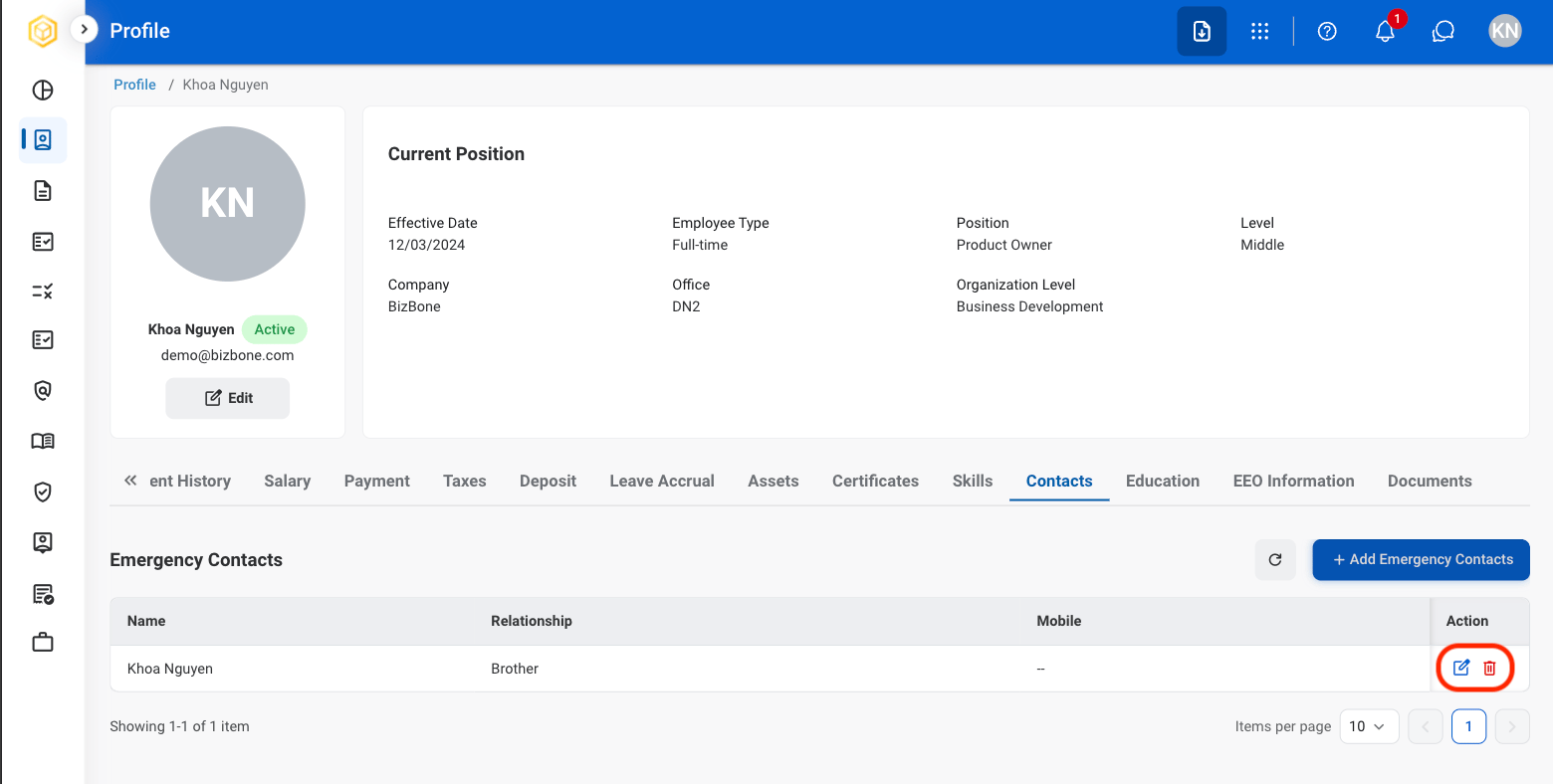
  <Step title="To make changes ">
    <Frame>
      <img src="https://mintcdn.com/bizbone/6cI01-W8VdftgePz/images/SS-P-Edit-C.png?fit=max&auto=format&n=6cI01-W8VdftgePz&q=85&s=e4f6d4987dd482b0b80dea51bb6c8eda" alt="SS P Edit C" width="1560" height="788" data-path="images/SS-P-Edit-C.png" />
    </Frame>

    * To **Edit**: Select the **edit icon** to update an existing entry.
    * To **Delete**: Select the **trash icon** to delete an existing entry. 
  </Step>
</Steps>

### Add Education

<Steps>
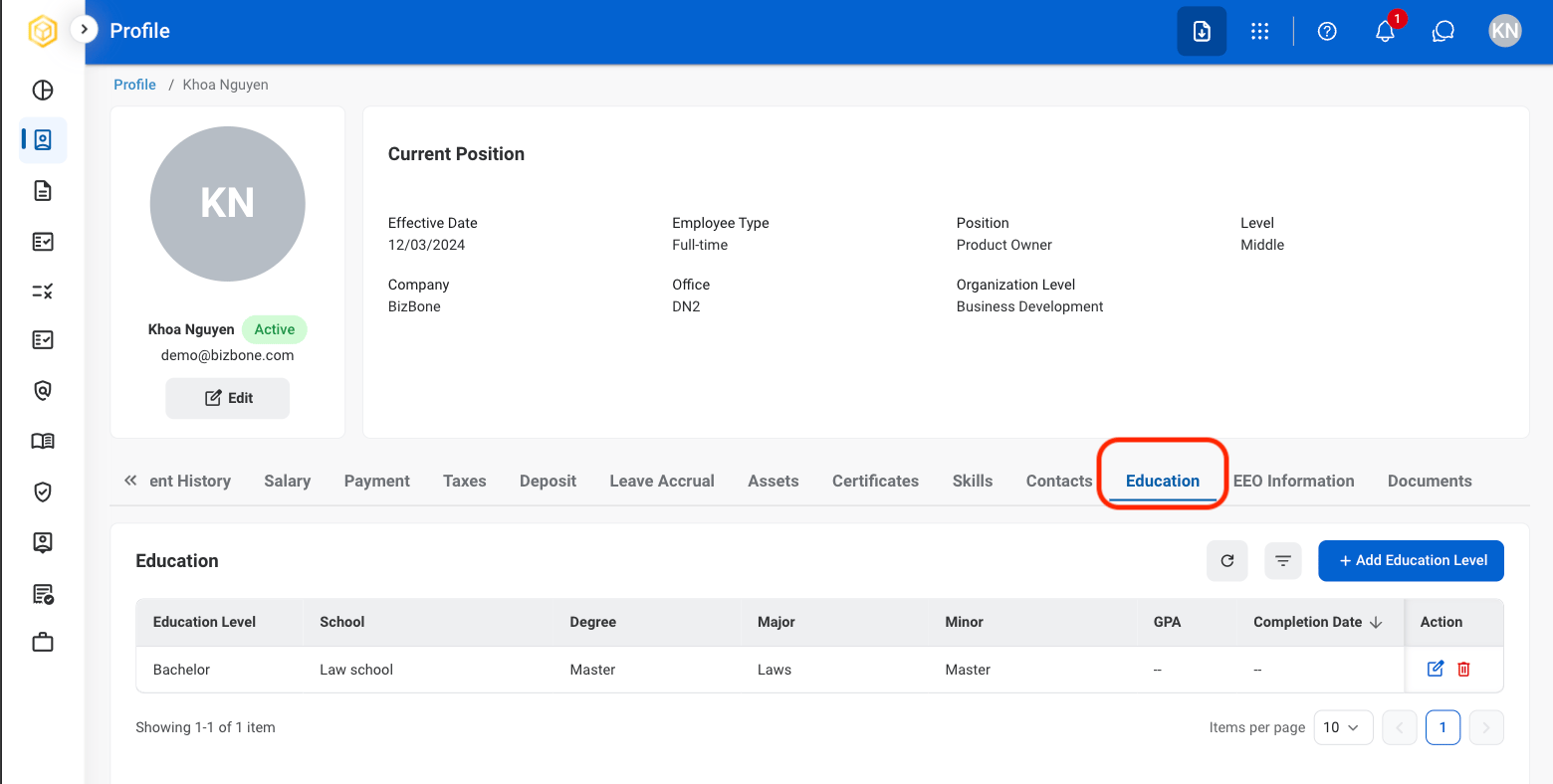
  <Step title="Select the Education tab">
    <Frame>
      <img src="https://mintcdn.com/bizbone/6cI01-W8VdftgePz/images/SS-P-Education.png?fit=max&auto=format&n=6cI01-W8VdftgePz&q=85&s=76f8d1ccdd7a7bf0fa6ff37eab8dc1ca" alt="SS P Education" width="1560" height="788" data-path="images/SS-P-Education.png" />
    </Frame>
  </Step>

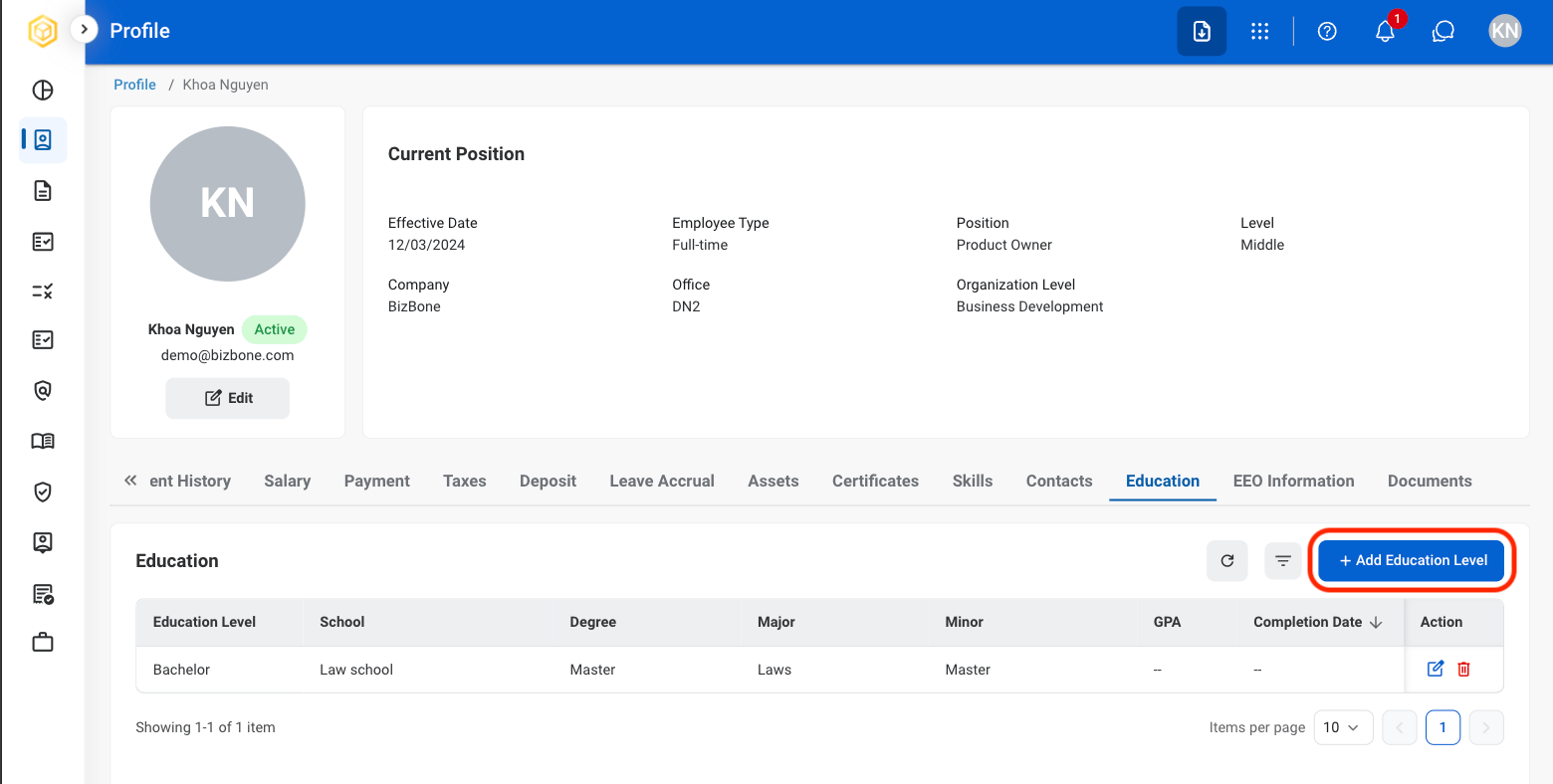
  <Step title="Select Add Education Level">
    <Frame>
      <img src="https://mintcdn.com/bizbone/6cI01-W8VdftgePz/images/SS-P-Add-Ed.png?fit=max&auto=format&n=6cI01-W8VdftgePz&q=85&s=253e4e0744ad60b968a53de4dc4f3f45" alt="SS P Add Ed" width="1560" height="788" data-path="images/SS-P-Add-Ed.png" />
    </Frame>
  </Step>

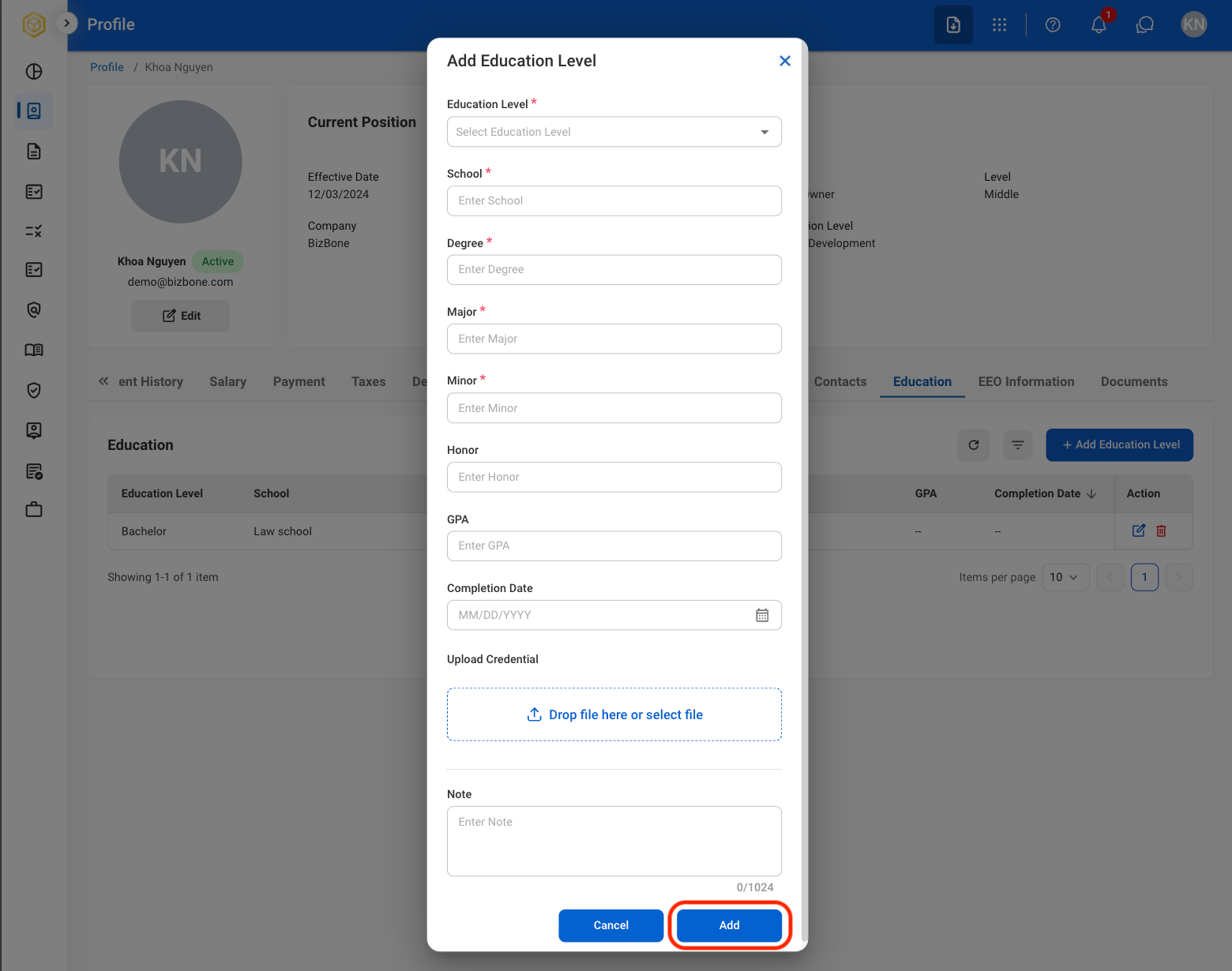
  <Step title="Fill in the required information ">
    <Frame>
      <img src="https://mintcdn.com/bizbone/6cI01-W8VdftgePz/images/SS-P-Conf-A-Ed.png?fit=max&auto=format&n=6cI01-W8VdftgePz&q=85&s=f5d72775ba249e4867b29765fb8077e3" alt="SS P Conf A Ed" width="1560" height="1230" data-path="images/SS-P-Conf-A-Ed.png" />
    </Frame>

    Select **Add** to complete or **Cancel** to exit withouth saving changes. 
  </Step>

  <Step title="To make changes">
    <Frame>
      <img src="https://mintcdn.com/bizbone/6cI01-W8VdftgePz/images/SS-Edit-Ed.png?fit=max&auto=format&n=6cI01-W8VdftgePz&q=85&s=a4a3829301b9778151e3988fe3d42d6b" alt="SS Edit Ed" width="1560" height="778" data-path="images/SS-Edit-Ed.png" />
    </Frame>

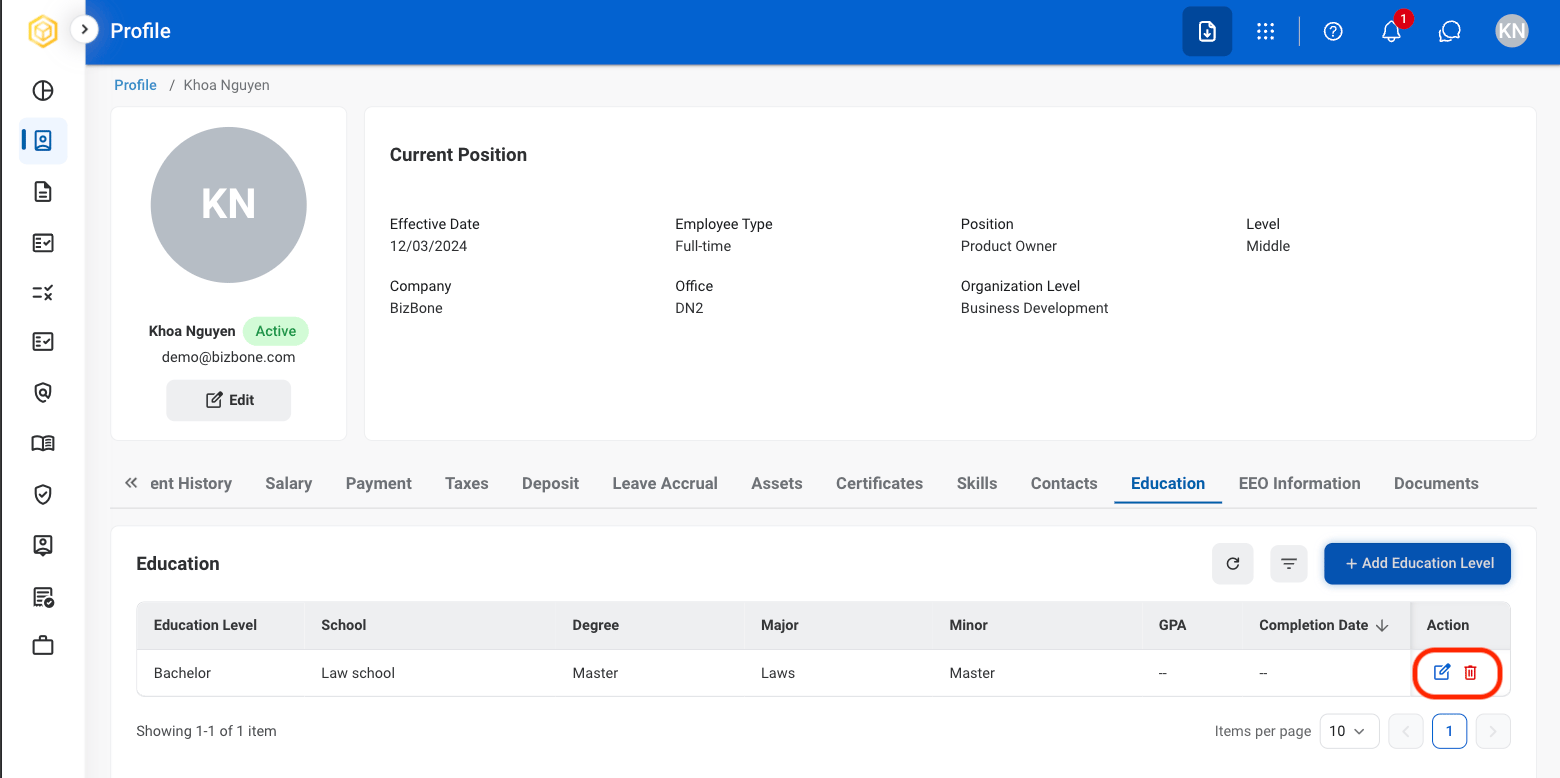
    * To **Edit**: Select the **edit icon** to update an existing entry.
    * To **Delete**: Select the  **trash icon** to delete an existing entry. 
  </Step>
</Steps>

### Add Documents

<Steps>
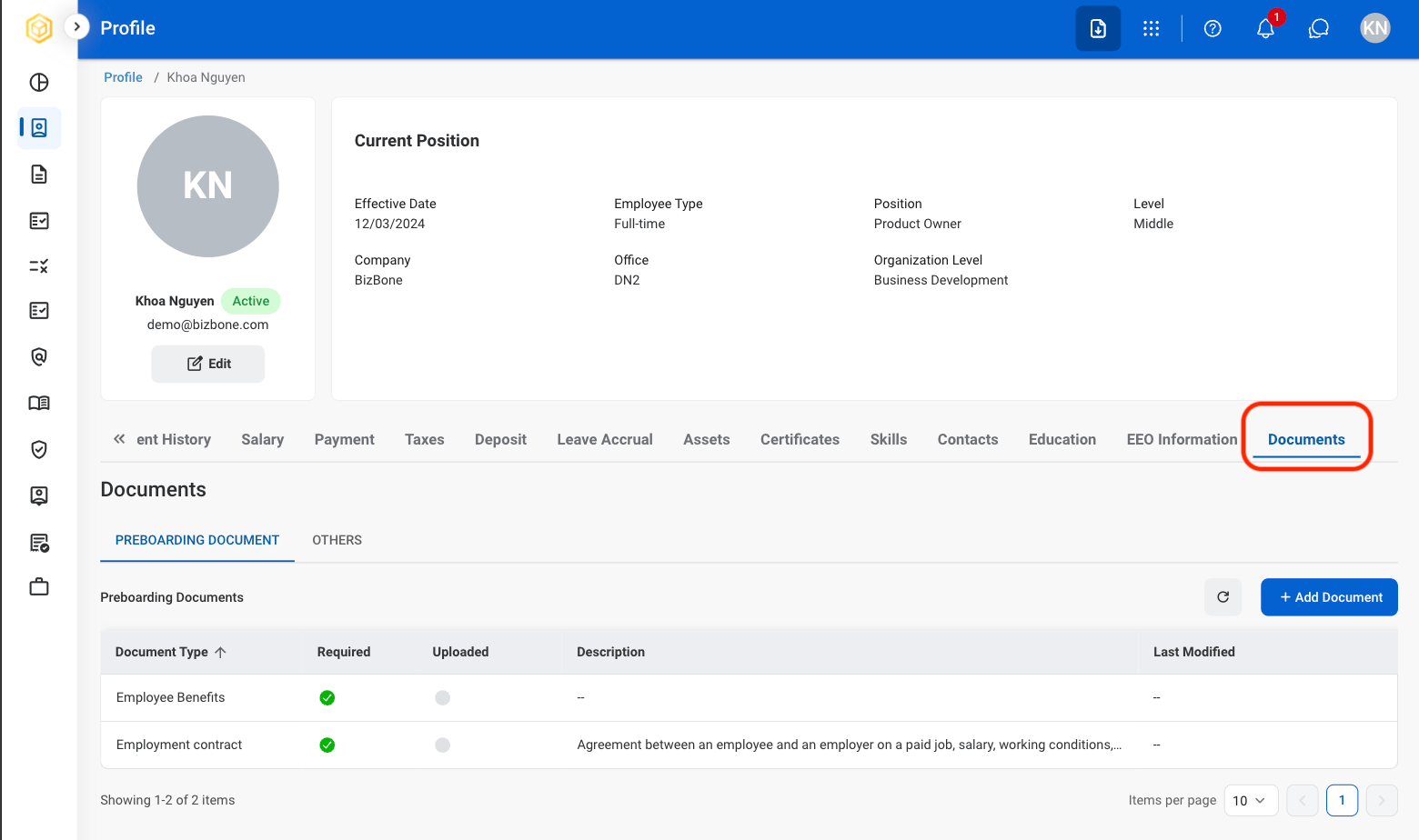
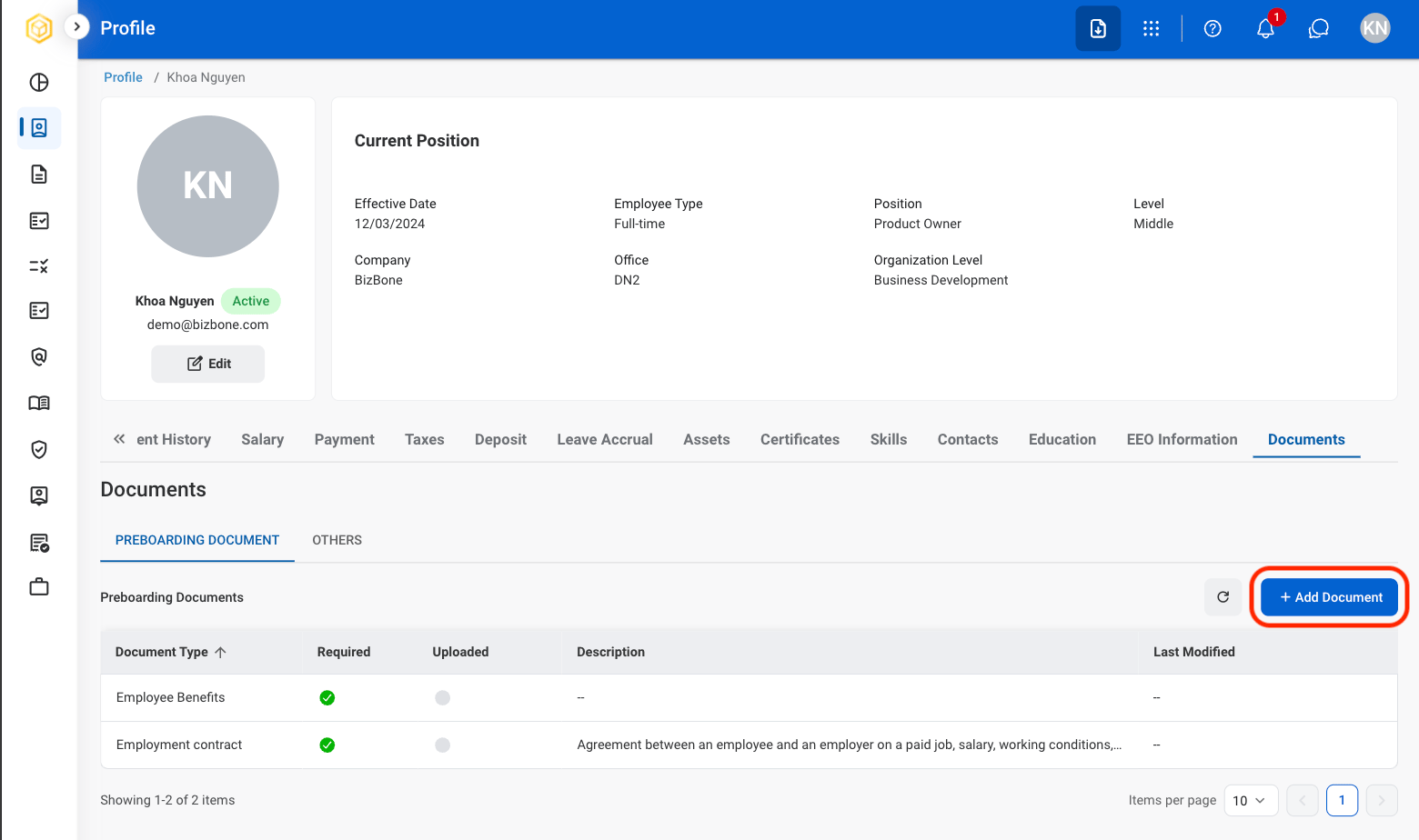
  <Step title="Select the Documents tab">
    <Frame>
      <img src="https://mintcdn.com/bizbone/6cI01-W8VdftgePz/images/SS-P-Docs.png?fit=max&auto=format&n=6cI01-W8VdftgePz&q=85&s=5b7d518d5d05d41460f517a2a8f83abf" alt="SS P Docs" width="1560" height="924" data-path="images/SS-P-Docs.png" />
    </Frame>
  </Step>

  <Step title="Select Add Document">
    <Frame>
      <img src="https://mintcdn.com/bizbone/6cI01-W8VdftgePz/images/SS-P-Add-Docs.png?fit=max&auto=format&n=6cI01-W8VdftgePz&q=85&s=8995fd1924d5ced2c7eef3fb72b7d54d" alt="SS P Add Docs" width="1560" height="924" data-path="images/SS-P-Add-Docs.png" />
    </Frame>
  </Step>

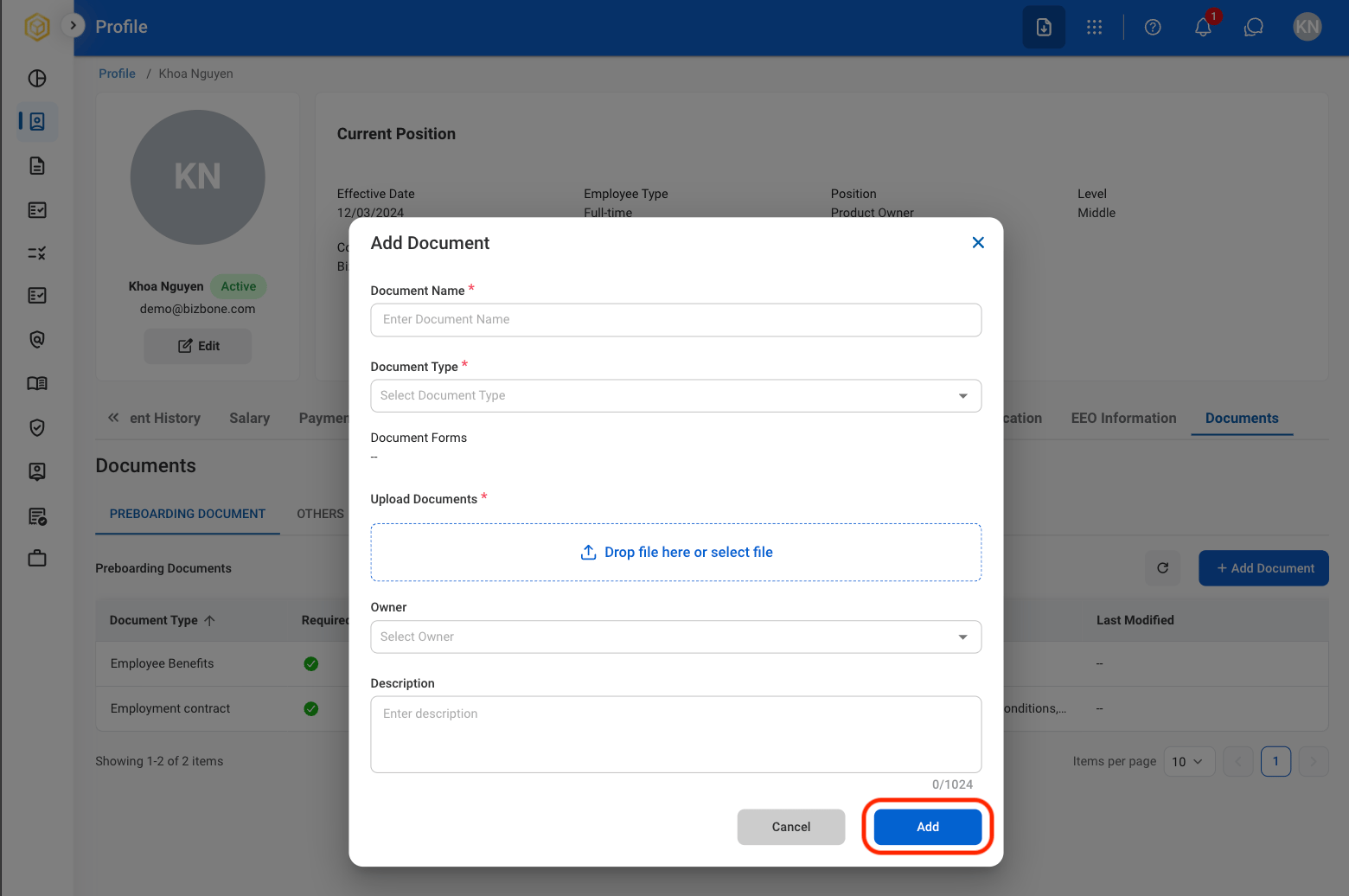
  <Step title="Fill in the required fields">
    <Frame>
      <img src="https://mintcdn.com/bizbone/6cI01-W8VdftgePz/images/SS-P-Conf-Add-D.png?fit=max&auto=format&n=6cI01-W8VdftgePz&q=85&s=44b15efbe95bddfe8867143d0710b06c" alt="SS P Conf Add D" width="1560" height="1036" data-path="images/SS-P-Conf-Add-D.png" />
    </Frame>

    Select **Add** to complete or **Cancel** to exit withouth saving changes. 
  </Step>
</Steps>

## Request to Update Employee Information

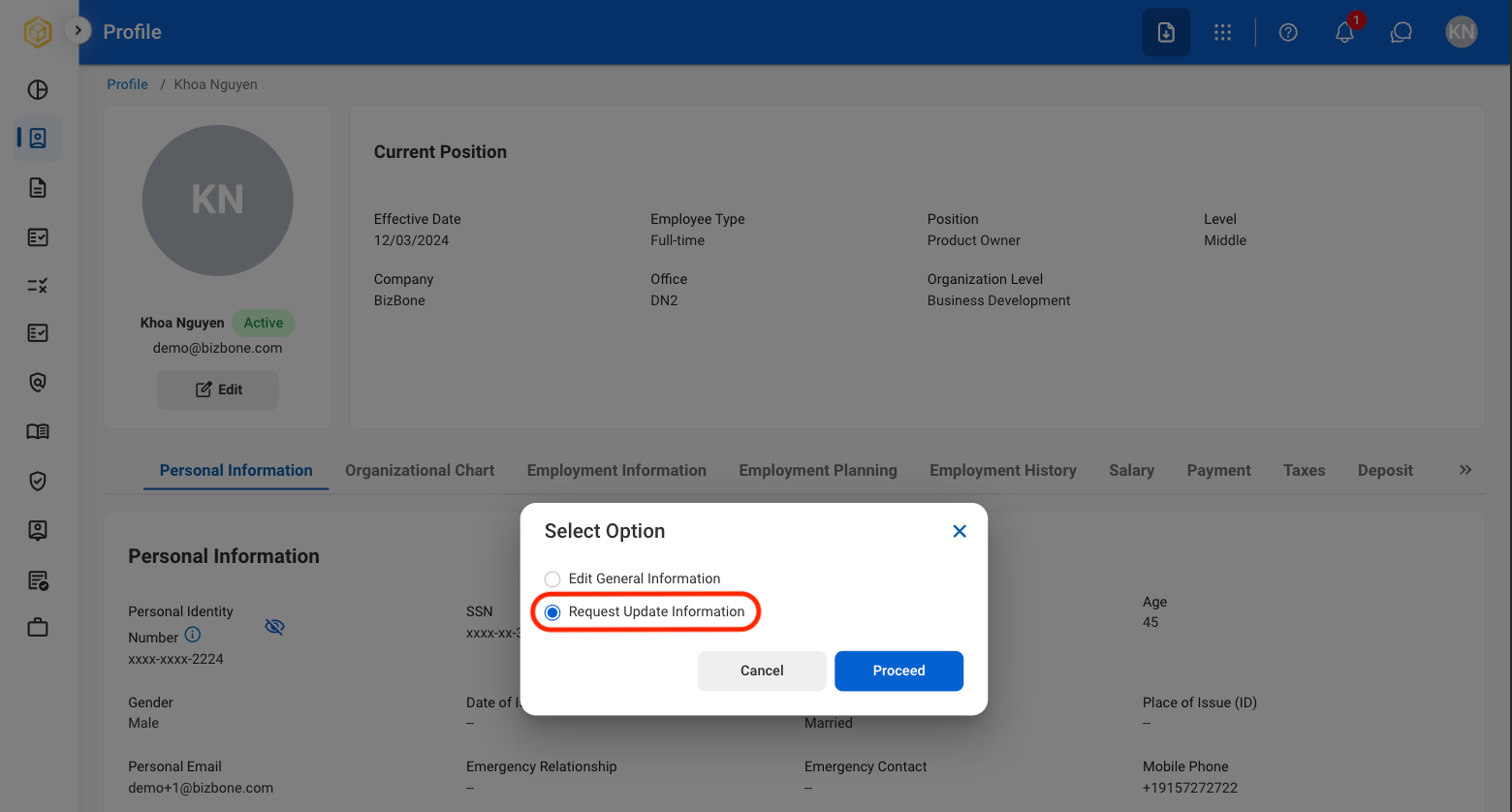
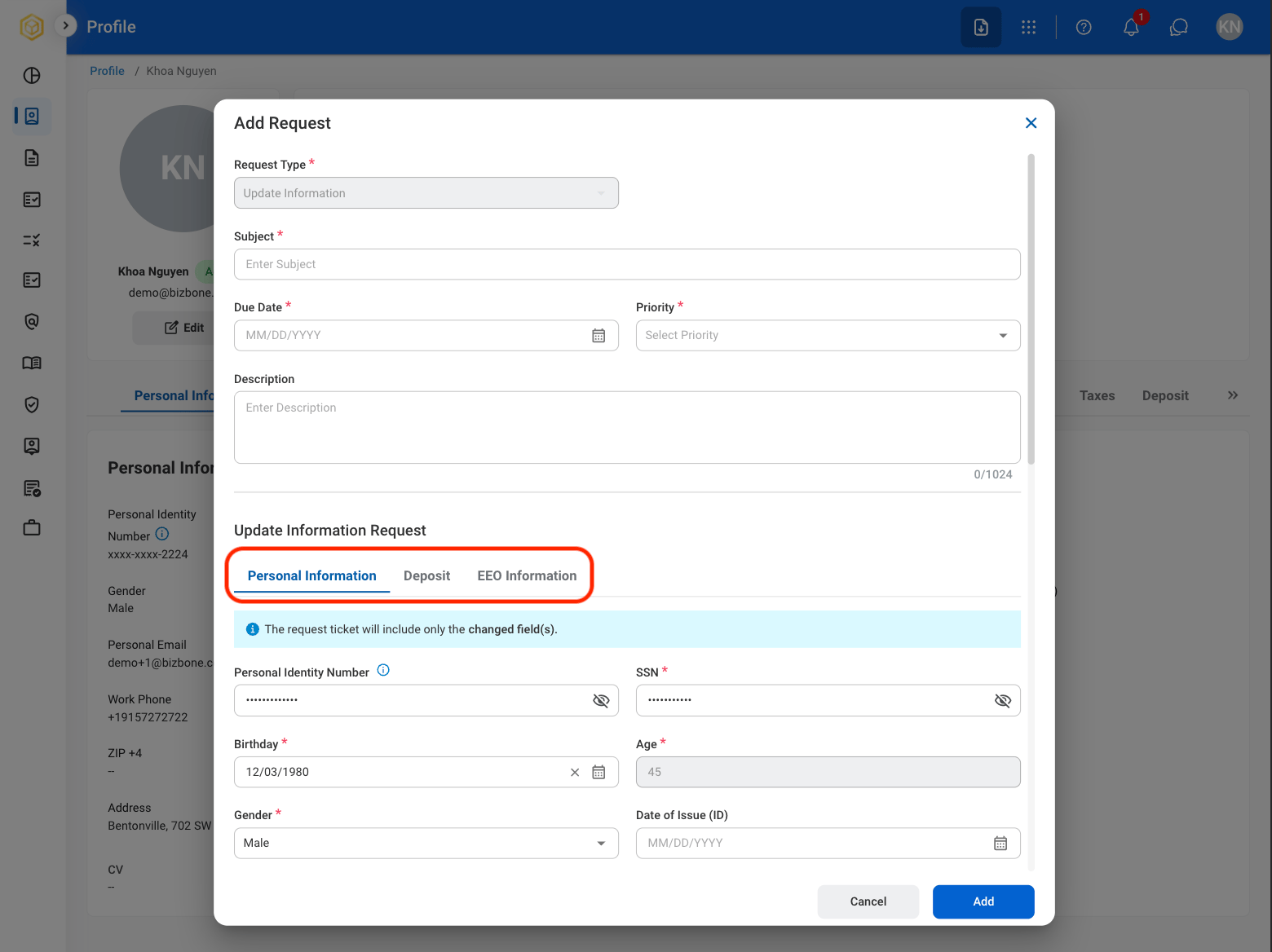
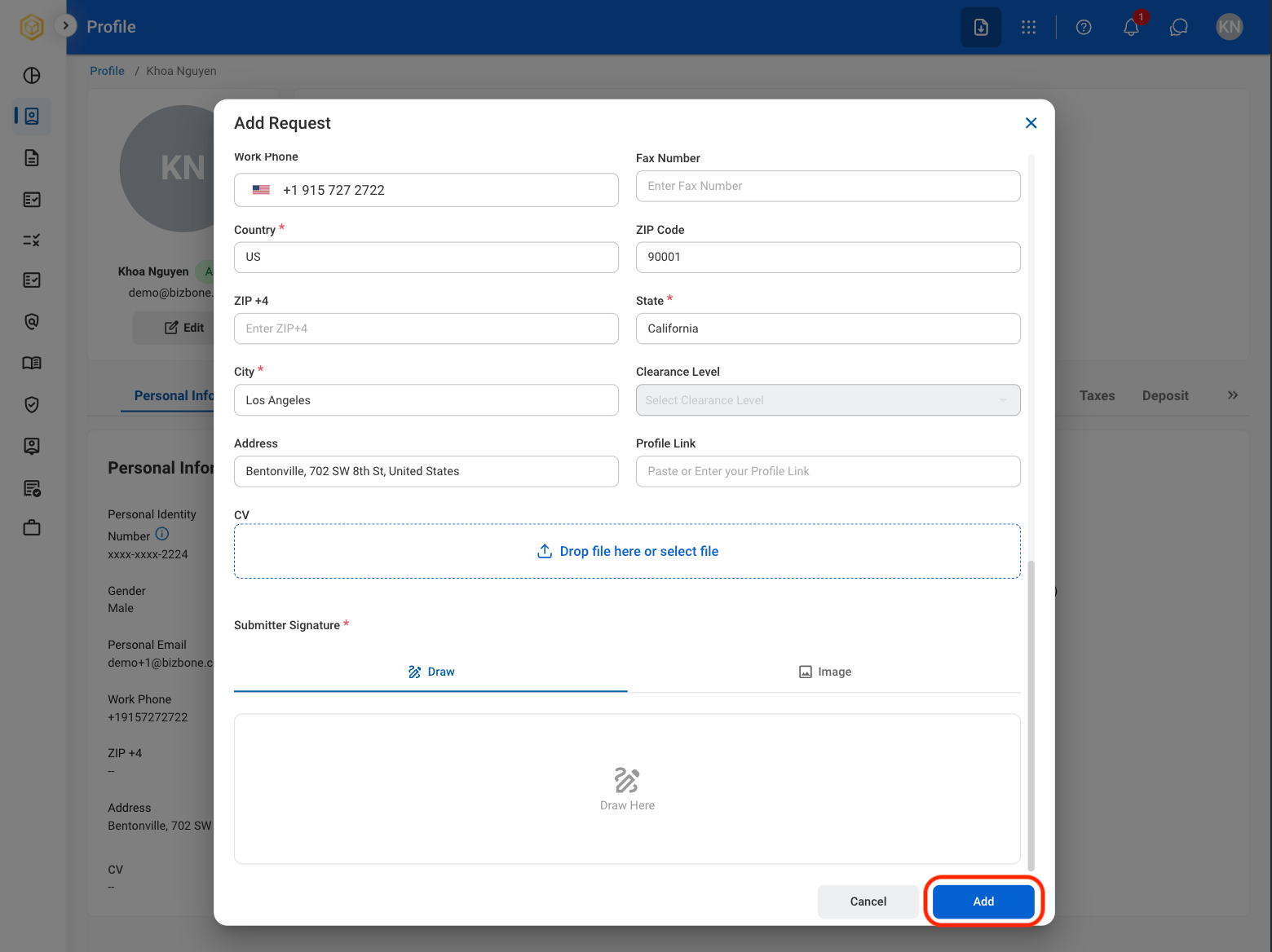
Updates to the Personal Information, Deposit, and EEO Information tabs require submission of a request and approval before changes can be applied.
<Steps>
  <Step title="Select Edit to make changes">
    <Frame>
      <img src="https://mintcdn.com/bizbone/6cI01-W8VdftgePz/images/SS-P-Edit.png?fit=max&auto=format&n=6cI01-W8VdftgePz&q=85&s=3ec48d8def1a80b8756fdcf629ed4daf" alt="SS P Edit" width="1560" height="1152" data-path="images/SS-P-Edit.png" />
    </Frame>
  </Step>

  <Step title="Select Request Update Information">
    <Frame>
      <img src="https://mintcdn.com/bizbone/6cI01-W8VdftgePz/images/SS-P-Request-Update.png?fit=max&auto=format&n=6cI01-W8VdftgePz&q=85&s=90d829de687f39b4ec9d01e7dcf98cfe" alt="SS P Request Update" width="1560" height="838" data-path="images/SS-P-Request-Update.png" />
    </Frame>

    Select **Proceed** to continue or **Cancel** to exit without saving changes. 
  </Step>

  <Step title="Select a request type">
    <Frame>
      <img src="https://mintcdn.com/bizbone/6cI01-W8VdftgePz/images/SS-P-Req-Type.png?fit=max&auto=format&n=6cI01-W8VdftgePz&q=85&s=5394e16e6872118e1e168b31a8d9dcdd" alt="SS P Req Type" width="1560" height="1168" data-path="images/SS-P-Req-Type.png" />
    </Frame>
  </Step>

  <Step title="Fill in the required information ">
    <Frame>
      <img src="https://mintcdn.com/bizbone/6cI01-W8VdftgePz/images/SS-P-Conf-Requ.png?fit=max&auto=format&n=6cI01-W8VdftgePz&q=85&s=39d2ea5a229fcdadc0ce9648421dc7ef" alt="SS P Conf Requ" width="1560" height="1168" data-path="images/SS-P-Conf-Requ.png" />
    </Frame>

    Select **Add** to continue or **Cancel** to exit without saving changes. 
  </Step>
</Steps>

### Request to Update Taxes

<Steps>
  <Step title="Select the Taxes tab">
    <Frame>
      <img src="https://mintcdn.com/bizbone/6cI01-W8VdftgePz/images/SS-P-Taxes.png?fit=max&auto=format&n=6cI01-W8VdftgePz&q=85&s=f83c9f89443c414425d6904dfaee6865" alt="SS P Taxes" width="1560" height="868" data-path="images/SS-P-Taxes.png" />
    </Frame>
  </Step>

  <Step title="Select Request Update Tax Form">
    <Frame>
      <img src="https://mintcdn.com/bizbone/6cI01-W8VdftgePz/images/SS-P-Requ-Taxes.png?fit=max&auto=format&n=6cI01-W8VdftgePz&q=85&s=e57854be3fa1dfc47c527165097c4e87" alt="SS P Requ Taxes" width="1560" height="866" data-path="images/SS-P-Requ-Taxes.png" />
    </Frame>
  </Step>

  <Step title="Select a tax type">
    <Frame>
      <img src="https://mintcdn.com/bizbone/6cI01-W8VdftgePz/images/SS-P-Type-Tax.png?fit=max&auto=format&n=6cI01-W8VdftgePz&q=85&s=2c416f9973f5851c6d9ce1ada5d2a2f0" alt="SS P Type Tax" width="1560" height="1172" data-path="images/SS-P-Type-Tax.png" />
    </Frame>
  </Step>

  <Step title="Fill out the required information">
    <Frame>
      <img src="https://mintcdn.com/bizbone/6cI01-W8VdftgePz/images/SS-P-Add-Tax.png?fit=max&auto=format&n=6cI01-W8VdftgePz&q=85&s=8bb47d15b41e1a12182d69e738620ee8" alt="SS P Add Tax" width="1560" height="1172" data-path="images/SS-P-Add-Tax.png" />
    </Frame>

    Select Add to complete or Cancel to exit without saving changes. 
  </Step>
</Steps>

## View Profile Tabs

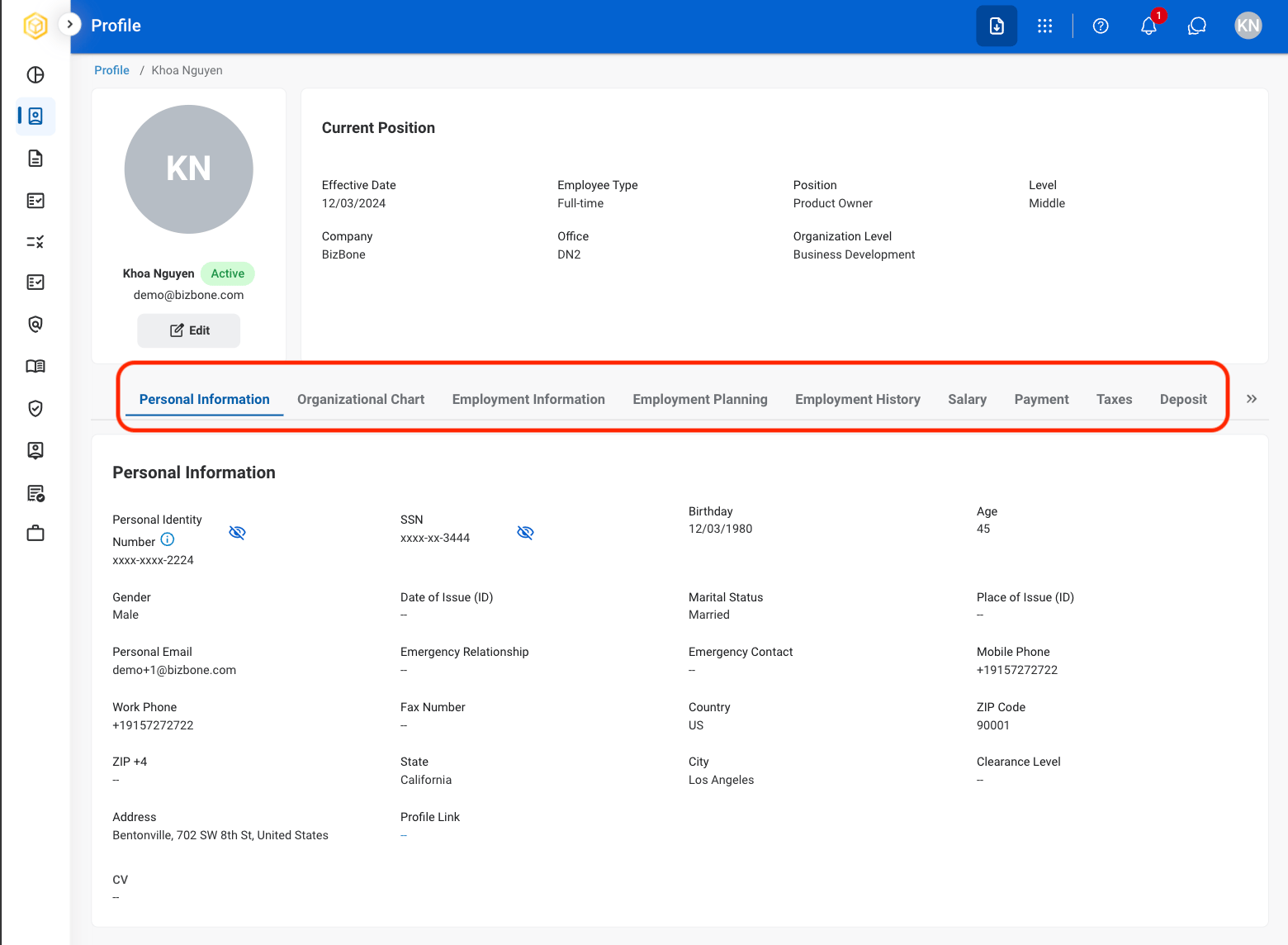
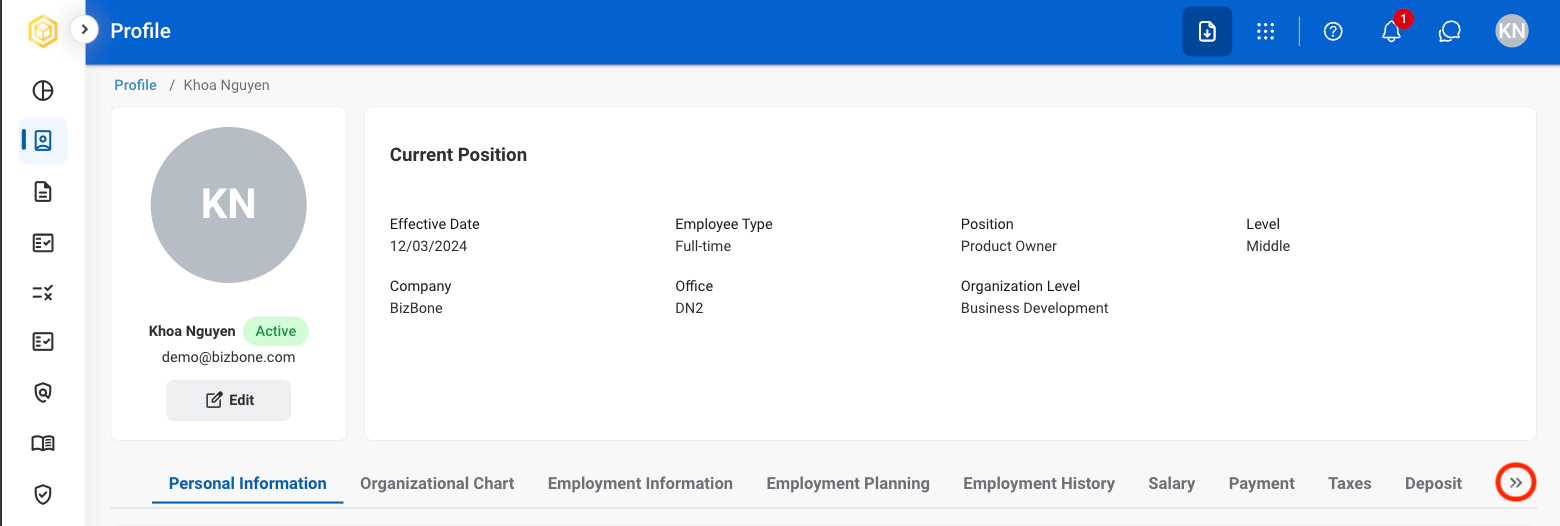
The following tabs are view-only: Personal Information, Organizational Chart, Employment Information, Employment Planning, Salary, Payment, Deposit, Leave Accrual, Assets,
<Steps>
  <Step title="Select the desired tab">
    <Frame>
      <img src="https://mintcdn.com/bizbone/6cI01-W8VdftgePz/images/SS-P-All-Tabs.png?fit=max&auto=format&n=6cI01-W8VdftgePz&q=85&s=dcf84184d10e27d31ce7483ee0f3a5ea" alt="SS P All Tabs" width="1560" height="1144" data-path="images/SS-P-All-Tabs.png" />
    </Frame>
  </Step>

  <Step title="If needed, use the arrows for tab navigation">
    <Frame>
      <img src="https://mintcdn.com/bizbone/6cI01-W8VdftgePz/images/SS-P-Arrows.png?fit=max&auto=format&n=6cI01-W8VdftgePz&q=85&s=ec5890a42a4916f4063ceb00c004602c" alt="SS P Arrows" width="1560" height="526" data-path="images/SS-P-Arrows.png" />
    </Frame>
  </Step>
</Steps>