> ## Documentation Index
> Fetch the complete documentation index at: https://docs.bizbone.com/llms.txt
> Use this file to discover all available pages before exploring further.
# Purchase Authorization Request
> Request approval before making a purchase, including the charge code, itemized costs, shipping, sales tax, and an optional advance payment.
A Purchase Authorization request asks for approval before a purchase is made. It records what will be bought, the estimated cost, and the charge code the cost is billed to. Once submitted, the request follows the configured approval workflow before being approved, rejected, or returned for revision.
## Create a Purchase Authorization Request
### Prerequisites
Before submitting a Purchase Authorization request:
* You must have an active employee account.
* The charge code for the purchase must exist and be active. See [Charge Code](/erp/accounting/charge-code).


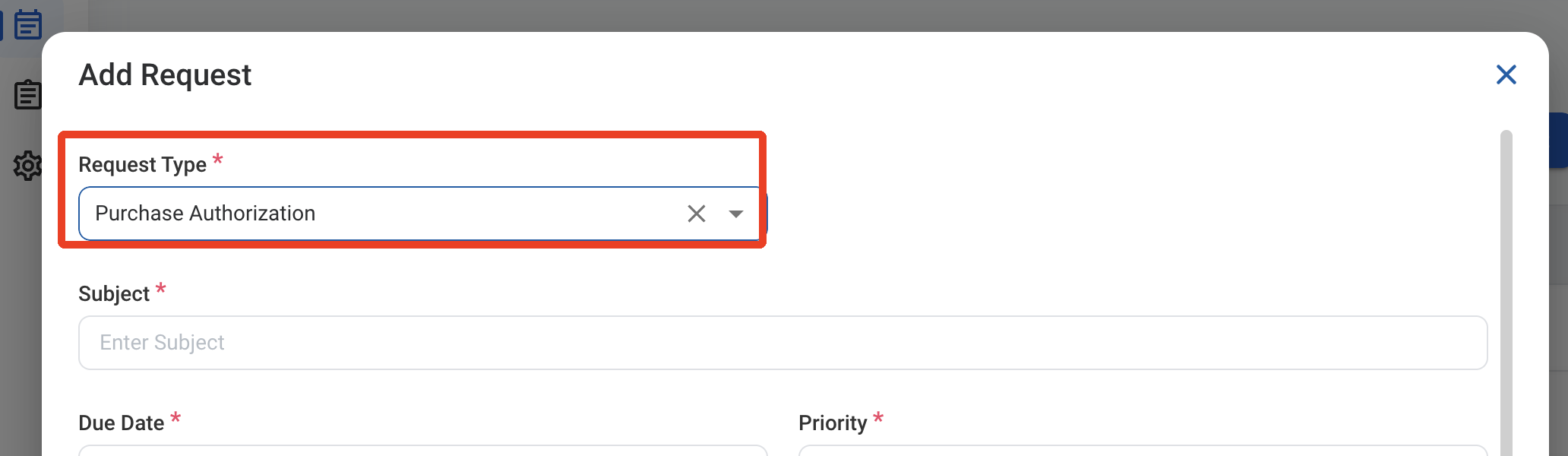
 ### Request Information
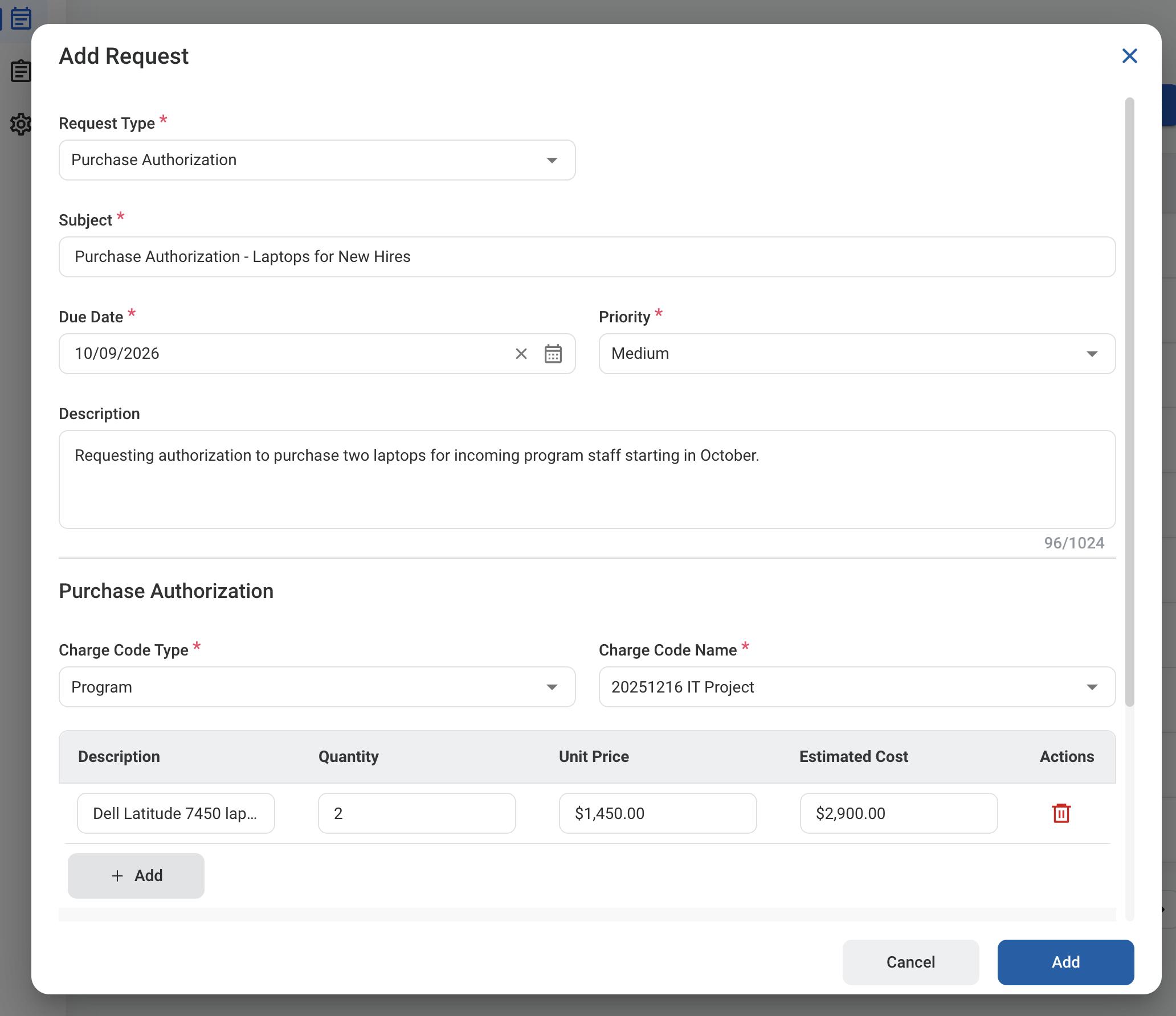
| Field | Description | Required | Example |
| :---------- | :------------------------------------------------------------- | :------- | :--------------------------------------------- |
| Subject | A short title describing the purchase. | ✓ | Purchase Authorization - Laptops for New Hires |
| Due Date | The expected completion or review date for the request. | ✓ | October 9, 2026 |
| Priority | Indicates the urgency of the request. | ✓ | Medium |
| Description | Additional details or business justification for the purchase. | | Two laptops for incoming program staff. |
### Request Information
| Field | Description | Required | Example |
| :---------- | :------------------------------------------------------------- | :------- | :--------------------------------------------- |
| Subject | A short title describing the purchase. | ✓ | Purchase Authorization - Laptops for New Hires |
| Due Date | The expected completion or review date for the request. | ✓ | October 9, 2026 |
| Priority | Indicates the urgency of the request. | ✓ | Medium |
| Description | Additional details or business justification for the purchase. | | Two laptops for incoming program staff. |
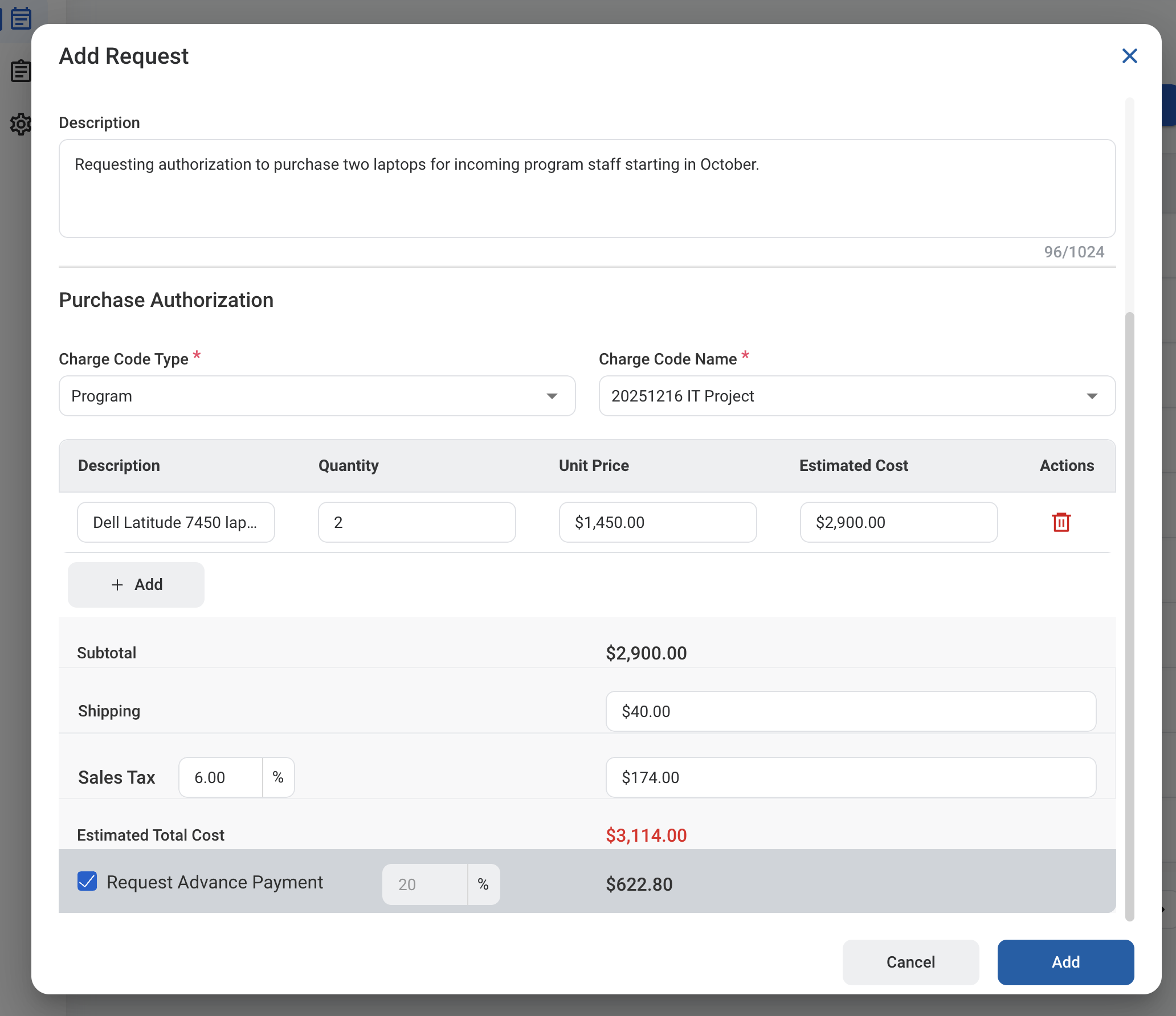 ### Purchase Authorization
| Field | Description | Required | Example |
| :--------------- | :-------------------------------------------------------------------------------------------------------- | :------- | :------------------ |
| Charge Code Type | Category of the charge code: Program, Business Opportunity, Organization Level, Ad Hoc, or Indirect Pool. | ✓ | Program |
| Charge Code Name | Charge code the purchase is billed to. Options depend on the selected type. | ✓ | 20251216 IT Project |
### Items
Select **Add** to add a line for each item being purchased.
| Field | Description | Required | Example |
| :------------- | :--------------------------------- | :------- | :------------------------ |
| Description | Name or description of the item. | | Dell Latitude 7450 laptop |
| Quantity | Number of units. | | 2 |
| Unit Price | Cost of one unit. | | \$1,450.00 |
| Estimated Cost | Quantity multiplied by Unit Price. | Auto | \$2,900.00 |
### Cost Summary
| Field | Description | Required | Example |
| :---------------------- | :-------------------------------------------------------------------------------------- | :------- | :------------- |
| Subtotal | Sum of all item estimated costs. | Auto | \$2,900.00 |
| Shipping | Estimated shipping cost. | | \$40.00 |
| Sales Tax | Sales tax rate (%) applied to the subtotal. The tax amount is calculated from the rate. | | 6% (\$174.00) |
| Estimated Total Cost | Subtotal plus shipping and sales tax. | Auto | \$3,114.00 |
| Request Advance Payment | Select to request part of the total in advance, then enter the percentage. | | 20% (\$622.80) |
### Purchase Authorization
| Field | Description | Required | Example |
| :--------------- | :-------------------------------------------------------------------------------------------------------- | :------- | :------------------ |
| Charge Code Type | Category of the charge code: Program, Business Opportunity, Organization Level, Ad Hoc, or Indirect Pool. | ✓ | Program |
| Charge Code Name | Charge code the purchase is billed to. Options depend on the selected type. | ✓ | 20251216 IT Project |
### Items
Select **Add** to add a line for each item being purchased.
| Field | Description | Required | Example |
| :------------- | :--------------------------------- | :------- | :------------------------ |
| Description | Name or description of the item. | | Dell Latitude 7450 laptop |
| Quantity | Number of units. | | 2 |
| Unit Price | Cost of one unit. | | \$1,450.00 |
| Estimated Cost | Quantity multiplied by Unit Price. | Auto | \$2,900.00 |
### Cost Summary
| Field | Description | Required | Example |
| :---------------------- | :-------------------------------------------------------------------------------------- | :------- | :------------- |
| Subtotal | Sum of all item estimated costs. | Auto | \$2,900.00 |
| Shipping | Estimated shipping cost. | | \$40.00 |
| Sales Tax | Sales tax rate (%) applied to the subtotal. The tax amount is calculated from the rate. | | 6% (\$174.00) |
| Estimated Total Cost | Subtotal plus shipping and sales tax. | Auto | \$3,114.00 |
| Request Advance Payment | Select to request part of the total in advance, then enter the percentage. | | 20% (\$622.80) |
 After a Purchase Authorization is approved, the journal entry must be created and posted separately through **Accounting > Transaction >** [Journal Entry](/erp/accounting/journal-entry).
## Review a Purchase Authorization Request
To review a submitted Purchase Authorization request and approve, reject, or discard it, see **Accounting >** [Request](/erp/accounting/request).
## Manage the Purchase Authorization Business Process
To manage the workflow for Purchase Authorization requests, see **Admin > Business Processes >** [Business Processes Overview](/erp/admin/business-process-overview).
After a Purchase Authorization is approved, the journal entry must be created and posted separately through **Accounting > Transaction >** [Journal Entry](/erp/accounting/journal-entry).
## Review a Purchase Authorization Request
To review a submitted Purchase Authorization request and approve, reject, or discard it, see **Accounting >** [Request](/erp/accounting/request).
## Manage the Purchase Authorization Business Process
To manage the workflow for Purchase Authorization requests, see **Admin > Business Processes >** [Business Processes Overview](/erp/admin/business-process-overview).