> ## Documentation Index
> Fetch the complete documentation index at: https://docs.bizbone.com/llms.txt
> Use this file to discover all available pages before exploring further.
# Modification Prime Contract Request
> Request a modification to a program's prime contract, such as a change to funding, with the modification number and funding allocation.
A Modification Prime Contract request records a modification to a program's prime contract, such as added funding or a change to scope, so it can be reviewed in Contract Management and Program Management. After you submit it, the request follows the configured approval workflow before being approved, rejected, or returned for revision.
## Create a Modification Prime Contract Request
### Prerequisites
Before submitting a Modification Prime Contract request:
* You must have an active employee account.
* You must have access to the program in **Program Management**.
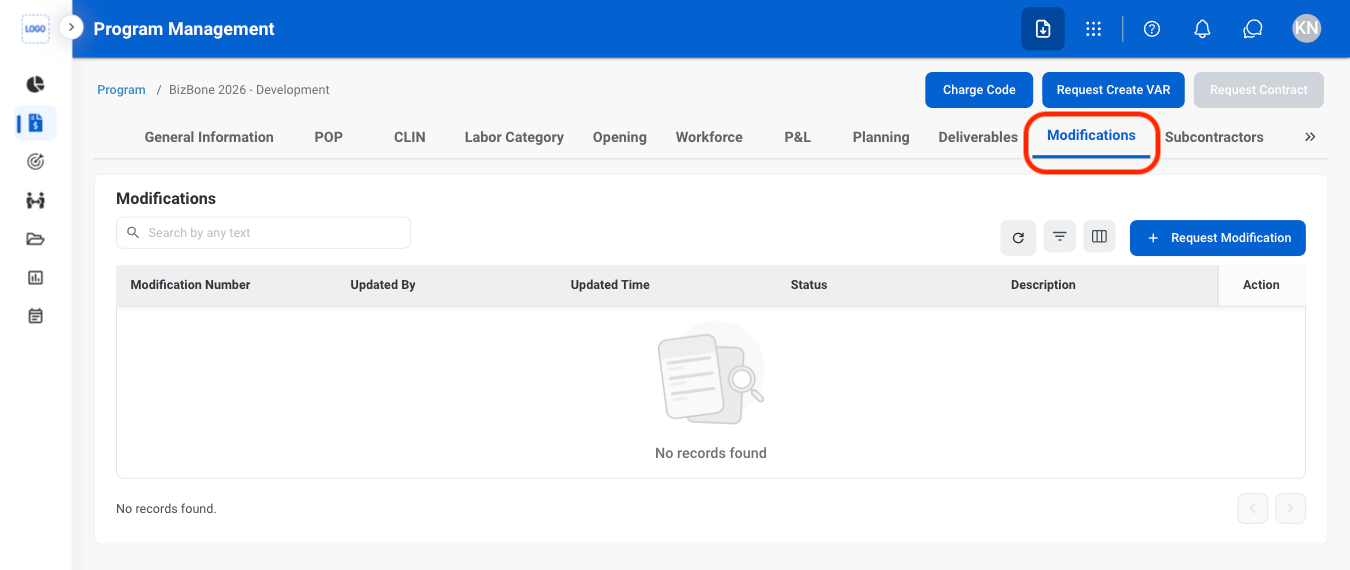
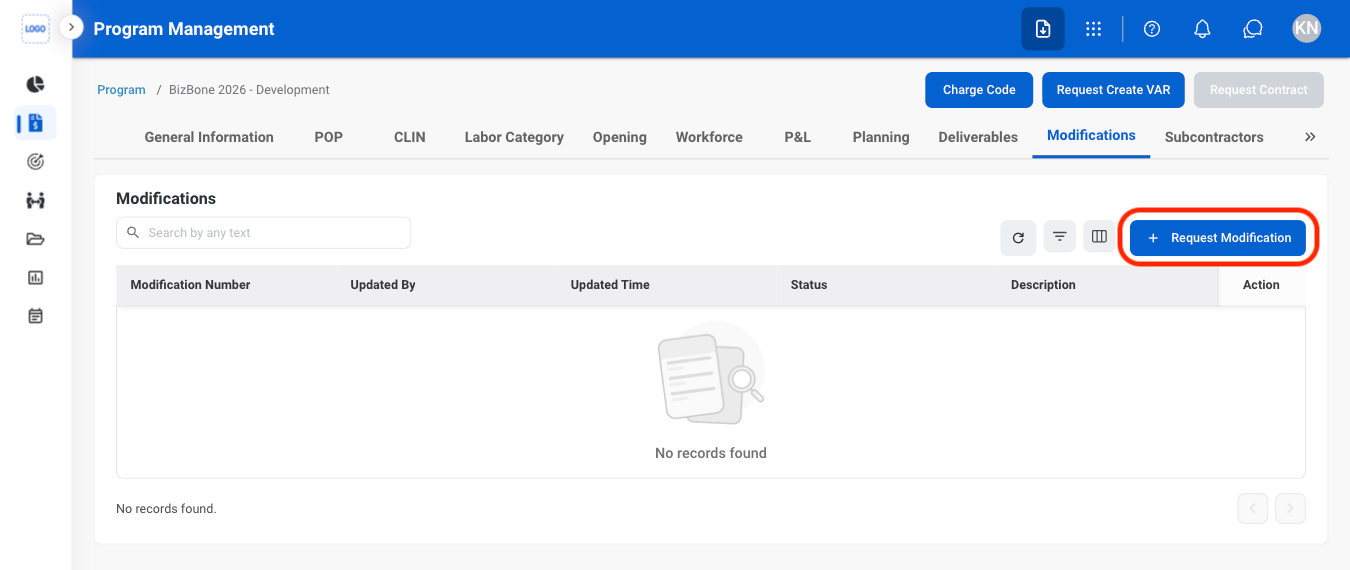
Modification Prime Contract requests are created from the program's **Modifications** tab in **Program Management**. See [Program Management](/erp/pm/program-management).
 ### General Information
| Field | Description | Required | Example |
| :------------------ | :----------------------------------------- | :------- | :----------------------------------- |
| Request Type | Modification Prime Contract. | Auto | Modification Prime Contract |
| Subject | A short title describing the modification. | ✓ | Modification 01 - Additional Funding |
| Priority / Due Date | Urgency and expected review date. | ✓ | Medium, October 9, 2026 |
| Description | Details of the modification. | | Add funding for option period 1. |
### Details
| Field | Description | Required | Example |
| :------------------------------ | :----------------------------------- | :------- | :-------------------------------- |
| Contract Name / Contract Number | Prime contract of the program. | Auto | BizBone 2026 - Development / 1234 |
| Modification Number | Number of the contract modification. | ✓ | MOD\_1234\_001 |
| Description | Description of the modification. | | |
### Funding Allocation
| Field | Description | Required | Example |
| :----------------- | :--------------------------------------------------------------------------------------------------------------------------------------------------- | :------- | :------ |
| Funding Allocation | POP, CLIN, and labor category the funding applies to. Select **Add New** to add allocations, with contract type, dates, labor rate, and total hours. | | |
Modification requests are routed to the Contract Management module, then sent back for review in the Program Management module.
## Review a Modification Prime Contract Request
To review a submitted Modification Prime Contract request and approve, reject, or discard it, see **Contracts >** [Requests](/erp/contract-management/requests).
## Manage the Modification Prime Contract Business Process
To manage the workflow for Modification Prime Contract requests, see **Admin > Business Processes >** [Business Processes Overview](/erp/admin/business-process-overview).
### General Information
| Field | Description | Required | Example |
| :------------------ | :----------------------------------------- | :------- | :----------------------------------- |
| Request Type | Modification Prime Contract. | Auto | Modification Prime Contract |
| Subject | A short title describing the modification. | ✓ | Modification 01 - Additional Funding |
| Priority / Due Date | Urgency and expected review date. | ✓ | Medium, October 9, 2026 |
| Description | Details of the modification. | | Add funding for option period 1. |
### Details
| Field | Description | Required | Example |
| :------------------------------ | :----------------------------------- | :------- | :-------------------------------- |
| Contract Name / Contract Number | Prime contract of the program. | Auto | BizBone 2026 - Development / 1234 |
| Modification Number | Number of the contract modification. | ✓ | MOD\_1234\_001 |
| Description | Description of the modification. | | |
### Funding Allocation
| Field | Description | Required | Example |
| :----------------- | :--------------------------------------------------------------------------------------------------------------------------------------------------- | :------- | :------ |
| Funding Allocation | POP, CLIN, and labor category the funding applies to. Select **Add New** to add allocations, with contract type, dates, labor rate, and total hours. | | |
Modification requests are routed to the Contract Management module, then sent back for review in the Program Management module.
## Review a Modification Prime Contract Request
To review a submitted Modification Prime Contract request and approve, reject, or discard it, see **Contracts >** [Requests](/erp/contract-management/requests).
## Manage the Modification Prime Contract Business Process
To manage the workflow for Modification Prime Contract requests, see **Admin > Business Processes >** [Business Processes Overview](/erp/admin/business-process-overview).