> ## Documentation Index
> Fetch the complete documentation index at: https://docs.bizbone.com/llms.txt
> Use this file to discover all available pages before exploring further.
# Consultant Agreement for Internal Department Request
> Request an agreement with a consultant who works for an internal department rather than a program, including rates, hours, and the total award amount.
A Consultant Agreement for Internal Department request asks to set up an agreement with a consultant who will work for one of your internal departments rather than on a program. After you submit it, the request follows the configured approval workflow before being approved, rejected, or returned for revision.
## Create a Consultant Agreement for Internal Department Request
### Prerequisites
Before submitting a Consultant Agreement for Internal Department request:
* You must have an active employee account.
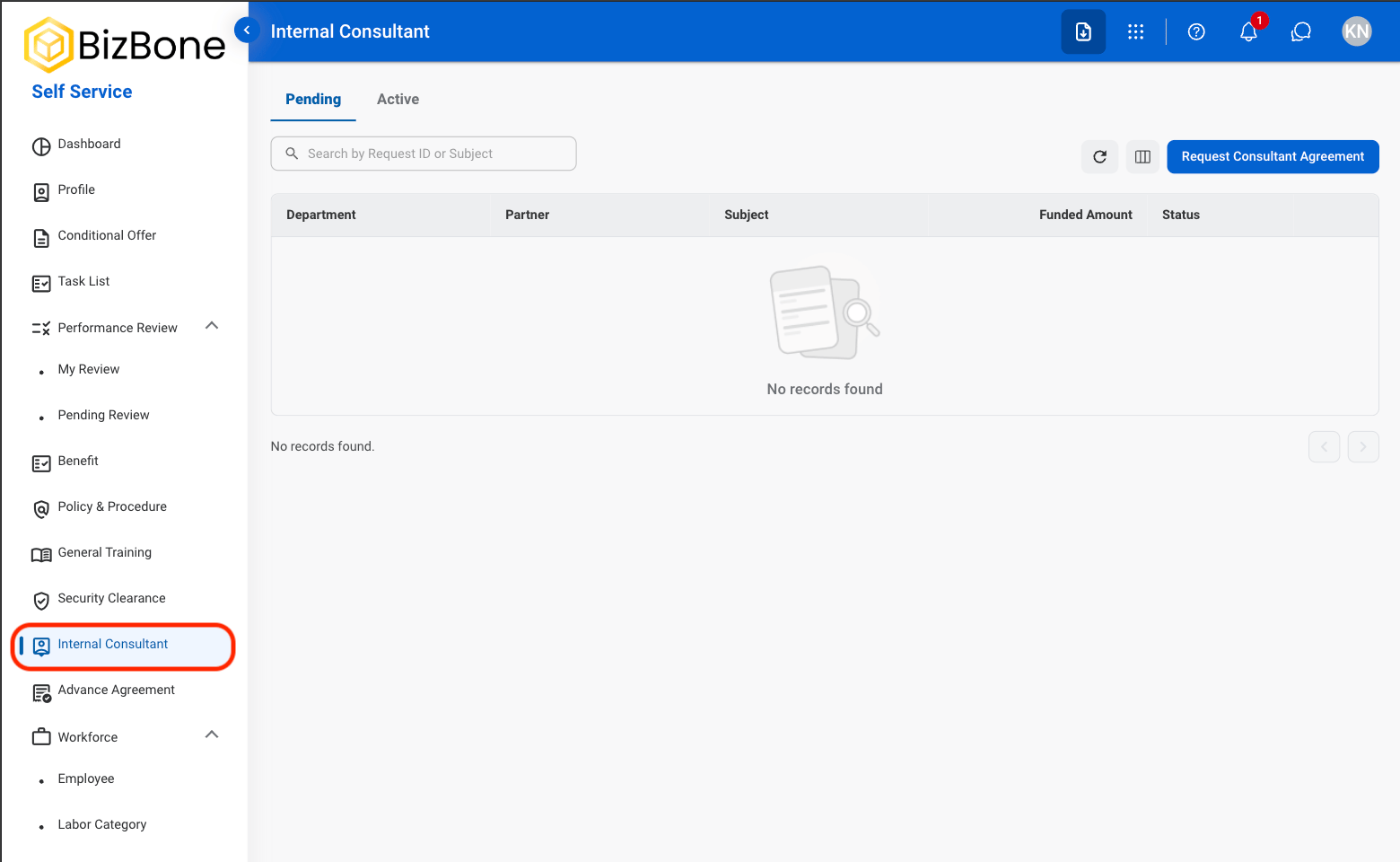
* You must have access to **Self Service > Internal Consultant**.
* The consultant must be set up as a business partner.
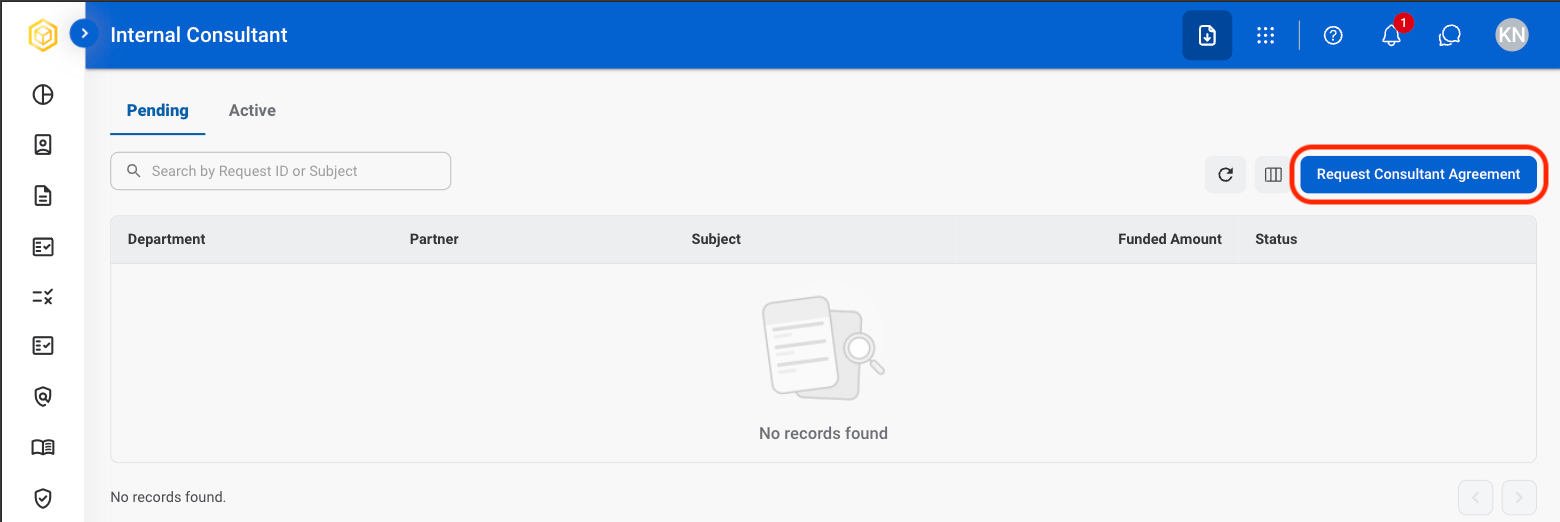
Consultant Agreement for Internal Department requests are created from **Self Service >** [Internal Consultant](/erp/self-service/internal-consultant).
 ### Request Information
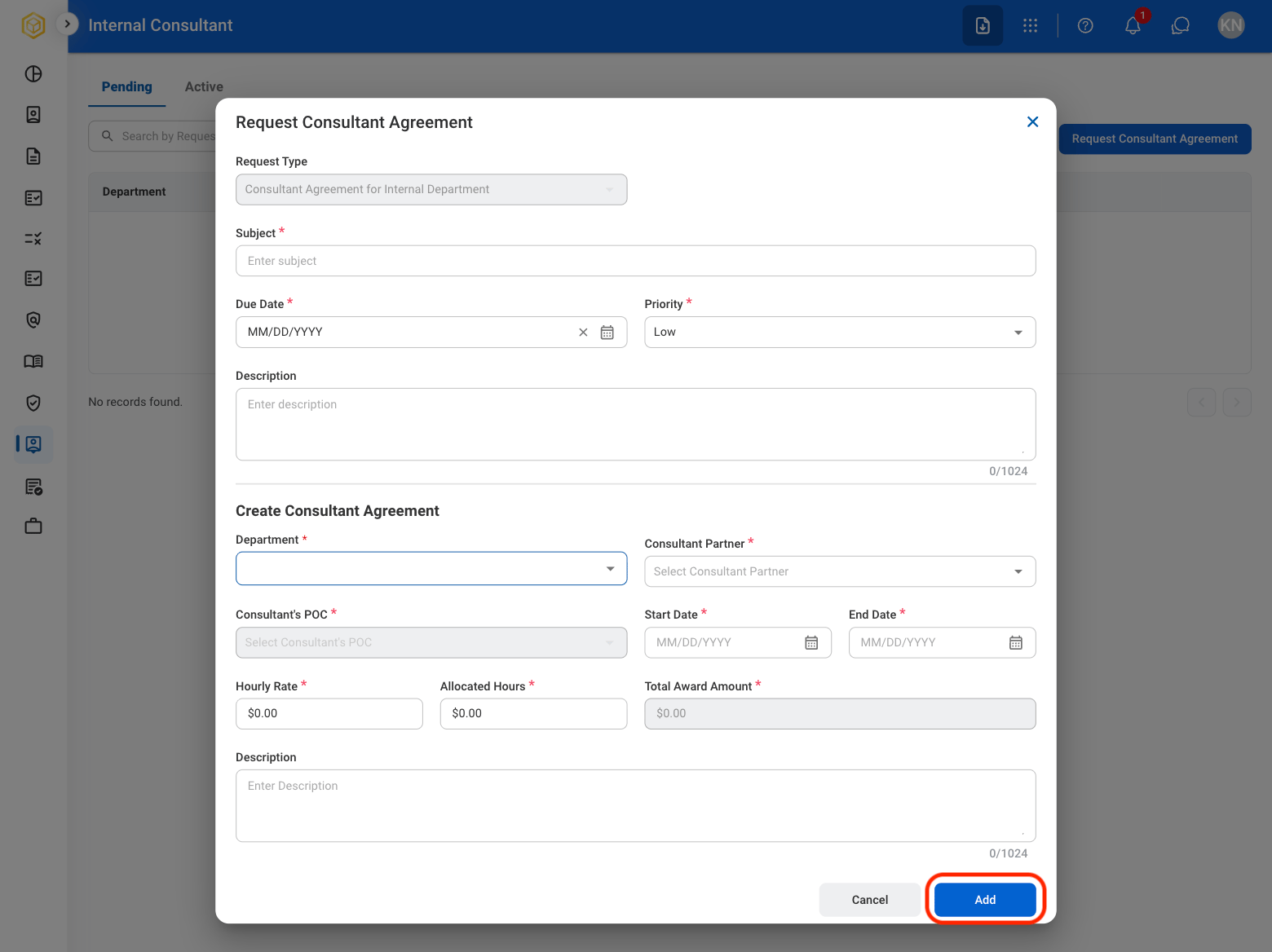
| Field | Description | Required | Example |
| :---------- | :------------------------------------------------------ | :------- | :-------------------------------------------------------------- |
| Subject | A short title describing the request. | ✓ | Consultant Agreement - Finance Systems Advisor |
| Due Date | The expected completion or review date for the request. | ✓ | October 9, 2026 |
| Priority | Indicates the urgency of the request. | ✓ | Low |
| Description | Additional details or reason for the request. | | Engaging a consultant to advise on the finance systems upgrade. |
### Create Consultant Agreement
| Field | Description | Required | Example |
| :---------------------------- | :---------------------------------------------------------- | :------- | :---------------------- |
| Department | Internal department the consultant will work for. | ✓ | Accounting |
| Consultant Partner | Consultant business partner. | ✓ | Honda |
| Consultant's POC | Point of contact at the consultant. | ✓ | Sarah Han |
| Start Date / End Date | Dates the agreement is in effect. | ✓ | 11/02/2026 - 04/30/2027 |
| Hourly Rate / Allocated Hours | Rate paid per hour and hours allocated under the agreement. | ✓ | \$110.00 / 400 |
| Total Award Amount | Hourly Rate multiplied by Allocated Hours. | Auto | \$44,000.00 |
| Description | Scope of the consultant's work. | | |
The request is displayed in the Request module and under **Self Service > Internal Consultant > Pending**.
## Review a Consultant Agreement for Internal Department Request
To review a submitted Consultant Agreement for Internal Department request and approve, reject, or discard it, see **Contracts >** [Requests](/erp/contract-management/requests).
## Manage the Consultant Agreement for Internal Department Business Process
To manage the workflow for Consultant Agreement for Internal Department requests, see **Admin > Business Processes >** [Business Processes Overview](/erp/admin/business-process-overview).
### Request Information
| Field | Description | Required | Example |
| :---------- | :------------------------------------------------------ | :------- | :-------------------------------------------------------------- |
| Subject | A short title describing the request. | ✓ | Consultant Agreement - Finance Systems Advisor |
| Due Date | The expected completion or review date for the request. | ✓ | October 9, 2026 |
| Priority | Indicates the urgency of the request. | ✓ | Low |
| Description | Additional details or reason for the request. | | Engaging a consultant to advise on the finance systems upgrade. |
### Create Consultant Agreement
| Field | Description | Required | Example |
| :---------------------------- | :---------------------------------------------------------- | :------- | :---------------------- |
| Department | Internal department the consultant will work for. | ✓ | Accounting |
| Consultant Partner | Consultant business partner. | ✓ | Honda |
| Consultant's POC | Point of contact at the consultant. | ✓ | Sarah Han |
| Start Date / End Date | Dates the agreement is in effect. | ✓ | 11/02/2026 - 04/30/2027 |
| Hourly Rate / Allocated Hours | Rate paid per hour and hours allocated under the agreement. | ✓ | \$110.00 / 400 |
| Total Award Amount | Hourly Rate multiplied by Allocated Hours. | Auto | \$44,000.00 |
| Description | Scope of the consultant's work. | | |
The request is displayed in the Request module and under **Self Service > Internal Consultant > Pending**.
## Review a Consultant Agreement for Internal Department Request
To review a submitted Consultant Agreement for Internal Department request and approve, reject, or discard it, see **Contracts >** [Requests](/erp/contract-management/requests).
## Manage the Consultant Agreement for Internal Department Business Process
To manage the workflow for Consultant Agreement for Internal Department requests, see **Admin > Business Processes >** [Business Processes Overview](/erp/admin/business-process-overview).