> ## Documentation Index
> Fetch the complete documentation index at: https://docs.bizbone.com/llms.txt
> Use this file to discover all available pages before exploring further.

# Job Management

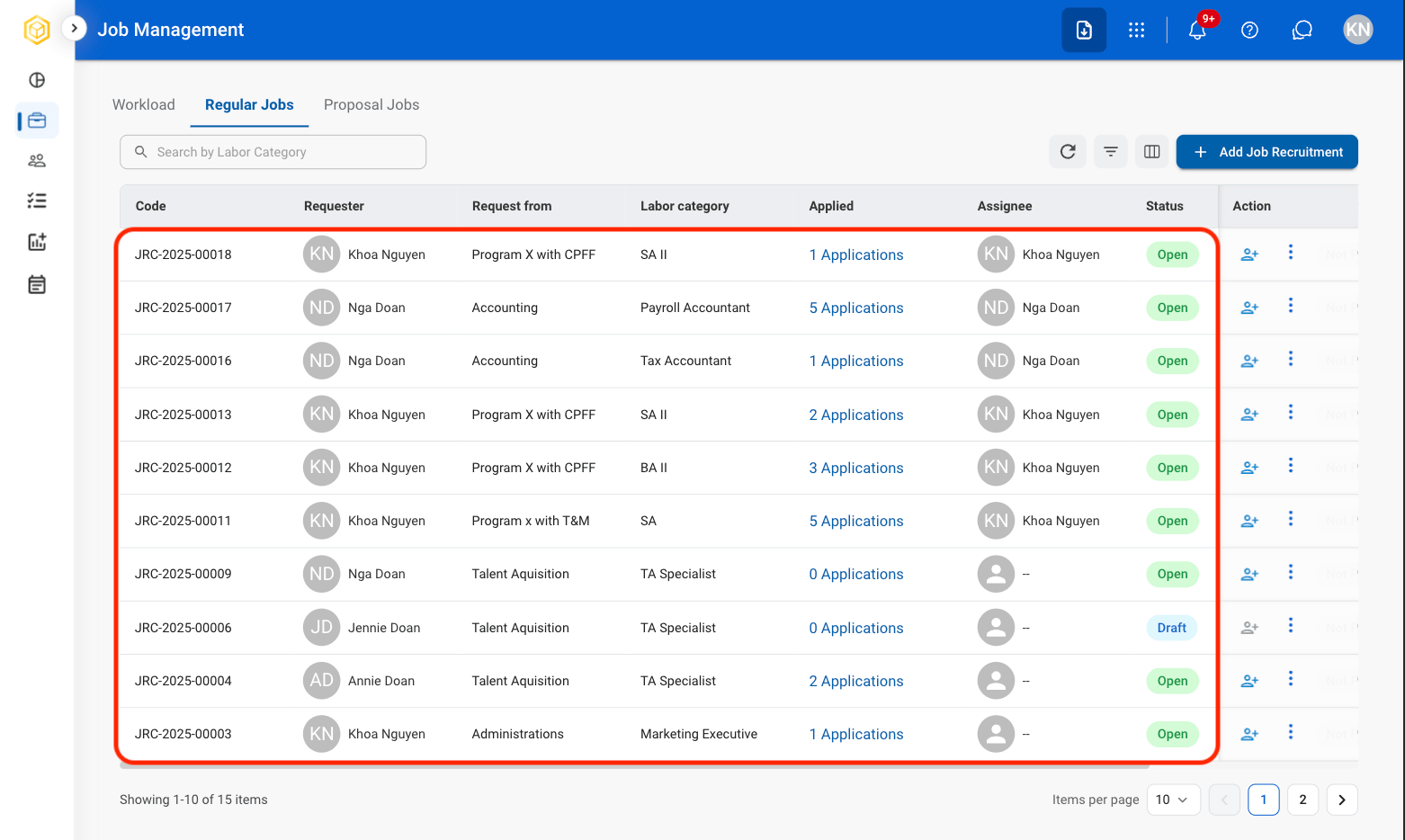
Estimate current HR workload, assign recruiters, monitor recruitment progress, and create detailed job postings. 

## Workload View

Monitor recruitment activity, recruiter workload, and hiring metrics through customizable dashboards.

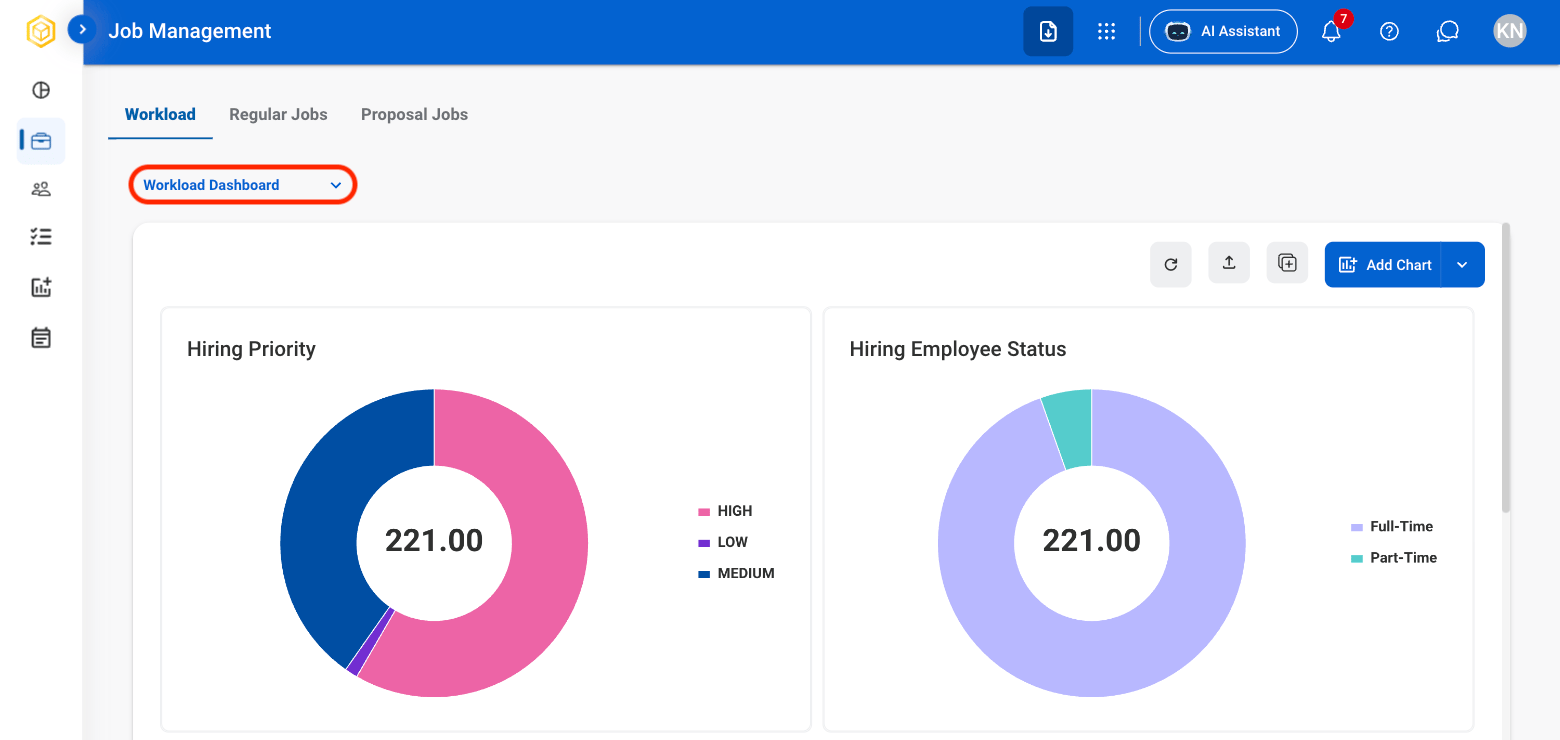
### Add a New Dashboard
<Steps>
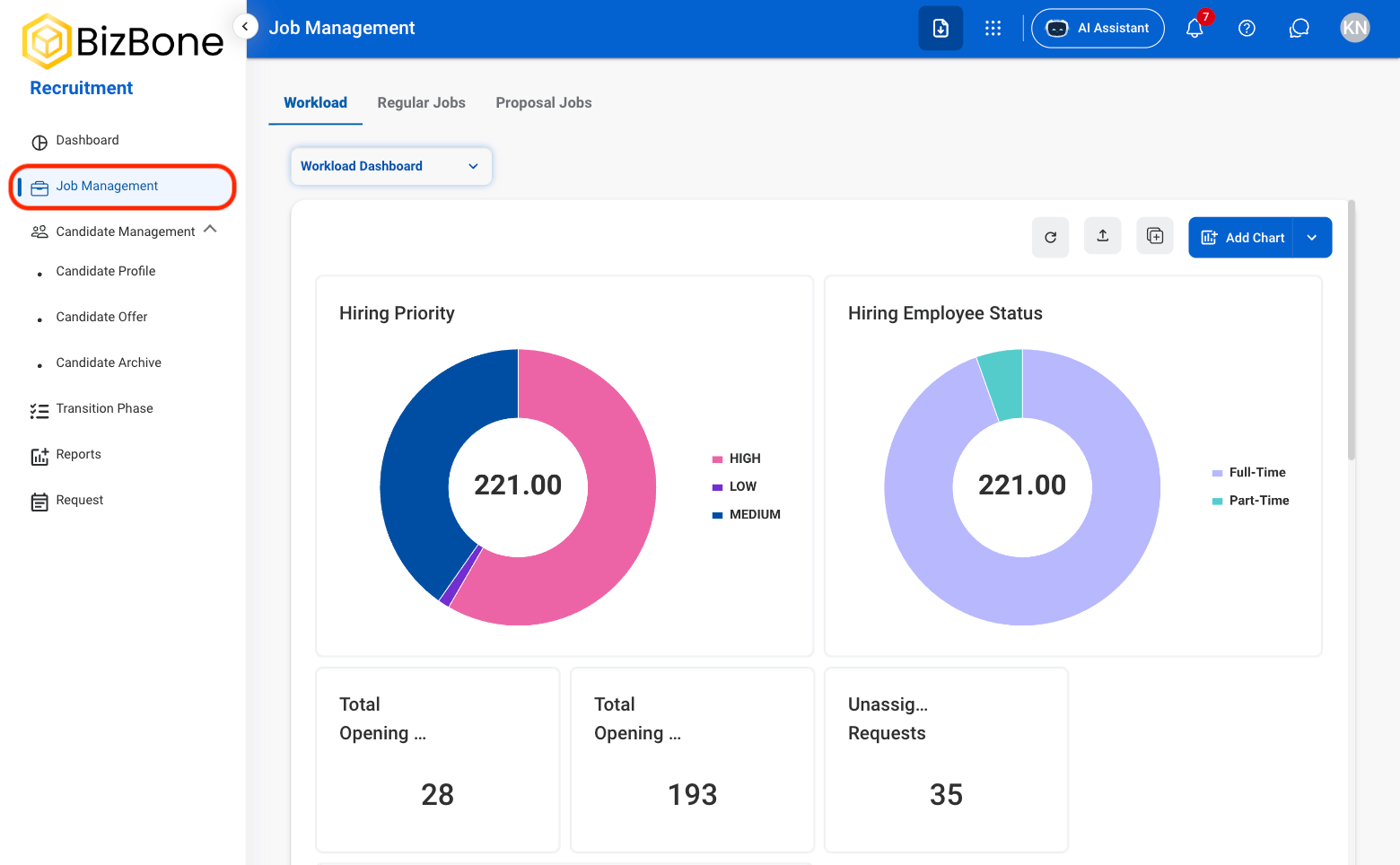
  <Step title="Navigate to Job Management">
    <Frame>
      <img src="https://mintcdn.com/bizbone/6oPBzRDpo6ZUIAeP/images/R-JM-Nav.png?fit=max&auto=format&n=6oPBzRDpo6ZUIAeP&q=85&s=0dafdf18d4d1cf6f33584bb02333a62f" alt="R JM Nav" width="1560" height="964" data-path="images/R-JM-Nav.png" />
    </Frame>
  </Step>

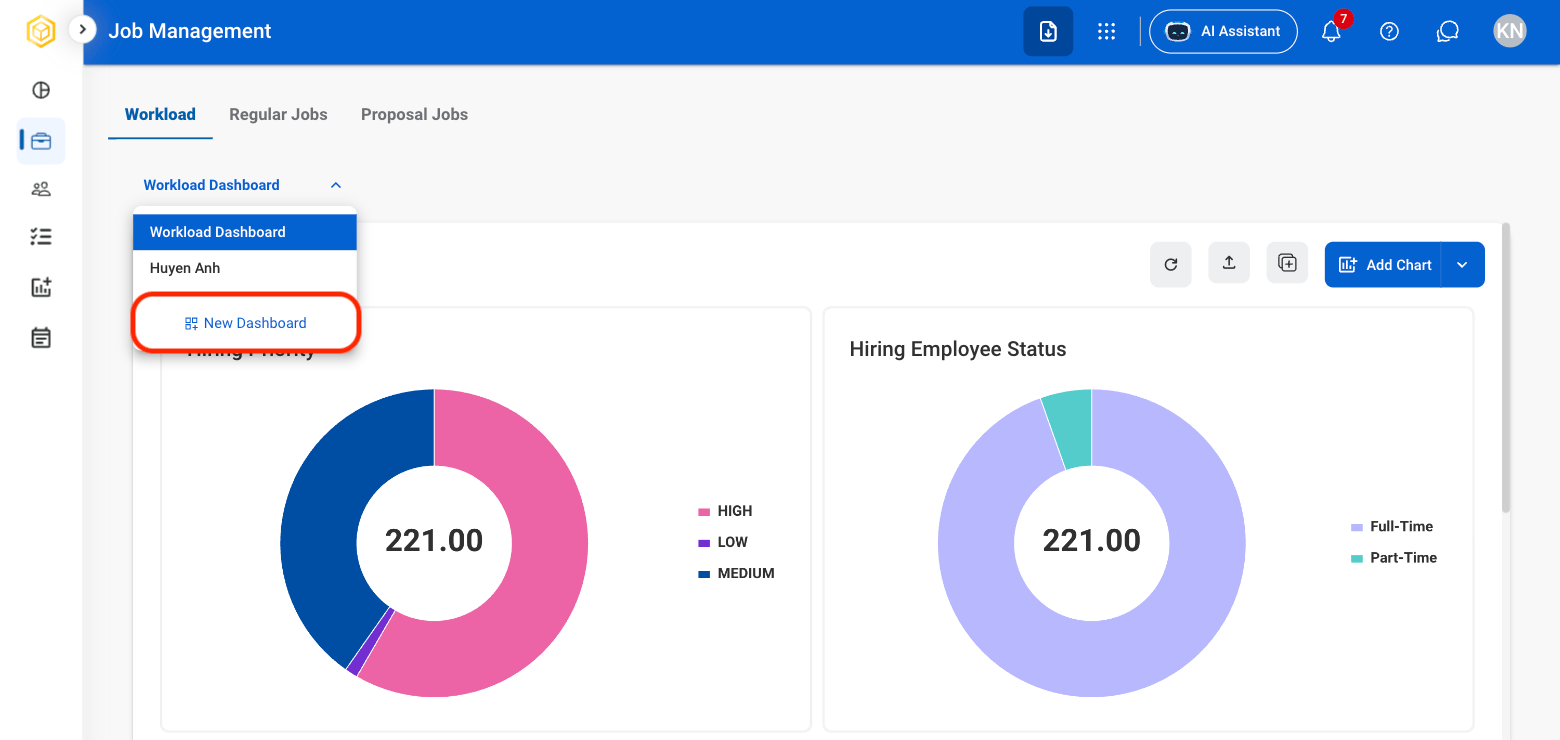
  <Step title="Select the dashboard dropdown">
    <Frame>
      <img src="https://mintcdn.com/bizbone/6oPBzRDpo6ZUIAeP/images/R-JM-Select-Dash.png?fit=max&auto=format&n=6oPBzRDpo6ZUIAeP&q=85&s=57bef4ae5a2f9ad35aa402affa1b6d98" alt="R JM Select Dash" width="1560" height="740" data-path="images/R-JM-Select-Dash.png" />
    </Frame>
  </Step>

  <Step title="Select New Dashboard">
    <Frame>
      <img src="https://mintcdn.com/bizbone/6oPBzRDpo6ZUIAeP/images/R-JM-New-Dash.png?fit=max&auto=format&n=6oPBzRDpo6ZUIAeP&q=85&s=db5ff8f223f9f33692e07b9dd7c57cfb" alt="R JM New Dash" width="1560" height="740" data-path="images/R-JM-New-Dash.png" />
    </Frame>
  </Step>

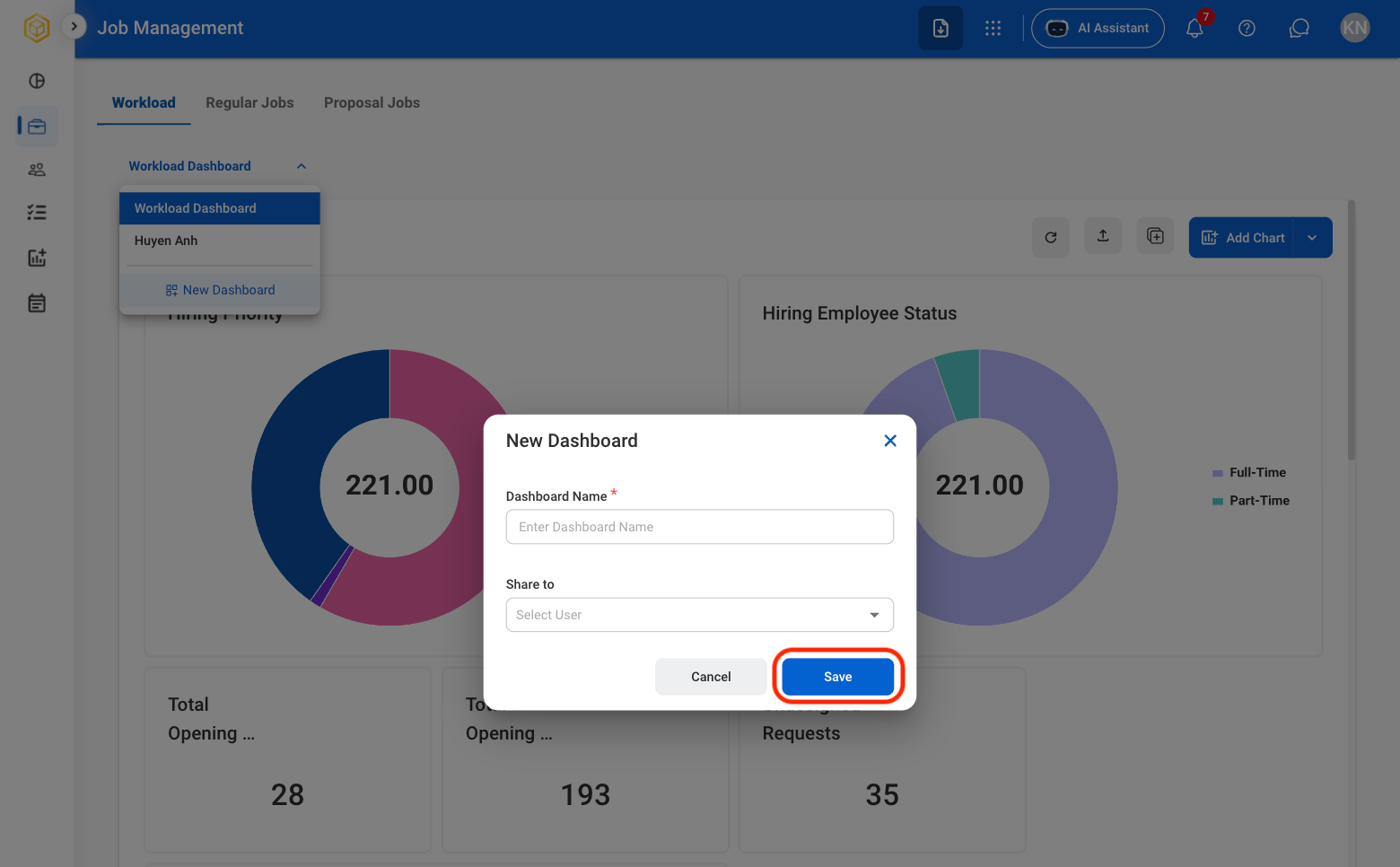
  <Step title="Fill in the required information ">
    <Frame>
      <img src="https://mintcdn.com/bizbone/6oPBzRDpo6ZUIAeP/images/R-JM-Dash-C.png?fit=max&auto=format&n=6oPBzRDpo6ZUIAeP&q=85&s=fa67f56adf62b088be56104ceac922e7" alt="R JM Dash C" width="1560" height="966" data-path="images/R-JM-Dash-C.png" />
    </Frame>

    Select **Save** to complete or **Cancel** to exit without saving changes. 
  </Step>
</Steps>

### Dashboard Actions

<Frame>
  <img src="https://mintcdn.com/bizbone/6oPBzRDpo6ZUIAeP/images/RJobMgmt.png?fit=max&auto=format&n=6oPBzRDpo6ZUIAeP&q=85&s=b2ff89ac65076b50673e9b40aeabc670" alt="R Job Mgmt" width="1562" height="740" data-path="images/RJobMgmt.png" />
</Frame>

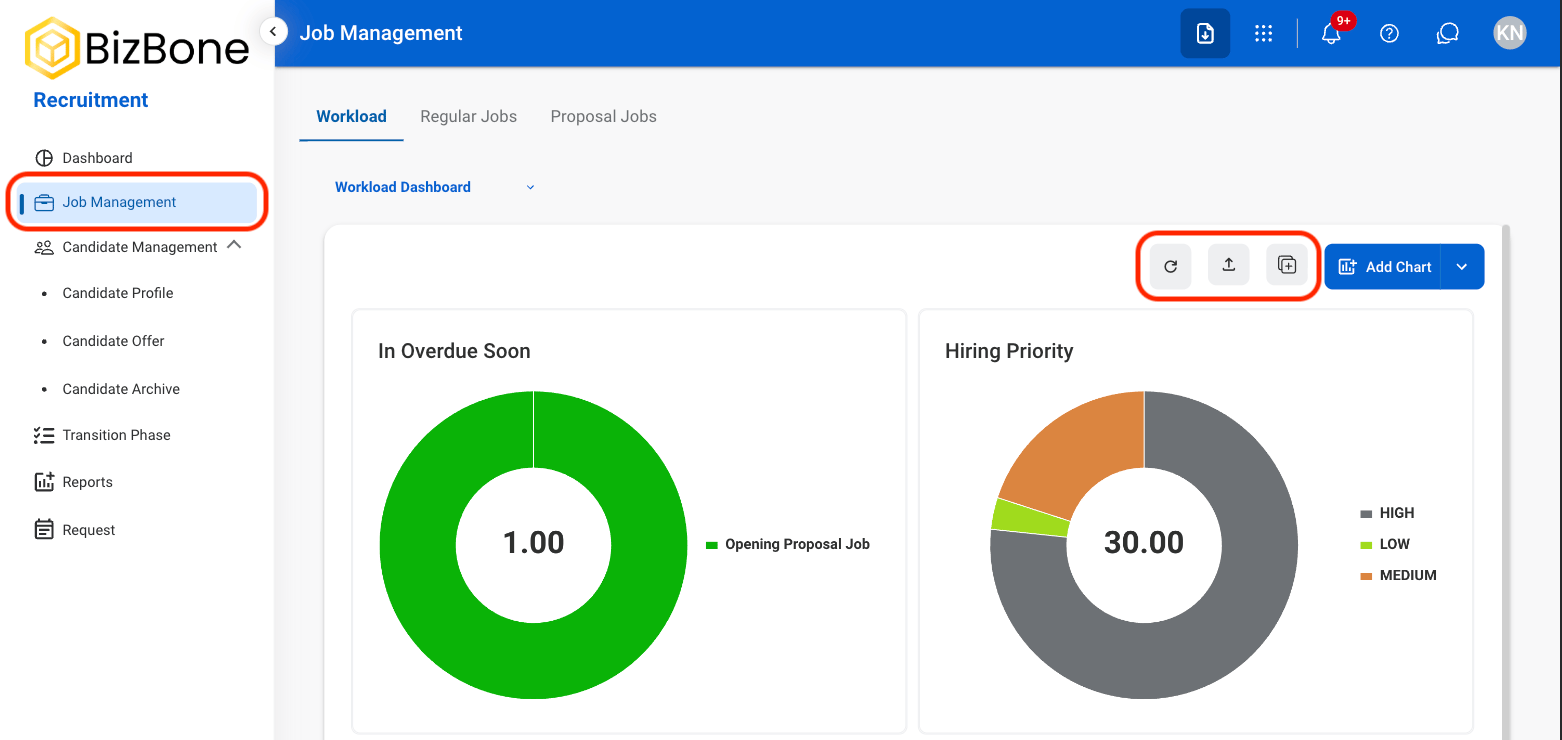
* **Refresh icon**: Refresh the information of the dashboard
* **Export icon**: Export the data 
* **Duplicate icon**: Duplicate the dashboard 

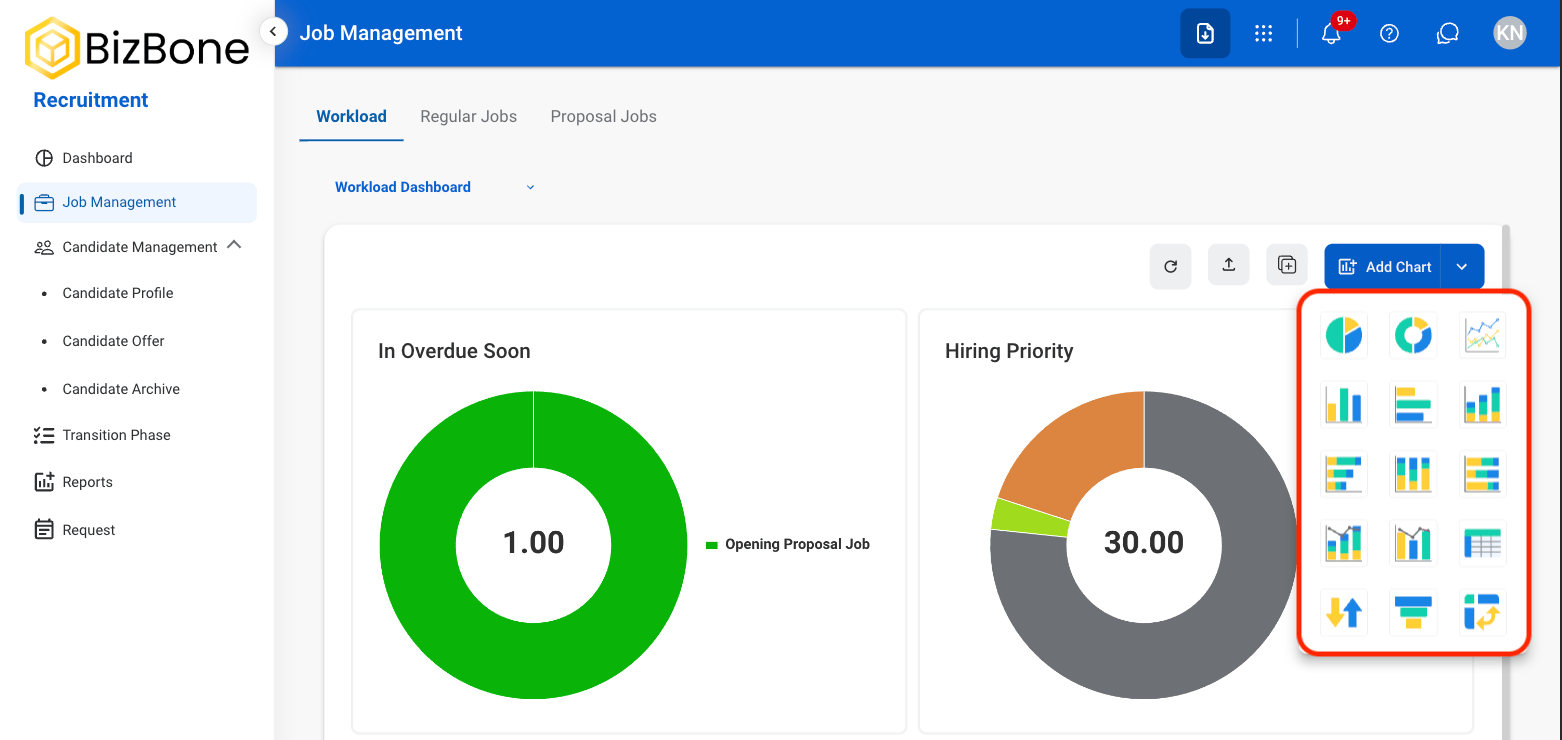
### Add Chart
<Steps>
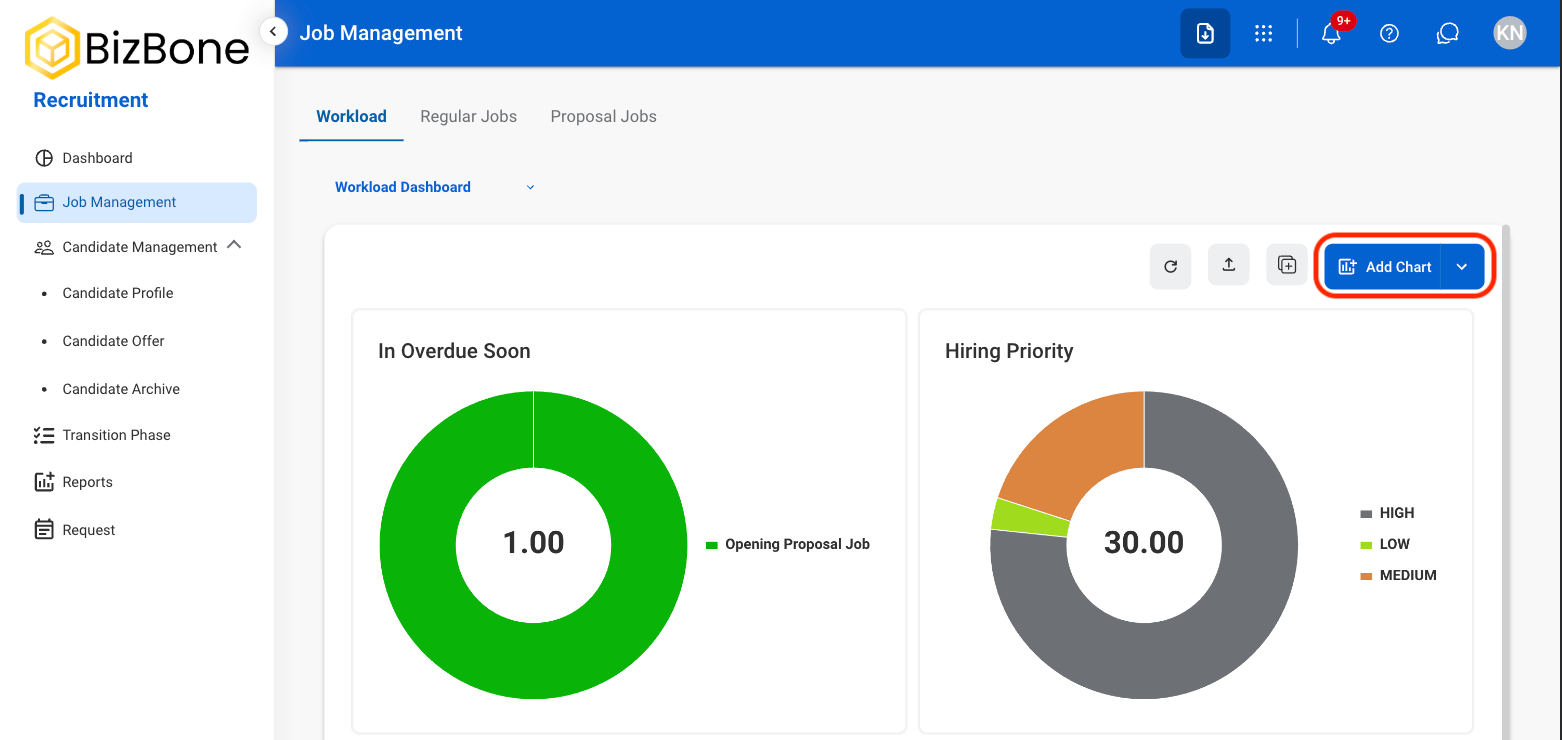
  <Step title="Select Add Chart" stepNumber={1}>
    <Frame>
      <img src="https://mintcdn.com/bizbone/6oPBzRDpo6ZUIAeP/images/R-JM-Add-Chart.png?fit=max&auto=format&n=6oPBzRDpo6ZUIAeP&q=85&s=efbd85acf361a42ad2890c9bd6e84b21" alt="R JM Add Chart" width="1562" height="740" data-path="images/R-JM-Add-Chart.png" />
    </Frame>
  </Step>

  <Step title="Select the desired chart" stepNumber={2}>
    <Frame>
      <img src="https://mintcdn.com/bizbone/6oPBzRDpo6ZUIAeP/images/R-JM-Chart-Type.png?fit=max&auto=format&n=6oPBzRDpo6ZUIAeP&q=85&s=8777a634ddee134f8deb8ec319741380" alt="R JM Chart Type" width="1562" height="740" data-path="images/R-JM-Chart-Type.png" />
    </Frame>
  </Step>

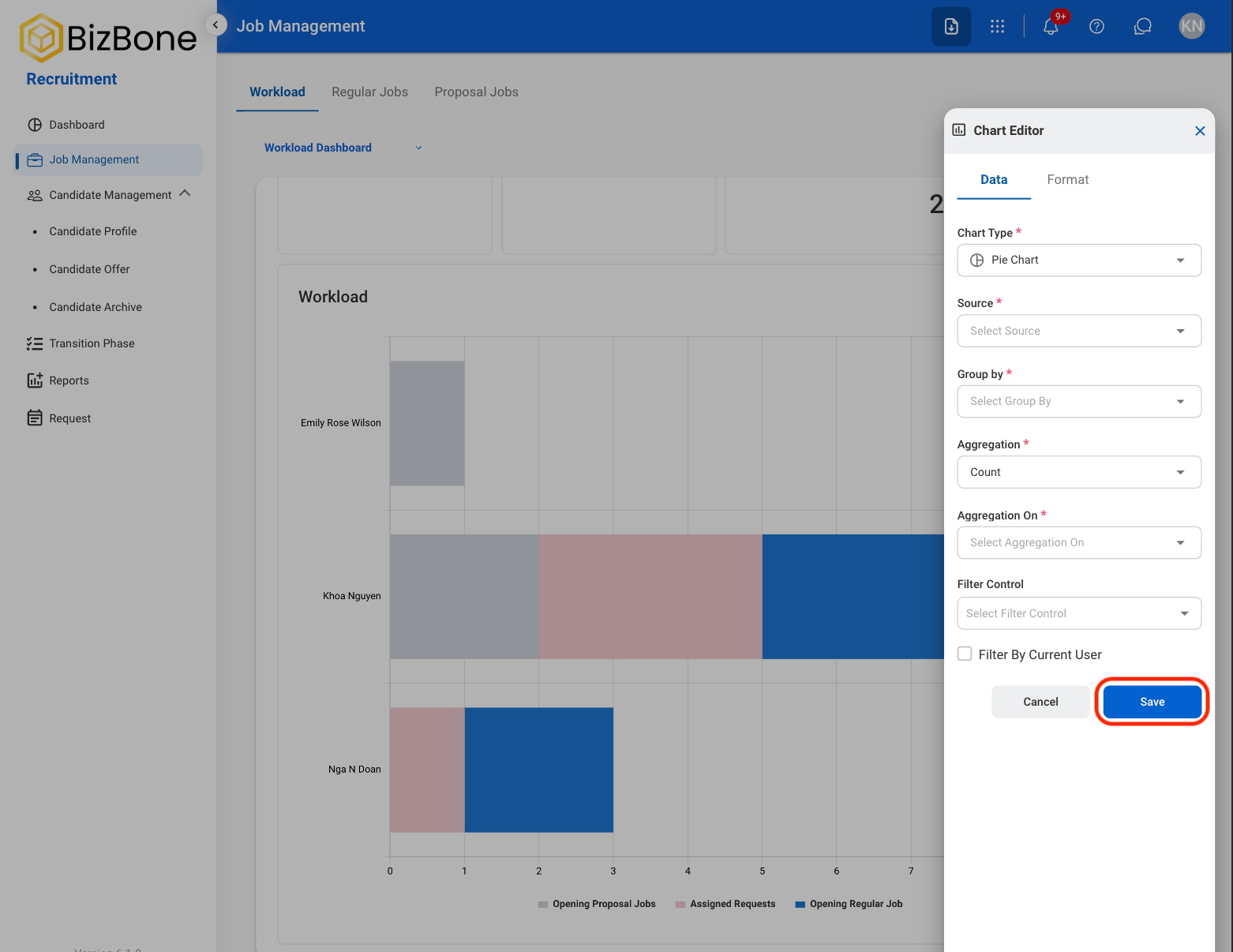
  <Step title="Fill the required information " stepNumber={3}>
    <Frame>
      <img src="https://mintcdn.com/bizbone/6oPBzRDpo6ZUIAeP/images/R-JM-Save-Chart.png?fit=max&auto=format&n=6oPBzRDpo6ZUIAeP&q=85&s=192bc38bfb6f6249b7981f4417a13747" alt="R JM Save Chart" width="1562" height="1206" data-path="images/R-JM-Save-Chart.png" />
    </Frame>

    Select  **Save** to complete the chart or  **Cancel** to exit without saving. 
  </Step>
</Steps>

### Chart Functions

Select a chart to interact with its functions using the following icons.

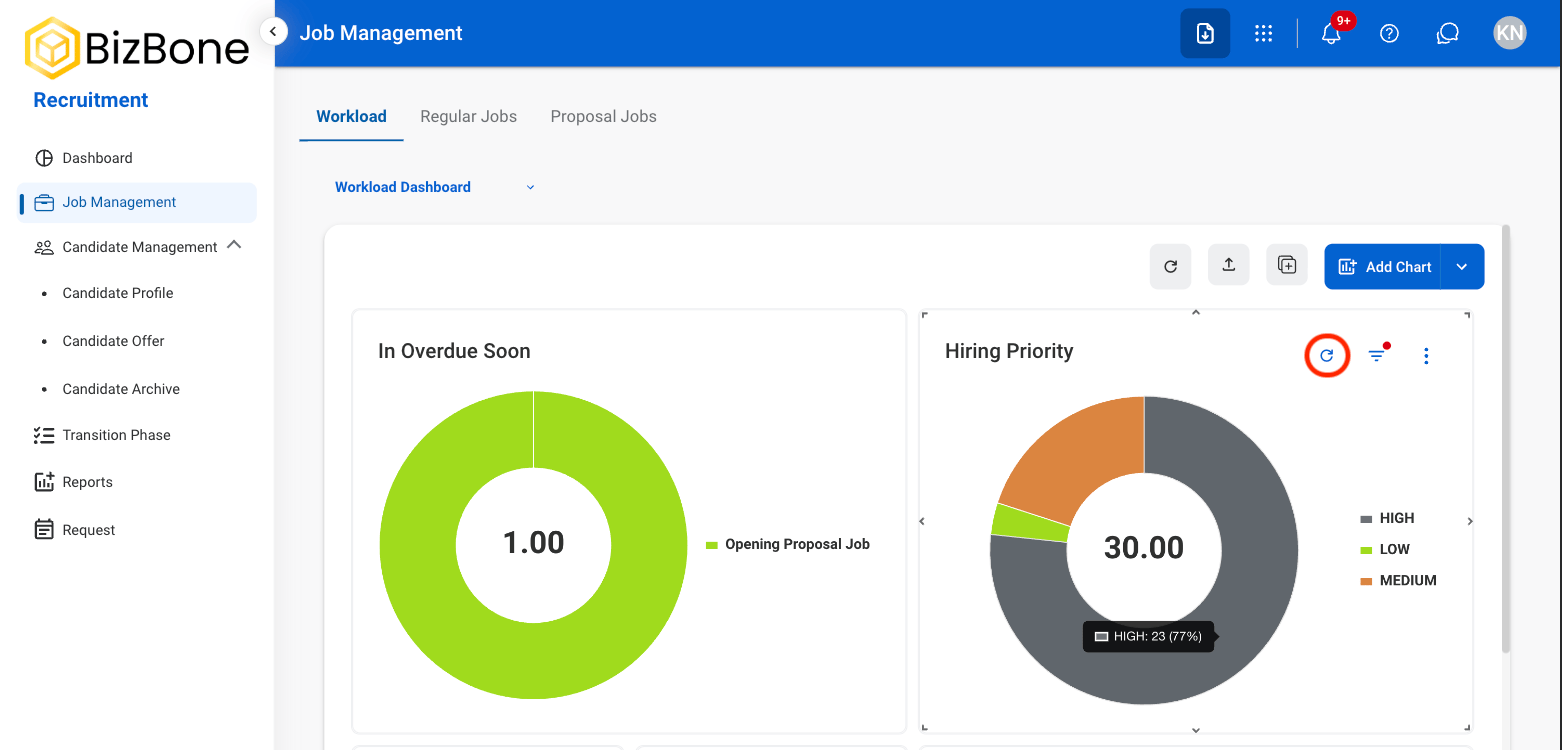
#### Refresh
<Frame>
  <img src="https://mintcdn.com/bizbone/6oPBzRDpo6ZUIAeP/images/R-JM-Rfrsh.png?fit=max&auto=format&n=6oPBzRDpo6ZUIAeP&q=85&s=a2caeaa5148c01fa97261c404aa314bd" alt="R JM Rfrsh" width="1562" height="750" data-path="images/R-JM-Rfrsh.png" />
</Frame>

Select the **Refresh** icon to update the dashboard with the latest data.

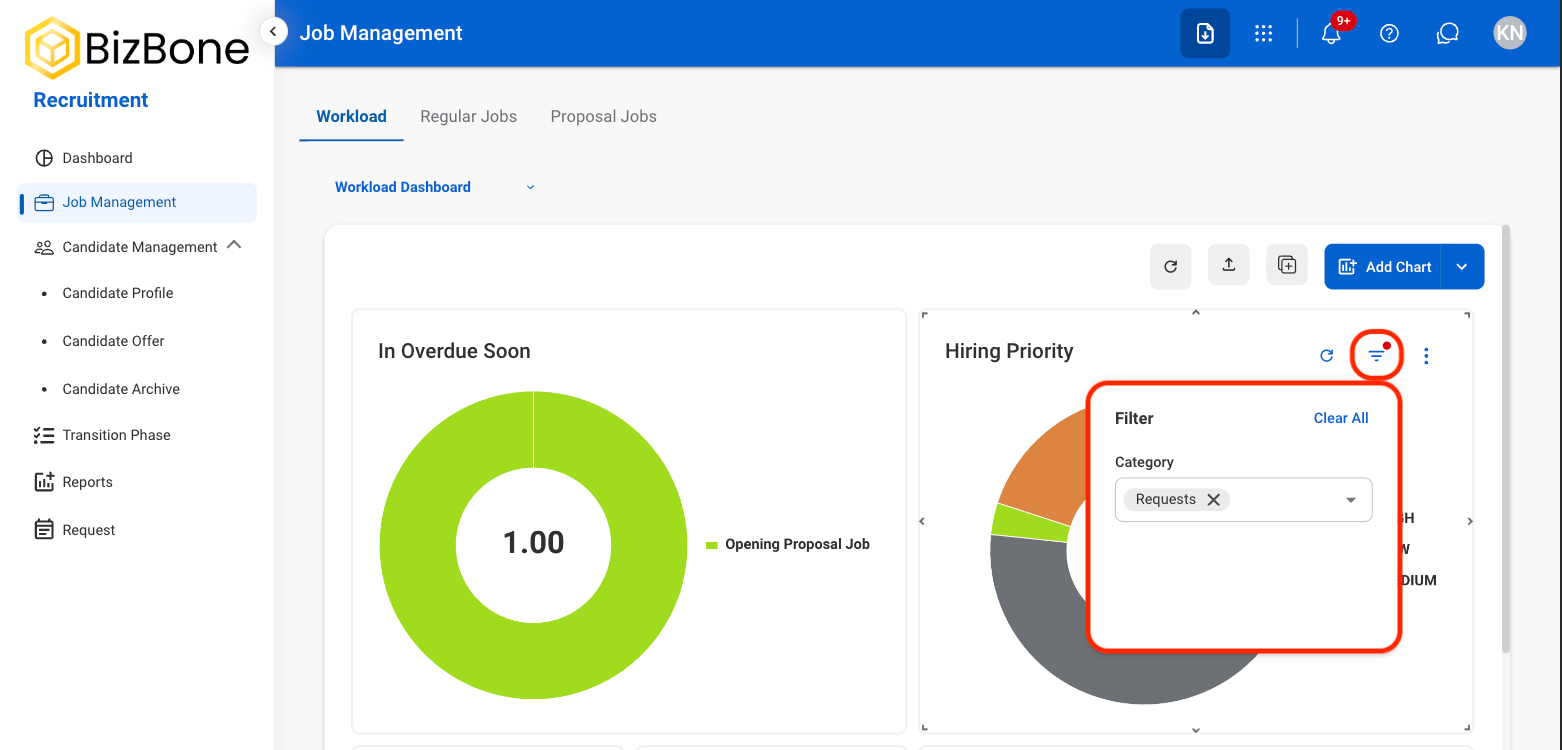
#### Filter
<Frame>
  <img src="https://mintcdn.com/bizbone/6oPBzRDpo6ZUIAeP/images/R-JM-Filter.png?fit=max&auto=format&n=6oPBzRDpo6ZUIAeP&q=85&s=1a18469c57f2f5d80a02e238d7ca95ab" alt="R JM Filter" width="1562" height="750" data-path="images/R-JM-Filter.png" />
</Frame>

Use the **Filter** icon to filter chart data by category. Select a category to apply or remove it.

#### Additional Functions
<Frame>
  <img src="https://mintcdn.com/bizbone/6oPBzRDpo6ZUIAeP/images/R-JM-Chart-Opt.png?fit=max&auto=format&n=6oPBzRDpo6ZUIAeP&q=85&s=fd541a0d3c142e4d81e4d4c461e1f229" alt="R JM Chart Opt" width="1562" height="750" data-path="images/R-JM-Chart-Opt.png" />
</Frame>

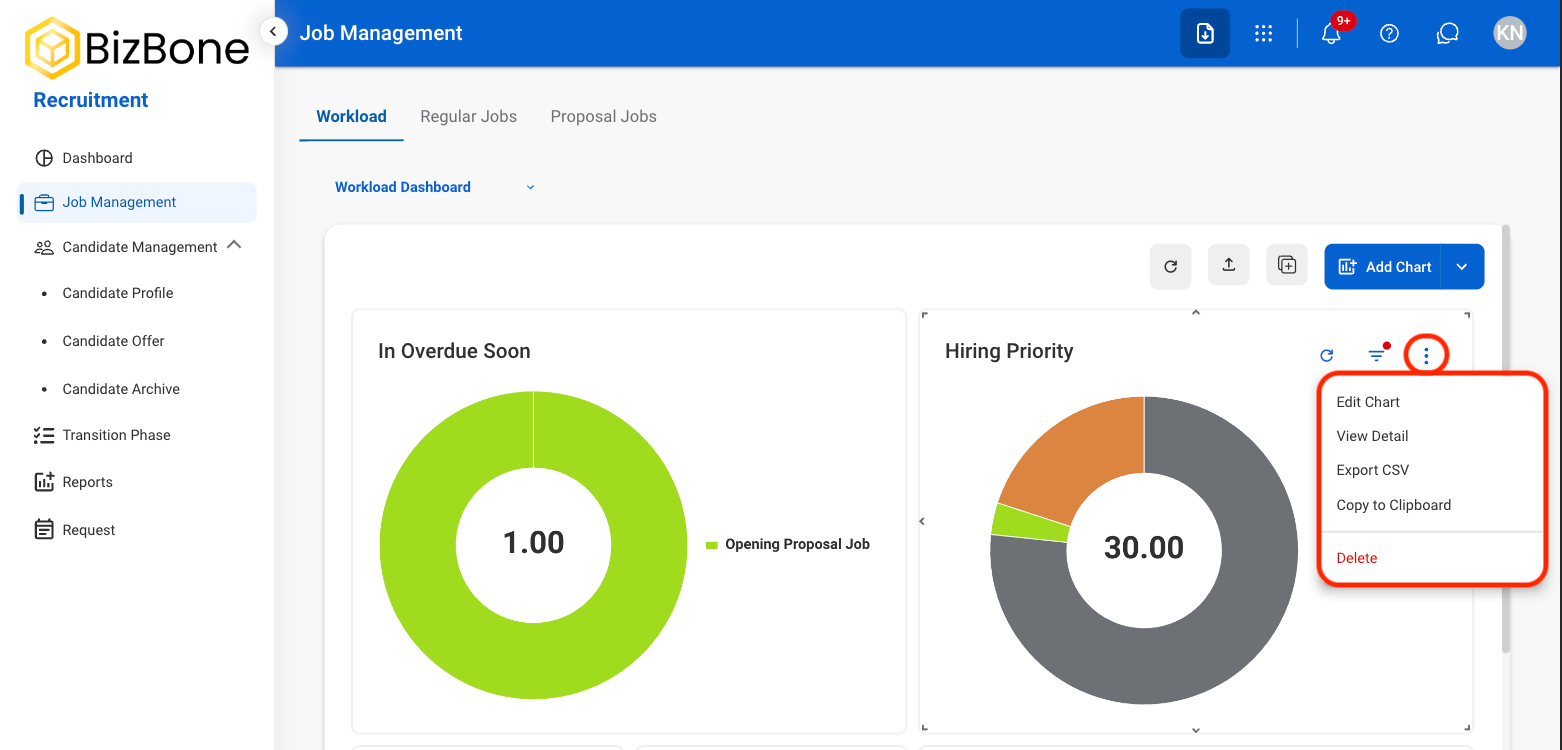
Select the dotted icon to view additional functions.

* **Edit Chart:** Modify chart settings, data, or display options.
* **View Detail:** View the underlying data used to generate the chart.
* **Export CSV:** Export the chart data as a CSV file.
* **Copy to Clipboard:** Copy an image of the chart to the clipboard.

## Job Dashboards

### Select a Job Type
<Steps>
  <Step title="Select a tab">
    <Frame>
      <img src="https://mintcdn.com/bizbone/6oPBzRDpo6ZUIAeP/images/R-JM-Job-View.png?fit=max&auto=format&n=6oPBzRDpo6ZUIAeP&q=85&s=8fb80a11f81f03678c5a2a4c9fe01d68" alt="R JM Job View" width="1560" height="924" data-path="images/R-JM-Job-View.png" />
    </Frame>

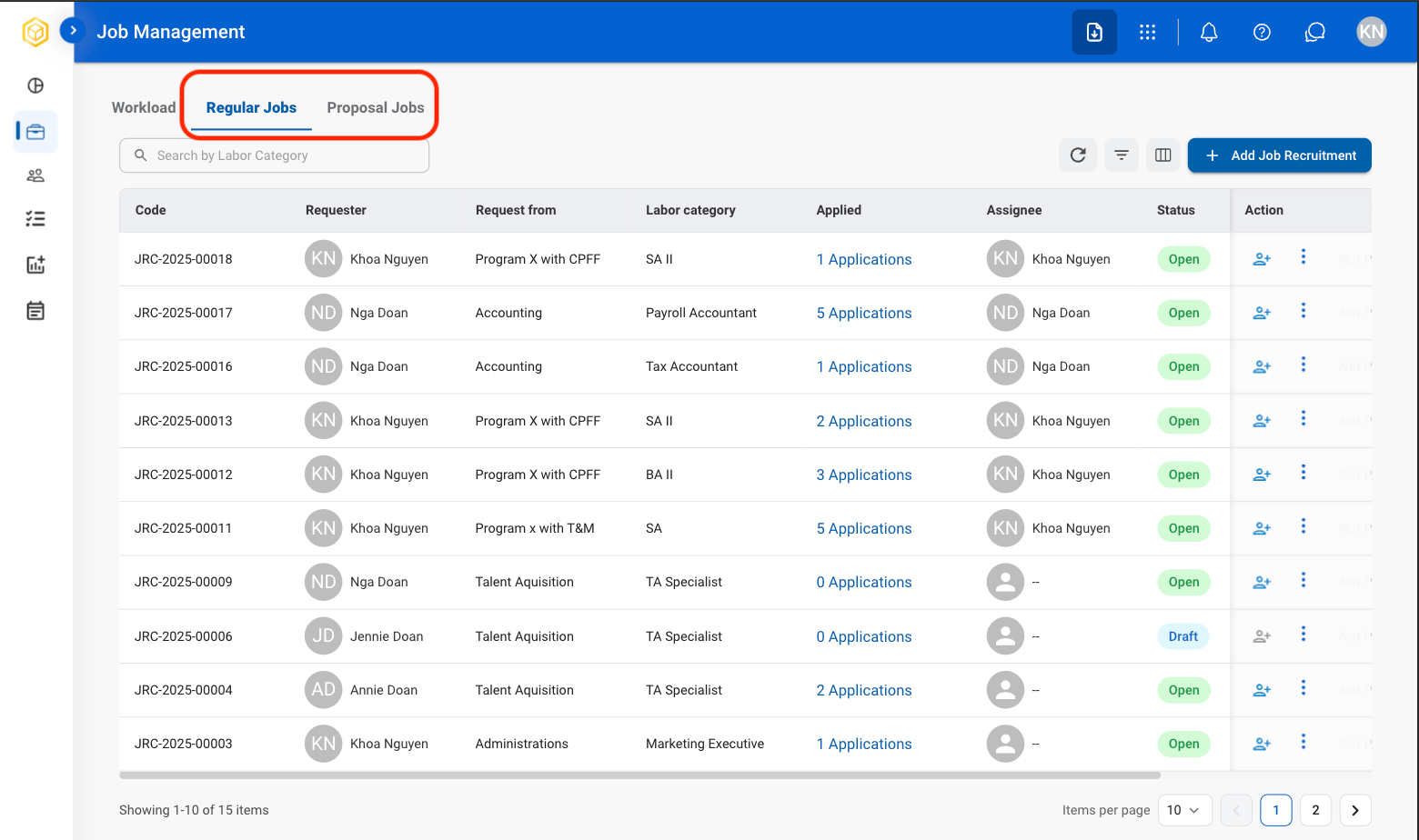
    * **Regular Jobs**: Manage standard recruitment positions, candidate activity, and hiring progress.
    * **Proposal Jobs**: Manage proposal-based recruitment positions, staffing requirements, and recruitment planning activities.
  </Step>
</Steps>

### Add Job Recruitment

<Steps>
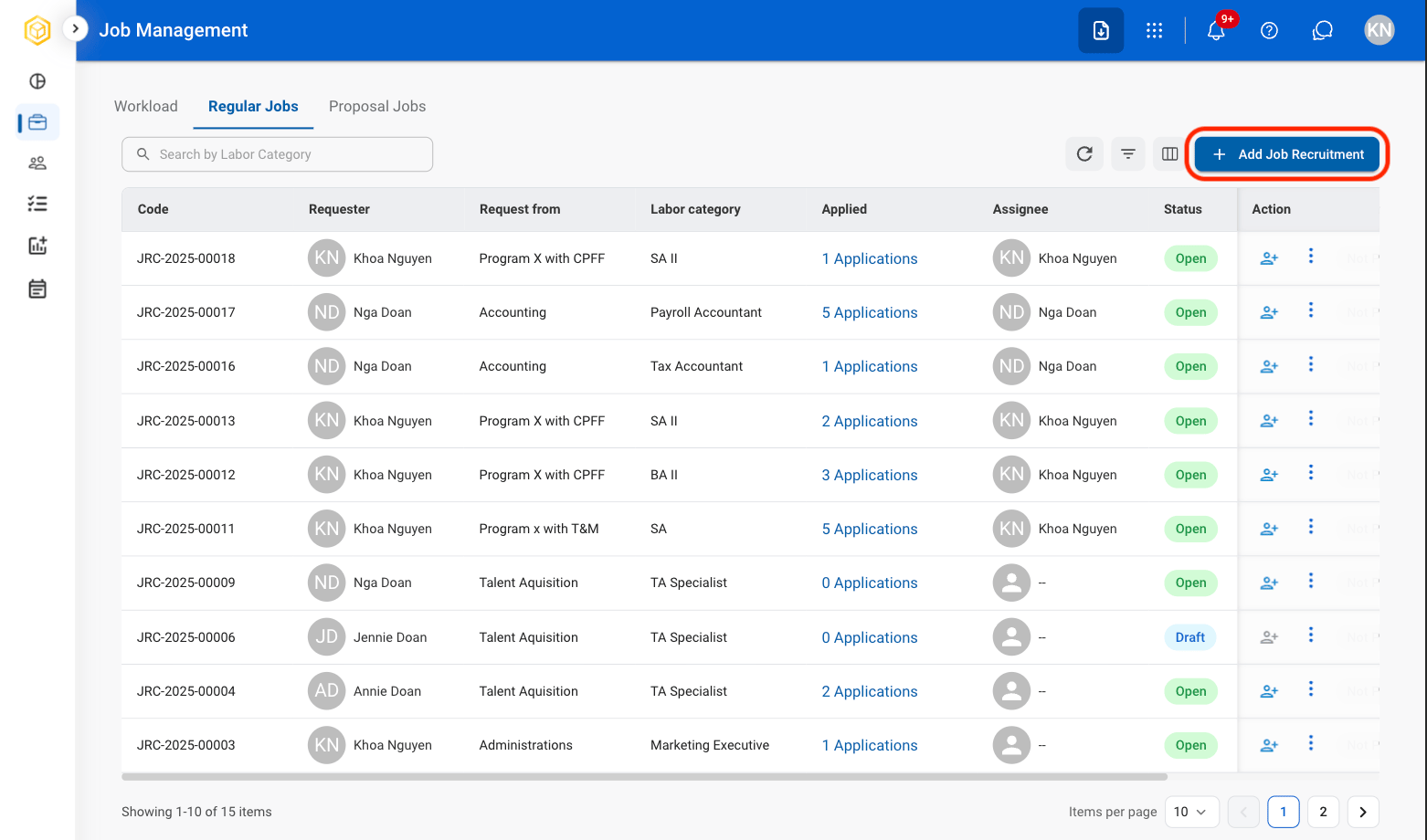
  <Step title="Select Add Job Recruitment">
    <Frame>
      <img src="https://mintcdn.com/bizbone/6oPBzRDpo6ZUIAeP/images/R-JM-AddJobRec.png?fit=max&auto=format&n=6oPBzRDpo6ZUIAeP&q=85&s=5d148582657cce96346a1f3cf642a304" alt="R JM Add Job Rec" width="1562" height="920" data-path="images/R-JM-AddJobRec.png" />
    </Frame>
  </Step>

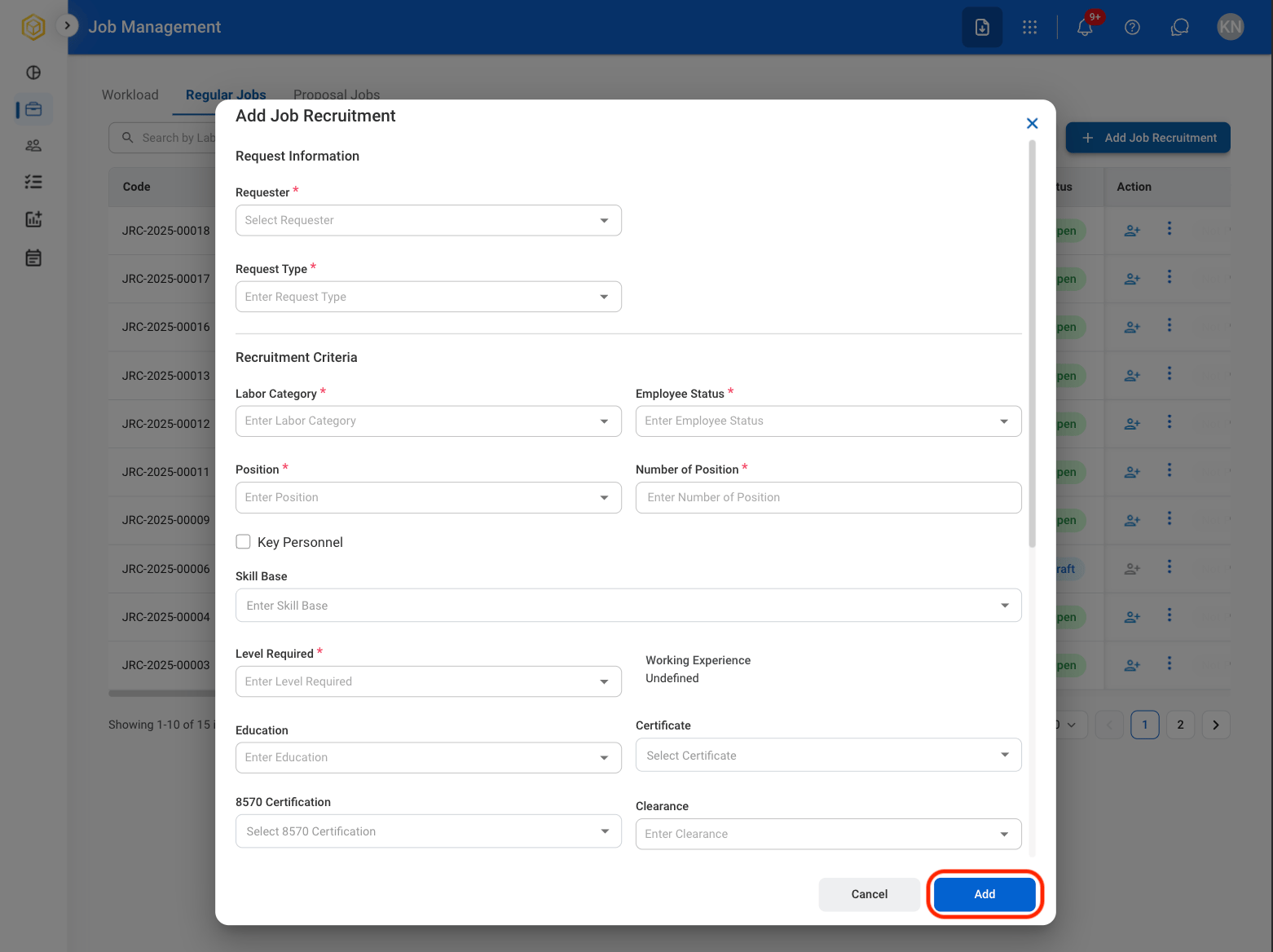
  <Step title="Fill in the required fields">
    <Frame>
      <img src="https://mintcdn.com/bizbone/6oPBzRDpo6ZUIAeP/images/R-JM-Save-JR.png?fit=max&auto=format&n=6oPBzRDpo6ZUIAeP&q=85&s=ca8595d4b5ea73f782fbbc8eedc7d6de" alt="R JM Save JR" width="1562" height="1168" data-path="images/R-JM-Save-JR.png" />
    </Frame>

    Select  **Save** to complete the chart or  **Cancel** to exit without saving. 
  </Step>
</Steps>

### Modify Job Recruitment

<Steps>
  <Step title="Select a profile to be edited">
    <Frame>
      <img src="https://mintcdn.com/bizbone/6oPBzRDpo6ZUIAeP/images/R-JM-Profile.png?fit=max&auto=format&n=6oPBzRDpo6ZUIAeP&q=85&s=170860ffe52908cd251c64ad4c540970" alt="R JM Profile" width="1562" height="934" data-path="images/R-JM-Profile.png" />
    </Frame>

    <Info>
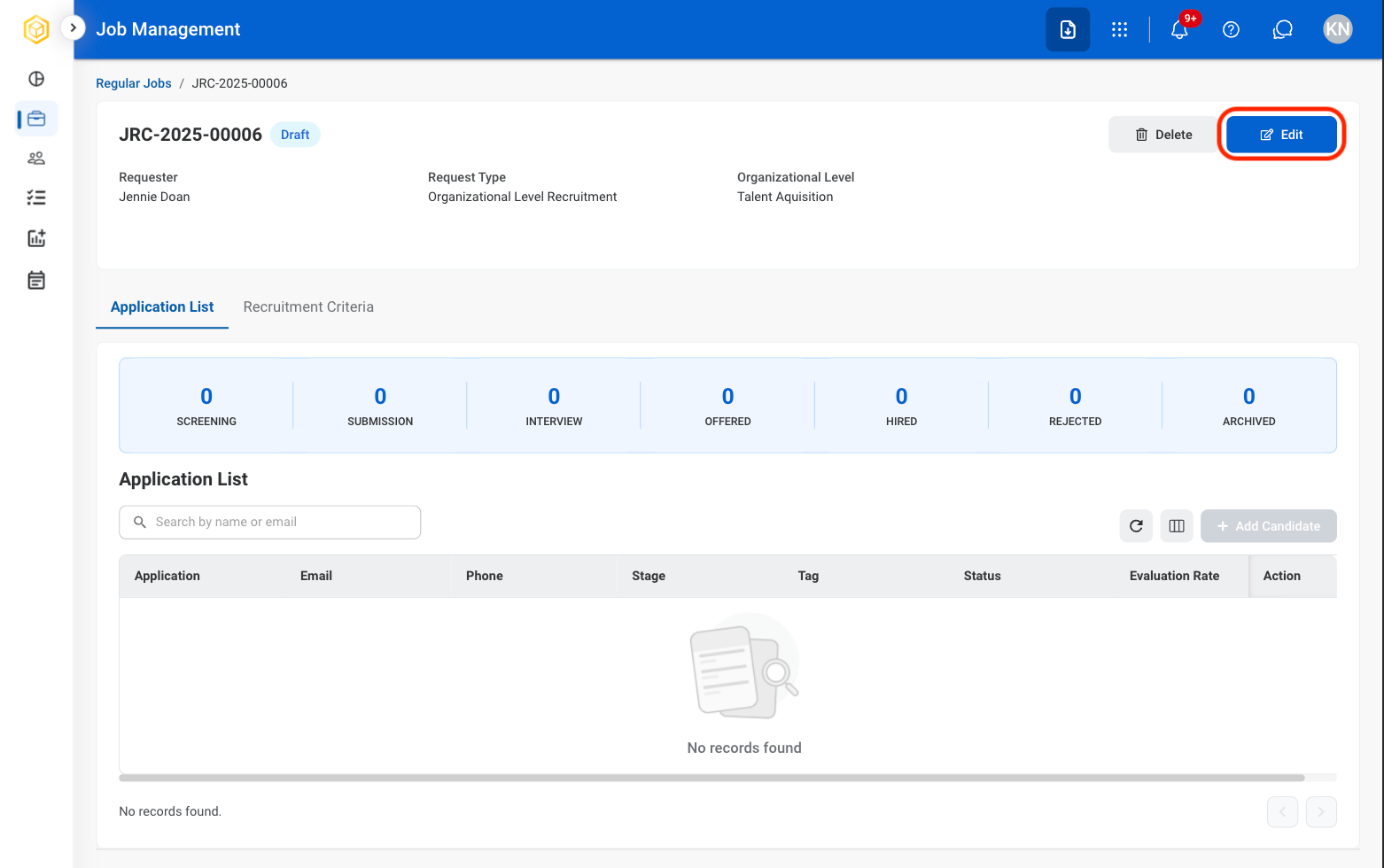
      Only jobs in Draft status can be edited. 
    </Info>
  </Step>

  <Step title="Select an action">
    <Frame>
      <img src="https://mintcdn.com/bizbone/6oPBzRDpo6ZUIAeP/images/R-JM-Edit-Job.png?fit=max&auto=format&n=6oPBzRDpo6ZUIAeP&q=85&s=d5a2fda00d1a006d450003997a3bd851" alt="R JM Edit Job" width="1562" height="980" data-path="images/R-JM-Edit-Job.png" />
    </Frame>

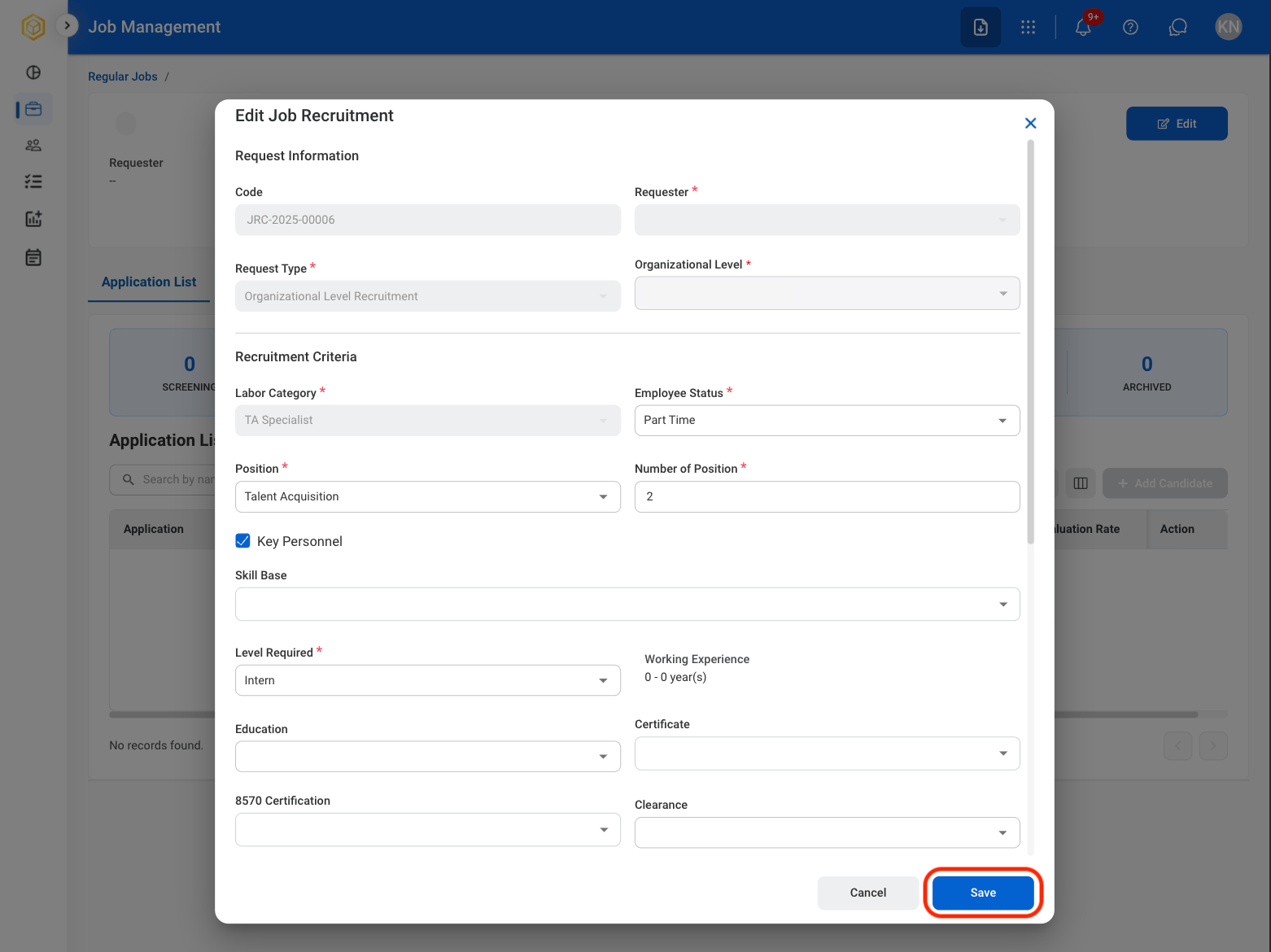
    * **Edit**: Make adjustments to the job listing before it is posted.
    * **Delete**: Remove the job listing before it is posted.
  </Step>

  <Step title="Confirm the action">
    <Frame>
      <img src="https://mintcdn.com/bizbone/6oPBzRDpo6ZUIAeP/images/R-JM-SaveEJ.png?fit=max&auto=format&n=6oPBzRDpo6ZUIAeP&q=85&s=2396f93075ad50889f86ad1c21fa5f1d" alt="R JM Save EJ" width="1562" height="1170" data-path="images/R-JM-SaveEJ.png" />
    </Frame>

    * **Edit**: Fill in the required information. Select  **Save** to complete the chart or  **Cancel** to exit without saving. 
    * **Delete**: Select  **Delete** to complete the chart or  **Cancel** to exit without saving. 
  </Step>
</Steps>

### Duplicate a Job Recruitment

<Steps>
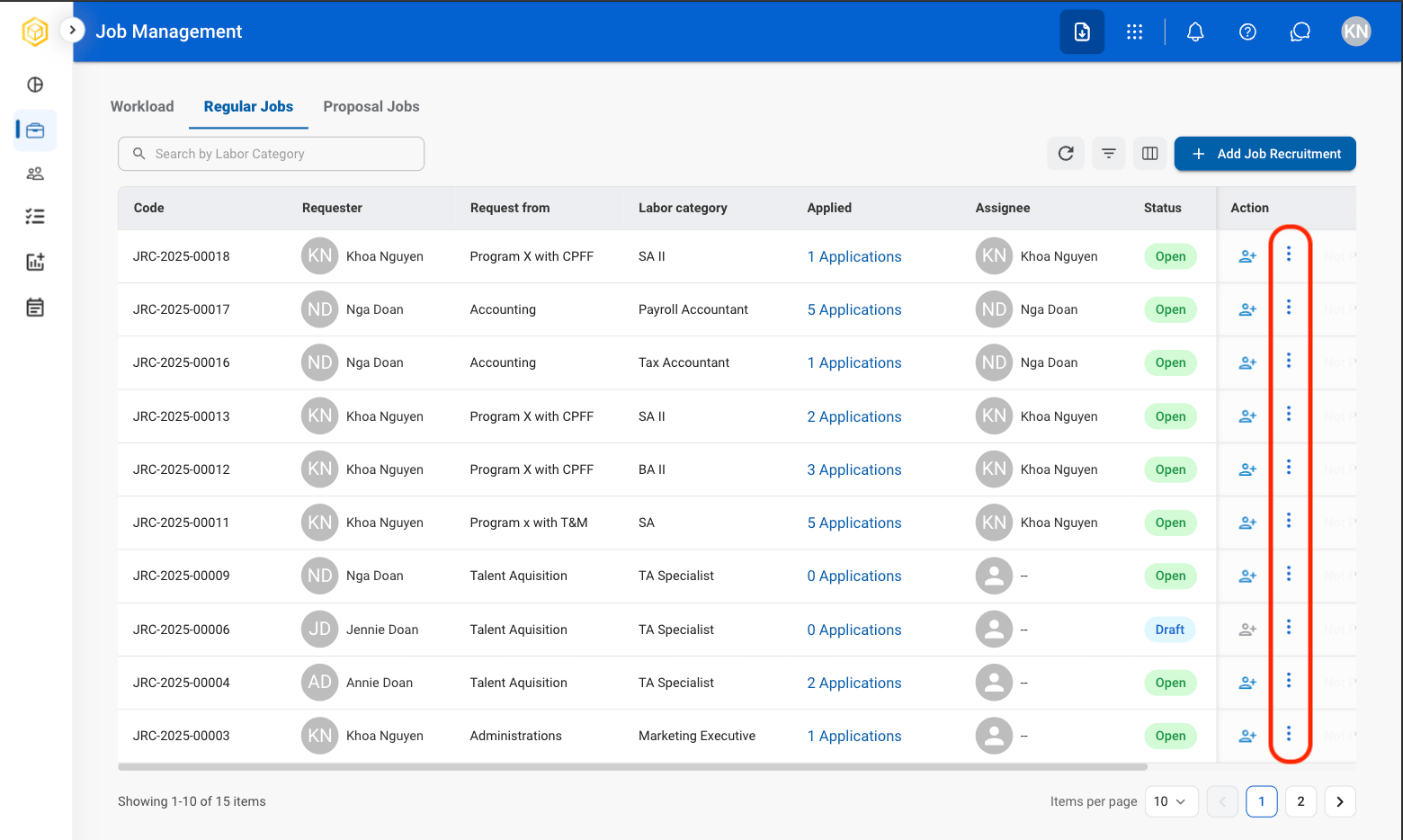
  <Step title="Select the ellipsis icon in the Action column">
    <Frame>
      <img src="https://mintcdn.com/bizbone/6oPBzRDpo6ZUIAeP/images/R-JM-VEllip.png?fit=max&auto=format&n=6oPBzRDpo6ZUIAeP&q=85&s=2d95e9f6f01b5d5ac1ebeff991270007" alt="R JM V Ellip" width="1560" height="934" data-path="images/R-JM-VEllip.png" />
    </Frame>
  </Step>

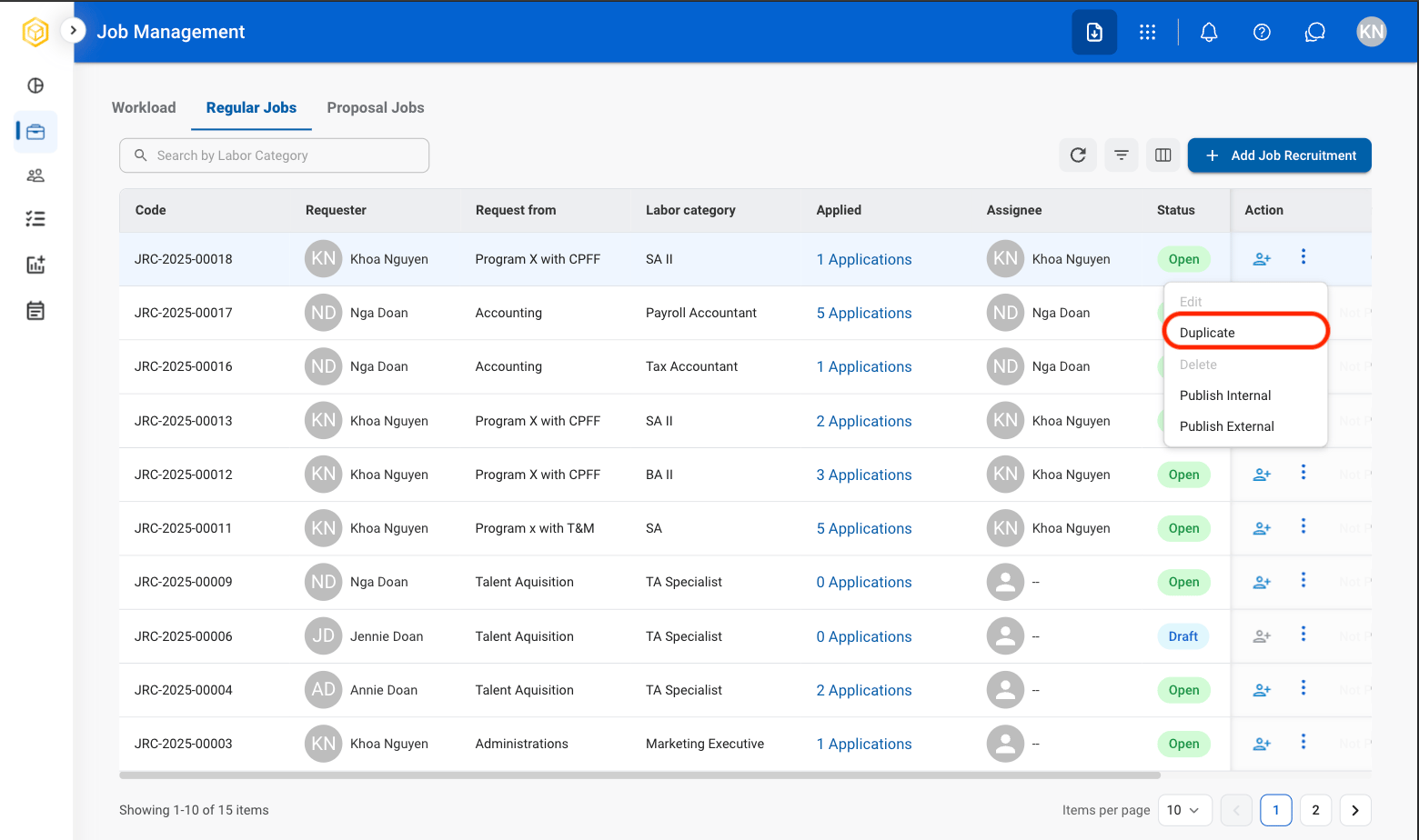
  <Step title="Select Duplicate">
    <Frame>
      <img src="https://mintcdn.com/bizbone/6oPBzRDpo6ZUIAeP/images/R-JM-Duplicate.png?fit=max&auto=format&n=6oPBzRDpo6ZUIAeP&q=85&s=828f435c61b5cb7717122d605cd121c2" alt="R JM Duplicate" width="1560" height="924" data-path="images/R-JM-Duplicate.png" />
    </Frame>
  </Step>

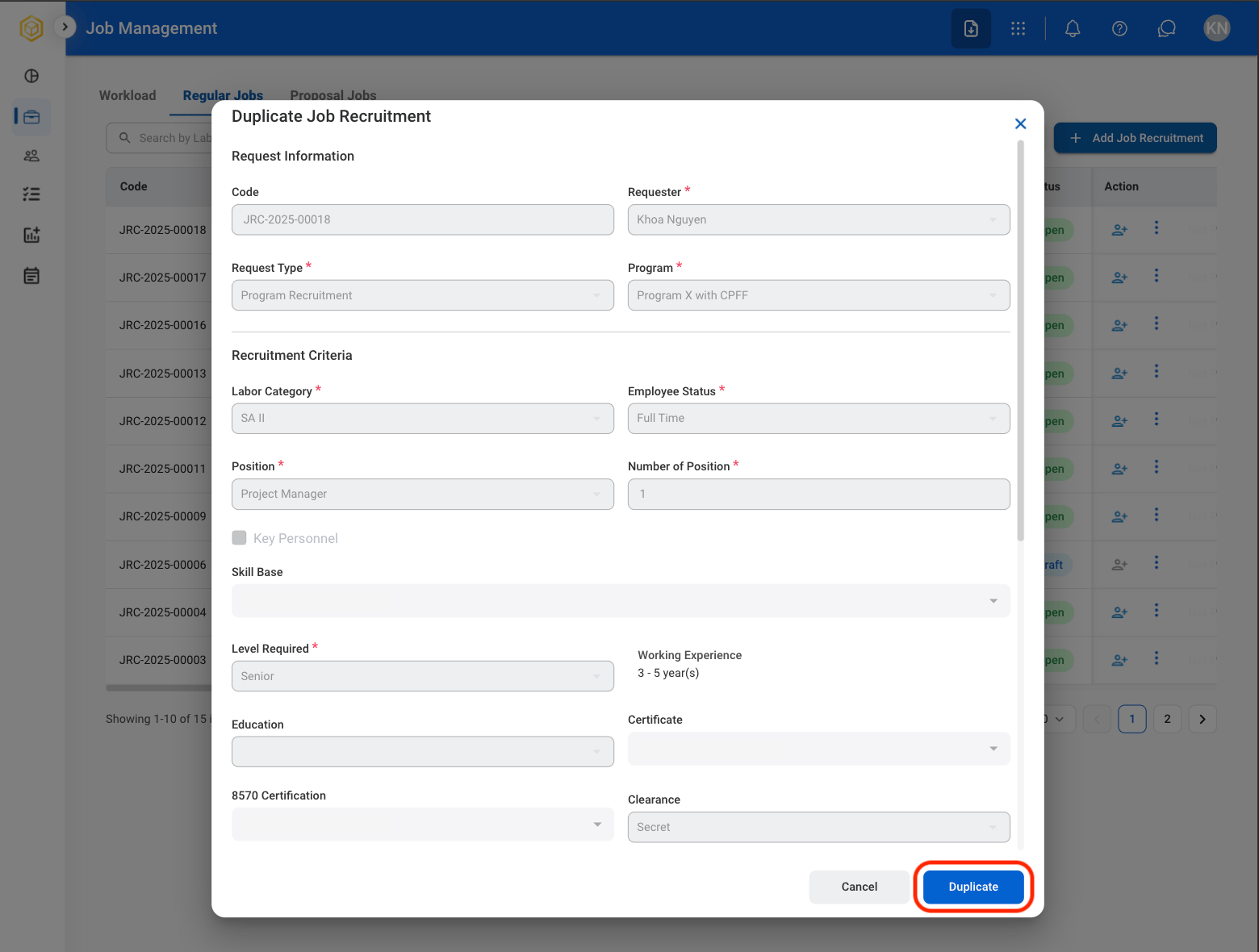
  <Step title="Fill in the required information">
    <Frame>
      <img src="https://mintcdn.com/bizbone/6oPBzRDpo6ZUIAeP/images/R-JM-ConfDuplicate.png?fit=max&auto=format&n=6oPBzRDpo6ZUIAeP&q=85&s=a4491ddc71e0d032959ef049b1122c65" alt="R JM Conf Duplicate" width="1560" height="1180" data-path="images/R-JM-ConfDuplicate.png" />
    </Frame>

    Select **Duplicate** to complete or **Cancel** to exit without saving changes. 
  </Step>
</Steps>

### Publish a Job Posting

<Steps>
  <Step title="Select the ellipsis icon in the Action column">
    <Frame>
      <img src="https://mintcdn.com/bizbone/6oPBzRDpo6ZUIAeP/images/R-JM-VEllip.png?fit=max&auto=format&n=6oPBzRDpo6ZUIAeP&q=85&s=2d95e9f6f01b5d5ac1ebeff991270007" alt="R JM V Ellip" width="1560" height="934" data-path="images/R-JM-VEllip.png" />
    </Frame>
  </Step>

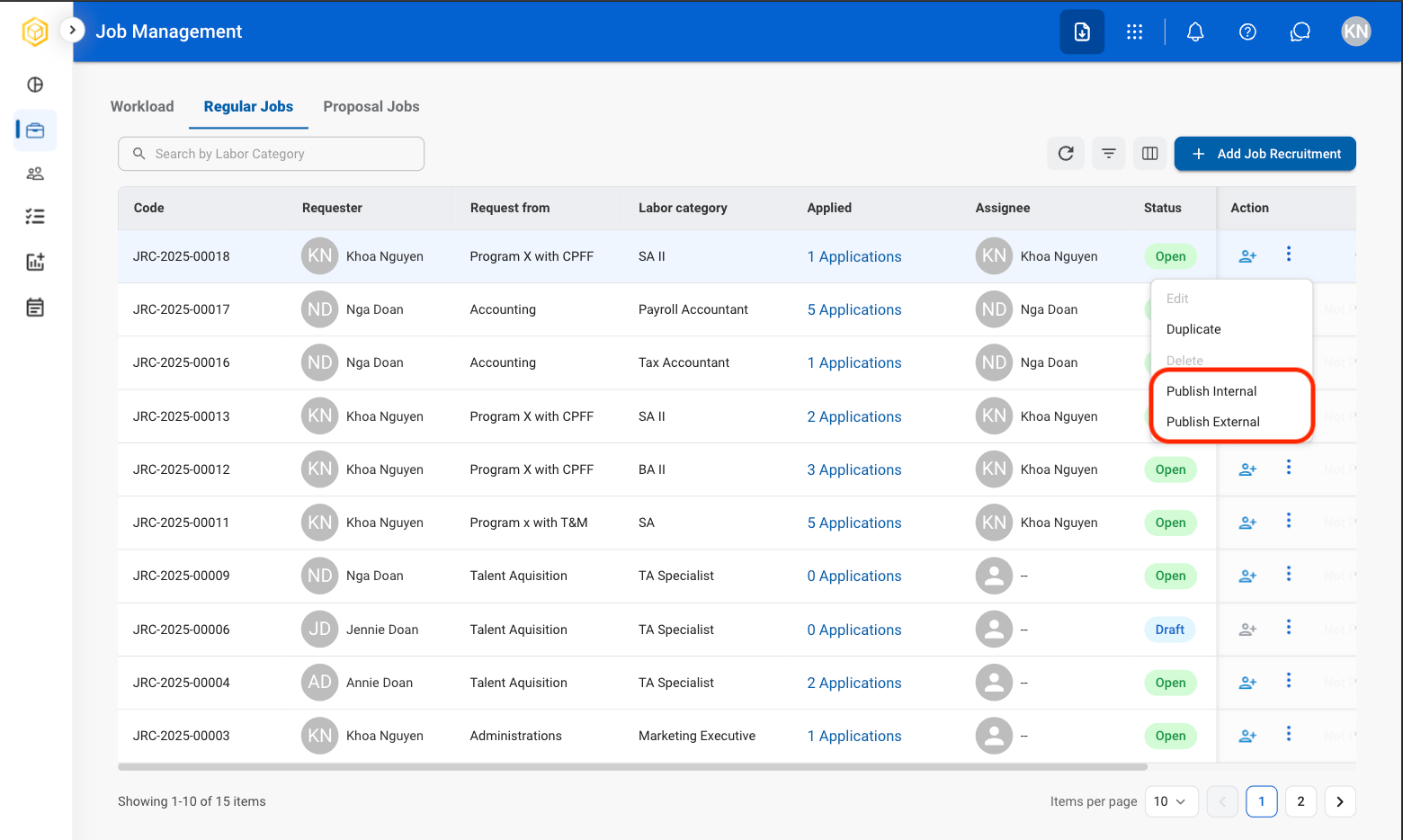
  <Step title="Select a publishing option">
    <Frame>
      <img src="https://mintcdn.com/bizbone/6oPBzRDpo6ZUIAeP/images/R-JM-Publish.png?fit=max&auto=format&n=6oPBzRDpo6ZUIAeP&q=85&s=6c3d093a027173080b9eb35536edcaca" alt="R JM Publish" width="1560" height="934" data-path="images/R-JM-Publish.png" />
    </Frame>

    * **Publish Internal:** Publish the position for viewing by current employees.
    * **Publish External:** Publish the position for viewing by external candidates.
  </Step>

  <Step title="Fill in the required information">
    <Frame>
      <img src="https://mintcdn.com/bizbone/6oPBzRDpo6ZUIAeP/images/R-JM-ConfPublish.png?fit=max&auto=format&n=6oPBzRDpo6ZUIAeP&q=85&s=ff8fa1e799efa68cd05bed2e8aa18391" alt="R JM Conf Publish" width="1560" height="1238" data-path="images/R-JM-ConfPublish.png" />
    </Frame>

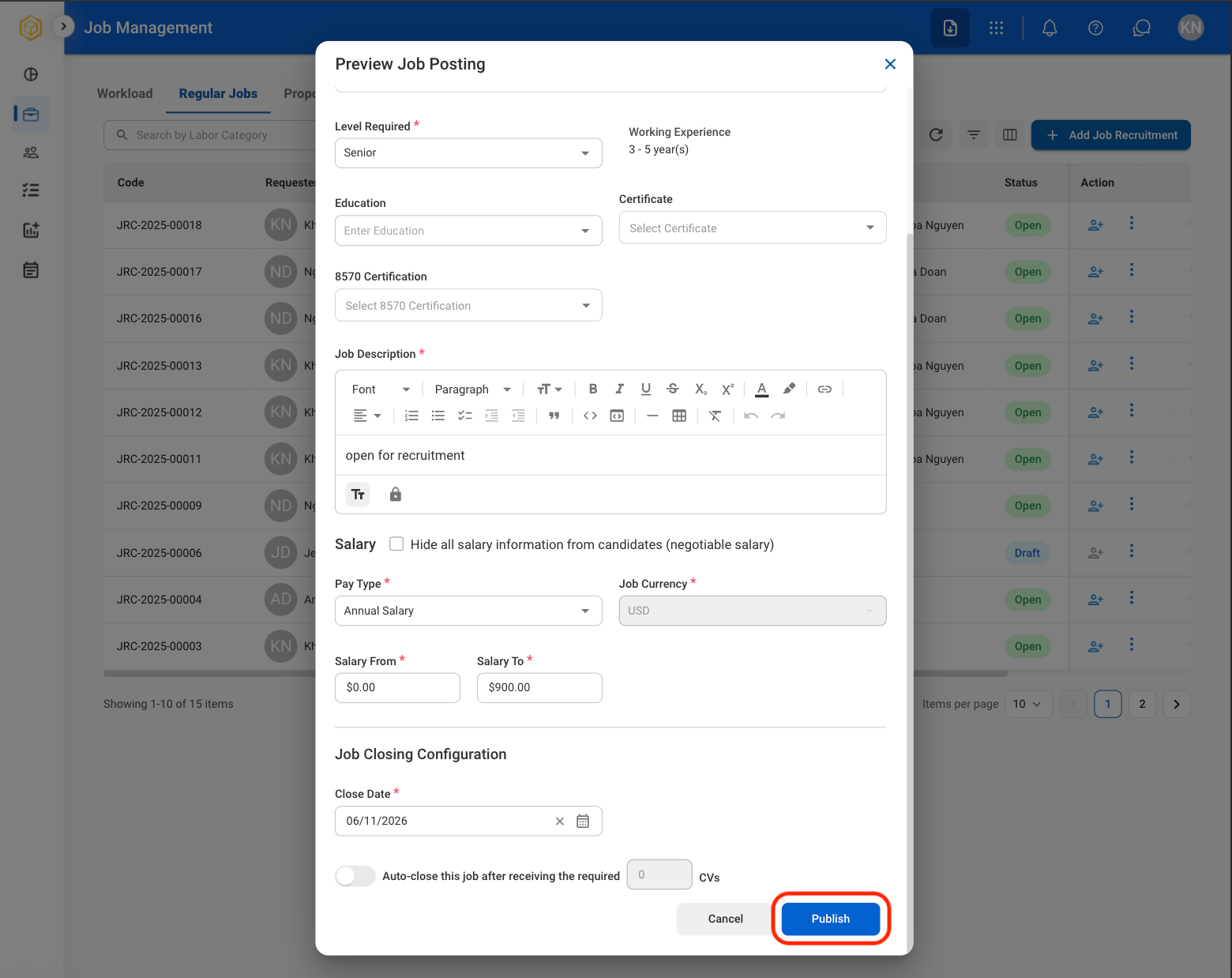
    Select **Publish** to complete or **Cancel** to exit without saving changes. 
  </Step>
</Steps>

### Add Candidate

<Steps>
  <Step title="Select a job">
    <Frame>
      <img src="https://mintcdn.com/bizbone/6oPBzRDpo6ZUIAeP/images/R-JM-Profile.png?fit=max&auto=format&n=6oPBzRDpo6ZUIAeP&q=85&s=170860ffe52908cd251c64ad4c540970" alt="R JM Profile" width="1562" height="934" data-path="images/R-JM-Profile.png" />
    </Frame>

    <Info>
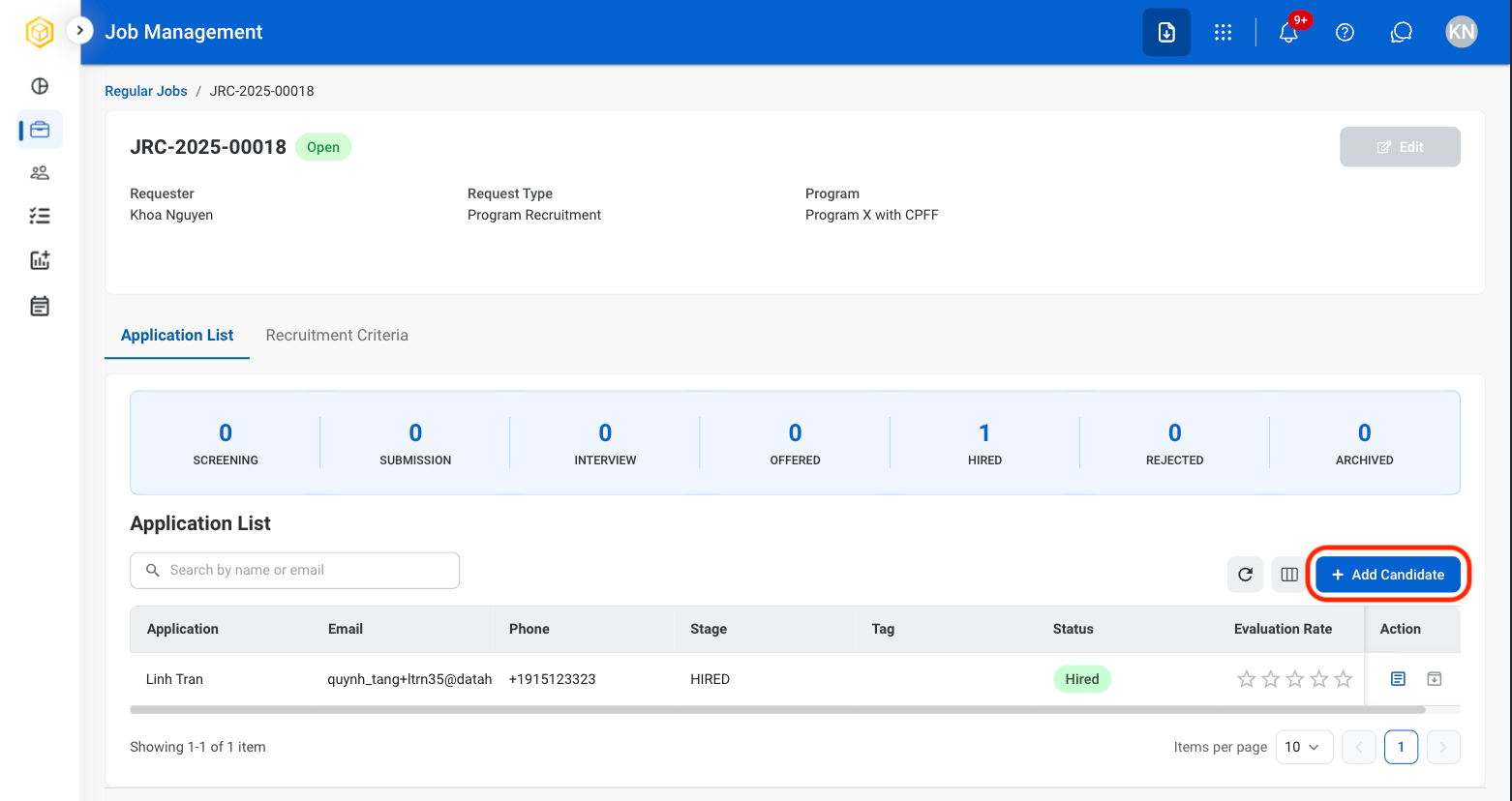
      Only jobs with Open status  enable the Add Candidate option. 
    </Info>
  </Step>

  <Step title="Select Add Candidate">
    <Frame>
      <img src="https://mintcdn.com/bizbone/hVdW0Cdb5EFCxb5_/images/R-JM-Add-Candidate.png?fit=max&auto=format&n=hVdW0Cdb5EFCxb5_&q=85&s=84b657ab29f477557b1265a7e69217c4" alt="R JM Add Candidate" width="1562" height="828" data-path="images/R-JM-Add-Candidate.png" />
    </Frame>
  </Step>

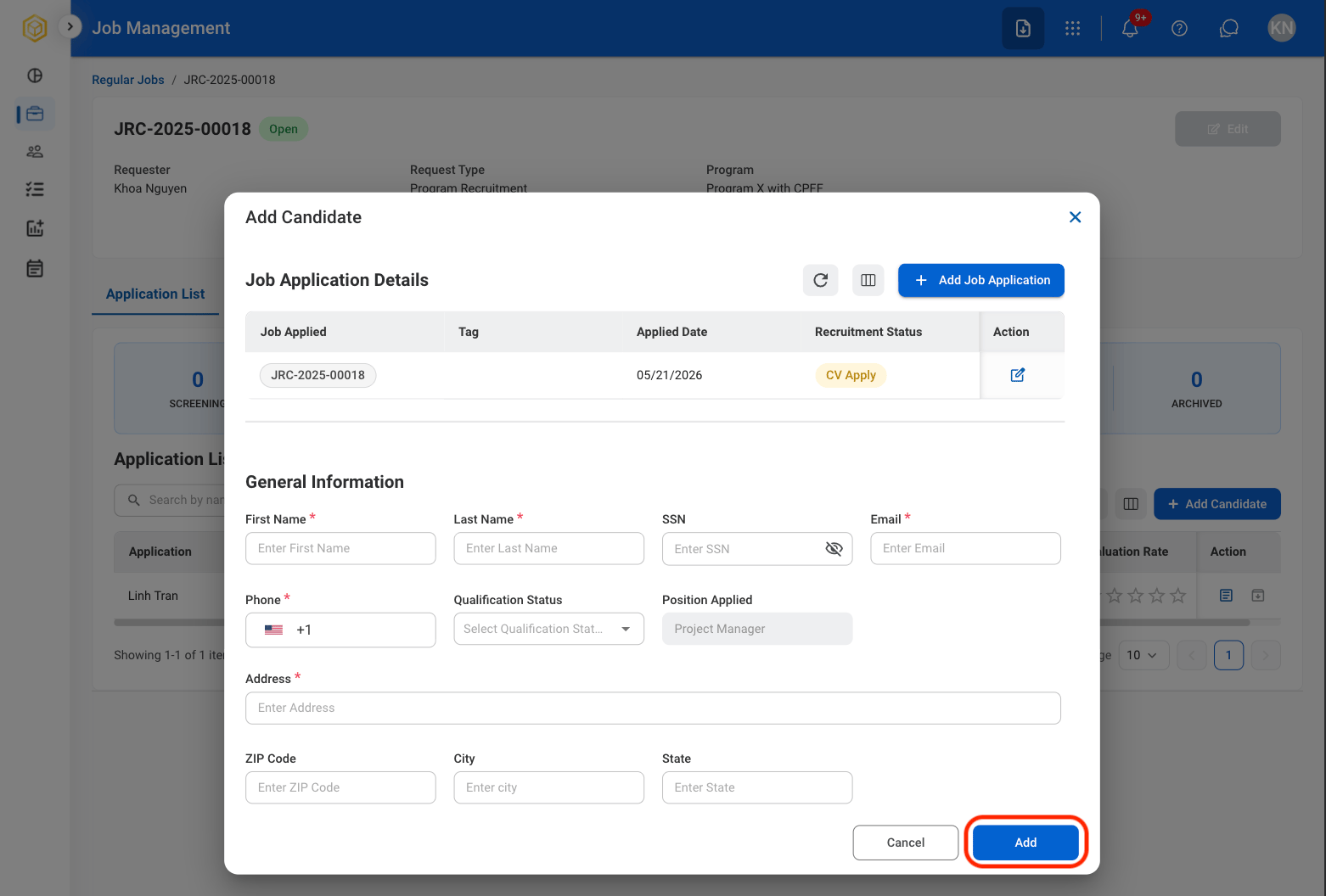
  <Step title="Fill in the required information">
    <Frame>
      <img src="https://mintcdn.com/bizbone/6oPBzRDpo6ZUIAeP/images/R-JM-SaveAC.png?fit=max&auto=format&n=6oPBzRDpo6ZUIAeP&q=85&s=82fbabdff5f8490c022ac8d3bba3e808" alt="R JM Save AC" width="1562" height="1056" data-path="images/R-JM-SaveAC.png" />
    </Frame>

    Select Add to complete or Cancel to exit without saving changes. 
  </Step>
</Steps>

### Quick Add Candidate

<Steps>
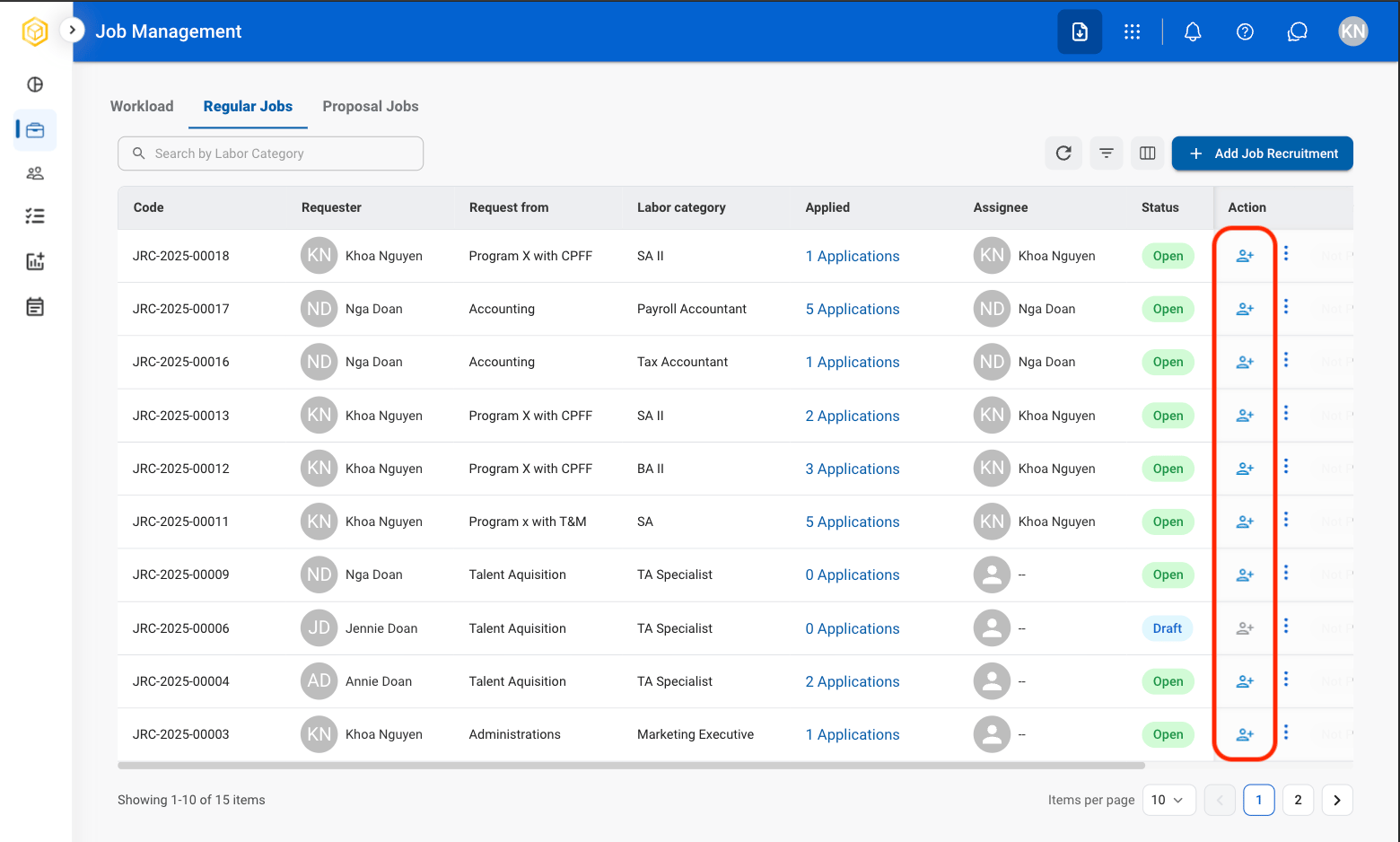
  <Step title="Select the Add icon in the Actions column">
    <Frame>
      <img src="https://mintcdn.com/bizbone/6oPBzRDpo6ZUIAeP/images/R-JM-Quick-Add-Cand.png?fit=max&auto=format&n=6oPBzRDpo6ZUIAeP&q=85&s=9d5782beafc7ab84267d2d500ed1f279" alt="R JM Quick Add Cand" width="1560" height="938" data-path="images/R-JM-Quick-Add-Cand.png" />
    </Frame>
  </Step>

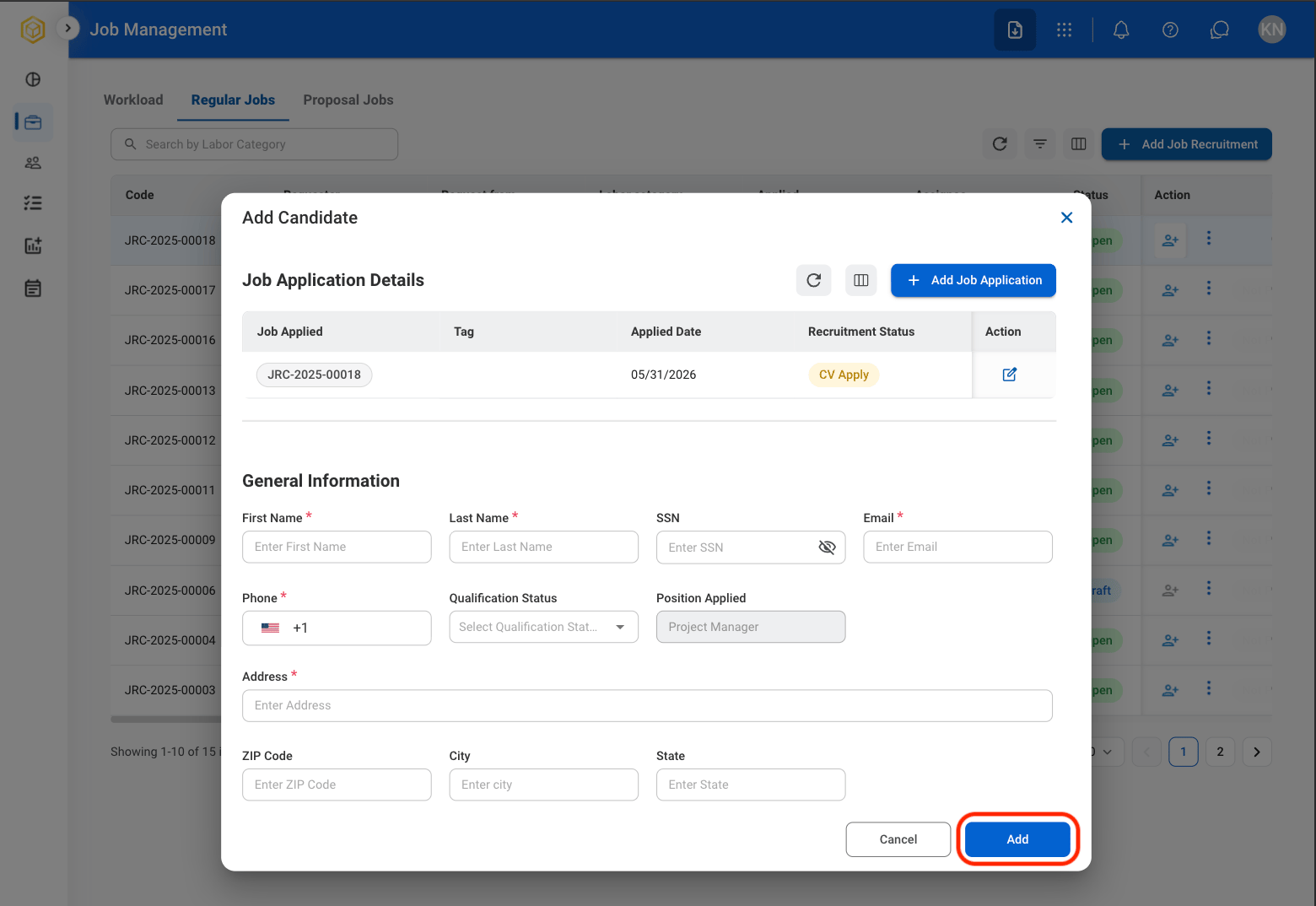
  <Step title="Fill in the required information ">
    <Frame>
      <img src="https://mintcdn.com/bizbone/hVdW0Cdb5EFCxb5_/images/R-JM-ACandidate-Info.png?fit=max&auto=format&n=hVdW0Cdb5EFCxb5_&q=85&s=ea8c466be9f25e464b5a770960bd593e" alt="R JM A Candidate Info" width="1560" height="1074" data-path="images/R-JM-ACandidate-Info.png" />
    </Frame>

    Select **Add** to complete or **Cancel** to exit without saving changes. 
  </Step>
</Steps>

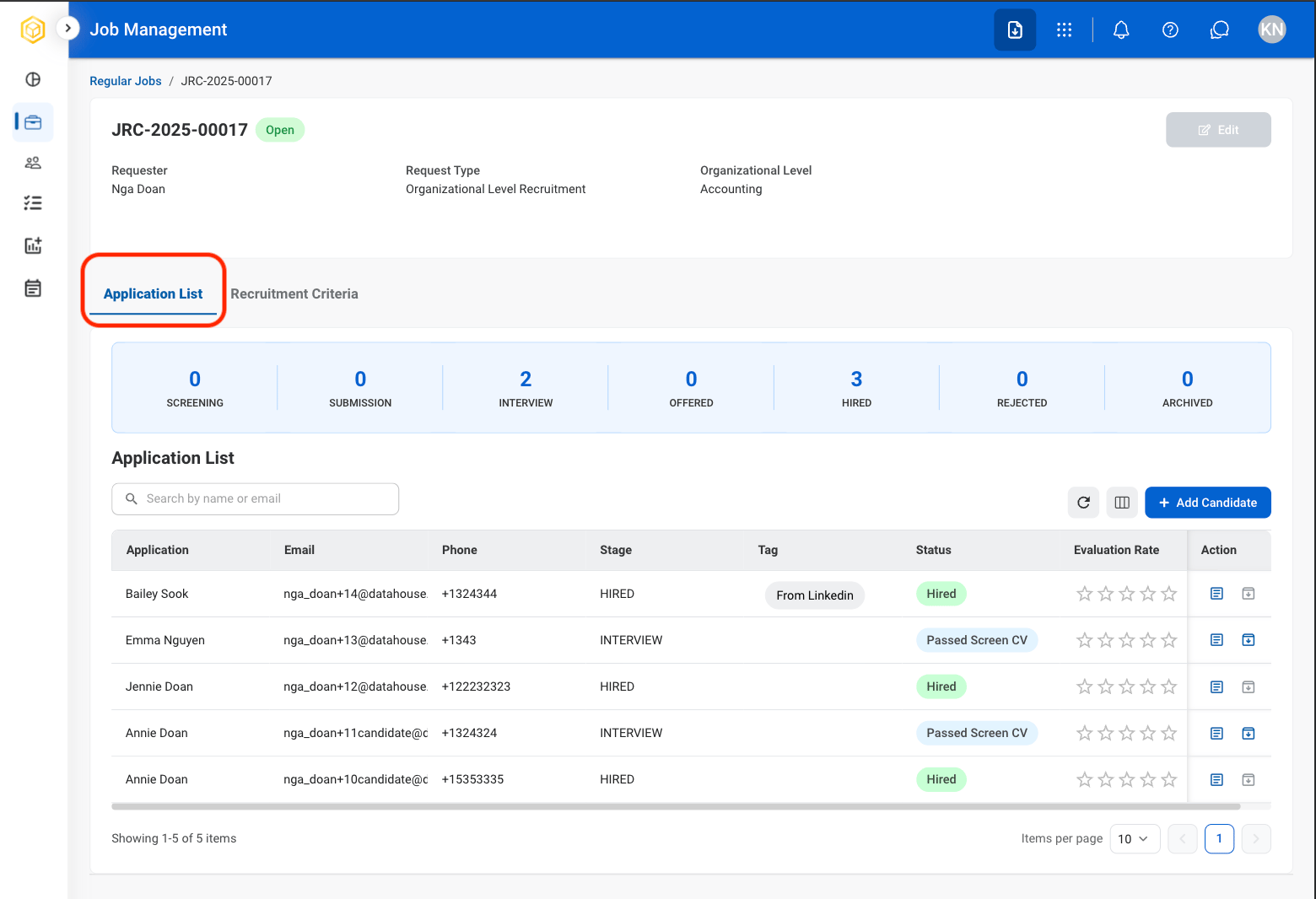
### View Application List

View and manage candidates who have applied for the selected position.
<Steps>
  <Step title="Select a job">
    <Frame>
      <img src="https://mintcdn.com/bizbone/6oPBzRDpo6ZUIAeP/images/R-JM-Profile.png?fit=max&auto=format&n=6oPBzRDpo6ZUIAeP&q=85&s=170860ffe52908cd251c64ad4c540970" alt="R JM Profile" width="1562" height="934" data-path="images/R-JM-Profile.png" />
    </Frame>
  </Step>

  <Step title="Select Application List">
    <Frame>
      <img src="https://mintcdn.com/bizbone/6oPBzRDpo6ZUIAeP/images/R-JM-Application-List.png?fit=max&auto=format&n=6oPBzRDpo6ZUIAeP&q=85&s=9027a687a2548df60ac72f540d445c9e" alt="R JM Application List" width="1560" height="1066" data-path="images/R-JM-Application-List.png" />
    </Frame>
  </Step>
</Steps>

### View Candidate Resume

<Steps>
  <Step title="Select a job">
    <Frame>
      <img src="https://mintcdn.com/bizbone/6oPBzRDpo6ZUIAeP/images/R-JM-Profile.png?fit=max&auto=format&n=6oPBzRDpo6ZUIAeP&q=85&s=170860ffe52908cd251c64ad4c540970" alt="R JM Profile" width="1562" height="934" data-path="images/R-JM-Profile.png" />
    </Frame>
  </Step>

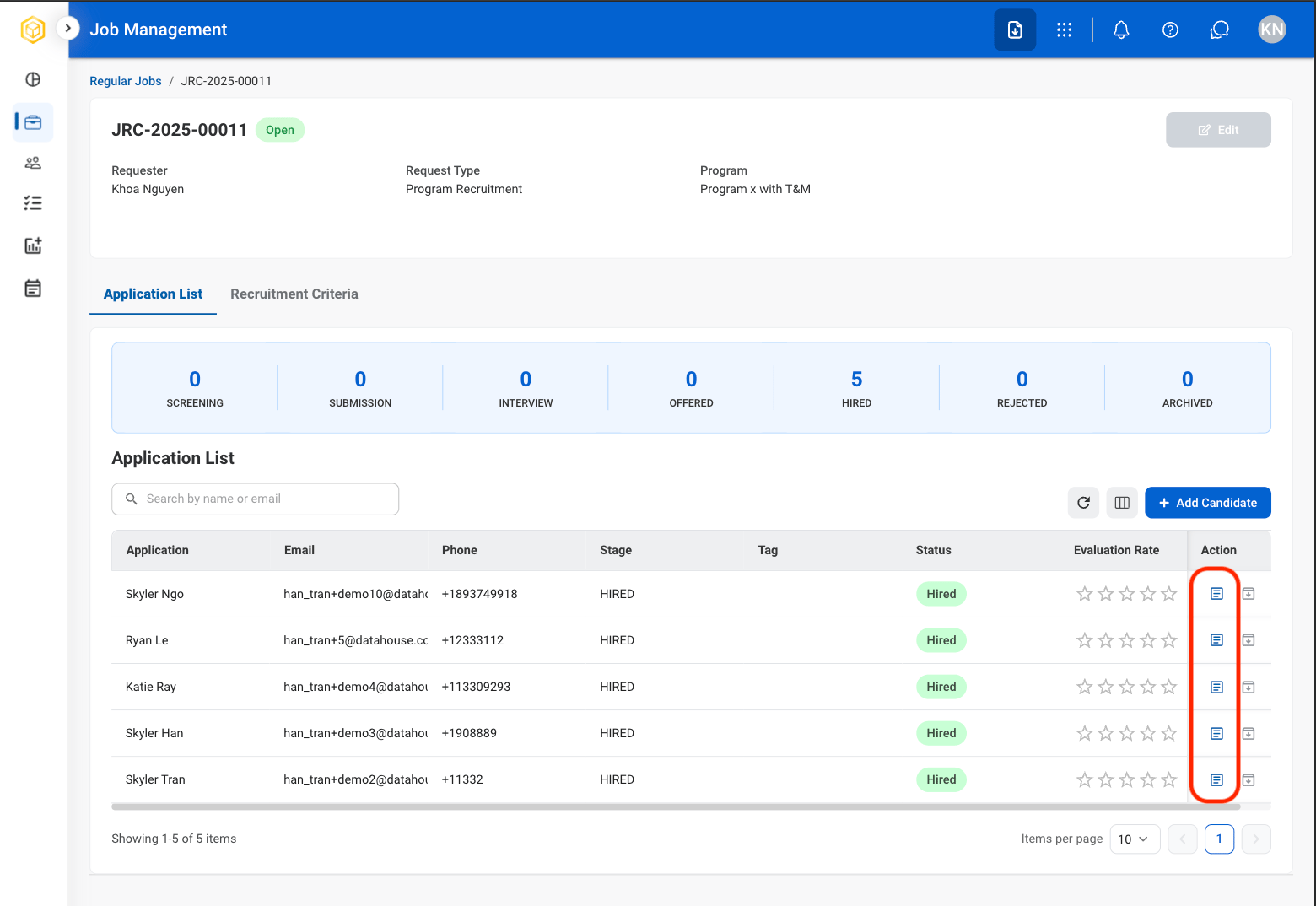
  <Step title="Select the resume icon in the Action column">
    <Frame>
      <img src="https://mintcdn.com/bizbone/6oPBzRDpo6ZUIAeP/images/R-JM-Resume-Download.png?fit=max&auto=format&n=6oPBzRDpo6ZUIAeP&q=85&s=248e8bd2b4a07002d57caff09318901a" alt="R JM Resume Download" width="1560" height="1074" data-path="images/R-JM-Resume-Download.png" />
    </Frame>
  </Step>
</Steps>

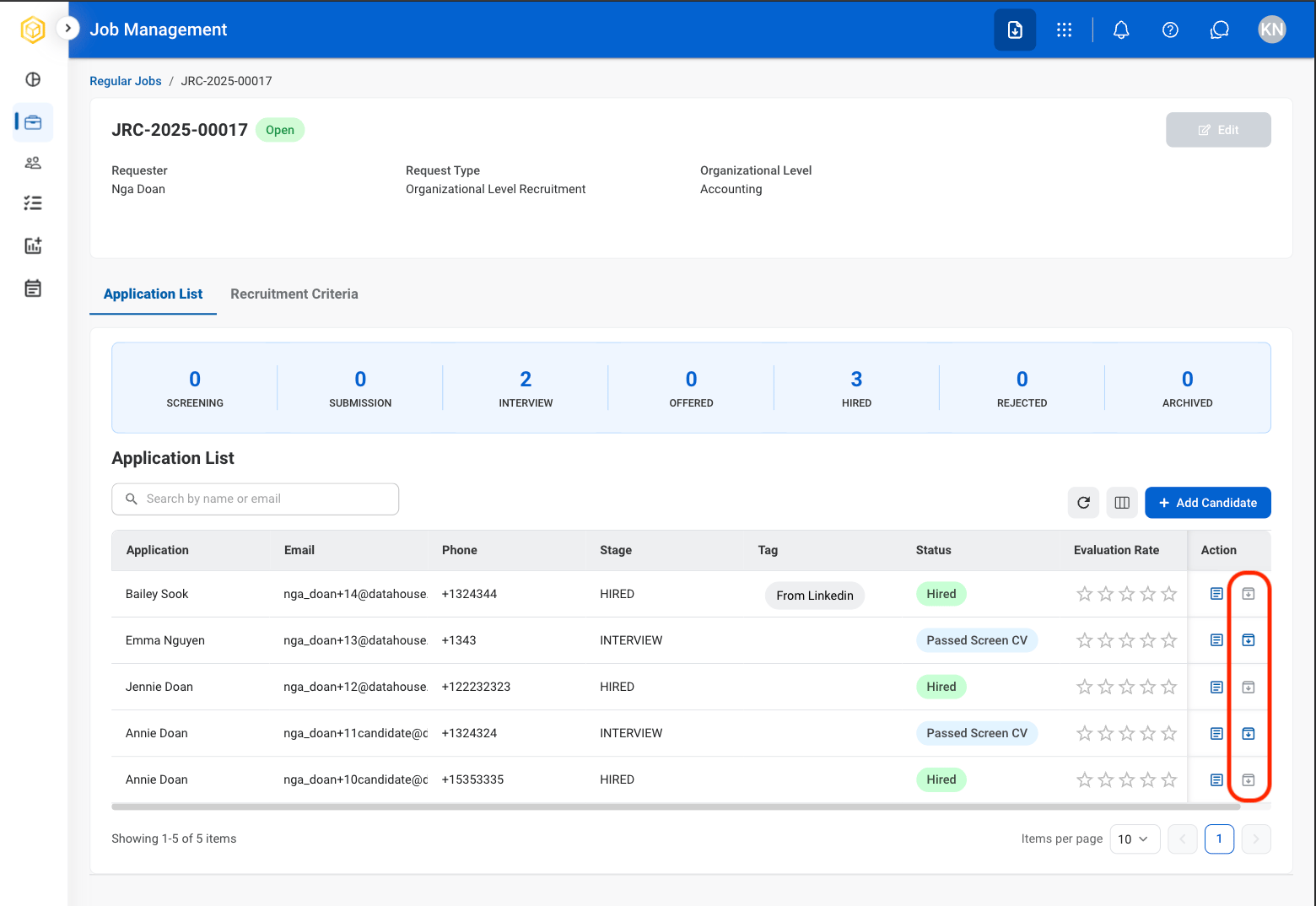
### Archive a Candidate's Application

Move a candidate's application to Candidate Archive.
<Steps>
  <Step title="Select a job">
    <Frame>
      <img src="https://mintcdn.com/bizbone/6oPBzRDpo6ZUIAeP/images/R-JM-Profile.png?fit=max&auto=format&n=6oPBzRDpo6ZUIAeP&q=85&s=170860ffe52908cd251c64ad4c540970" alt="R JM Profile" width="1562" height="934" data-path="images/R-JM-Profile.png" />
    </Frame>
  </Step>

  <Step title="Select the archive icon in the Action column">
    <Frame>
      <img src="https://mintcdn.com/bizbone/6oPBzRDpo6ZUIAeP/images/R-JM-Archive.png?fit=max&auto=format&n=6oPBzRDpo6ZUIAeP&q=85&s=2f7746641a7a7437af4534ce55cb8eeb" alt="R JM Archive" width="1560" height="1074" data-path="images/R-JM-Archive.png" />
    </Frame>
  </Step>

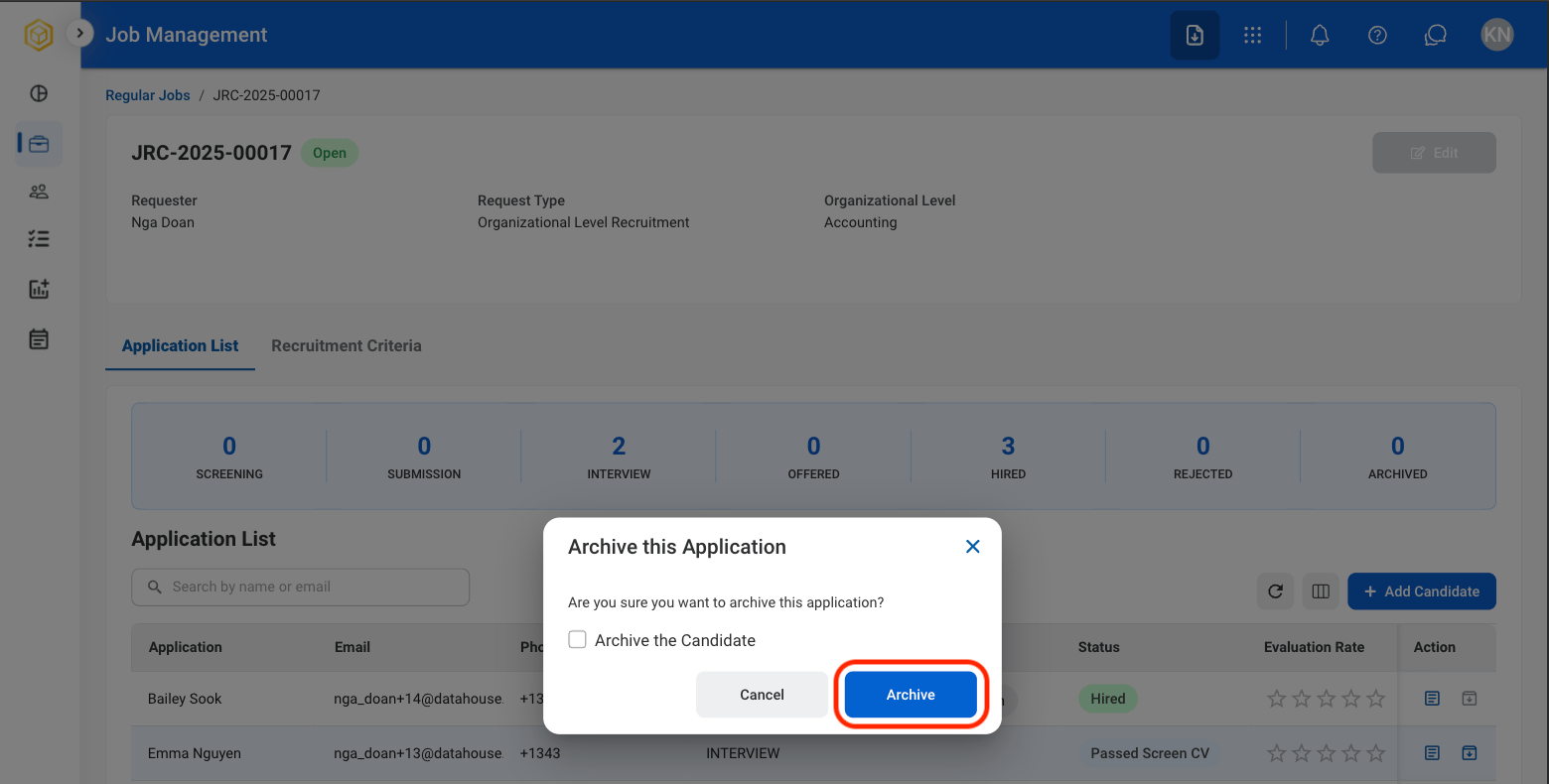
  <Step title="Confirm selection">
    <Frame>
      <img src="https://mintcdn.com/bizbone/6oPBzRDpo6ZUIAeP/images/R-JM-Archive-Confirm.png?fit=max&auto=format&n=6oPBzRDpo6ZUIAeP&q=85&s=d3066331bffa0ebcfad6693899eaadce" alt="R JM Archive Confirm" width="1560" height="790" data-path="images/R-JM-Archive-Confirm.png" />
    </Frame>

    Select **Archive** to complete or **Cancel** to exit without saving changes. 
  </Step>
</Steps>

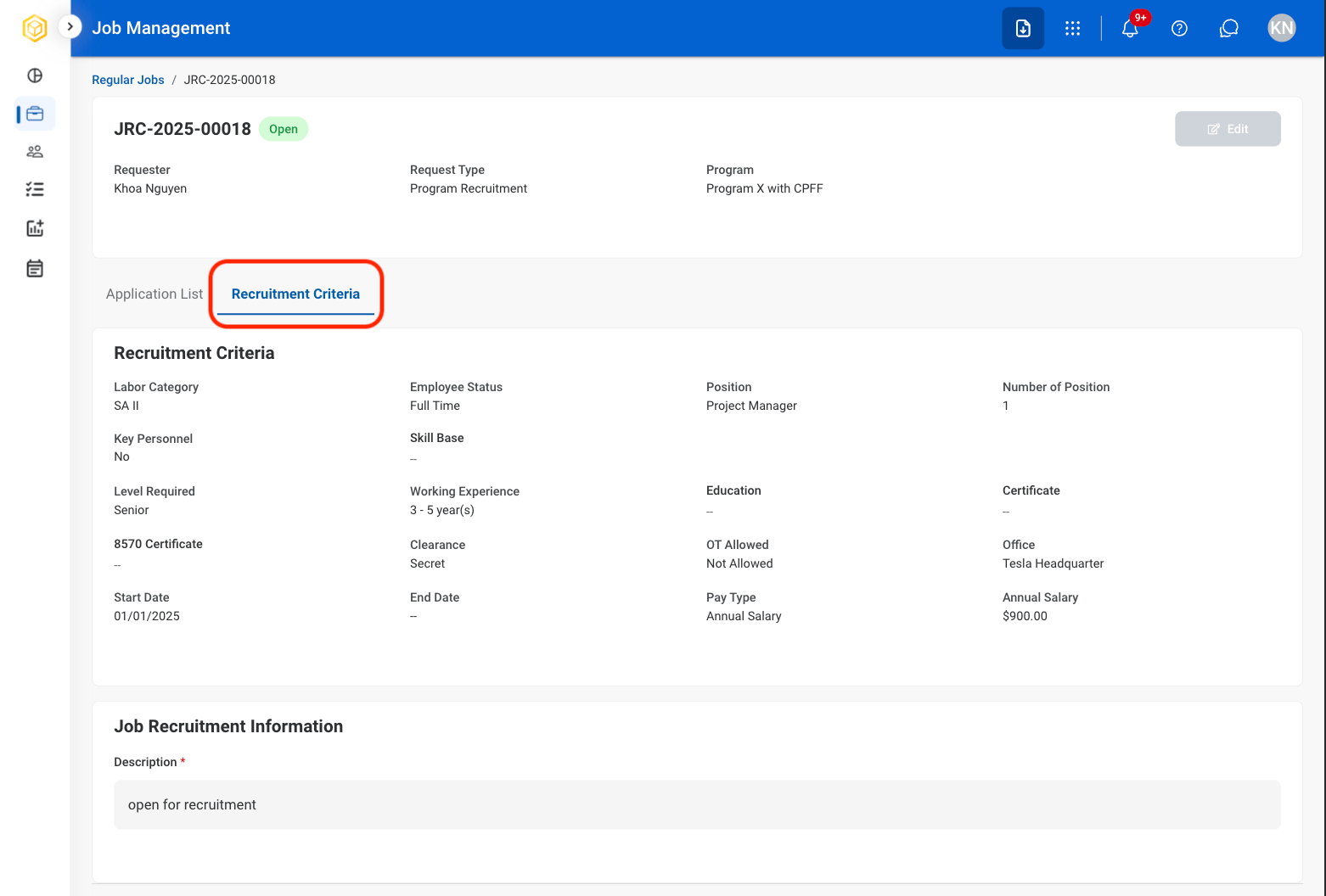
### View Recruitment Criteria

View the qualifications, requirements, and evaluation criteria associated with the selected position.
<Steps>
  <Step title="Select a job">
    <Frame>
      <img src="https://mintcdn.com/bizbone/6oPBzRDpo6ZUIAeP/images/R-JM-Profile.png?fit=max&auto=format&n=6oPBzRDpo6ZUIAeP&q=85&s=170860ffe52908cd251c64ad4c540970" alt="R JM Profile" width="1562" height="934" data-path="images/R-JM-Profile.png" />
    </Frame>
  </Step>

  <Step title="Select Recruitment Criteria">
    <Frame>
      <img src="https://mintcdn.com/bizbone/6oPBzRDpo6ZUIAeP/images/R-JM-RCriteria.png?fit=max&auto=format&n=6oPBzRDpo6ZUIAeP&q=85&s=d0db36c97fbfc76f383722c6b18ffe4f" alt="R JM R Criteria" width="1562" height="1056" data-path="images/R-JM-RCriteria.png" />
    </Frame>
  </Step>
</Steps>