> ## Documentation Index
> Fetch the complete documentation index at: https://docs.bizbone.com/llms.txt
> Use this file to discover all available pages before exploring further.

# Candidate Offer

Manage candidate offers, track offer status, and monitor acceptance throughout the offer lifecycle.

## Offer Status: Draft

The following actions are only available when Candidate Offer Status is in Draft.

### Edit a Candidate's Offer

Make changes to an offer before it is sent to the candidate.
<Steps>
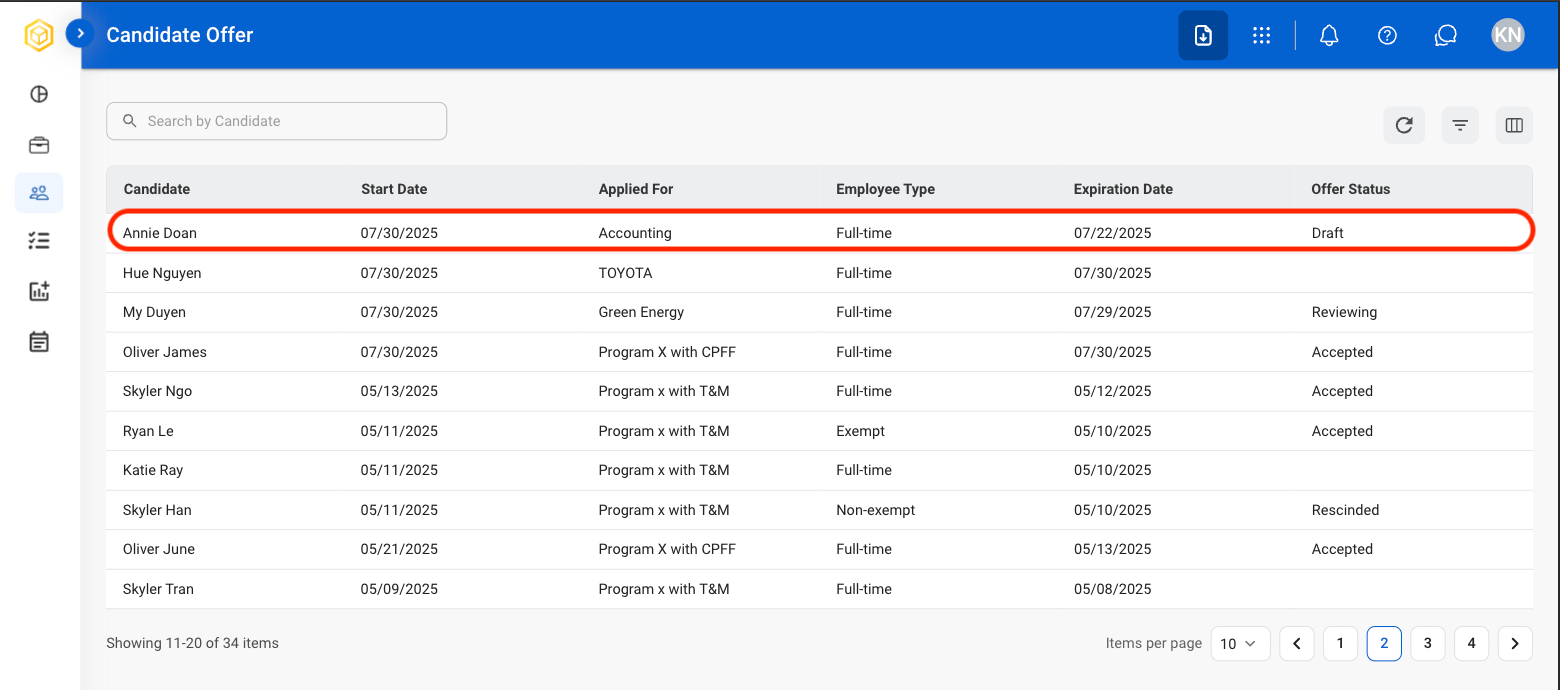
  <Step title="Select a candidate profile">
    <Frame>
      <img src="https://mintcdn.com/bizbone/hVdW0Cdb5EFCxb5_/images/R-CM-Select-Draft.png?fit=max&auto=format&n=hVdW0Cdb5EFCxb5_&q=85&s=af2ed233a81e7448e1b13543f139e4e0" alt="R CM Select Draft" width="1560" height="690" data-path="images/R-CM-Select-Draft.png" />
    </Frame>

    <Info>
      Candidate Offer Status must be Draft in order to edit.
    </Info>
  </Step>

  <Step title="Select Edit">
    <Frame>
      <img src="https://mintcdn.com/bizbone/hVdW0Cdb5EFCxb5_/images/R-CM-Edit-Offer.png?fit=max&auto=format&n=hVdW0Cdb5EFCxb5_&q=85&s=f26e5f1a2927bfdf38b19e6898e1922f" alt="R CM Edit Offer" width="1560" height="948" data-path="images/R-CM-Edit-Offer.png" />
    </Frame>
  </Step>

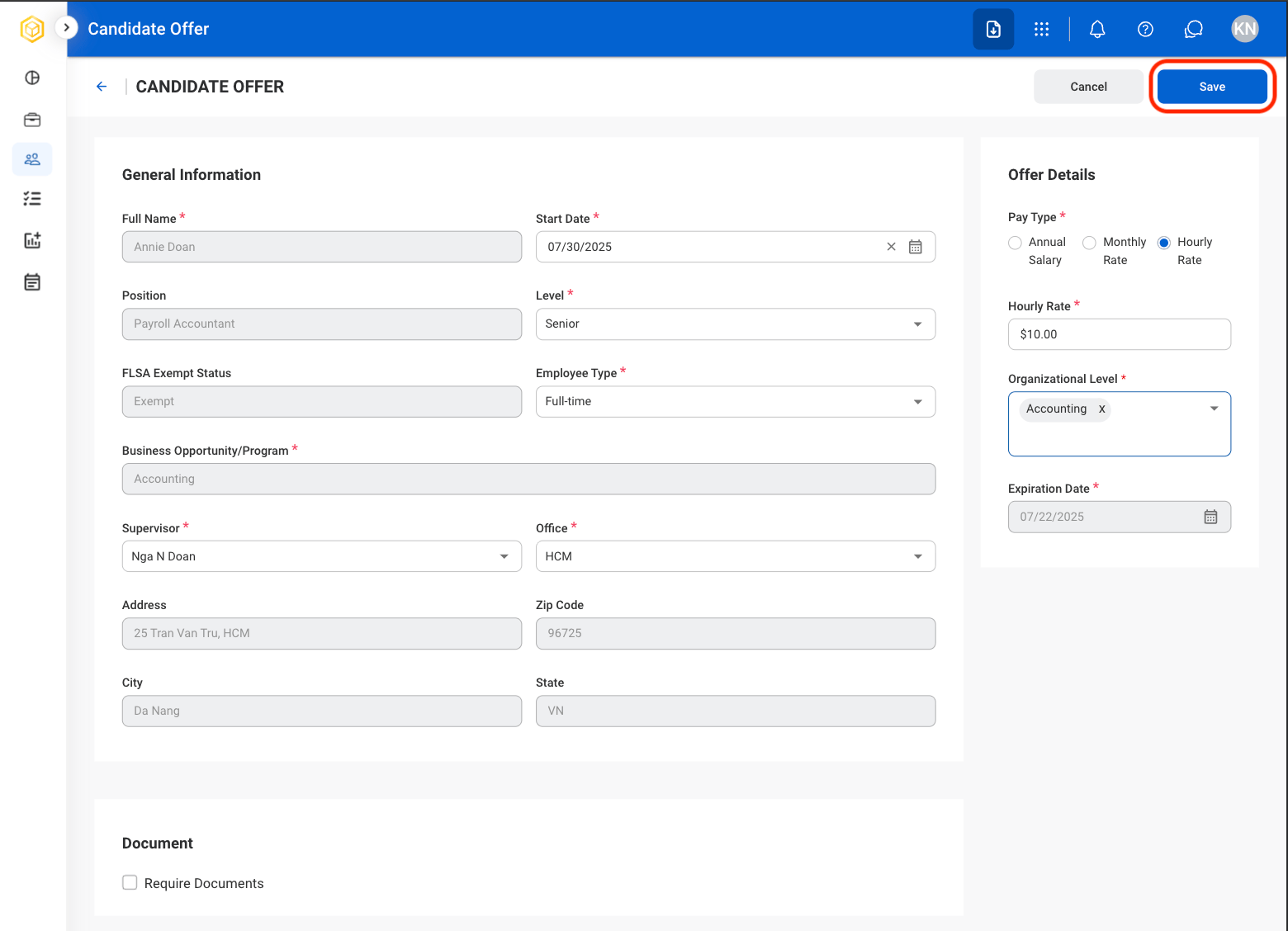
  <Step title="Fill in the required information">
    <Frame>
      <img src="https://mintcdn.com/bizbone/hVdW0Cdb5EFCxb5_/images/R-CM-EditO-Save.png?fit=max&auto=format&n=hVdW0Cdb5EFCxb5_&q=85&s=5d9548d0255011580ec843c0282b0ce5" alt="R CM Edit O Save" width="1560" height="1128" data-path="images/R-CM-EditO-Save.png" />
    </Frame>

    Select **Save** to complete or **Cancel** to exit without saving changes. 
  </Step>
</Steps>

## Submit a Candidate's Offer

Move a candidate forward in the hiring process by sending their profile to HR.

<Steps>
  <Step title="Select a candidate profile">
    <Frame>
      <img src="https://mintcdn.com/bizbone/hVdW0Cdb5EFCxb5_/images/R-CM-Select-Draft.png?fit=max&auto=format&n=hVdW0Cdb5EFCxb5_&q=85&s=af2ed233a81e7448e1b13543f139e4e0" alt="R CM Select Draft" width="1560" height="690" data-path="images/R-CM-Select-Draft.png" />
    </Frame>

    <Info>
      Candidate Offer Status must be Draft to Submit.
    </Info>
  </Step>

  <Step title="Select Submit">
    <Frame>
      <img src="https://mintcdn.com/bizbone/hVdW0Cdb5EFCxb5_/images/P-CO-Submit.png?fit=max&auto=format&n=hVdW0Cdb5EFCxb5_&q=85&s=e3468c972a3c95b688a5fa69dcab3bbd" alt="P CO Submit" width="1560" height="988" data-path="images/P-CO-Submit.png" />
    </Frame>
  </Step>

  <Step title="Confirm the selection">
    <Frame>
      <img src="https://mintcdn.com/bizbone/hVdW0Cdb5EFCxb5_/images/P-CO-Submit-C.png?fit=max&auto=format&n=hVdW0Cdb5EFCxb5_&q=85&s=73f09ca39347ac0107b97cabe4eeaa4f" alt="P CO Submit C" width="1560" height="792" data-path="images/P-CO-Submit-C.png" />
    </Frame>

    Select **Send / Submit** to complete or **Cancel** to exit without saving changes. 

    <Info>
      Once completed, this action cannot be undone. 
    </Info>
  </Step>
</Steps>

## Remove a Candidate from Recruitment

Permanently remove the candidate from the recruitment process. The candidate will not be sent to HR or considered for the position.

<Steps>
  <Step title="Select a candidate profile">
    <Frame>
      <img src="https://mintcdn.com/bizbone/hVdW0Cdb5EFCxb5_/images/R-CM-Select-Draft.png?fit=max&auto=format&n=hVdW0Cdb5EFCxb5_&q=85&s=af2ed233a81e7448e1b13543f139e4e0" alt="R CM Select Draft" width="1560" height="690" data-path="images/R-CM-Select-Draft.png" />
    </Frame>

    <Info>
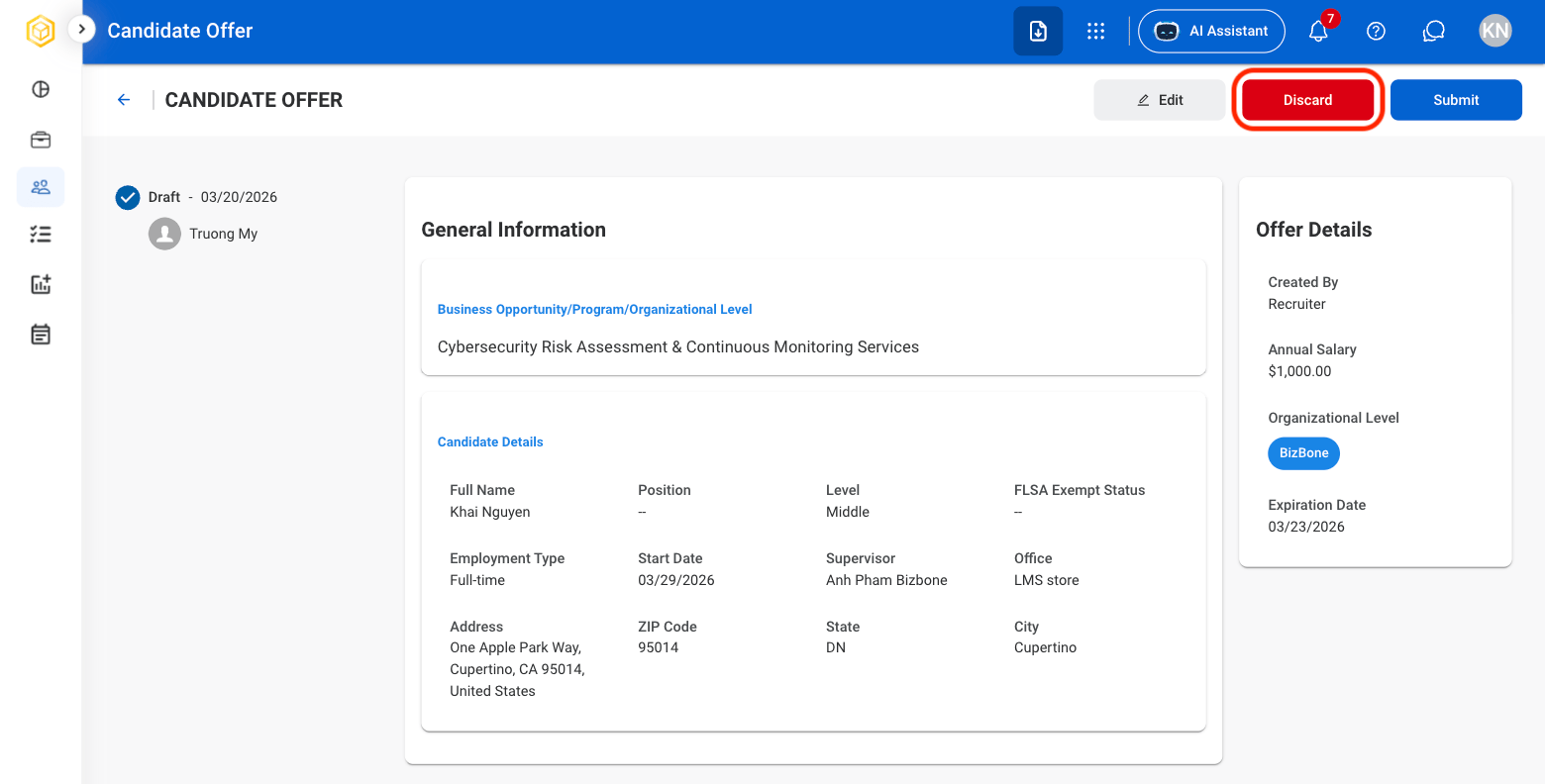
      Candidate Offer Status must be Draft to Discard.
    </Info>
  </Step>

  <Step title="Select Discard">
    <Frame>
      <img src="https://mintcdn.com/bizbone/hVdW0Cdb5EFCxb5_/images/P-CO-Reject.png?fit=max&auto=format&n=hVdW0Cdb5EFCxb5_&q=85&s=4856d58b345db0e43215ffc052ddb55c" alt="P CO Reject" width="1560" height="792" data-path="images/P-CO-Reject.png" />
    </Frame>
  </Step>

  <Step title="Confirm the selection">
    <Frame>
      <img src="https://mintcdn.com/bizbone/hVdW0Cdb5EFCxb5_/images/P-CO-Reject-C.png?fit=max&auto=format&n=hVdW0Cdb5EFCxb5_&q=85&s=8702b0972c364143984ab31f6606ce08" alt="P CO Reject C" width="1560" height="792" data-path="images/P-CO-Reject-C.png" />
    </Frame>

    Select **Discard** to complete or **Cancel** to exit without saving changes. 

    <Info>
      Once completed, this action cannot be undone. 
    </Info>
  </Step>
</Steps>

## Offer Status: Sent to Candidate

The following actions are only available once the candidate has been sent an offer letter.

### Offer Accepted by Candidate

Move a candidate forward in the hiring process by confirming their offer acceptance.
<Steps>
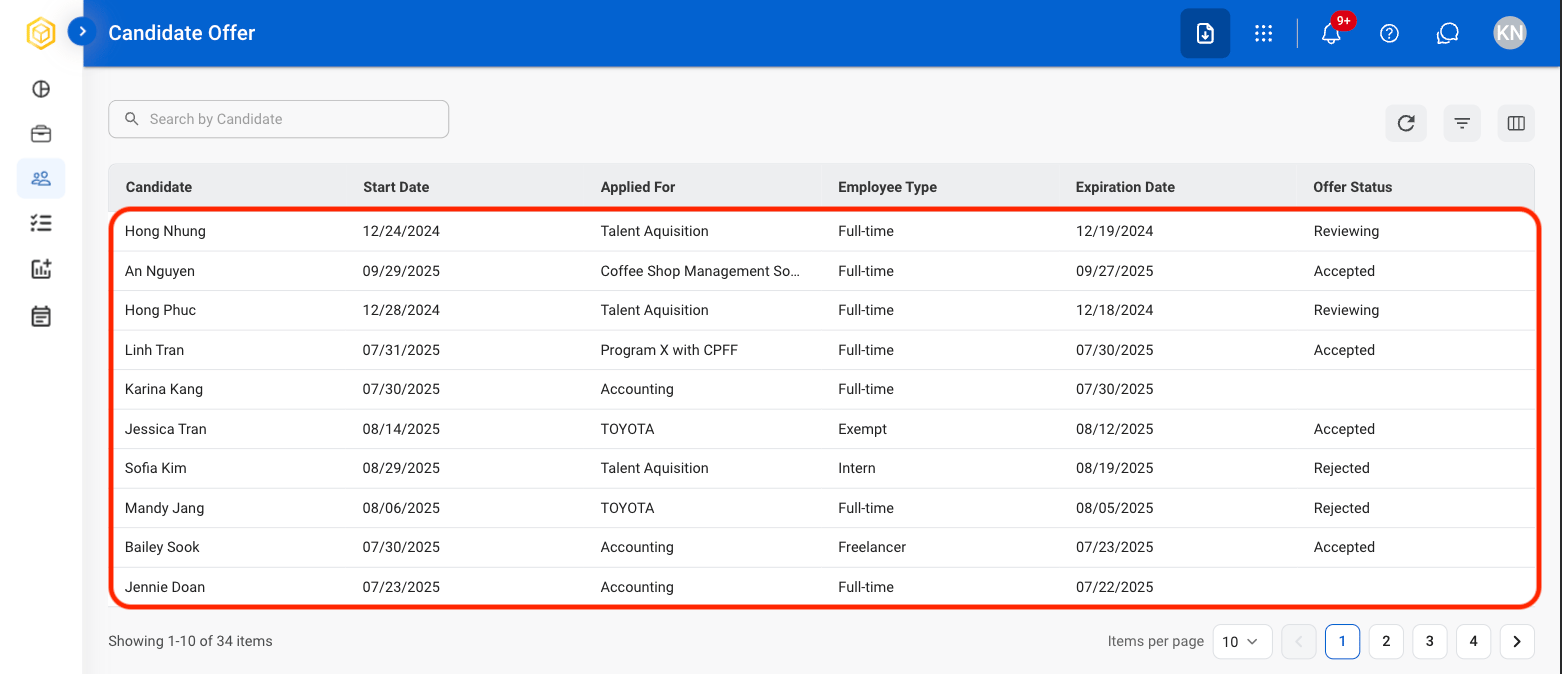
  <Step title="Select a candidate profile">
    <Frame>
      <img src="https://mintcdn.com/bizbone/hVdW0Cdb5EFCxb5_/images/R-CO-Select-Candidate.png?fit=max&auto=format&n=hVdW0Cdb5EFCxb5_&q=85&s=637cf91bf53b83024b2c4f5067891ef8" alt="R CO Select Candidate" width="1562" height="674" data-path="images/R-CO-Select-Candidate.png" />
    </Frame>

    <Info>
      Candidate Offer Status must be Sent to Candidate in order to Accept, Reject, or Rescind. 
    </Info>
  </Step>

  <Step title="Select Accepted by Candidate">
    <Frame>
      <img src="https://mintcdn.com/bizbone/hVdW0Cdb5EFCxb5_/images/P-CO-Accepted.png?fit=max&auto=format&n=hVdW0Cdb5EFCxb5_&q=85&s=d3fc4ee9dcfe14a517e19a224d0c1e38" alt="P CO Accepted" width="1560" height="1112" data-path="images/P-CO-Accepted.png" />
    </Frame>
  </Step>

  <Step title="Upload supporting document(s). ">
    <Frame>
      <img src="https://mintcdn.com/bizbone/hVdW0Cdb5EFCxb5_/images/P-CO-Accepted-C.png?fit=max&auto=format&n=hVdW0Cdb5EFCxb5_&q=85&s=714a23e2dd645d1561578e14a1d0edb6" alt="P CO Accepted C" width="1560" height="866" data-path="images/P-CO-Accepted-C.png" />
    </Frame>

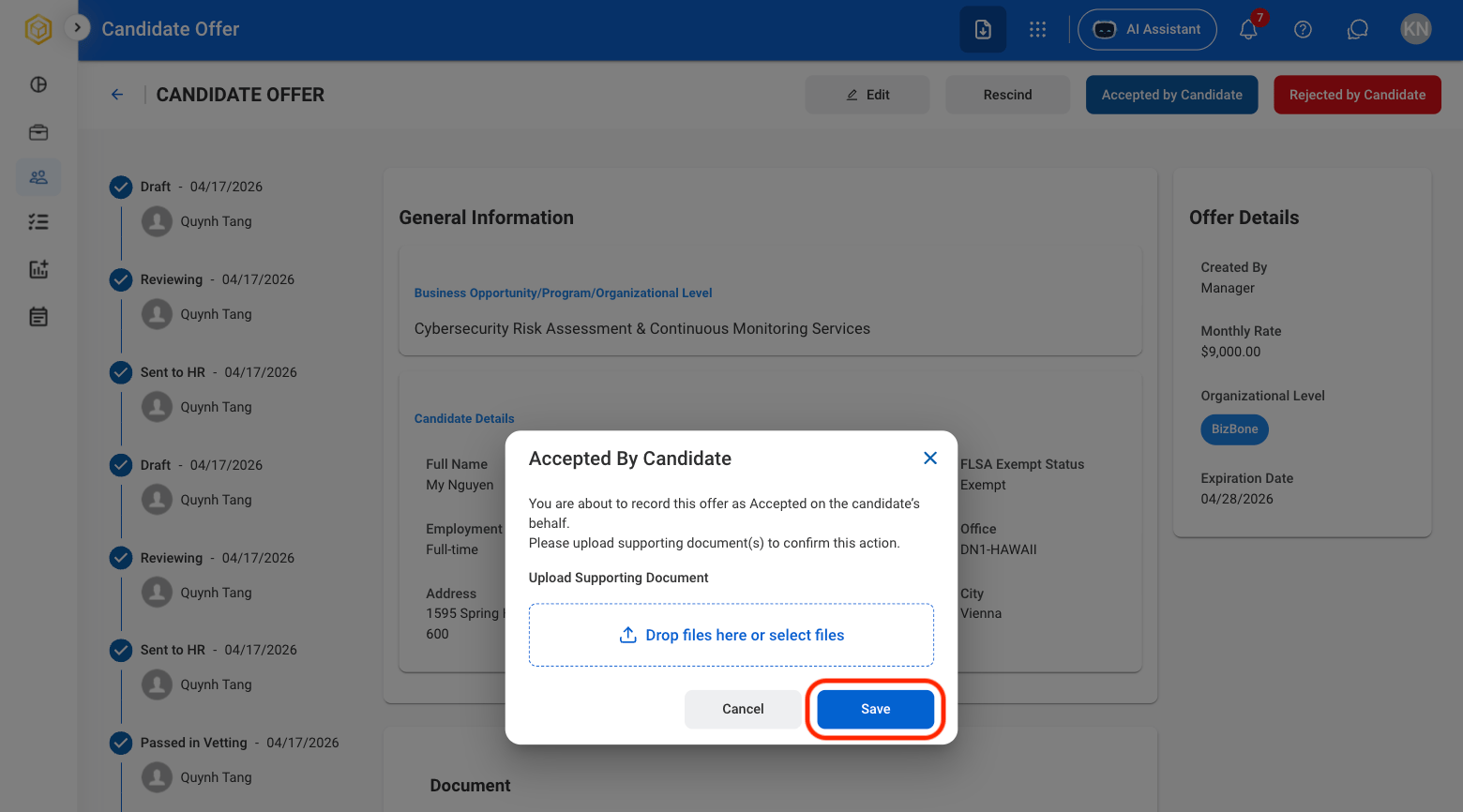
    Select **Save** to complete or **Cancel** to exit without saving changes. 
  </Step>
</Steps>

### Offer Rejected by Candidate

Record that the candidate has declined the employment offer.

<Steps>
  <Step title="Select a candidate profile">
    <Frame>
      <img src="https://mintcdn.com/bizbone/hVdW0Cdb5EFCxb5_/images/R-CO-Select-Candidate.png?fit=max&auto=format&n=hVdW0Cdb5EFCxb5_&q=85&s=637cf91bf53b83024b2c4f5067891ef8" alt="R CO Select Candidate" width="1562" height="674" data-path="images/R-CO-Select-Candidate.png" />
    </Frame>

    <Info>
      Candidate Offer Status must be Sent to Candidate in order to Accept, Reject, or Rescind. 
    </Info>
  </Step>

  <Step title="Select Rejected by Candidate">
    <Frame>
      <img src="https://mintcdn.com/bizbone/hVdW0Cdb5EFCxb5_/images/P-CO-Rejected.png?fit=max&auto=format&n=hVdW0Cdb5EFCxb5_&q=85&s=9bedeca88df73fd33f6e099625266b63" alt="P CO Rejected" width="1560" height="768" data-path="images/P-CO-Rejected.png" />
    </Frame>
  </Step>

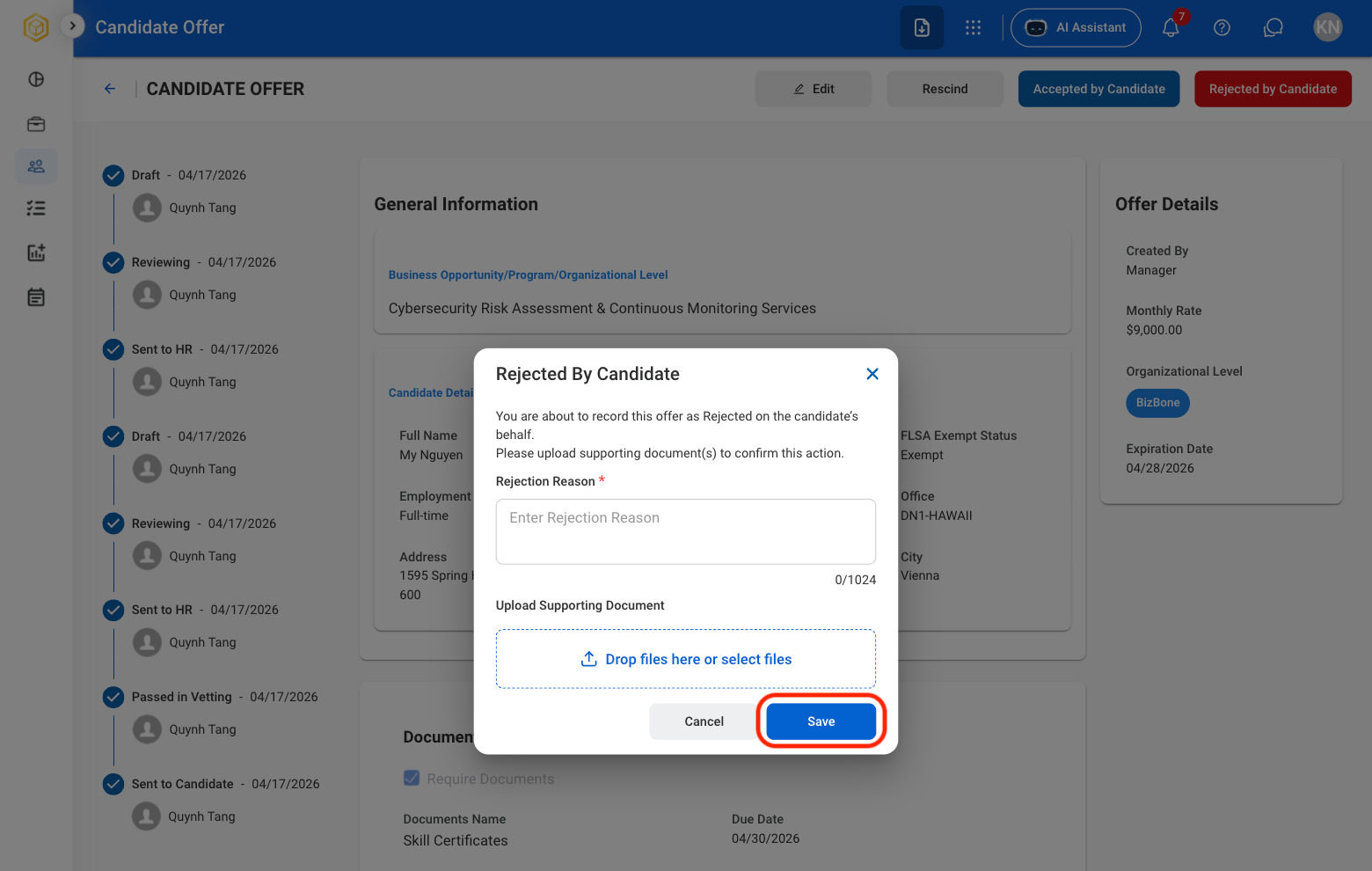
  <Step title="Upload rejection reason and supporting document(s). ">
    <Frame>
      <img src="https://mintcdn.com/bizbone/hVdW0Cdb5EFCxb5_/images/P-CO-Rejected-C.png?fit=max&auto=format&n=hVdW0Cdb5EFCxb5_&q=85&s=56fd9044e97e71cd6c179c4c6184dc38" alt="P CO Rejected C" width="1560" height="990" data-path="images/P-CO-Rejected-C.png" />
    </Frame>

    Select **Save** to complete or **Cancel** to exit without saving changes. 
  </Step>
</Steps>

### Rescind an Offer

Withdraw the employment offer and discontinue the offer process.

<Steps>
  <Step title="Select a candidate profile">
    <Frame>
      <img src="https://mintcdn.com/bizbone/hVdW0Cdb5EFCxb5_/images/R-CO-Select-Candidate.png?fit=max&auto=format&n=hVdW0Cdb5EFCxb5_&q=85&s=637cf91bf53b83024b2c4f5067891ef8" alt="R CO Select Candidate" width="1562" height="674" data-path="images/R-CO-Select-Candidate.png" />
    </Frame>

    <Info>
      Candidate Offer Status must be Sent to Candidate in order to Accept, Reject, or Rescind. 
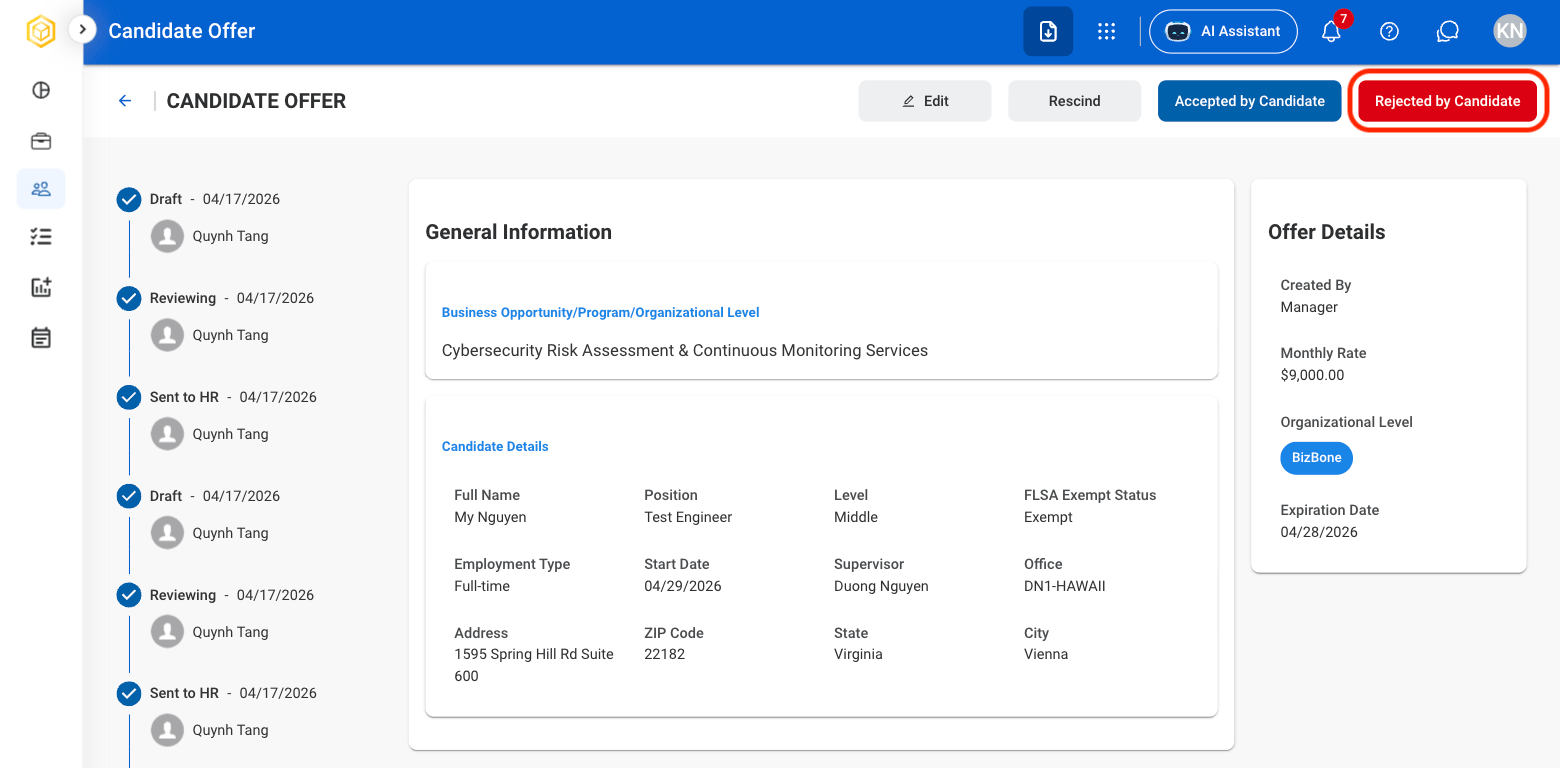
    </Info>
  </Step>

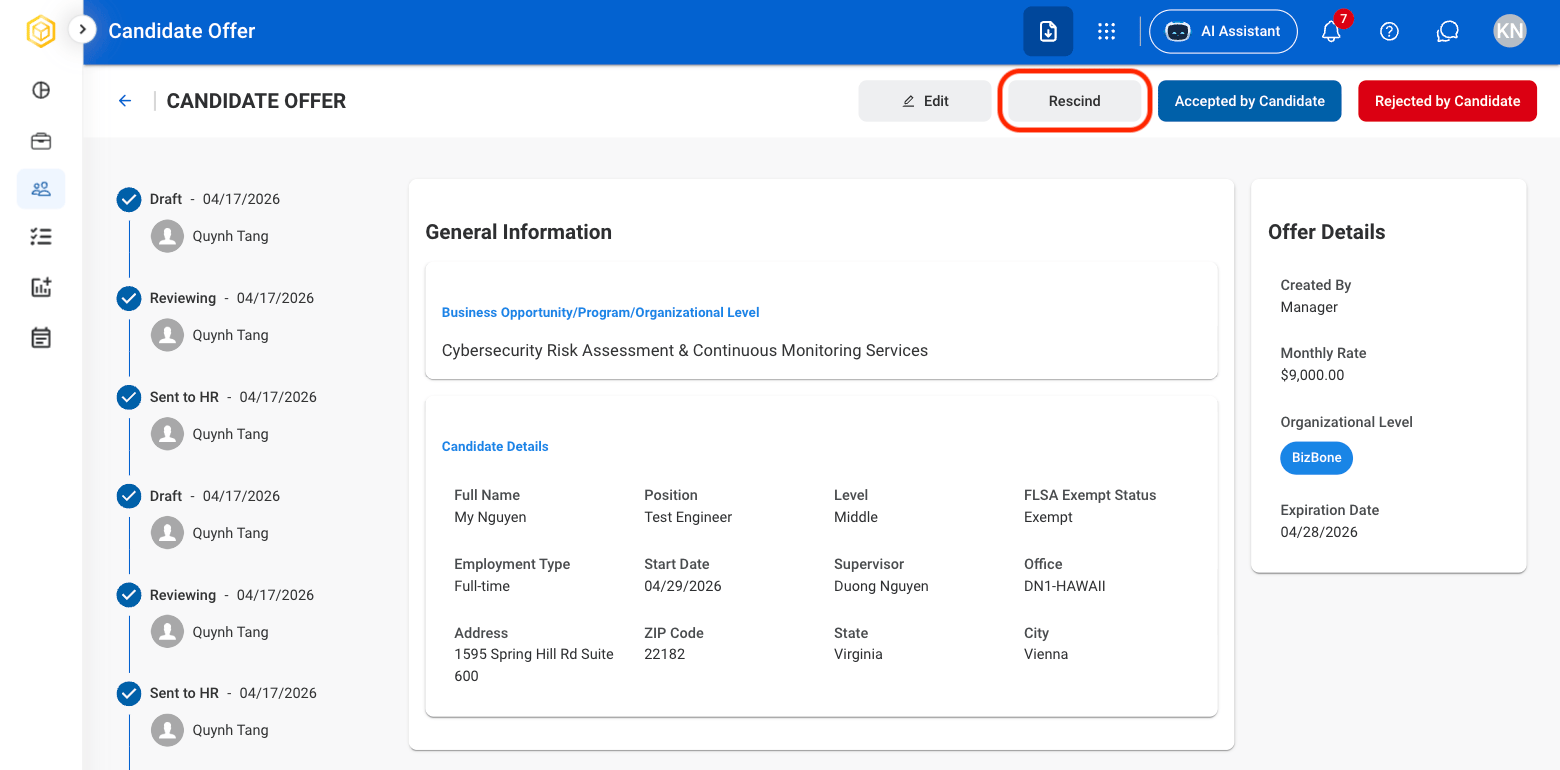
  <Step title="Select Rescind">
    <Frame>
      <img src="https://mintcdn.com/bizbone/hVdW0Cdb5EFCxb5_/images/P-CO-Rescind.png?fit=max&auto=format&n=hVdW0Cdb5EFCxb5_&q=85&s=50852c9efe442c1ff6dd9e2e658b210c" alt="P CO Rescind" width="1560" height="770" data-path="images/P-CO-Rescind.png" />
    </Frame>
  </Step>

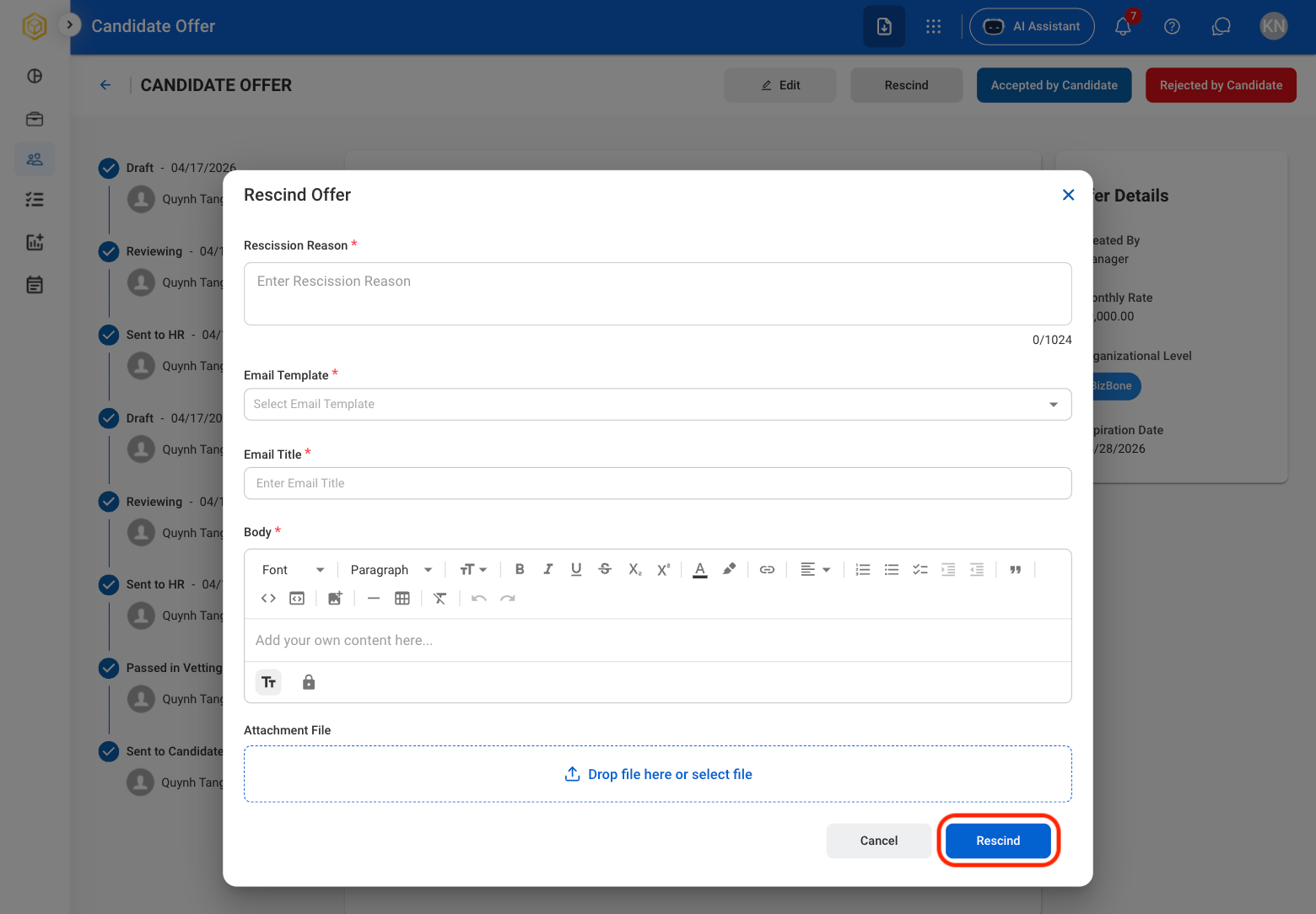
  <Step title="Fill in the required information ">
    <Frame>
      <img src="https://mintcdn.com/bizbone/hVdW0Cdb5EFCxb5_/images/P-CO-Rescind-C.png?fit=max&auto=format&n=hVdW0Cdb5EFCxb5_&q=85&s=4064da74d47a4000575d8d00477ed356" alt="P CO Rescind C" width="1560" height="1084" data-path="images/P-CO-Rescind-C.png" />
    </Frame>

    Provide a Rescission Reason and select the appropriate email template. Select **Rescind** to withdraw the offer and send the  rescission email to the candidate, or **Cancel** to exit without making changes.
  </Step>
</Steps>