> ## Documentation Index
> Fetch the complete documentation index at: https://docs.bizbone.com/llms.txt
> Use this file to discover all available pages before exploring further.

# Third Party

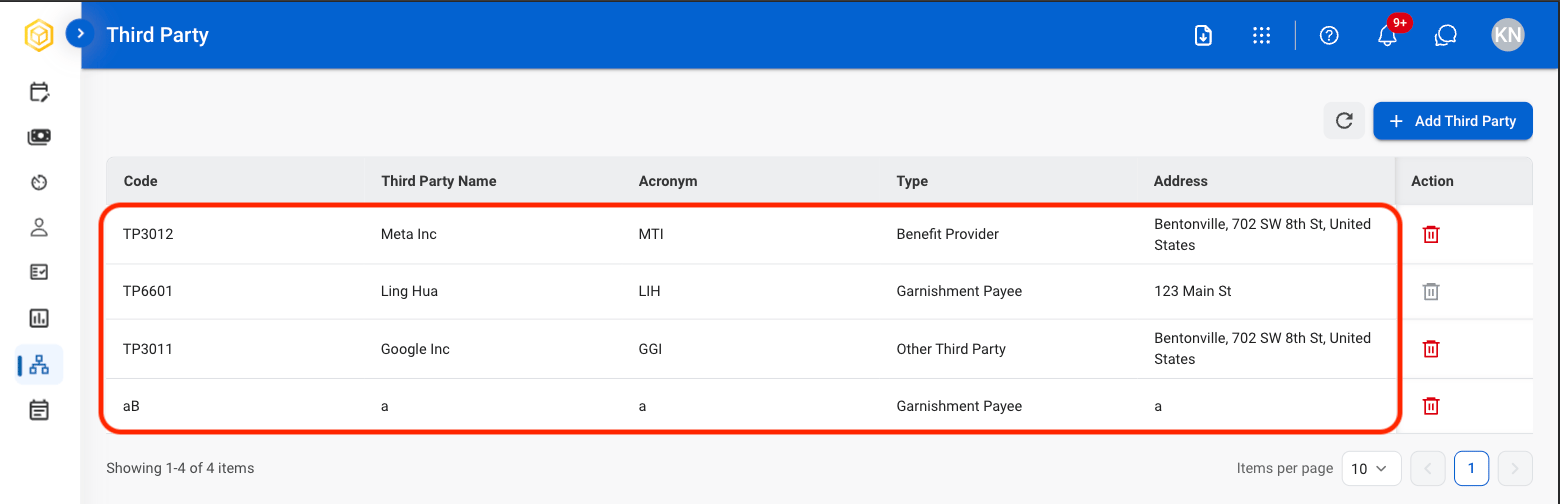
Manage interactions with third-party vendors or services related to payroll, such as tax agencies, benefits providers, and contractors. 

## View Third Party Information

<Steps>
  <Step title="Navigate to Third Party">
    <Frame>
      <img src="https://mintcdn.com/bizbone/hVdW0Cdb5EFCxb5_/images/P-Third-Party.png?fit=max&auto=format&n=hVdW0Cdb5EFCxb5_&q=85&s=0b1b857a0f5bcbc724828fc600e83034" alt="P Third Party" width="1560" height="528" data-path="images/P-Third-Party.png" />
    </Frame>
  </Step>

  <Step title="Select third party">
    <Frame>
      <img src="https://mintcdn.com/bizbone/hVdW0Cdb5EFCxb5_/images/P-TP-View.png?fit=max&auto=format&n=hVdW0Cdb5EFCxb5_&q=85&s=17750eb707cedc0bcbe551d58bc3ea33" alt="P TP View" width="1560" height="504" data-path="images/P-TP-View.png" />
    </Frame>
  </Step>
</Steps>

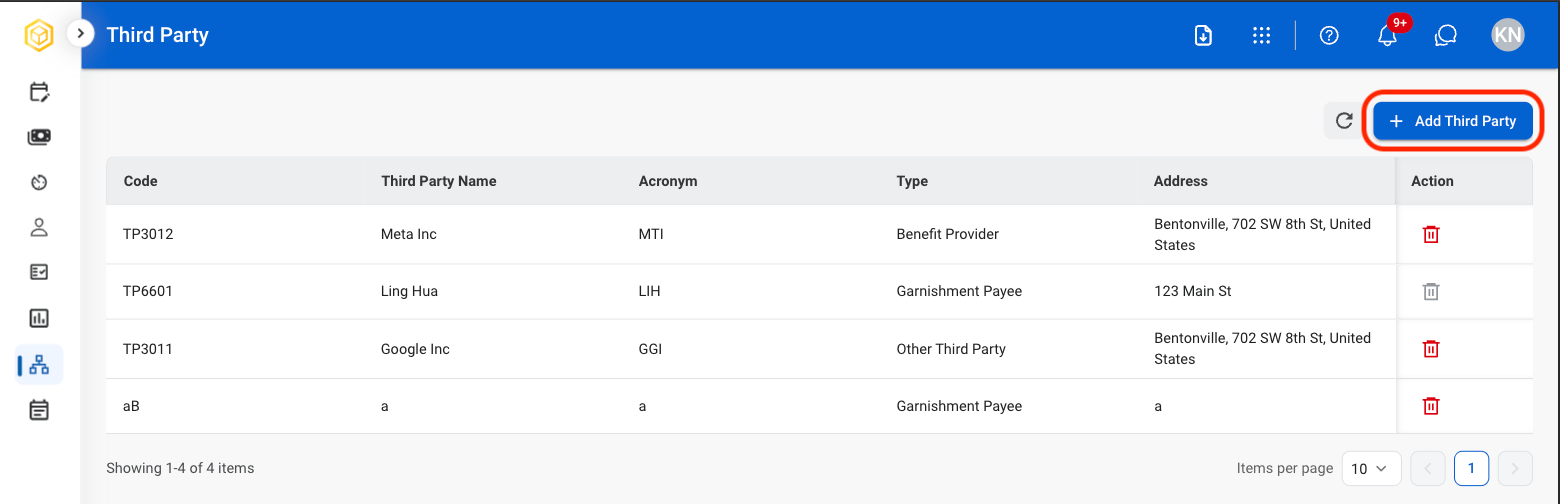
## Add Third Party

<Steps>
  <Step title="Select Add Third Party">
    <Frame>
      <img src="https://mintcdn.com/bizbone/hVdW0Cdb5EFCxb5_/images/P-TP-Add.png?fit=max&auto=format&n=hVdW0Cdb5EFCxb5_&q=85&s=3833f785af6f0eebdf6a7808ae19da84" alt="P TP Add" width="1560" height="504" data-path="images/P-TP-Add.png" />
    </Frame>
  </Step>

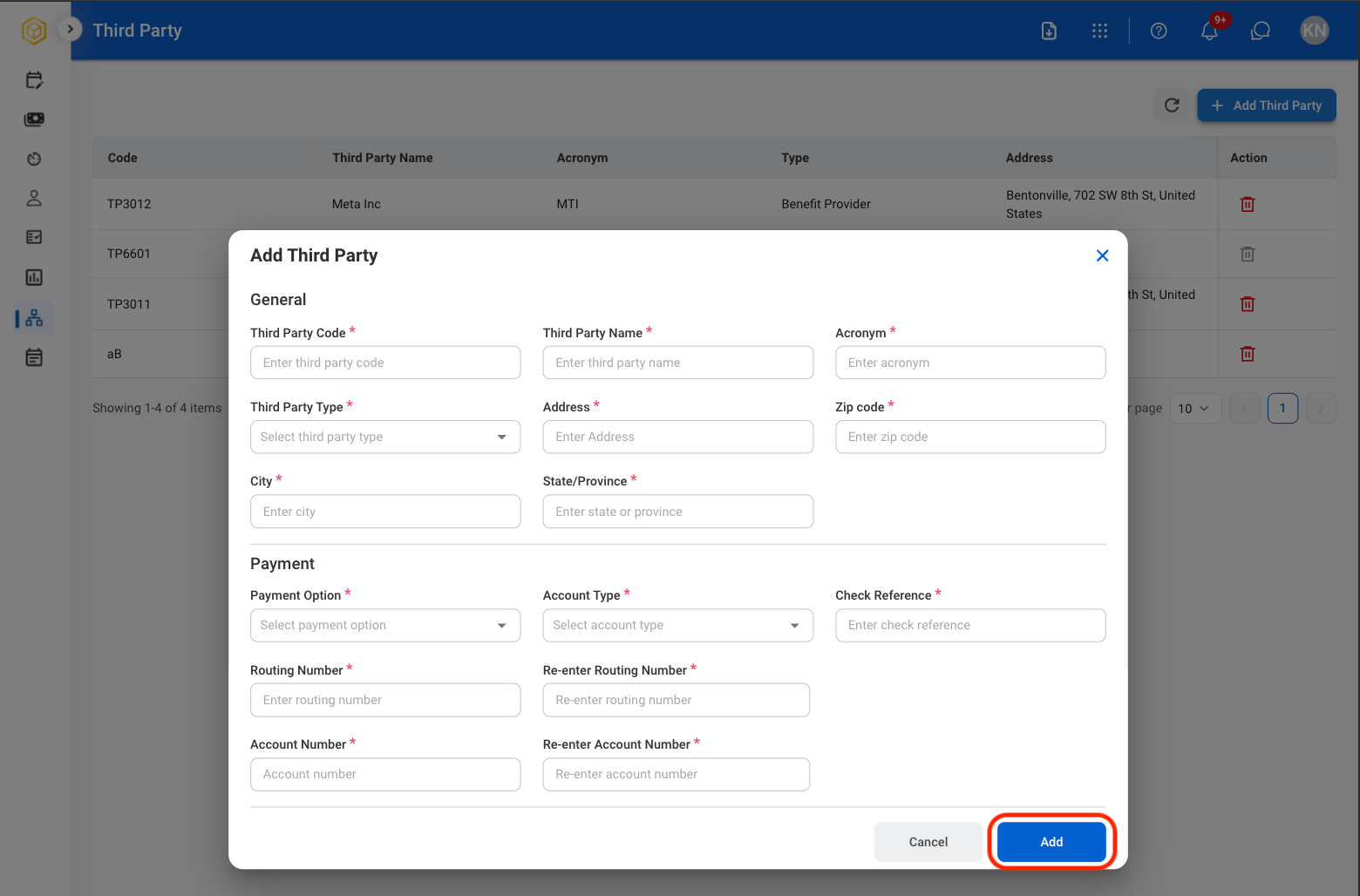
  <Step title="Fill in the required information ">
    <Frame>
      <img src="https://mintcdn.com/bizbone/hVdW0Cdb5EFCxb5_/images/P-TP-Info.png?fit=max&auto=format&n=hVdW0Cdb5EFCxb5_&q=85&s=79ab7ce6ee9a8de43ff1afa63c22f46b" alt="P TP Info" width="1560" height="1028" data-path="images/P-TP-Info.png" />
    </Frame>

    Select **Add** to complete or **Cancel** to exit without saving changes.
  </Step>
</Steps>

## Edit Third Party Information

<Steps>
  <Step title="Select a Third Party">
    <Frame>
      <img src="https://mintcdn.com/bizbone/hVdW0Cdb5EFCxb5_/images/P-TP-View.png?fit=max&auto=format&n=hVdW0Cdb5EFCxb5_&q=85&s=17750eb707cedc0bcbe551d58bc3ea33" alt="P TP View" width="1560" height="504" data-path="images/P-TP-View.png" />
    </Frame>
  </Step>

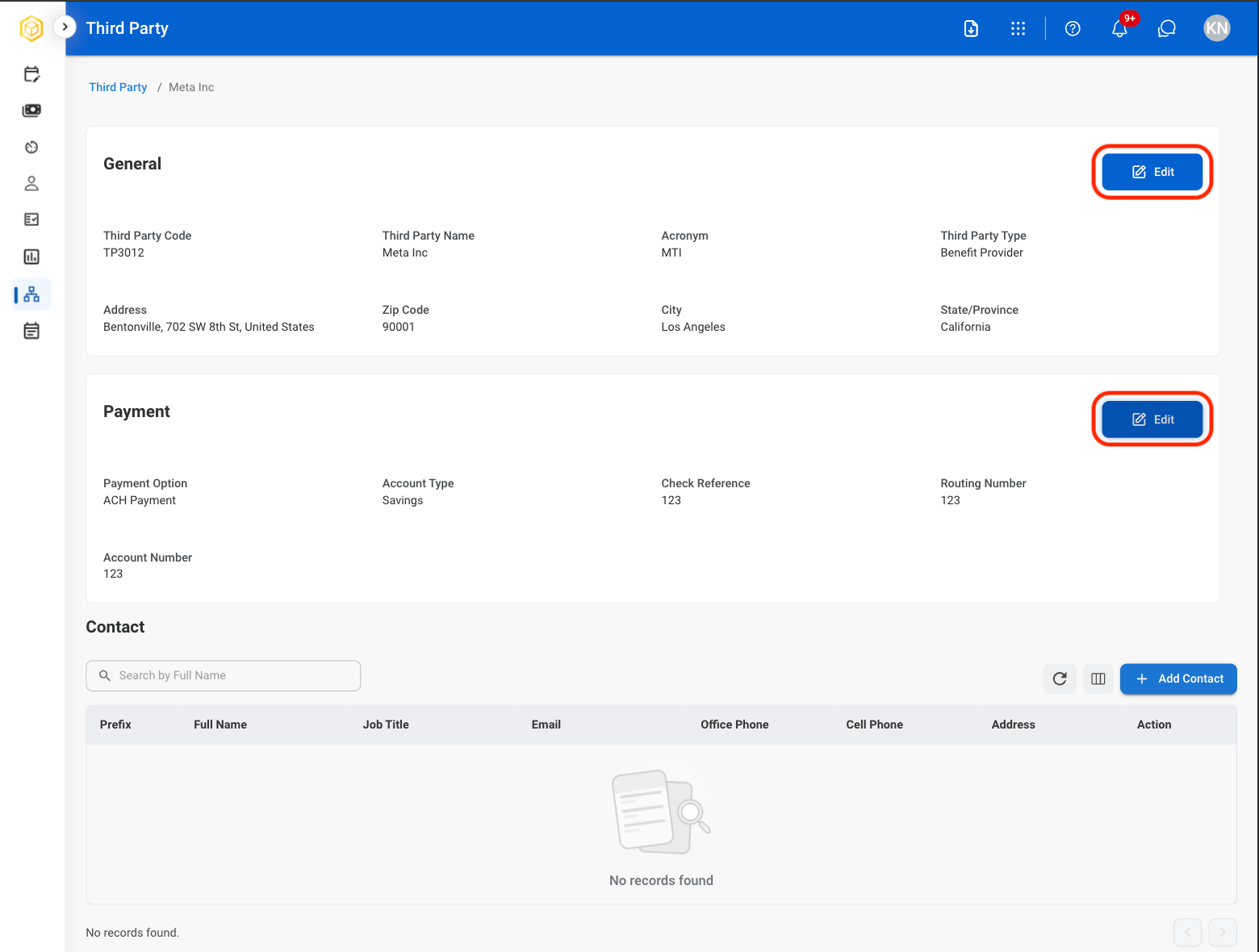
  <Step title="Select Edit in the desired section">
    <Frame>
      <img src="https://mintcdn.com/bizbone/hVdW0Cdb5EFCxb5_/images/P-TP-Edit.png?fit=max&auto=format&n=hVdW0Cdb5EFCxb5_&q=85&s=db9378b747d70e4342bde837ac090730" alt="P TP Edit" width="1560" height="1180" data-path="images/P-TP-Edit.png" />
    </Frame>

    * **General Information:** Identifying and organizational details such as third-party code, name, acronym, type, and address.
    * **Payment Information:** Payment and banking details such as payment method, account type, routing number, account number, and check reference information.
  </Step>
</Steps>

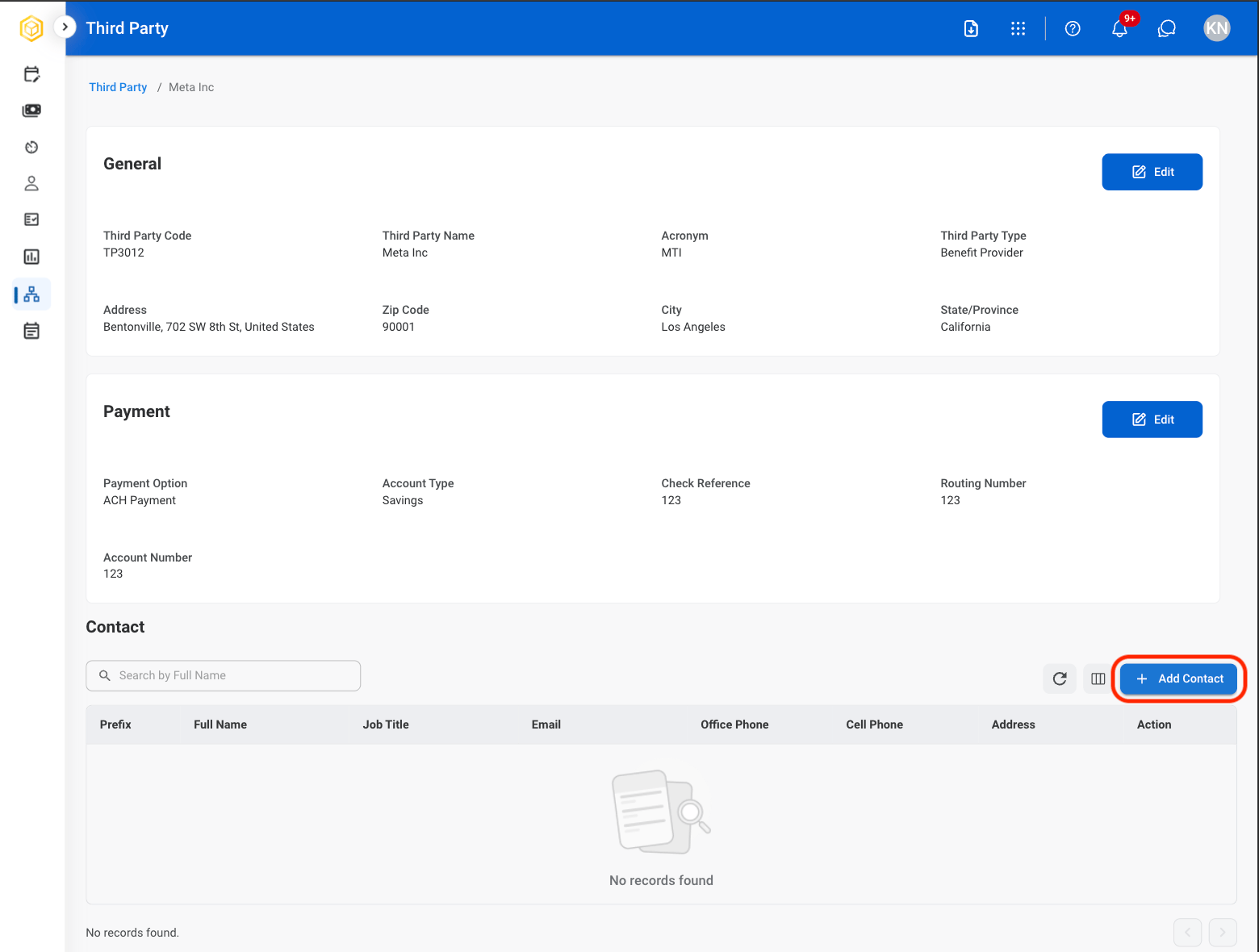
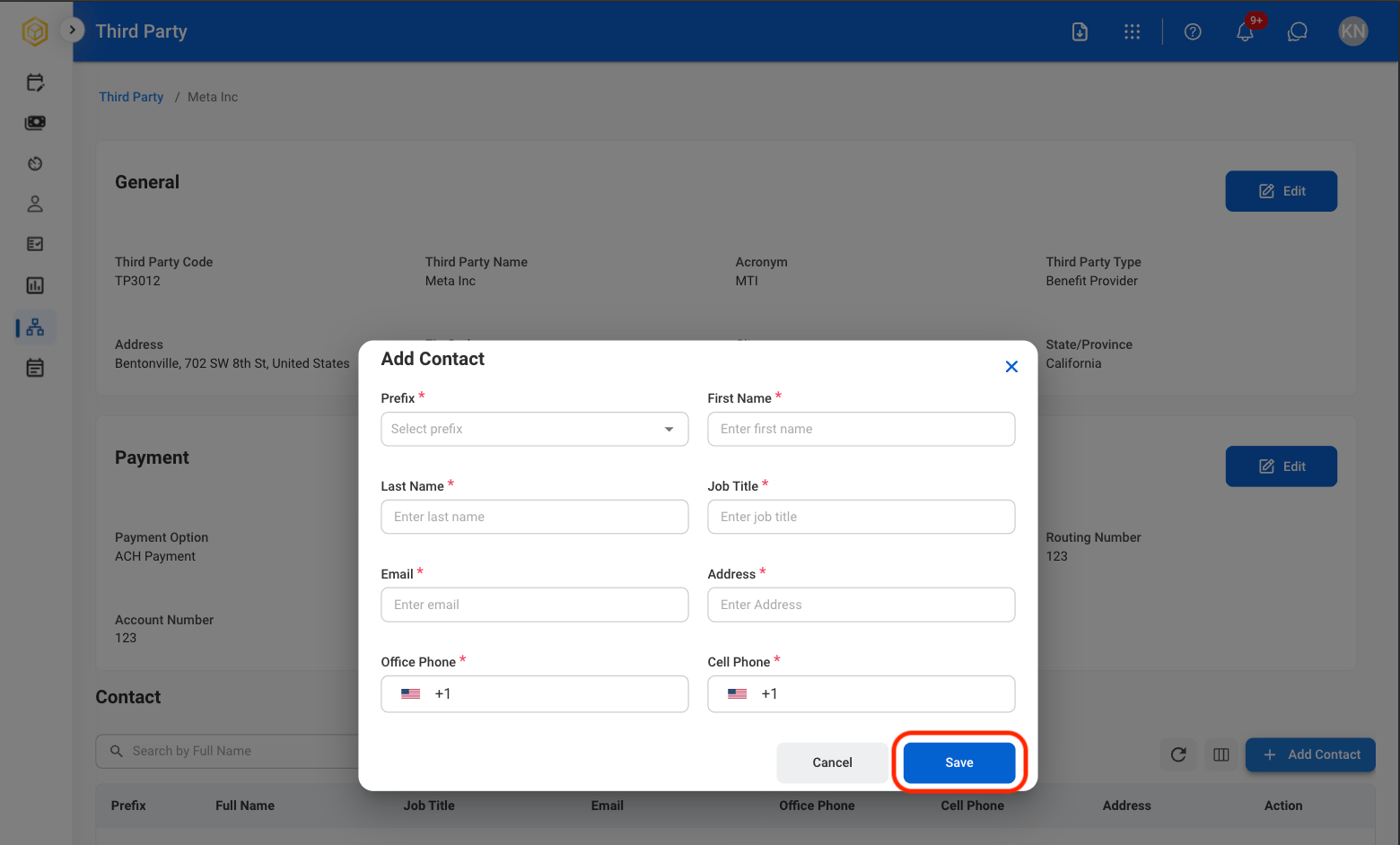
## Add Third Party Contact

<Steps>
  <Step title="Select a Third Party">
    <Frame>
      <img src="https://mintcdn.com/bizbone/hVdW0Cdb5EFCxb5_/images/P-TP-View.png?fit=max&auto=format&n=hVdW0Cdb5EFCxb5_&q=85&s=17750eb707cedc0bcbe551d58bc3ea33" alt="P TP View" width="1560" height="504" data-path="images/P-TP-View.png" />
    </Frame>
  </Step>

  <Step title="Select Add Contact">
    <Frame>
      <img src="https://mintcdn.com/bizbone/hVdW0Cdb5EFCxb5_/images/P-TP-Add-Contact.png?fit=max&auto=format&n=hVdW0Cdb5EFCxb5_&q=85&s=ec3754e5a08a916624b21efbba122c60" alt="P TP Add Contact" width="1560" height="1180" data-path="images/P-TP-Add-Contact.png" />
    </Frame>
  </Step>

  <Step title="Fill in the required information">
    <Frame>
      <img src="https://mintcdn.com/bizbone/hVdW0Cdb5EFCxb5_/images/P-TP-Contact-Info.png?fit=max&auto=format&n=hVdW0Cdb5EFCxb5_&q=85&s=3376cfe2c7da6a2b1e781f52d28f045b" alt="P TP Contact Info" width="1560" height="942" data-path="images/P-TP-Contact-Info.png" />
    </Frame>
  </Step>
</Steps>

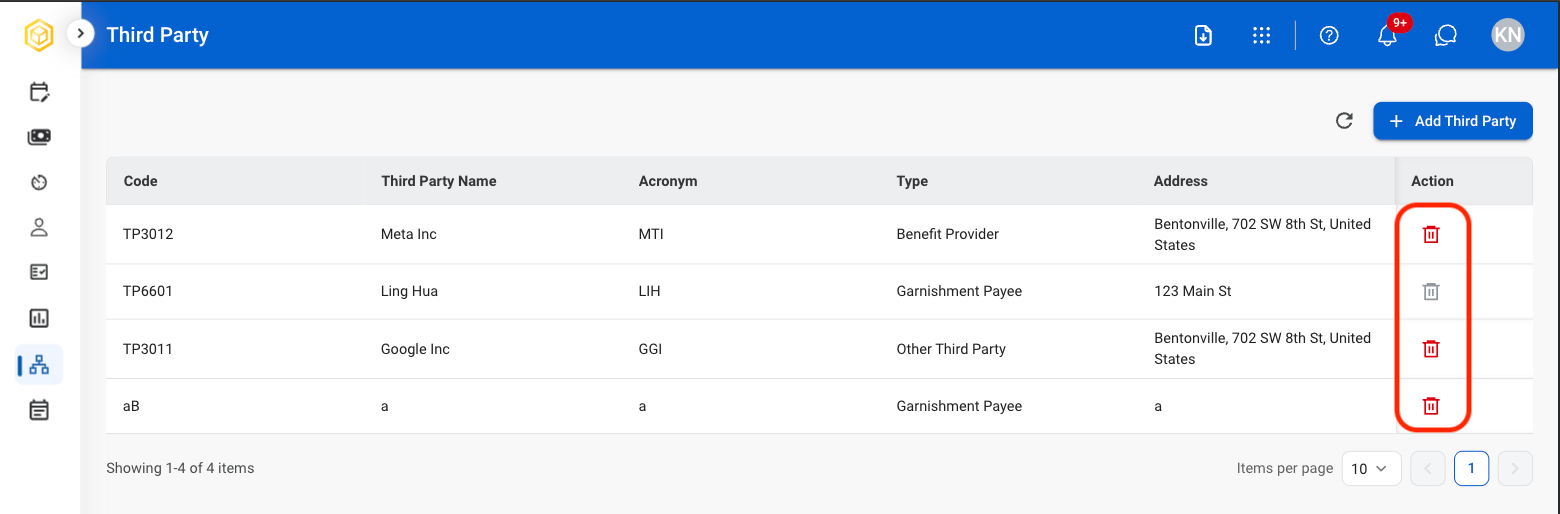
## Delete Third Party

<Steps>
  <Step title="Select the delete icon">
    <Frame>
      <img src="https://mintcdn.com/bizbone/hVdW0Cdb5EFCxb5_/images/P-TP-Delete.png?fit=max&auto=format&n=hVdW0Cdb5EFCxb5_&q=85&s=927099375ed7aae8dd046d94edb27f31" alt="P TP Delete" width="1560" height="514" data-path="images/P-TP-Delete.png" />
    </Frame>
  </Step>

  <Step title="Confirm selection">
    <Frame>
      <img src="https://mintcdn.com/bizbone/hVdW0Cdb5EFCxb5_/images/P-TP-Confirm-Delete.png?fit=max&auto=format&n=hVdW0Cdb5EFCxb5_&q=85&s=28fa26d3e87bef12794be08d3e0e4564" alt="P TP Confirm Delete" width="1560" height="766" data-path="images/P-TP-Confirm-Delete.png" />
    </Frame>

    <Info>
      This action cannot be undone.
    </Info>
  </Step>
</Steps>