> ## Documentation Index
> Fetch the complete documentation index at: https://docs.bizbone.com/llms.txt
> Use this file to discover all available pages before exploring further.

# Virtual Host & VMs

> Manage Virtual Host and Virtual Machine assets and their associated inventory information. Supports tracking asset quantities, usage and storage status, and physical condition across workplace equipment such as chairs, desks, and projectors.

## Add a Virtual Host or Machine
<Steps>
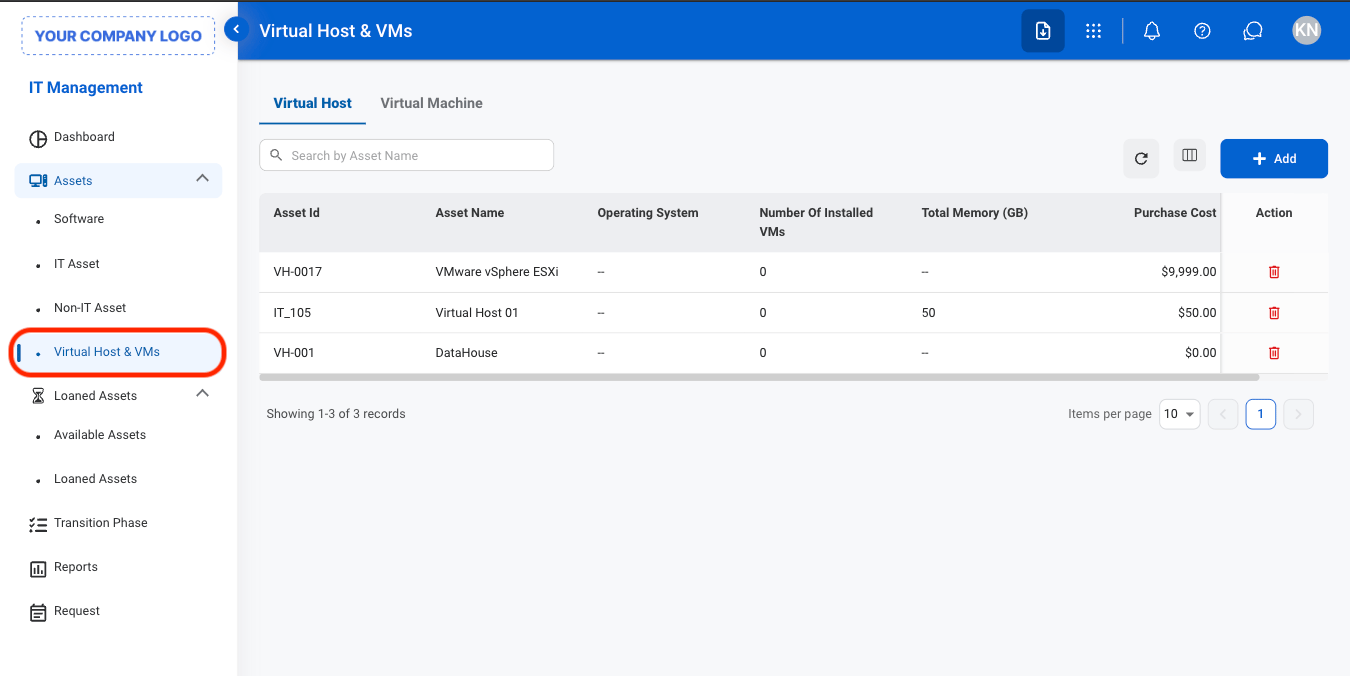
  <Step title="Navigate to Virtual Host & VM">
    <Frame>
      <img src="https://mintcdn.com/bizbone/O9JmyLbaIonl17vu/images/IM-A-V-Nav.png?fit=max&auto=format&n=O9JmyLbaIonl17vu&q=85&s=31812290d4b95759d71712d54cf1fe5f" alt="IM A V Nav" width="1350" height="676" data-path="images/IM-A-V-Nav.png" />
    </Frame>
  </Step>

  <Step title="Select a tab">
    <Frame>
      <img src="https://mintcdn.com/bizbone/O9JmyLbaIonl17vu/images/IM-A-V-Tab.png?fit=max&auto=format&n=O9JmyLbaIonl17vu&q=85&s=38e64e3a78b18b326addcae7562e92d5" alt="IM A V Tab" width="1350" height="444" data-path="images/IM-A-V-Tab.png" />
    </Frame>

    * **Virtual Host**: Manage physical or cloud infrastructure that provides computing resources for hosting virtual machines.
    * **Virtual Machine**: Manage virtualized computing environments that run applications and operating systems on a virtual host
  </Step>

  <Step title="Select Add">
    <Frame>
      <img src="https://mintcdn.com/bizbone/O9JmyLbaIonl17vu/images/IM-A-V-Add.png?fit=max&auto=format&n=O9JmyLbaIonl17vu&q=85&s=4b1b7b6a3e6fbd6e967bb6e5f5be431d" alt="IM A V Add" width="1350" height="444" data-path="images/IM-A-V-Add.png" />
    </Frame>
  </Step>

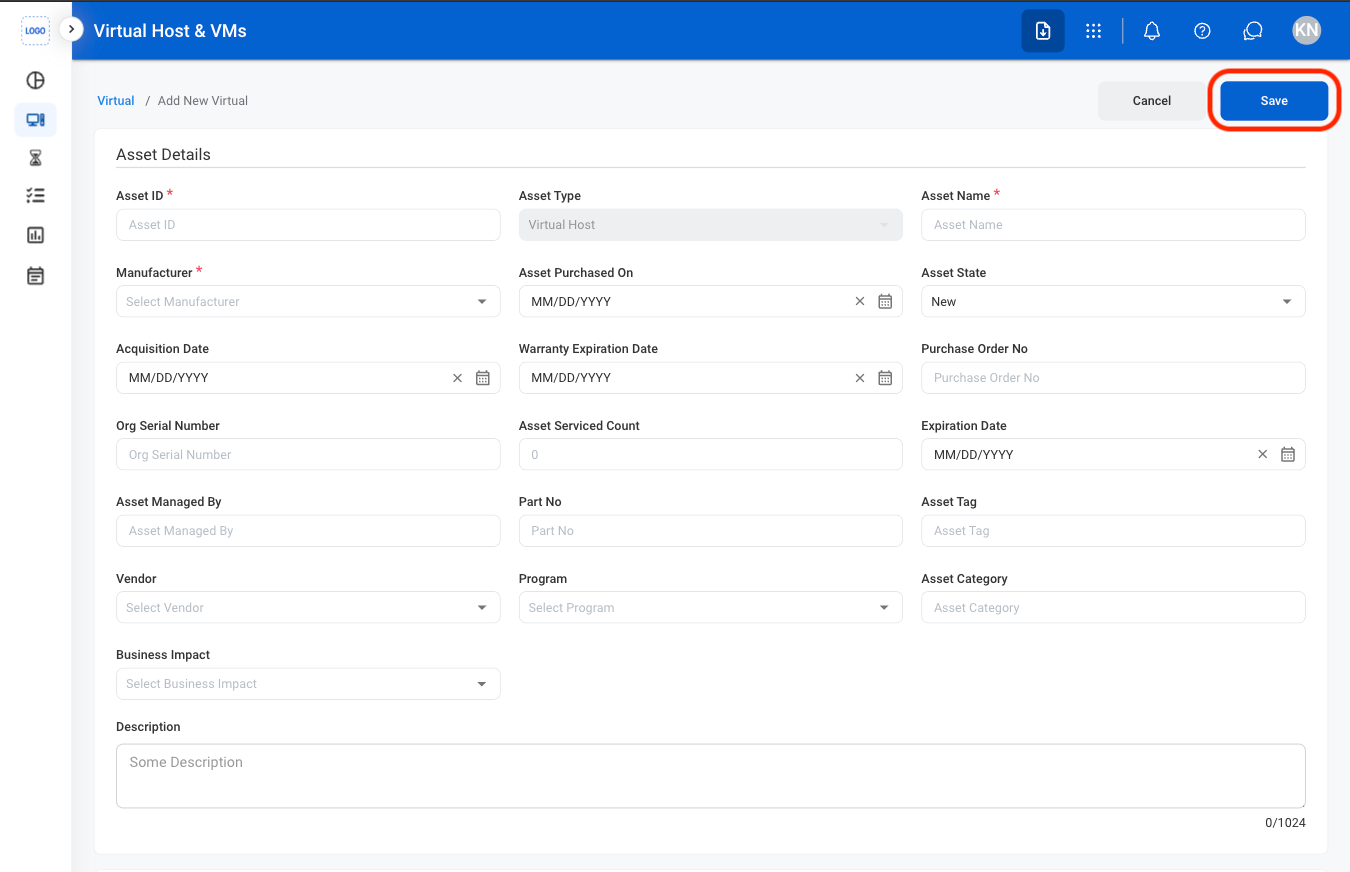
  <Step title="Fill in the required information">
    <Frame>
      <img src="https://mintcdn.com/bizbone/O9JmyLbaIonl17vu/images/IM-A-V-CAdd.png?fit=max&auto=format&n=O9JmyLbaIonl17vu&q=85&s=535510139c8770515174171ebc134583" alt="IM A V C Add" width="1350" height="872" data-path="images/IM-A-V-CAdd.png" />
    </Frame>

    Select **Save** to complete or **Cancel** to exit without saving changes. 
  </Step>
</Steps>

## Edit a Virtual Host or Machine

<Steps>
  <Step title="Select a tab">
    <Frame>
      <img src="https://mintcdn.com/bizbone/O9JmyLbaIonl17vu/images/IM-A-V-Tab.png?fit=max&auto=format&n=O9JmyLbaIonl17vu&q=85&s=38e64e3a78b18b326addcae7562e92d5" alt="IM A V Tab" width="1350" height="444" data-path="images/IM-A-V-Tab.png" />
    </Frame>
  </Step>

  <Step title="Select an asset">
    <Frame>
      <img src="https://mintcdn.com/bizbone/O9JmyLbaIonl17vu/images/IM-A-V-SelectA.png?fit=max&auto=format&n=O9JmyLbaIonl17vu&q=85&s=b67d5eb6e9ddc045ddbf0bf68a86ca3f" alt="IM A V Select A" width="1350" height="432" data-path="images/IM-A-V-SelectA.png" />
    </Frame>
  </Step>

  <Step title="Select Edit">
    <Frame>
      <img src="https://mintcdn.com/bizbone/O9JmyLbaIonl17vu/images/IM-A-V-EAsset.png?fit=max&auto=format&n=O9JmyLbaIonl17vu&q=85&s=ebd354d08a29659569989e865b8a1d5b" alt="IM A V E Asset" width="1350" height="1156" data-path="images/IM-A-V-EAsset.png" />
    </Frame>
  </Step>

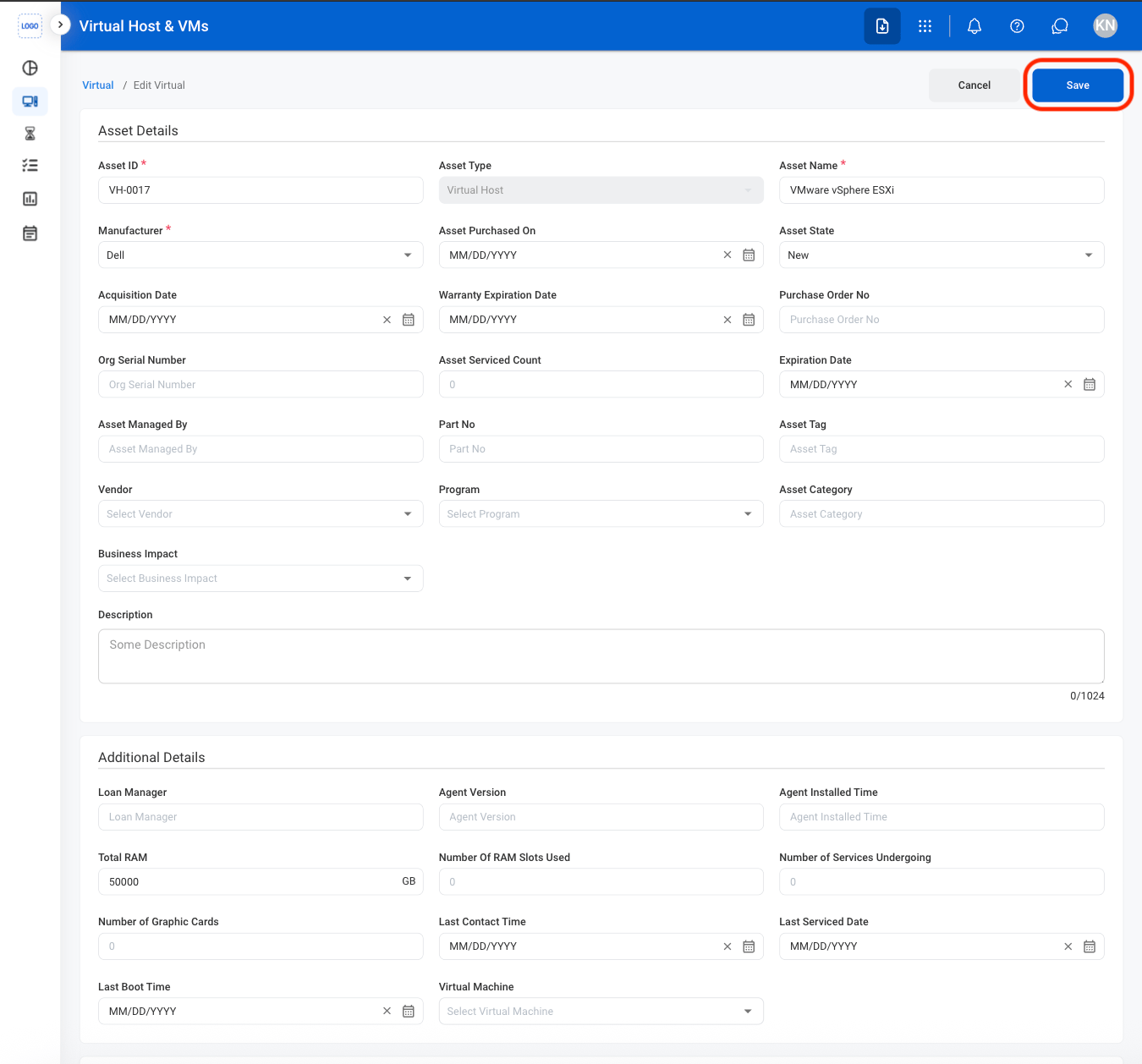
  <Step title="Fill in the required information ">
    <Frame>
      <img src="https://mintcdn.com/bizbone/O9JmyLbaIonl17vu/images/IM-A-V-CEditA.png?fit=max&auto=format&n=O9JmyLbaIonl17vu&q=85&s=418807e21285cf46db1ea0a5b087c357" alt="IM A V C Edit A" width="1350" height="1258" data-path="images/IM-A-V-CEditA.png" />
    </Frame>

    Select **Save** to complete or **Cancel** to exit without saving changes. 
  </Step>
</Steps>

## Delete a Virtual Host or Machine

<Steps>
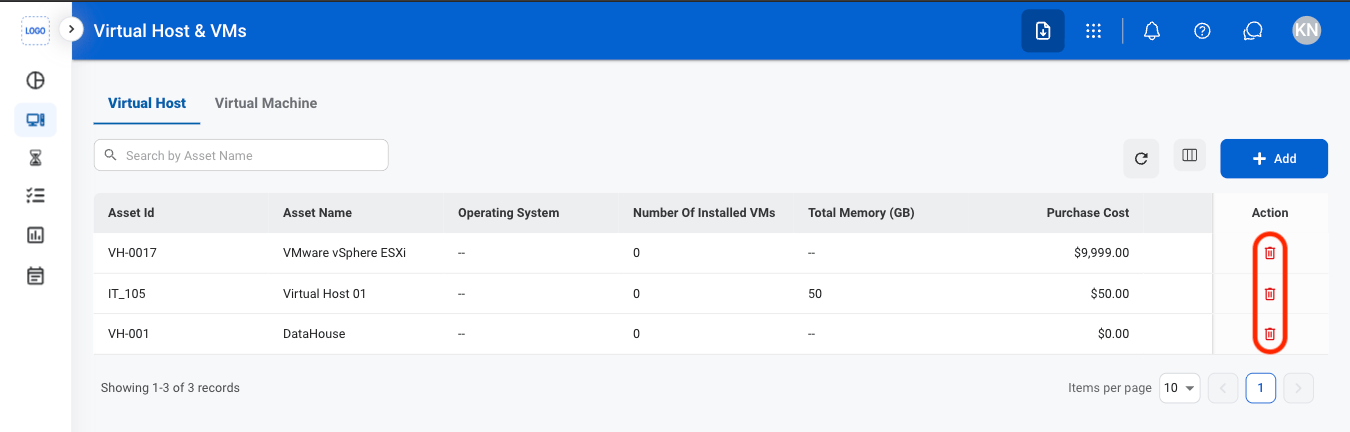
  <Step title="Select the delete icon">
    <Frame>
      <img src="https://mintcdn.com/bizbone/O9JmyLbaIonl17vu/images/IM-A-V-Delete.png?fit=max&auto=format&n=O9JmyLbaIonl17vu&q=85&s=9db2e0547a03b053bd3e7f4812aaccf2" alt="IM A V Delete" width="1350" height="432" data-path="images/IM-A-V-Delete.png" />
    </Frame>
  </Step>

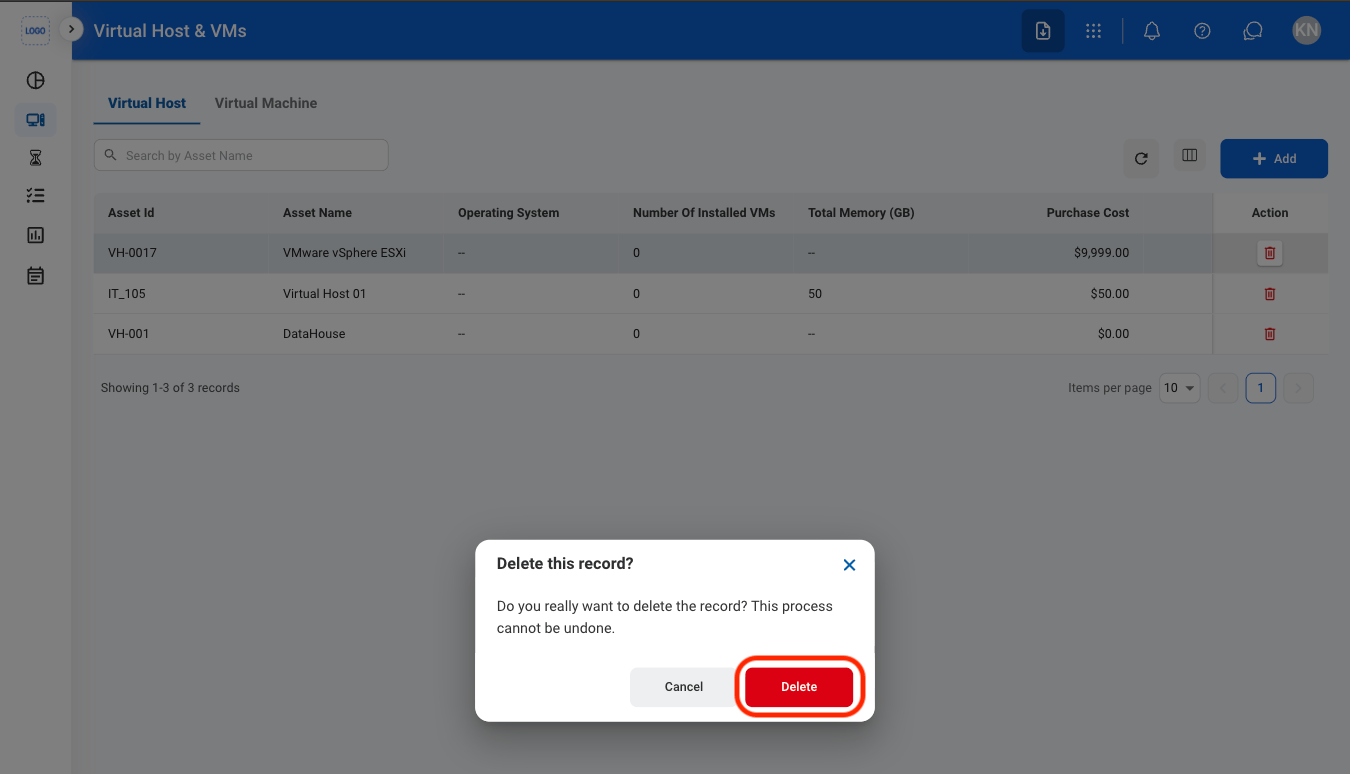
  <Step title="Confirm the action">
    <Frame>
      <img src="https://mintcdn.com/bizbone/O9JmyLbaIonl17vu/images/IM-A-V-CDelete.png?fit=max&auto=format&n=O9JmyLbaIonl17vu&q=85&s=fec92c6fe34357c724da327e937f4080" alt="IM A V C Delete" width="1350" height="774" data-path="images/IM-A-V-CDelete.png" />
    </Frame>

    Select **Delete** to complete or **Cancel** to exit without saving changes. 
  </Step>
</Steps>