> ## Documentation Index
> Fetch the complete documentation index at: https://docs.bizbone.com/llms.txt
> Use this file to discover all available pages before exploring further.

# Non-IT Asset

> Manage non-IT assets and their associated inventory information. Supports tracking asset quantities, usage and storage status, and physical condition across workplace equipment such as chairs, desks, and projectors.

## Add a Non-IT Asset Category

<Steps>
  <Step title="Navigate to Non-IT Asset">
    <Frame>
      <img src="https://mintcdn.com/bizbone/O9JmyLbaIonl17vu/images/IM-A-N-Nav.png?fit=max&auto=format&n=O9JmyLbaIonl17vu&q=85&s=a35b572b337abfae6ca1c36d020505eb" alt="IM A N Nav" width="1350" height="664" data-path="images/IM-A-N-Nav.png" />
    </Frame>
  </Step>

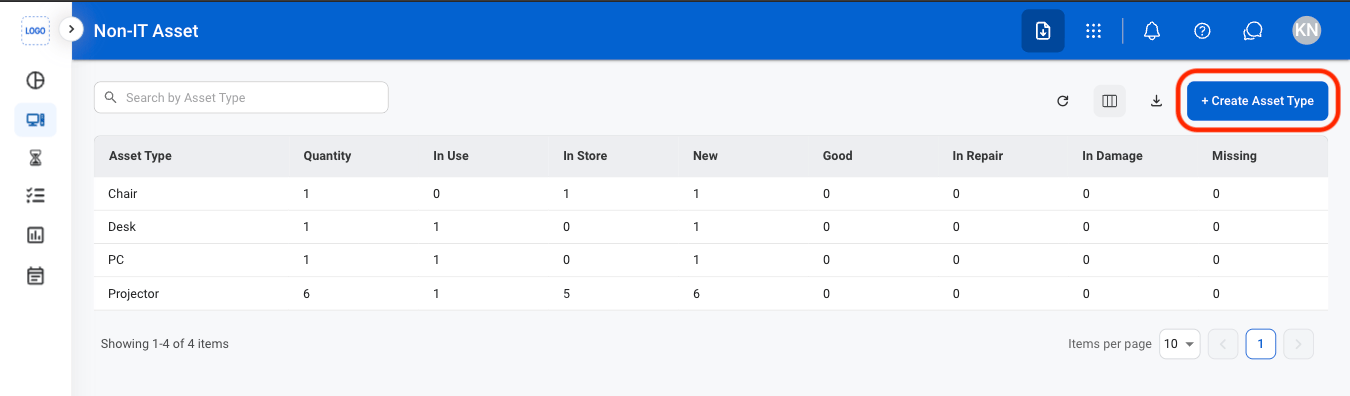
  <Step title="Select Create Asset Type">
    <Frame>
      <img src="https://mintcdn.com/bizbone/O9JmyLbaIonl17vu/images/IM-A-N-Create-AT.png?fit=max&auto=format&n=O9JmyLbaIonl17vu&q=85&s=eb2fd3393a29b1a4bd0e9a531f520151" alt="IM A N Create AT" width="1350" height="396" data-path="images/IM-A-N-Create-AT.png" />
    </Frame>
  </Step>

  <Step title="Fill in the required information ">
    <Frame>
      <img src="https://mintcdn.com/bizbone/O9JmyLbaIonl17vu/images/IM-A-N-CCreate-AT.png?fit=max&auto=format&n=O9JmyLbaIonl17vu&q=85&s=5b295bd683467d8fa1da9e60b4527467" alt="IM A N C Create AT" width="1350" height="848" data-path="images/IM-A-N-CCreate-AT.png" />
    </Frame>

    Select **Save** to complete or **Cancel** to exit without saving changes. 
  </Step>
</Steps>

## Add a Non-IT Asset

<Steps>
  <Step title="Select an asset category">
    <Frame>
      <img src="https://mintcdn.com/bizbone/O9JmyLbaIonl17vu/images/IM-A-N-Select-AC.png?fit=max&auto=format&n=O9JmyLbaIonl17vu&q=85&s=ccb40d325299b1370abd77e1904ab146" alt="IM A N Select AC" width="1350" height="402" data-path="images/IM-A-N-Select-AC.png" />
    </Frame>
  </Step>

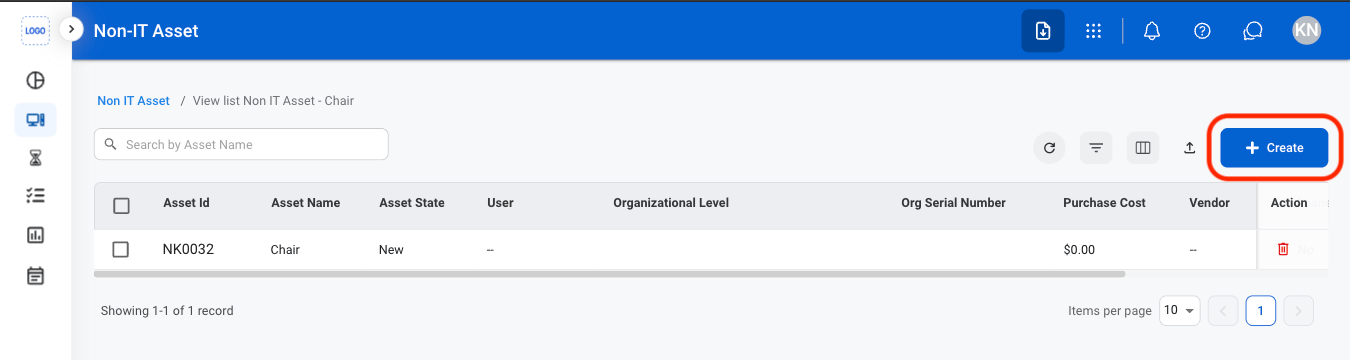
  <Step title="Select Create">
    <Frame>
      <img src="https://mintcdn.com/bizbone/O9JmyLbaIonl17vu/images/IM-A-N-AAsset.png?fit=max&auto=format&n=O9JmyLbaIonl17vu&q=85&s=932da1e1fa8a057fe351fba012ea0273" alt="IM A N A Asset" width="1350" height="360" data-path="images/IM-A-N-AAsset.png" />
    </Frame>
  </Step>

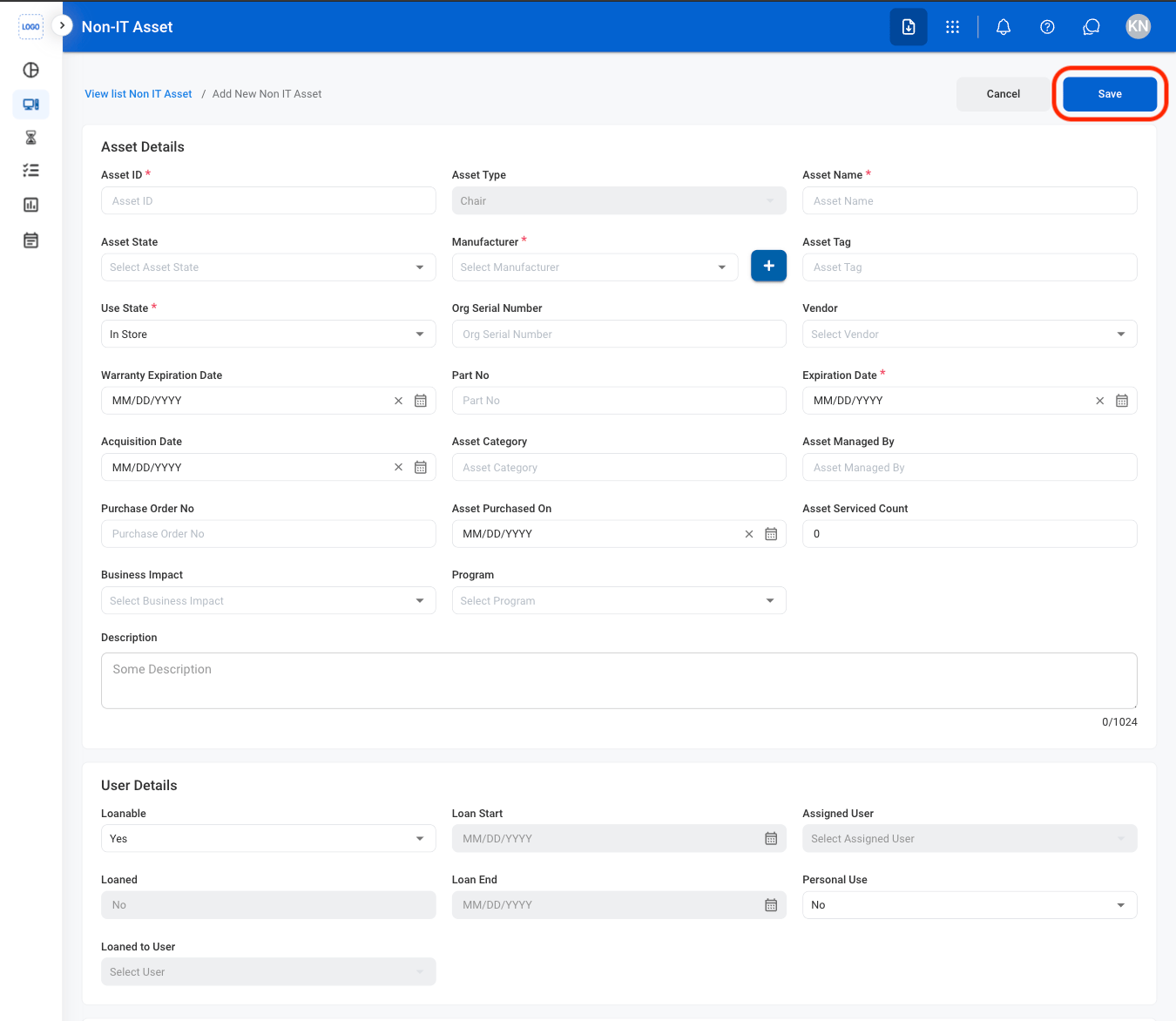
  <Step title="Fill in the required information">
    <Frame>
      <img src="https://mintcdn.com/bizbone/O9JmyLbaIonl17vu/images/IM-A-N-CAAsset.png?fit=max&auto=format&n=O9JmyLbaIonl17vu&q=85&s=d314e9fd18bc3b013d7ec19fc935b3d5" alt="IM A N CA Asset" width="1350" height="1172" data-path="images/IM-A-N-CAAsset.png" />
    </Frame>

    Select **Save** to complete or **Cancel** to exit without saving changes. 
  </Step>
</Steps>

## Edit a Non-IT Asset

<Steps>
  <Step title="Select an asset">
    <Frame>
      <img src="https://mintcdn.com/bizbone/O9JmyLbaIonl17vu/images/IM-A-N-SAsset.png?fit=max&auto=format&n=O9JmyLbaIonl17vu&q=85&s=dc5be9da3889b11e07a7657f177e90d7" alt="IM A N S Asset" width="1350" height="356" data-path="images/IM-A-N-SAsset.png" />
    </Frame>
  </Step>

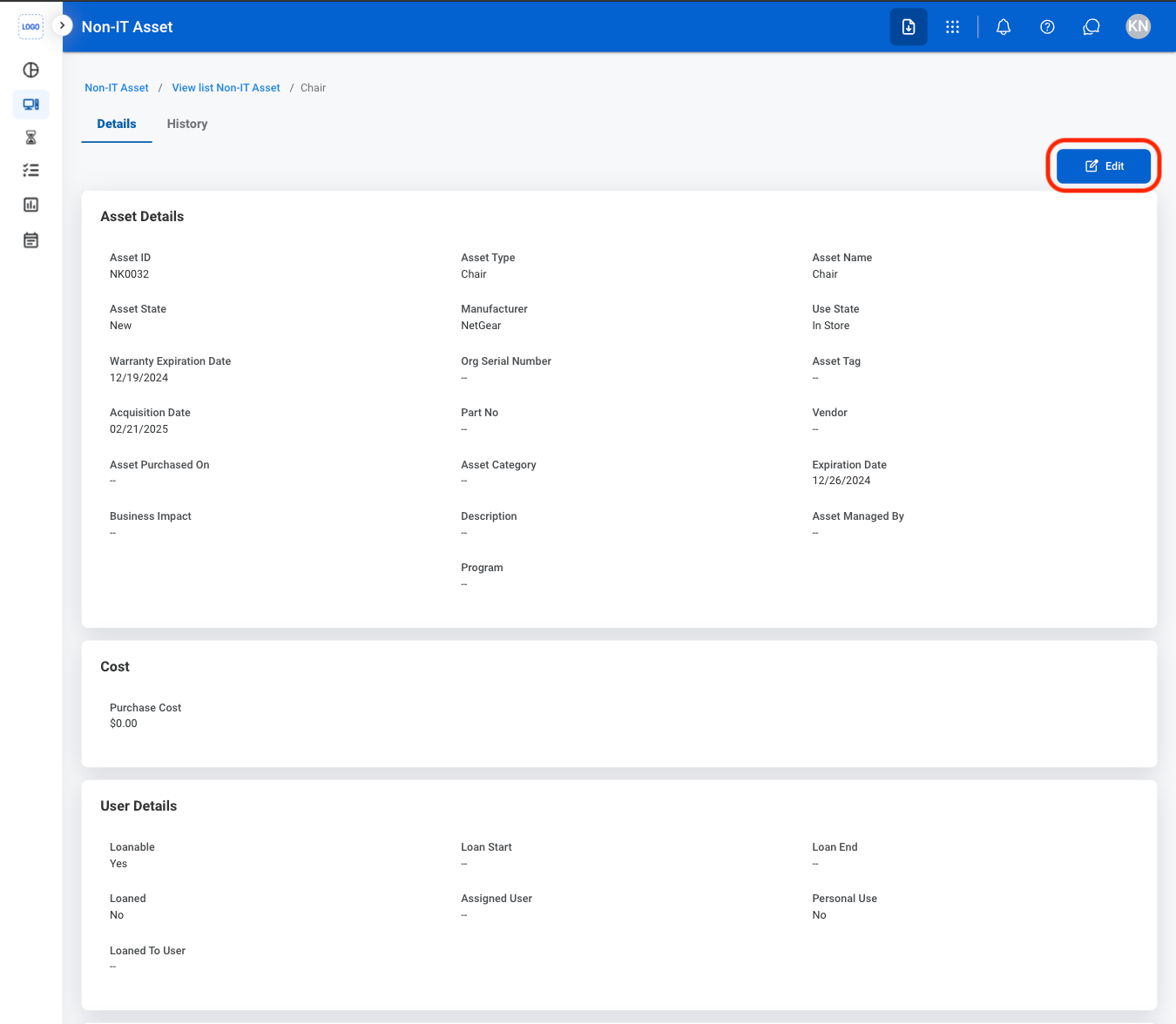
  <Step title="Select Edit">
    <Frame>
      <img src="https://mintcdn.com/bizbone/O9JmyLbaIonl17vu/images/IM-A-N-EAsset.png?fit=max&auto=format&n=O9JmyLbaIonl17vu&q=85&s=fd4687876c440cafde3c10fa21f2f0fd" alt="IM A N E Asset" width="1350" height="1176" data-path="images/IM-A-N-EAsset.png" />
    </Frame>
  </Step>

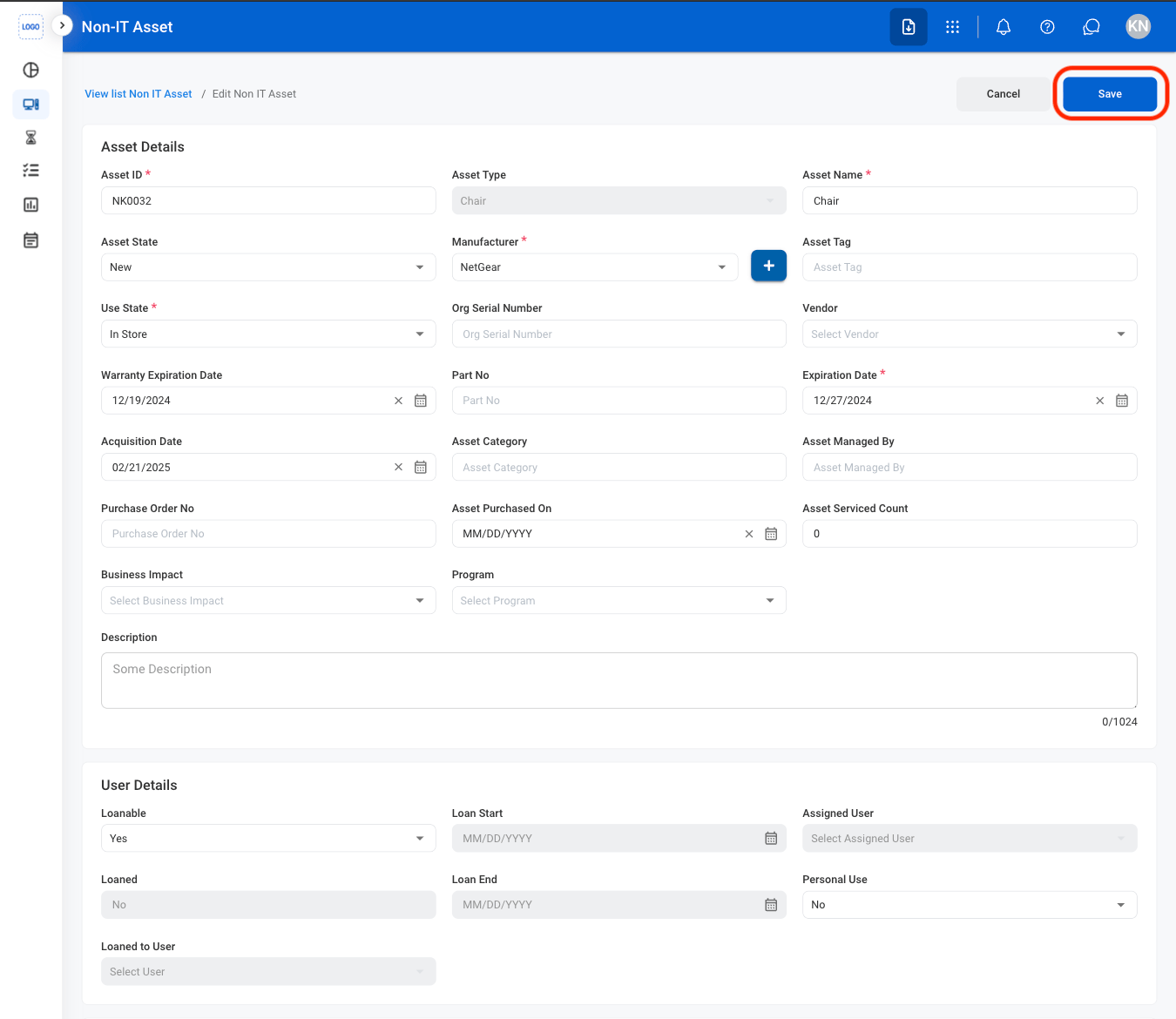
  <Step title="Fill in the required information ">
    <Frame>
      <img src="https://mintcdn.com/bizbone/O9JmyLbaIonl17vu/images/IM-A-CAsset.png?fit=max&auto=format&n=O9JmyLbaIonl17vu&q=85&s=0a6640ed75350ae1331318190db5dd58" alt="IM A C Asset" width="1350" height="1170" data-path="images/IM-A-CAsset.png" />
    </Frame>

    Select **Save** to complete or **Cancel** to exit without saving changes. 
  </Step>
</Steps>

## Delete a Non-IT Asset

<Steps>
  <Step title="Select the delete icon">
    <Frame>
      <img src="https://mintcdn.com/bizbone/O9JmyLbaIonl17vu/images/IM-A-N-Delete.png?fit=max&auto=format&n=O9JmyLbaIonl17vu&q=85&s=6b79d2044a45b27e9bffcd410f41d65a" alt="IM A N Delete" width="1350" height="358" data-path="images/IM-A-N-Delete.png" />
    </Frame>
  </Step>

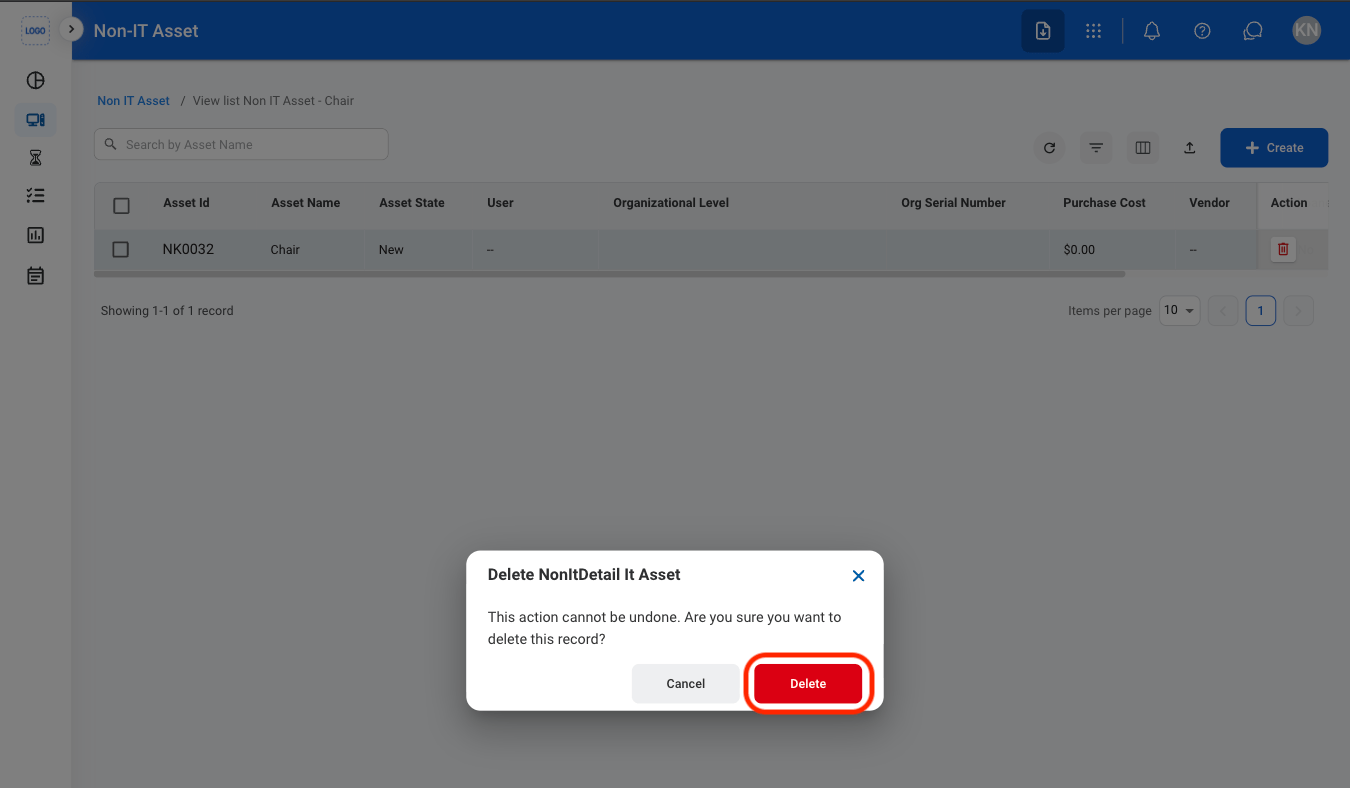
  <Step title="Confirm the action">
    <Frame>
      <img src="https://mintcdn.com/bizbone/O9JmyLbaIonl17vu/images/IM-A-N-CDelete.png?fit=max&auto=format&n=O9JmyLbaIonl17vu&q=85&s=b67d7ed22a697f12154010a45cba4f40" alt="IM A N C Delete" width="1350" height="788" data-path="images/IM-A-N-CDelete.png" />
    </Frame>

    Select **Delete** to complete or **Cancel** to exit without saving changes. 
  </Step>
</Steps>