> ## Documentation Index
> Fetch the complete documentation index at: https://docs.bizbone.com/llms.txt
> Use this file to discover all available pages before exploring further.

# Performance Review

> Facilitates structured employee performance evaluations. Configure review criteria based on roles and goals, manage participation, and track review completion.

## Create a New Performance Review
<Steps>
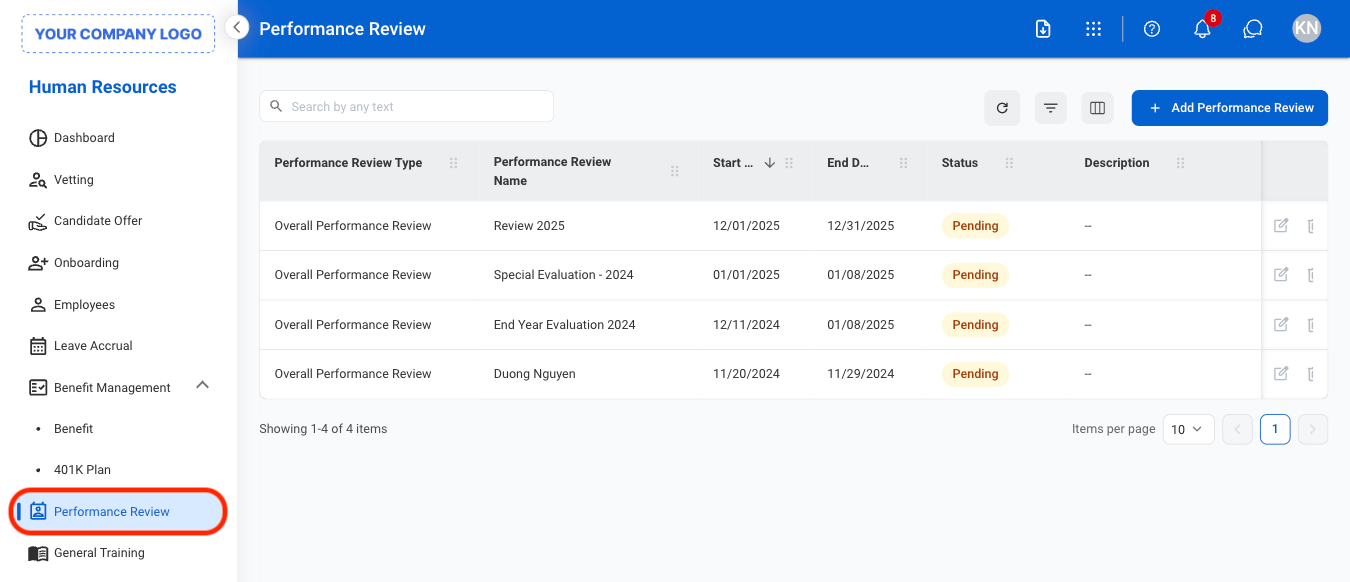
  <Step title="Navigate to Performance Review">
    <Frame>
      <img src="https://mintcdn.com/bizbone/KMkrFVSQmkxvZOZ7/images/HR-P-Nav.png?fit=max&auto=format&n=KMkrFVSQmkxvZOZ7&q=85&s=4db493bb64016a79656c8d69888c8ac4" alt="HR P Nav" width="1350" height="582" data-path="images/HR-P-Nav.png" />
    </Frame>
  </Step>

  <Step title="Select Add Performance Review">
    <Frame>
      <img src="https://mintcdn.com/bizbone/KMkrFVSQmkxvZOZ7/images/HR-P-Add.png?fit=max&auto=format&n=KMkrFVSQmkxvZOZ7&q=85&s=7cbee9015e3c80cd95d2b39bbdb7b2a7" alt="HR P Add" width="1350" height="448" data-path="images/HR-P-Add.png" />
    </Frame>
  </Step>

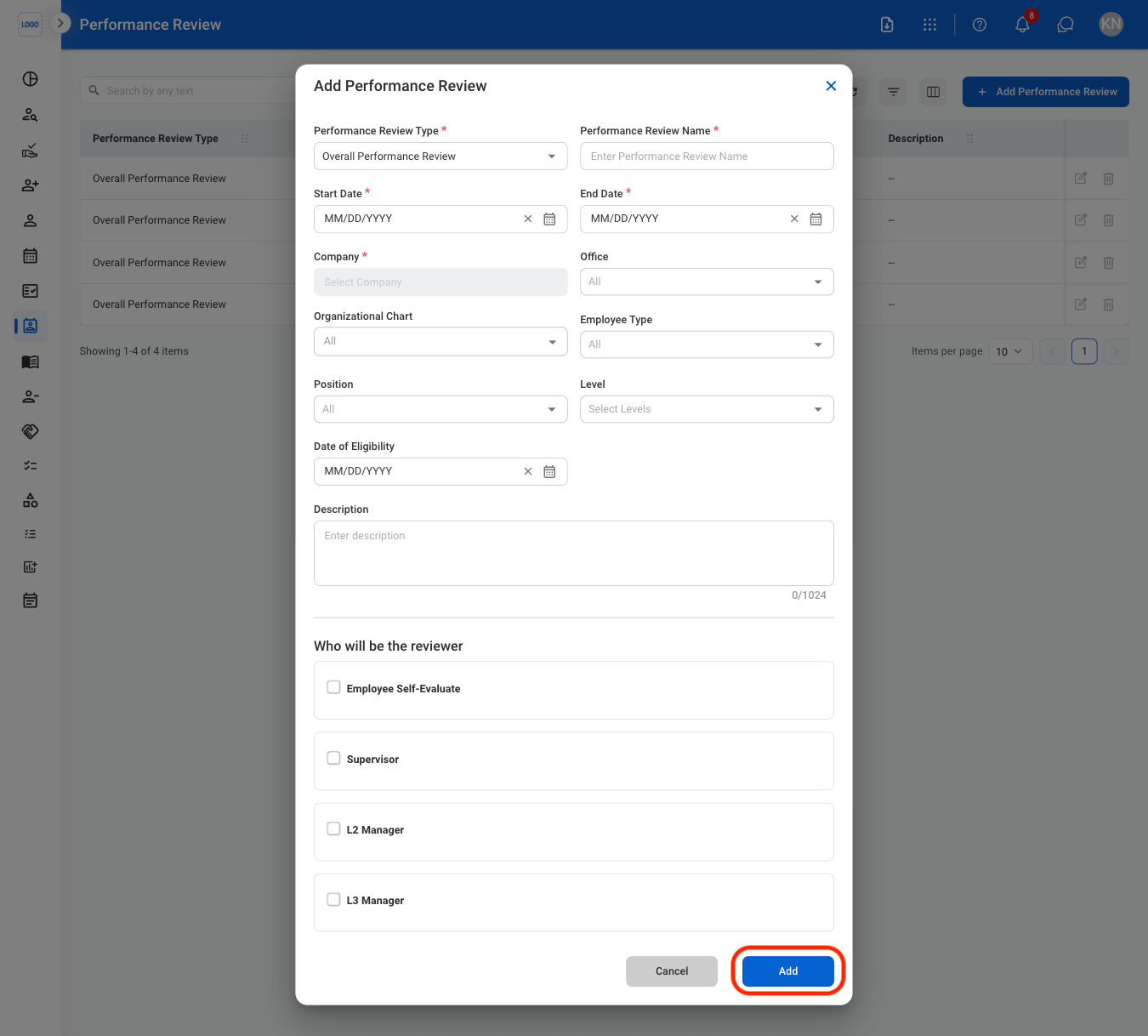
  <Step title="Fill in the required information ">
    <Frame>
      <img src="https://mintcdn.com/bizbone/KMkrFVSQmkxvZOZ7/images/HR-P-CAdd.png?fit=max&auto=format&n=KMkrFVSQmkxvZOZ7&q=85&s=6991fdc4709f2a9fdd868b0936a0a6c5" alt="HR P C Add" width="1350" height="1218" data-path="images/HR-P-CAdd.png" />
    </Frame>

    Select **Add** to complete or **Cancel** to exit without saving changes 
  </Step>
</Steps>

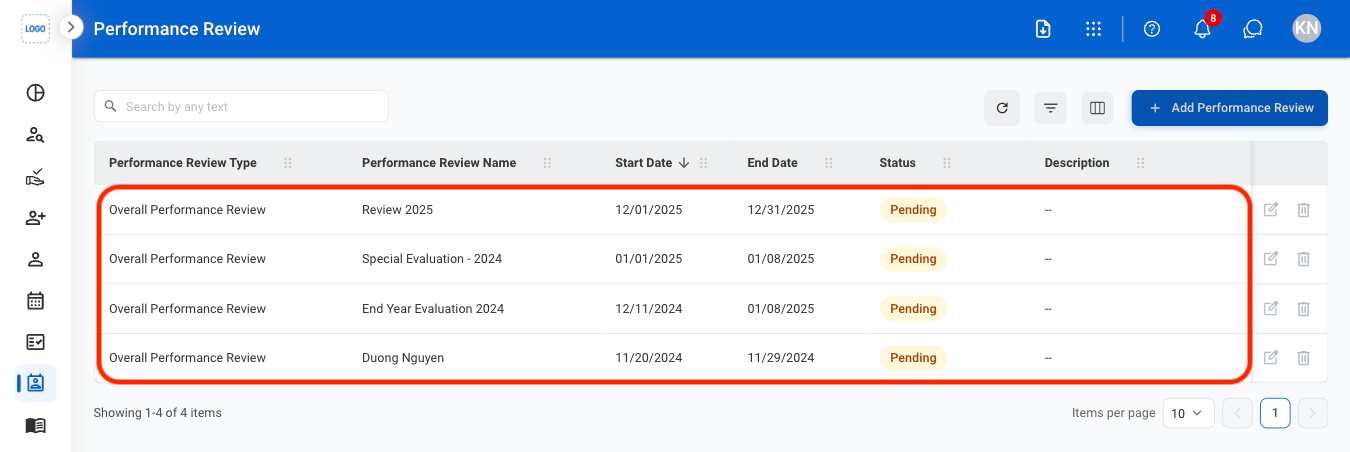
## Add an Appraisal Form

Upload and submit employee performance evaluations and appraisal records for review.
<Steps>
  <Step title="Select a performance review">
    <Frame>
      <img src="https://mintcdn.com/bizbone/KMkrFVSQmkxvZOZ7/images/HR-P-Select.png?fit=max&auto=format&n=KMkrFVSQmkxvZOZ7&q=85&s=62d8811b23d047be0d142a5d40487762" alt="HR P Select" width="1350" height="452" data-path="images/HR-P-Select.png" />
    </Frame>
  </Step>

  <Step title="Navigate to Eligible Employee List">
    <Frame>
      <img src="https://mintcdn.com/bizbone/KMkrFVSQmkxvZOZ7/images/HR-P-EEL-Nav.png?fit=max&auto=format&n=KMkrFVSQmkxvZOZ7&q=85&s=7a043ea0bfc68569072d8dc7754c91fd" alt="HR P EEL Nav" width="1350" height="452" data-path="images/HR-P-EEL-Nav.png" />
    </Frame>

    **Eligible employee list**: All employees assigned to complete the performance review. 
  </Step>

  <Step title="Select the upload icon">
    <Frame>
      <img src="https://mintcdn.com/bizbone/KMkrFVSQmkxvZOZ7/images/HR-P-Upload.png?fit=max&auto=format&n=KMkrFVSQmkxvZOZ7&q=85&s=e77d60ec56495fc751e81a7b27e916e0" alt="HR P Upload" width="1350" height="452" data-path="images/HR-P-Upload.png" />
    </Frame>
  </Step>

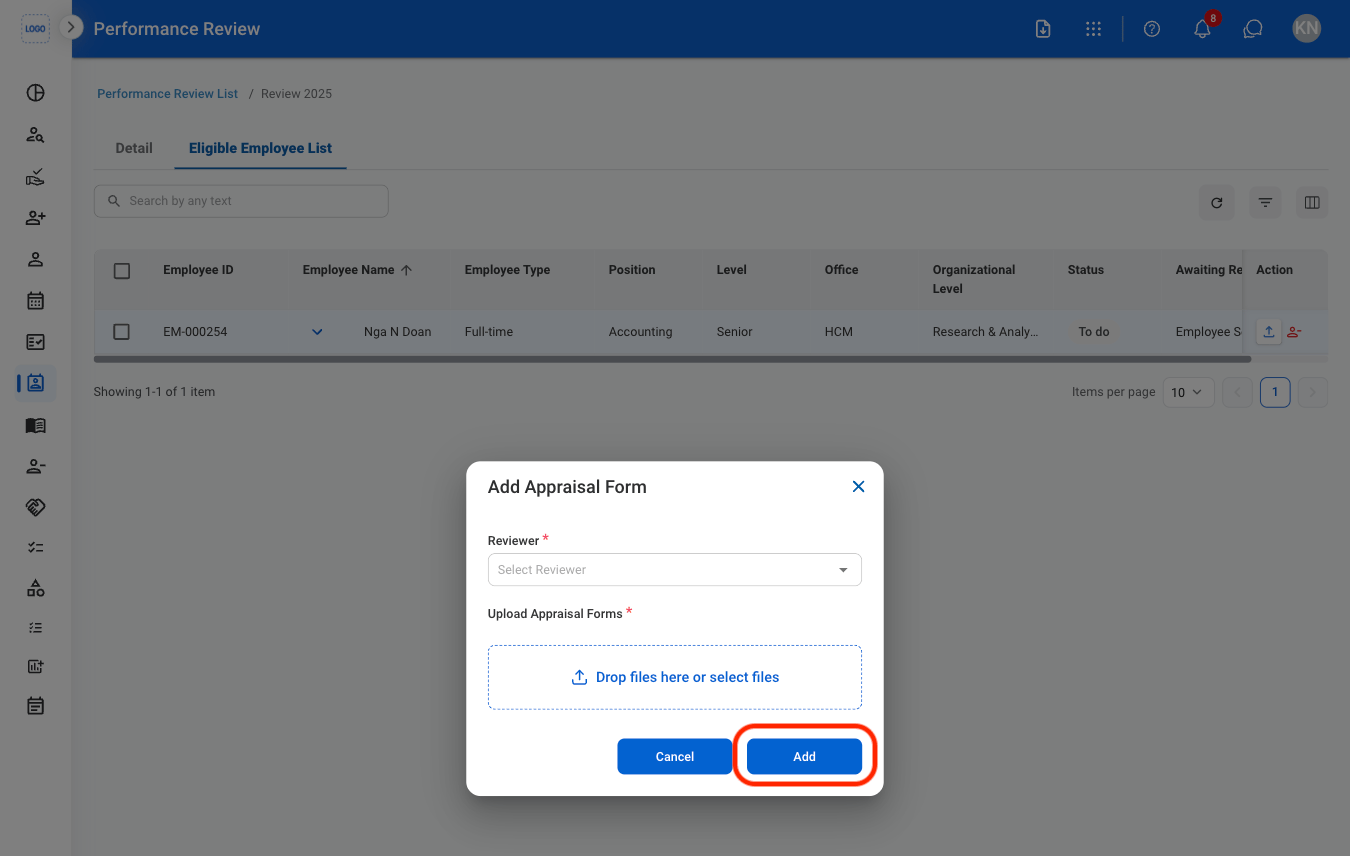
  <Step title="Fill in the required information">
    <Frame>
      <img src="https://mintcdn.com/bizbone/KMkrFVSQmkxvZOZ7/images/HR-P-CUpload.png?fit=max&auto=format&n=KMkrFVSQmkxvZOZ7&q=85&s=386b3a30052452efd999e6b38bc6e70f" alt="HR P C Upload" width="1350" height="856" data-path="images/HR-P-CUpload.png" />
    </Frame>

    Select **Add** to complete or **Cancel** to exit without saving changes
  </Step>
</Steps>

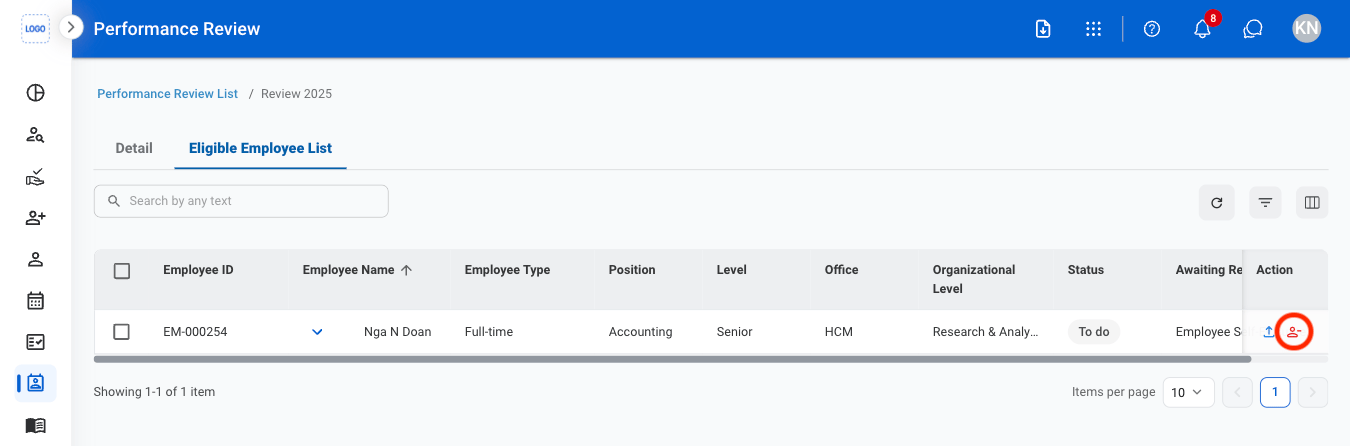
## Remove an Employee From a Performance Review
<Steps>
  <Step title="Navigate to Eligible Employee List">
    <Frame>
      <img src="https://mintcdn.com/bizbone/KMkrFVSQmkxvZOZ7/images/HR-P-EEL-Nav.png?fit=max&auto=format&n=KMkrFVSQmkxvZOZ7&q=85&s=7a043ea0bfc68569072d8dc7754c91fd" alt="HR P EEL Nav" width="1350" height="452" data-path="images/HR-P-EEL-Nav.png" />
    </Frame>
  </Step>

  <Step title="Select the Remove Employee icon">
    <Frame>
      <img src="https://mintcdn.com/bizbone/KMkrFVSQmkxvZOZ7/images/HR-P-R-Emp.png?fit=max&auto=format&n=KMkrFVSQmkxvZOZ7&q=85&s=54bf790b5038b9f543874c64ab814d82" alt="HR P R Emp" width="1350" height="446" data-path="images/HR-P-R-Emp.png" />
    </Frame>
  </Step>

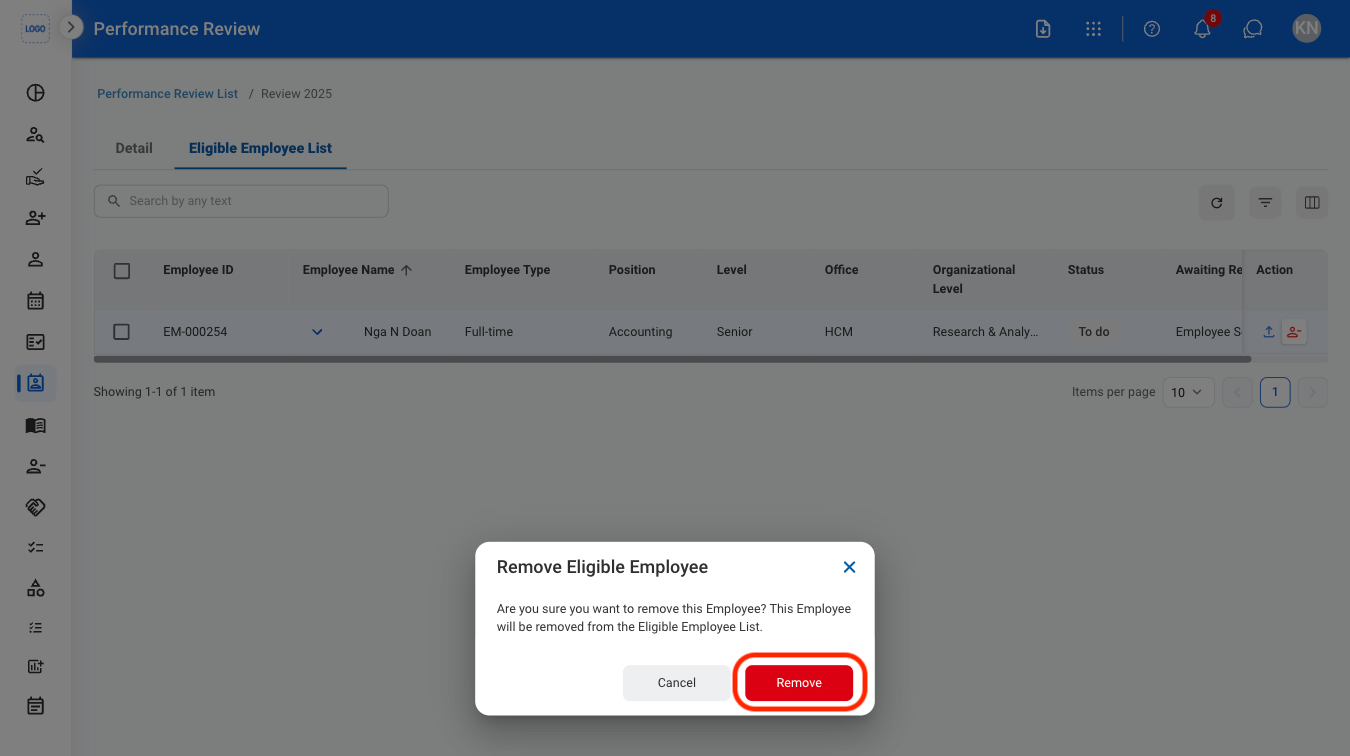
  <Step title="Confirm the action ">
    <Frame>
      <img src="https://mintcdn.com/bizbone/KMkrFVSQmkxvZOZ7/images/HR-P-CR-Emp.png?fit=max&auto=format&n=KMkrFVSQmkxvZOZ7&q=85&s=12521a814e3a3d722f4f497b4a49dfe1" alt="HR P CR Emp" width="1350" height="756" data-path="images/HR-P-CR-Emp.png" />
    </Frame>
  </Step>
</Steps>