> ## Documentation Index
> Fetch the complete documentation index at: https://docs.bizbone.com/llms.txt
> Use this file to discover all available pages before exploring further.

# Offboarding

> Supports the employee exit process by managing required tasks such as exit interviews, asset return, system access removal, and final administrative steps.

## View Offboarding Information
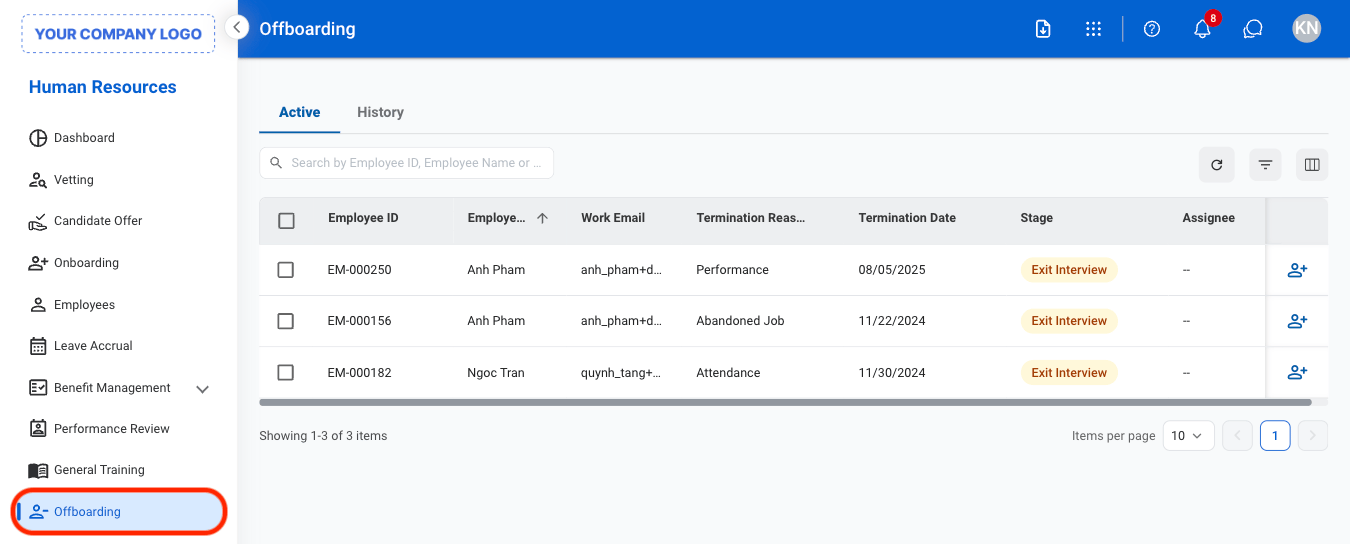
<Steps>
  <Step title="Select Offboarding">
    <Frame>
      <img src="https://mintcdn.com/bizbone/KMkrFVSQmkxvZOZ7/images/HR-O-Nav-1.png?fit=max&auto=format&n=KMkrFVSQmkxvZOZ7&q=85&s=c8fa5b16209810ba9f773ac37d14ab3a" alt="HR O Nav 1" width="1350" height="544" data-path="images/HR-O-Nav-1.png" />
    </Frame>
  </Step>

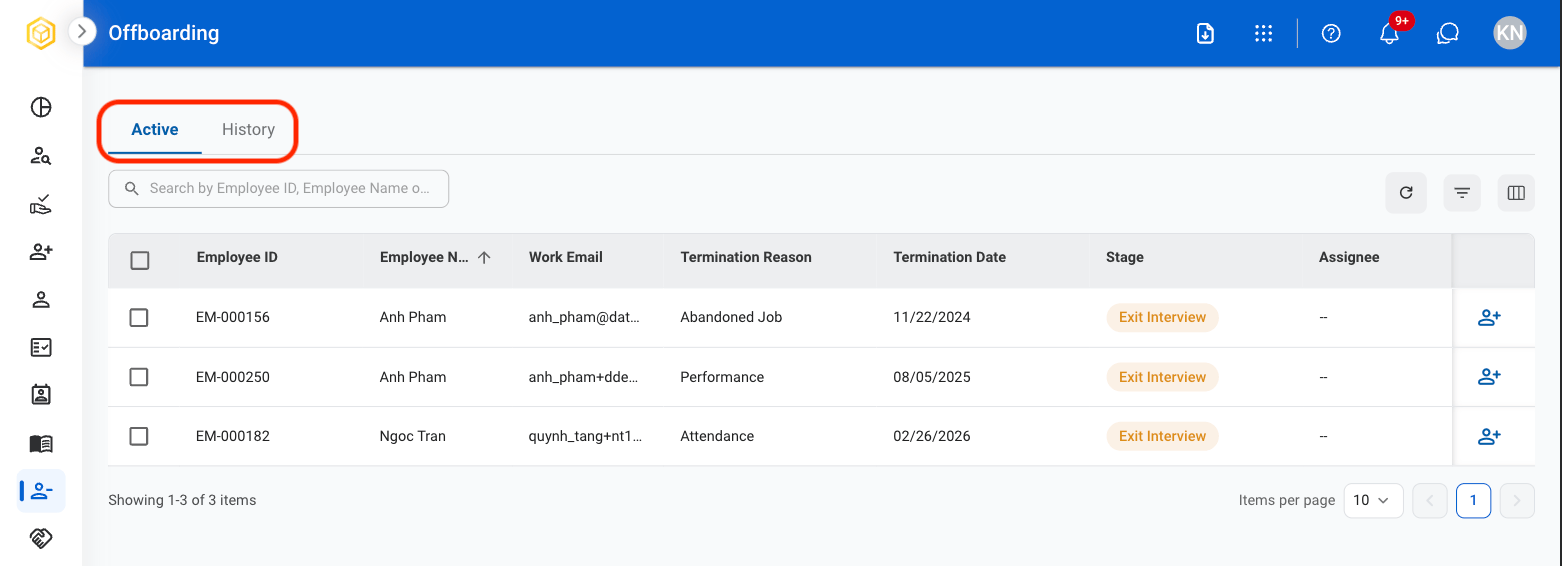
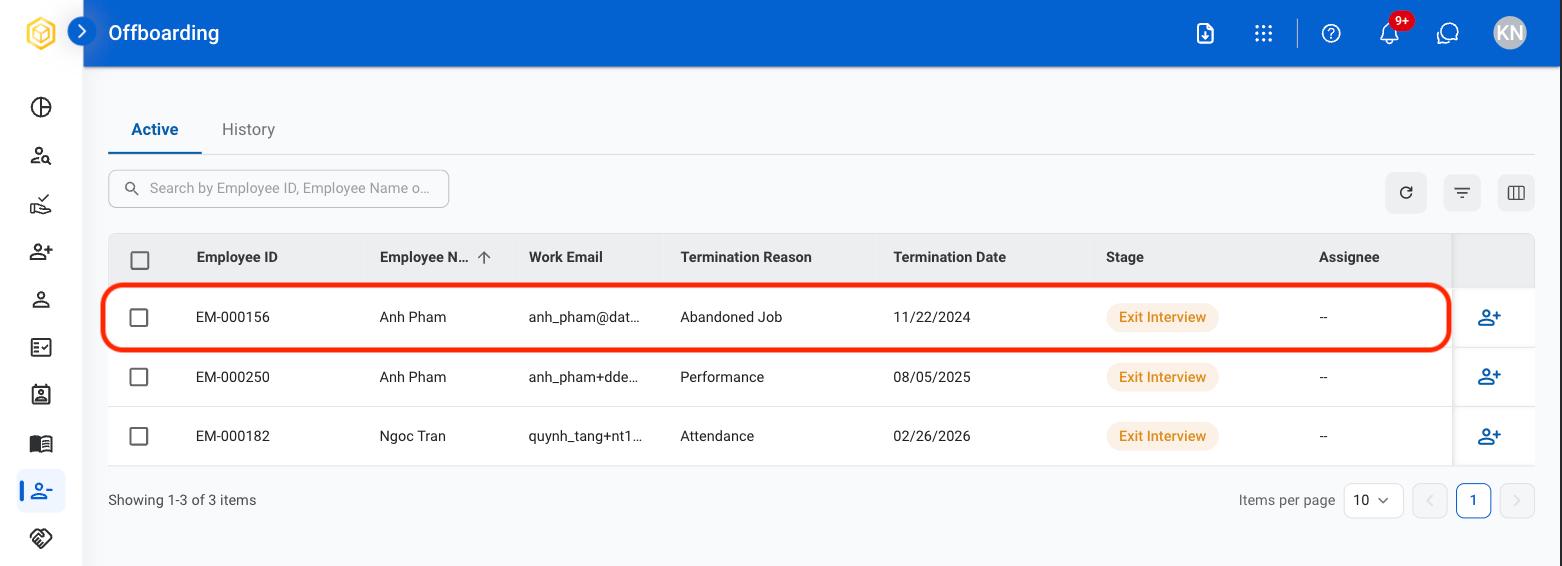
  <Step title="Select a tab">
    <Frame>
      <img src="https://mintcdn.com/bizbone/3BvPU03mTm_6TIU5/images/Offboarding-View.png?fit=max&auto=format&n=3BvPU03mTm_6TIU5&q=85&s=e792cb350542f5eb12a1a07acdc1202a" alt="Offboarding View" width="1562" height="566" data-path="images/Offboarding-View.png" />
    </Frame>

    **Active**: Current ongoing records.

    **History**: Previously closed records.
  </Step>

  <Step title="Select a profile for more information">
    <Frame>
      <img src="https://mintcdn.com/bizbone/3BvPU03mTm_6TIU5/images/Offboarding-Select.png?fit=max&auto=format&n=3BvPU03mTm_6TIU5&q=85&s=569222773be292cb7cb1c8a6598b025d" alt="Offboarding Select" width="1562" height="566" data-path="images/Offboarding-Select.png" />
    </Frame>
  </Step>

  <Step title="To make changes">
    <Frame>
      <img src="https://mintcdn.com/bizbone/3BvPU03mTm_6TIU5/images/Offboarding-Changes.png?fit=max&auto=format&n=3BvPU03mTm_6TIU5&q=85&s=2c385abb5503b8a3d47ec9e55a7ab91d" alt="Offboarding Changes" width="1562" height="920" data-path="images/Offboarding-Changes.png" />
    </Frame>

    * Select **Cancel Offboarding** to move profile back to Employees
    * Select **Edit** to update termination reason, date, and documentation. 
  </Step>
</Steps>

## Assign Agreement Information

<Steps>
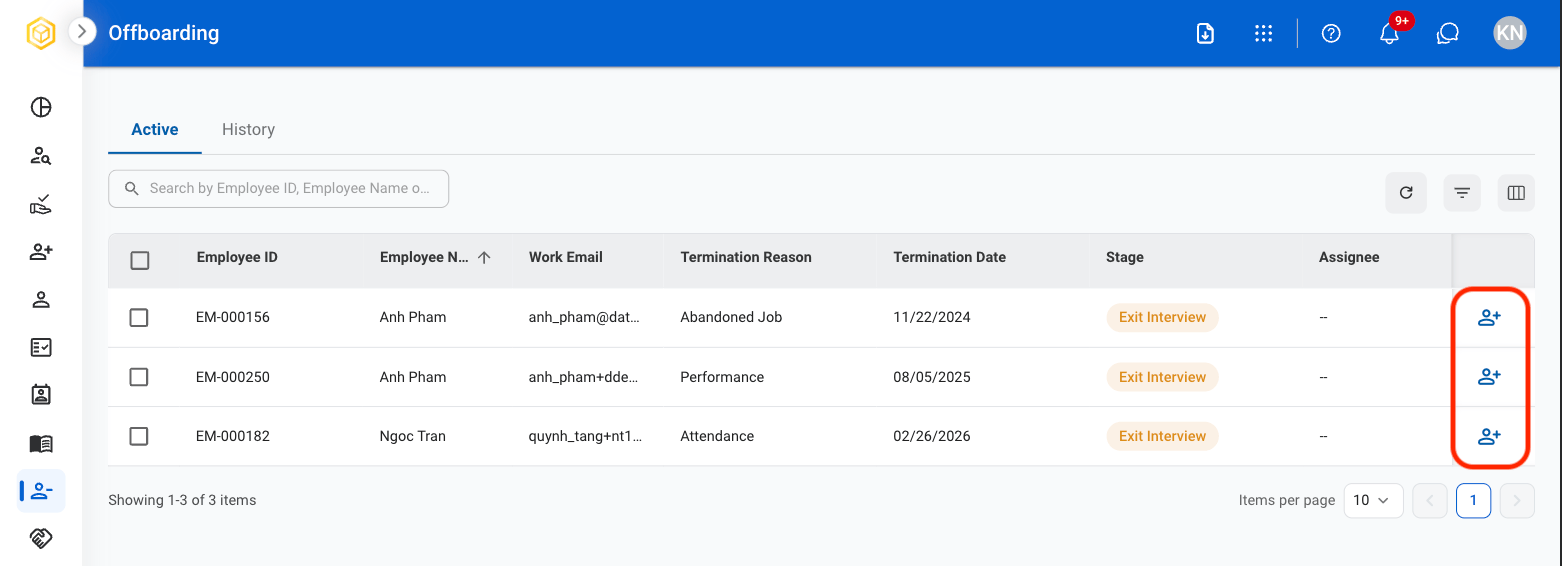
  <Step title="Select the Assign icon on an active Offboarding profile">
    <Frame>
      <img src="https://mintcdn.com/bizbone/3BvPU03mTm_6TIU5/images/Offboarding-Assign.png?fit=max&auto=format&n=3BvPU03mTm_6TIU5&q=85&s=898c43fde6d484fb1c60190546c3abcf" alt="Offboarding Assign" width="1562" height="566" data-path="images/Offboarding-Assign.png" />
    </Frame>
  </Step>

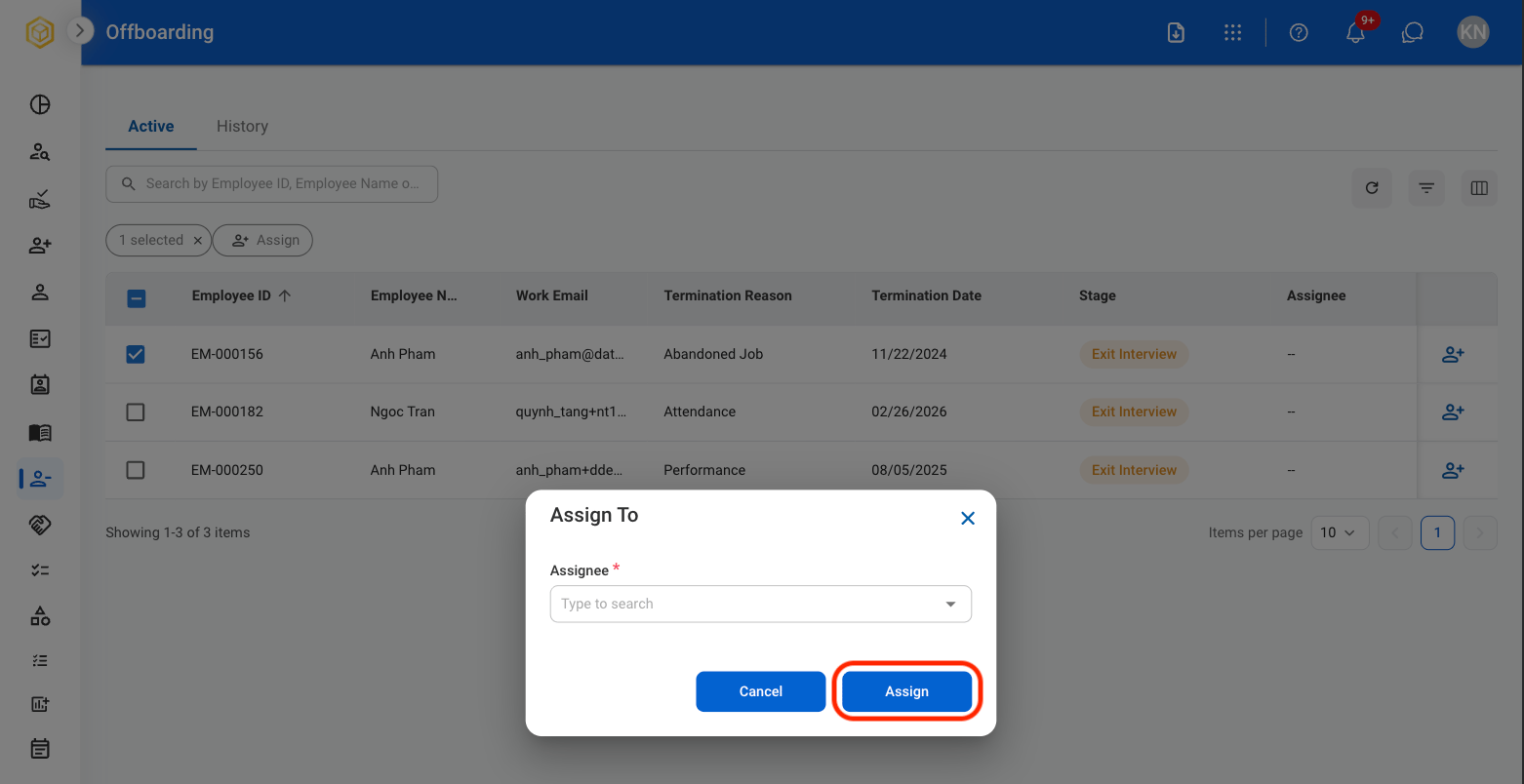
  <Step title="Select an assignee">
    <Frame>
      <img src="https://mintcdn.com/bizbone/3BvPU03mTm_6TIU5/images/Offboarding-Assignee.png?fit=max&auto=format&n=3BvPU03mTm_6TIU5&q=85&s=cdcc88d7fc4c58d761e02cc2c2becb17" alt="Offboarding Assignee" width="1562" height="804" data-path="images/Offboarding-Assignee.png" />
    </Frame>

    Select **Assign** to complete or **Cancel** to exit without saving changes.
  </Step>
</Steps>

## Exit Interview

Record exit interview information and track interview completion status.

<Steps>
  <Step title="Select an employee profile">
    <Frame>
      <img src="https://mintcdn.com/bizbone/3BvPU03mTm_6TIU5/images/Offboarding-Select.png?fit=max&auto=format&n=3BvPU03mTm_6TIU5&q=85&s=569222773be292cb7cb1c8a6598b025d" alt="Offboarding Select" width="1562" height="566" data-path="images/Offboarding-Select.png" />
    </Frame>
  </Step>

  <Step title="Select the Exit Interview tab">
    <Frame>
      <img src="https://mintcdn.com/bizbone/3BvPU03mTm_6TIU5/images/Off-Exit-Int.png?fit=max&auto=format&n=3BvPU03mTm_6TIU5&q=85&s=6bbbd35615c7bd84480960859861f358" alt="Off Exit Int" width="1562" height="1124" data-path="images/Off-Exit-Int.png" />
    </Frame>
  </Step>

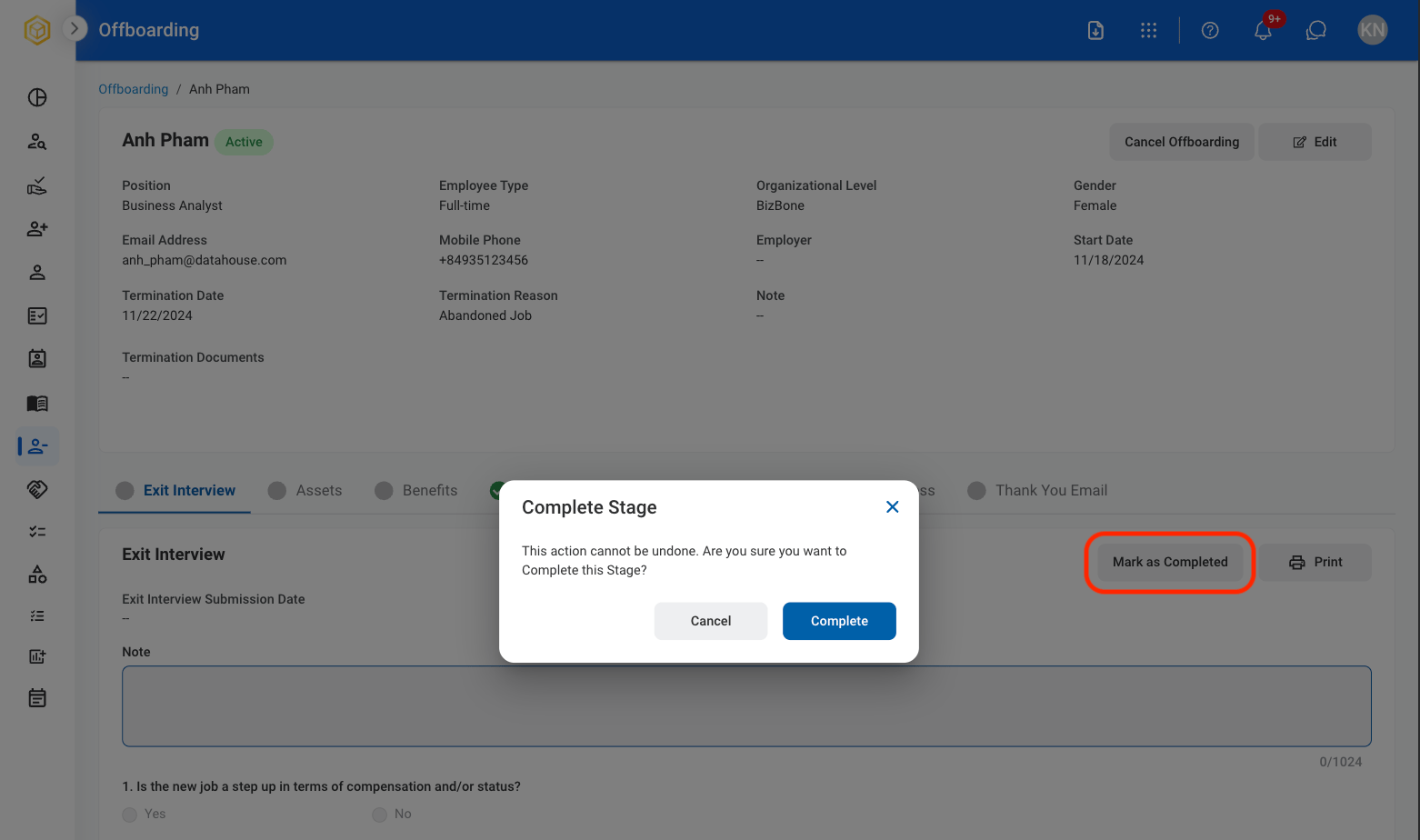
  <Step title="Once completed by employee, select Mark as Completed">
    <Frame>
      <img src="https://mintcdn.com/bizbone/3BvPU03mTm_6TIU5/images/Off-Complete-EI.png?fit=max&auto=format&n=3BvPU03mTm_6TIU5&q=85&s=80c1fc0980d2c3b5d724f12d4820345c" alt="Off Complete EI" width="1562" height="924" data-path="images/Off-Complete-EI.png" />
    </Frame>

    Select **Complete** to complete or **Cancel** to exit without saving changes
  </Step>
</Steps>

## Assets

View assigned assets and track asset return status during offboarding.

<Steps>
  <Step title="Select the Assets tab">
    <Frame>
      <img src="https://mintcdn.com/bizbone/3BvPU03mTm_6TIU5/images/Off-Assets.png?fit=max&auto=format&n=3BvPU03mTm_6TIU5&q=85&s=f8a44e56624bf4d347a9256b0188182c" alt="Off Assets" width="1562" height="1164" data-path="images/Off-Assets.png" />
    </Frame>
  </Step>

  <Step title="Once asset return is completed, select Mark as Completed">
    <Frame>
      <img src="https://mintcdn.com/bizbone/3BvPU03mTm_6TIU5/images/Off-MaC.png?fit=max&auto=format&n=3BvPU03mTm_6TIU5&q=85&s=db1ea73ee42c967c921e4e6d92f97655" alt="Off Ma C" width="1562" height="752" data-path="images/Off-MaC.png" />
    </Frame>

    Select **Complete** to complete or **Cancel** to exit without saving changes. 

    <Info>
      Once completed, this action cannot be undone.
    </Info>
  </Step>
</Steps>

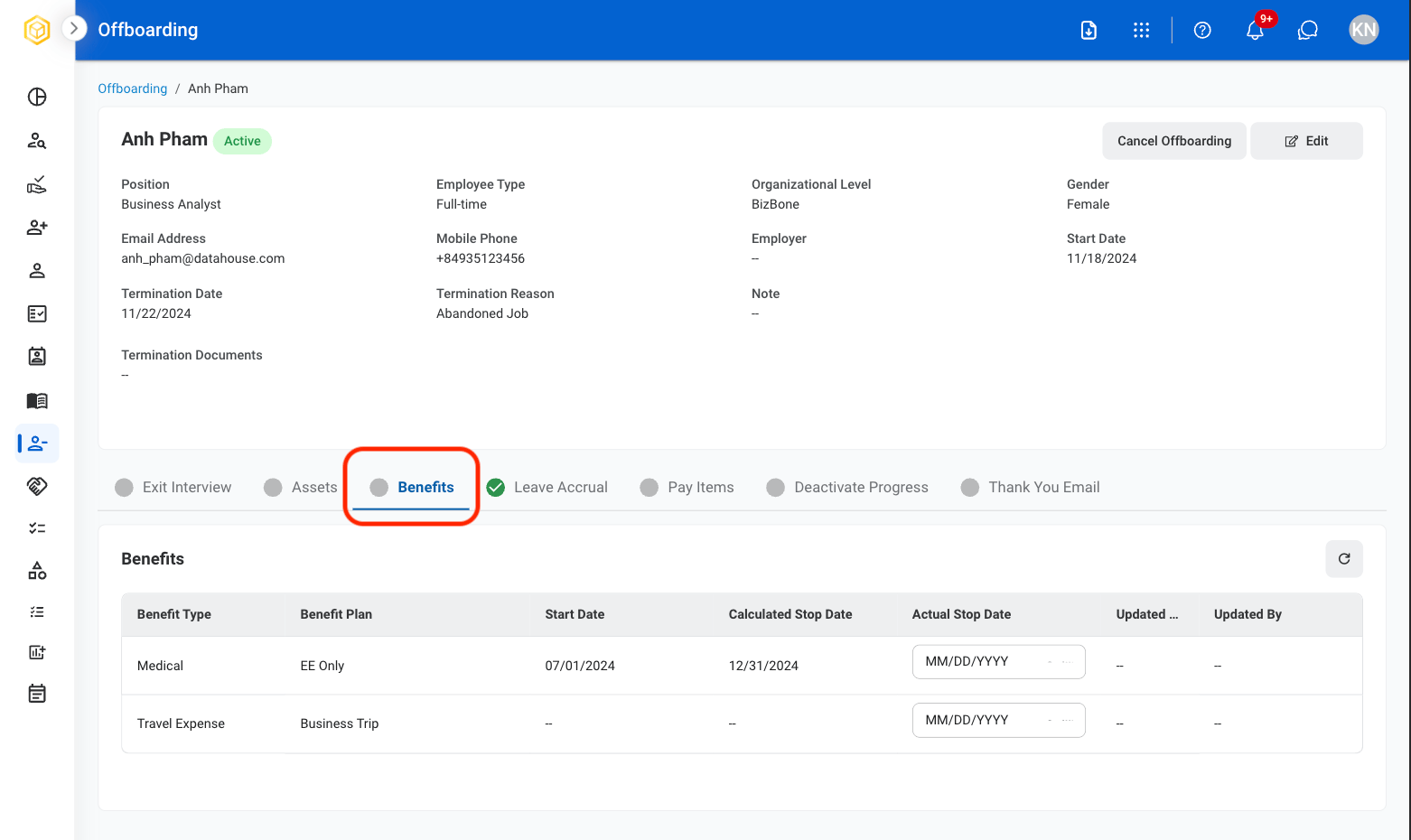
## Benefits

Record benefit termination information and benefit end dates.
<Steps>
  <Step title="Select the Benefits tab">
    <Frame>
      <img src="https://mintcdn.com/bizbone/3BvPU03mTm_6TIU5/images/Off-Benefits-Tab.png?fit=max&auto=format&n=3BvPU03mTm_6TIU5&q=85&s=d6e0d2f32c3a12dc4c2fa95d07db873e" alt="Off Benefits Tab" width="1562" height="930" data-path="images/Off-Benefits-Tab.png" />
    </Frame>
  </Step>

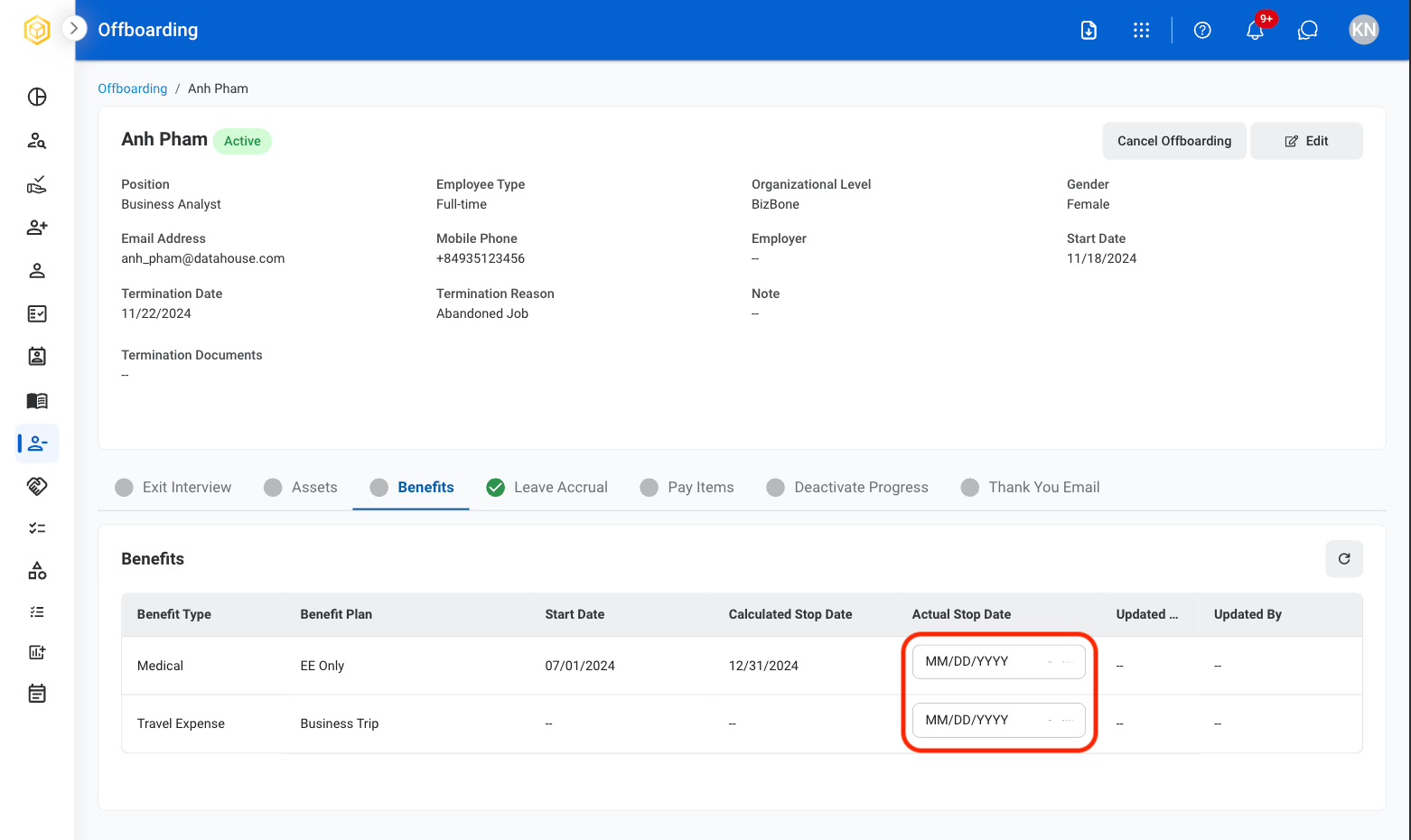
  <Step title="Select MM/DD/YYYY to update Actual Stop Date">
    <Frame>
      <img src="https://mintcdn.com/bizbone/3BvPU03mTm_6TIU5/images/Off-Benefits-Date.png?fit=max&auto=format&n=3BvPU03mTm_6TIU5&q=85&s=c3f350dcabd35ccbc118fe00001a6b1d" alt="Off Benefits Date" width="1562" height="930" data-path="images/Off-Benefits-Date.png" />
    </Frame>
  </Step>
</Steps>

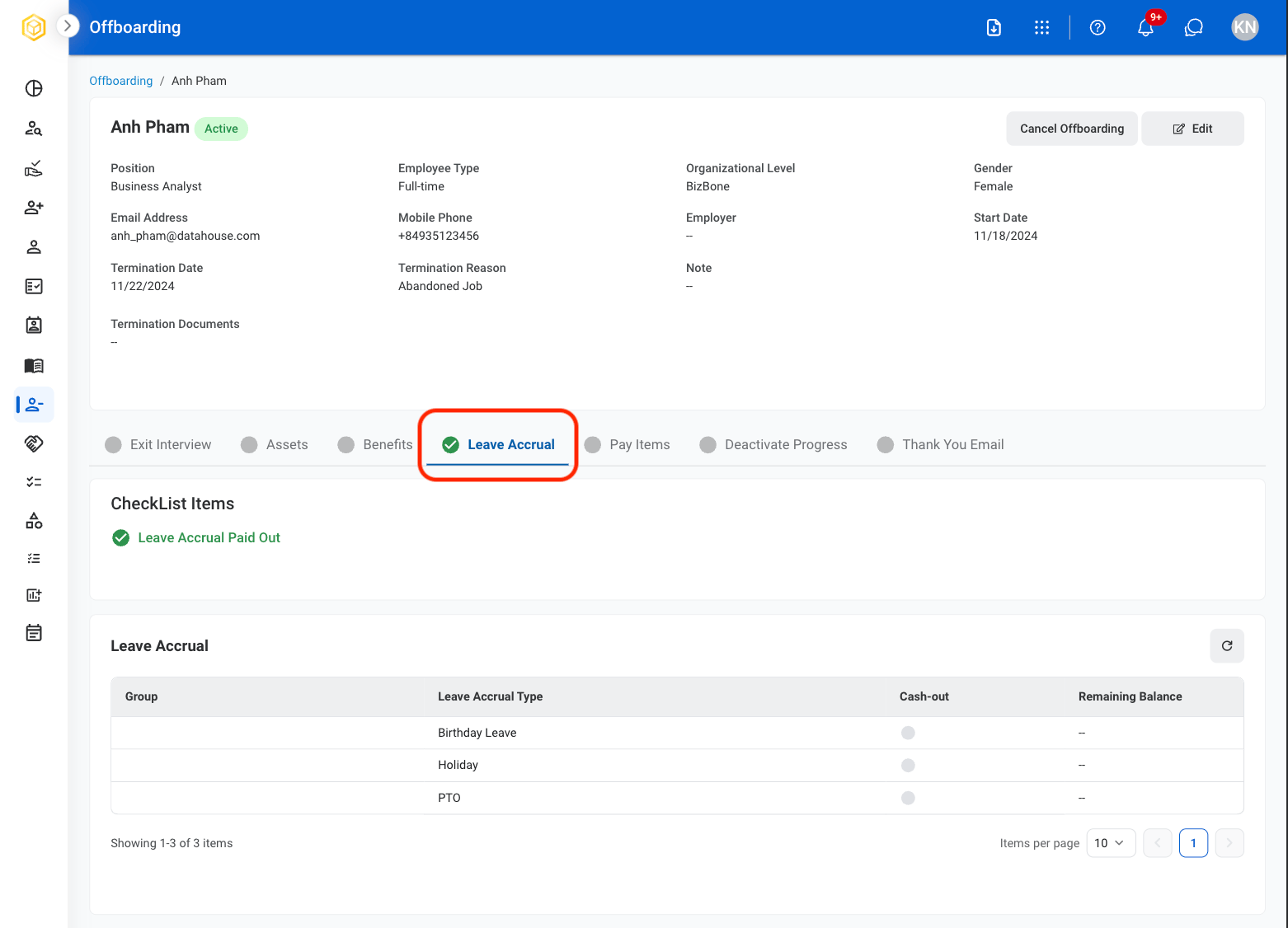
## Leave Accrual

View remaining leave accrual balances and manage leave payout information.
<Steps>
  <Step title="Select the Leave Accrual tab ">
    <Frame>
      <img src="https://mintcdn.com/bizbone/3BvPU03mTm_6TIU5/images/Off-Leave-A.png?fit=max&auto=format&n=3BvPU03mTm_6TIU5&q=85&s=7e8461ce2a0a276eed69ee027f78e2b1" alt="Off Leave A" width="1562" height="1126" data-path="images/Off-Leave-A.png" />
    </Frame>
  </Step>
</Steps>

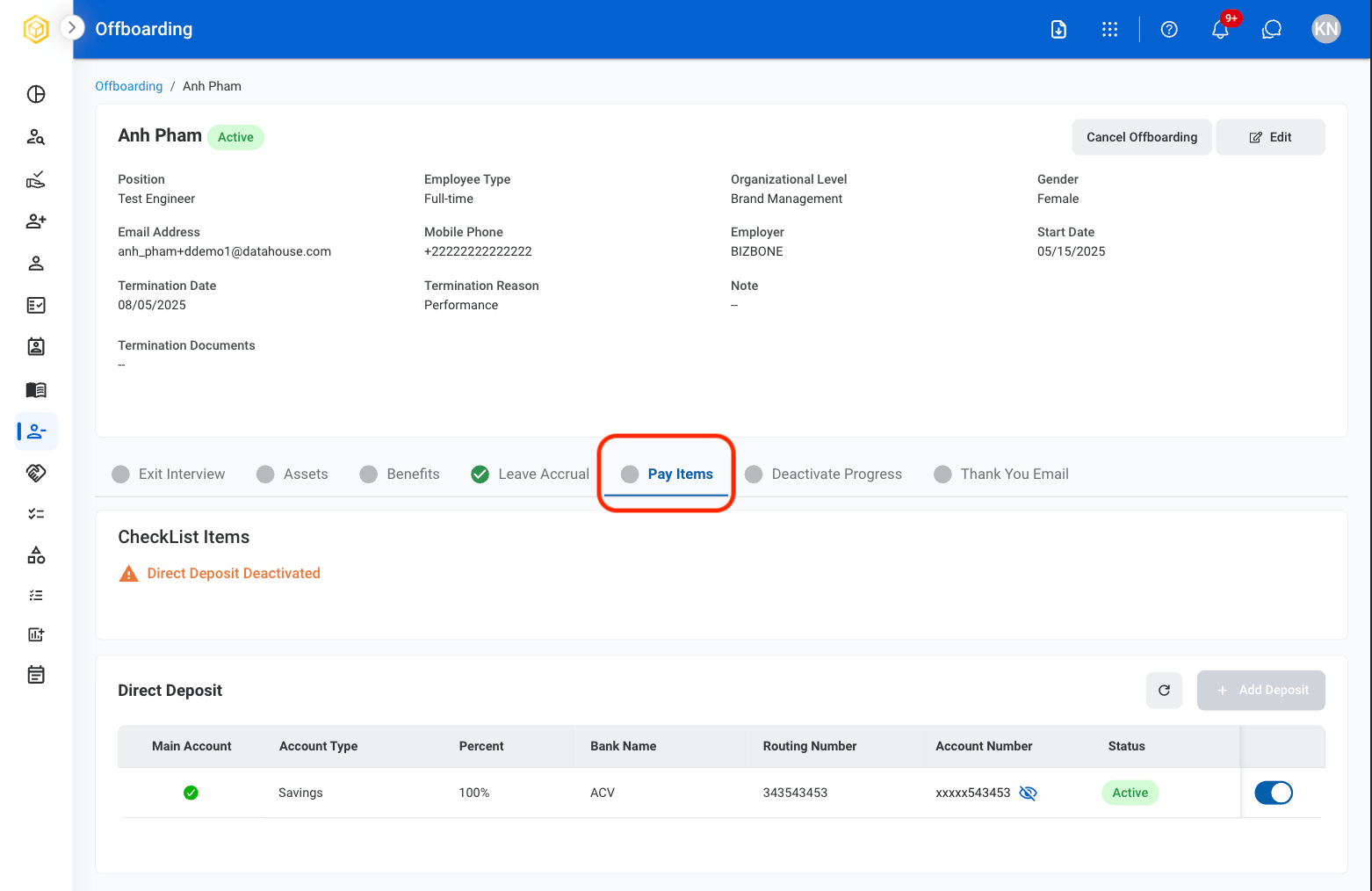
## Pay Items

View direct deposit information and manage account deactivation status.
<Steps>
  <Step title="Select the Pay Items tab">
    <Frame>
      <img src="https://mintcdn.com/bizbone/3BvPU03mTm_6TIU5/images/Off-Pay-Items.png?fit=max&auto=format&n=3BvPU03mTm_6TIU5&q=85&s=b05c67c5c6fe904b4bef23f1860c19b3" alt="Off Pay Items" width="1562" height="1014" data-path="images/Off-Pay-Items.png" />
    </Frame>
  </Step>

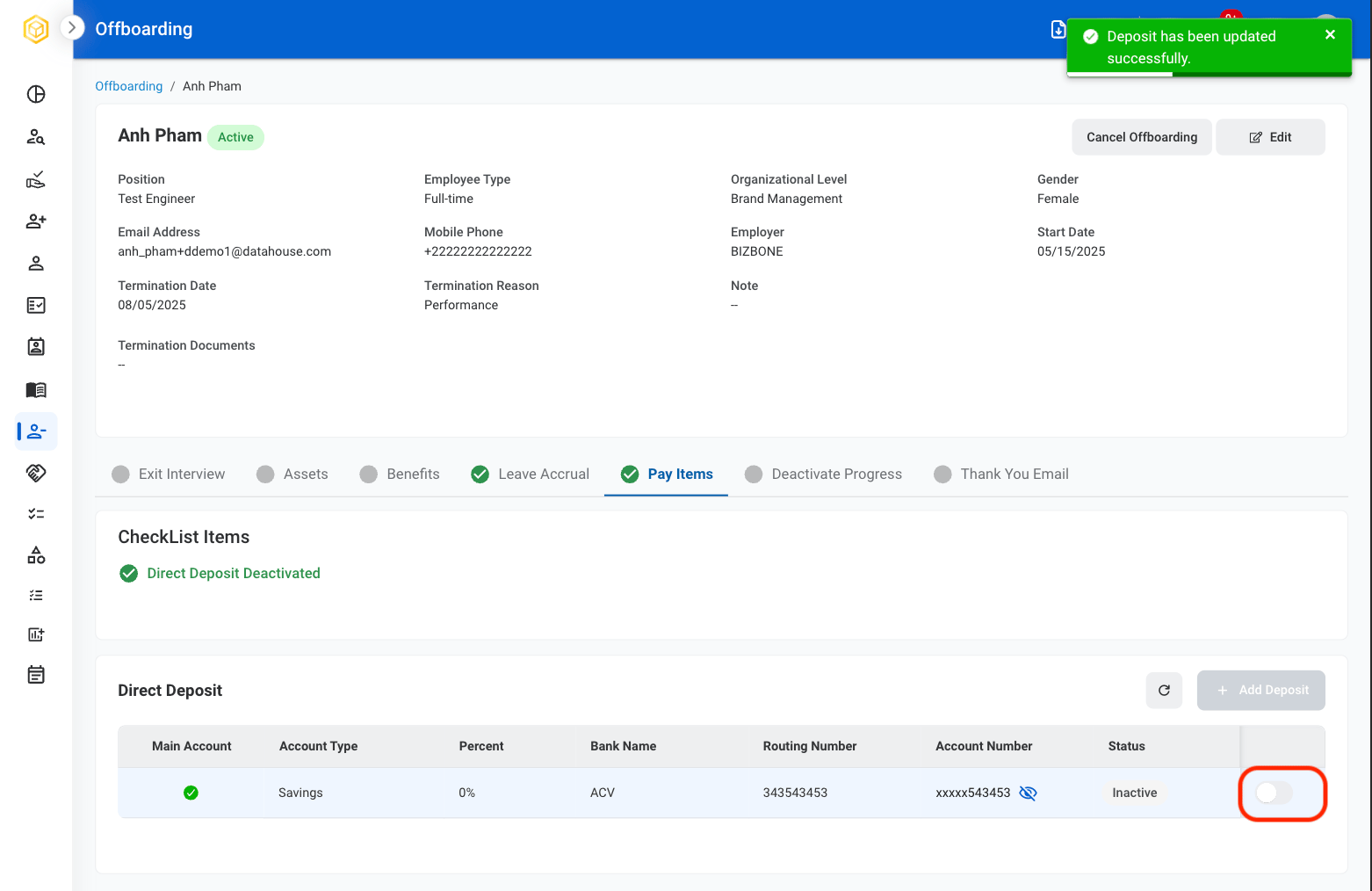
  <Step title="Toggle the slider to deactivate direct deposit">
    <Frame>
      <img src="https://mintcdn.com/bizbone/3BvPU03mTm_6TIU5/images/Off-PI-Deact.png?fit=max&auto=format&n=3BvPU03mTm_6TIU5&q=85&s=88e90be30f59896596ecb8143496b647" alt="Off PI Deact" width="1562" height="1014" data-path="images/Off-PI-Deact.png" />
    </Frame>

    <Info>
      Once deactivated, this action cannot be undone. 
    </Info>
  </Step>
</Steps>

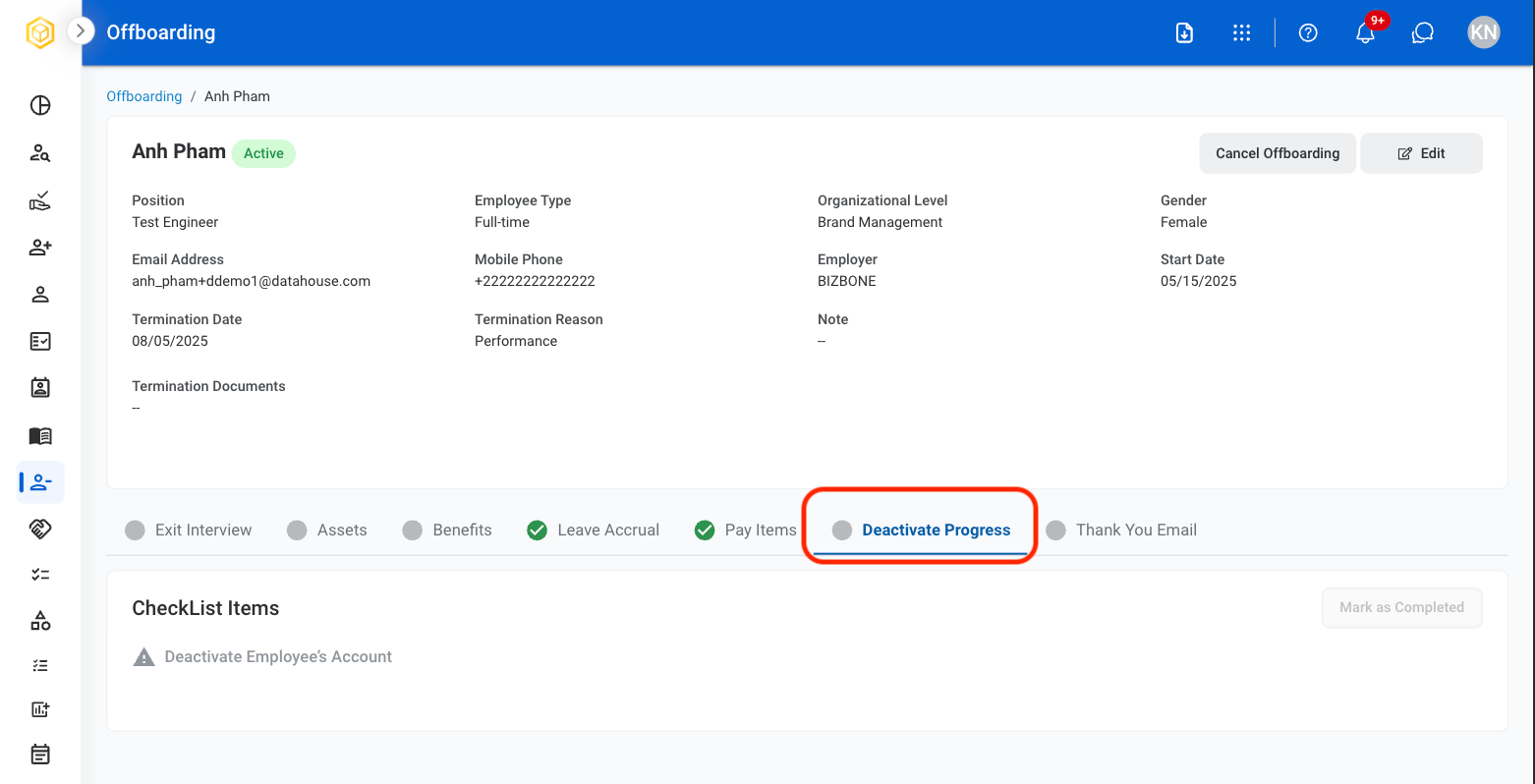
## Deactivate Progress

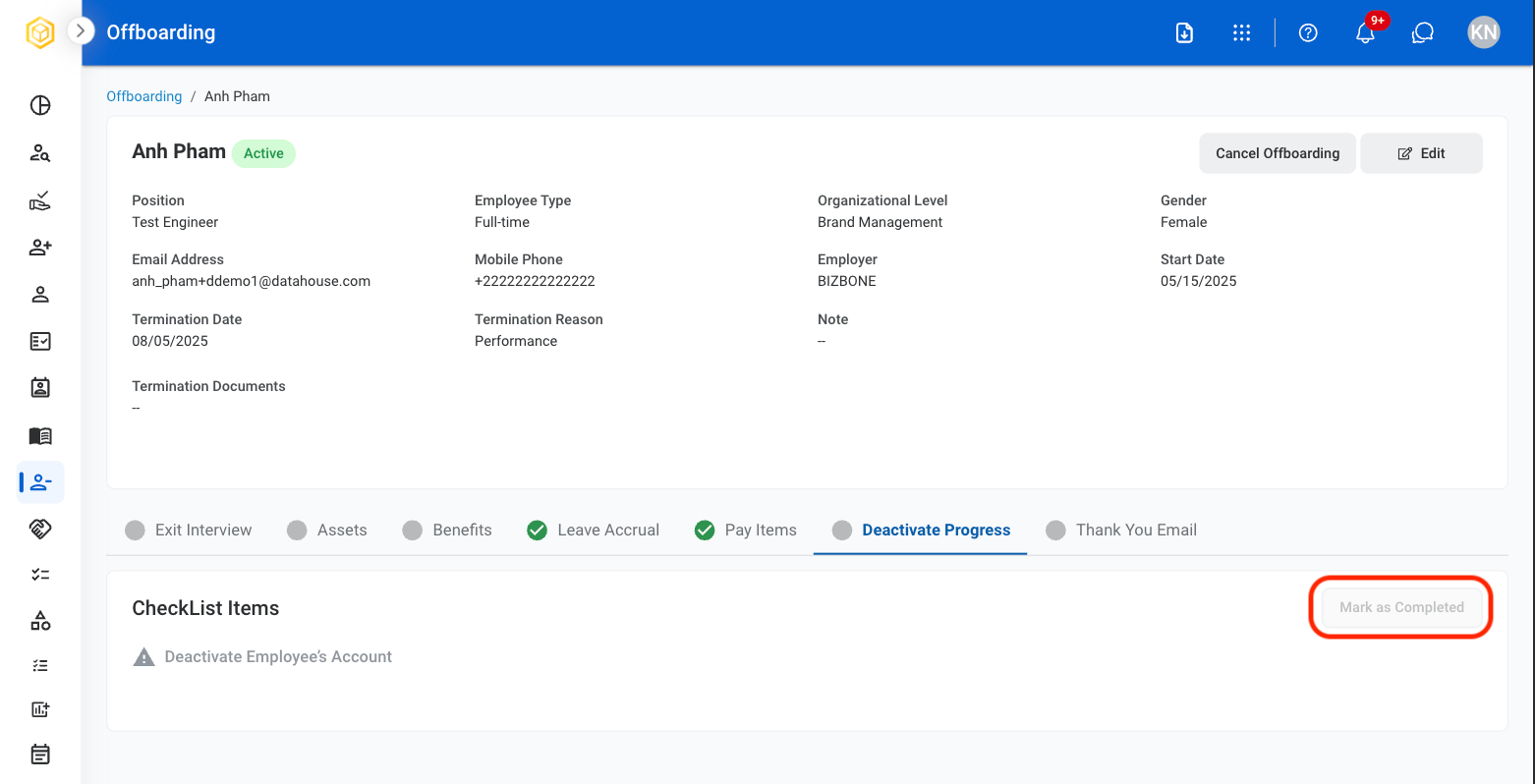
Deactivate employee system access and complete the offboarding process after all requirements have been satisfied.
<Steps>
  <Step title="Select the Deactivate Progress tab in the employee profile">
    <Frame>
      <img src="https://mintcdn.com/bizbone/3BvPU03mTm_6TIU5/images/Off-Deact-Prog.png?fit=max&auto=format&n=3BvPU03mTm_6TIU5&q=85&s=fa2780091f1e0f265bb16bfa63647557" alt="Off Deact Prog" width="1562" height="798" data-path="images/Off-Deact-Prog.png" />
    </Frame>
  </Step>

  <Step title="Once all offboarding activities are complete, select Mark as Completed.">
    <Frame>
      <img src="https://mintcdn.com/bizbone/3BvPU03mTm_6TIU5/images/Off-Deact-MaC.png?fit=max&auto=format&n=3BvPU03mTm_6TIU5&q=85&s=c78300ddd7ac504f02c24b1399243f60" alt="Off Deact Ma C" width="1562" height="798" data-path="images/Off-Deact-MaC.png" />
    </Frame>

    <Info>
      All offboarding requirements must be completed before account deactivation can be finalized.
    </Info>
  </Step>
</Steps>

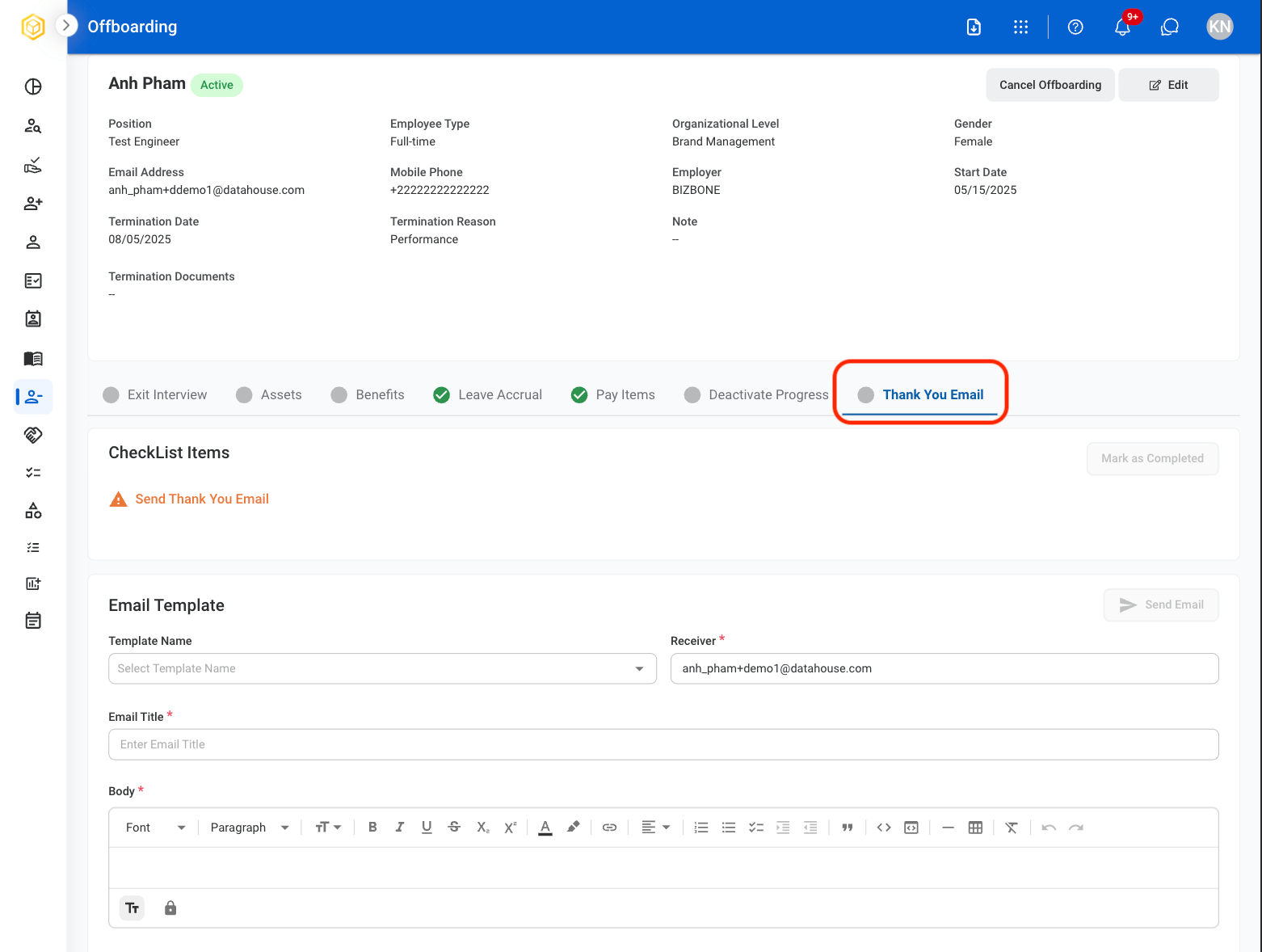
## Thank You Email

Create and send a final communication to the employee as part of the offboarding process.
<Steps>
  <Step title="Select the Thank You Email tab.">
    <Frame>
      <img src="https://mintcdn.com/bizbone/3BvPU03mTm_6TIU5/images/OThankYouE.png?fit=max&auto=format&n=3BvPU03mTm_6TIU5&q=85&s=5dff28907360adfbcd644deb08a1bab7" alt="O Thank You E" width="1562" height="1178" data-path="images/OThankYouE.png" />
    </Frame>
  </Step>

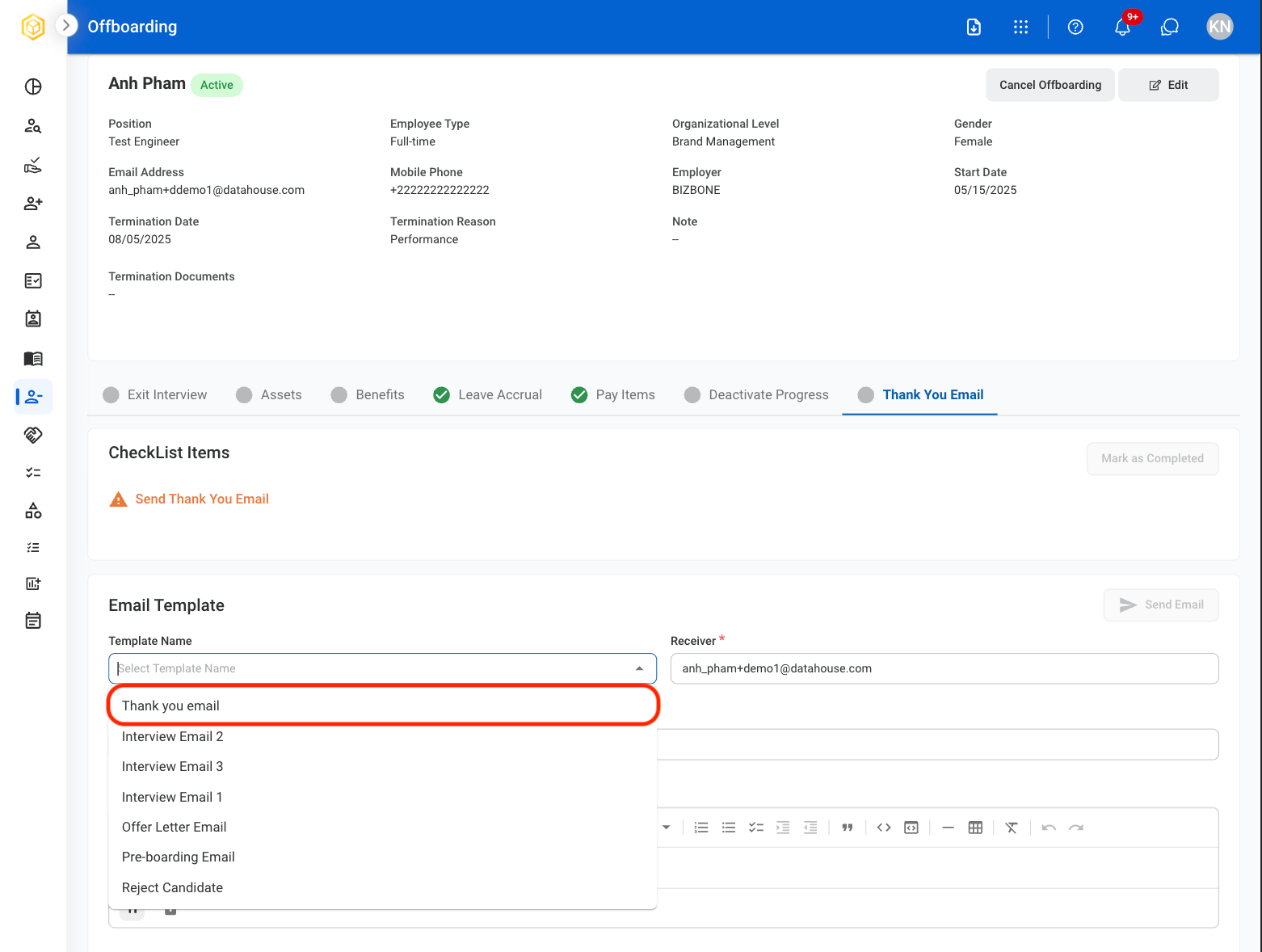
  <Step title="Select the Thank you email template">
    <Frame>
      <img src="https://mintcdn.com/bizbone/3BvPU03mTm_6TIU5/images/OTYTemp.png?fit=max&auto=format&n=3BvPU03mTm_6TIU5&q=85&s=f8fc556267613167c15a6494a08a61ea" alt="OTY Temp" width="1562" height="1178" data-path="images/OTYTemp.png" />
    </Frame>
  </Step>

  <Step title="Select Send Email">
    <Frame>
      <img src="https://mintcdn.com/bizbone/3BvPU03mTm_6TIU5/images/OTYESend.png?fit=max&auto=format&n=3BvPU03mTm_6TIU5&q=85&s=0d476b5c28a85c5b6ab28029202f7c16" alt="OTYE Send" width="1562" height="1248" data-path="images/OTYESend.png" />
    </Frame>
  </Step>

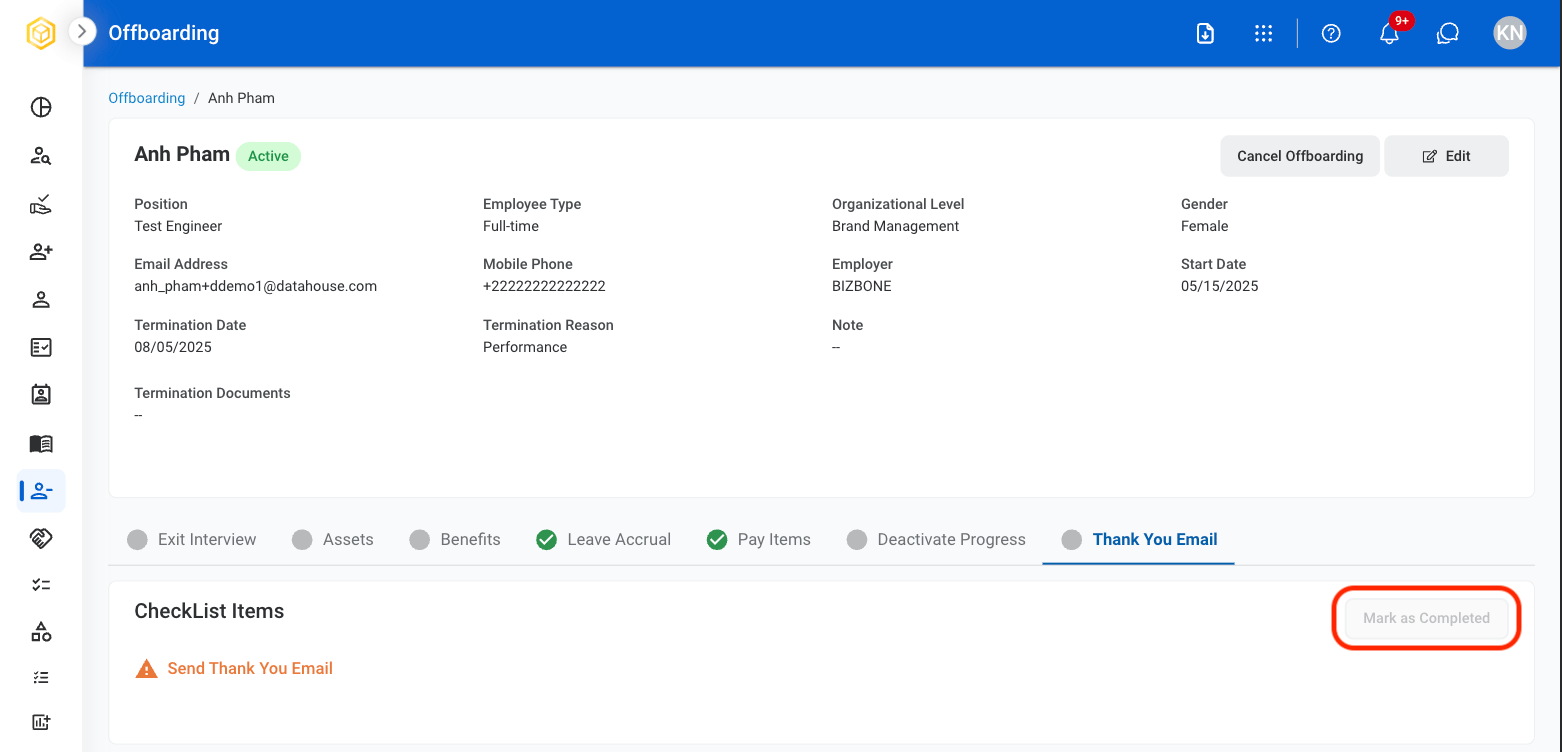
  <Step title="Select Mark as Completed">
    <Frame>
      <img src="https://mintcdn.com/bizbone/3BvPU03mTm_6TIU5/images/OTYEMaC.png?fit=max&auto=format&n=3BvPU03mTm_6TIU5&q=85&s=8bb7df5fae64d1b1e53e1b70fcf66634" alt="OTYE Ma C" width="1562" height="752" data-path="images/OTYEMaC.png" />
    </Frame>
  </Step>
</Steps>