> ## Documentation Index
> Fetch the complete documentation index at: https://docs.bizbone.com/llms.txt
> Use this file to discover all available pages before exploring further.

# Opportunities

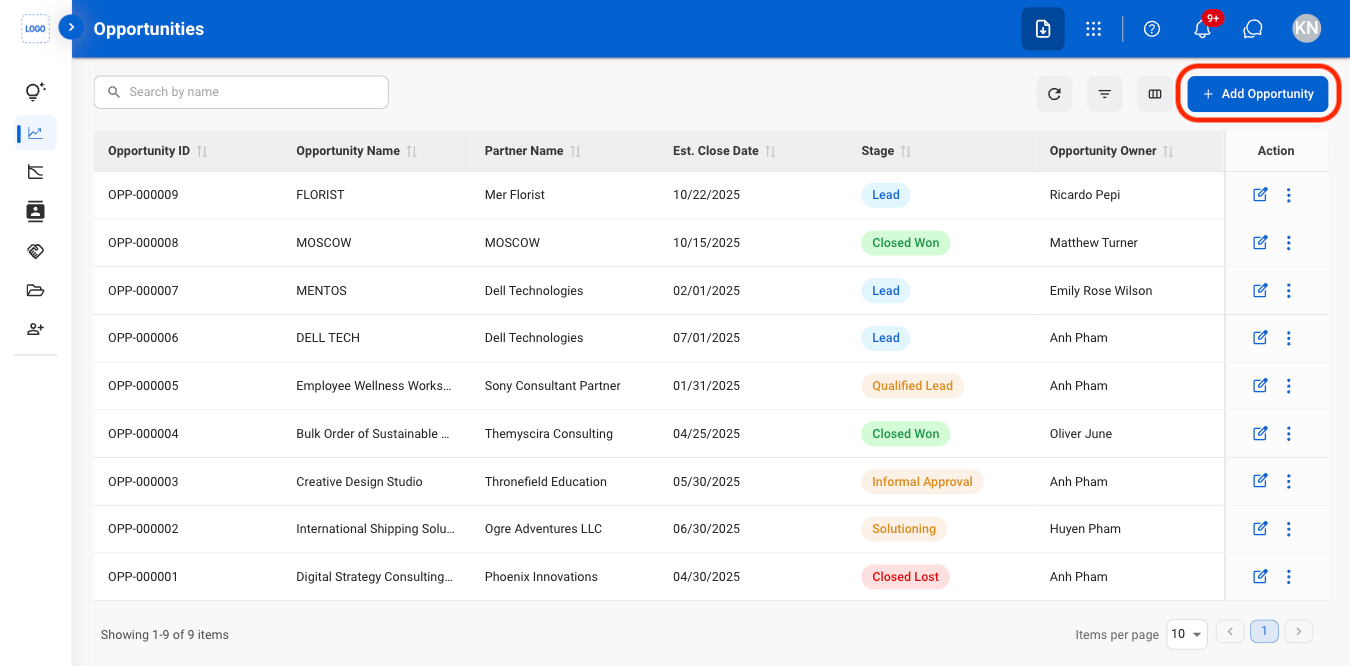
## Add an Opportunity
<Steps>
  <Step title="Navigate to Opportunities ">
    <Frame>
      <img src="https://mintcdn.com/bizbone/j9nXCGIfRGEHdTNl/images/CRM-O-Nav.png?fit=max&auto=format&n=j9nXCGIfRGEHdTNl&q=85&s=8aaed6c4e294292bf91277284df197e7" alt="CRM O Nav" width="1350" height="666" data-path="images/CRM-O-Nav.png" />
    </Frame>
  </Step>

  <Step title="Select Add Opportunity">
    <Frame>
      <img src="https://mintcdn.com/bizbone/j9nXCGIfRGEHdTNl/images/CRM-O-Add.png?fit=max&auto=format&n=j9nXCGIfRGEHdTNl&q=85&s=7f9e7e47d0788cd94e6277fe0dff6c6c" alt="CRM O Add" width="1350" height="666" data-path="images/CRM-O-Add.png" />
    </Frame>
  </Step>

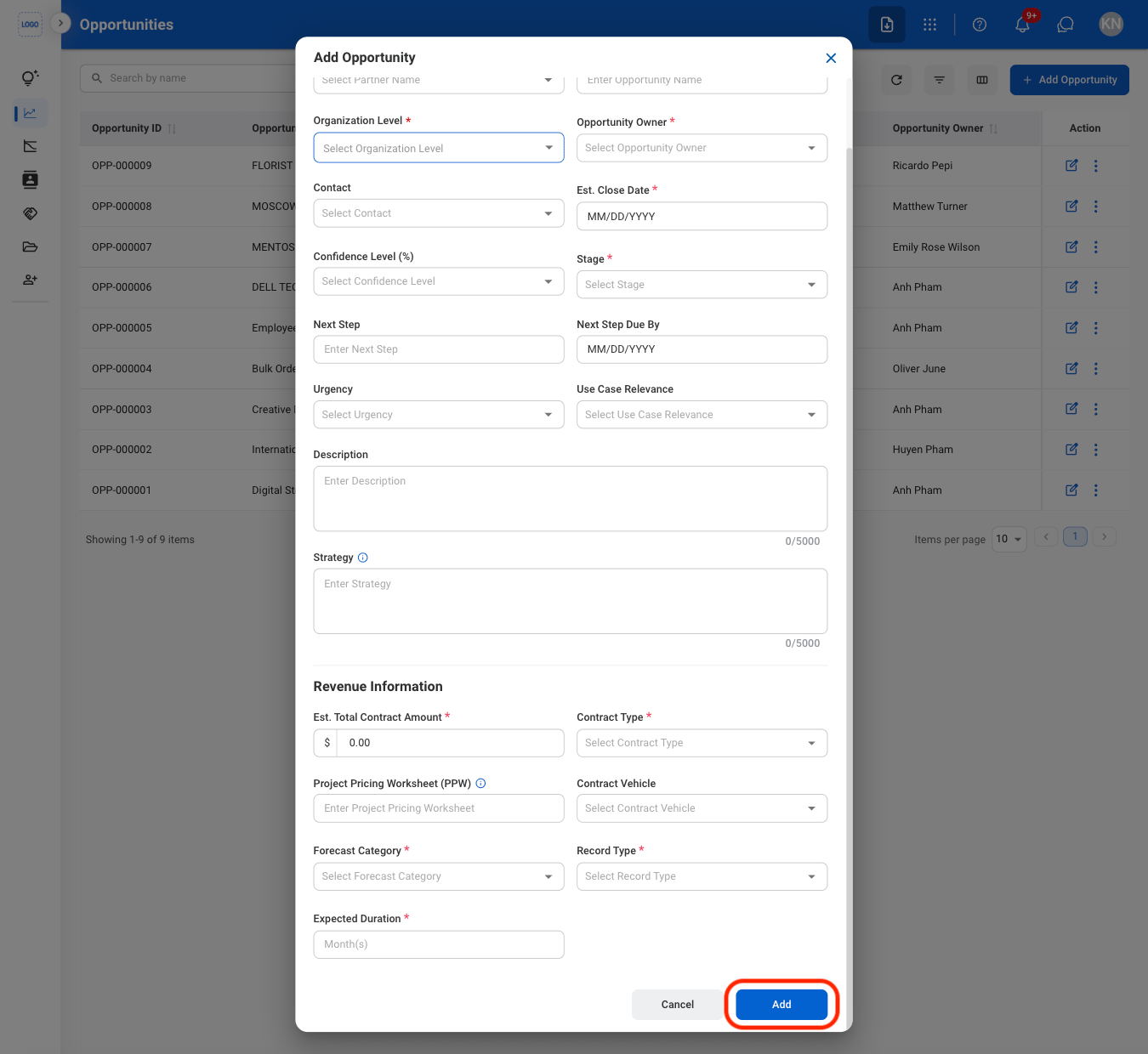
  <Step title="Fill in the required information">
    <Frame>
      <img src="https://mintcdn.com/bizbone/j9nXCGIfRGEHdTNl/images/CRM-O-Add-C.png?fit=max&auto=format&n=j9nXCGIfRGEHdTNl&q=85&s=f089f00fda1c736dd44bb986b59c07e1" alt="CRM O Add C" width="1350" height="1240" data-path="images/CRM-O-Add-C.png" />
    </Frame>

    Select **Add** to complete or **Cancel** to exit without saving changes. 
  </Step>
</Steps>

## Modify an Opportunity

<Steps>
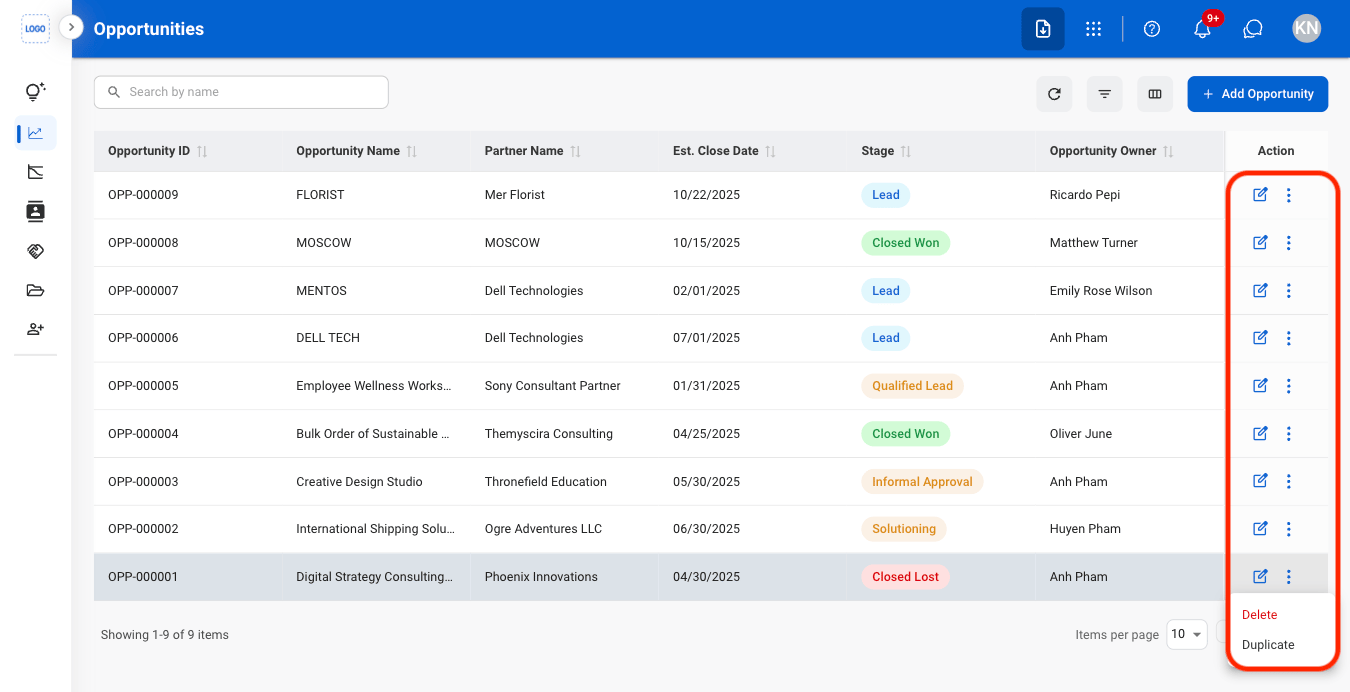
  <Step title="Select an action">
    <Frame>
      <img src="https://mintcdn.com/bizbone/j9nXCGIfRGEHdTNl/images/CRM-O-Modify.png?fit=max&auto=format&n=j9nXCGIfRGEHdTNl&q=85&s=0156d3af2ad5ce20b761fd5d70d0e0cf" alt="CRM O Modify" width="1350" height="692" data-path="images/CRM-O-Modify.png" />
    </Frame>

    * **Edit:** Update opportunity information.
    * **Delete:** Permanently remove the opportunity from the system.
    * **Duplicate:** Create a copy of the opportunity to use as the basis for a new opportunity record.
  </Step>

  <Step title="Confirm the action">
    * **Edit:** Fill in the required information. Select **Update** to complete or **Cancel** to exit without saving changes. 
    * **Delete:** Select **Delete** to complete or **Cancel** to exit without saving changes. 
    * **Duplicate:** Fill in the required information. Select **Save** to complete or **Cancel** to exit without saving changes. 
  </Step>
</Steps>

## Add a Note

<Steps>
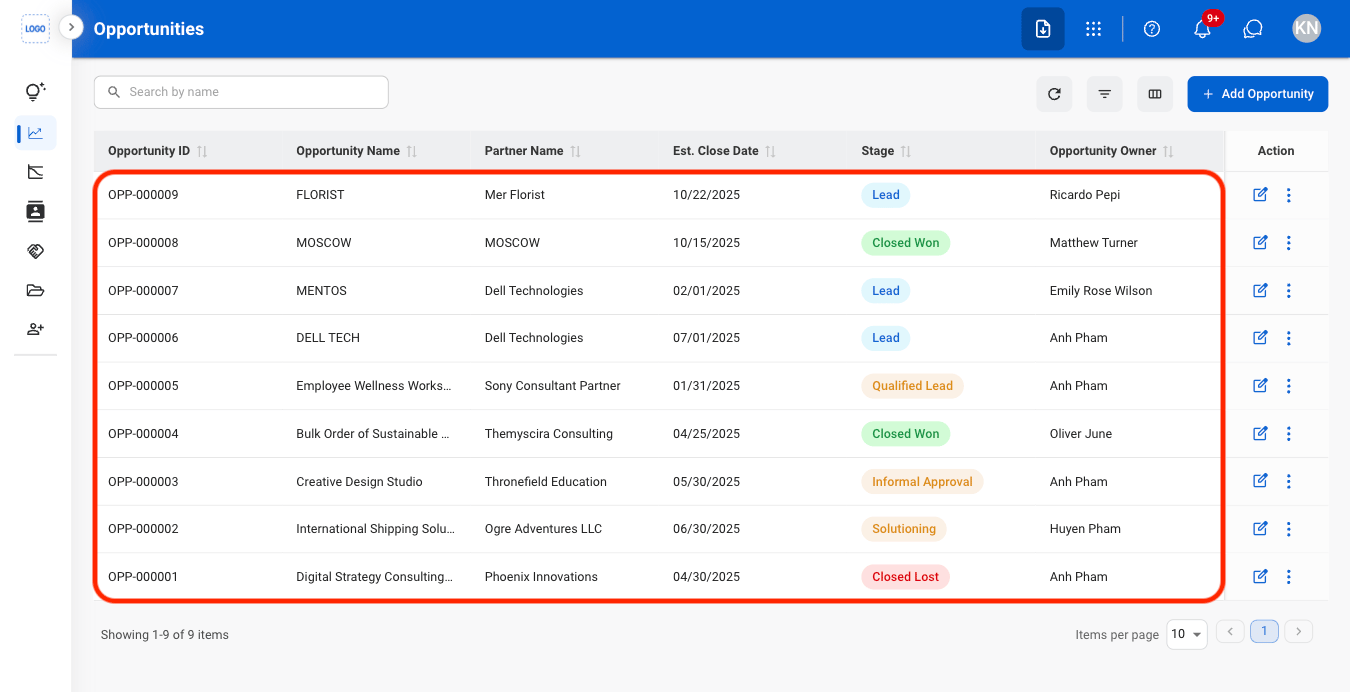
  <Step title="Select an Opportunity ">
    <Frame>
      <img src="https://mintcdn.com/bizbone/j9nXCGIfRGEHdTNl/images/CRM-O-Select.png?fit=max&auto=format&n=j9nXCGIfRGEHdTNl&q=85&s=df0e1eafacc1589998644044e48526b0" alt="CRM O Select" width="1350" height="692" data-path="images/CRM-O-Select.png" />
    </Frame>
  </Step>

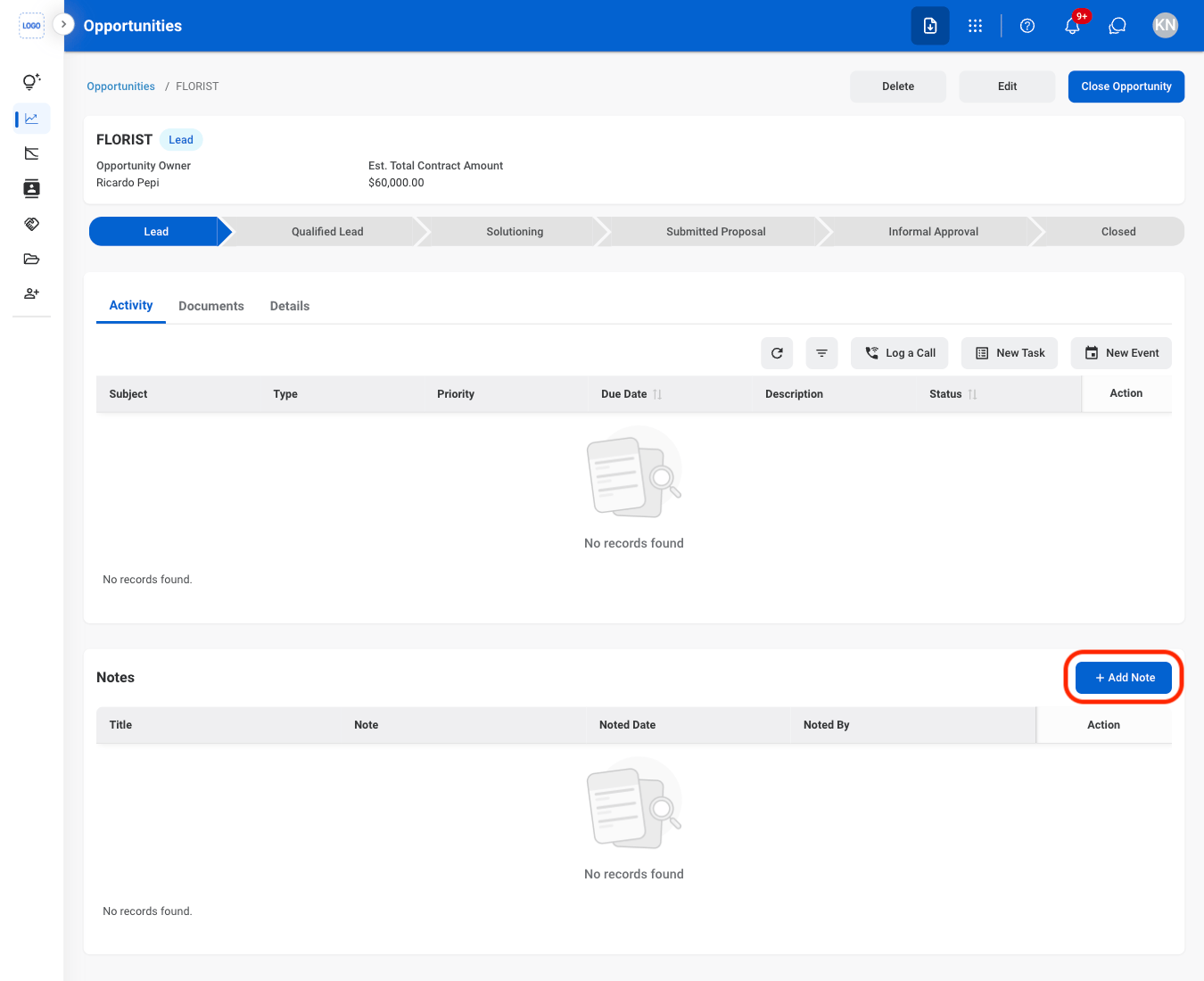
  <Step title="Select Add Note">
    <Frame>
      <img src="https://mintcdn.com/bizbone/j9nXCGIfRGEHdTNl/images/CRM-L-Note.png?fit=max&auto=format&n=j9nXCGIfRGEHdTNl&q=85&s=8630b28a26ce06b5d36ce1ca2b54afd7" alt="CRM L Note" width="1350" height="1100" data-path="images/CRM-L-Note.png" />
    </Frame>
  </Step>

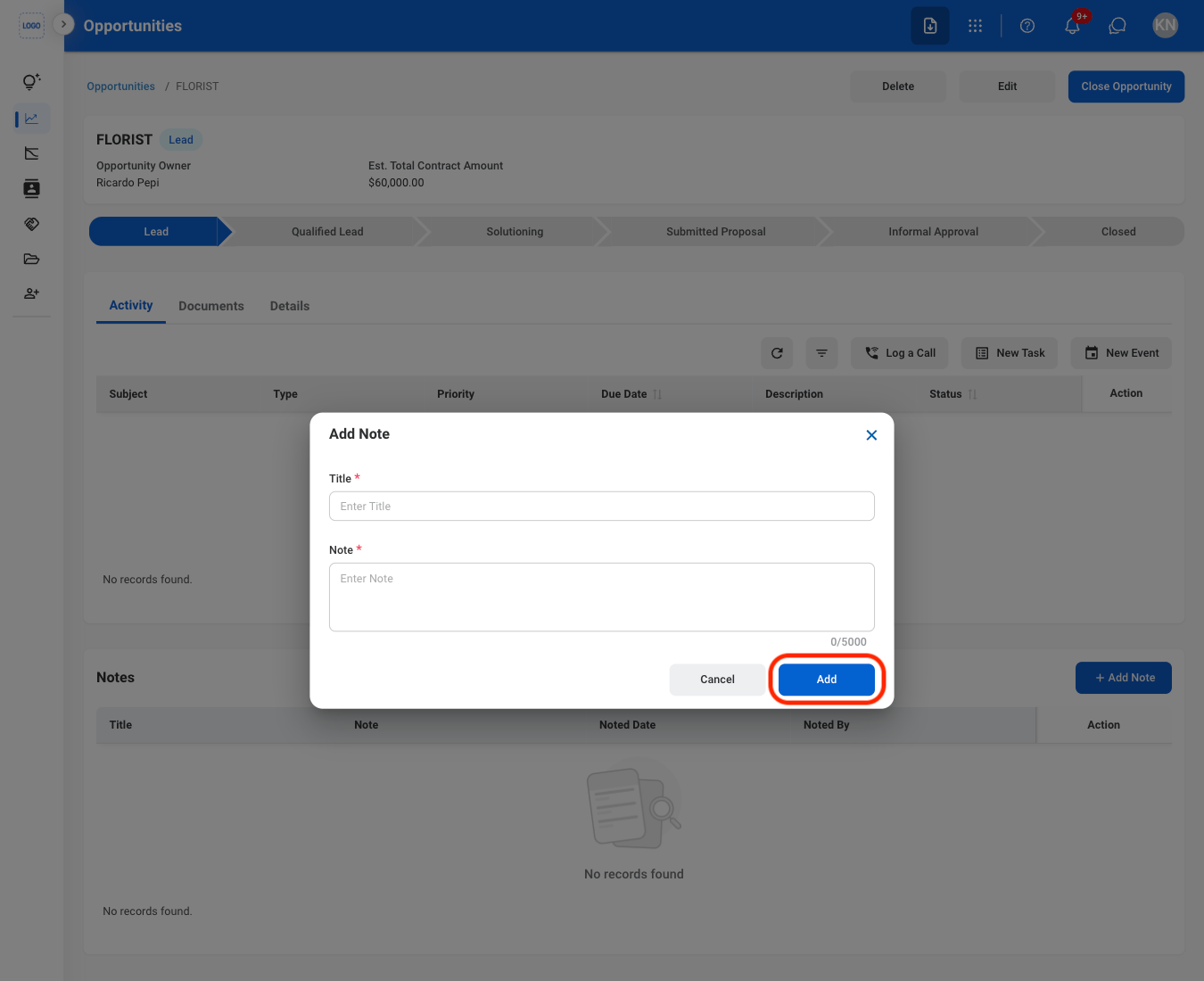
  <Step title="Fill in the required information">
    <Frame>
      <img src="https://mintcdn.com/bizbone/j9nXCGIfRGEHdTNl/images/CRM-L-Note-C.png?fit=max&auto=format&n=j9nXCGIfRGEHdTNl&q=85&s=ce6850f4c96847957ae362158d529850" alt="CRM L Note C" width="1350" height="1100" data-path="images/CRM-L-Note-C.png" />
    </Frame>

    Select **Add** to complete or **Cancel** to exit without saving changes. 
  </Step>
</Steps>

## Add a Document

<Steps>
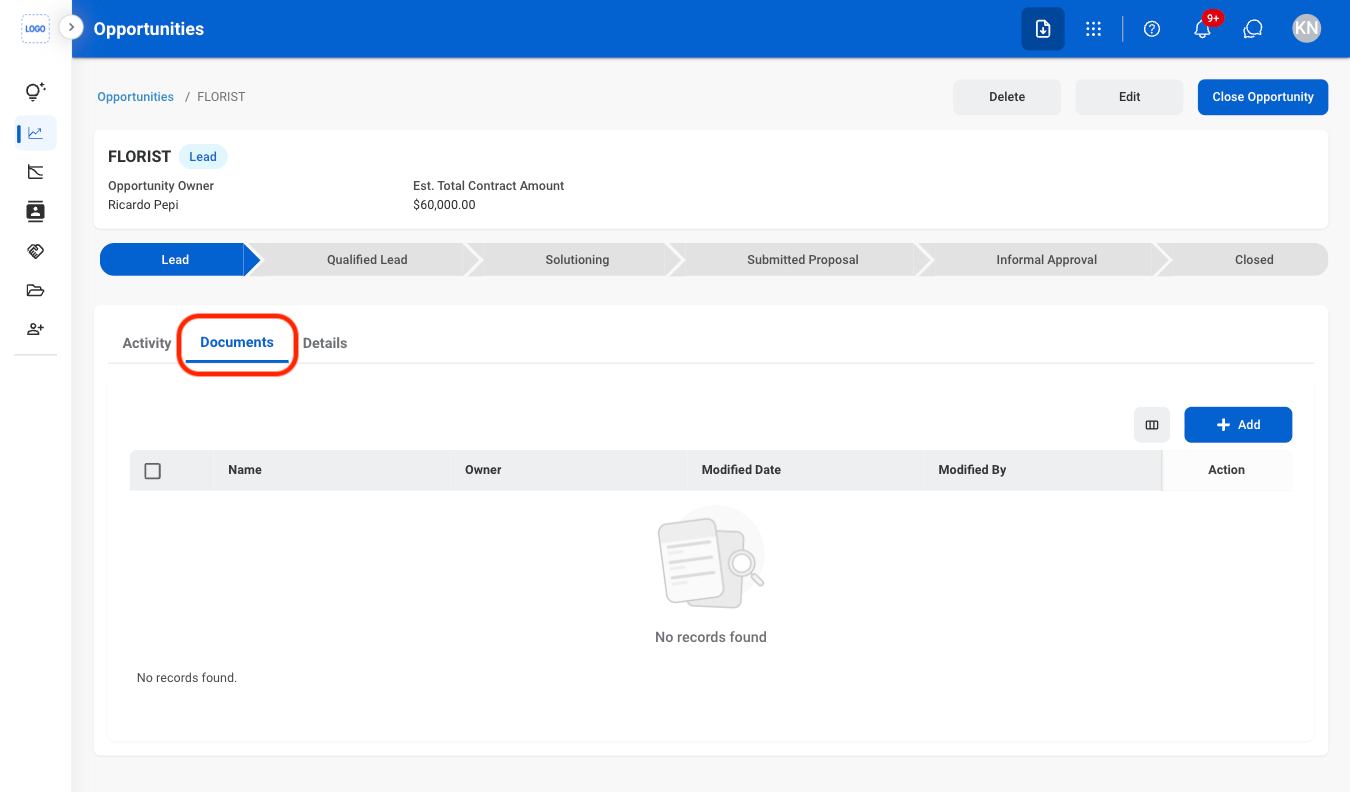
  <Step title="Select the Documents tab">
    <Frame>
      <img src="https://mintcdn.com/bizbone/j9nXCGIfRGEHdTNl/images/CRM-L-Doc.png?fit=max&auto=format&n=j9nXCGIfRGEHdTNl&q=85&s=63ea4cb0172deea150409f828d942e6f" alt="CRM L Doc" width="1350" height="792" data-path="images/CRM-L-Doc.png" />
    </Frame>
  </Step>

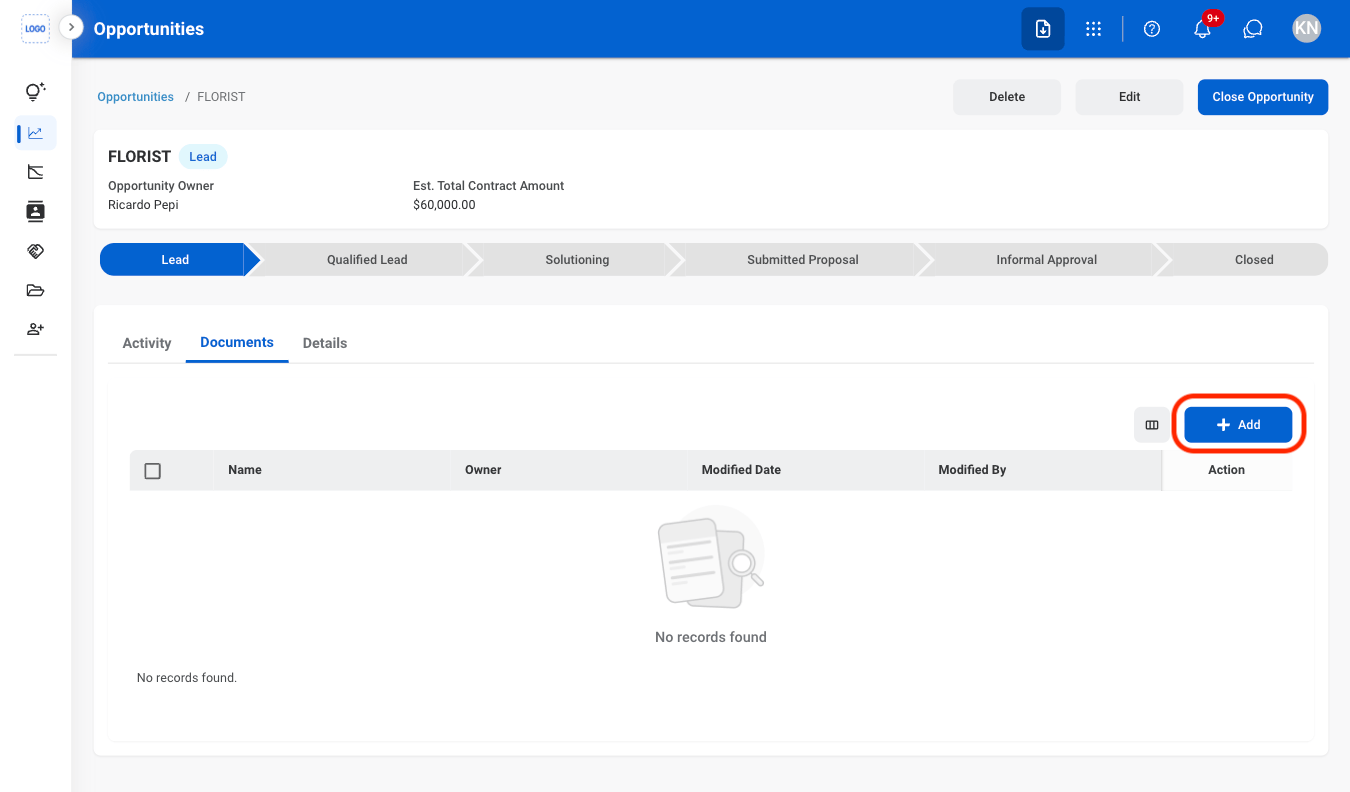
  <Step title="Select Add">
    <Frame>
      <img src="https://mintcdn.com/bizbone/j9nXCGIfRGEHdTNl/images/CRM-L-Doc-A.png?fit=max&auto=format&n=j9nXCGIfRGEHdTNl&q=85&s=5dca6e7ce312b4381cf63bd3a93f2200" alt="CRM L Doc A" width="1350" height="792" data-path="images/CRM-L-Doc-A.png" />
    </Frame>
  </Step>

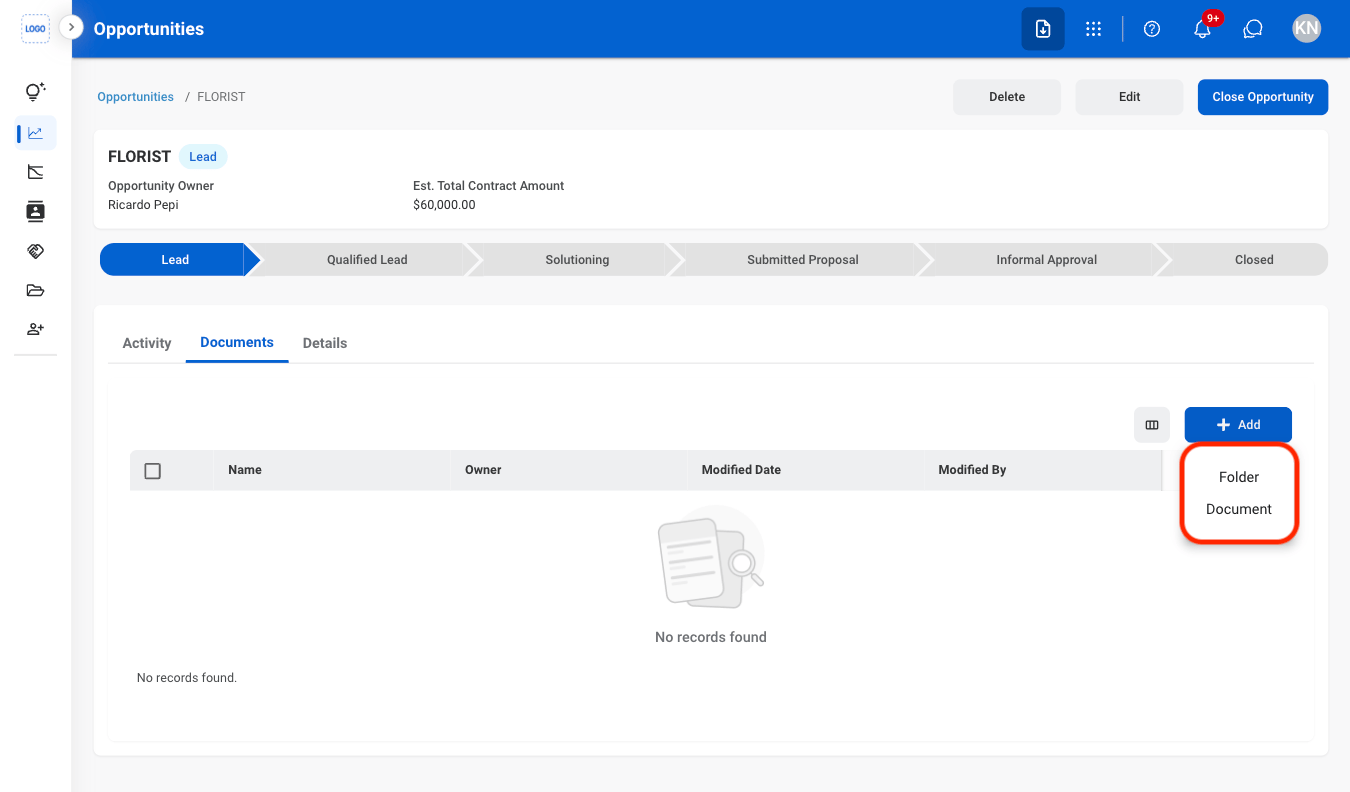
  <Step title="Select Folder or Document">
    <Frame>
      <img src="https://mintcdn.com/bizbone/j9nXCGIfRGEHdTNl/images/CRM-L-Doc-Type.png?fit=max&auto=format&n=j9nXCGIfRGEHdTNl&q=85&s=6357107720424834c3b335c5ff341d9c" alt="CRM L Doc Type" width="1350" height="792" data-path="images/CRM-L-Doc-Type.png" />
    </Frame>
  </Step>

  <Step title="Fill in the required information">
    Select **Save** to complete or **Cancel** to exit without saving changes. 
  </Step>
</Steps>

## Change an Opportunity Status

<Steps>
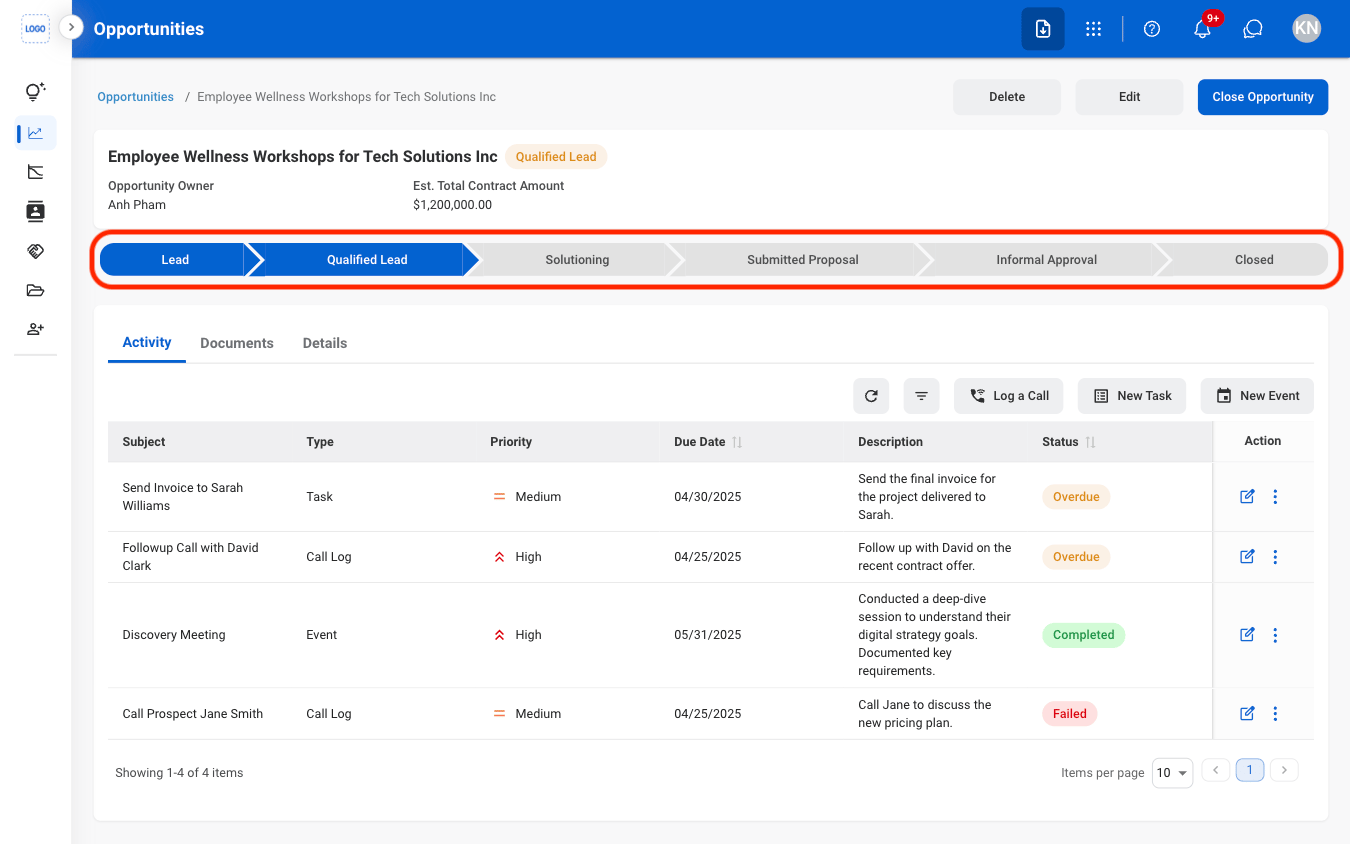
  <Step title="Select an Opportunity Status">
    <Frame>
      <img src="https://mintcdn.com/bizbone/j9nXCGIfRGEHdTNl/images/CRM-O-Status.png?fit=max&auto=format&n=j9nXCGIfRGEHdTNl&q=85&s=95a1da0ed5a89fe187014b2336b54fbe" alt="CRM O Status" width="1350" height="844" data-path="images/CRM-O-Status.png" />
    </Frame>
  </Step>

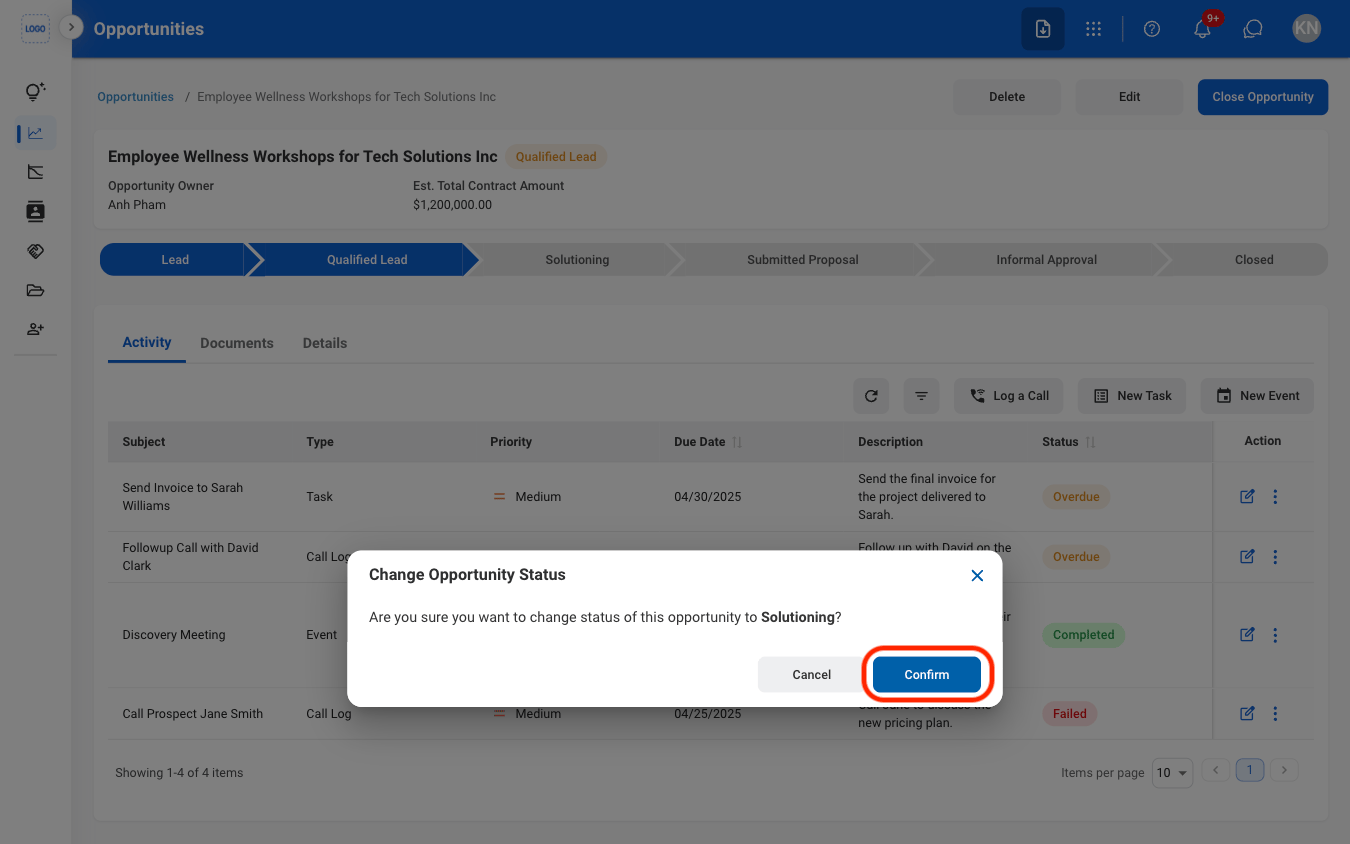
  <Step title="Confirm the action">
    <Frame>
      <img src="https://mintcdn.com/bizbone/j9nXCGIfRGEHdTNl/images/CRM-O-Status-C.png?fit=max&auto=format&n=j9nXCGIfRGEHdTNl&q=85&s=83e5696627cbb8d1a5409249cfcc6eea" alt="CRM O Status C" width="1350" height="844" data-path="images/CRM-O-Status-C.png" />
    </Frame>
  </Step>
</Steps>

## Close an Opportunity

<Steps>
  <Step title="Select an opportunity ">
    <Frame>
      <img src="https://mintcdn.com/bizbone/j9nXCGIfRGEHdTNl/images/CRM-O-Select.png?fit=max&auto=format&n=j9nXCGIfRGEHdTNl&q=85&s=df0e1eafacc1589998644044e48526b0" alt="CRM O Select" width="1350" height="692" data-path="images/CRM-O-Select.png" />
    </Frame>
  </Step>

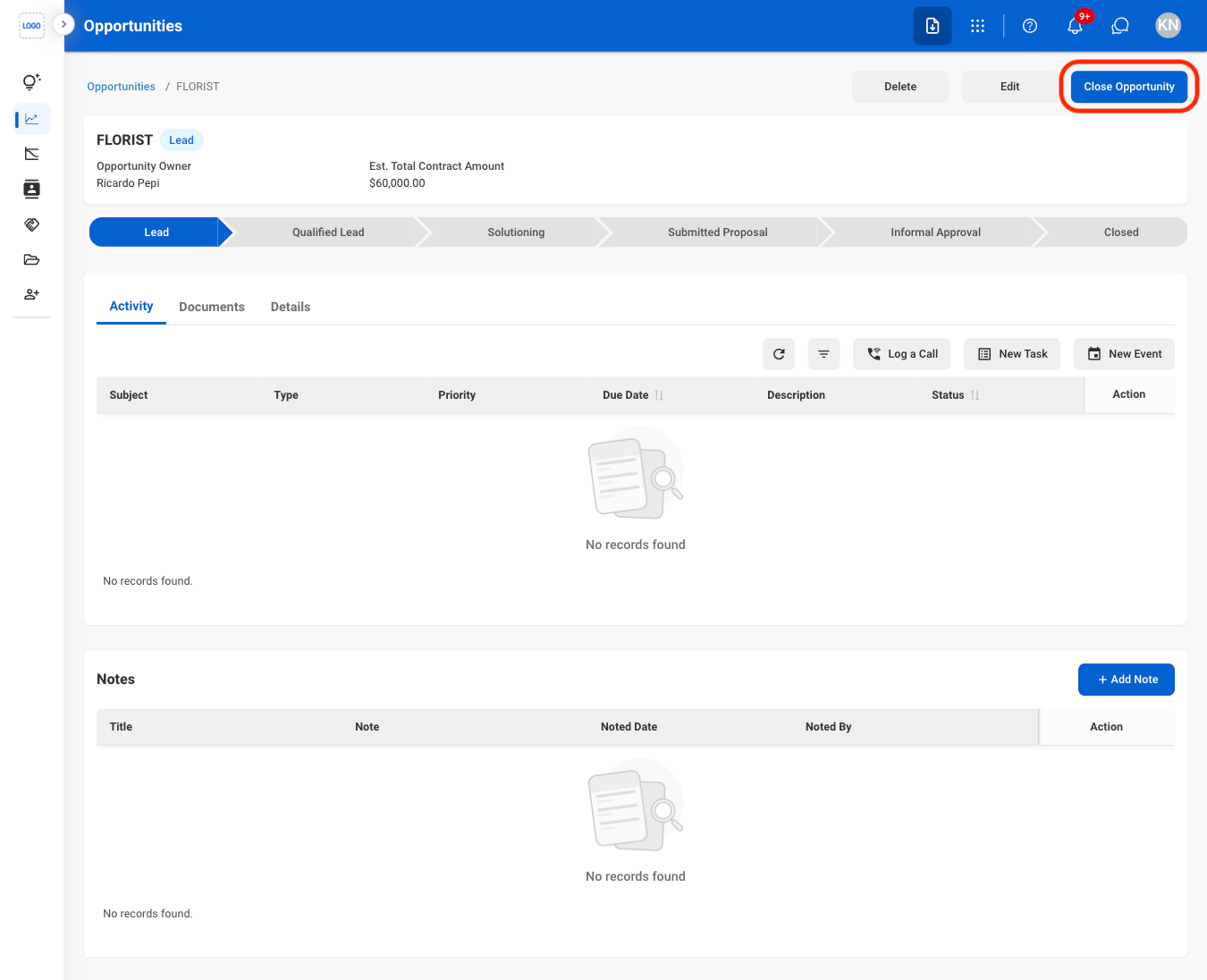
  <Step title="Select Close Opportunity ">
    <Frame>
      <img src="https://mintcdn.com/bizbone/j9nXCGIfRGEHdTNl/images/CRM-O-Close.png?fit=max&auto=format&n=j9nXCGIfRGEHdTNl&q=85&s=5d0f9f1dbf54826344fc36e144cc7f57" alt="CRM O Close" width="1350" height="1096" data-path="images/CRM-O-Close.png" />
    </Frame>
  </Step>

  <Step title="Fill in the required information ">
    <Frame>
      <img src="https://mintcdn.com/bizbone/j9nXCGIfRGEHdTNl/images/CRM-O-Close-C.png?fit=max&auto=format&n=j9nXCGIfRGEHdTNl&q=85&s=d58532adad9c439bcd732d866c515f3d" alt="CRM O Close C" width="1350" height="864" data-path="images/CRM-O-Close-C.png" />
    </Frame>

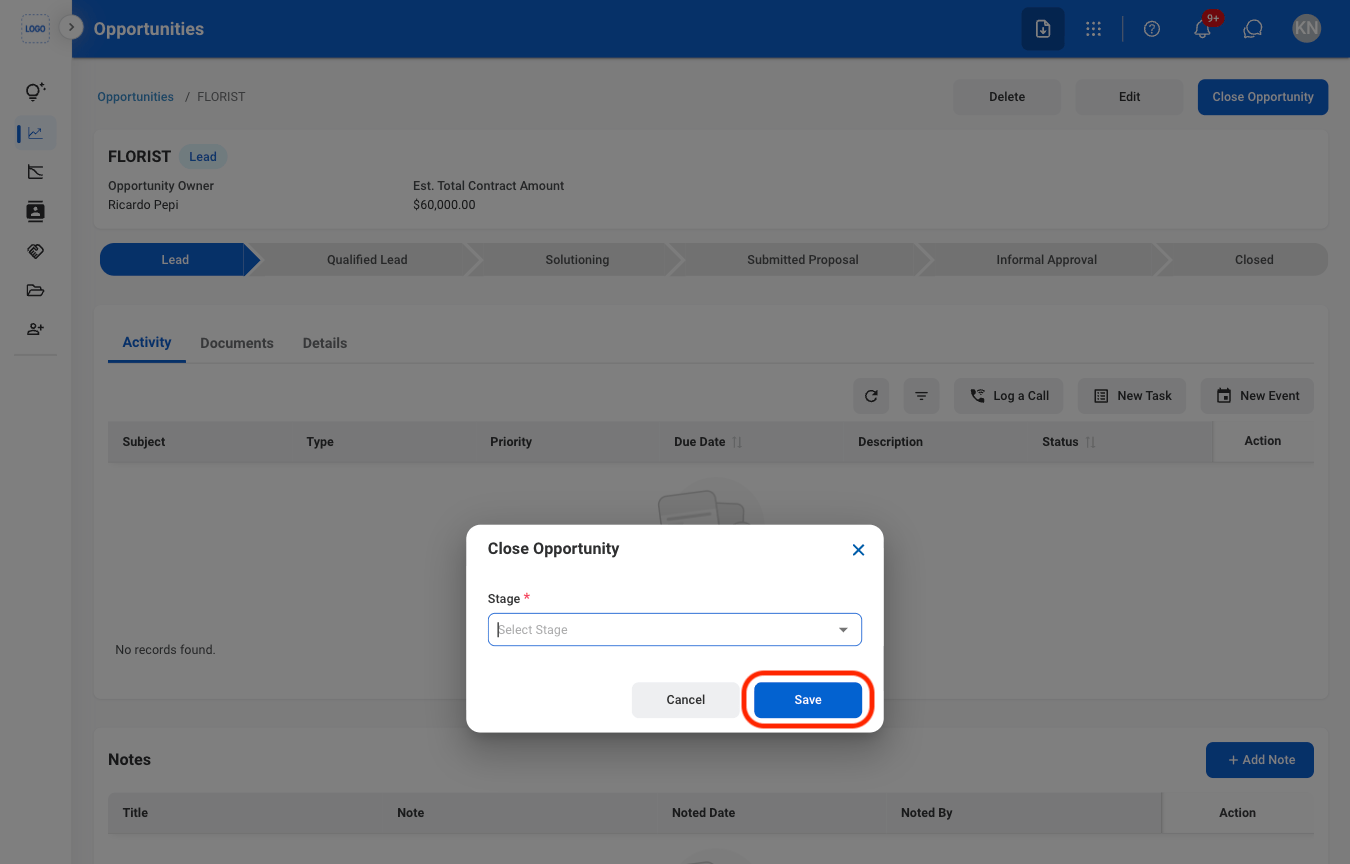
    * **Closed Won:** Mark the opportunity as successfully completed after the sale has been won.
    * **Closed Lost:** Mark the opportunity as closed without a successful sale.

    Select **Save** to complete or **Cancel** to exit without saving changes. 
  </Step>
</Steps>

## Add an Onboarding Request

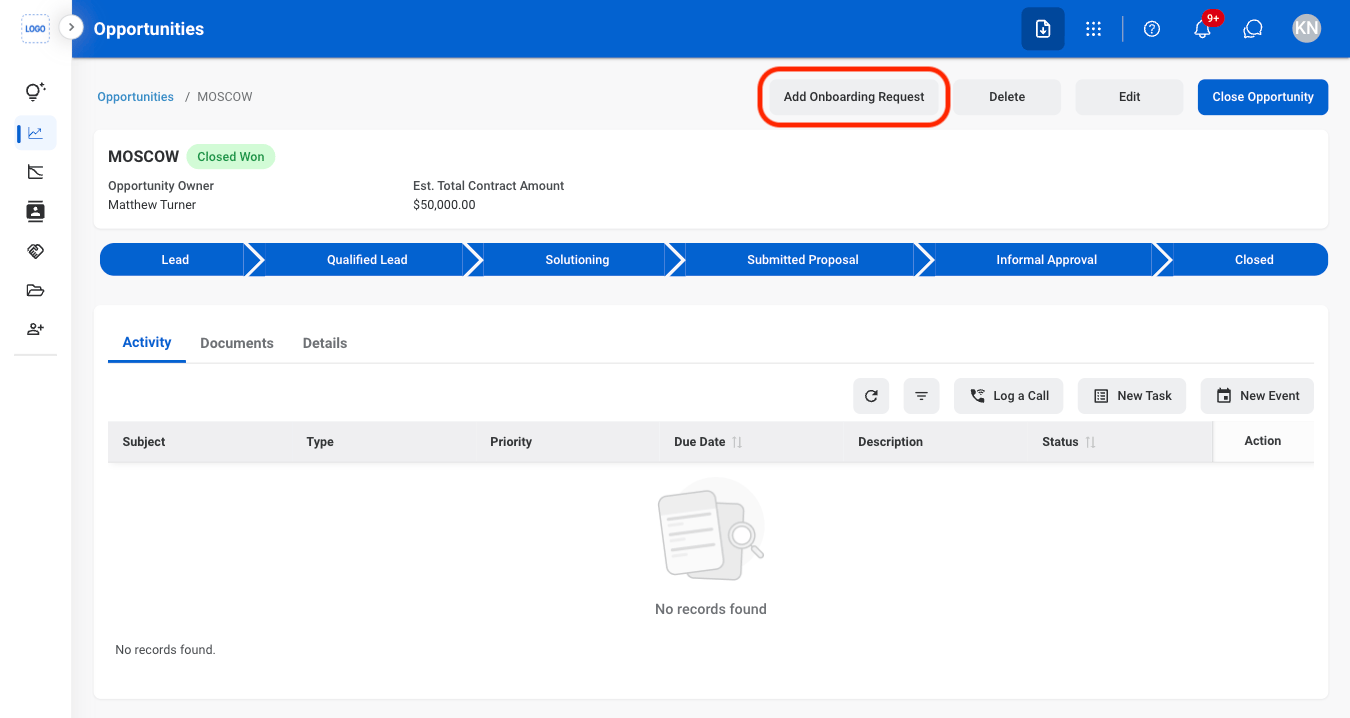
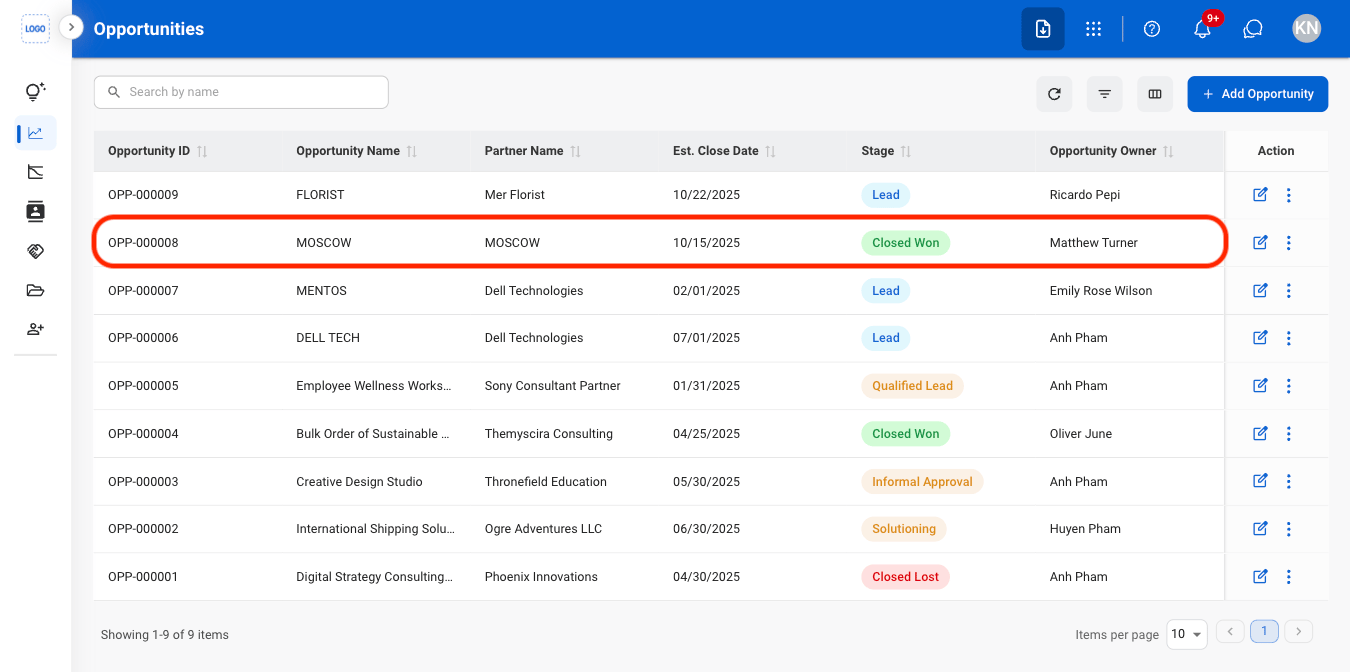
Create onboarding requests for customers with successfully won opportunities. Creating an onboarding request automatically creates a corresponding record in the Onboarding Tickets section for further processing.

<Info>
  Onboarding requests can only be created after the opportunity stage has been updated to **Closed Won**.
</Info>

<Steps>
  <Step title="Select an opportunity in the Closed Won stage">
    <Frame>
      <img src="https://mintcdn.com/bizbone/j9nXCGIfRGEHdTNl/images/CRM-O-ClosedW.png?fit=max&auto=format&n=j9nXCGIfRGEHdTNl&q=85&s=a2e19656801008132201a2d534b0d3da" alt="CRM O Closed W" width="1350" height="672" data-path="images/CRM-O-ClosedW.png" />
    </Frame>
  </Step>

  <Step title="Select Add Onboarding Request">
    <Frame>
      <img src="https://mintcdn.com/bizbone/j9nXCGIfRGEHdTNl/images/CRM-O-Add-OR.png?fit=max&auto=format&n=j9nXCGIfRGEHdTNl&q=85&s=4ca82336f4ae4d5c84cfb43192f2af79" alt="CRM O Add OR" width="1350" height="718" data-path="images/CRM-O-Add-OR.png" />
    </Frame>
  </Step>

  <Step title="Fill in the required information">
    <Frame>
      <img src="https://mintcdn.com/bizbone/j9nXCGIfRGEHdTNl/images/CRM-O-Add-OR-C.png?fit=max&auto=format&n=j9nXCGIfRGEHdTNl&q=85&s=8bd0c6e638a005f6d94b300018a80bbc" alt="CRM O Add OR C" width="1350" height="1156" data-path="images/CRM-O-Add-OR-C.png" />
    </Frame>

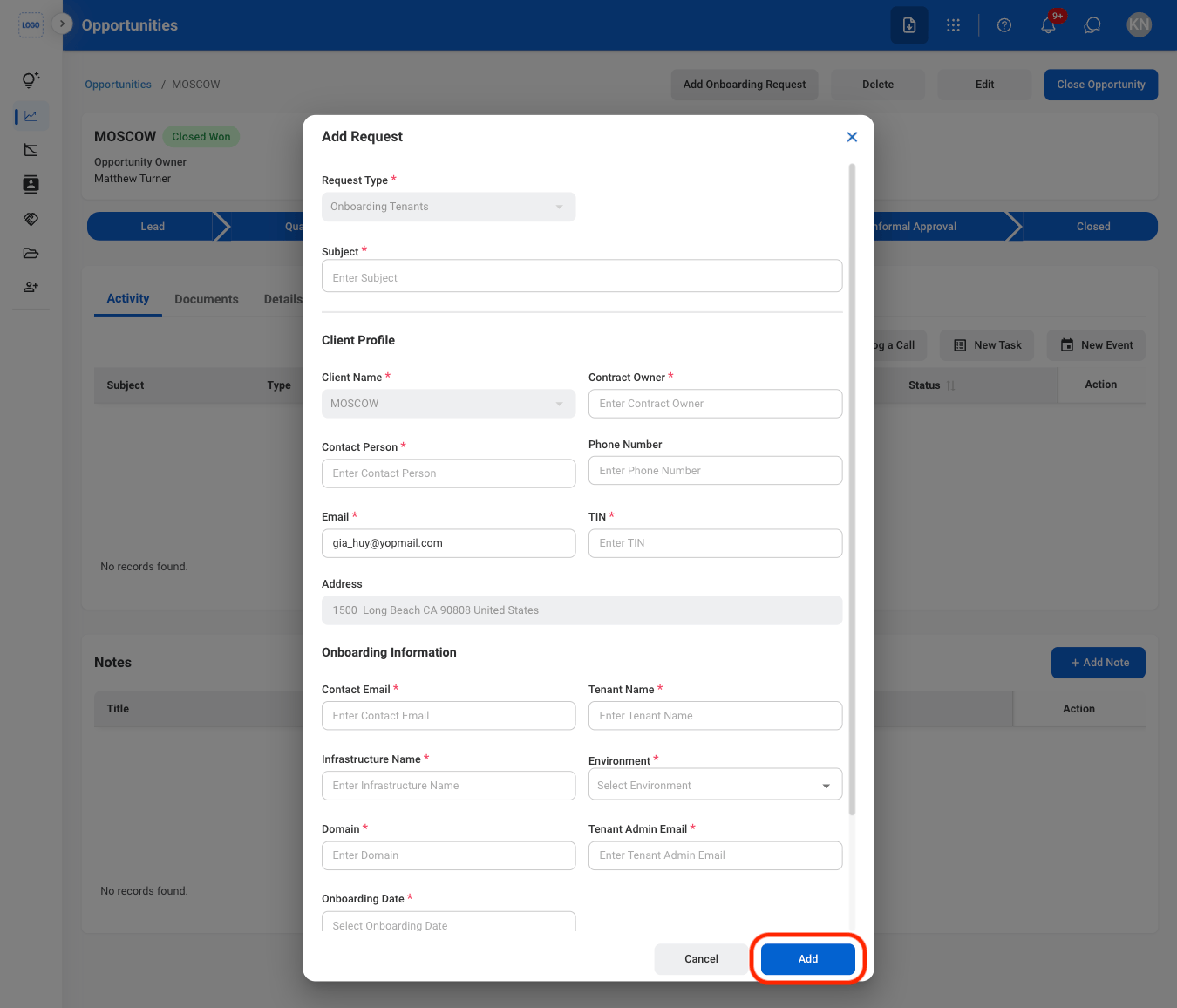
    Select **Add** to complete or **Cancel** to exit without saving changes. 
  </Step>
</Steps>