> ## Documentation Index
> Fetch the complete documentation index at: https://docs.bizbone.com/llms.txt
> Use this file to discover all available pages before exploring further.

# Leads

> Manage lead records throughout the sales process. Supports capturing, tracking, qualifying, and converting potential customers into business opportunities.

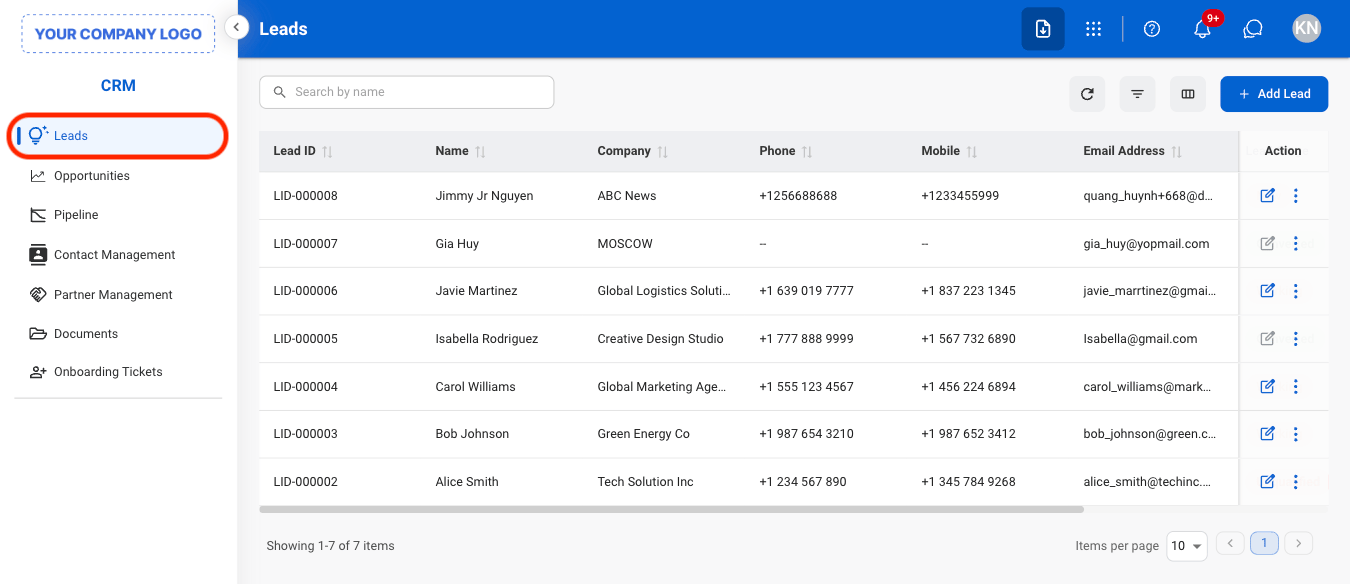
## Add a Lead
<Steps>
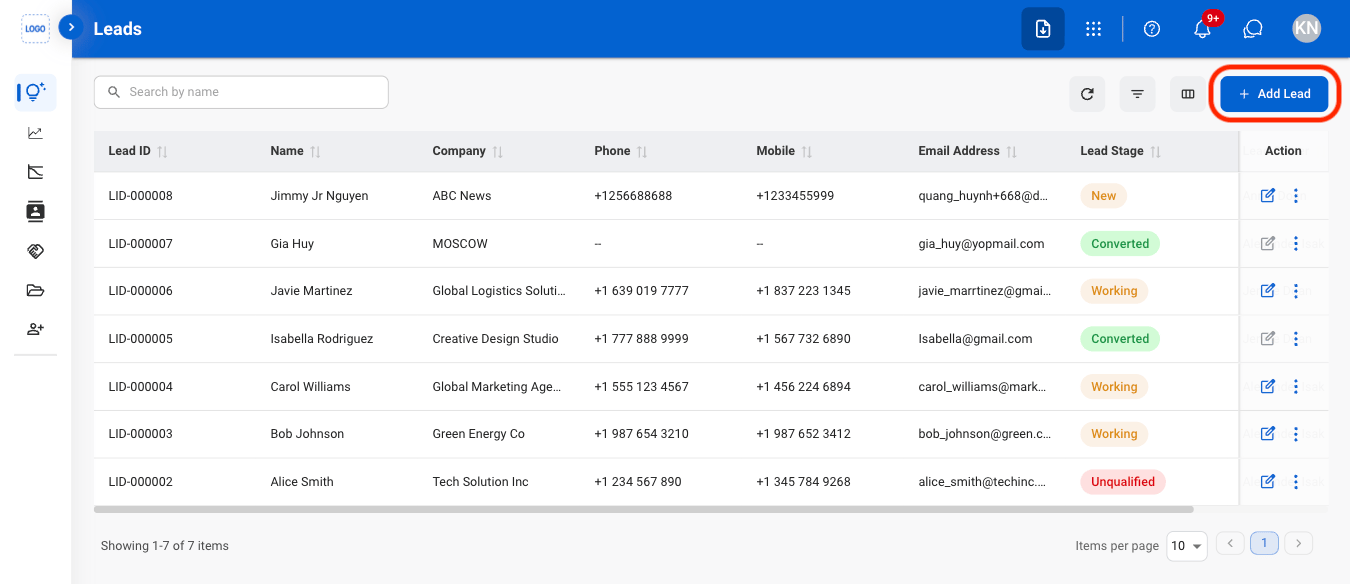
  <Step title="Navigate to Leads">
    <Frame>
      <img src="https://mintcdn.com/bizbone/j9nXCGIfRGEHdTNl/images/CRM-L-Nav.png?fit=max&auto=format&n=j9nXCGIfRGEHdTNl&q=85&s=b2c5db1a74b0c0f06b72664dc3956205" alt="CRM L Nav" width="1350" height="584" data-path="images/CRM-L-Nav.png" />
    </Frame>
  </Step>

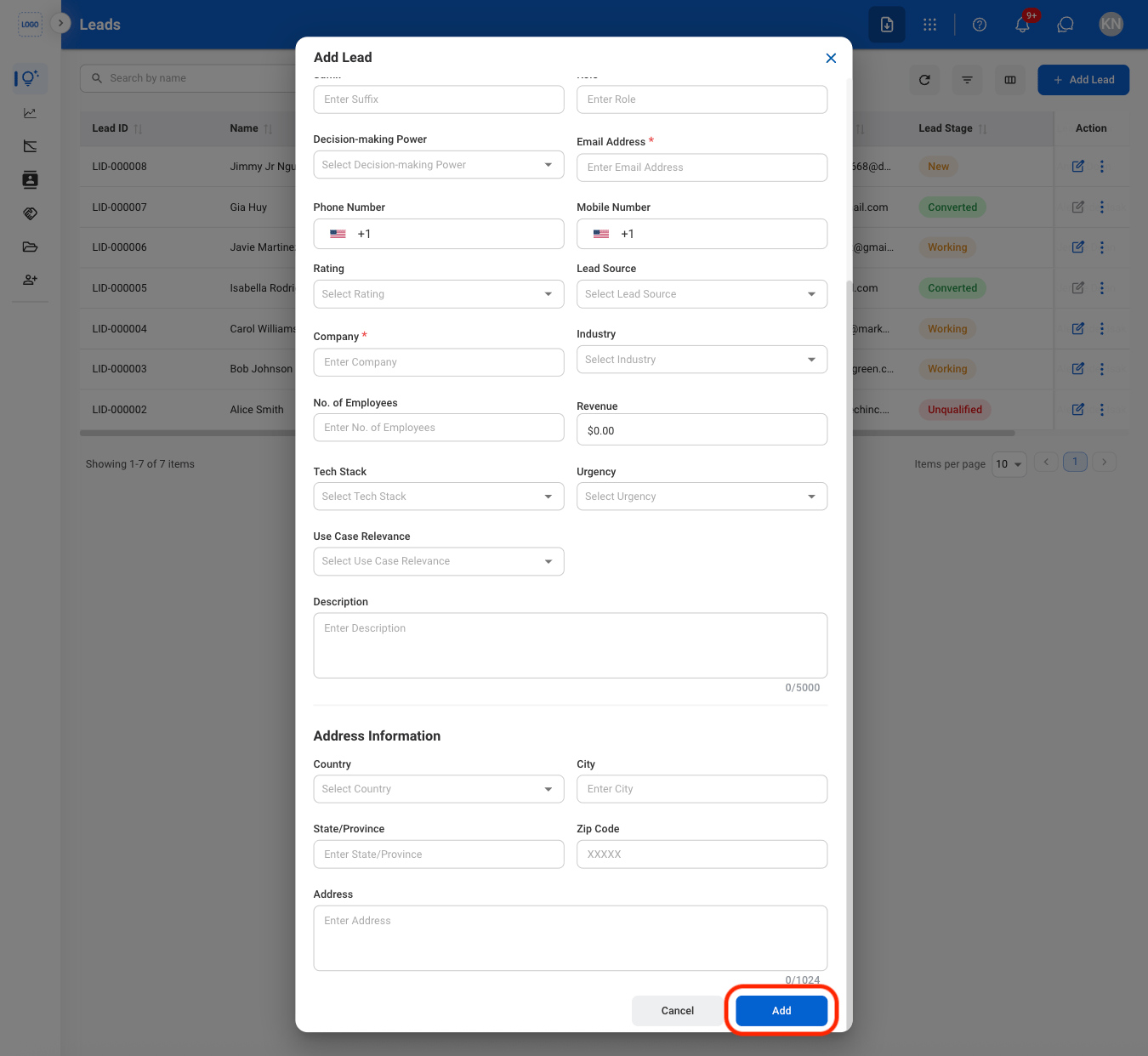
  <Step title="Select Add Lead">
    <Frame>
      <img src="https://mintcdn.com/bizbone/j9nXCGIfRGEHdTNl/images/CRM-L-Add.png?fit=max&auto=format&n=j9nXCGIfRGEHdTNl&q=85&s=9f35f8f279b4d6f426e6c1e513c62a94" alt="CRM L Add" width="1350" height="584" data-path="images/CRM-L-Add.png" />
    </Frame>
  </Step>

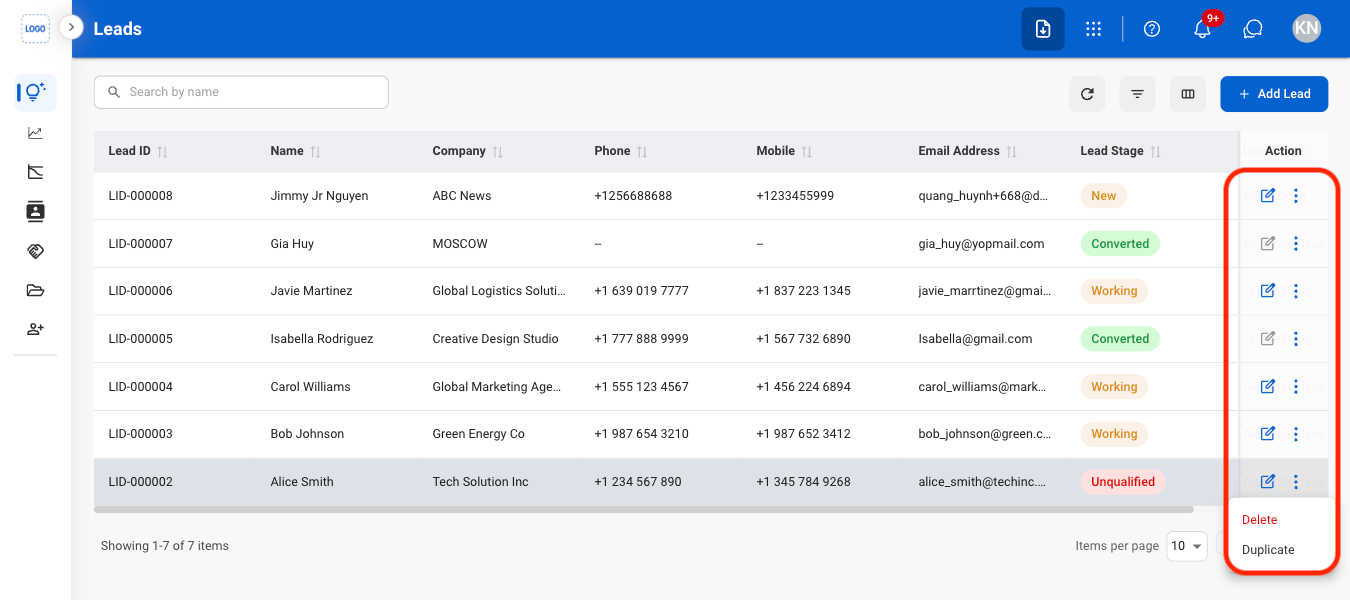
  <Step title="Fill in the required information ">
    <Frame>
      <img src="https://mintcdn.com/bizbone/j9nXCGIfRGEHdTNl/images/CRM-L-Add-C.png?fit=max&auto=format&n=j9nXCGIfRGEHdTNl&q=85&s=e778ef2df66dd357326e03acaaa2299d" alt="CRM L Add C" width="1350" height="1242" data-path="images/CRM-L-Add-C.png" />
    </Frame>

    Select **Add** to complete or **Cancel** to exit without saving changes. 

    <Info>
      If a duplicate entry is detected, the system will ask for confirmation to continue before creating a new entry. 
    </Info>

    <Info>
      When a lead is added, a corresponding contact is automatically created in the Contact Management section.
    </Info>
  </Step>
</Steps>

## Modify a Lead

<Steps>
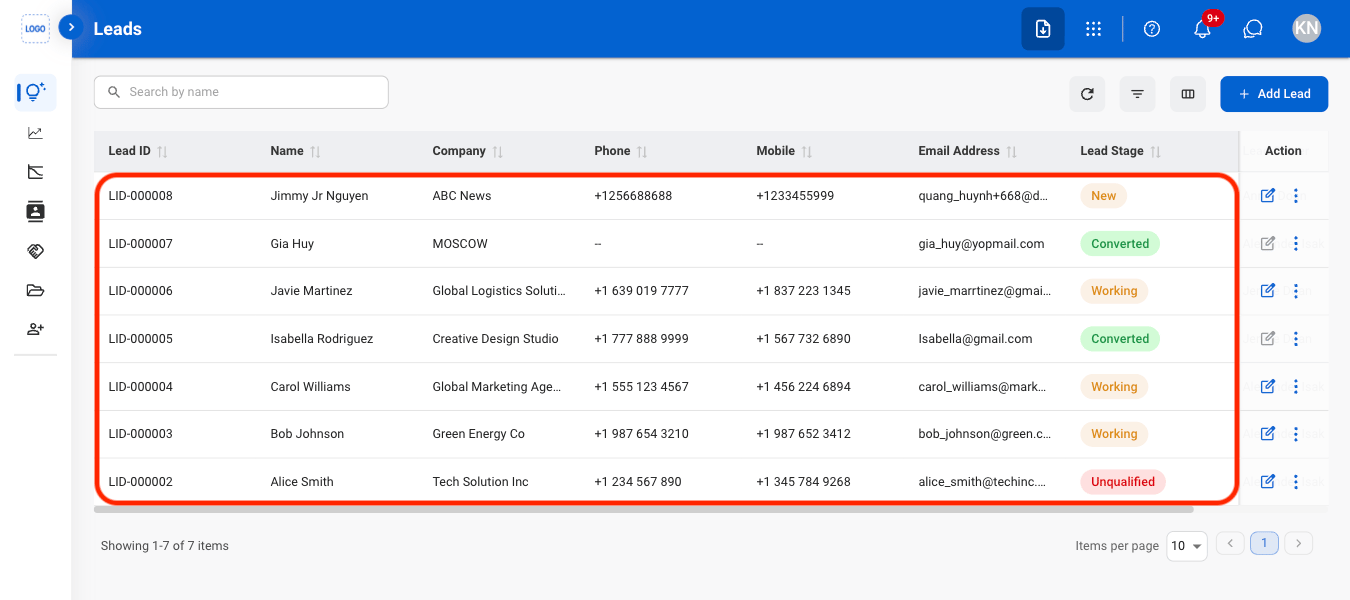
  <Step title="Select an action">
    <Frame>
      <img src="https://mintcdn.com/bizbone/j9nXCGIfRGEHdTNl/images/CRM-L-Modify.png?fit=max&auto=format&n=j9nXCGIfRGEHdTNl&q=85&s=e713d1c48a1e89a0ff3a7d1c05a9c6a9" alt="CRM L Modify" width="1350" height="600" data-path="images/CRM-L-Modify.png" />
    </Frame>

    <Info>
      Only leads that have not been converted to opportunities can be edited or deleted.
    </Info>

    * **Edit:** Update lead information before it is converted to an opportunity.
    * **Delete:** Permanently remove the lead from the system.
    * **Duplicate:** Create a copy of the lead to use as the basis for a new lead record.
  </Step>

  <Step title="Confirm the action">
    * **Edit:** Fill in the required information. Select **Update** to complete or **Cancel** to exit without saving changes. 
    * **Delete:** Select **Delete** to complete or **Cancel** to exit without saving changes. 
    * **Duplicate:** Fill in the required information. Select **Save** to complete or **Cancel** to exit without saving changes. 
  </Step>
</Steps>

## Add a Note

<Steps>
  <Step title="Select a Lead">
    <Frame>
      <img src="https://mintcdn.com/bizbone/j9nXCGIfRGEHdTNl/images/CRM-L-Select.png?fit=max&auto=format&n=j9nXCGIfRGEHdTNl&q=85&s=2e622fa297b9755f1de365ea6fd8fda5" alt="CRM L Select" width="1350" height="600" data-path="images/CRM-L-Select.png" />
    </Frame>
  </Step>

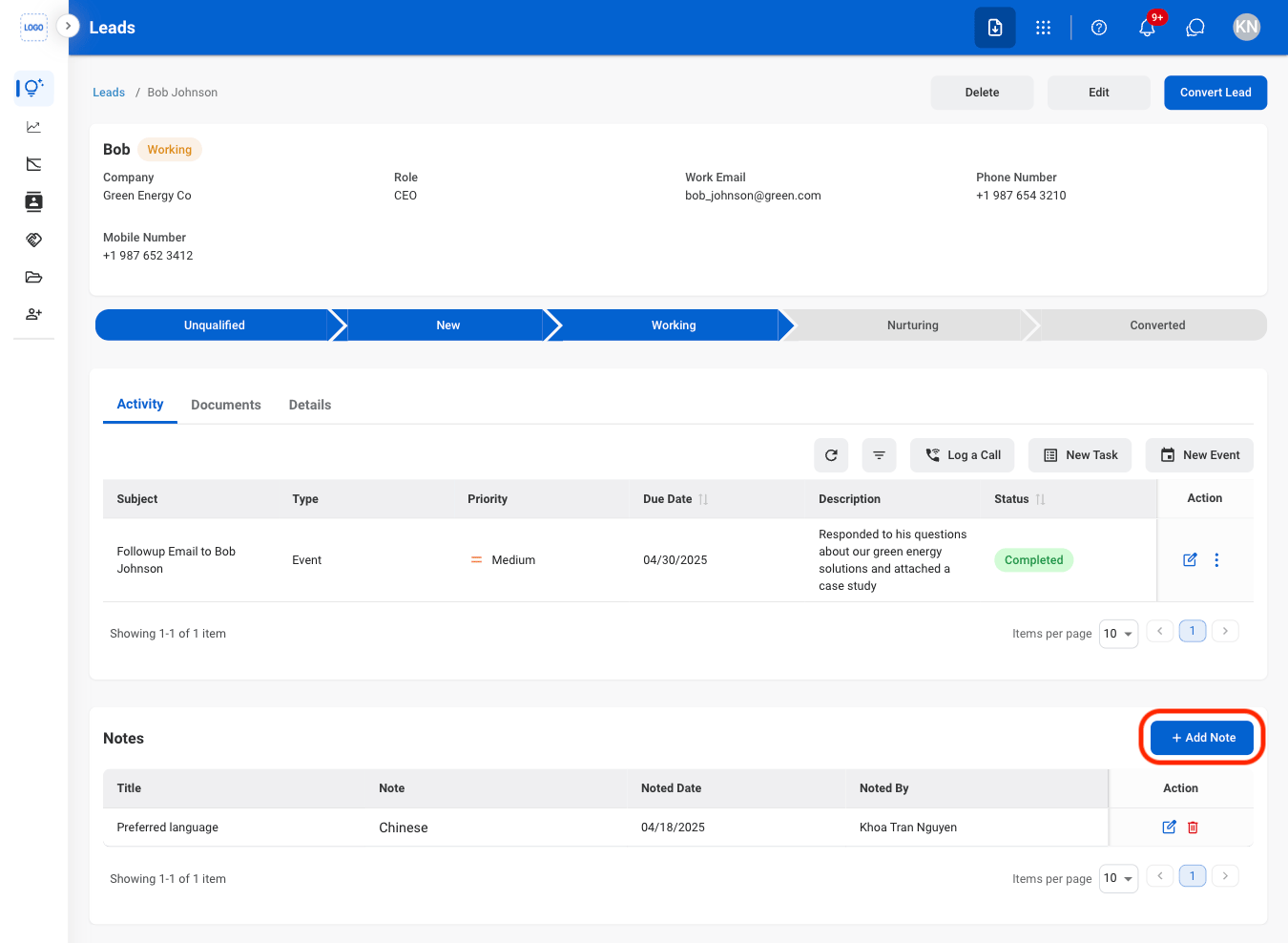
  <Step title="Select Add Note">
    <Frame>
      <img src="https://mintcdn.com/bizbone/j9nXCGIfRGEHdTNl/images/CRM-L-Add-Note.png?fit=max&auto=format&n=j9nXCGIfRGEHdTNl&q=85&s=8f4a6c803fcff9e65a5d5dc929531fb0" alt="CRM L Add Note" width="1350" height="988" data-path="images/CRM-L-Add-Note.png" />
    </Frame>
  </Step>

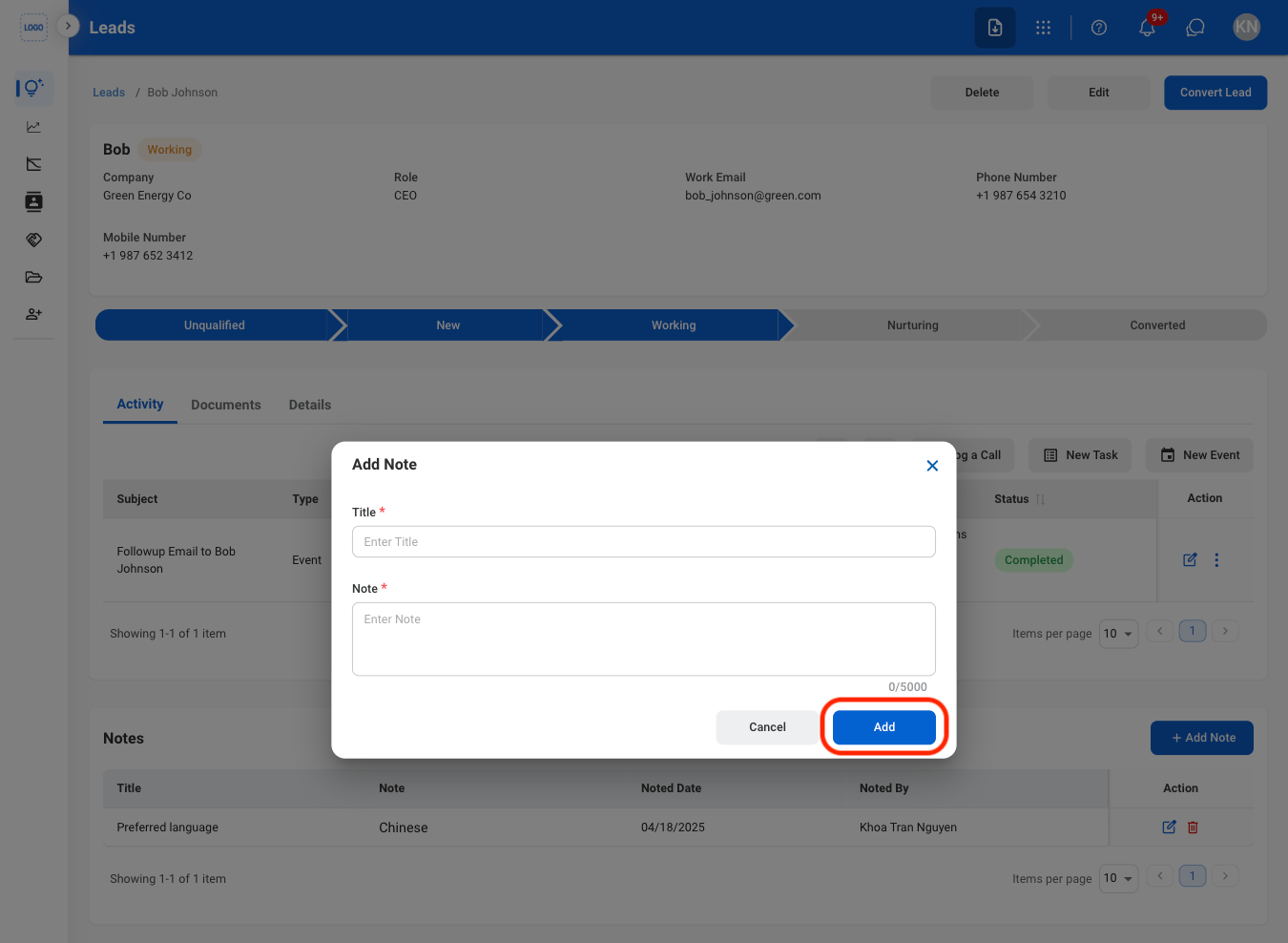
  <Step title="Fill in the required information">
    <Frame>
      <img src="https://mintcdn.com/bizbone/j9nXCGIfRGEHdTNl/images/CRM-L-Add-Note-C.png?fit=max&auto=format&n=j9nXCGIfRGEHdTNl&q=85&s=c9ae78abc8334248e3c41b80dfcfabd0" alt="CRM L Add Note C" width="1350" height="988" data-path="images/CRM-L-Add-Note-C.png" />
    </Frame>

    Select **Add** to complete or **Cancel** to exit without saving changes. 
  </Step>
</Steps>

## Add a Document

<Steps>
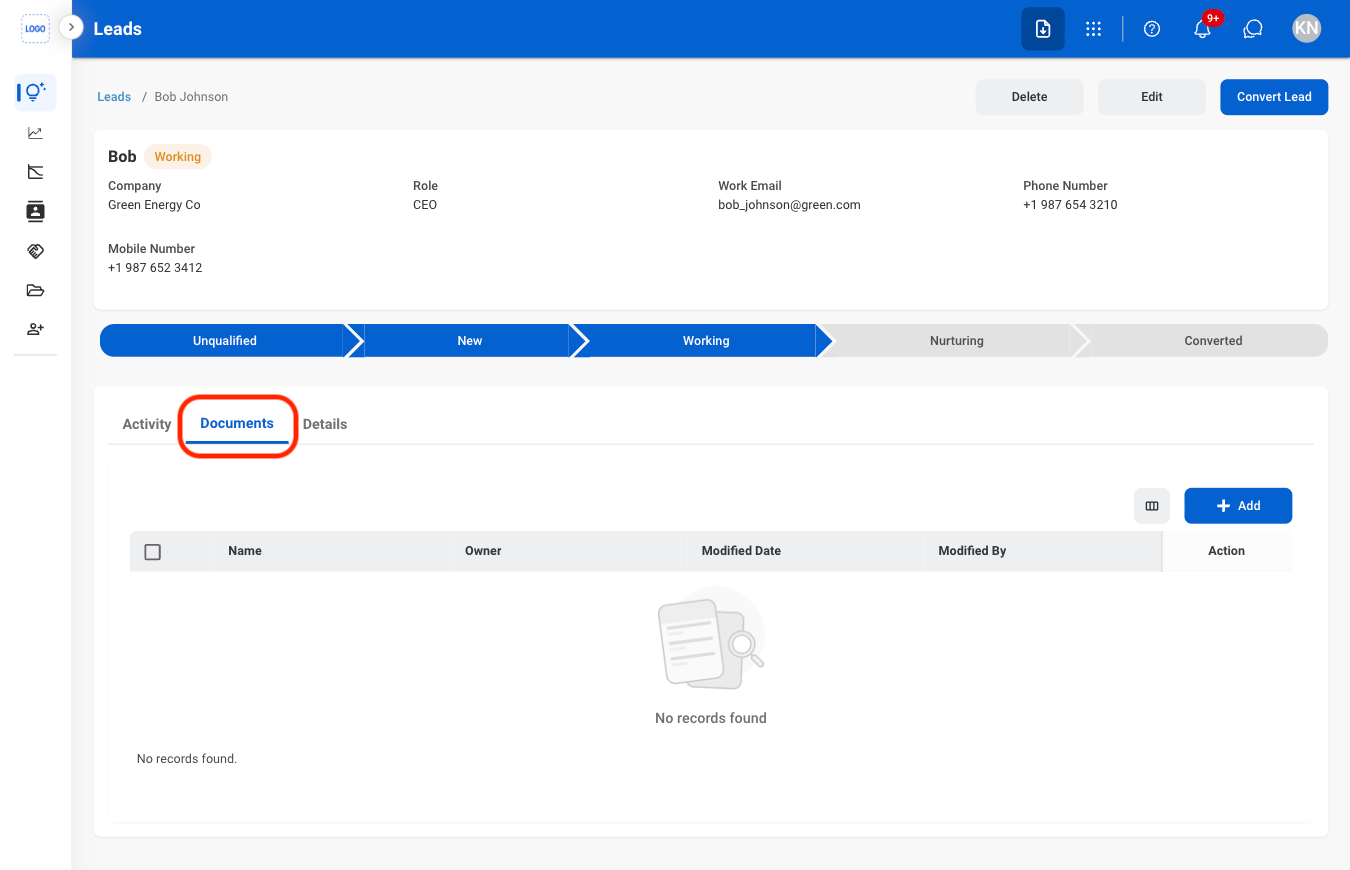
  <Step title="Select the Documents tab">
    <Frame>
      <img src="https://mintcdn.com/bizbone/j9nXCGIfRGEHdTNl/images/CRM-L-Documents.png?fit=max&auto=format&n=j9nXCGIfRGEHdTNl&q=85&s=31972caa7b41275ed44d80eb97a4771e" alt="CRM L Documents" width="1350" height="870" data-path="images/CRM-L-Documents.png" />
    </Frame>
  </Step>

  <Step title="Select Add">
    <Frame>
      <img src="https://mintcdn.com/bizbone/j9nXCGIfRGEHdTNl/images/CRM-L-Documents-Add.png?fit=max&auto=format&n=j9nXCGIfRGEHdTNl&q=85&s=d33d3e5310054e6ea07559cb054c3c33" alt="CRM L Documents Add" width="1350" height="870" data-path="images/CRM-L-Documents-Add.png" />
    </Frame>
  </Step>

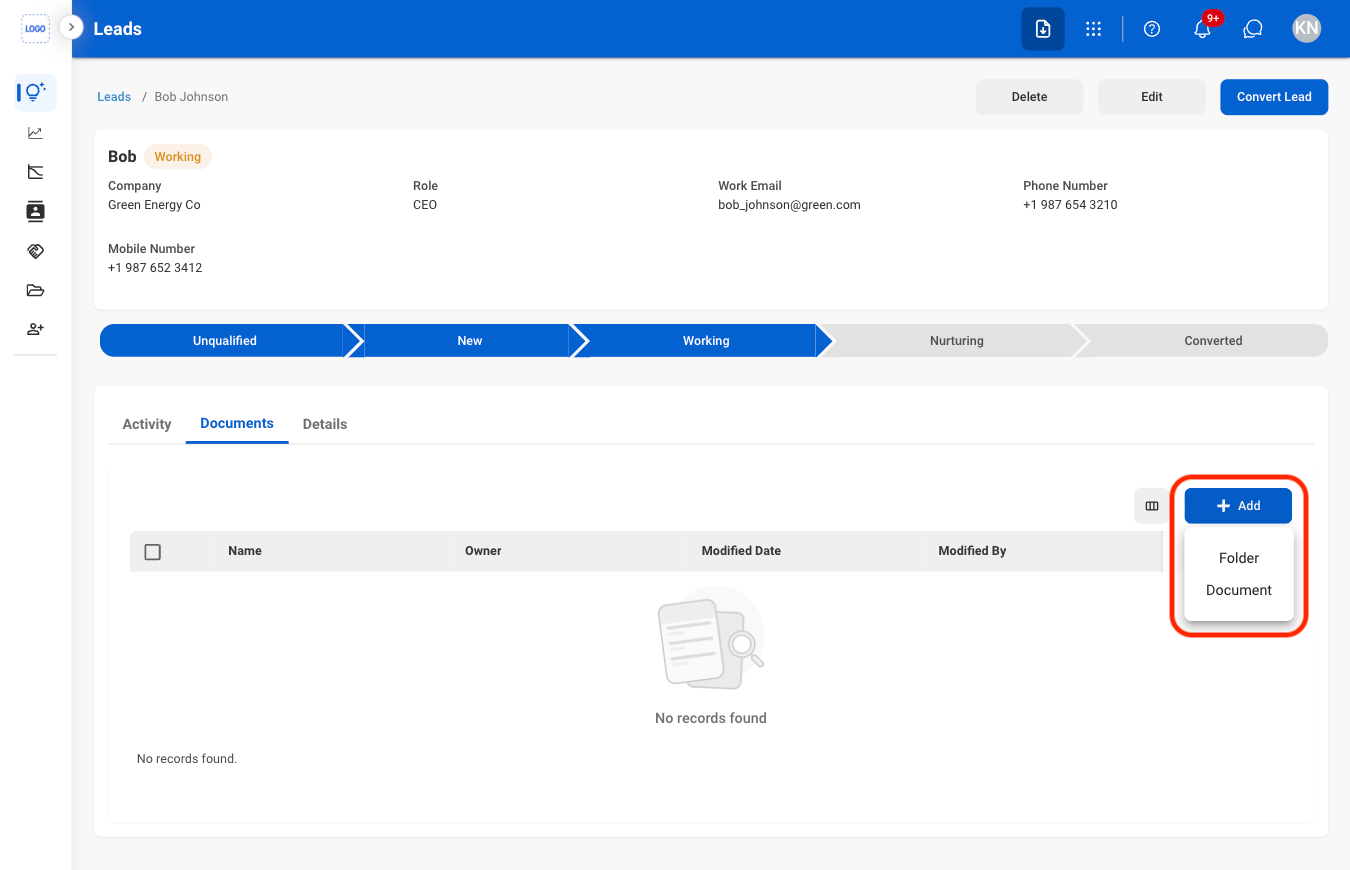
  <Step title="Select Folder or Document">
    <Frame>
      <img src="https://mintcdn.com/bizbone/j9nXCGIfRGEHdTNl/images/CRM-L-Documents-Type.png?fit=max&auto=format&n=j9nXCGIfRGEHdTNl&q=85&s=6c653d03bcc7cb8919f55f961cc9a56d" alt="CRM L Documents Type" width="1350" height="870" data-path="images/CRM-L-Documents-Type.png" />
    </Frame>
  </Step>

  <Step title="Fill in the required information">
    Select **Save** to complete or **Cancel** to exit without saving changes. 
  </Step>
</Steps>

## Change a Lead Stage

<Steps>
  <Step title="Select a lead stage">
    <Frame>
      <img src="https://mintcdn.com/bizbone/j9nXCGIfRGEHdTNl/images/CRM-L-Stage.png?fit=max&auto=format&n=j9nXCGIfRGEHdTNl&q=85&s=3fc4c3c4b6fd1ecc6c2d228603173294" alt="CRM L Stage" width="1350" height="800" data-path="images/CRM-L-Stage.png" />
    </Frame>
  </Step>

  <Step title="Confirm the action">
    <Frame>
      <img src="https://mintcdn.com/bizbone/j9nXCGIfRGEHdTNl/images/CRM-L-Stage-C.png?fit=max&auto=format&n=j9nXCGIfRGEHdTNl&q=85&s=5d6fcc548db02e881849e3fe267a21c0" alt="CRM L Stage C" width="1350" height="800" data-path="images/CRM-L-Stage-C.png" />
    </Frame>
  </Step>
</Steps>

## Convert a Lead

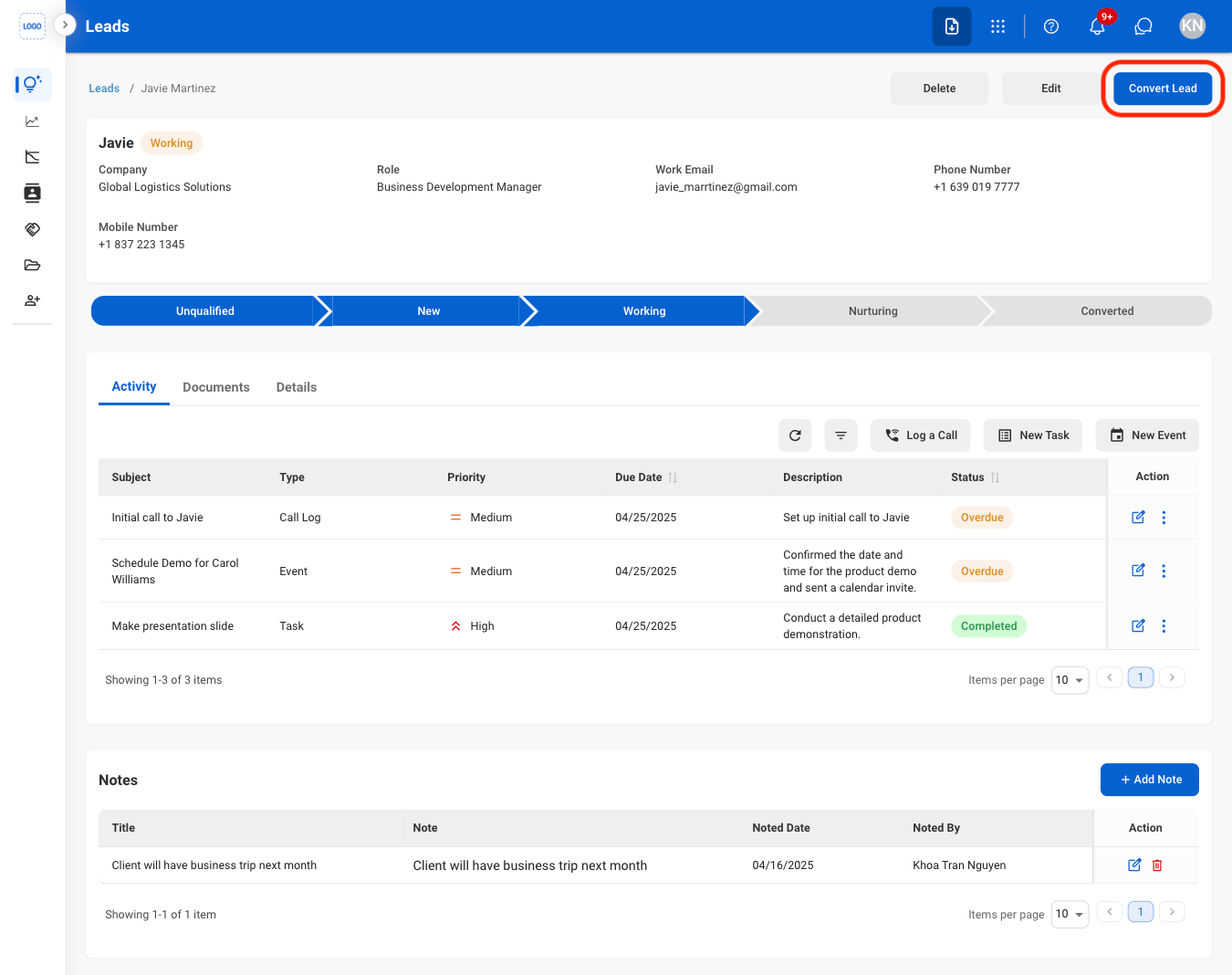
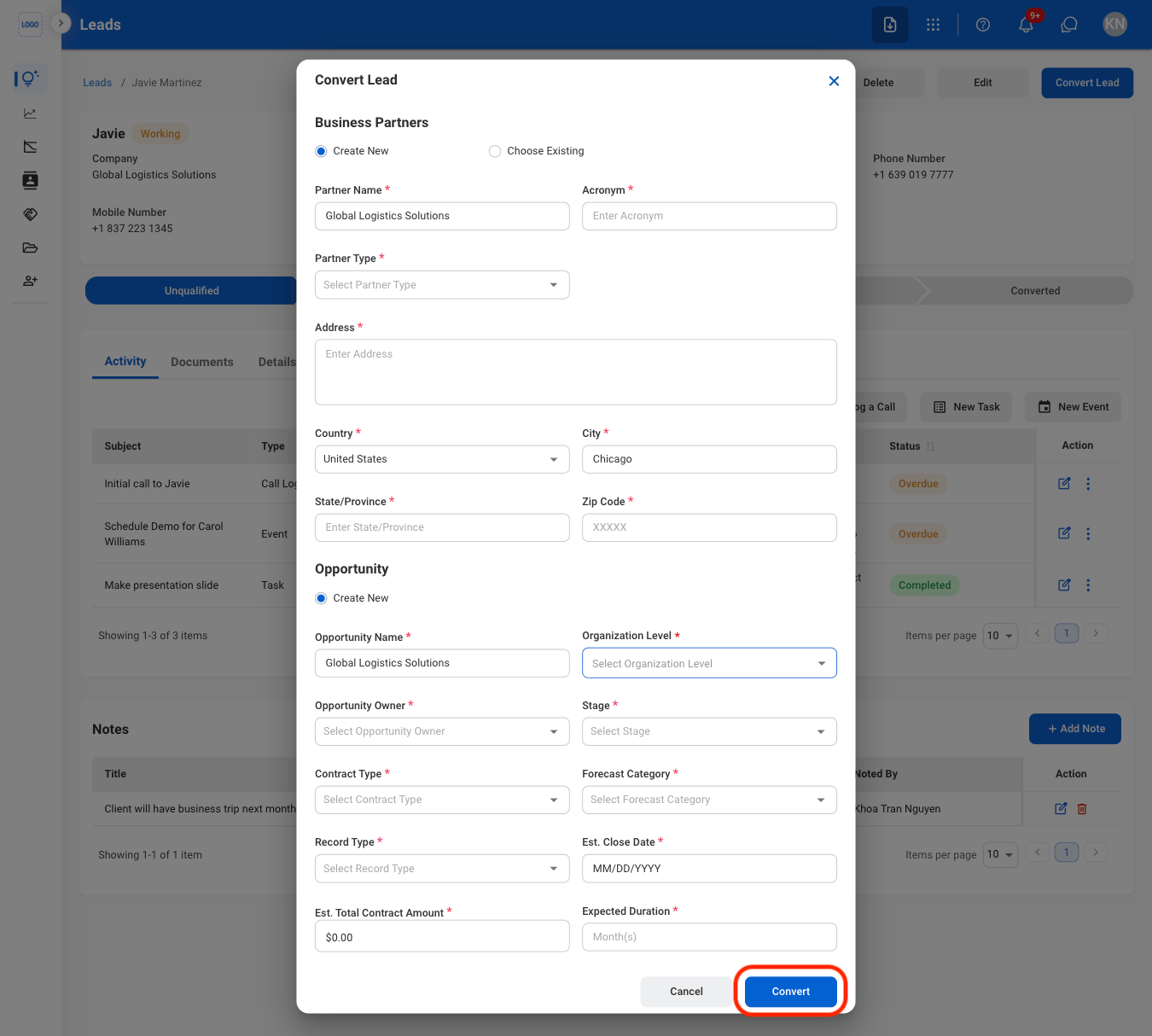
Convert qualified leads into business opportunities. Converting a lead creates a corresponding opportunity record in the Opportunities section while marking the original lead as converted.
<Steps>
  <Step title="Select Convert Lead">
    <Frame>
      <img src="https://mintcdn.com/bizbone/j9nXCGIfRGEHdTNl/images/CRM-L-Convert.png?fit=max&auto=format&n=j9nXCGIfRGEHdTNl&q=85&s=deb4668aa9e001d99360319c125a853c" alt="CRM L Convert" width="1350" height="1068" data-path="images/CRM-L-Convert.png" />
    </Frame>
  </Step>

  <Step title="Fill in the required information">
    <Frame>
      <img src="https://mintcdn.com/bizbone/j9nXCGIfRGEHdTNl/images/CRM-L-Convert-C.png?fit=max&auto=format&n=j9nXCGIfRGEHdTNl&q=85&s=52ed8af51e8f83f544c66ad7d820c3a8" alt="CRM L Convert C" width="1350" height="1214" data-path="images/CRM-L-Convert-C.png" />
    </Frame>

    Select **Convert** to complete or **Cancel** to exit without saving changes. 
  </Step>
</Steps>