> ## Documentation Index
> Fetch the complete documentation index at: https://docs.bizbone.com/llms.txt
> Use this file to discover all available pages before exploring further.

# Prime Contracts

## View a Prime Contract
<Steps>
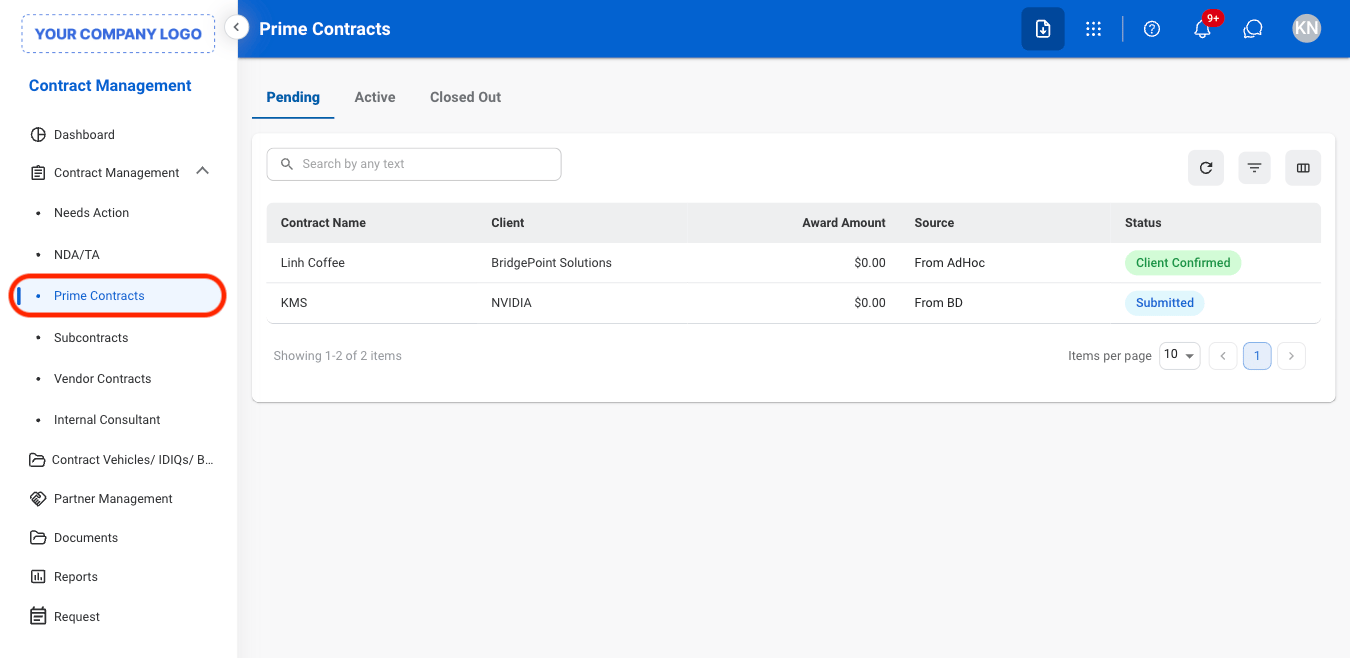
  <Step title="Navigate to Prime Contracts">
    <Frame>
      <img src="https://mintcdn.com/bizbone/j9nXCGIfRGEHdTNl/images/CM-PC-Nav.png?fit=max&auto=format&n=j9nXCGIfRGEHdTNl&q=85&s=b4b764ff8fd299cc132bba1ebe8c727a" alt="CM PC Nav" width="1350" height="658" data-path="images/CM-PC-Nav.png" />
    </Frame>
  </Step>

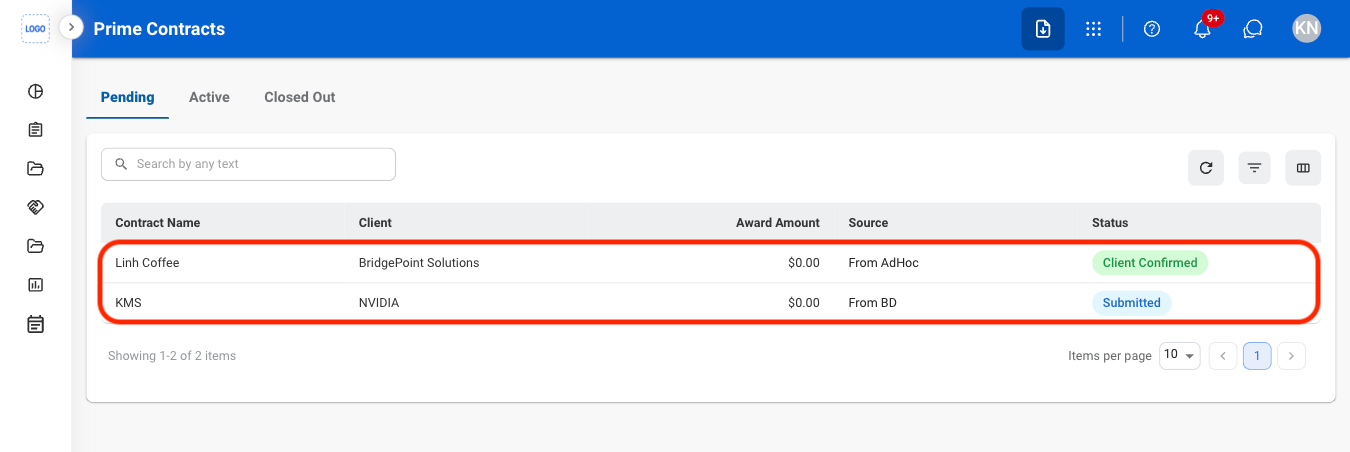
  <Step title="Select a tab">
    <Frame>
      <img src="https://mintcdn.com/bizbone/j9nXCGIfRGEHdTNl/images/CM-PC-Tab.png?fit=max&auto=format&n=j9nXCGIfRGEHdTNl&q=85&s=e67e5bb1b60ce3bfbc4fa88955a15e8b" alt="CM PC Tab" width="1350" height="452" data-path="images/CM-PC-Tab.png" />
    </Frame>

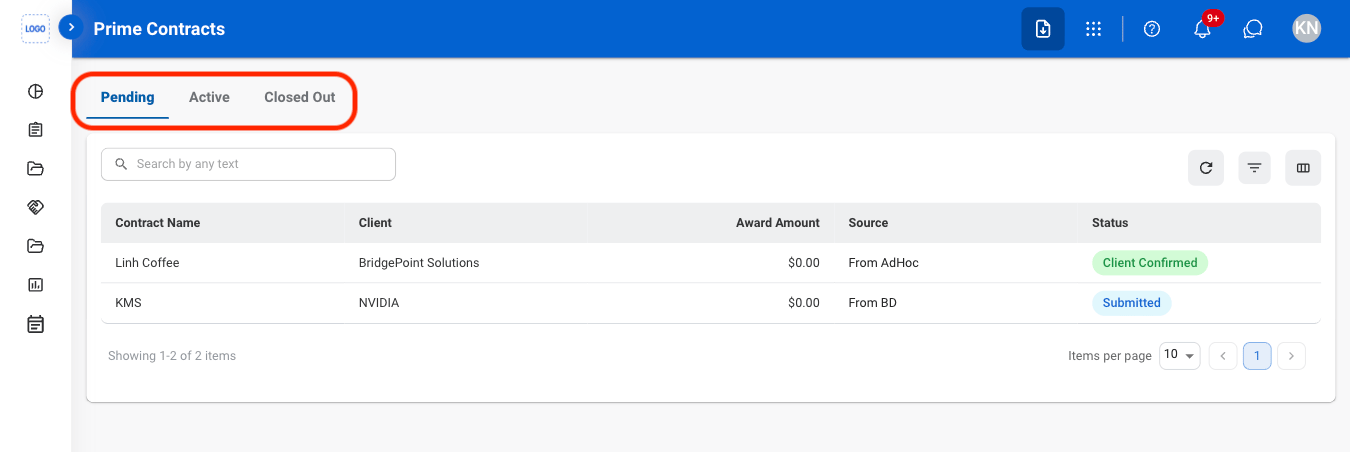
    * **Pending:** Contracts in progress or awaiting action.
    * **Active:** Contracts currently in effect.
    * **Closed Out:** Contracts that have been completed and finalized.
  </Step>

  <Step title="Select a contract">
    <Frame>
      <img src="https://mintcdn.com/bizbone/j9nXCGIfRGEHdTNl/images/CM-PC-Select.png?fit=max&auto=format&n=j9nXCGIfRGEHdTNl&q=85&s=71137380a199ab3a7d112006036bf87e" alt="CM PC Select" width="1350" height="452" data-path="images/CM-PC-Select.png" />
    </Frame>
  </Step>
</Steps>

## Create a Prime Contract

<Steps>
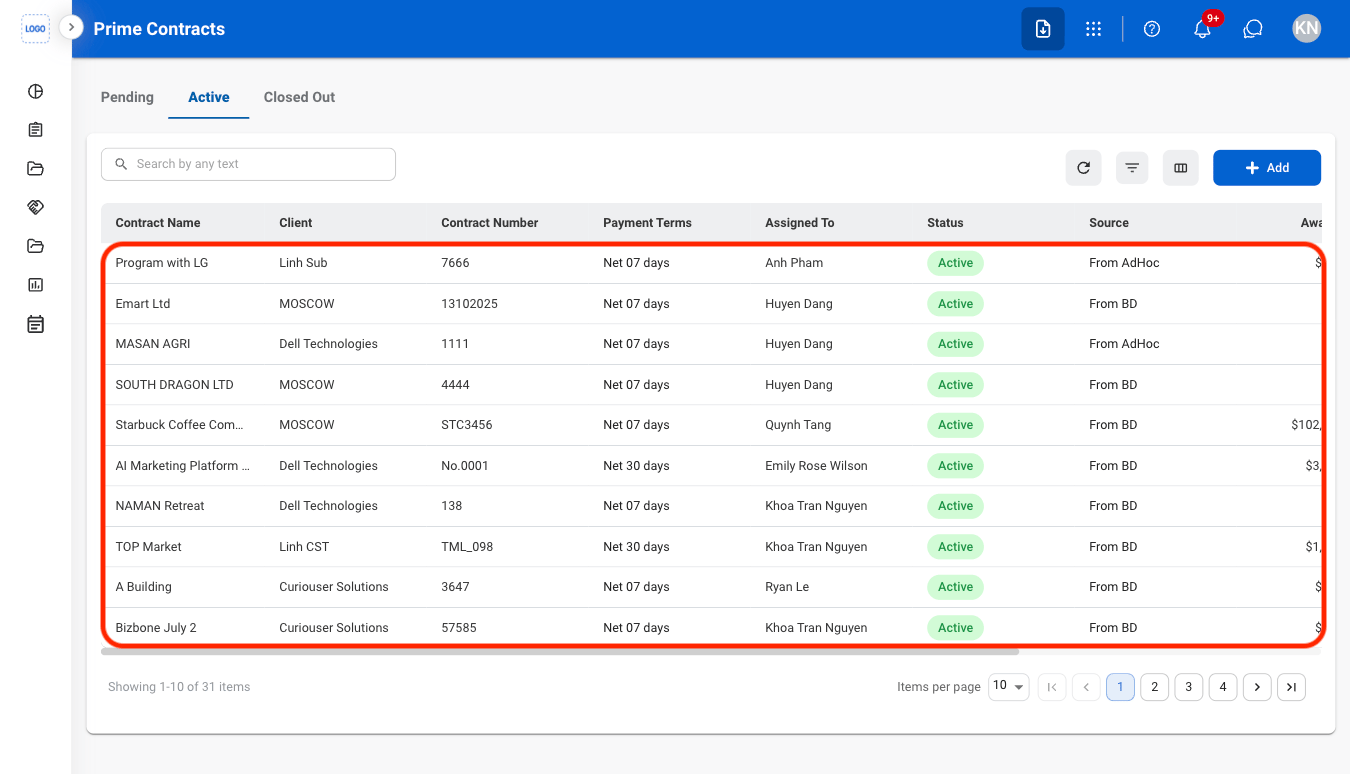
  <Step title="Select the Active tab">
    <Frame>
      <img src="https://mintcdn.com/bizbone/ucjb0UiAtHlFjGiT/images/CM-PC-Active.png?fit=max&auto=format&n=ucjb0UiAtHlFjGiT&q=85&s=ad5d3aa1c282b2c0e273abd05ccf8fa0" alt="CM PC Active" width="1350" height="770" data-path="images/CM-PC-Active.png" />
    </Frame>
  </Step>

  <Step title="Select Add">
    <Frame>
      <img src="https://mintcdn.com/bizbone/ucjb0UiAtHlFjGiT/images/CM-PC-Add.png?fit=max&auto=format&n=ucjb0UiAtHlFjGiT&q=85&s=822c3dc85f95fb523d0c1cd5206ec5e6" alt="CM PC Add" width="1350" height="774" data-path="images/CM-PC-Add.png" />
    </Frame>
  </Step>

  <Step title="Fill in the required information ">
    <Frame>
      <img src="https://mintcdn.com/bizbone/ucjb0UiAtHlFjGiT/images/CM-PC-Add-C.png?fit=max&auto=format&n=ucjb0UiAtHlFjGiT&q=85&s=0d01d35aa895813a1519559e7b4c9136" alt="CM PC Add C" width="1350" height="1184" data-path="images/CM-PC-Add-C.png" />
    </Frame>

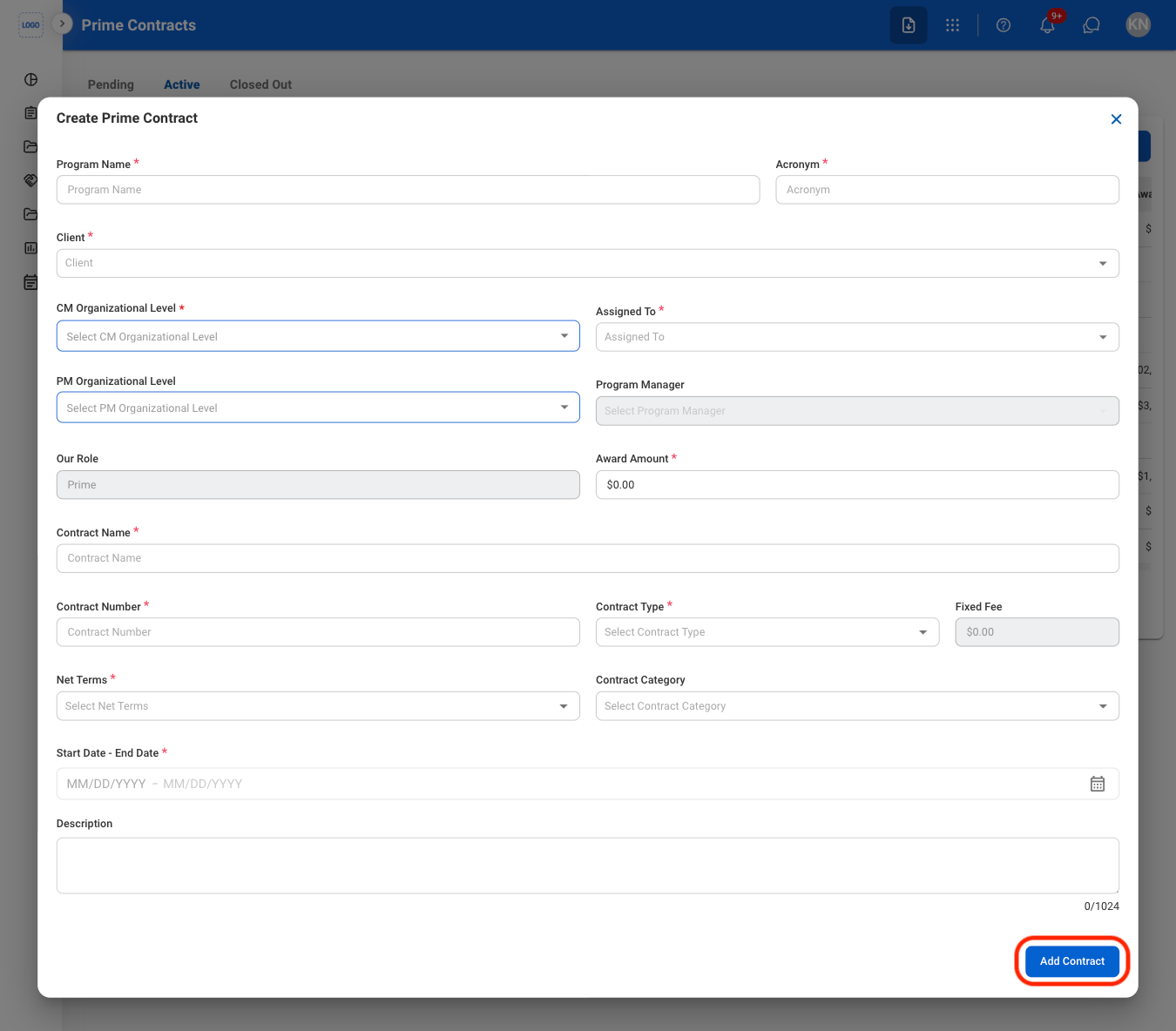
    Select **Add Contract** to complete. 
  </Step>
</Steps>

## Add a Place of Performance

<Steps>
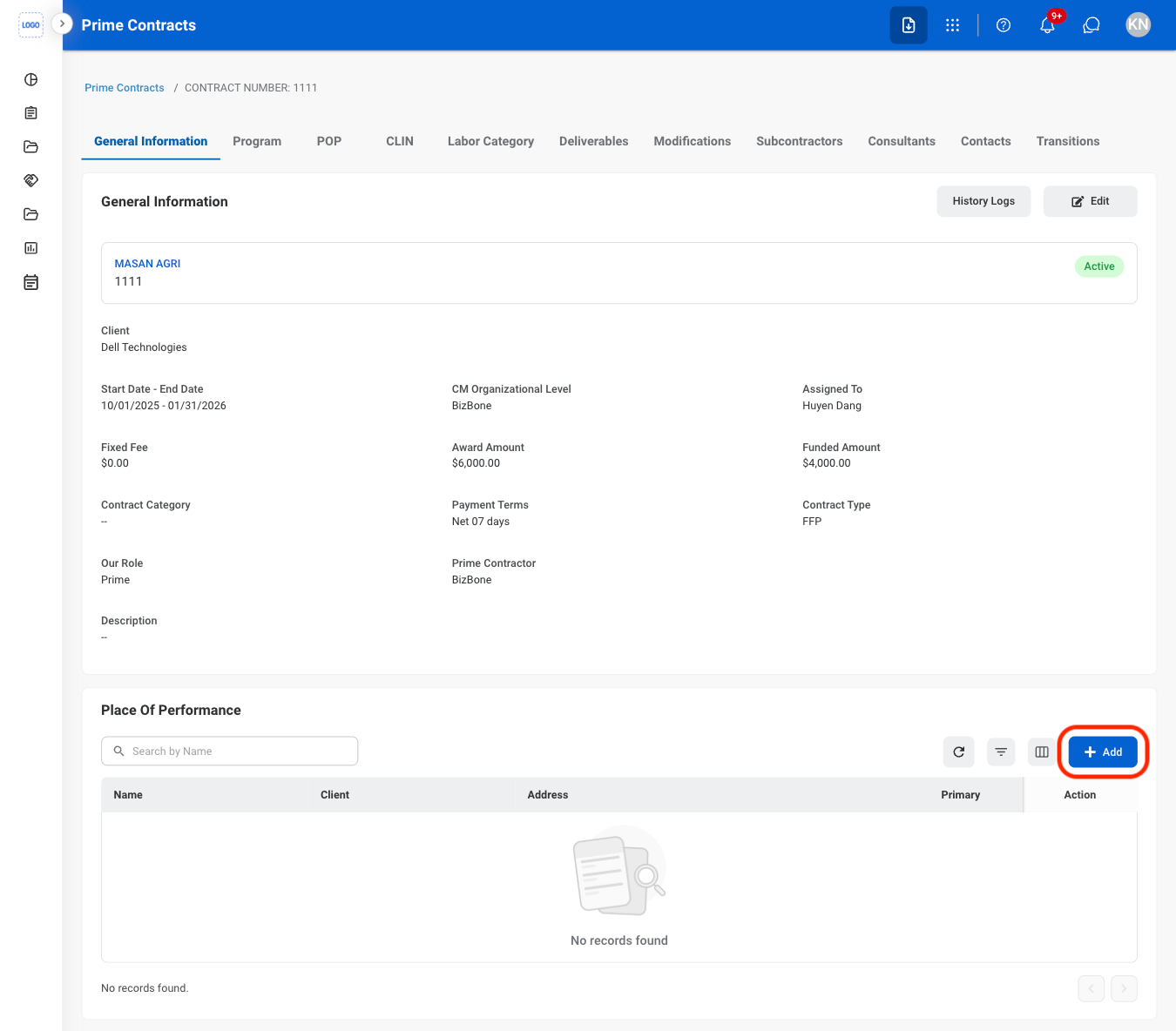
  <Step title="Select an active contract">
    <Frame>
      <img src="https://mintcdn.com/bizbone/j9nXCGIfRGEHdTNl/images/CM-PC-Select-Active.png?fit=max&auto=format&n=j9nXCGIfRGEHdTNl&q=85&s=e8af81b588f84d94578b8d8bdaef5aa7" alt="CM PC Select Active" width="1350" height="774" data-path="images/CM-PC-Select-Active.png" />
    </Frame>
  </Step>

  <Step title="Select the Add button under Place of Performance">
    <Frame>
      <img src="https://mintcdn.com/bizbone/ucjb0UiAtHlFjGiT/images/CM-PC-Add-PP.png?fit=max&auto=format&n=ucjb0UiAtHlFjGiT&q=85&s=aacadac3a618a156022632e34ba06e44" alt="CM PC Add PP" width="1350" height="1184" data-path="images/CM-PC-Add-PP.png" />
    </Frame>
  </Step>

  <Step title="Fill in the required information ">
    <Frame>
      <img src="https://mintcdn.com/bizbone/ucjb0UiAtHlFjGiT/images/CM-PC-Add-PP-C.png?fit=max&auto=format&n=ucjb0UiAtHlFjGiT&q=85&s=89569fce51420aa6e93f596b40b5520f" alt="CM PC Add PP C" width="1350" height="954" data-path="images/CM-PC-Add-PP-C.png" />
    </Frame>

    ç
  </Step>
</Steps>

## Modify a Place of Performance

<Steps>
  <Step title="Select the Edit or Delete icon in the Action column">
    <Frame>
      <img src="https://mintcdn.com/bizbone/j9nXCGIfRGEHdTNl/images/CM-PC-Modify-PP.png?fit=max&auto=format&n=j9nXCGIfRGEHdTNl&q=85&s=1ebee7f479817c67fff144e49883a201" alt="CM PC Modify PP" width="1350" height="1094" data-path="images/CM-PC-Modify-PP.png" />
    </Frame>

    <Info>
      Entries designated as the primary Place of Performance cannot be deleted. To enable the delete button, select edit and clear the **Primary** designation. 
    </Info>
  </Step>

  <Step title="Confirm the action ">
    * Edit: Fill in the required information and select **Save** to complete or **Cancel** to exit without saving changes. 
    * Delete: Select **Delete** to complete or **Cancel** to exit without saving changes.
  </Step>
</Steps>

## Add a Document

<Steps>
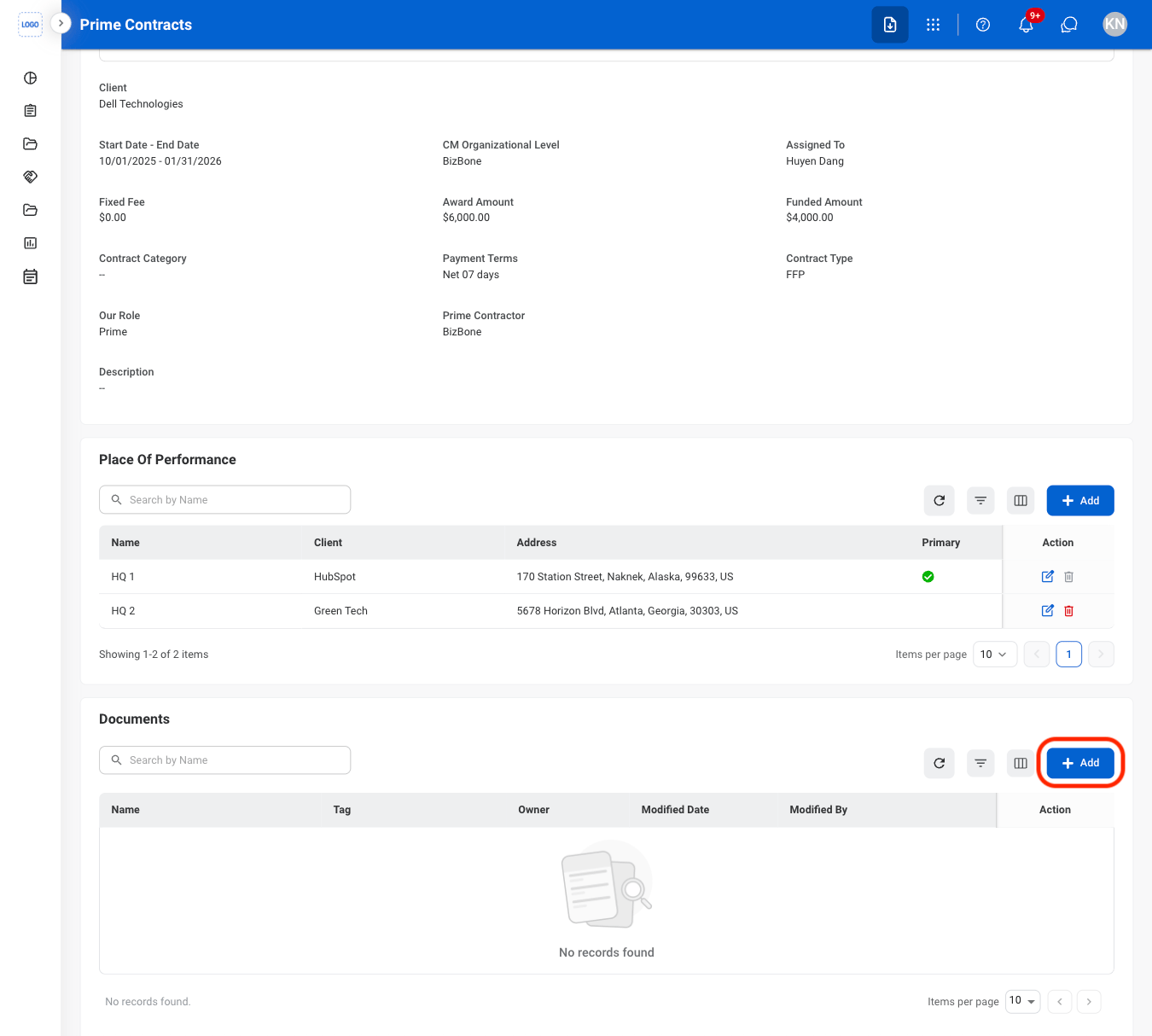
  <Step title="Select the Add button under Documents">
    <Frame>
      <img src="https://mintcdn.com/bizbone/ucjb0UiAtHlFjGiT/images/CM-PC-Add-D.png?fit=max&auto=format&n=ucjb0UiAtHlFjGiT&q=85&s=e07918458de9b2fdd467c29bb52206de" alt="CM PC Add D" width="1350" height="1214" data-path="images/CM-PC-Add-D.png" />
    </Frame>
  </Step>

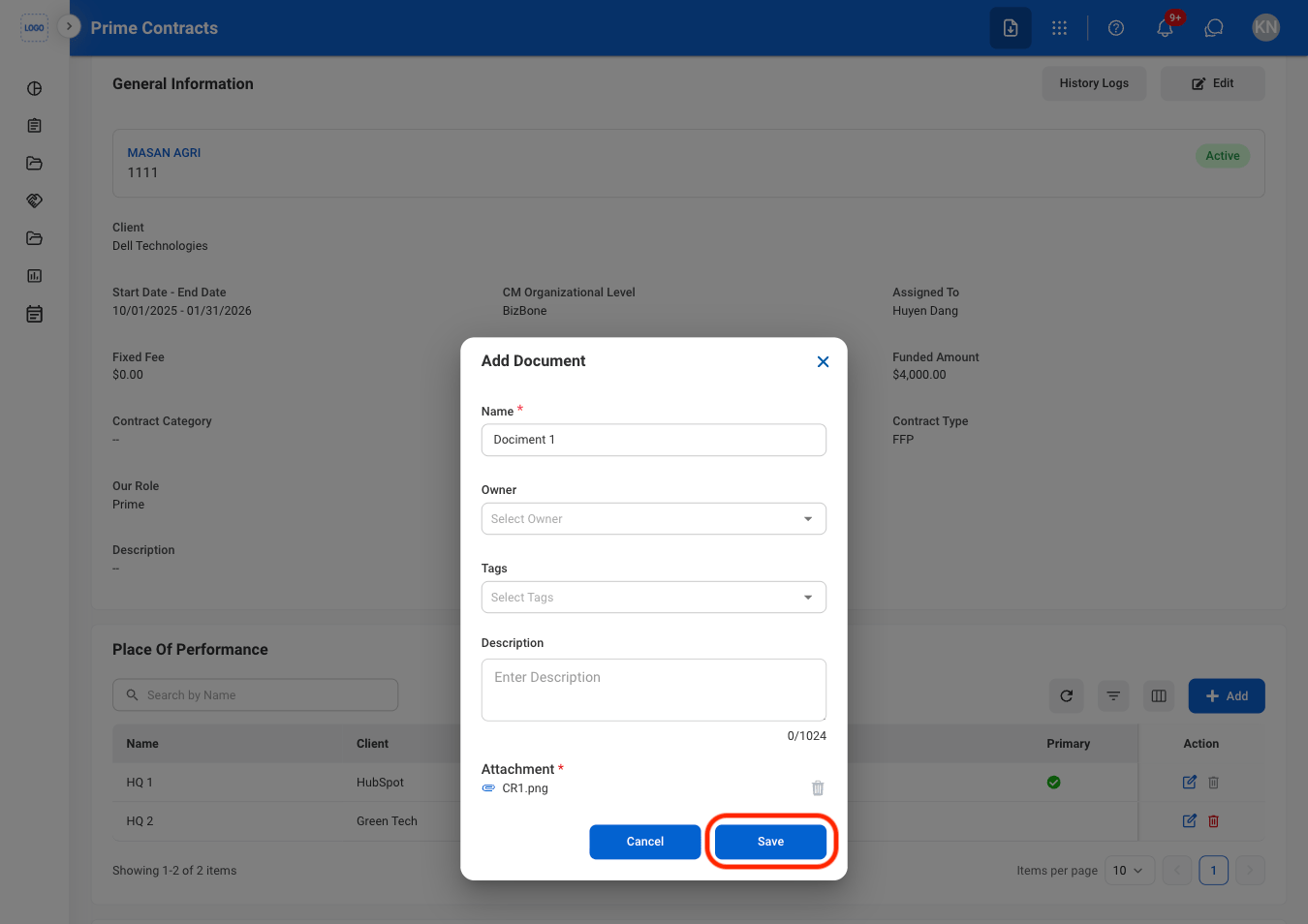
  <Step title="Fill in the required information ">
    <Frame>
      <img src="https://mintcdn.com/bizbone/ucjb0UiAtHlFjGiT/images/CM-PC-Add-D-C.png?fit=max&auto=format&n=ucjb0UiAtHlFjGiT&q=85&s=bb9c59d5953772ed8b771c771056d55e" alt="CM PC Add D C" width="1350" height="954" data-path="images/CM-PC-Add-D-C.png" />
    </Frame>

    Select **Save** to complete or **Cancel** to exit without saving changes. 
  </Step>
</Steps>

## Modify a Document

<Steps>
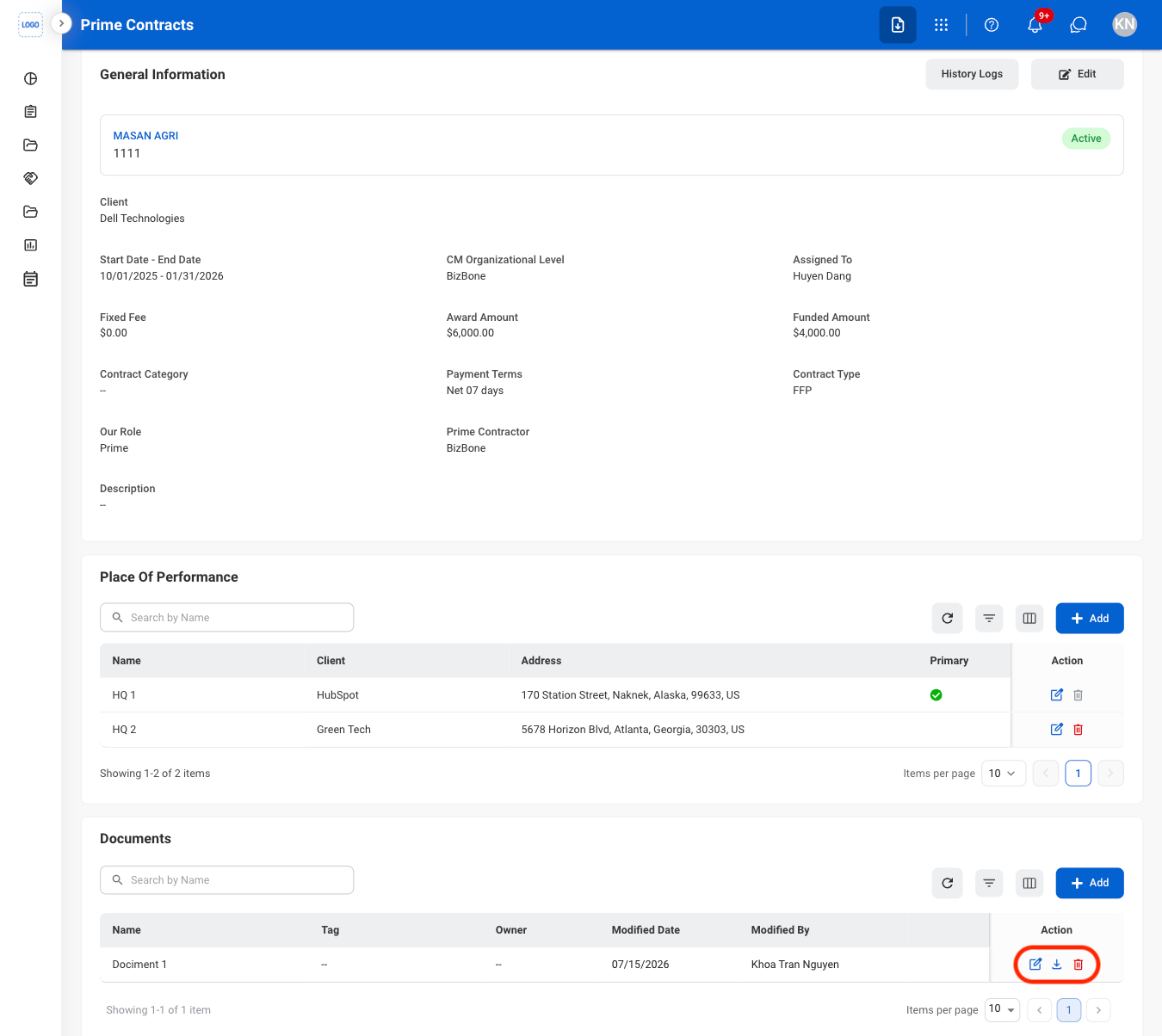
  <Step title="Select the Edit or Delete icon in the Action column">
    <Frame>
      <img src="https://mintcdn.com/bizbone/j9nXCGIfRGEHdTNl/images/CM-PC-Modify-D.png?fit=max&auto=format&n=j9nXCGIfRGEHdTNl&q=85&s=27e619ecea4851ebcc17696999942042" alt="CM PC Modify D" width="1350" height="1204" data-path="images/CM-PC-Modify-D.png" />
    </Frame>
  </Step>

  <Step title="Confirm the action ">
    * Edit: Fill in the required information and select **Save** to complete or **Cancel** to exit without saving changes. 
    * Delete: Select **Delete** to complete or **Cancel** to exit without saving changes.
  </Step>
</Steps>

## Add CPARS Rating

<Steps>
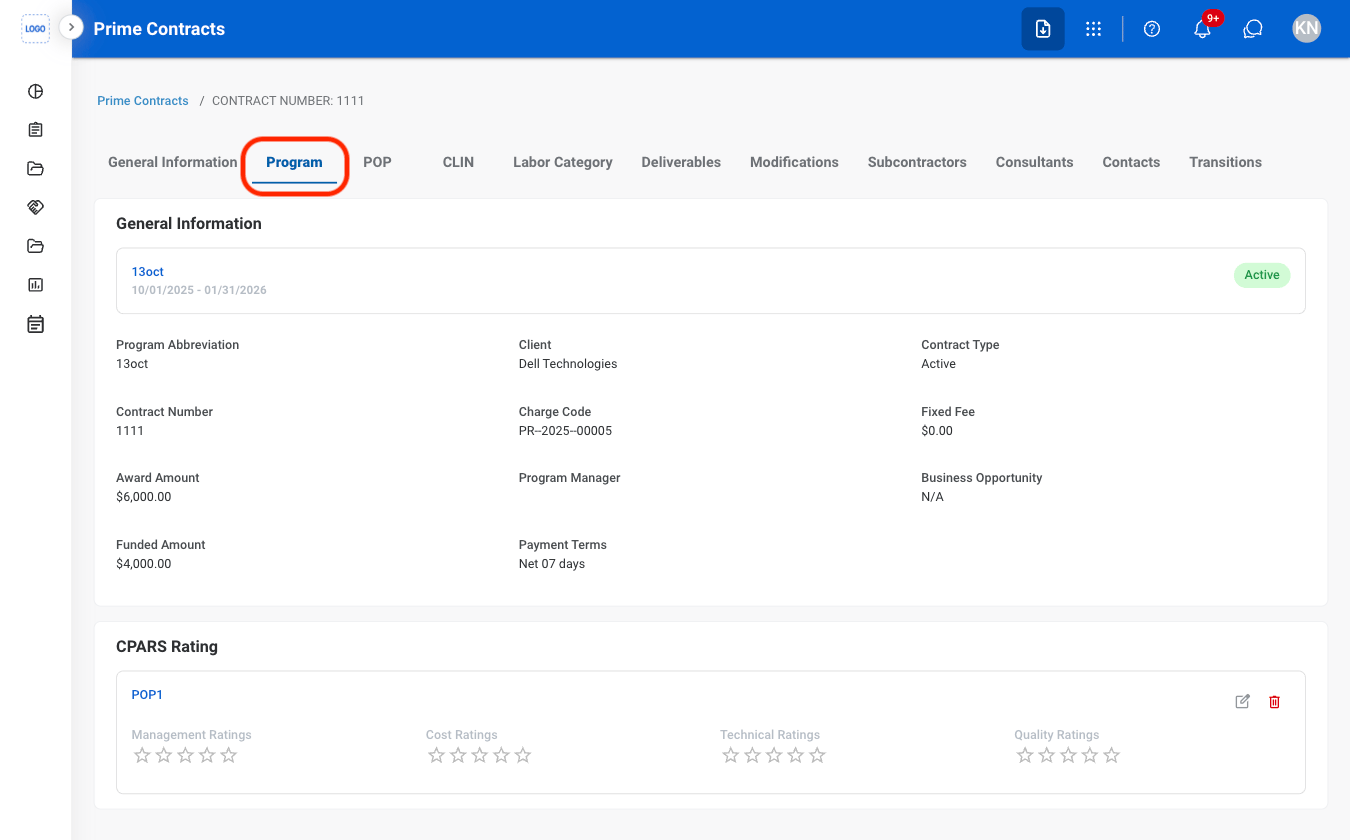
  <Step title="Select the Program tab">
    <Frame>
      <img src="https://mintcdn.com/bizbone/j9nXCGIfRGEHdTNl/images/CM-PC-Program.png?fit=max&auto=format&n=j9nXCGIfRGEHdTNl&q=85&s=8d96d9debbbb7313c48591fb51077535" alt="CM PC Program" width="1350" height="840" data-path="images/CM-PC-Program.png" />
    </Frame>
  </Step>

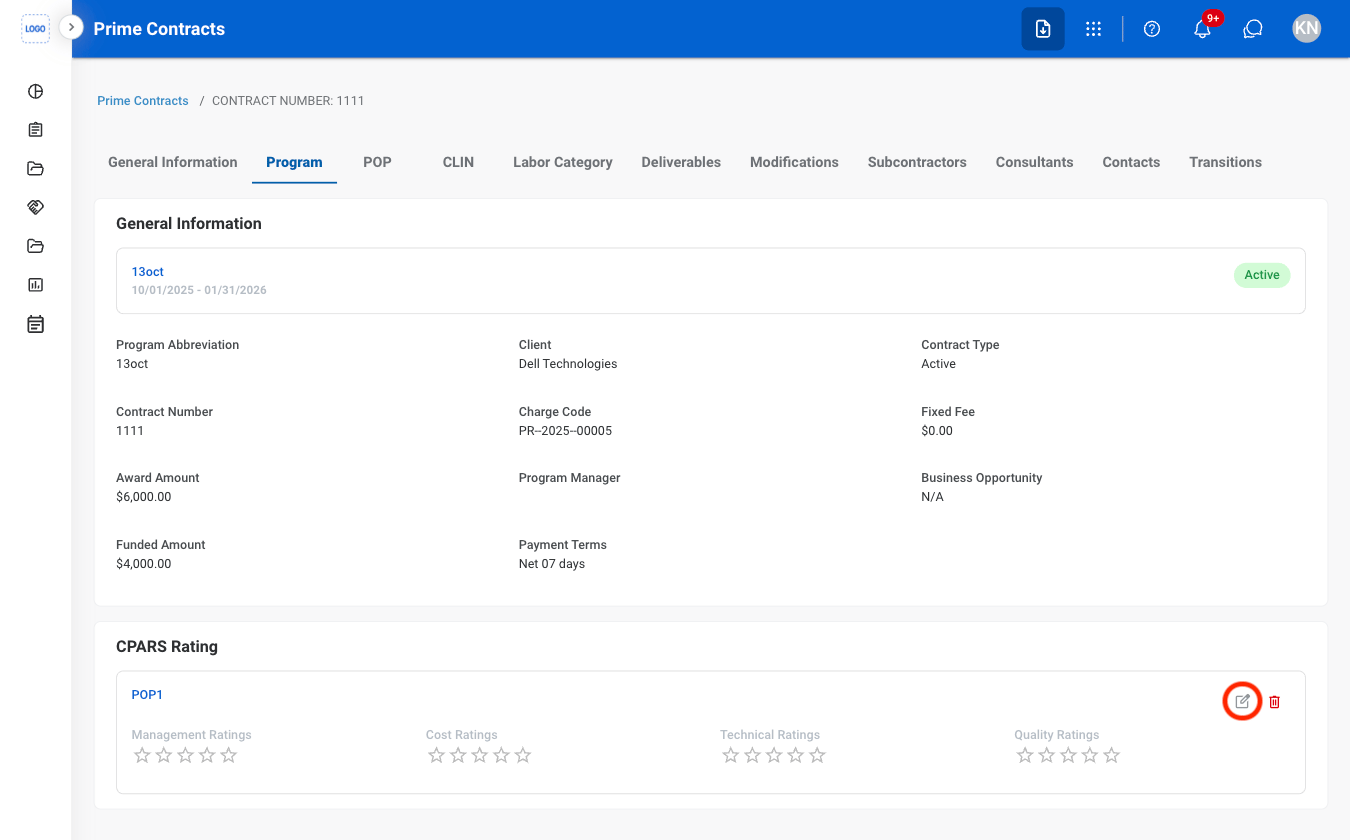
  <Step title="Select the Edit icon">
    <Frame>
      <img src="https://mintcdn.com/bizbone/ucjb0UiAtHlFjGiT/images/CM-PC-Edit-C-Rating.png?fit=max&auto=format&n=ucjb0UiAtHlFjGiT&q=85&s=0d70691f066869db17e8ab7d21633e8a" alt="CM PC Edit C Rating" width="1350" height="840" data-path="images/CM-PC-Edit-C-Rating.png" />
    </Frame>
  </Step>

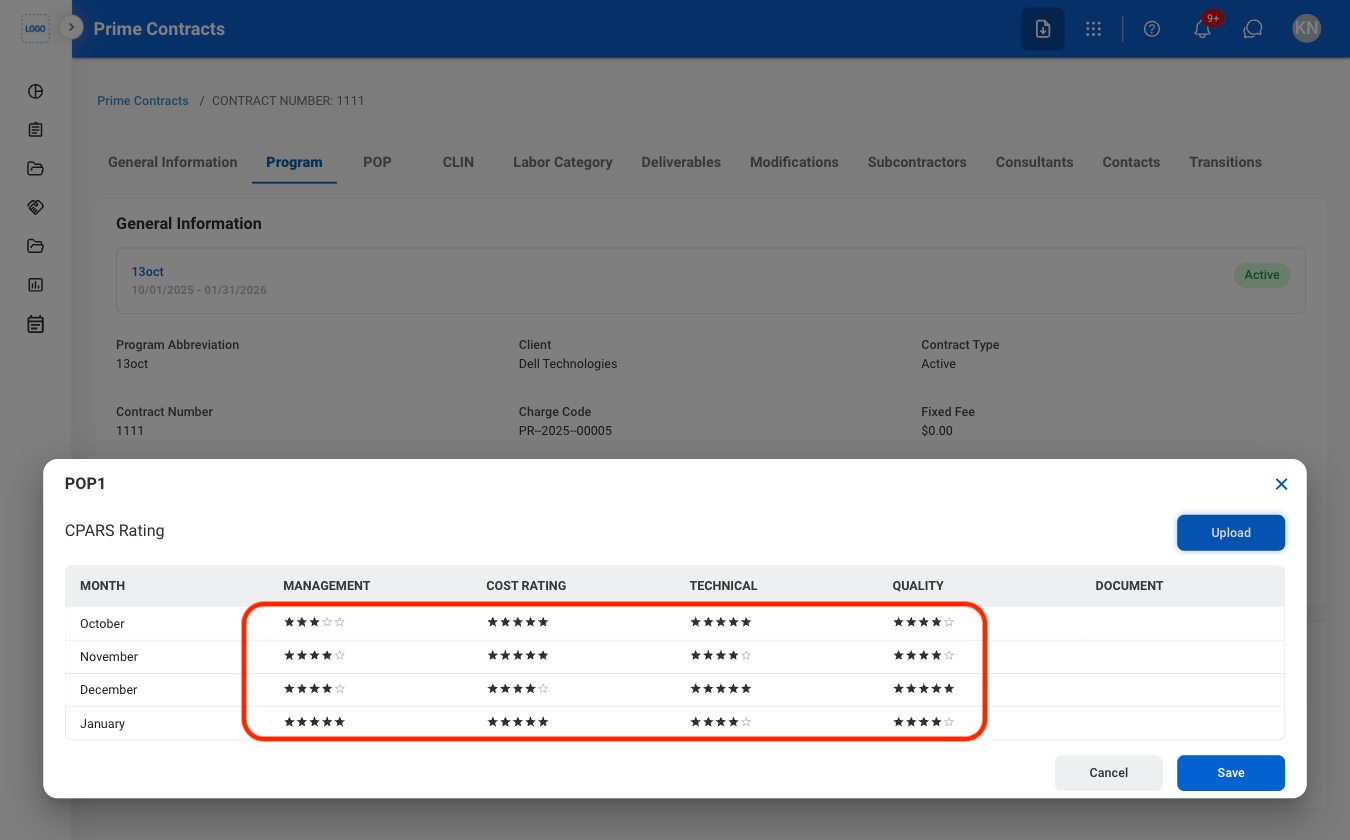
  <Step title="Select ratings for each category">
    <Frame>
      <img src="https://mintcdn.com/bizbone/j9nXCGIfRGEHdTNl/images/CM-PC-Rating.png?fit=max&auto=format&n=j9nXCGIfRGEHdTNl&q=85&s=d57ff748a5f7bf28eddedc48936375bb" alt="CM PC Rating" width="1350" height="840" data-path="images/CM-PC-Rating.png" />
    </Frame>

    Select **Save** to complete or **Cancel** to exit without saving changes. 
  </Step>

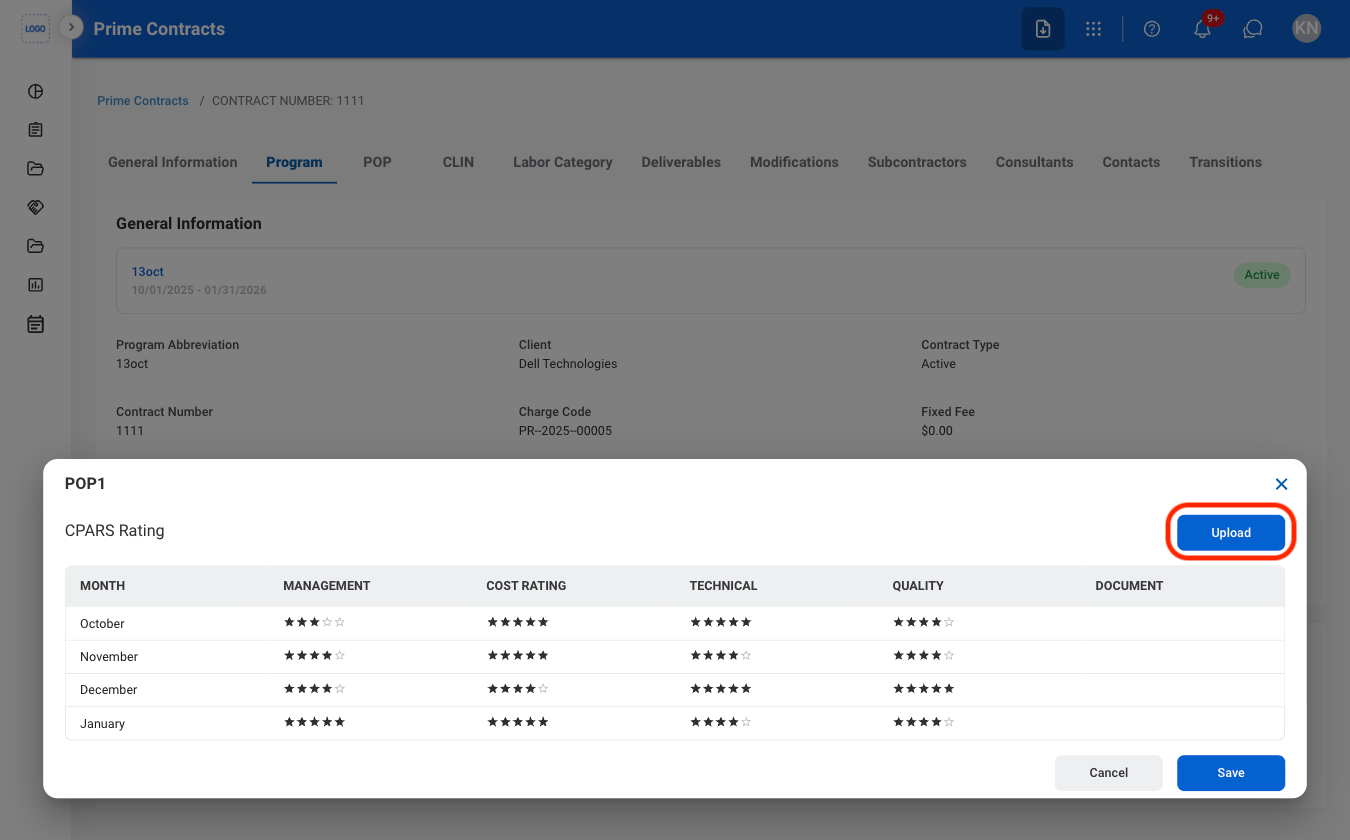
  <Step title="Optional: Select Upload to attach supporting documents">
    <Frame>
      <img src="https://mintcdn.com/bizbone/ucjb0UiAtHlFjGiT/images/CM-PC-Doc.png?fit=max&auto=format&n=ucjb0UiAtHlFjGiT&q=85&s=9bf5ed075fdbcdb5650a10d0b67f51df" alt="CM PC Doc" width="1350" height="840" data-path="images/CM-PC-Doc.png" />
    </Frame>
  </Step>
</Steps>

## View POP CLINs

<Steps>
  <Step title="Navigate to POP">
    <Frame>
      <img src="https://mintcdn.com/bizbone/j9nXCGIfRGEHdTNl/images/CM-PC-POP-Nav.png?fit=max&auto=format&n=j9nXCGIfRGEHdTNl&q=85&s=8889b9258ceca6f8dc5ebdb1cb7d9bad" alt="CM PC POP Nav" width="1350" height="556" data-path="images/CM-PC-POP-Nav.png" />
    </Frame>
  </Step>

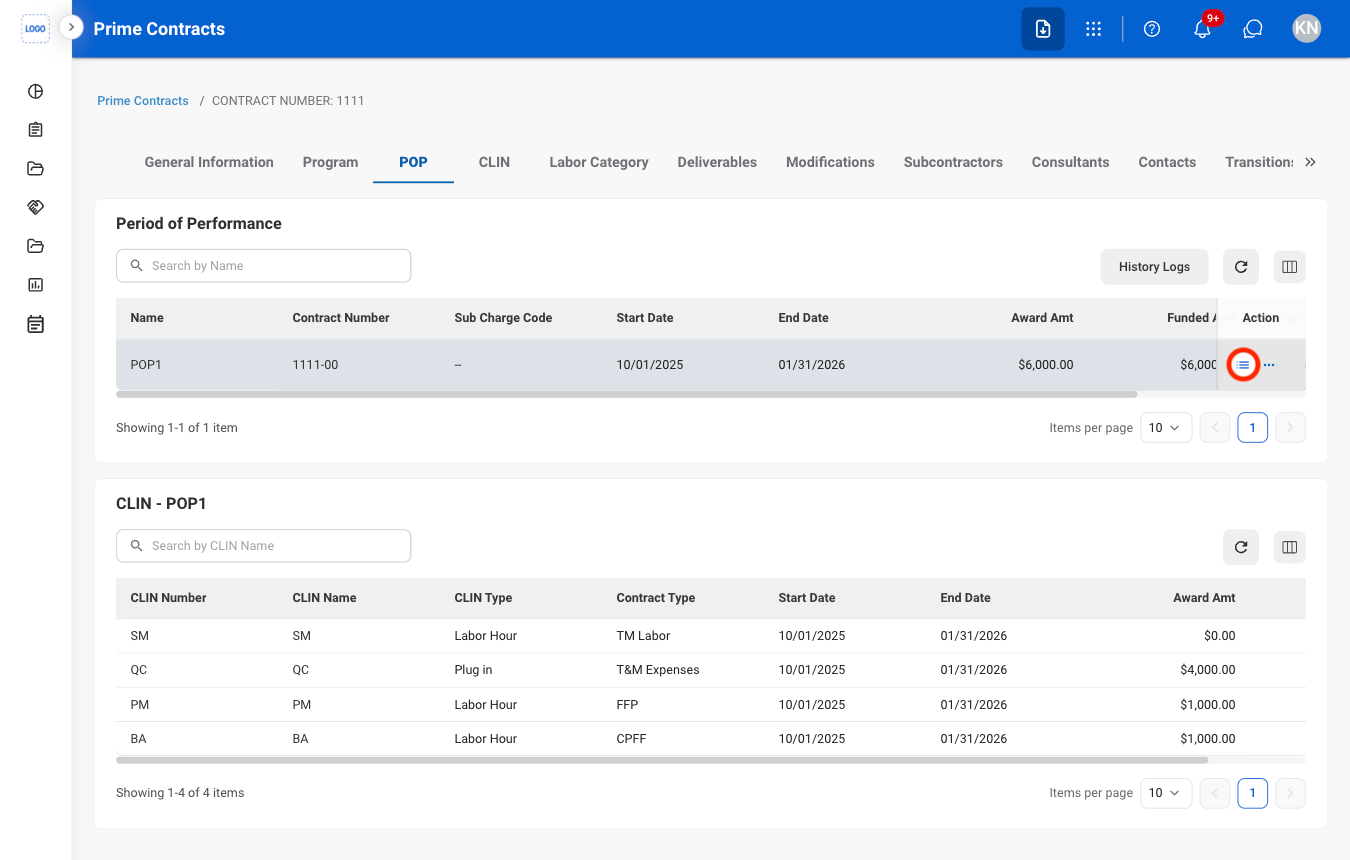
  <Step title="Select the list icon">
    <Frame>
      <img src="https://mintcdn.com/bizbone/j9nXCGIfRGEHdTNl/images/CM-PC-POP-List.png?fit=max&auto=format&n=j9nXCGIfRGEHdTNl&q=85&s=3093bed10e86dd116570df7d1262f0bd" alt="CM PC POP List" width="1350" height="860" data-path="images/CM-PC-POP-List.png" />
    </Frame>
  </Step>
</Steps>

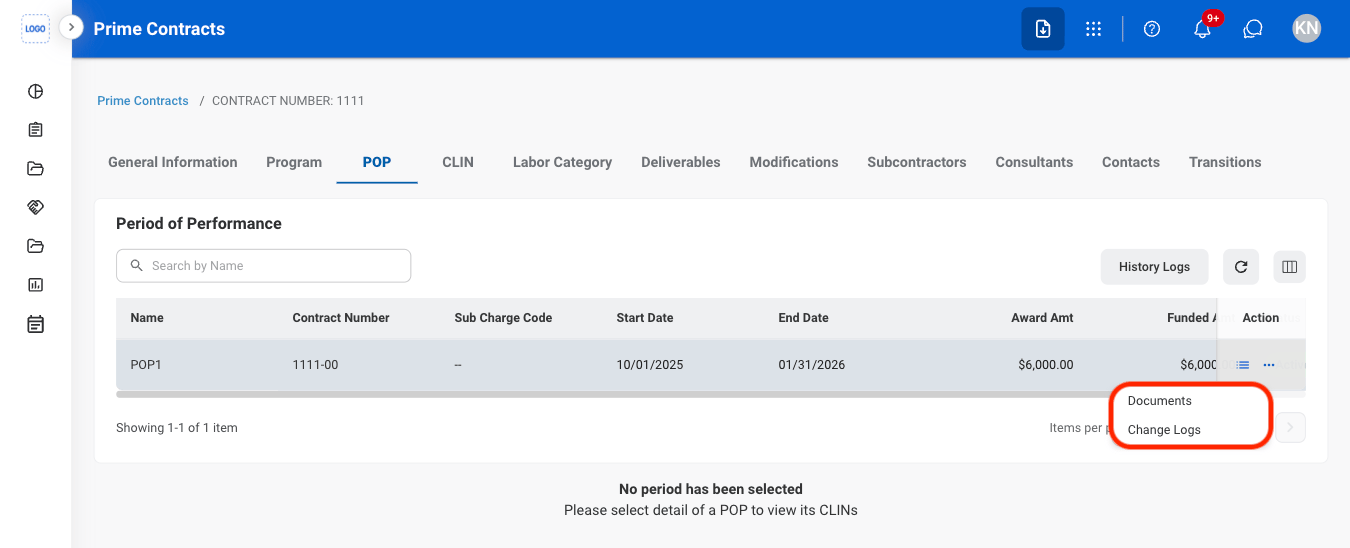
## View POP Documents and Change Logs
<Steps>
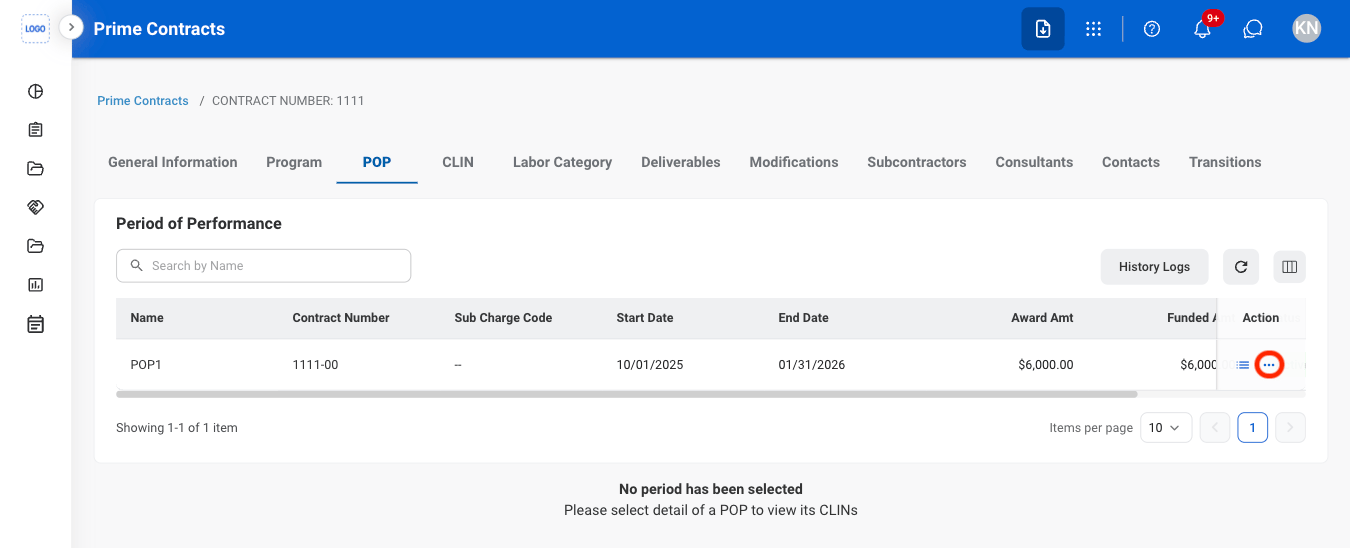
  <Step title="Select the ellipsis">
    <Frame>
      <img src="https://mintcdn.com/bizbone/j9nXCGIfRGEHdTNl/images/CM-PC-POP-E.png?fit=max&auto=format&n=j9nXCGIfRGEHdTNl&q=85&s=75743e2332c44dd693198adf6bfedaf5" alt="CM PC POP E" width="1350" height="548" data-path="images/CM-PC-POP-E.png" />
    </Frame>
  </Step>

  <Step title="Select Documents or Change Logs">
    <Frame>
      <img src="https://mintcdn.com/bizbone/j9nXCGIfRGEHdTNl/images/CM-PC-POP-E-List.png?fit=max&auto=format&n=j9nXCGIfRGEHdTNl&q=85&s=796f9a2e55b694a6597b8d10d4c65604" alt="CM PC POP E List" width="1350" height="548" data-path="images/CM-PC-POP-E-List.png" />
    </Frame>
  </Step>
</Steps>

## View CLIN Labor Categories

<Steps>
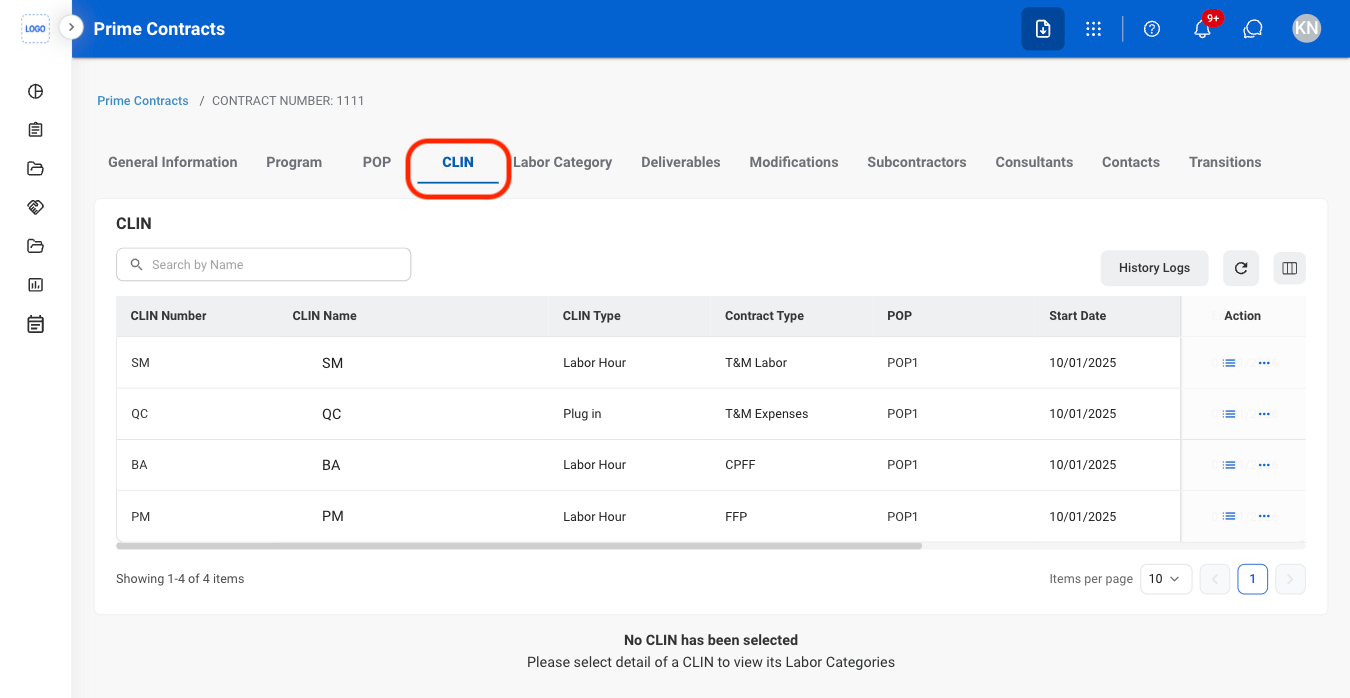
  <Step title="Navigate to CLIN">
    <Frame>
      <img src="https://mintcdn.com/bizbone/ucjb0UiAtHlFjGiT/images/CM-PC-CLIN.png?fit=max&auto=format&n=ucjb0UiAtHlFjGiT&q=85&s=49a6be00d935668d4e7f822202f4562b" alt="CM PC CLIN" width="1350" height="698" data-path="images/CM-PC-CLIN.png" />
    </Frame>
  </Step>

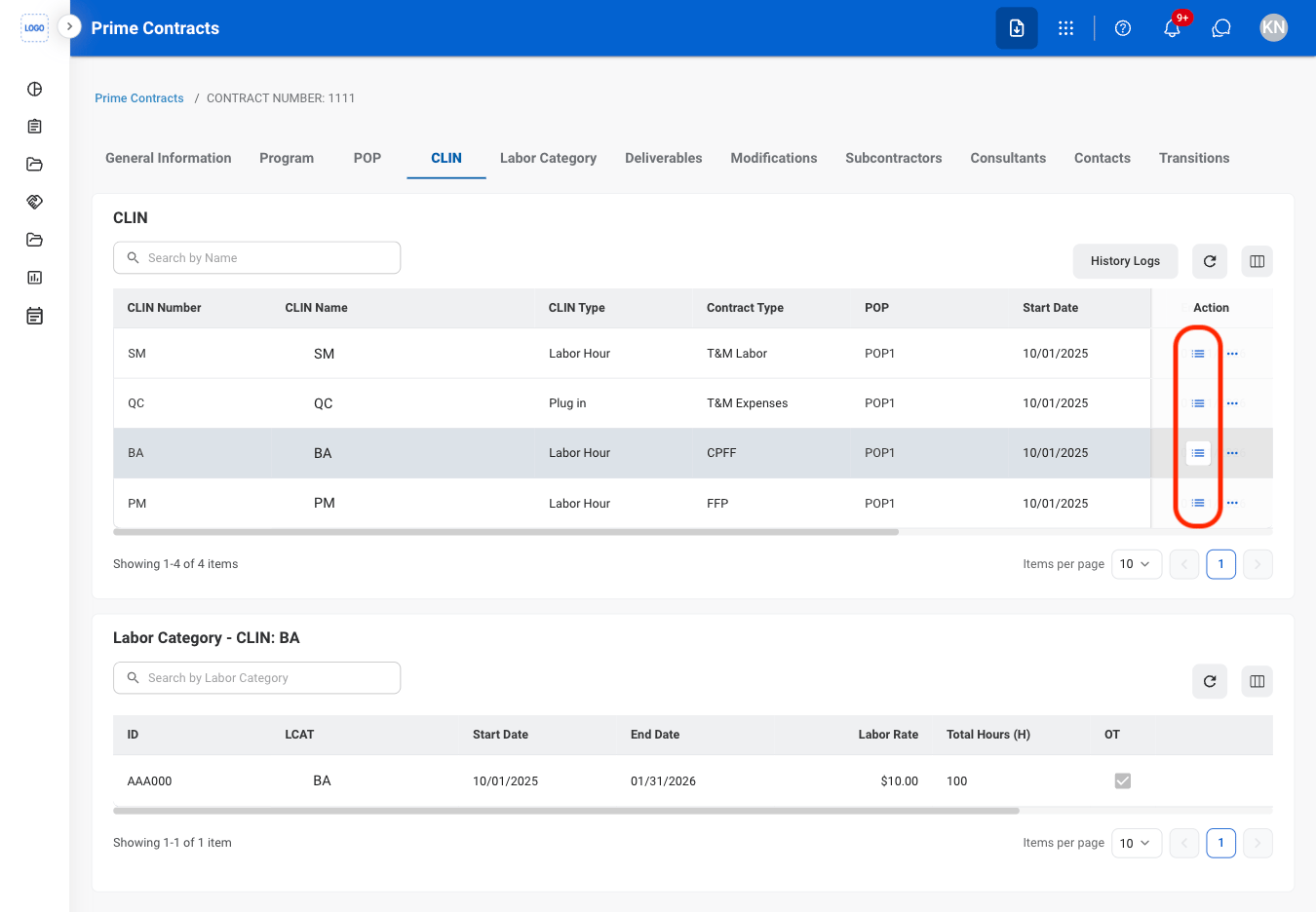
  <Step title="Select the list icon ">
    <Frame>
      <img src="https://mintcdn.com/bizbone/ucjb0UiAtHlFjGiT/images/CM-PC-CLIN-LC.png?fit=max&auto=format&n=ucjb0UiAtHlFjGiT&q=85&s=33be896bcf83da785f03bc17e7322ec6" alt="CM PC CLIN LC" width="1350" height="936" data-path="images/CM-PC-CLIN-LC.png" />
    </Frame>
  </Step>
</Steps>

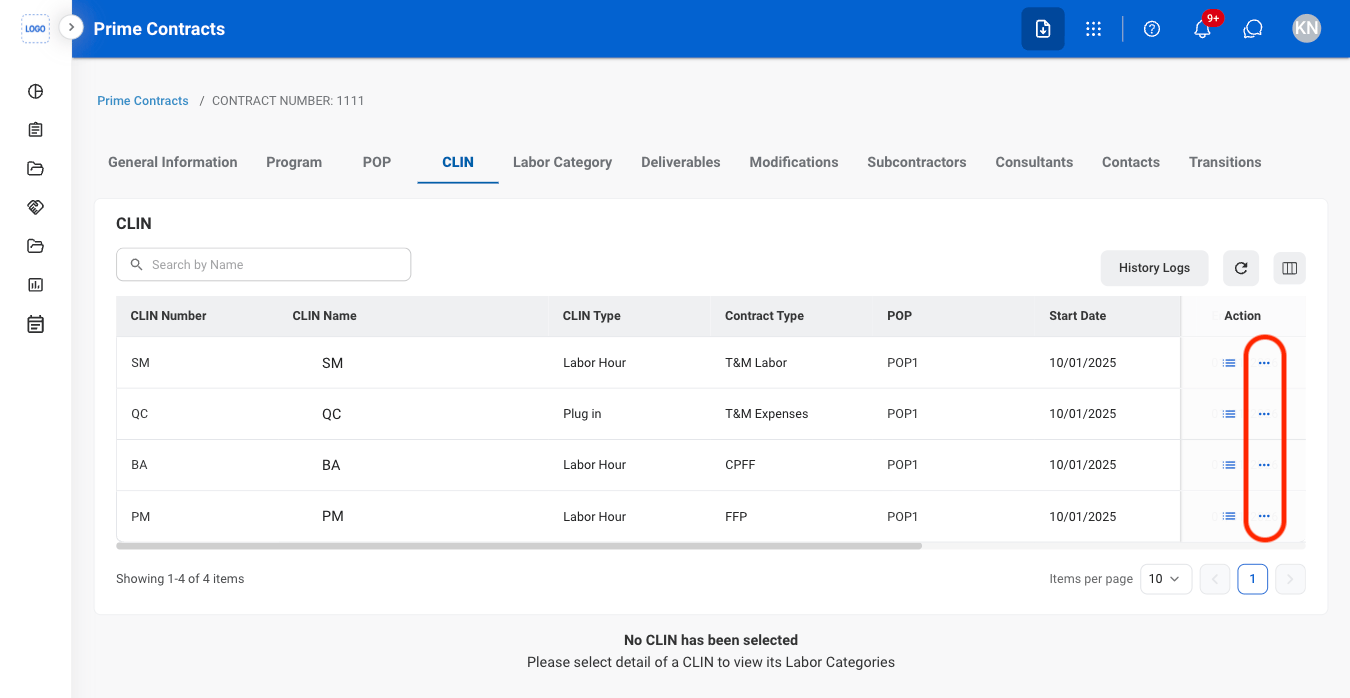
## View CLIN Documents and Change Logs
<Steps>
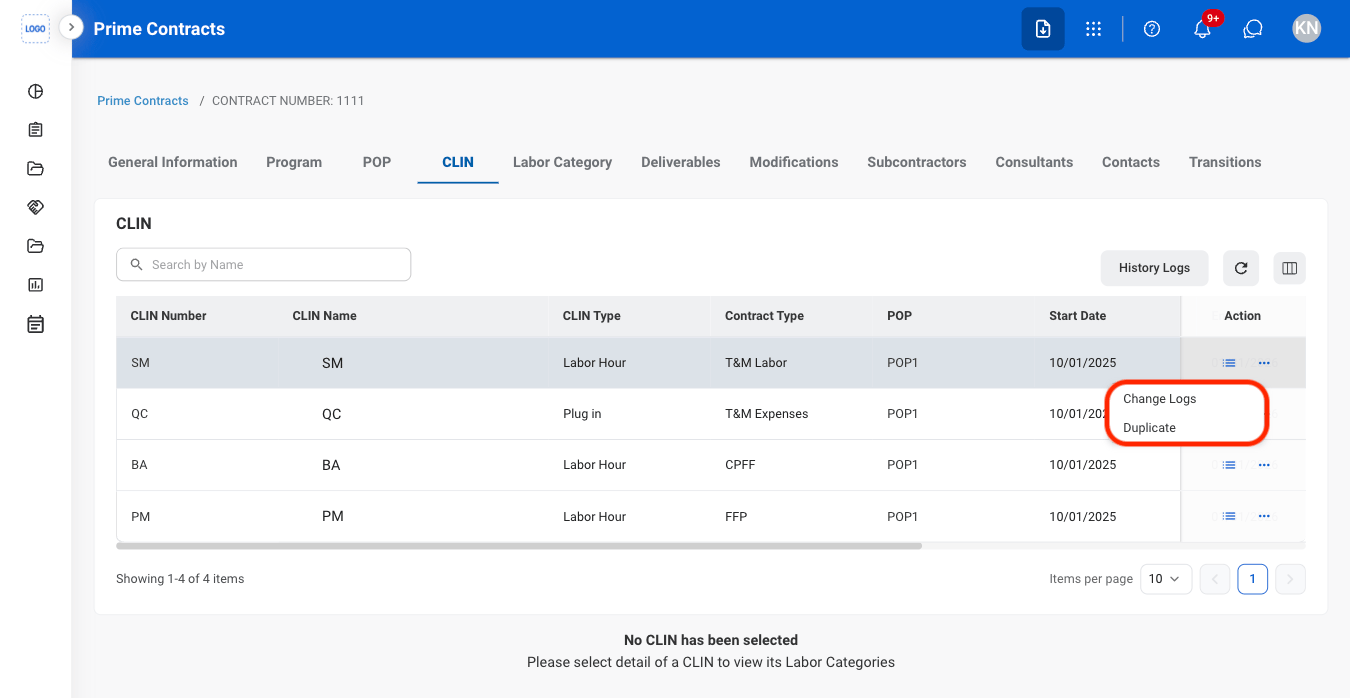
  <Step title="Select the ellipsis">
    <Frame>
      <img src="https://mintcdn.com/bizbone/ucjb0UiAtHlFjGiT/images/CM-PC-C-E.png?fit=max&auto=format&n=ucjb0UiAtHlFjGiT&q=85&s=db9bdbe2eeda5dae1f999f44930662d5" alt="CM PC C E" width="1350" height="698" data-path="images/CM-PC-C-E.png" />
    </Frame>
  </Step>

  <Step title="Select Documents or Change Logs">
    <Frame>
      <img src="https://mintcdn.com/bizbone/ucjb0UiAtHlFjGiT/images/CM-PC-C-E-List.png?fit=max&auto=format&n=ucjb0UiAtHlFjGiT&q=85&s=2087df043a109c7f31338c19cef093cd" alt="CM PC C E List" width="1350" height="698" data-path="images/CM-PC-C-E-List.png" />
    </Frame>
  </Step>
</Steps>

## View Labor Category Change Logs

<Steps>
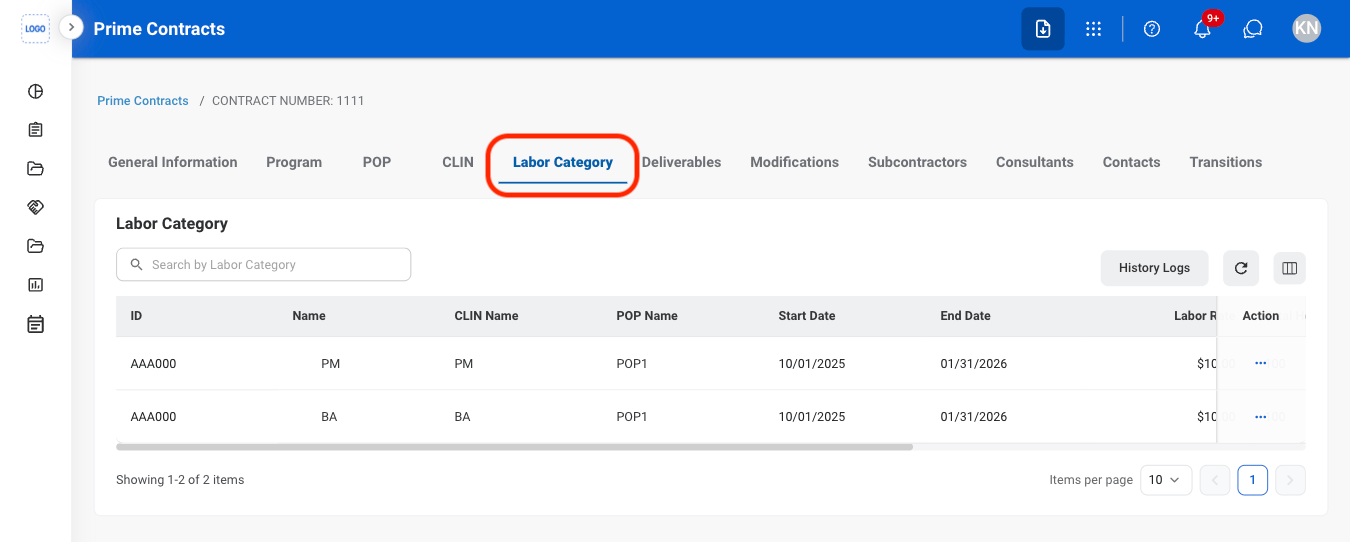
  <Step title="Navigate to Labor Category">
    <Frame>
      <img src="https://mintcdn.com/bizbone/j9nXCGIfRGEHdTNl/images/CM-PC-LC-Nav.png?fit=max&auto=format&n=j9nXCGIfRGEHdTNl&q=85&s=7f14c9d197640b93525b25d9db5ceecc" alt="CM PC LC Nav" width="1350" height="542" data-path="images/CM-PC-LC-Nav.png" />
    </Frame>
  </Step>

  <Step title="Select the ellipsis">
    <Frame>
      <img src="https://mintcdn.com/bizbone/j9nXCGIfRGEHdTNl/images/CM-PC-LC-E.png?fit=max&auto=format&n=j9nXCGIfRGEHdTNl&q=85&s=b6b74621de517438277a01e2781ea414" alt="CM PC LC E" width="1350" height="542" data-path="images/CM-PC-LC-E.png" />
    </Frame>
  </Step>

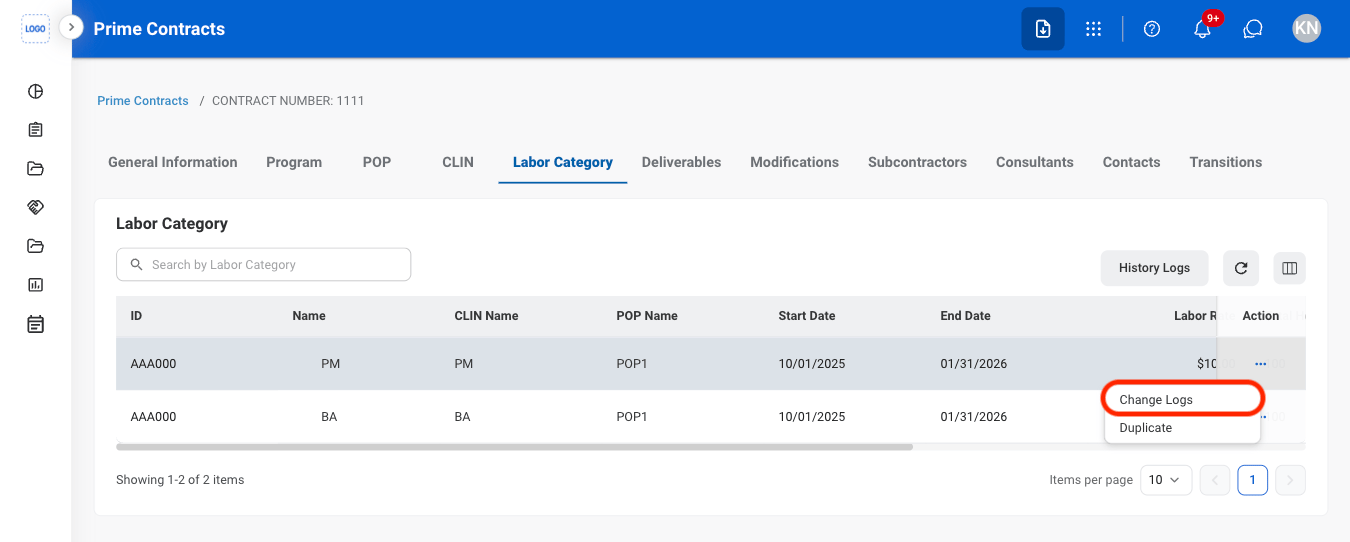
  <Step title="Select Change Logs">
    <Frame>
      <img src="https://mintcdn.com/bizbone/ucjb0UiAtHlFjGiT/images/CM-PC-LC-E-List.png?fit=max&auto=format&n=ucjb0UiAtHlFjGiT&q=85&s=82390b4c582a62616b6e562b049b162a" alt="CM PC LC E List" width="1350" height="542" data-path="images/CM-PC-LC-E-List.png" />
    </Frame>
  </Step>
</Steps>

## Add Deliverables

<Steps>
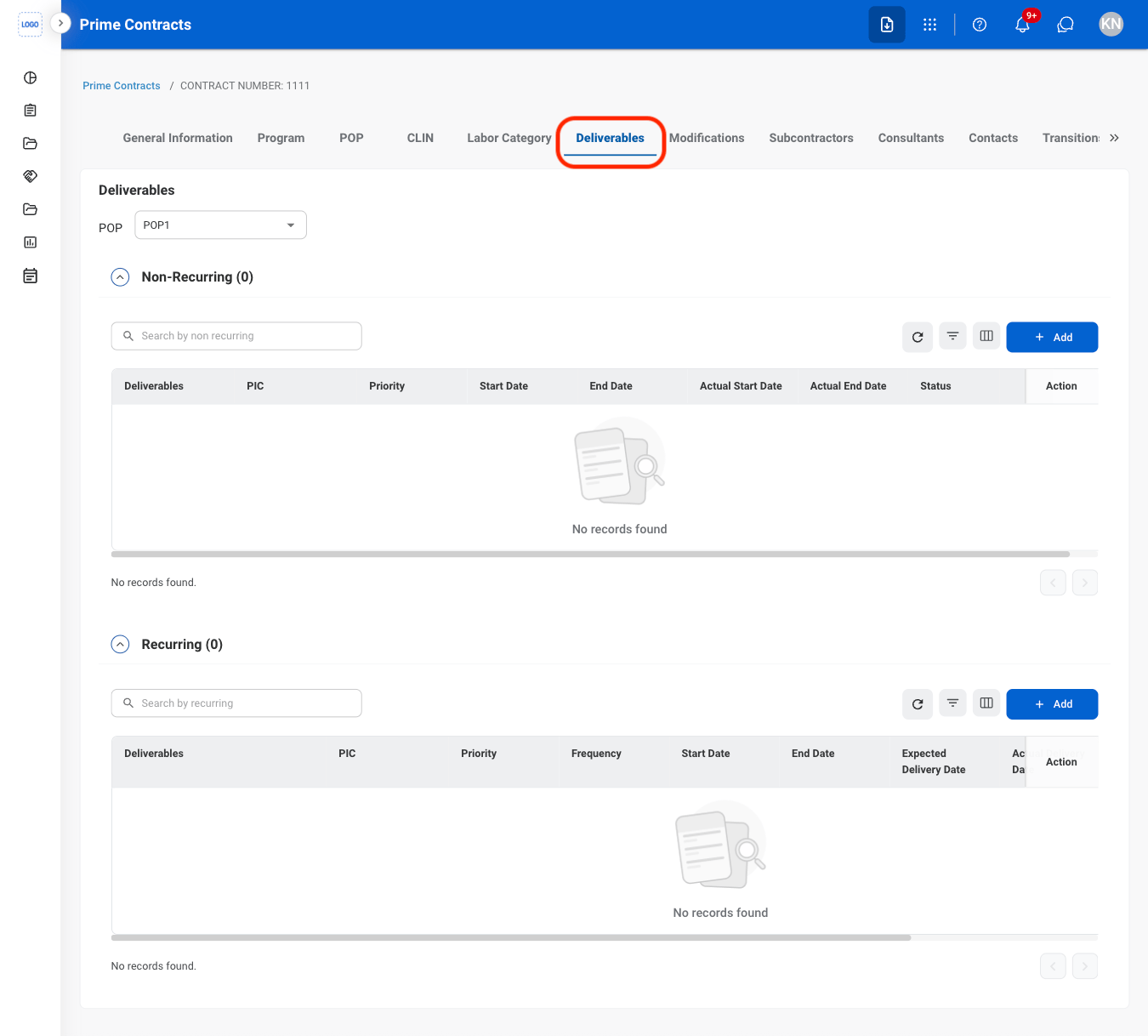
  <Step title="Navigate to Deliverables">
    <Frame>
      <img src="https://mintcdn.com/bizbone/ucjb0UiAtHlFjGiT/images/CM-PC-D-Nav.png?fit=max&auto=format&n=ucjb0UiAtHlFjGiT&q=85&s=40b530d41df259e8dec27e6065361c8e" alt="CM PC D Nav" width="1350" height="1218" data-path="images/CM-PC-D-Nav.png" />
    </Frame>
  </Step>

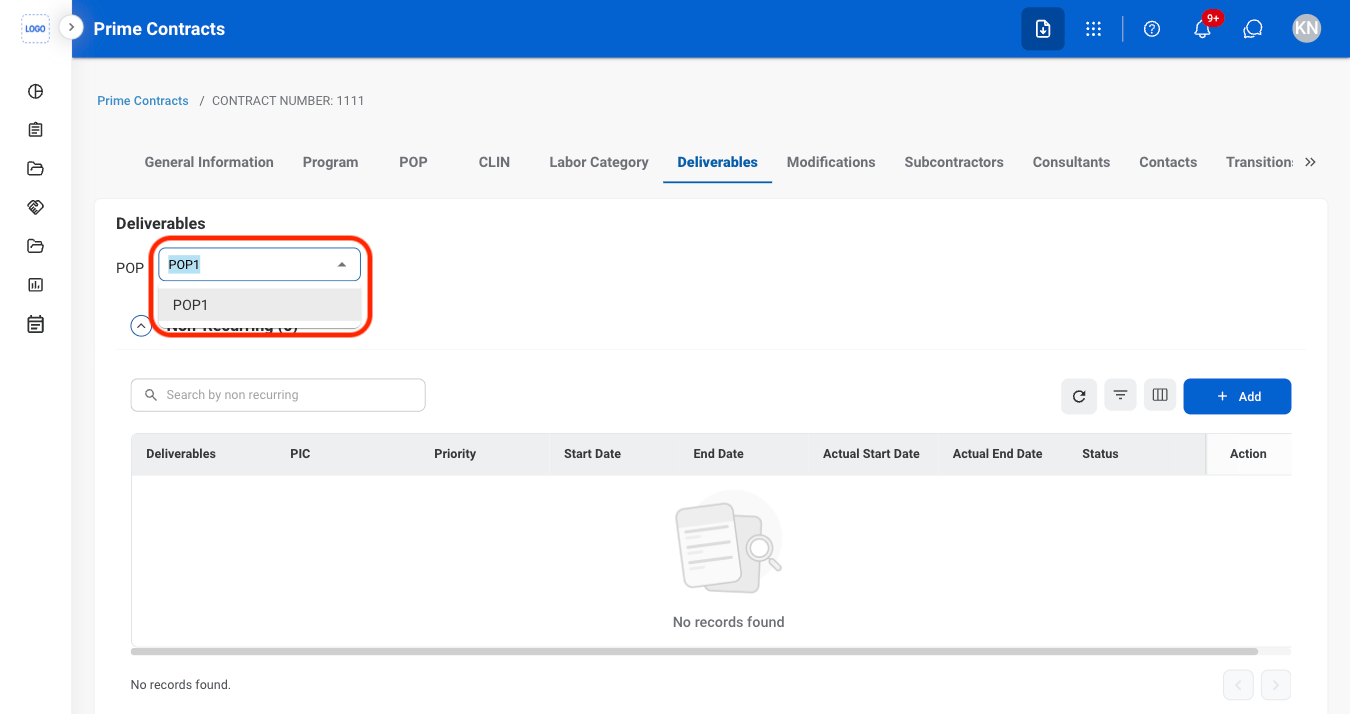
  <Step title="Non-recurring Deliverables only: Select a POP">
    <Frame>
      <img src="https://mintcdn.com/bizbone/ucjb0UiAtHlFjGiT/images/CM-PC-D-POP.png?fit=max&auto=format&n=ucjb0UiAtHlFjGiT&q=85&s=78e7a66ada53fcb5edd8eb604fee7125" alt="CM PC D POP" width="1350" height="714" data-path="images/CM-PC-D-POP.png" />
    </Frame>
  </Step>

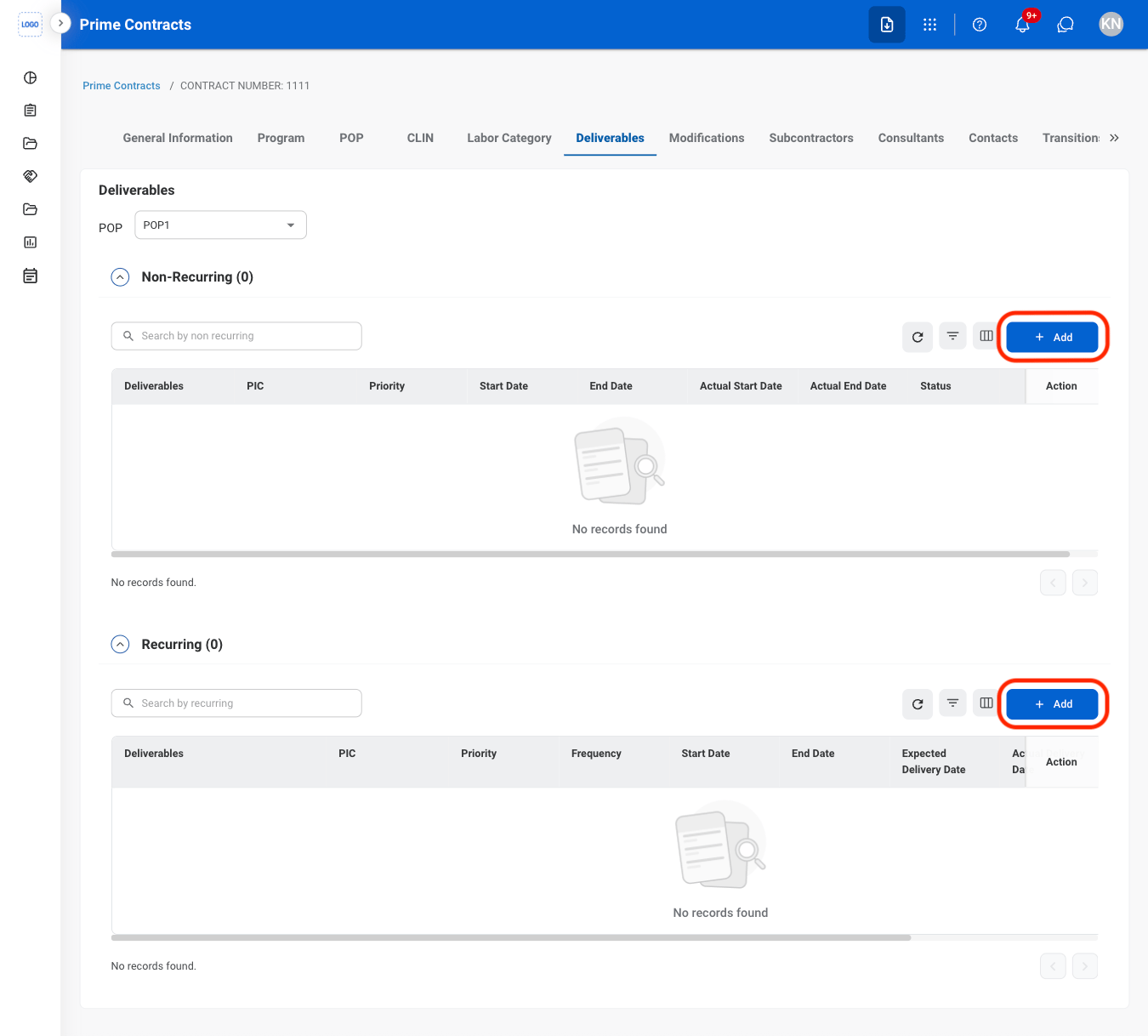
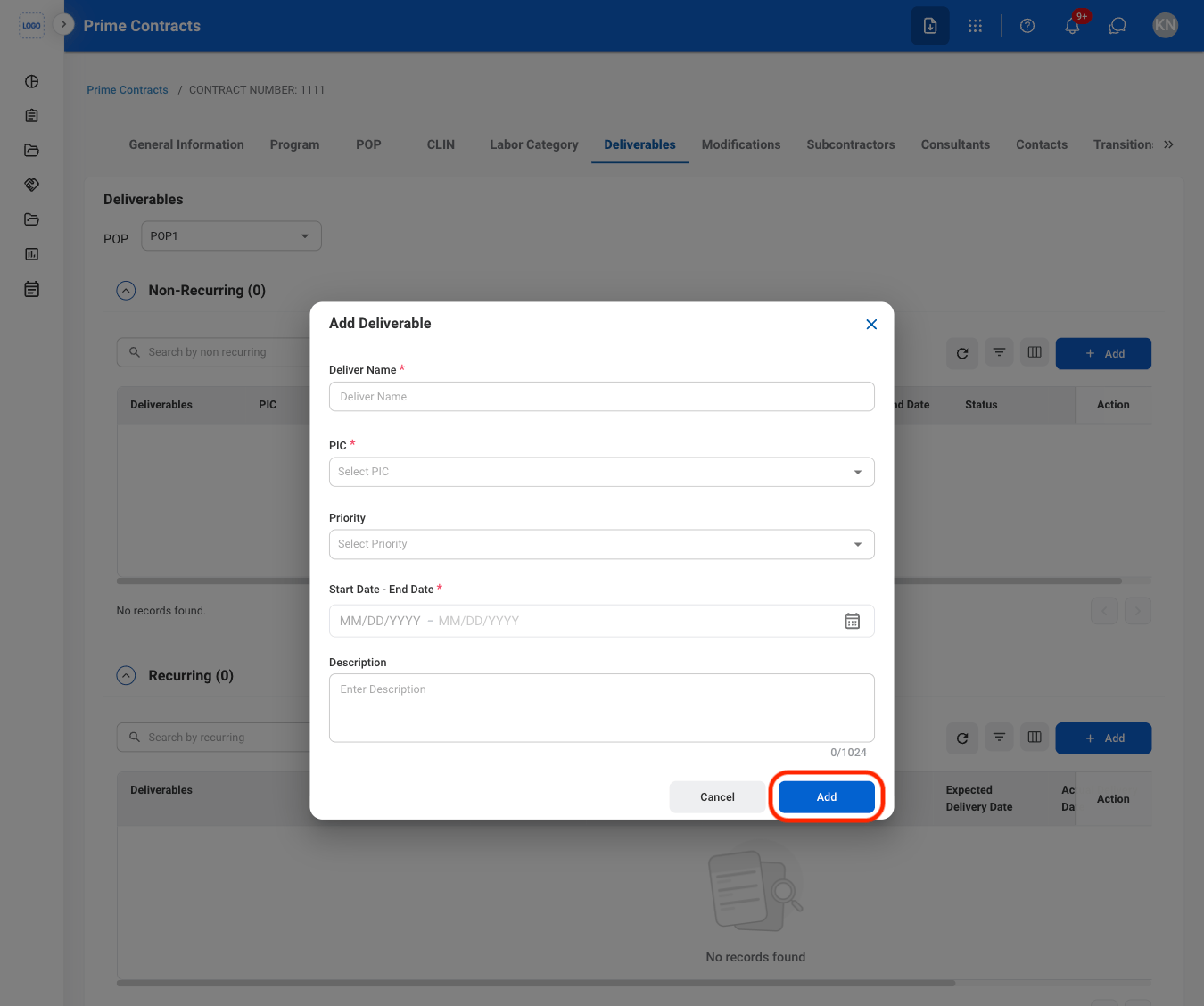
  <Step title="Select Add under the appropriate section">
    <Frame>
      <img src="https://mintcdn.com/bizbone/ucjb0UiAtHlFjGiT/images/CM-PC-D-Add.png?fit=max&auto=format&n=ucjb0UiAtHlFjGiT&q=85&s=c7e3d5f6fc977e3f75498117dd54cfb0" alt="CM PC D Add" width="1350" height="1218" data-path="images/CM-PC-D-Add.png" />
    </Frame>

    \*\*Non-Recurring: \*\*Deliverables that are submitted once or occur only during a specific Period of Performance (POP).

    \*\*Recurring: \*\*Deliverables that occur on a repeated schedule or require ongoing submission throughout the contract period.
  </Step>

  <Step title="Fill in the required information ">
    <Frame>
      <img src="https://mintcdn.com/bizbone/ucjb0UiAtHlFjGiT/images/CM-PC-D-Add-C.png?fit=max&auto=format&n=ucjb0UiAtHlFjGiT&q=85&s=136631d1f7810c8c4a5f3e8ab51c0255" alt="CM PC D Add C" width="1350" height="1128" data-path="images/CM-PC-D-Add-C.png" />
    </Frame>

    Select **Add** to complete or **Cancel** to exit without saving changes. 
  </Step>
</Steps>

## Modify a Deliverable

<Steps>
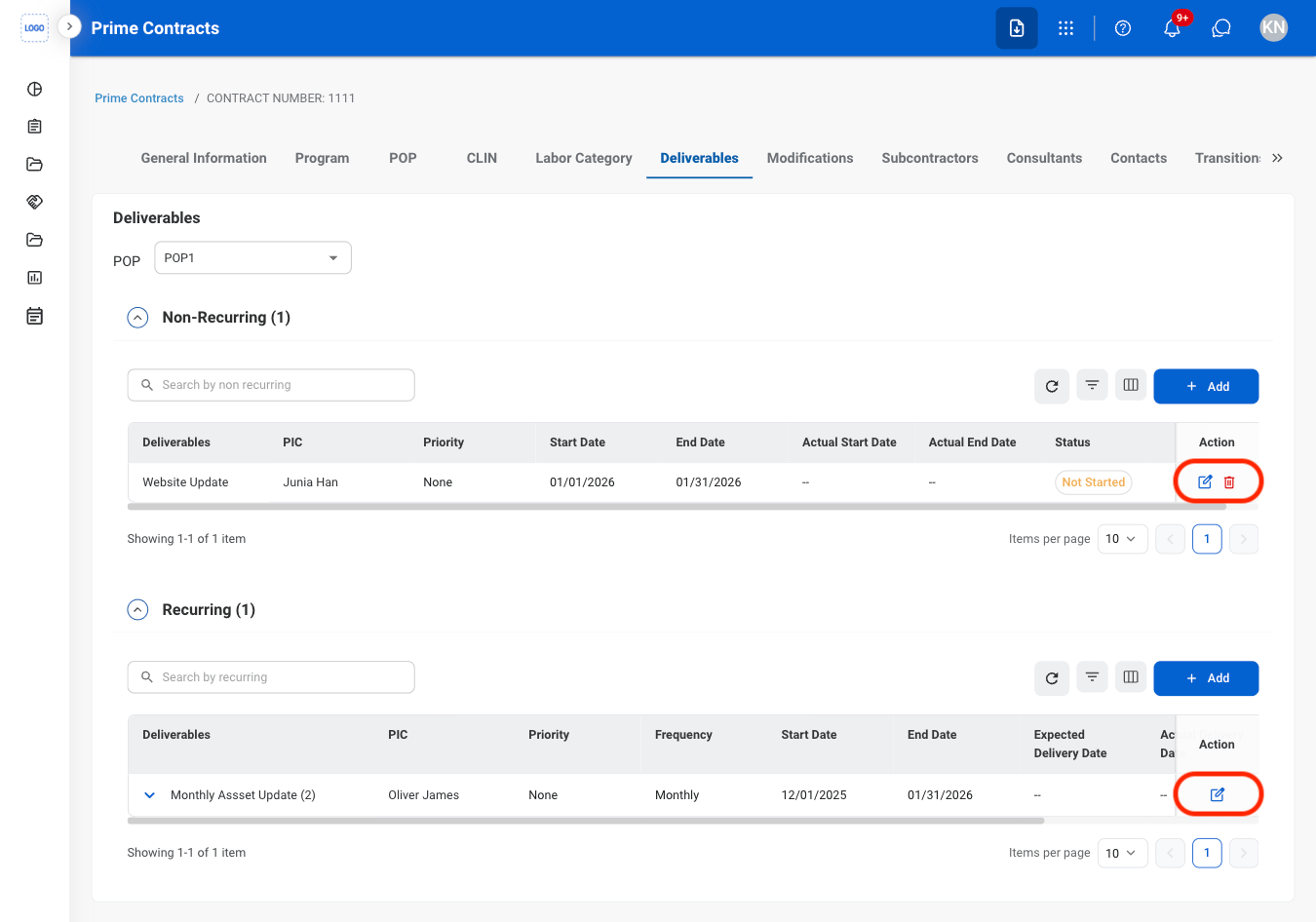
  <Step title="Select the Edit or Delete icon in the Action column">
    <Frame>
      <img src="https://mintcdn.com/bizbone/ucjb0UiAtHlFjGiT/images/CM-PC-D-Mod.png?fit=max&auto=format&n=ucjb0UiAtHlFjGiT&q=85&s=e02000ce8fde2aef92002a89b2881edd" alt="CM PC D Mod" width="1350" height="946" data-path="images/CM-PC-D-Mod.png" />
    </Frame>
  </Step>

  <Step title="Confirm the action">
    * Edit: Fill in the required information and select **Update** to complete or **Cancel** to exit without saving changes. 
    * Delete: Select **Delete** to complete or **Cancel** to exit without saving changes.
  </Step>
</Steps>

## Add a Modification

<Steps>
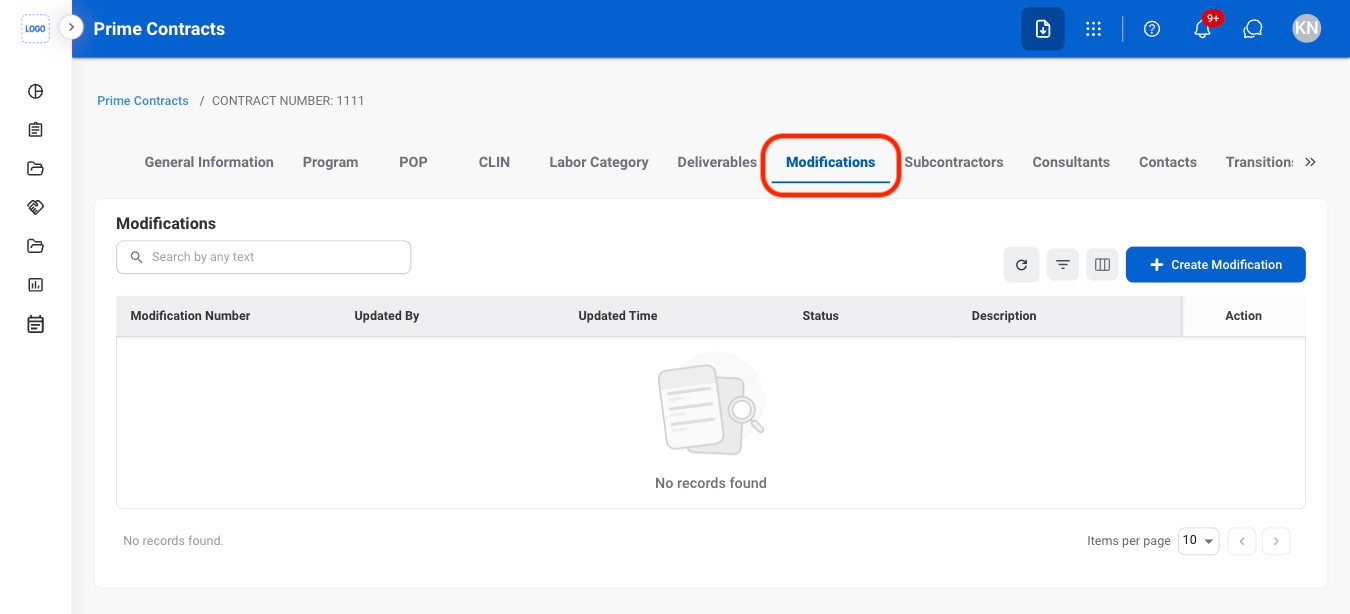
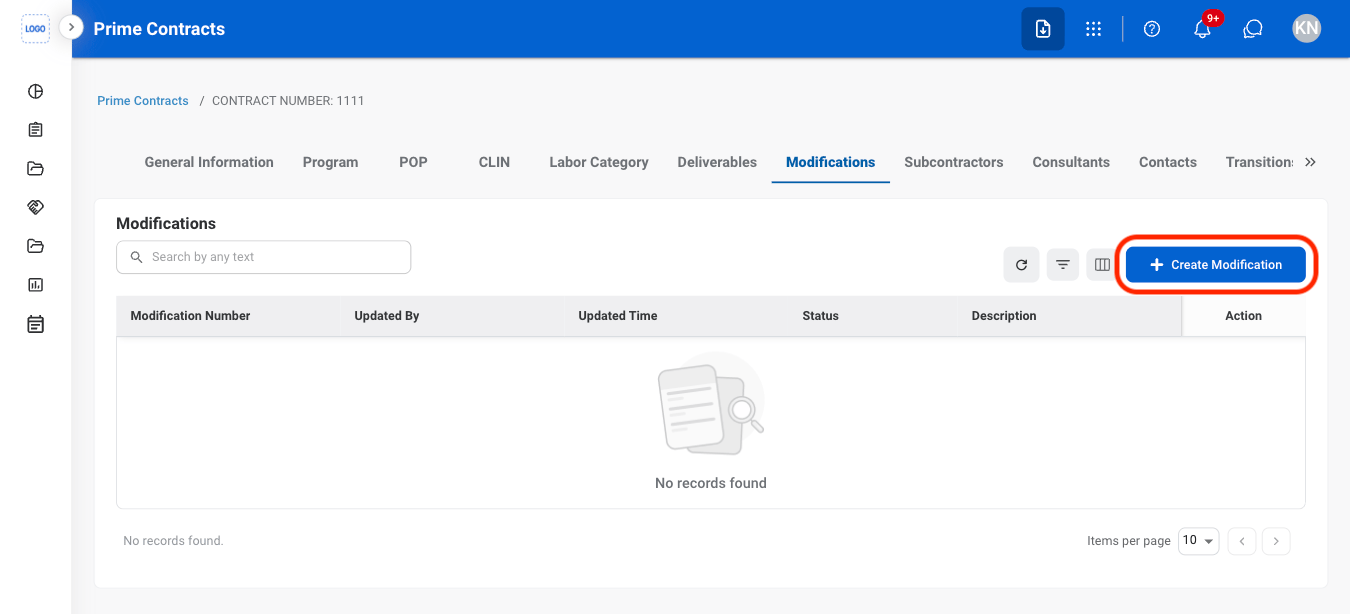
  <Step title="Navigate to Modifications">
    <Frame>
      <img src="https://mintcdn.com/bizbone/j9nXCGIfRGEHdTNl/images/CM-PC-M-Nav.png?fit=max&auto=format&n=j9nXCGIfRGEHdTNl&q=85&s=234a06a658b3ac98a37d469a370b3736" alt="CM PC M Nav" width="1350" height="614" data-path="images/CM-PC-M-Nav.png" />
    </Frame>
  </Step>

  <Step title="Select Create Modification">
    <Frame>
      <img src="https://mintcdn.com/bizbone/j9nXCGIfRGEHdTNl/images/CM-PC-M-Add.png?fit=max&auto=format&n=j9nXCGIfRGEHdTNl&q=85&s=0b74fe10832381153e8add4d91bae4fe" alt="CM PC M Add" width="1350" height="614" data-path="images/CM-PC-M-Add.png" />
    </Frame>
  </Step>

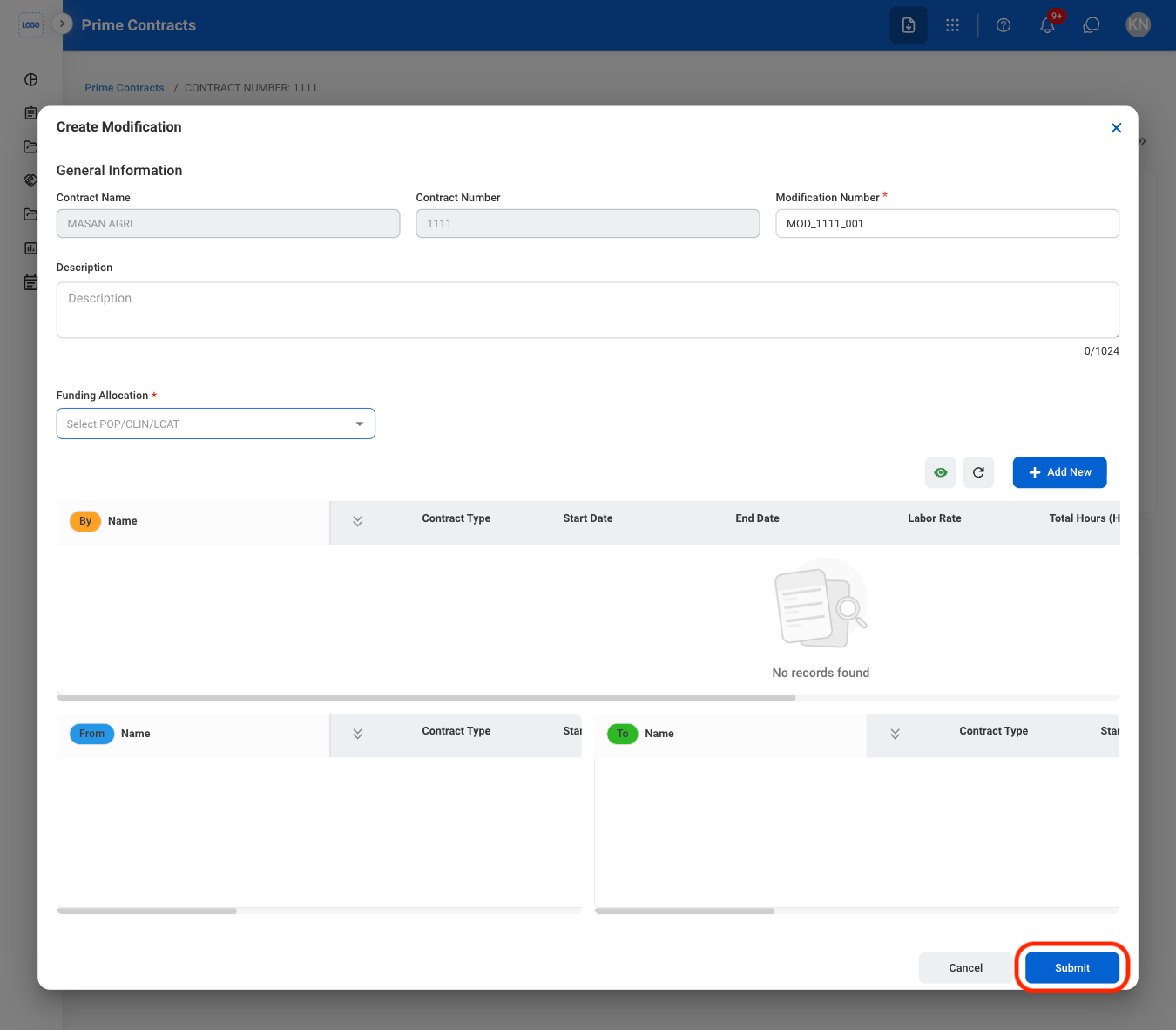
  <Step title="Fill in the required information ">
    <Frame>
      <img src="https://mintcdn.com/bizbone/j9nXCGIfRGEHdTNl/images/CM-PC-M-Add-C.png?fit=max&auto=format&n=j9nXCGIfRGEHdTNl&q=85&s=dafbd6a4b3f557f1a395d50d72050732" alt="CM PC M Add C" width="1350" height="1182" data-path="images/CM-PC-M-Add-C.png" />
    </Frame>
  </Step>
</Steps>

## Issue a Modification Record

<Steps>
  <Step title="Select a modification with Manager Approved status" />

  <Step title="Select Issue" />

  <Step title="Fill in the required information ">
    Select Submit to complete or Cancel to exit without saving changes. 
  </Step>
</Steps>