> ## Documentation Index
> Fetch the complete documentation index at: https://docs.bizbone.com/llms.txt
> Use this file to discover all available pages before exploring further.

# Introduction

## Overview of the Contract Management Module

The Contract Management module provides tools to manage contract records, contract vehicles, business partners, and contract documentation. Supports the full contract lifecycle through contract creation, administration, performance tracking, document management, reporting, and request processing.

## Key Features of the Contract Management Module

<Columns cols={2}>
  <Column>
    <Card title="Dashboard" icon="chart-line">
      View contract metrics, upcoming activities, and contract performance.
    </Card>
  </Column>

  <Column>
    <Card title="Needs Action" icon="loader">
      View contracts requiring attention and quickly access contract records across all contract types.
    </Card>
  </Column>

  <Column>
    <Card title="Contract Management" icon="file-signature">
      Manage NDA/TA, Prime Contracts, Subcontracts, Vendor Contracts, and Internal Consultant Agreements.
    </Card>
  </Column>

  <Column>
    <Card title="Contract Vehicles" icon="briefcase">
      Manage contract vehicle records, including IDIQs, BPAs, and other contract vehicle information.
    </Card>
  </Column>

  <Column>
    <Card title="Partner Management" icon="users">
      Manage partner information associated with contracts, including organizations, subcontractors, consultants, and vendors.
    </Card>
  </Column>

  <Column>
    <Card title="Documents" icon="folder-open">
      Manage contract-related documents and folders. Organize, upload, and maintain supporting contract documentation.
    </Card>
  </Column>

  <Column>
    <Card title="Reports" icon="file-chart-column">
      Generate contract reports to monitor contract status, performance, compliance, and operational activities.
    </Card>
  </Column>

  <Column>
    <Card title="Requests" icon="clipboard-list">
      View, assign, and process contract-related requests submitted for review and approval.
    </Card>
  </Column>
</Columns>

## Module Access

<Steps>
  <Step title="Select the Module Menu icon">
    <Frame>
      <img src="https://mintcdn.com/bizbone/3BvPU03mTm_6TIU5/images/Module-Menu.png?fit=max&auto=format&n=3BvPU03mTm_6TIU5&q=85&s=5a2b8a581849af05aa2fde51d766d9e6" alt="Module Menu" width="1562" height="122" data-path="images/Module-Menu.png" />
    </Frame>
  </Step>

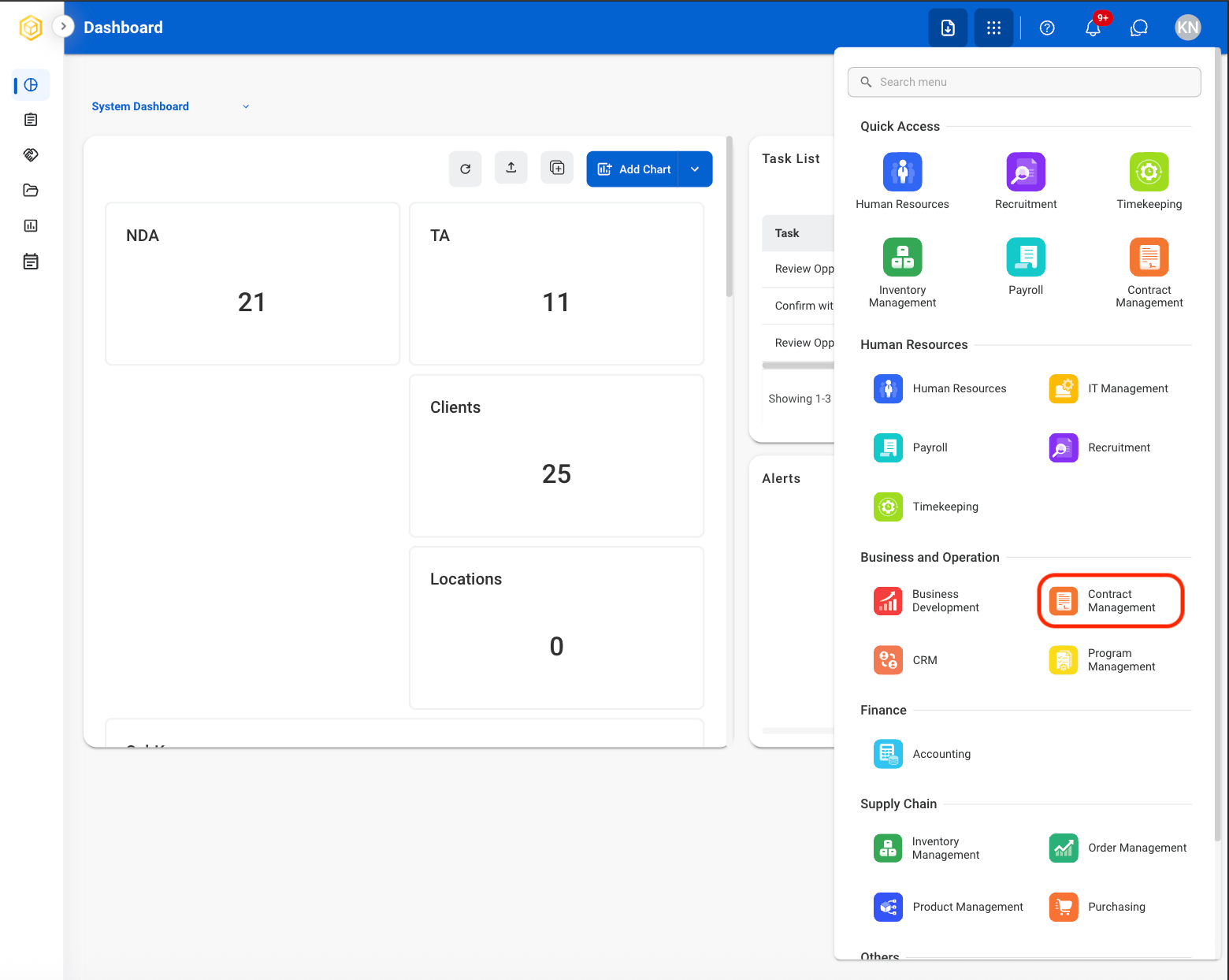
  <Step title="Select the Contract Management Module">
    <Frame>
      <img src="https://mintcdn.com/bizbone/EQMH50CXltJa58cr/images/CM-Module-Nav.png?fit=max&auto=format&n=EQMH50CXltJa58cr&q=85&s=45f43d01eabc0ddfb57e0da712113f52" alt="CM Module Nav" width="1560" height="1244" data-path="images/CM-Module-Nav.png" />
    </Frame>
  </Step>
</Steps>