> ## Documentation Index
> Fetch the complete documentation index at: https://docs.bizbone.com/llms.txt
> Use this file to discover all available pages before exploring further.

# Company Profile

Manage organizational profile information used throughout the system. Supports maintenance of company details, work locations, legal representatives, branding assets, and currency settings.

## Edit Company Profile
<Steps>
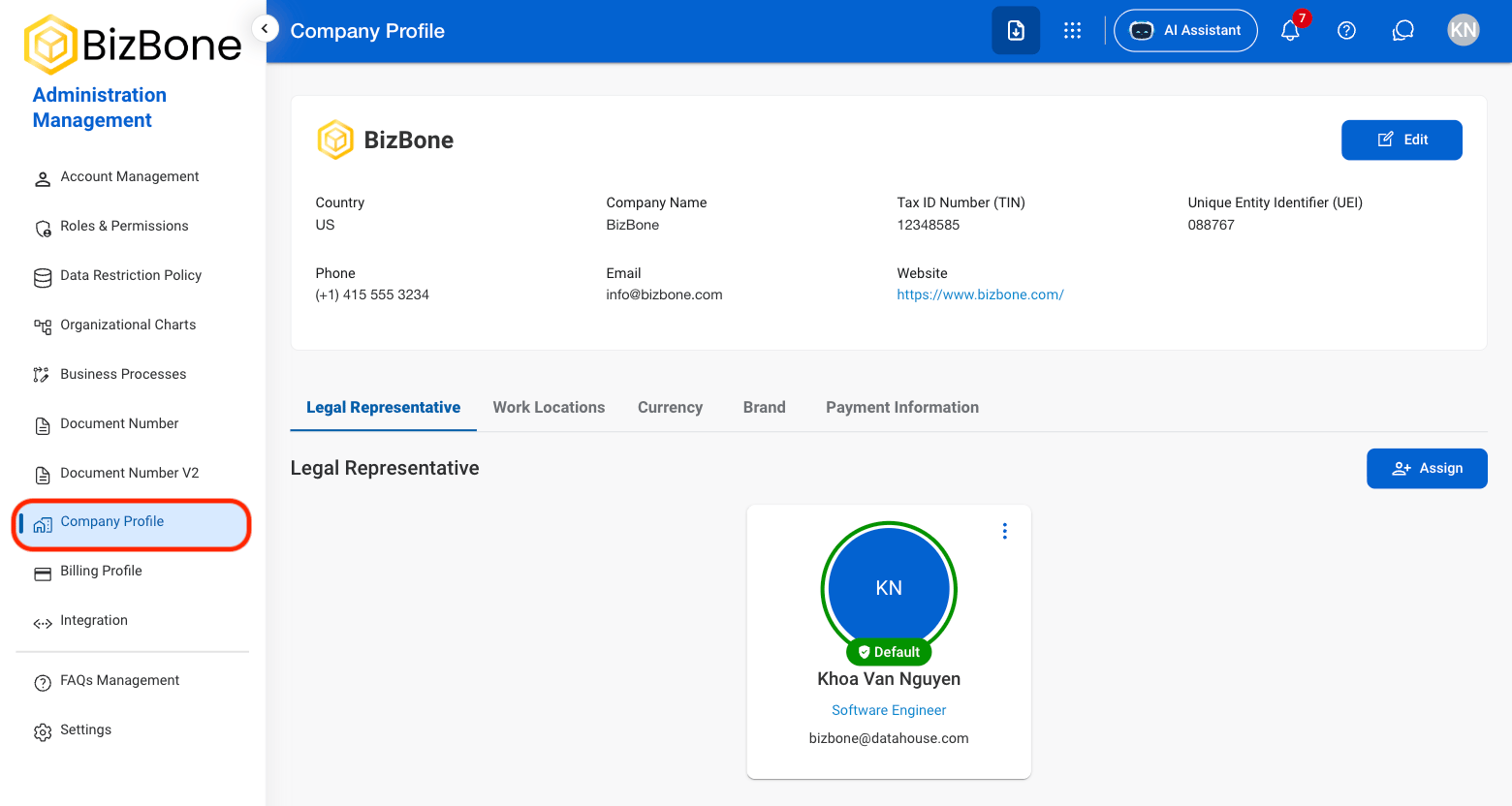
  <Step title="Navigate to Company Profile">
    <Frame>
      <img src="https://mintcdn.com/bizbone/z2WpNnNS_B8VDNRA/images/AM-CP-Nav.png?fit=max&auto=format&n=z2WpNnNS_B8VDNRA&q=85&s=f608fe24b4db006a6e4d50b85aad1cd5" alt="AM CP Nav" width="1560" height="832" data-path="images/AM-CP-Nav.png" />
    </Frame>
  </Step>

  <Step title="Select Edit">
    <Frame>
      <img src="https://mintcdn.com/bizbone/z2WpNnNS_B8VDNRA/images/AM-CP-Edit.png?fit=max&auto=format&n=z2WpNnNS_B8VDNRA&q=85&s=7e7b894f3886b2973163cca87e07a9a7" alt="AM CP Edit" width="1560" height="832" data-path="images/AM-CP-Edit.png" />
    </Frame>
  </Step>

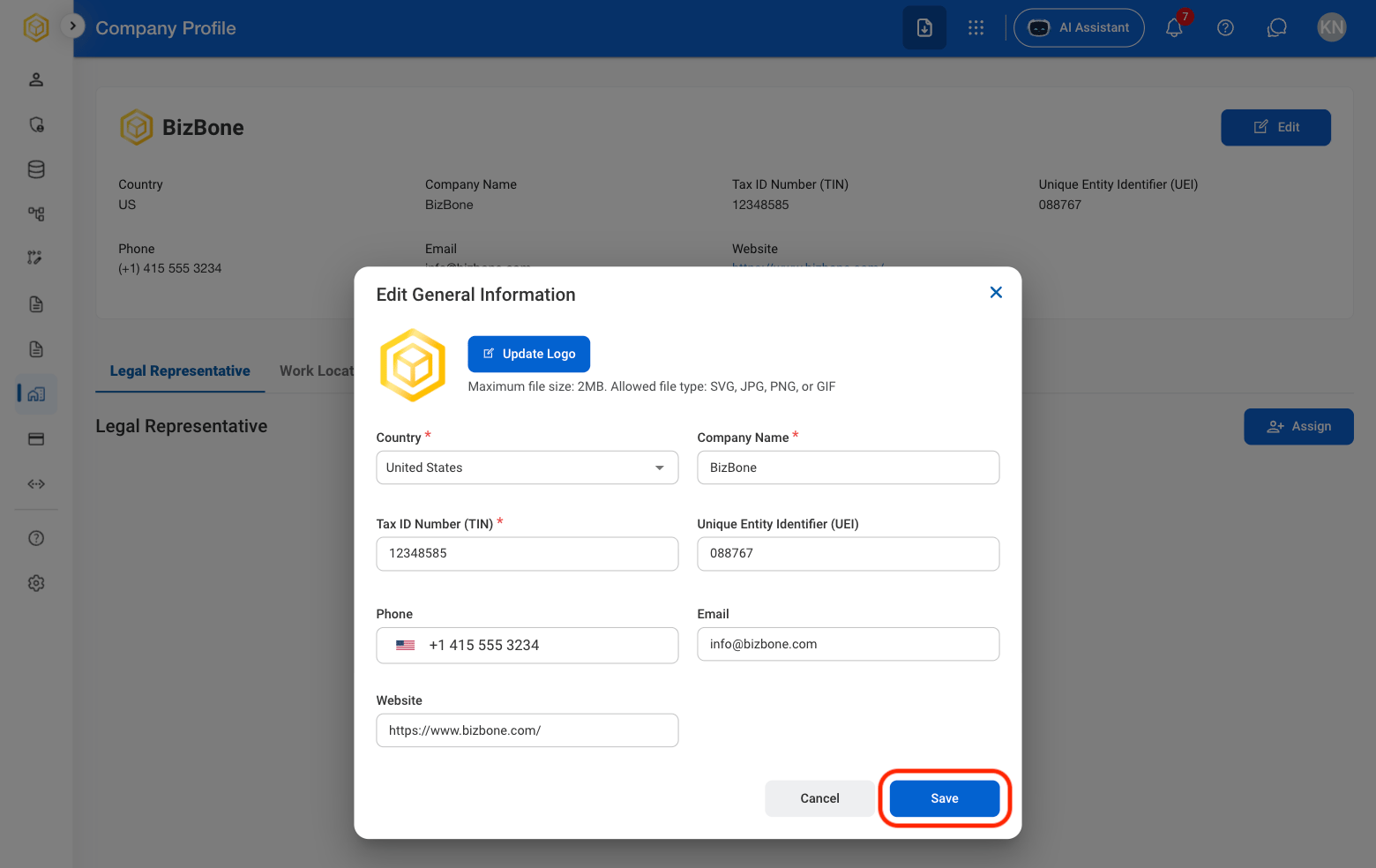
  <Step title="Fill in the required information ">
    <Frame>
      <img src="https://mintcdn.com/bizbone/z2WpNnNS_B8VDNRA/images/AM-CP-Edit-C.png?fit=max&auto=format&n=z2WpNnNS_B8VDNRA&q=85&s=b74f3a743b2845303a777e402931bf70" alt="AM CP Edit C" width="1560" height="984" data-path="images/AM-CP-Edit-C.png" />
    </Frame>
  </Step>
</Steps>

## Assign a Legal Representative

<Steps>
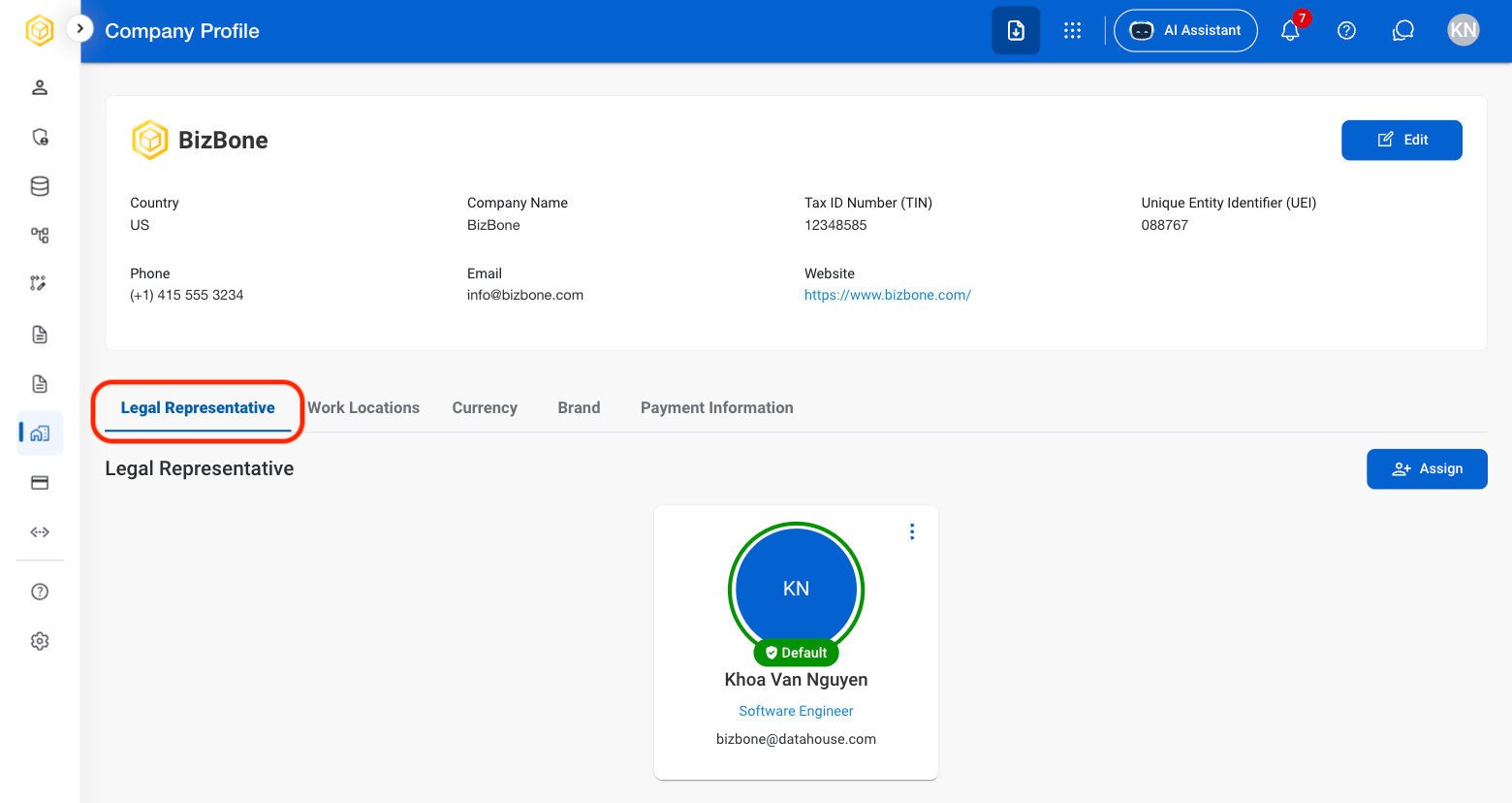
  <Step title="Select Legal Representative">
    <Frame>
      <img src="https://mintcdn.com/bizbone/z2WpNnNS_B8VDNRA/images/AM-CP-Legal-Rep.png?fit=max&auto=format&n=z2WpNnNS_B8VDNRA&q=85&s=cb104ddd66283cbb003710c578949b15" alt="AM CP Legal Rep" width="1560" height="828" data-path="images/AM-CP-Legal-Rep.png" />
    </Frame>
  </Step>

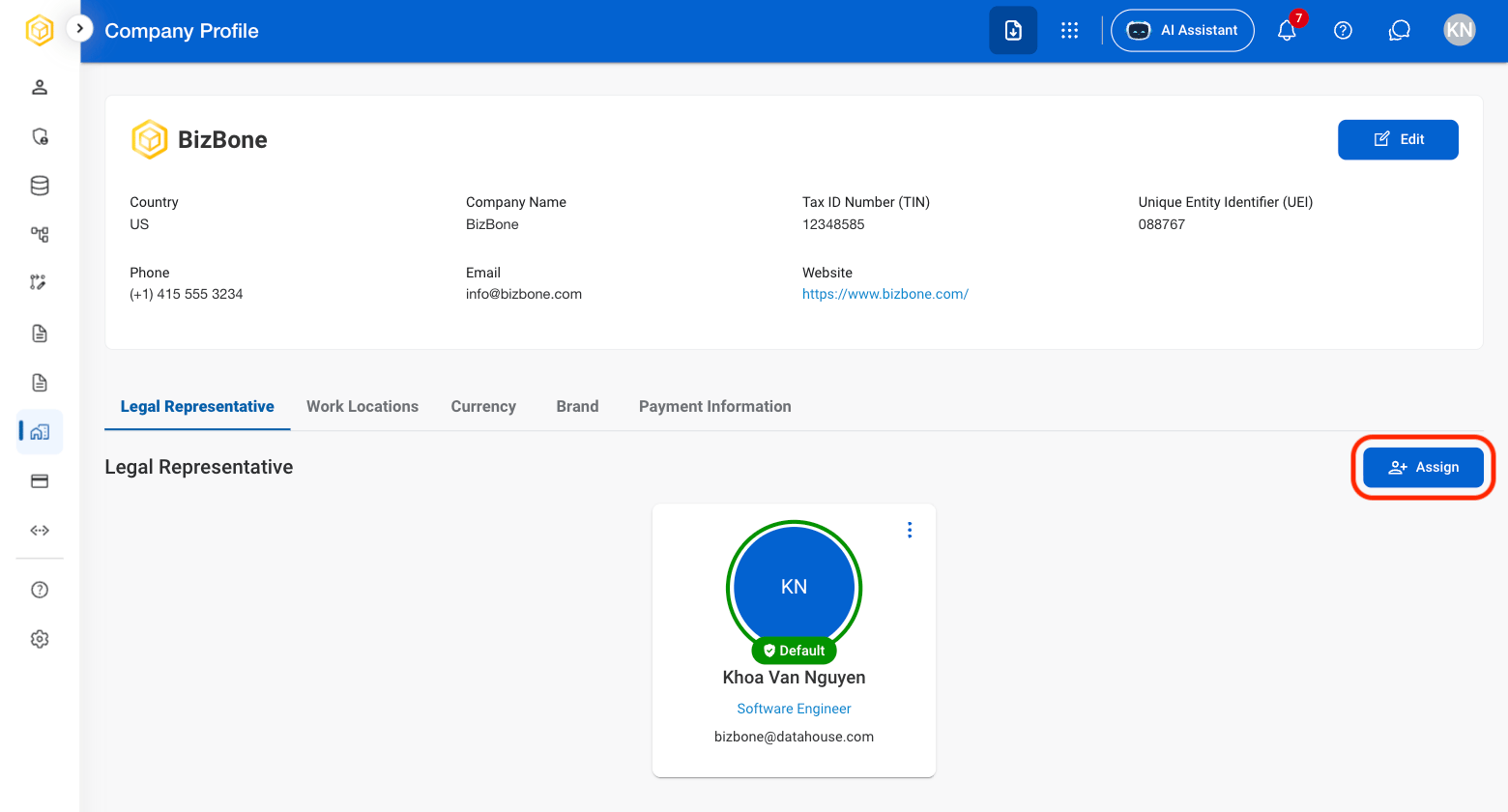
  <Step title="Select Assign">
    <Frame>
      <img src="https://mintcdn.com/bizbone/e1cqGEFCIODj8CuR/images/AM-CP-Assign.png?fit=max&auto=format&n=e1cqGEFCIODj8CuR&q=85&s=ef9d181b1905a068b27573cf31ed0d4a" alt="AM CP Assign" width="1560" height="840" data-path="images/AM-CP-Assign.png" />
    </Frame>
  </Step>

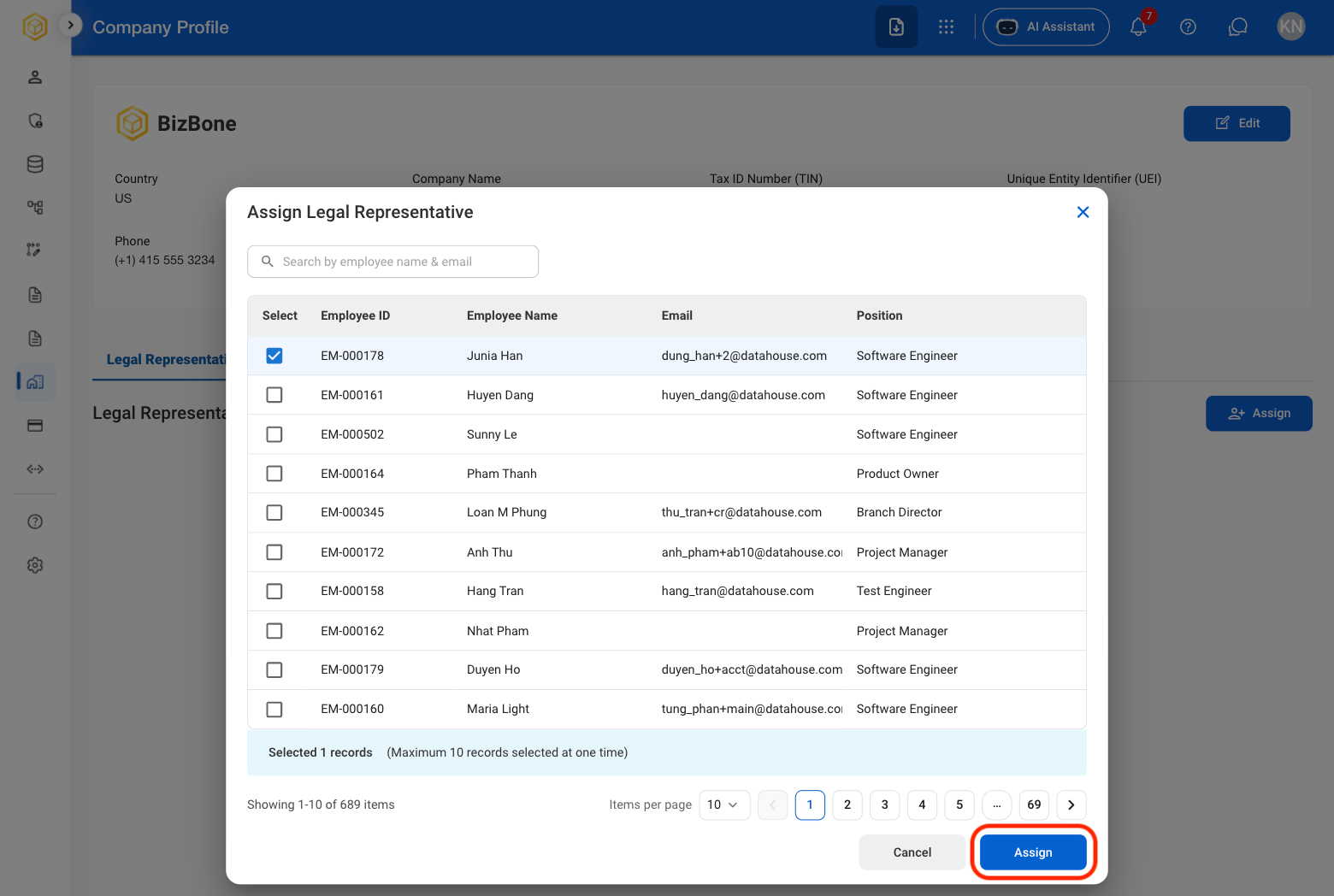
  <Step title="Select an employee">
    <Frame>
      <img src="https://mintcdn.com/bizbone/e1cqGEFCIODj8CuR/images/AM-CP-Assign-C.png?fit=max&auto=format&n=e1cqGEFCIODj8CuR&q=85&s=dfa106032d85596106f24e86321b302d" alt="AM CP Assign C" width="1560" height="1048" data-path="images/AM-CP-Assign-C.png" />
    </Frame>

    Select **Assign** to complete or **Cancel** to exit without saving changes.
  </Step>
</Steps>

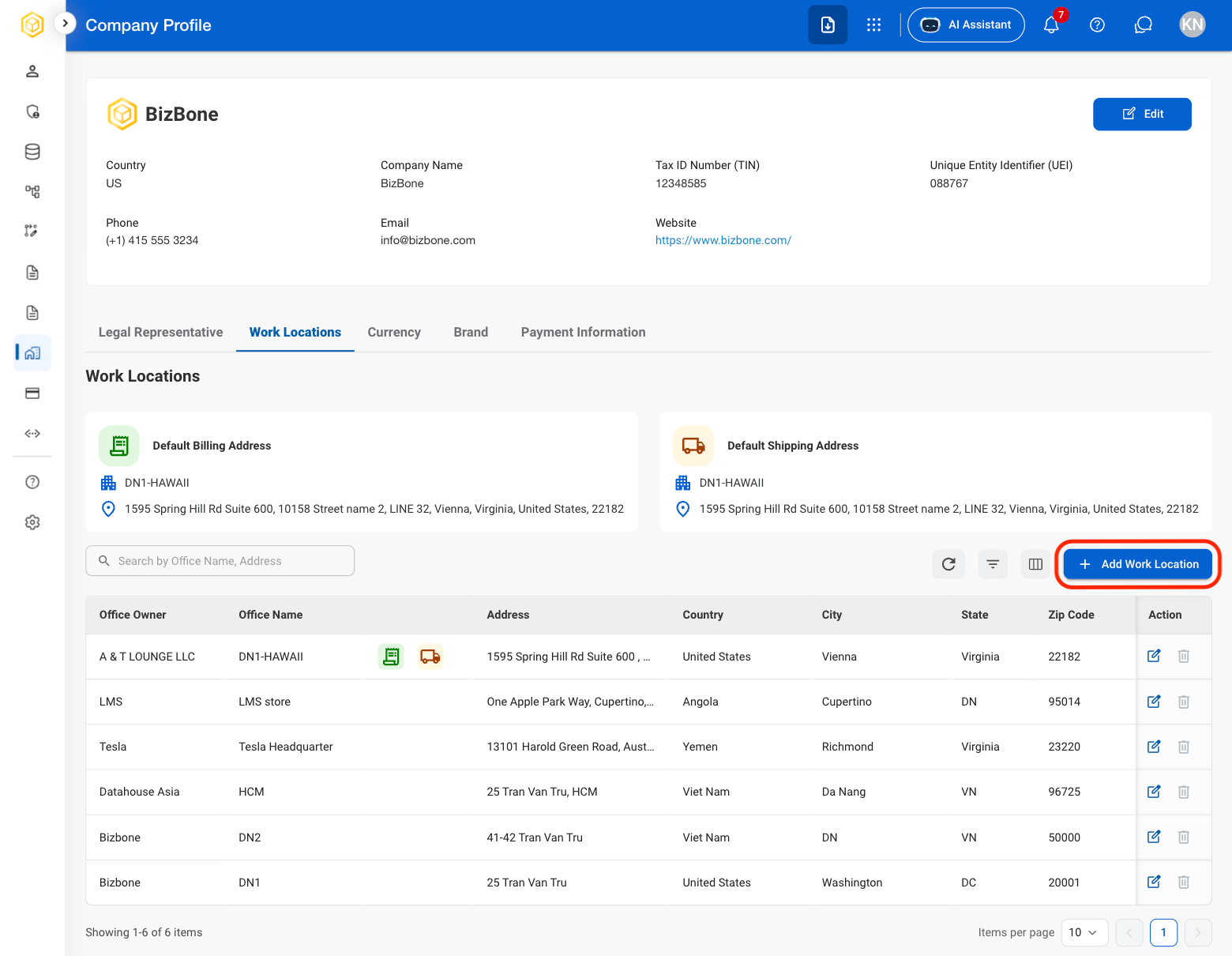
## Add a Work Location

<Steps>
  <Step title="Select Work Locations">
    <Frame>
      <img src="https://mintcdn.com/bizbone/z2WpNnNS_B8VDNRA/images/AM-CP-Work-Locations.png?fit=max&auto=format&n=z2WpNnNS_B8VDNRA&q=85&s=f54eb8cae498261707158502844f3eb0" alt="AM CP Work Locations" width="1560" height="1220" data-path="images/AM-CP-Work-Locations.png" />
    </Frame>
  </Step>

  <Step title="Select Add Work Location">
    <Frame>
      <img src="https://mintcdn.com/bizbone/e1cqGEFCIODj8CuR/images/AM-CP-Add-Work-Locations.png?fit=max&auto=format&n=e1cqGEFCIODj8CuR&q=85&s=6749ea4336e05a1d80d9120ef5f0cf16" alt="AM CP Add Work Locations" width="1560" height="1210" data-path="images/AM-CP-Add-Work-Locations.png" />
    </Frame>
  </Step>

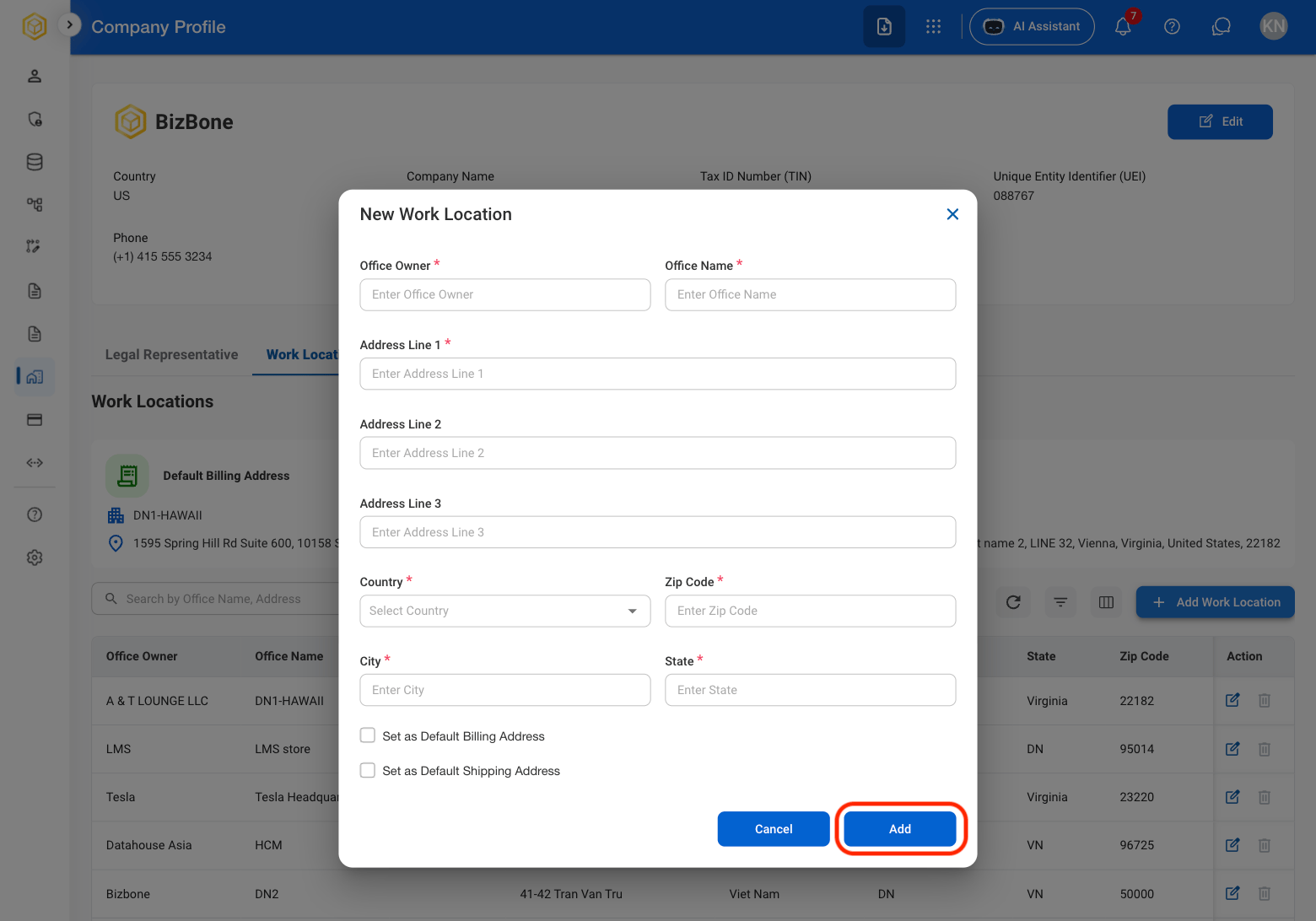
  <Step title="Fill in the required information ">
    <Frame>
      <img src="https://mintcdn.com/bizbone/e1cqGEFCIODj8CuR/images/AM-CP-Add-WL-C.png?fit=max&auto=format&n=e1cqGEFCIODj8CuR&q=85&s=f05bd42ae1e37c66ad706c3480f1916f" alt="AM CP Add WL C" width="1560" height="1092" data-path="images/AM-CP-Add-WL-C.png" />
    </Frame>

    Select **Add** to complete or **Cancel** to exit without saving changes. 
  </Step>
</Steps>

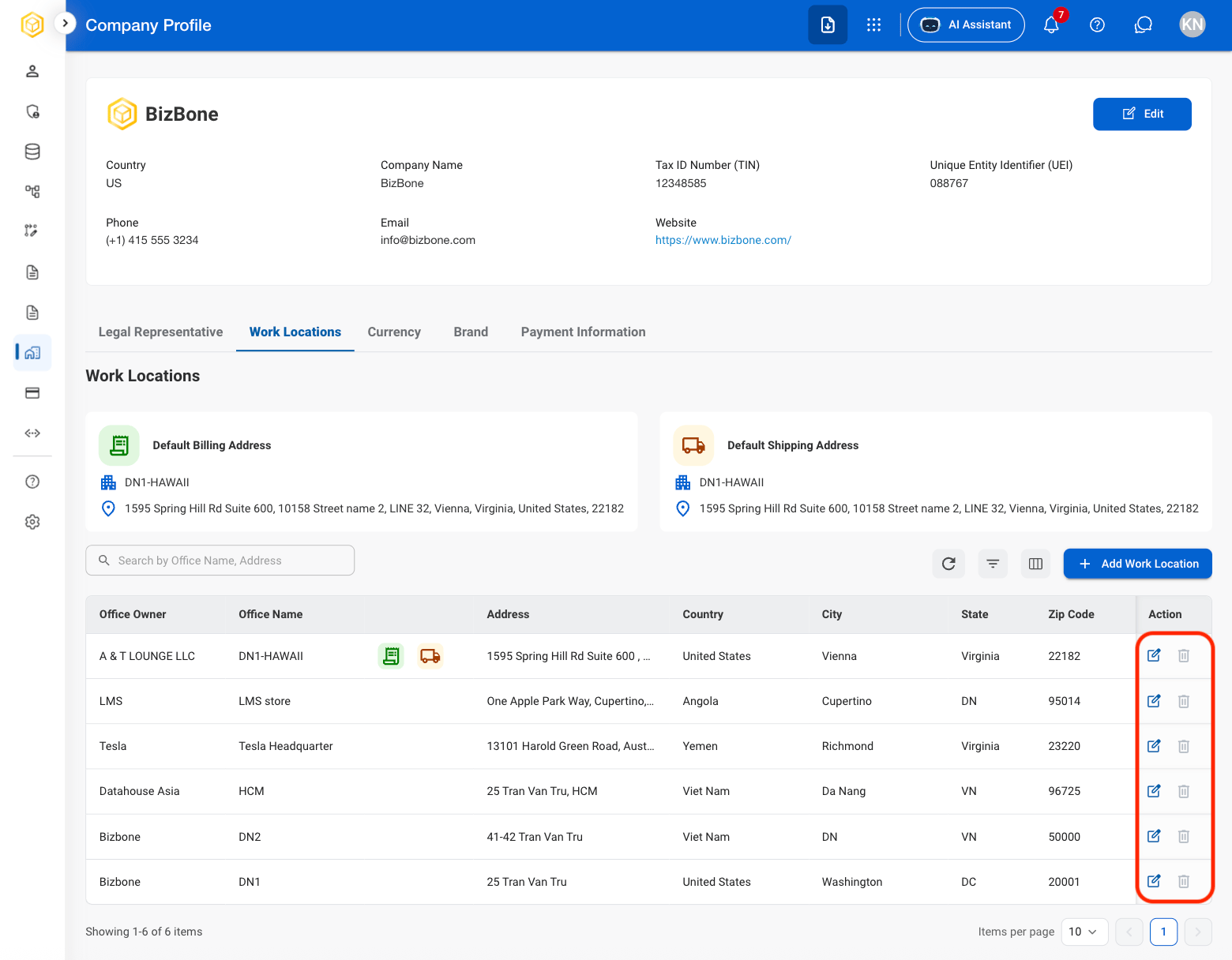
## Modify a Work Location

<Steps>
  <Step title="Select the Edit or Delete icon in the Action column">
    <Frame>
      <img src="https://mintcdn.com/bizbone/e1cqGEFCIODj8CuR/images/AM-CP-Action.png?fit=max&auto=format&n=e1cqGEFCIODj8CuR&q=85&s=1d4d4af51287afeece22f22e4f202b09" alt="AM CP Action" width="1560" height="1216" data-path="images/AM-CP-Action.png" />
    </Frame>
  </Step>

  <Step title="Confirm action">
    * **Edit**: Select **Save** to complete or **Cancel** to exit without saving changes. 
    * **Delete**: Select **Delete** to complete or **Cancel** to exit without saving changes. 
  </Step>
</Steps>

## View Currency Settings

Explanation of how to gain access to Add Currency

<Steps>
  <Step title="Select Currency">
    <Frame>
      <img src="https://mintcdn.com/bizbone/e1cqGEFCIODj8CuR/images/AM-CP-Currency.png?fit=max&auto=format&n=e1cqGEFCIODj8CuR&q=85&s=ca798a664ccd332e47599d2a54ad1476" alt="AM CP Currency" width="1560" height="826" data-path="images/AM-CP-Currency.png" />
    </Frame>
  </Step>
</Steps>

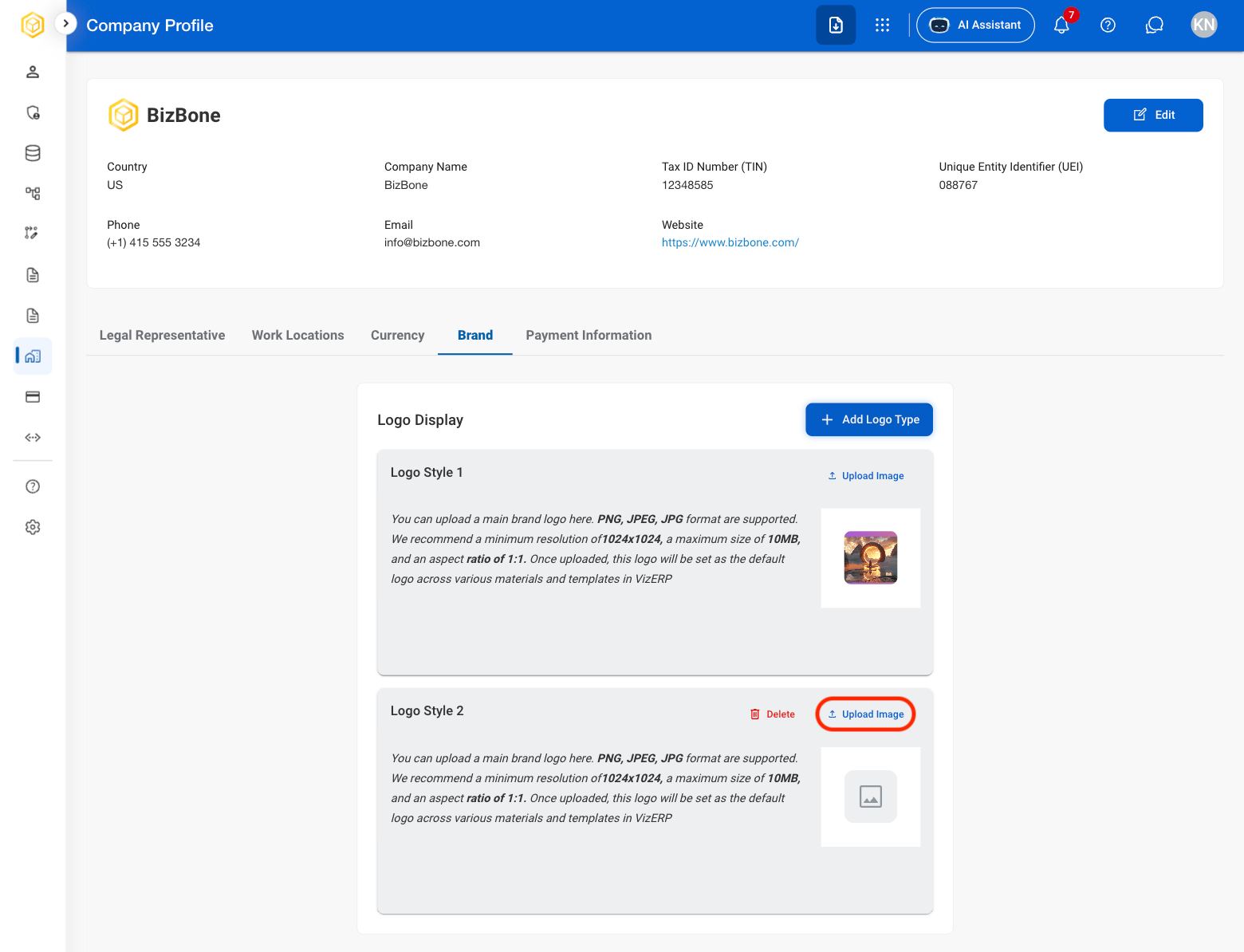
## Add a Company Logo

Explanation of usage
<Steps>
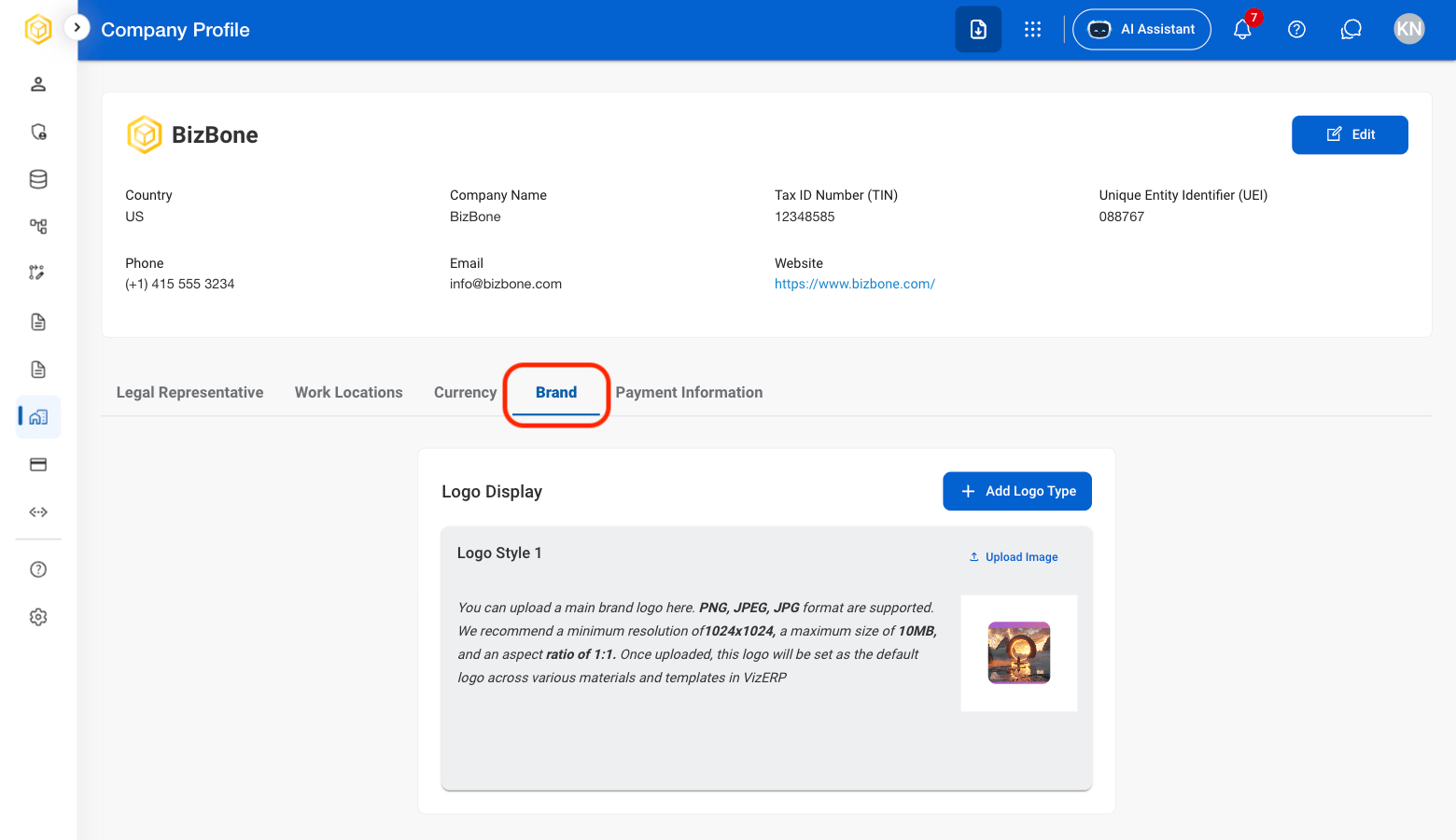
  <Step title="Select Brand">
    <Frame>
      <img src="https://mintcdn.com/bizbone/e1cqGEFCIODj8CuR/images/AM-CP-Brand.png?fit=max&auto=format&n=e1cqGEFCIODj8CuR&q=85&s=0bf6177c18e2efde3ab68ba87ca4b0d1" alt="AM CP Brand" width="1560" height="900" data-path="images/AM-CP-Brand.png" />
    </Frame>
  </Step>

  <Step title="Select Add Logo Type">
    <Frame>
      <img src="https://mintcdn.com/bizbone/e1cqGEFCIODj8CuR/images/AM-CP-Add-Logo.png?fit=max&auto=format&n=e1cqGEFCIODj8CuR&q=85&s=627e19c2a3f407a17be971ae01d627ce" alt="AM CP Add Logo" width="1560" height="900" data-path="images/AM-CP-Add-Logo.png" />
    </Frame>
  </Step>

  <Step title="Select Upload Image">
    <Frame>
      <img src="https://mintcdn.com/bizbone/z2WpNnNS_B8VDNRA/images/AM-CP-Image.png?fit=max&auto=format&n=z2WpNnNS_B8VDNRA&q=85&s=cd82075ee6ef4d5c08d830509335df29" alt="AM CP Image" width="1560" height="1194" data-path="images/AM-CP-Image.png" />
    </Frame>
  </Step>
</Steps>

## Edit Payment Information

Explanation of how to gain access to Add Payment Information
<Steps>
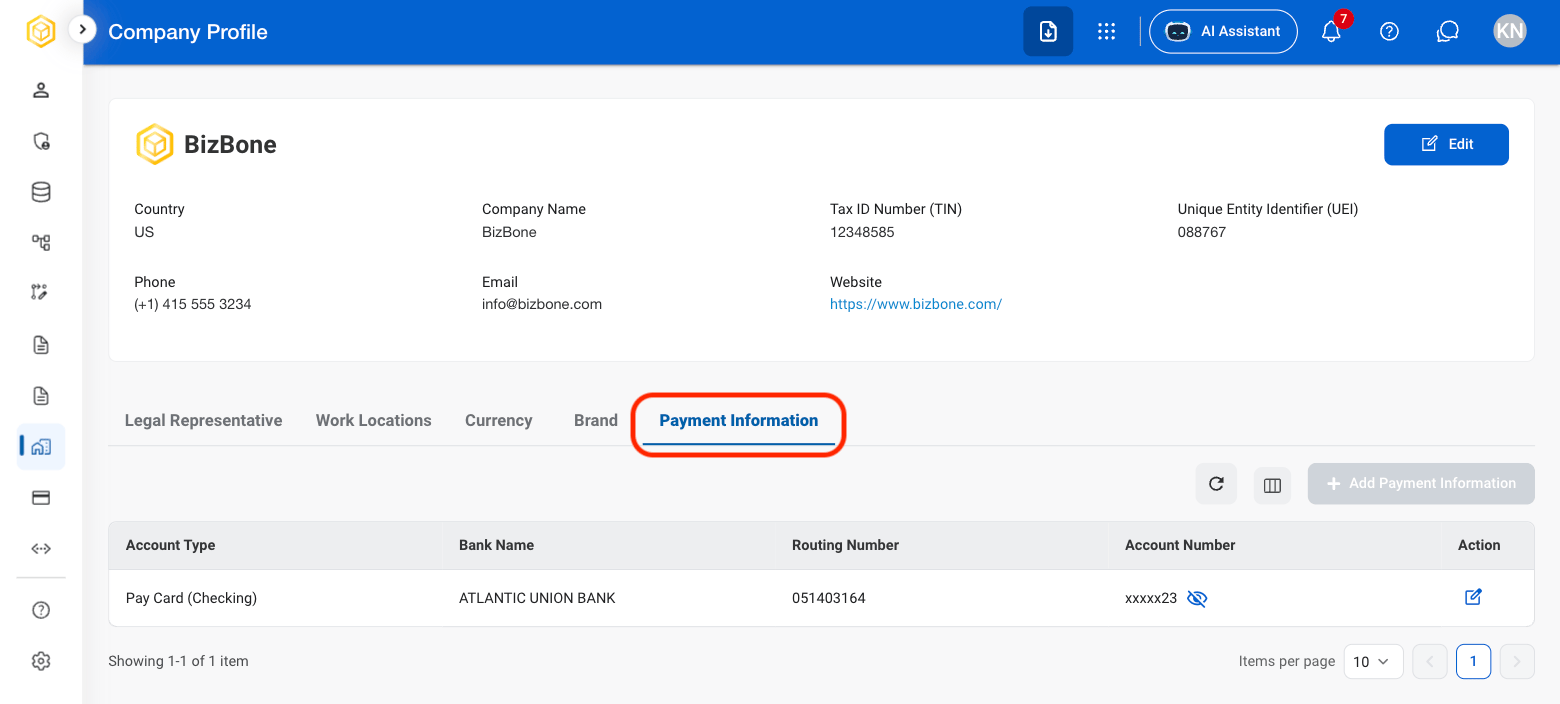
  <Step title="Select Payment Information ">
    <Frame>
      <img src="https://mintcdn.com/bizbone/z2WpNnNS_B8VDNRA/images/AM-CP-Payment-Info.png?fit=max&auto=format&n=z2WpNnNS_B8VDNRA&q=85&s=cbec0fe1bad09db627870e11a9f208b2" alt="AM CP Payment Info" width="1560" height="704" data-path="images/AM-CP-Payment-Info.png" />
    </Frame>
  </Step>

  <Step title="Select the edit icon">
    <Frame>
      <img src="https://mintcdn.com/bizbone/z2WpNnNS_B8VDNRA/images/AM-CP-PI-Edit.png?fit=max&auto=format&n=z2WpNnNS_B8VDNRA&q=85&s=ff0c1b67eb8a19a05af80563769118a8" alt="AM CP PI Edit" width="1560" height="704" data-path="images/AM-CP-PI-Edit.png" />
    </Frame>
  </Step>

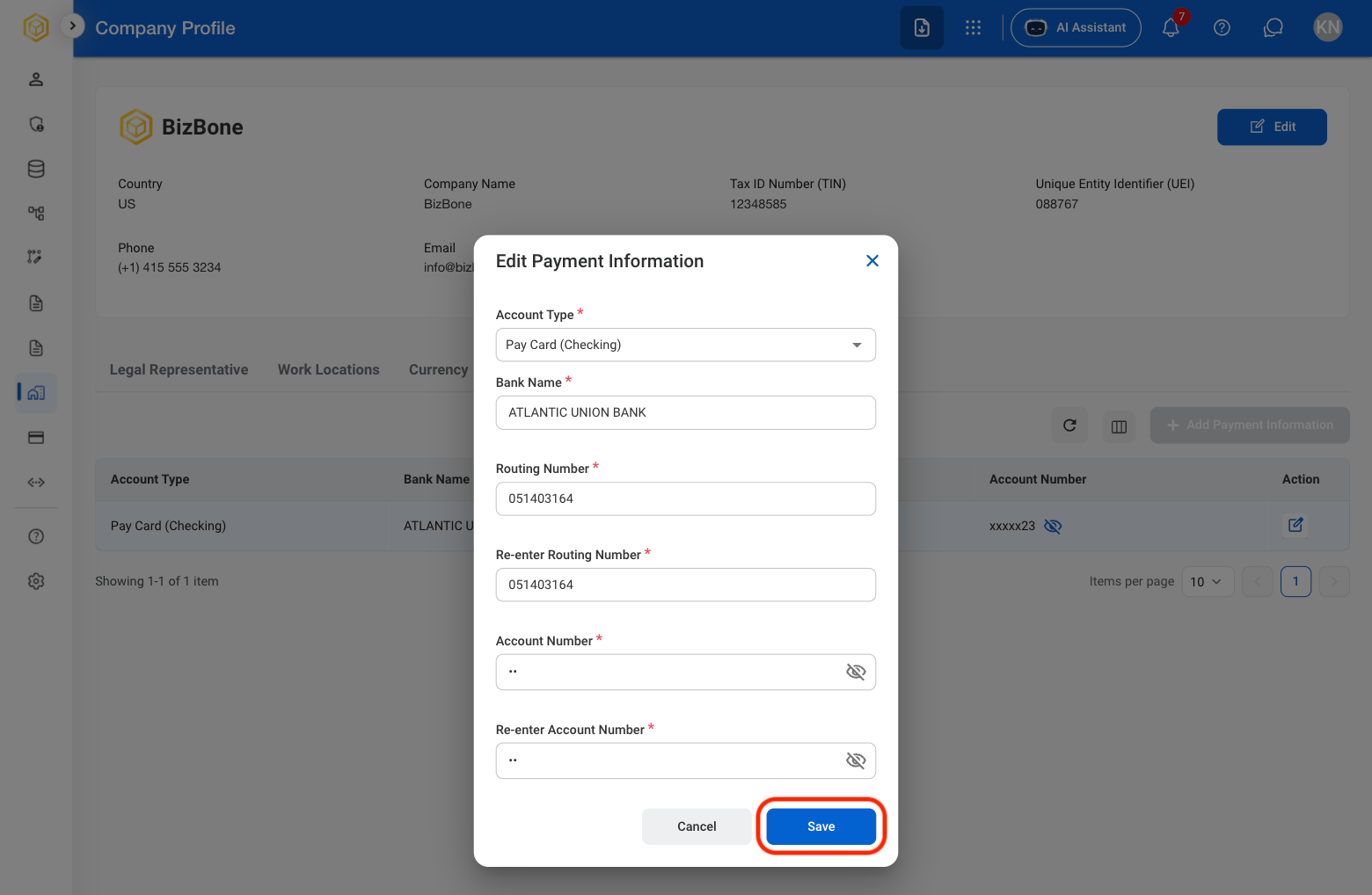
  <Step title="Fill in the required information">
    <Frame>
      <img src="https://mintcdn.com/bizbone/z2WpNnNS_B8VDNRA/images/AM-CP-PI-Edit-C.png?fit=max&auto=format&n=z2WpNnNS_B8VDNRA&q=85&s=ec82399482f5e1949d003b4905d4ca54" alt="AM CP PI Edit C" width="1560" height="1018" data-path="images/AM-CP-PI-Edit-C.png" />
    </Frame>

    Select **Save** to complete or **Cancel** to exit without saving changes. 
  </Step>
</Steps>