> ## Documentation Index
> Fetch the complete documentation index at: https://docs.bizbone.com/llms.txt
> Use this file to discover all available pages before exploring further.

# Reports

Generate and export financial reports for analysis, auditing, and regulatory compliance. Supports accounts receivable, accounts payable, financial statements, general ledger reporting, and cash flow analysis.

## Available Reports

<AccordionGroup>
  <Accordion title="AP Aging">
    View outstanding payable balances grouped by aging period.
  </Accordion>

  <Accordion title="AR Aging">
    View outstanding receivable balances grouped by aging period.
  </Accordion>

  <Accordion title="Income Statement">
    View revenue, expenses, and profitability for a selected period.
  </Accordion>

  <Accordion title="Trial Balance">
    View account balances and transaction activity for a selected period.
  </Accordion>

  <Accordion title="Balance Sheet">
    View assets, liabilities, and equity at a specific point in time.
  </Accordion>

  <Accordion title="General Ledger">
    View posting-level transaction details by account.
  </Accordion>

  <Accordion title="Check Register">
    View issued checks and payment activity.
  </Accordion>

  <Accordion title="Cash Flow Statement">
    View cash inflows and outflows across operating, investing, and financing activities.
  </Accordion>
</AccordionGroup>

## Create a Report Template

<Steps>
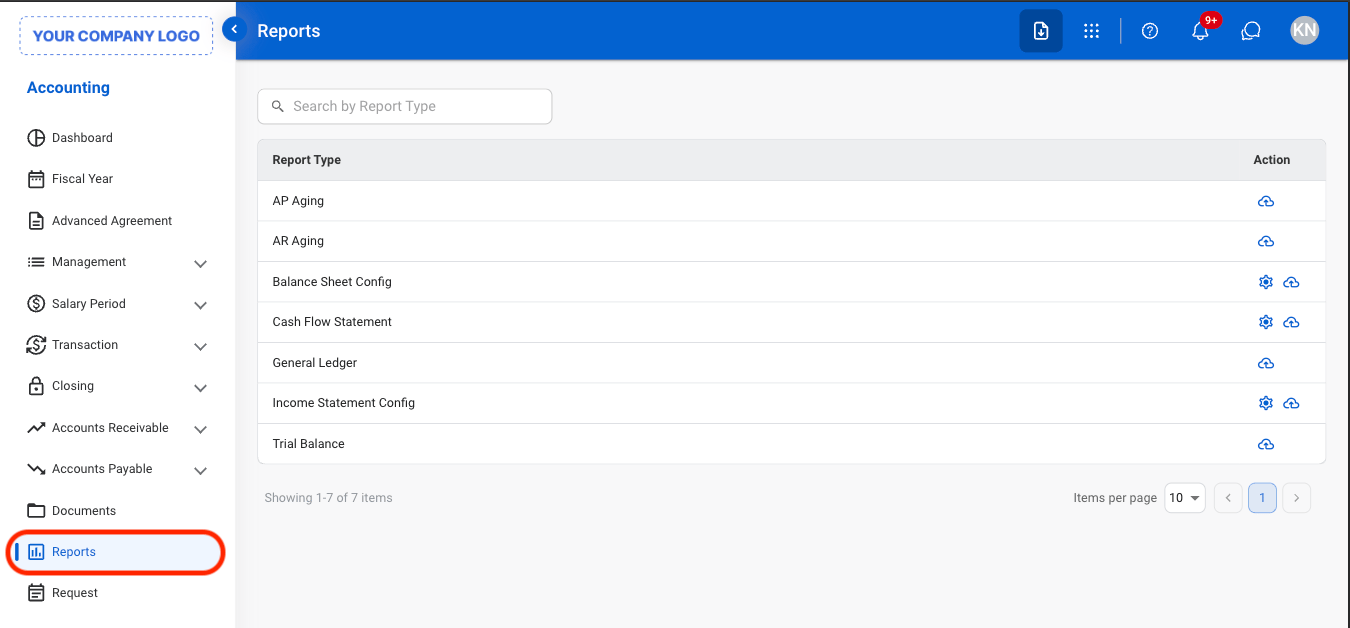
  <Step title="Navigate to Report">
    <Frame>
      <img src="https://mintcdn.com/bizbone/e1cqGEFCIODj8CuR/images/A-R-Nav.png?fit=max&auto=format&n=e1cqGEFCIODj8CuR&q=85&s=0adebde2441f4dfd29ab4277b41cb9d8" alt="A R Nav" width="1350" height="628" data-path="images/A-R-Nav.png" />
    </Frame>
  </Step>

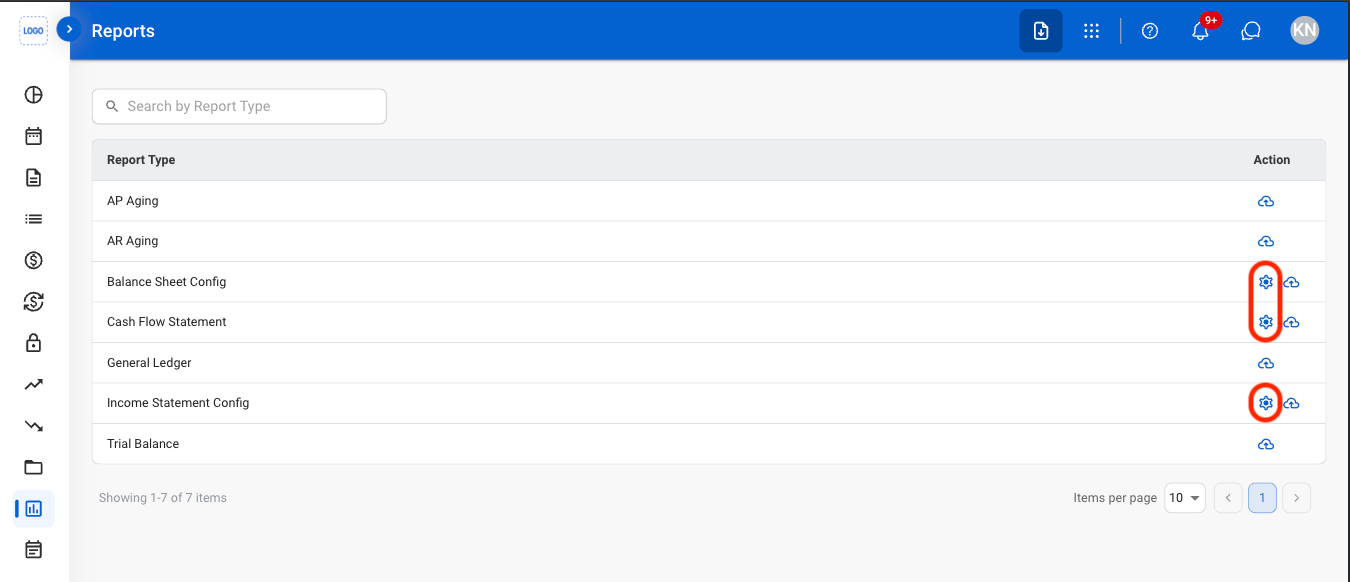
  <Step title="Select the Settings icon">
    <Frame>
      <img src="https://mintcdn.com/bizbone/e1cqGEFCIODj8CuR/images/A-R-Settings.png?fit=max&auto=format&n=e1cqGEFCIODj8CuR&q=85&s=75ff7f2249e306be80c20c5abd1dbd2b" alt="A R Settings" width="1350" height="582" data-path="images/A-R-Settings.png" />
    </Frame>
  </Step>

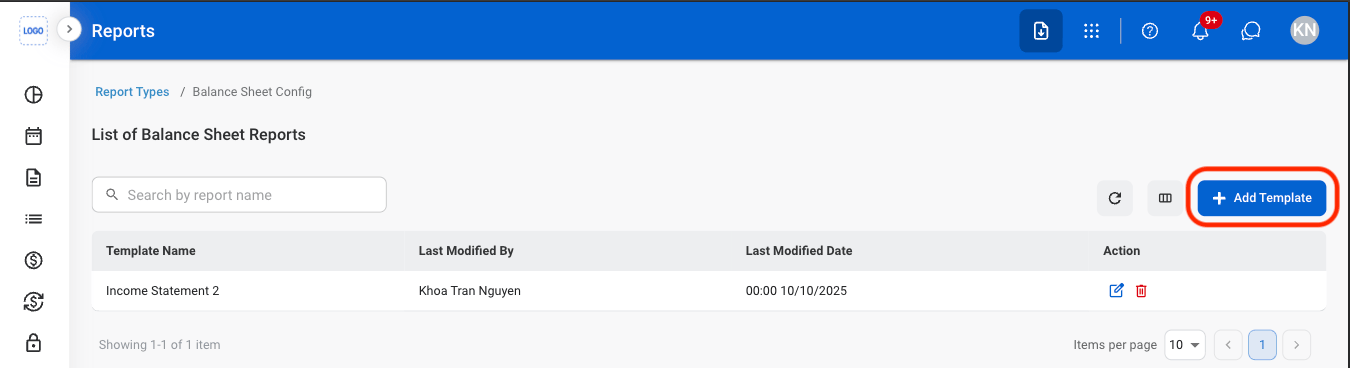
  <Step title="Select Add Template">
    <Frame>
      <img src="https://mintcdn.com/bizbone/e1cqGEFCIODj8CuR/images/A-R-Add-T.png?fit=max&auto=format&n=e1cqGEFCIODj8CuR&q=85&s=c20e3a2fc6fccc44257f07a28666adab" alt="A R Add T" width="1350" height="368" data-path="images/A-R-Add-T.png" />
    </Frame>
  </Step>

  <Step title="Select the Add icon to add reporting categories">
    <Frame>
      <img src="https://mintcdn.com/bizbone/e1cqGEFCIODj8CuR/images/A-R-Add-T-C.png?fit=max&auto=format&n=e1cqGEFCIODj8CuR&q=85&s=54fc28caac277904840c61022d2170fe" alt="A R Add T C" width="1350" height="452" data-path="images/A-R-Add-T-C.png" />
    </Frame>

    * **Save**: Update the current template
    * **Save as Default Template:** Set the default report template.
  </Step>
</Steps>

## Generate a Report

<Steps>
  <Step title="Select the report icon">
    <Frame>
      <img src="https://mintcdn.com/bizbone/e1cqGEFCIODj8CuR/images/A-R-Generate.png?fit=max&auto=format&n=e1cqGEFCIODj8CuR&q=85&s=636fccbdba04a231bc95fcbe4c51aacf" alt="A R Generate" width="1350" height="596" data-path="images/A-R-Generate.png" />
    </Frame>
  </Step>

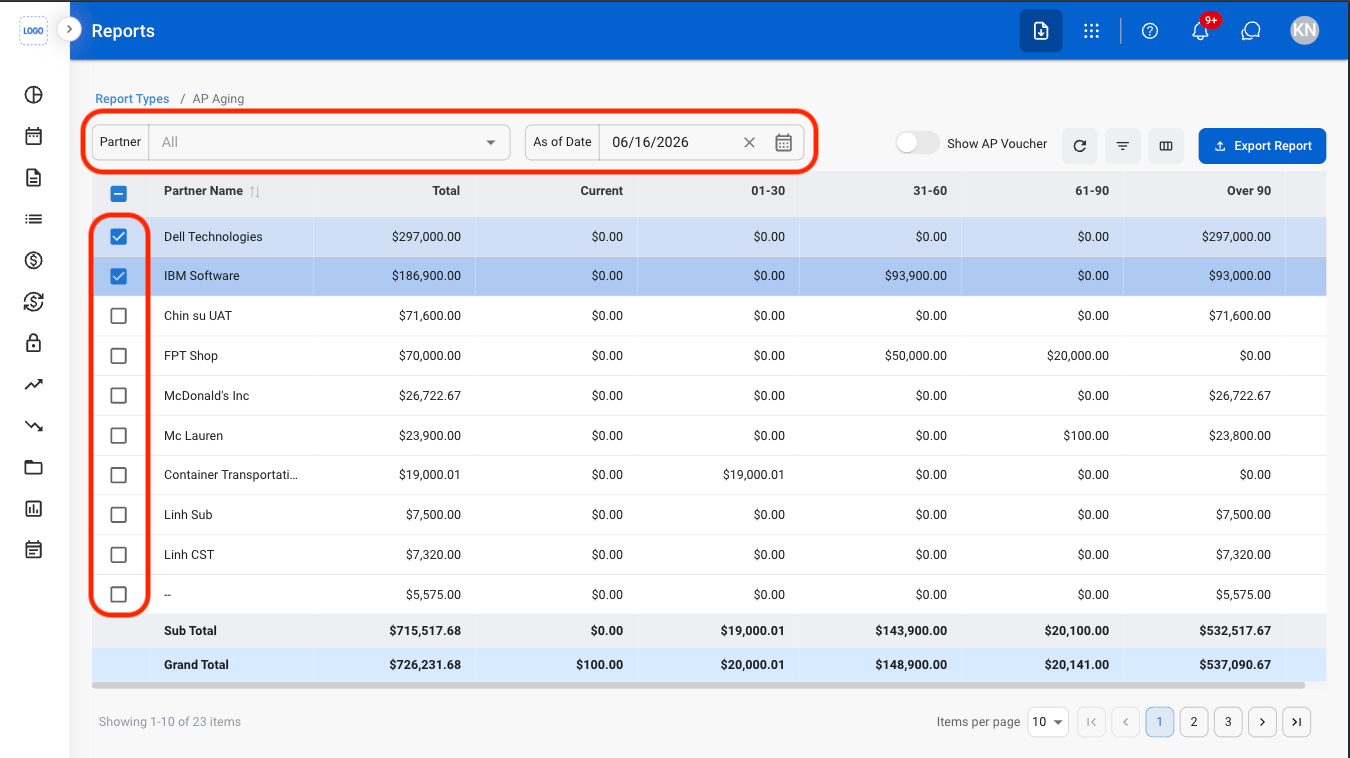
  <Step title="Apply filters and select entries">
    <Frame>
      <img src="https://mintcdn.com/bizbone/e1cqGEFCIODj8CuR/images/A-R-Filters.png?fit=max&auto=format&n=e1cqGEFCIODj8CuR&q=85&s=a9cb2440dac63fffde5eb565106146a4" alt="A R Filters" width="1350" height="758" data-path="images/A-R-Filters.png" />
    </Frame>

    Select a **Partner** and **As of Date** to filter results. Select a checkbox to include an entry in the report. 
  </Step>

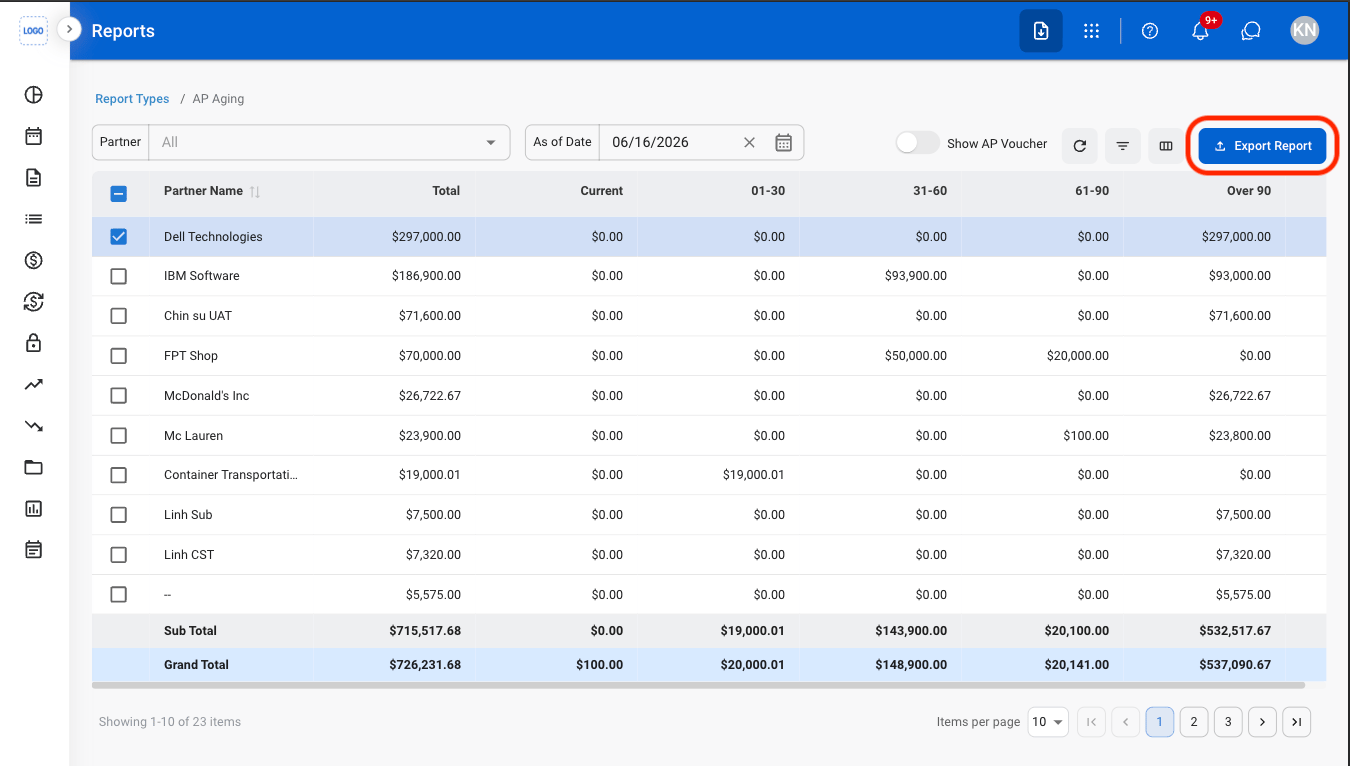
  <Step title="Select Export Report">
    <Frame>
      <img src="https://mintcdn.com/bizbone/e1cqGEFCIODj8CuR/images/A-R-Export.png?fit=max&auto=format&n=e1cqGEFCIODj8CuR&q=85&s=366bd356ebe9fcf082c8202593e57640" alt="A R Export" width="1350" height="766" data-path="images/A-R-Export.png" />
    </Frame>
  </Step>

  <Step title="Enter a report name ">
    <Frame>
      <img src="https://mintcdn.com/bizbone/e1cqGEFCIODj8CuR/images/A-R-Name.png?fit=max&auto=format&n=e1cqGEFCIODj8CuR&q=85&s=a7c0f863548c66dfbf60a8797192e5bb" alt="A R Name" width="1350" height="766" data-path="images/A-R-Name.png" />
    </Frame>
  </Step>

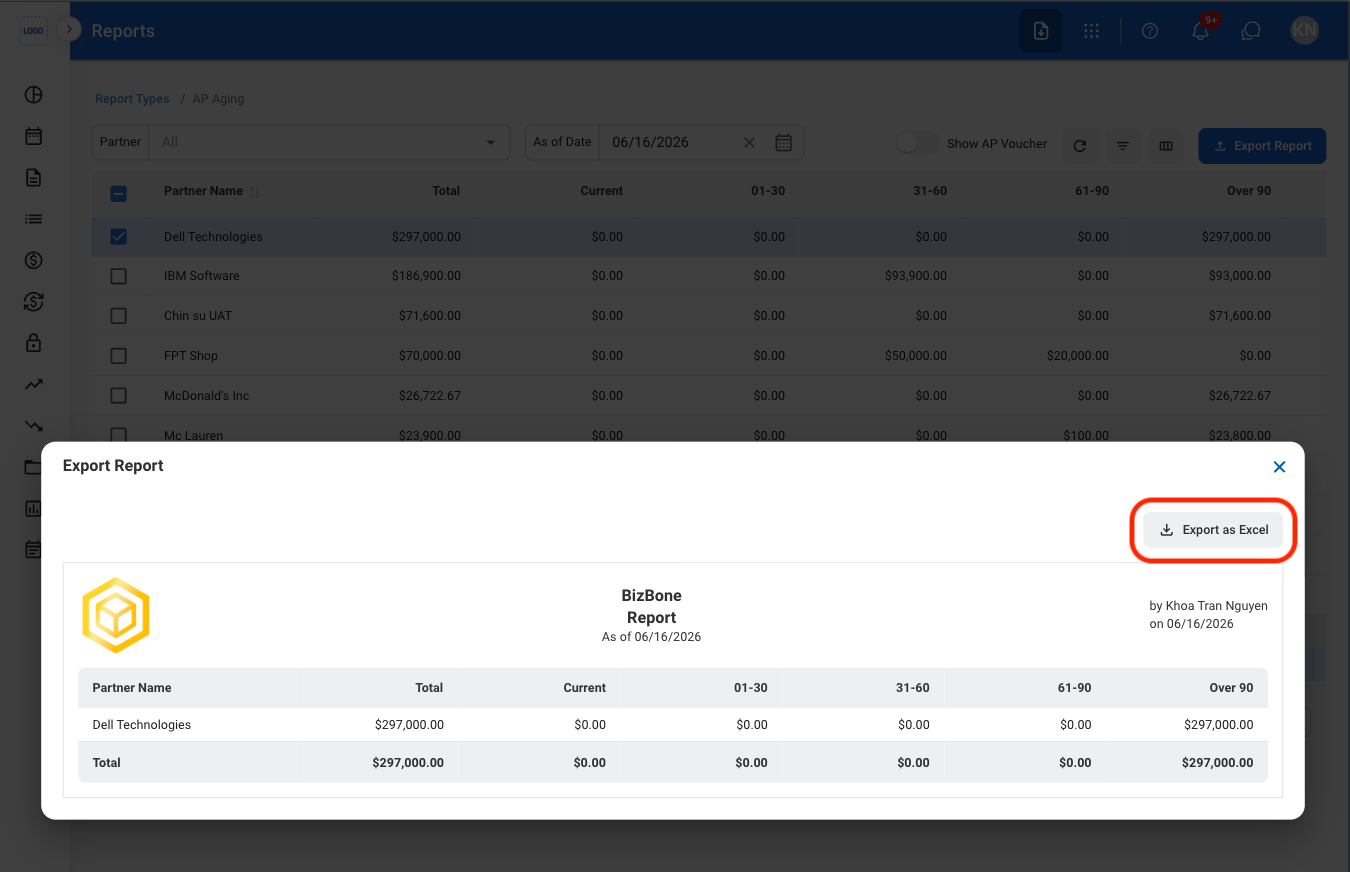
  <Step title="Select Export as Excel">
    <Frame>
      <img src="https://mintcdn.com/bizbone/e1cqGEFCIODj8CuR/images/A-R-Export-C.png?fit=max&auto=format&n=e1cqGEFCIODj8CuR&q=85&s=06e3392de057335efbd03846c9fa0bd1" alt="A R Export C" width="1350" height="872" data-path="images/A-R-Export-C.png" />
    </Frame>
  </Step>
</Steps>