> ## Documentation Index
> Fetch the complete documentation index at: https://docs.bizbone.com/llms.txt
> Use this file to discover all available pages before exploring further.

# Pool Settings

Configure indirect cost pools used for allocating indirect expenses across the organization. Supports setup and maintenance of pool cost and base rules.

## Add Indirect Cost Pool
<Steps>
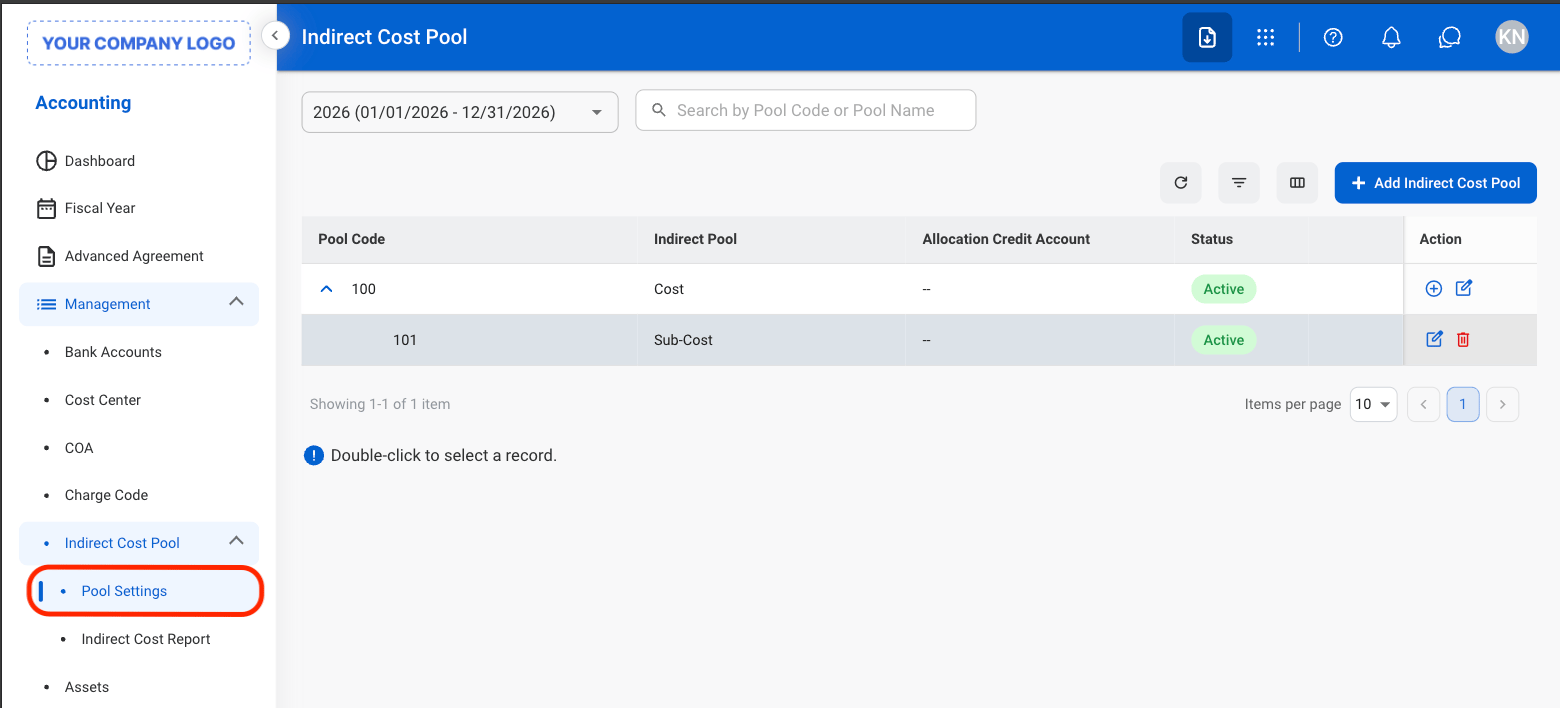
  <Step title="Navigate to Pool Settings">
    <Frame>
      <img src="https://mintcdn.com/bizbone/e1cqGEFCIODj8CuR/images/A-M-PS-Nav.png?fit=max&auto=format&n=e1cqGEFCIODj8CuR&q=85&s=bed5da4d56bbdcf160ab232a27d229f7" alt="A M PS Nav" width="1560" height="708" data-path="images/A-M-PS-Nav.png" />
    </Frame>
  </Step>

  <Step title="Select Add Indirect Cost Pool">
    <Frame>
      <img src="https://mintcdn.com/bizbone/e1cqGEFCIODj8CuR/images/A-M-PS-Add.png?fit=max&auto=format&n=e1cqGEFCIODj8CuR&q=85&s=eab03e441945c4d88e4ac9ddf73d08b1" alt="A M PS Add" width="1560" height="424" data-path="images/A-M-PS-Add.png" />
    </Frame>
  </Step>

  <Step title="Fill in the required information">
    <Frame>
      <img src="https://mintcdn.com/bizbone/e1cqGEFCIODj8CuR/images/A-M-PS-Add-C.png?fit=max&auto=format&n=e1cqGEFCIODj8CuR&q=85&s=e6a70a4b281a7b85173a5fbf675a9275" alt="A M PS Add C" width="1560" height="872" data-path="images/A-M-PS-Add-C.png" />
    </Frame>

    Select **Create** to complete or **Cancel** to exit without saving changes. 
  </Step>
</Steps>

## Modify Indirect Cost Pool

<Steps>
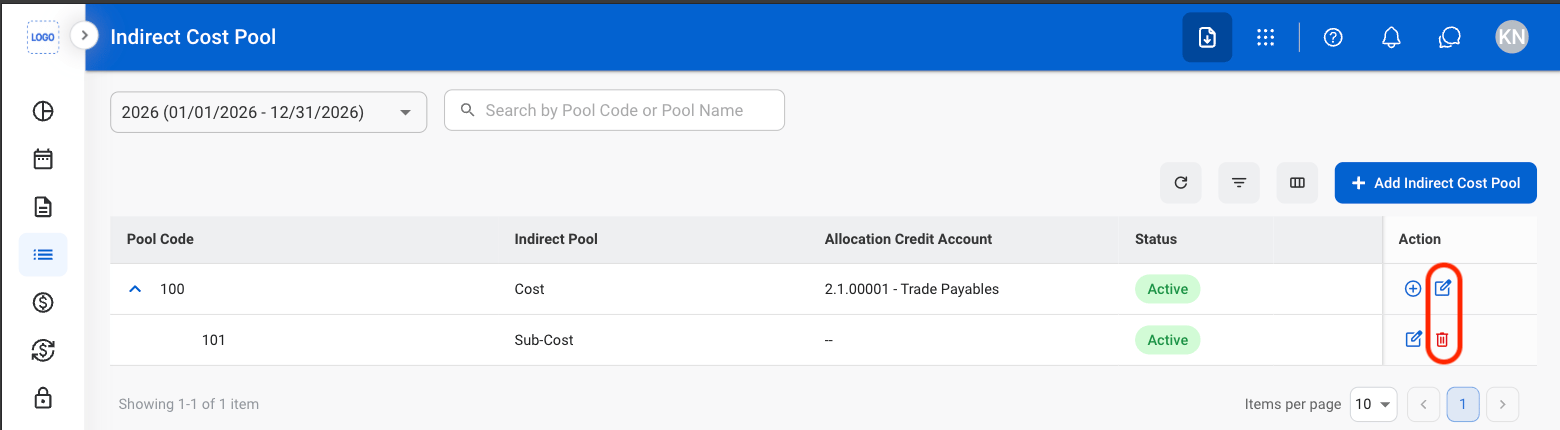
  <Step title="Select the Edit or Delete icon">
    <Frame>
      <img src="https://mintcdn.com/bizbone/e1cqGEFCIODj8CuR/images/A-M-PS-Mod.png?fit=max&auto=format&n=e1cqGEFCIODj8CuR&q=85&s=f55591134a02699998c1454e62acd32c" alt="A M PS Mod" width="1560" height="430" data-path="images/A-M-PS-Mod.png" />
    </Frame>
  </Step>

  <Step title="Confirm action">
    **Edit**: Select **Create** to complete or **Cancel** to exit without saving changes. 

    **Delete**: Select **Delete** to complete or **Cancel** to exit without saving changes. 
  </Step>
</Steps>

## Add Indirect Cost Sub-Pool

<Steps>
  <Step title="Select the Add icon">
    <Frame>
      <img src="https://mintcdn.com/bizbone/e1cqGEFCIODj8CuR/images/A-M-PS-Add-Sub.png?fit=max&auto=format&n=e1cqGEFCIODj8CuR&q=85&s=2813abea93ac4671c1023bd6cff05070" alt="A M PS Add Sub" width="1560" height="430" data-path="images/A-M-PS-Add-Sub.png" />
    </Frame>
  </Step>

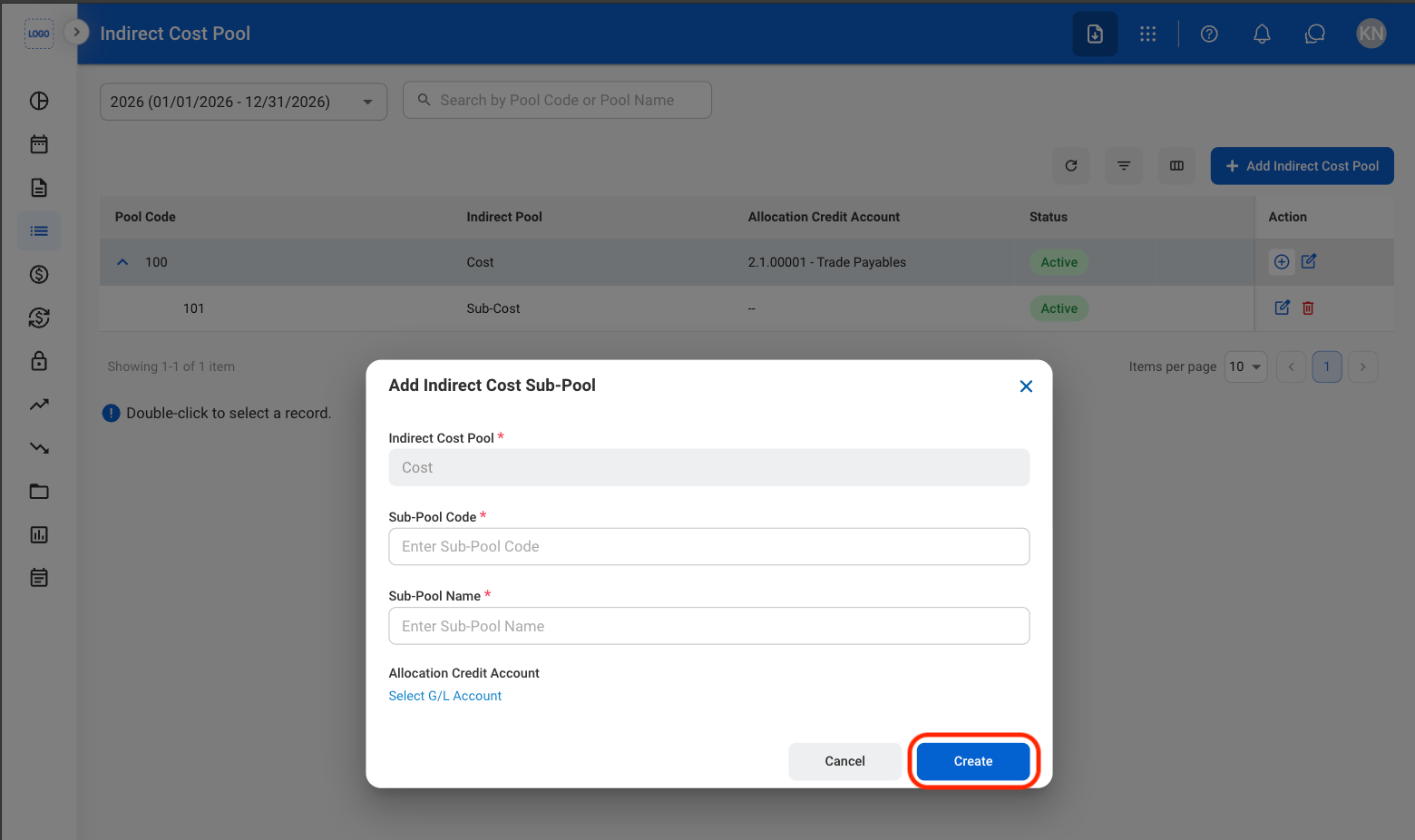
  <Step title="Fill in the required information ">
    <Frame>
      <img src="https://mintcdn.com/bizbone/e1cqGEFCIODj8CuR/images/A-M-PS-Add-S-C.png?fit=max&auto=format&n=e1cqGEFCIODj8CuR&q=85&s=e353e396c695921d02105d358b2bab92" alt="A M PS Add S C" width="1560" height="926" data-path="images/A-M-PS-Add-S-C.png" />
    </Frame>

    Select **Create** to complete or **Cancel** to exit without saving changes. 
  </Step>
</Steps>

## Modify Pool Cost or Base

<Steps>
  <Step />
</Steps>