> ## Documentation Index
> Fetch the complete documentation index at: https://docs.bizbone.com/llms.txt
> Use this file to discover all available pages before exploring further.

# Partner

Manage partner records used for accounts payable processing. Supports maintenance of subcontractor, consultant, and vendor information, including payment details and related transactions.

## View Partner Records
<Steps>
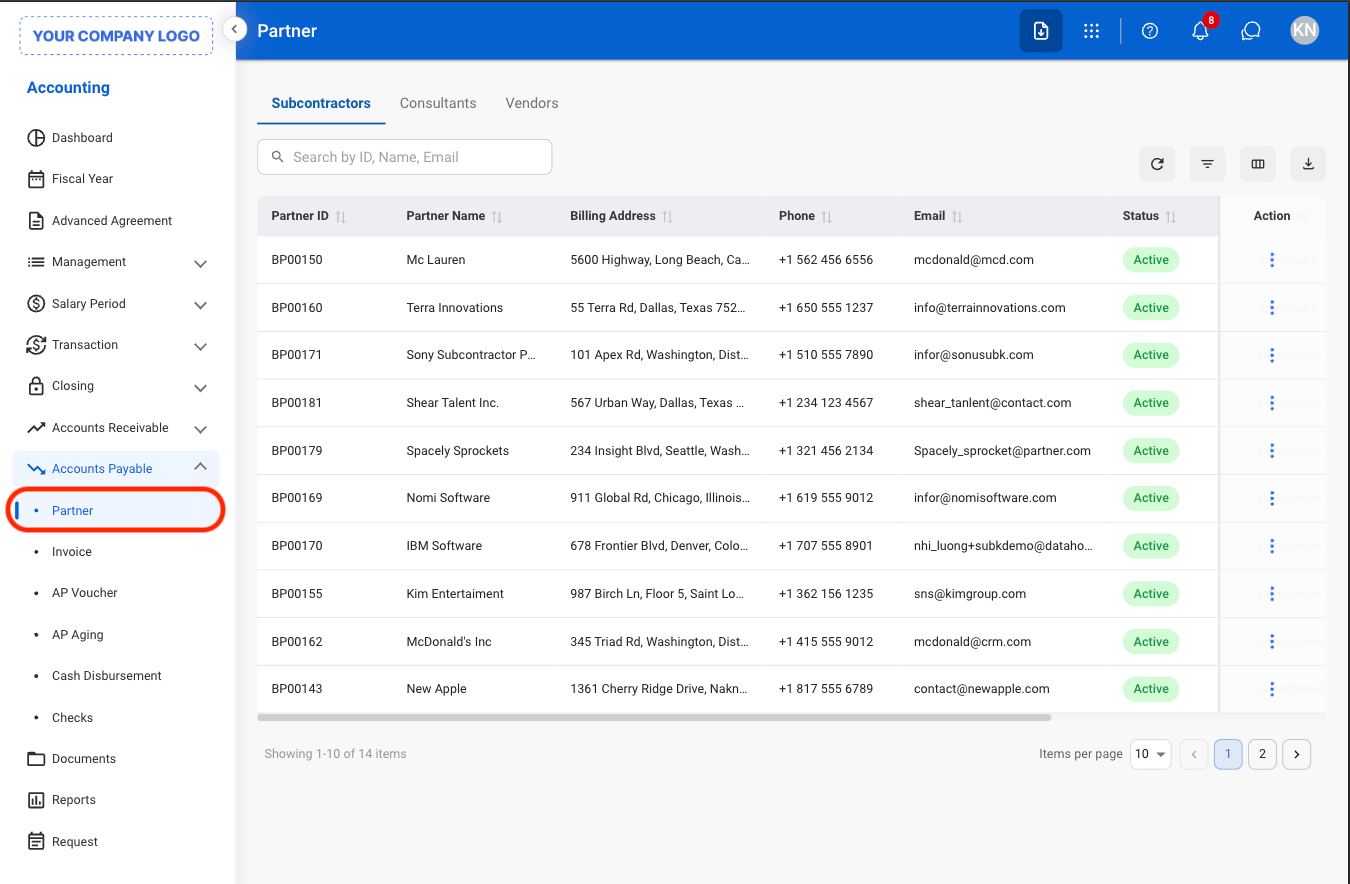
  <Step title="Navigate to Partner">
    <Frame>
      <img src="https://mintcdn.com/bizbone/0ql_iPMXm4wX7du4/images/A-AP-P-Nav.png?fit=max&auto=format&n=0ql_iPMXm4wX7du4&q=85&s=13721718a9bcb3385a854dd47da299e3" alt="A AP P Nav" width="1350" height="884" data-path="images/A-AP-P-Nav.png" />
    </Frame>
  </Step>

  <Step title="Select a tab">
    <Frame>
      <img src="https://mintcdn.com/bizbone/Jsy5oFRS7gkIoPr-/images/A-AP-P-Tab.png?fit=max&auto=format&n=Jsy5oFRS7gkIoPr-&q=85&s=047745359bf4ed323730a487f33226d3" alt="A AP P Tab" width="1350" height="790" data-path="images/A-AP-P-Tab.png" />
    </Frame>

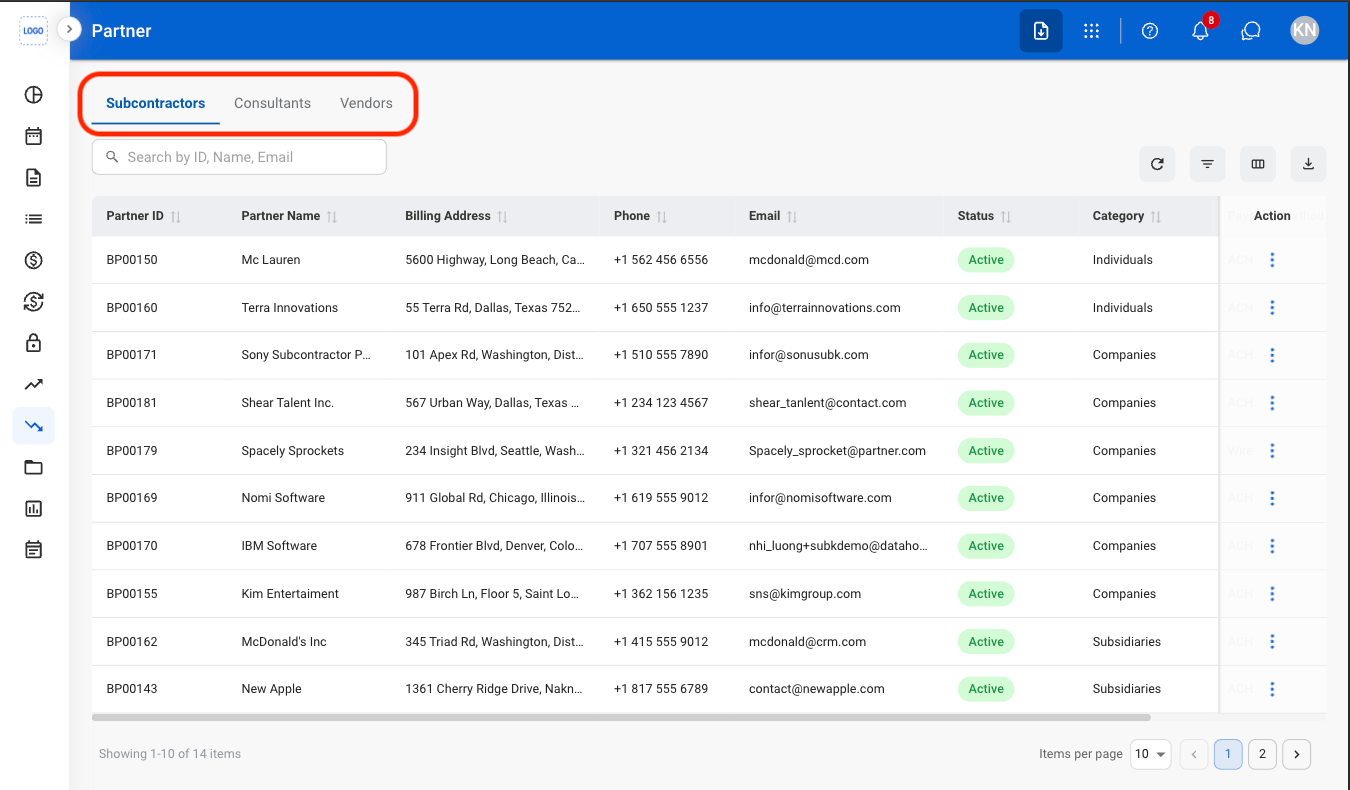
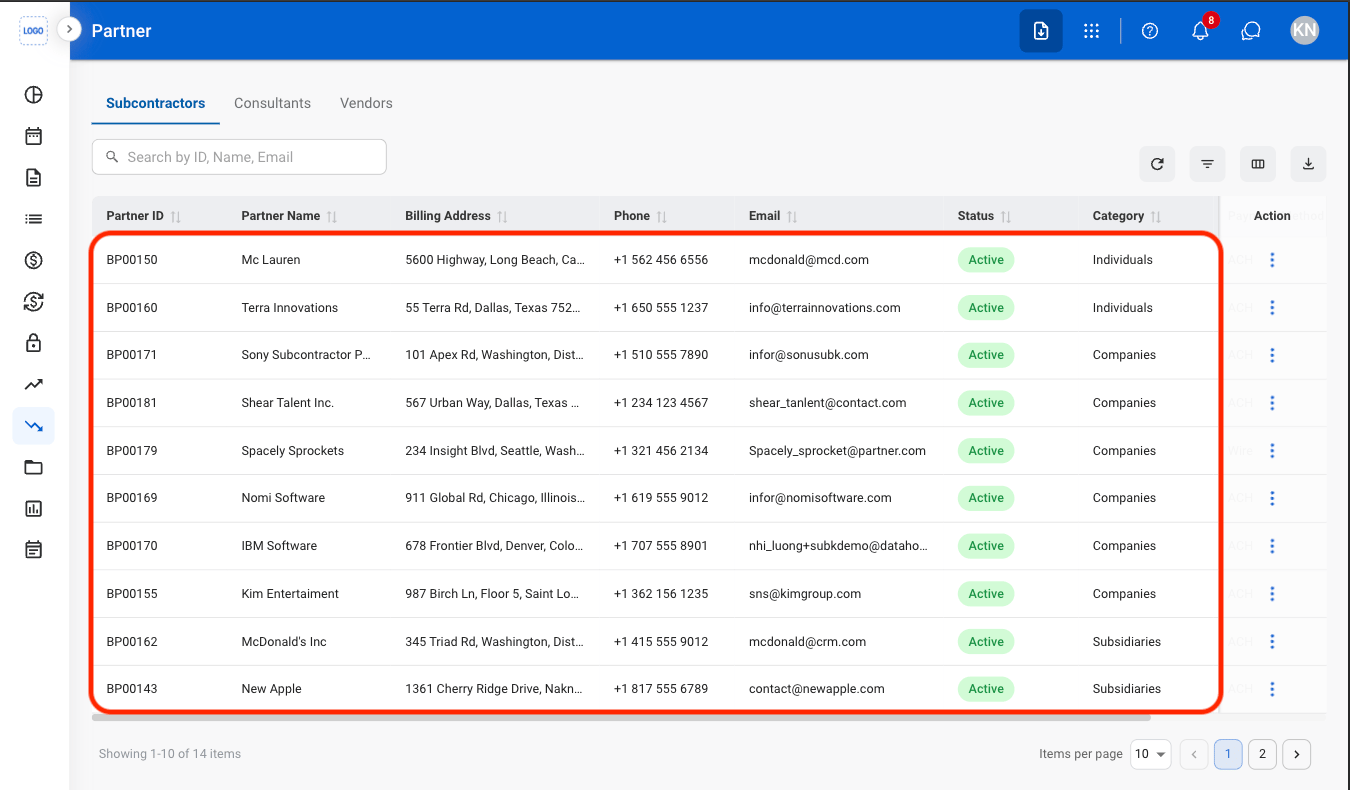
    * **Subcontractors:** Organizations contracted to perform project or contract-related work.
    * **Consultants:** Independent professionals providing specialized services.
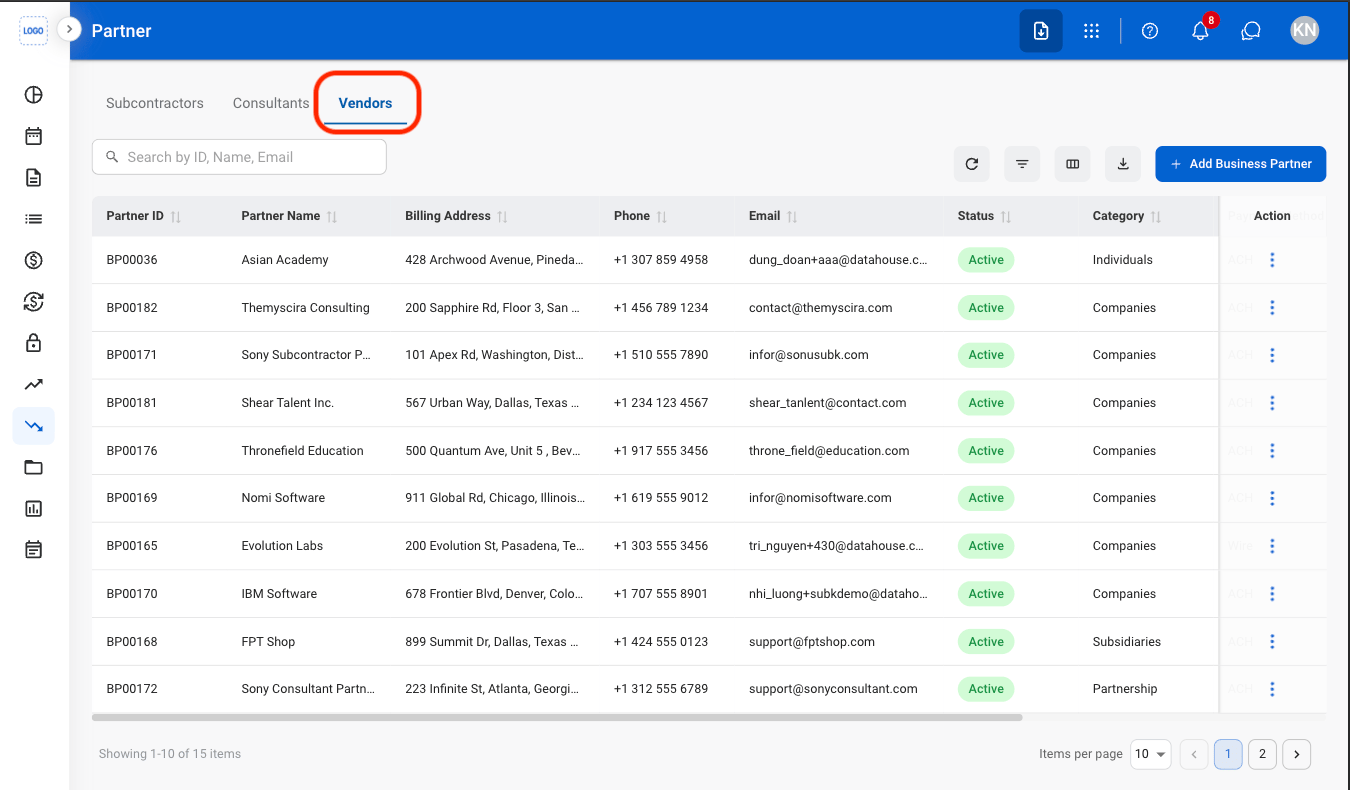
    * **Vendors:** Suppliers providing goods or services to the company.
  </Step>

  <Step title="Select a partner">
    <Frame>
      <img src="https://mintcdn.com/bizbone/Jsy5oFRS7gkIoPr-/images/A-AP-P-Select.png?fit=max&auto=format&n=Jsy5oFRS7gkIoPr-&q=85&s=7eb0a8629d061514ae20470e2337d4a8" alt="A AP P Select" width="1350" height="790" data-path="images/A-AP-P-Select.png" />
    </Frame>
  </Step>
</Steps>

## Add a Business Partner

<Steps>
  <Step title="Select the Vendors tab">
    <Frame>
      <img src="https://mintcdn.com/bizbone/Jsy5oFRS7gkIoPr-/images/A-AP-P-Vendor.png?fit=max&auto=format&n=Jsy5oFRS7gkIoPr-&q=85&s=a066f6a1dca82d050a4f6597639cd028" alt="A AP P Vendor" width="1350" height="790" data-path="images/A-AP-P-Vendor.png" />
    </Frame>
  </Step>

  <Step title="Select Add Business Partner">
    <Frame>
      <img src="https://mintcdn.com/bizbone/0ql_iPMXm4wX7du4/images/A-AP-P-Add.png?fit=max&auto=format&n=0ql_iPMXm4wX7du4&q=85&s=f52593b52c05f969d3ca5a2823f2203e" alt="A AP P Add" width="1350" height="790" data-path="images/A-AP-P-Add.png" />
    </Frame>
  </Step>

  <Step title="Fill in the required information ">
    <Frame>
      <img src="https://mintcdn.com/bizbone/0ql_iPMXm4wX7du4/images/A-AP-P-Add-C.png?fit=max&auto=format&n=0ql_iPMXm4wX7du4&q=85&s=4db876ba6a5862fb6f521322b23f2e06" alt="A AP P Add C" width="1350" height="1246" data-path="images/A-AP-P-Add-C.png" />
    </Frame>

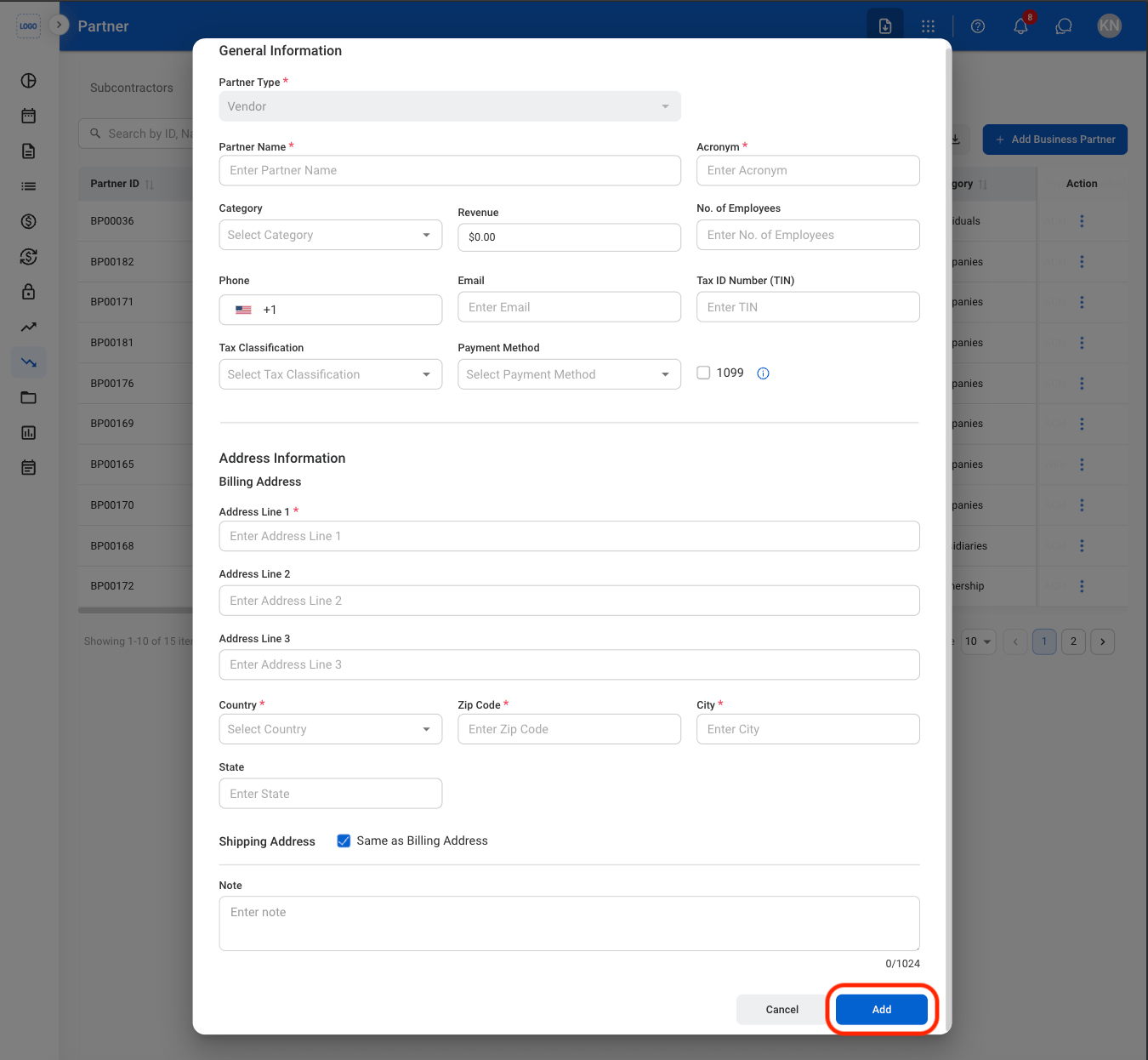
    Select **Add** to complete or **Cancel** to exit without saving changes. 
  </Step>
</Steps>

## Import Business Partner Information
<Steps>
  <Step title="Select a tab">
    <Frame>
      <img src="https://mintcdn.com/bizbone/Jsy5oFRS7gkIoPr-/images/A-AP-P-Tab.png?fit=max&auto=format&n=Jsy5oFRS7gkIoPr-&q=85&s=047745359bf4ed323730a487f33226d3" alt="A AP P Tab" width="1350" height="790" data-path="images/A-AP-P-Tab.png" />
    </Frame>
  </Step>

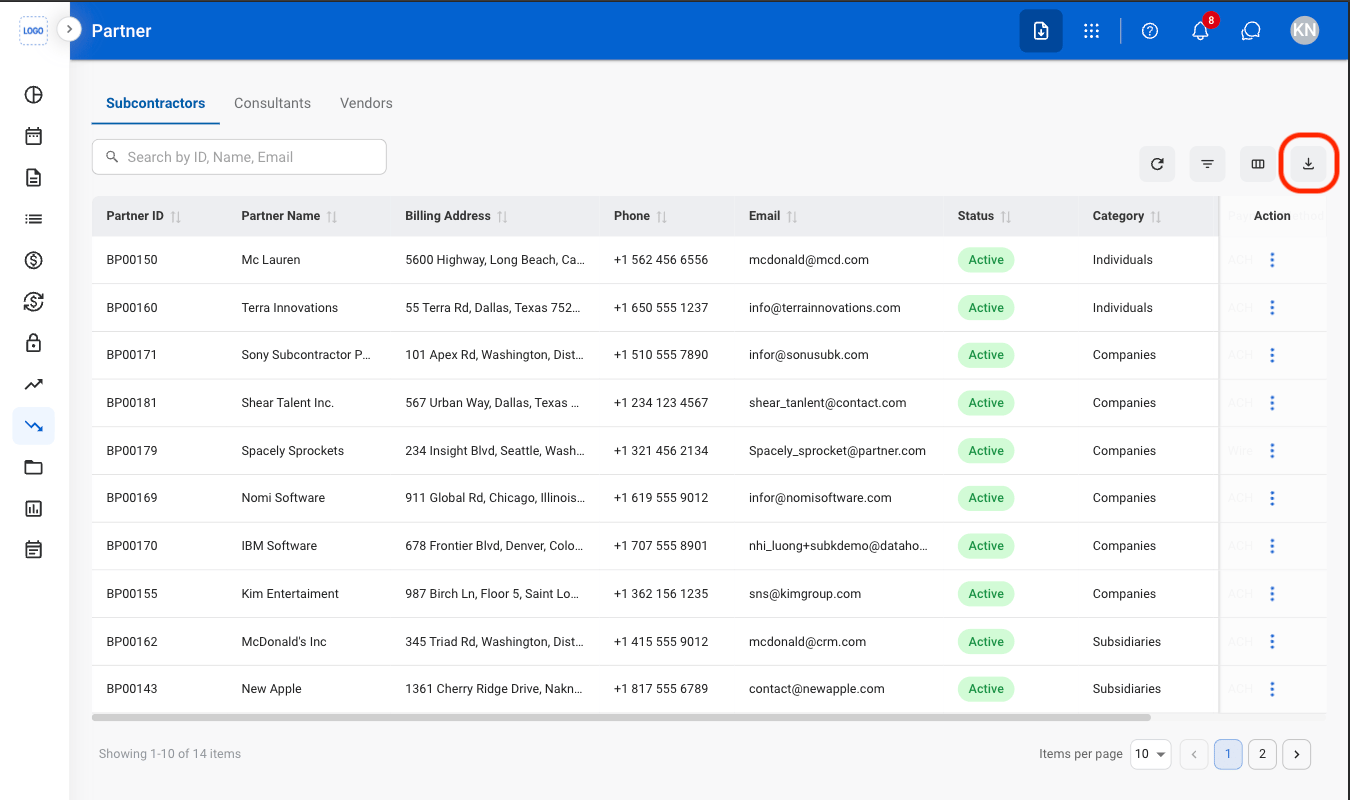
  <Step title="Select the Import button">
    <Frame>
      <img src="https://mintcdn.com/bizbone/0ql_iPMXm4wX7du4/images/A-AP-P-Import.png?fit=max&auto=format&n=0ql_iPMXm4wX7du4&q=85&s=634430c2b91e8cc4f0a90394b74856f5" alt="A AP P Import" width="1350" height="800" data-path="images/A-AP-P-Import.png" />
    </Frame>
  </Step>

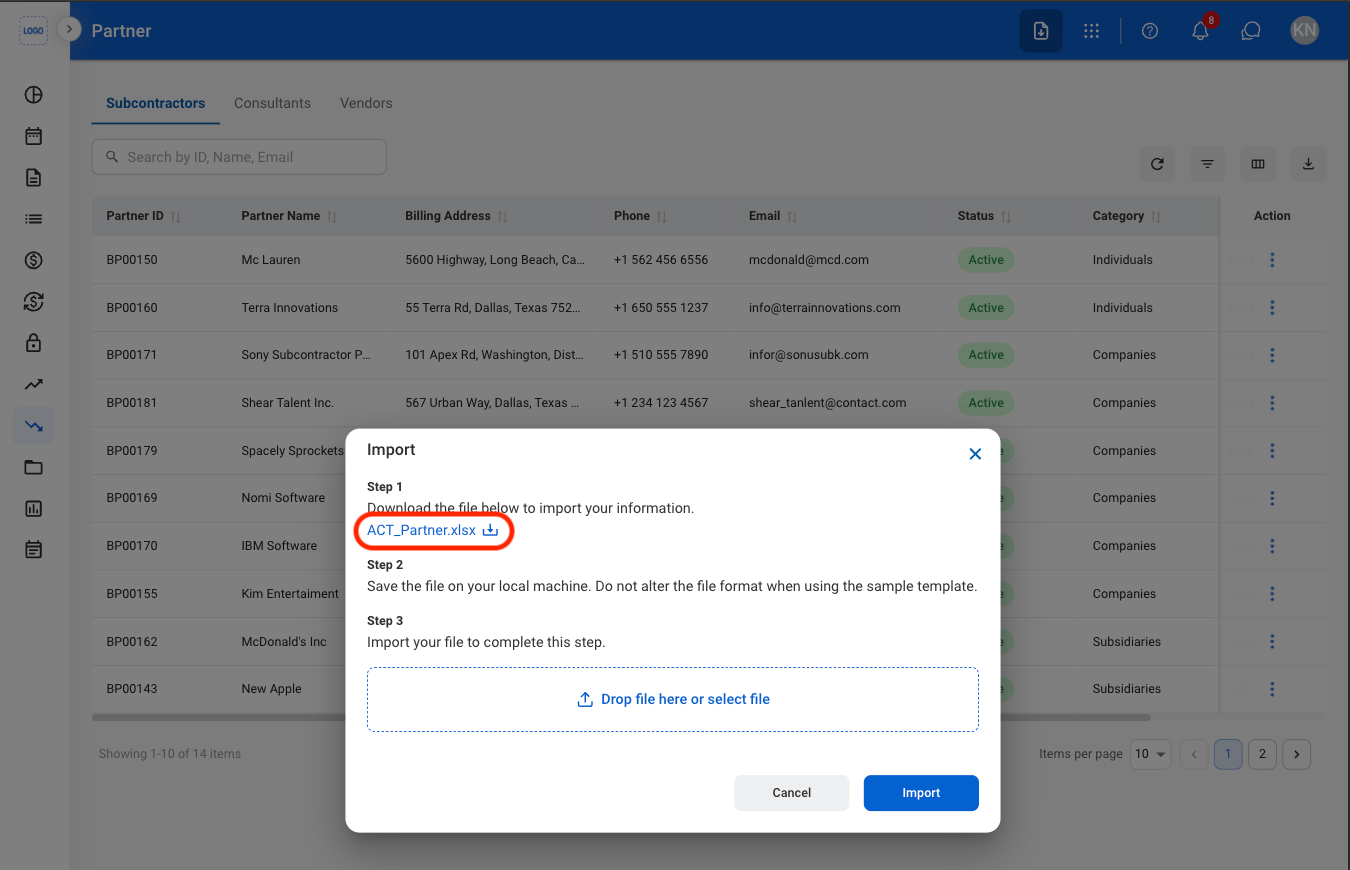
  <Step title="Download the template">
    <Frame>
      <img src="https://mintcdn.com/bizbone/Jsy5oFRS7gkIoPr-/images/A-AP-P-Template.png?fit=max&auto=format&n=Jsy5oFRS7gkIoPr-&q=85&s=a70b61c63cde67d94cec6036234baafc" alt="A AP P Template" width="1350" height="870" data-path="images/A-AP-P-Template.png" />
    </Frame>
  </Step>

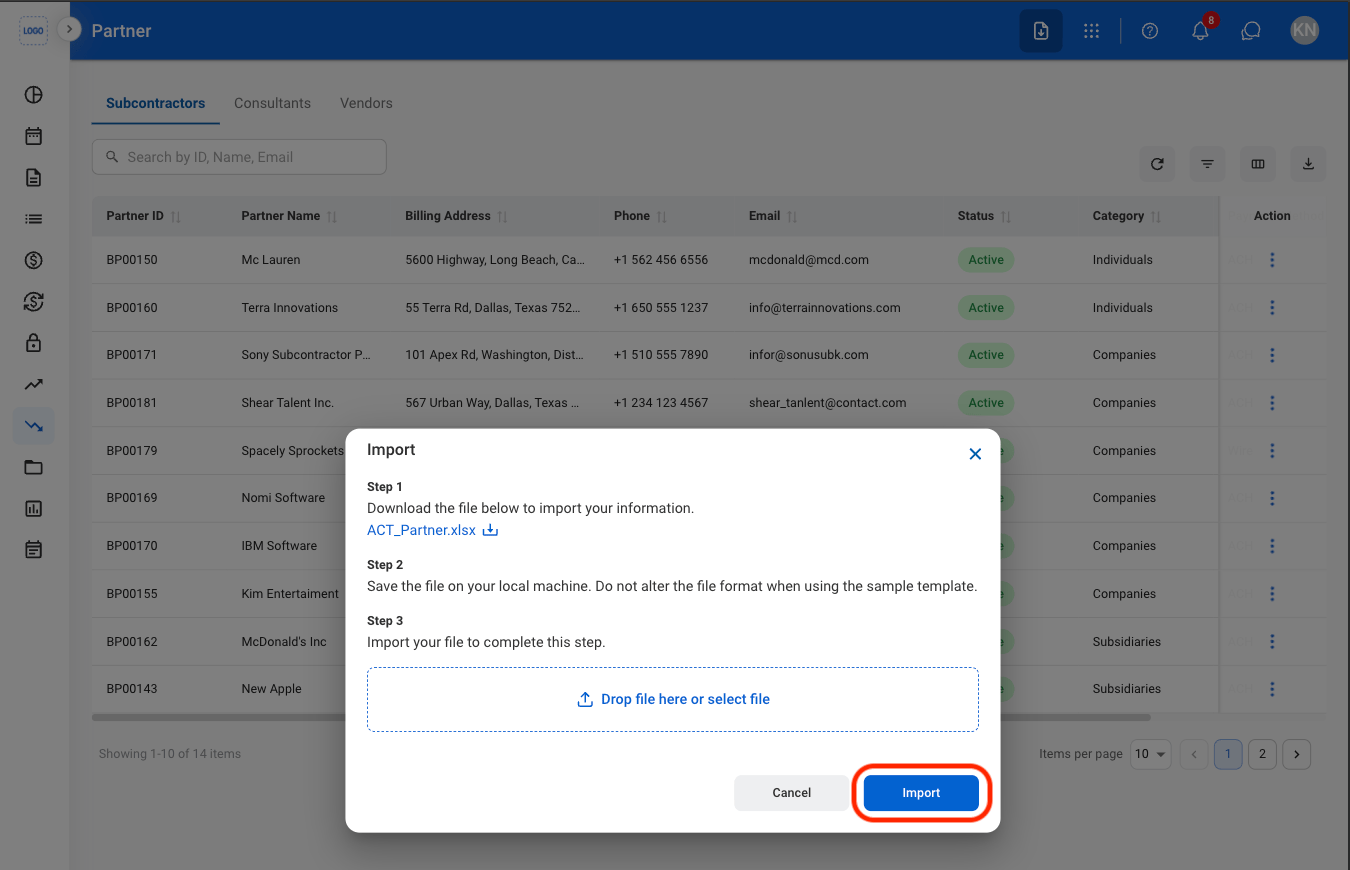
  <Step title="Upload the completed template">
    <Frame>
      <img src="https://mintcdn.com/bizbone/0ql_iPMXm4wX7du4/images/A-AP-P-Import-C.png?fit=max&auto=format&n=0ql_iPMXm4wX7du4&q=85&s=ac08ab80491bd4a42a92436821d3b69f" alt="A AP P Import C" width="1350" height="870" data-path="images/A-AP-P-Import-C.png" />
    </Frame>

    Select **Import** to complete or **Cancel** to exit without saving changes. 
  </Step>
</Steps>

## Add Partner Payment Information

<Steps>
  <Step title="Select a business partner">
    <Frame>
      <img src="https://mintcdn.com/bizbone/Jsy5oFRS7gkIoPr-/images/A-AP-P-Select.png?fit=max&auto=format&n=Jsy5oFRS7gkIoPr-&q=85&s=7eb0a8629d061514ae20470e2337d4a8" alt="A AP P Select" width="1350" height="790" data-path="images/A-AP-P-Select.png" />
    </Frame>
  </Step>

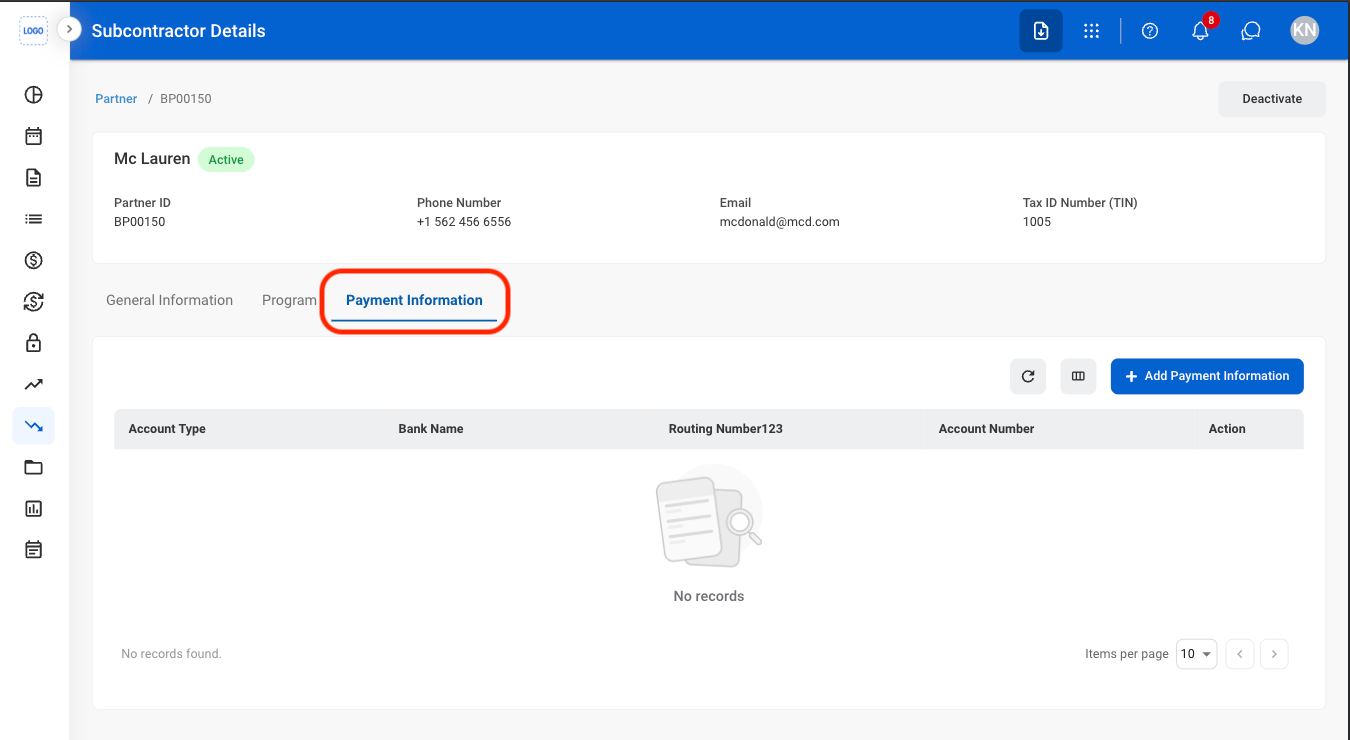
  <Step title="Select Payment Information">
    <Frame>
      <img src="https://mintcdn.com/bizbone/0ql_iPMXm4wX7du4/images/A-AP-P-Payment-Info.png?fit=max&auto=format&n=0ql_iPMXm4wX7du4&q=85&s=75de0e8e287a4fb16ea43b5e63addf3b" alt="A AP P Payment Info" width="1350" height="740" data-path="images/A-AP-P-Payment-Info.png" />
    </Frame>
  </Step>

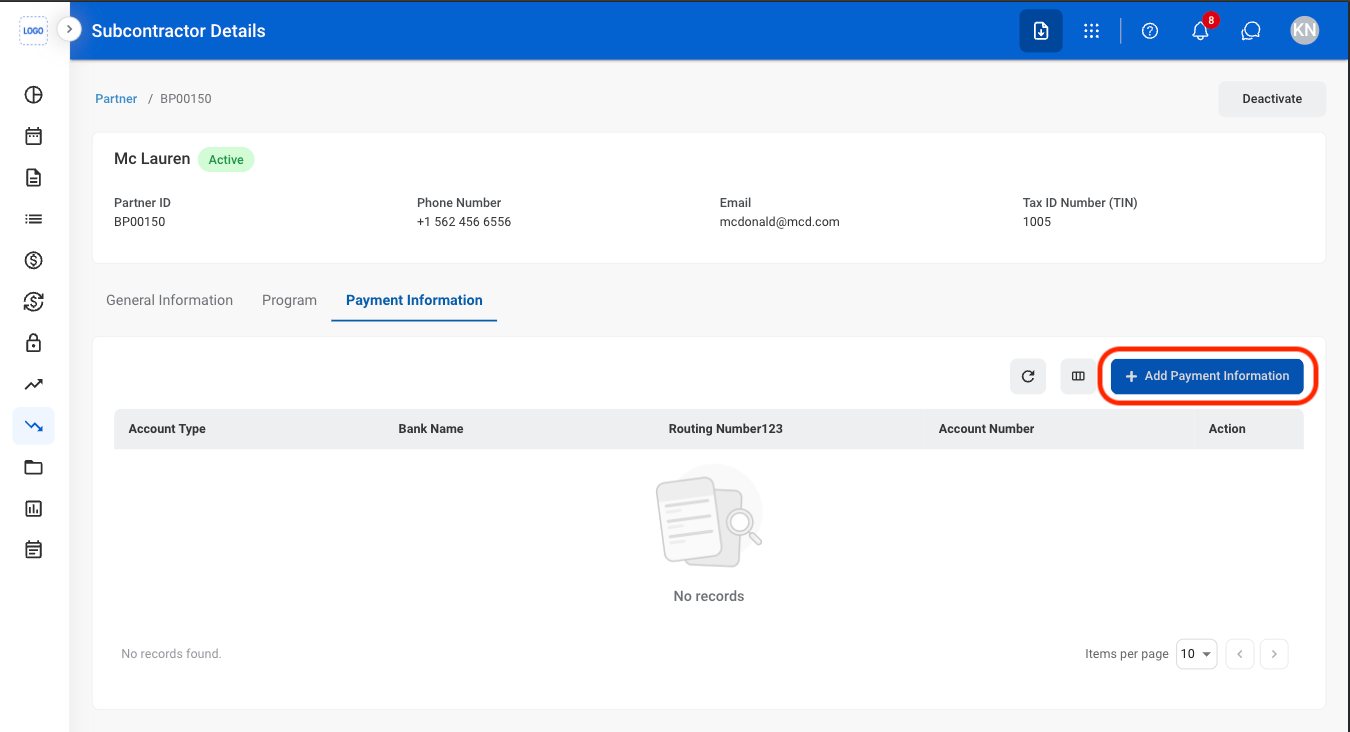
  <Step title="Select Add Payment Information">
    <Frame>
      <img src="https://mintcdn.com/bizbone/0ql_iPMXm4wX7du4/images/A-AP-Add-PI.png?fit=max&auto=format&n=0ql_iPMXm4wX7du4&q=85&s=b110cac14db662f491b7aa6846ea2ced" alt="A AP Add PI" width="1350" height="732" data-path="images/A-AP-Add-PI.png" />
    </Frame>
  </Step>

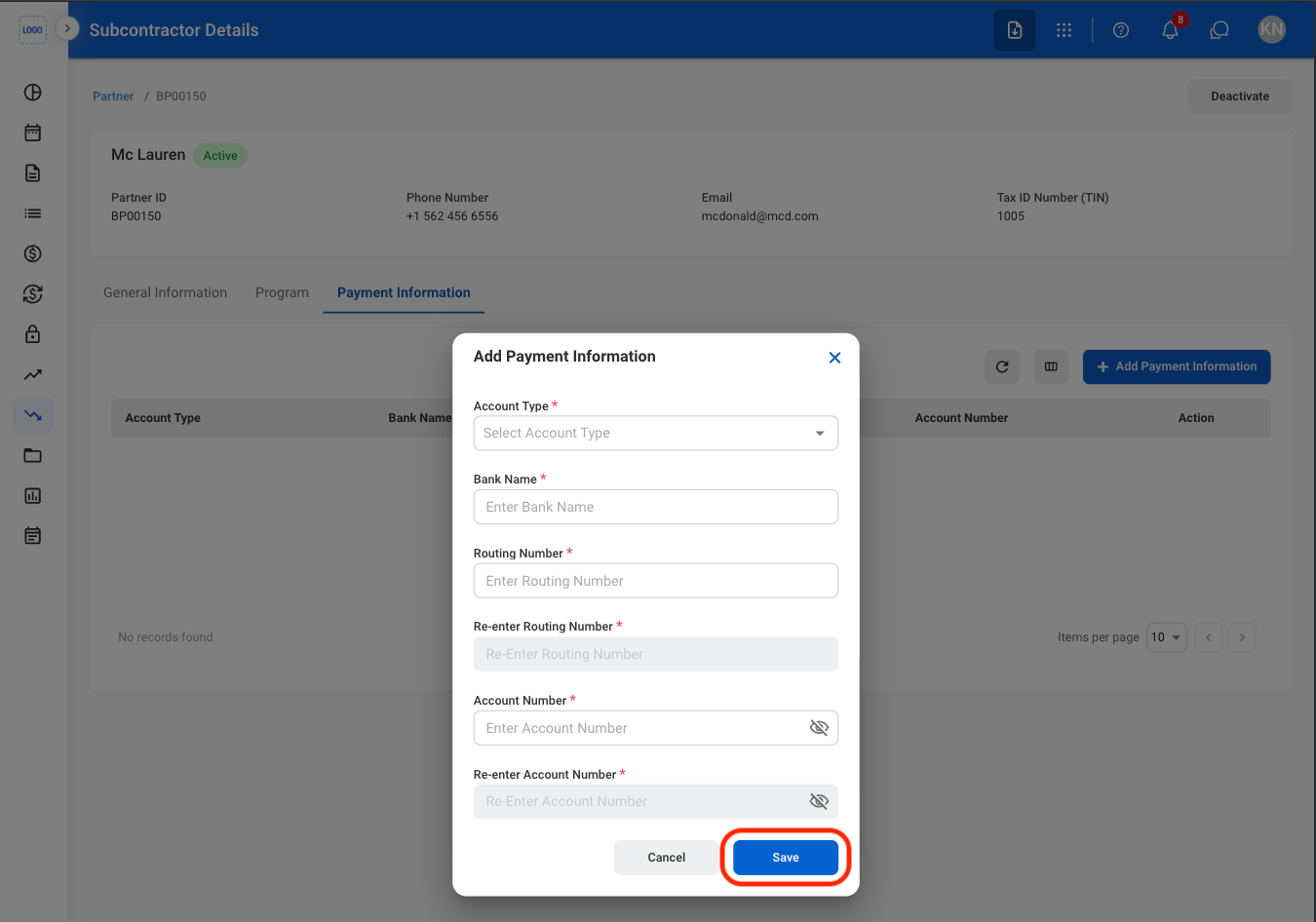
  <Step title="Fill in the required information ">
    <Frame>
      <img src="https://mintcdn.com/bizbone/0ql_iPMXm4wX7du4/images/A-AP-P-Add-PI-C.png?fit=max&auto=format&n=0ql_iPMXm4wX7du4&q=85&s=a4dcd033c319a6f6bd244fcf1f71df00" alt="A AP P Add PI C" width="1350" height="946" data-path="images/A-AP-P-Add-PI-C.png" />
    </Frame>

    Select **Save** to complete or **Cancel** to exit without saving changes. 
  </Step>
</Steps>

## Edit Partner Payment Information

<Steps>
  <Step title="Select a business partner">
    <Frame>
      <img src="https://mintcdn.com/bizbone/Jsy5oFRS7gkIoPr-/images/A-AP-P-Select.png?fit=max&auto=format&n=Jsy5oFRS7gkIoPr-&q=85&s=7eb0a8629d061514ae20470e2337d4a8" alt="A AP P Select" width="1350" height="790" data-path="images/A-AP-P-Select.png" />
    </Frame>
  </Step>

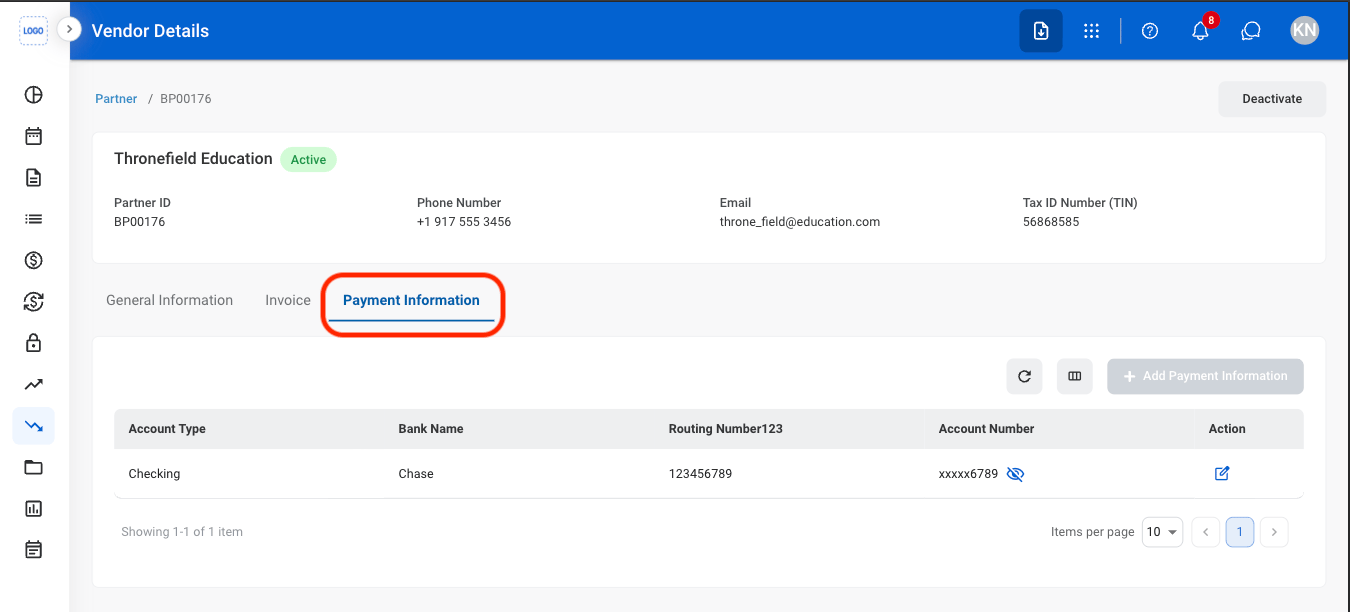
  <Step title="Select Payment Information">
    <Frame>
      <img src="https://mintcdn.com/bizbone/Jsy5oFRS7gkIoPr-/images/A-AP-Pay-Info.png?fit=max&auto=format&n=Jsy5oFRS7gkIoPr-&q=85&s=258d628b17e2af4ba8c40616b2f1e6dc" alt="A AP Pay Info" width="1350" height="612" data-path="images/A-AP-Pay-Info.png" />
    </Frame>
  </Step>

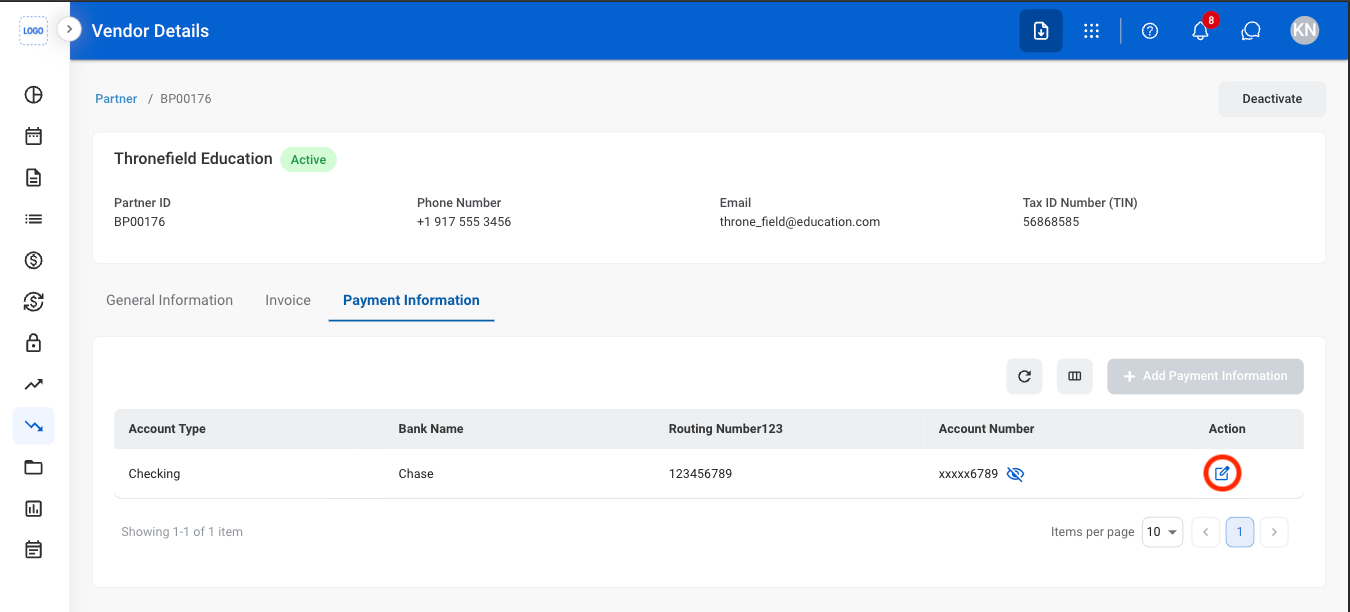
  <Step title="Select the Edit icon">
    <Frame>
      <img src="https://mintcdn.com/bizbone/0ql_iPMXm4wX7du4/images/A-AP-P-Edit-PI.png?fit=max&auto=format&n=0ql_iPMXm4wX7du4&q=85&s=3cb28bf3050ec2832396057705a0003f" alt="A AP P Edit PI" width="1350" height="612" data-path="images/A-AP-P-Edit-PI.png" />
    </Frame>
  </Step>

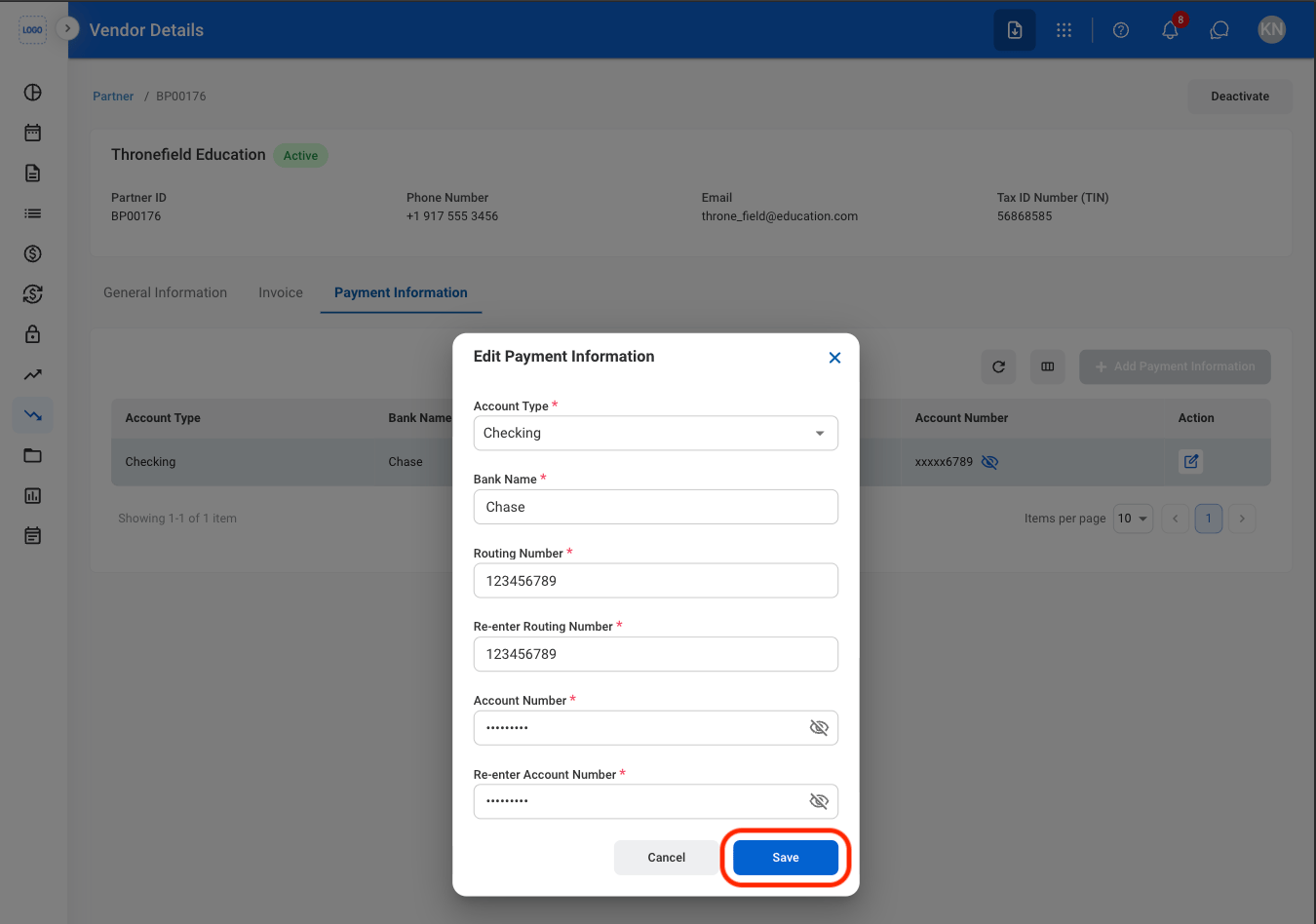
  <Step title="Fill in the required information ">
    <Frame>
      <img src="https://mintcdn.com/bizbone/0ql_iPMXm4wX7du4/images/A-AP-P-Edit-C.png?fit=max&auto=format&n=0ql_iPMXm4wX7du4&q=85&s=ef9b78d692db248f4faffdf0360d3d09" alt="A AP P Edit C" width="1350" height="948" data-path="images/A-AP-P-Edit-C.png" />
    </Frame>

    Select **Save** to complete or **Cancel** to exit without saving changes. 
  </Step>
</Steps>

## Delete or Deactivate a Business Partner
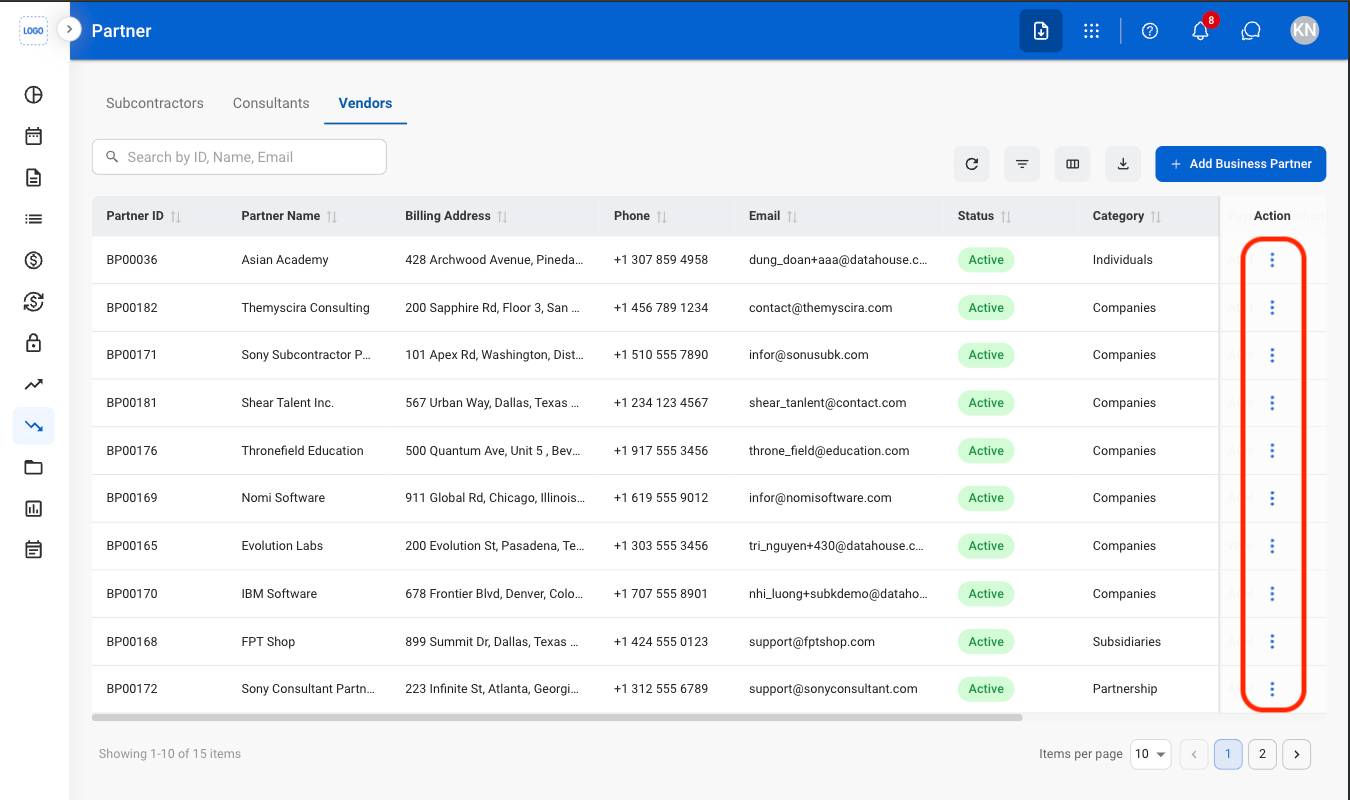
<Steps>
  <Step title="Select the ellipsis icon">
    <Frame>
      <img src="https://mintcdn.com/bizbone/0ql_iPMXm4wX7du4/images/A-AP-P-Ellipsis.png?fit=max&auto=format&n=0ql_iPMXm4wX7du4&q=85&s=fad9cd90c1d7b6786f8244d9f7da652f" alt="A AP P Ellipsis" width="1350" height="800" data-path="images/A-AP-P-Ellipsis.png" />
    </Frame>
  </Step>

  <Step title="Select an action">
    <Frame>
      <img src="https://mintcdn.com/bizbone/0ql_iPMXm4wX7du4/images/A-AP-P-Action.png?fit=max&auto=format&n=0ql_iPMXm4wX7du4&q=85&s=42a1fab59a8659ef934e40823d36d49b" alt="A AP P Action" width="1350" height="800" data-path="images/A-AP-P-Action.png" />
    </Frame>

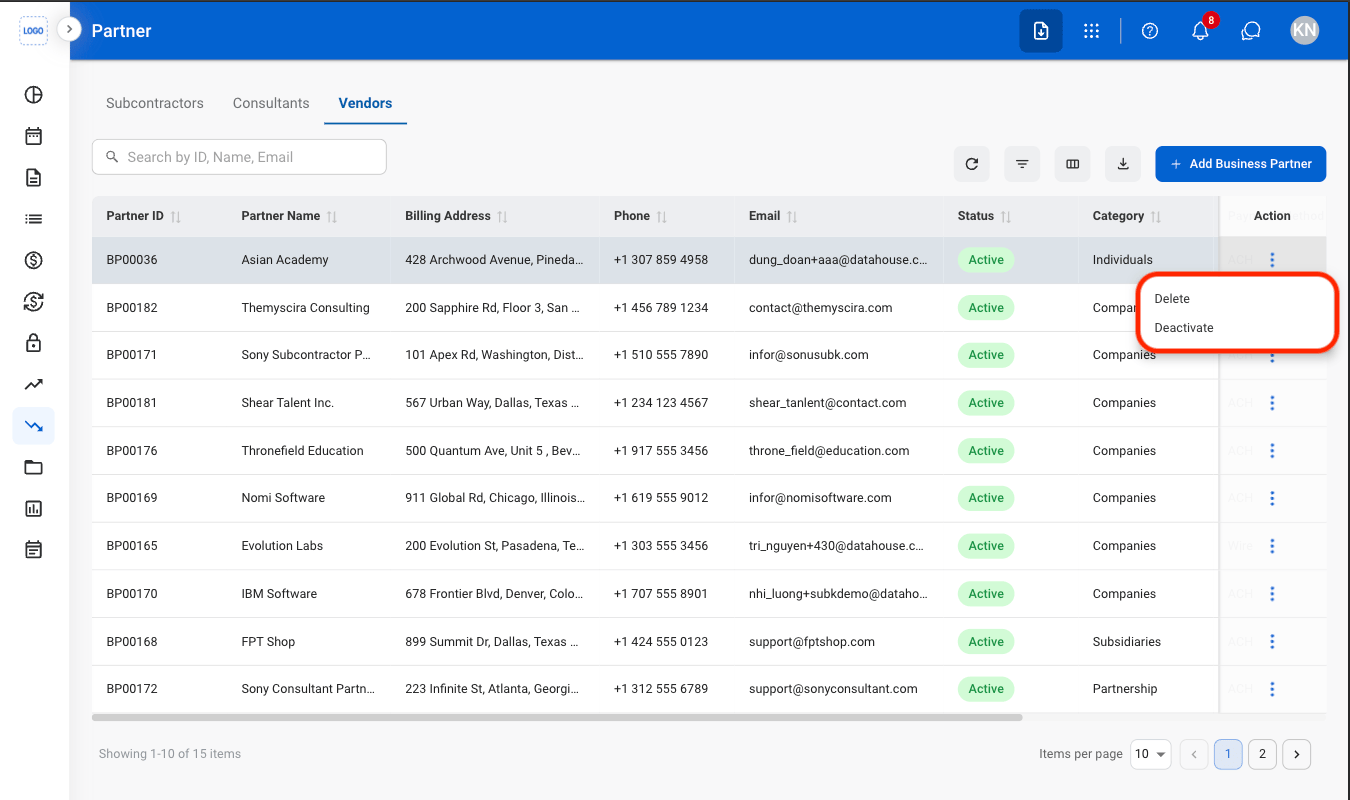
    * **Delete:** Permanently remove the partner record from the system.
    * **Deactivate:** Mark the partner as inactive to prevent use in future transactions while retaining existing records.
  </Step>

  <Step title="Confirm the action">
    * **Delete:** Select **Delete** to complete or **Cancel** to exit without saving changes. 
    * **Deactivate:** Select **Deactivate** to complete or **Cancel** to exit without saving changes. 
  </Step>
</Steps>