> ## Documentation Index
> Fetch the complete documentation index at: https://docs.bizbone.com/llms.txt
> Use this file to discover all available pages before exploring further.
# General Ledger DO NOT DELETE
View General Ledger records and posted financial transactions across the organization. Supports review of account activity, transaction history, and financial data for reporting and audit purposes.
## View General Ledger Records
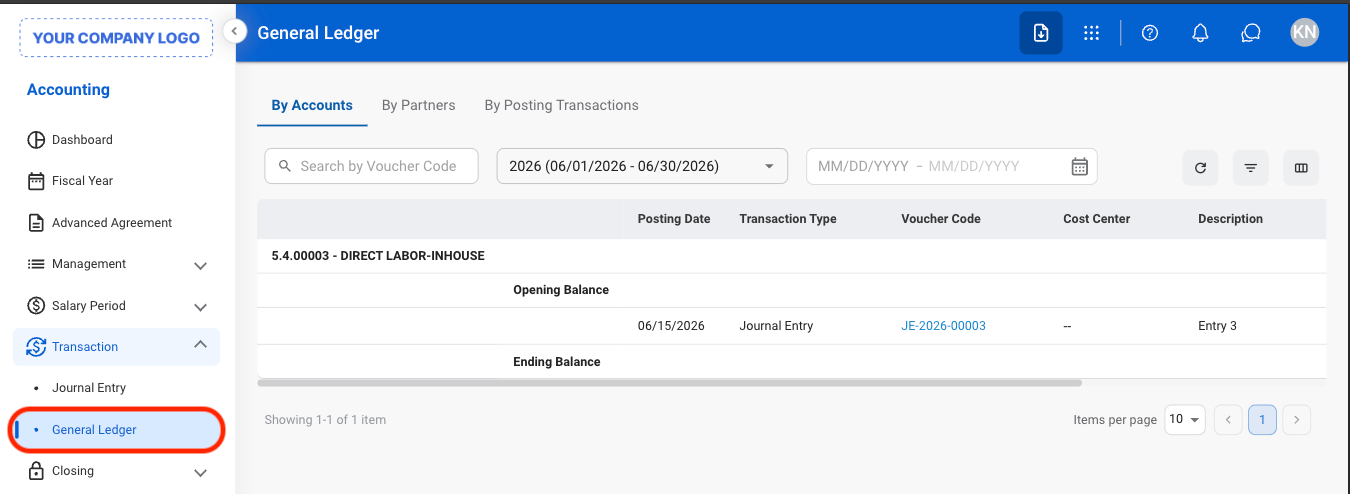
 * **By Accounts:** View posted transactions and balances organized by General Ledger account.
* **By Partners:** View posted transactions associated with specific customers, vendors, or partner records.
* **By Posting Transactions:** View individual posted transactions and their associated accounting entries.
* **By Accounts:** View posted transactions and balances organized by General Ledger account.
* **By Partners:** View posted transactions associated with specific customers, vendors, or partner records.
* **By Posting Transactions:** View individual posted transactions and their associated accounting entries.
 ## Export General Ledger
Export functions are only available in By Posting Transactions.
## Export General Ledger
Export functions are only available in By Posting Transactions.
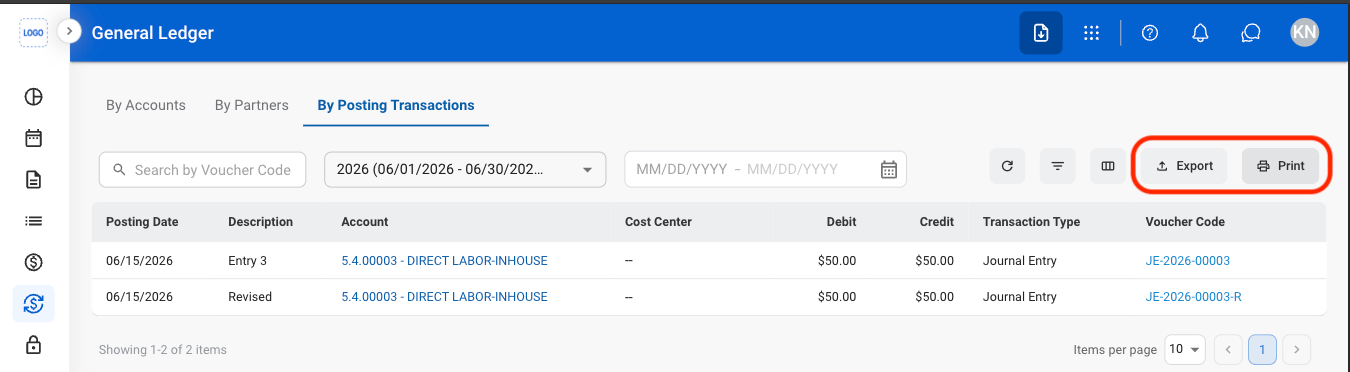 * **Export**: Download a G/L summary in xlsx.
* **Print**: Open system print settings to print a G/L summary.
* **Export**: Download a G/L summary in xlsx.
* **Print**: Open system print settings to print a G/L summary.